
Calibrite Display 123
4.0Editor score
Guided one-two-three setup
Supports two connected displays
Compact USB-C colorimeter
Explore our Monitor Calibration Tool guide, which compares ten colorimeters for accuracy, display support, HDR performance, workflows, ease of use, and
A monitor calibration tool measures and corrects your display so its colors, brightness, contrast, and tone response are more consistent and dependable. The right device matters because each screen technology, creative workflow, and room lighting situation presents a different calibration challenge, from standard office LCDs to high-luminance OLED and mini-LED panels.
The ten products in this guide were compared using their published specifications and supplied feature details. We examine sensor capability, supported display types, maximum luminance, software control, validation tools, video functions, multi-display support, connectivity, and ease of use, covering options suitable for photography, design, video, and advanced color-critical work.
Each review explains where the tool stands out and where buyers should temper their expectations. Ratings reflect the supplied marketplace feedback, while product details may evolve with updated software or hardware revisions. Current prices and availability change frequently, so check the latest listing information before making a purchase.
4.0Editor score

4.3Editor score

4.0Editor score
This side-by-side comparison highlights each colorimeter's supported display technologies, brightness capability, calibration controls, and workflow features, helping you identify the most appropriate option for general accuracy, photo editing, HDR work, or professional video monitoring.



The Calibrite Display Pro HL combines a high-luminance colorimeter with advanced profiling controls, making it a strong all-around choice for photographers, designers, editors, and video professionals. Its supplied rating of 4.3 reflects generally favorable buyer feedback. The key attraction is a sensor that measures up to 3000 nits, allowing the tool to handle modern mini-LED, OLED, Apple XDR, LCD, and compatible projector environments rather than limiting itself to conventional office panels.
We may earn a commission when you buy through this link, at no additional cost to you.
The included Calibrite PROFILER software provides both Basic and Advanced modes. Users can adjust white point, luminance, contrast ratio, gamma, and other characteristics, then save presets for repeated workflows. Additional tools such as Quick Check, profile validation, uniformity checking, and flare correction help users confirm not only that calibration completed, but that the result behaves as expected. Custom patch sets built from personal images offer an especially useful level of control for creators who want targeted profiles.
There are trade-offs to consider. PROFILER's advanced options and validation suite make the device more involved than a guided entry-level colorimeter. The 3000-nit ceiling is ample for many professional displays, but it is not appropriate for every extreme HDR environment. Users should also allow time to warm up the display, understand room conditions, and learn which settings suit their workflow. These are reasonable learning requirements for a professional tool rather than serious drawbacks.
This is our Editor's Choice because it covers a broad range of modern display technologies without pushing into the specialized highest-luminance class. It is particularly appropriate for a creator who edits photographs, prepares graphics, grades video, or owns a bright mini-LED or OLED monitor and wants repeatable control. For basic web use, it may offer more than necessary, but for color-critical work it is the most versatile selection in this roundup.
Support for LCD, mini-LED, OLED, and Apple XDR displays is a major advantage in a mixed-device studio. The 3000-nit measurement range also gives the sensor useful headroom for bright creative monitors without requiring the specialized ceiling of the premium HDR model.
Saved presets, custom patch sets, and multiple-display profiling make repeated work more consistent. These functions are valuable when moving between a laptop, a calibrated editing display, and a shared workstation instead of starting from unrelated settings every session.
We may earn a commission when you buy through this link, at no additional cost to you.
The Calibrite Display 123 is the most approachable selection in this guide, with a 4.0 supplied rating and a clear one-two-three software workflow. It targets photographers and creators who need more dependable color but do not want to manage a large set of professional parameters. The device is approximately 34 millimeters tall and 37 millimeters in diameter, making it easy to position against a laptop or desktop display.
We may earn a commission when you buy through this link, at no additional cost to you.
Its USB-C connection and adjustable counterweight simplify the physical setup, while brightness target choices include Native and Photo modes. The before-and-after check gives users an immediate visual indication of the changes, which is useful for confirming that calibration is producing a visible improvement. Supporting up to two displays is also practical for creators who edit on a laptop and a separate monitor.
The limitation is scope. This is a streamlined tool rather than a complete professional monitoring package, and its feature set does not emphasize high-luminance measurement, extensive video standards, or custom patch creation. It is better suited to standard creative displays and general color accuracy than to the most demanding HDR grading environment. Buyers who need those specialized features should move to the Display Pro HL or Display Plus HL.
The Display 123 is our Best Budget pick for a reason: it removes much of the friction associated with color management while still offering meaningful correction, two-display support, and a clear result comparison. It is a sensible first calibration device for photo editing, design work, or general content creation, particularly for someone who values a short learning curve over a deep menu of controls.
The guided workflow leads users through the necessary stages without requiring deep knowledge of color science. This makes the tool approachable while still correcting common monitor color shifts and improving tone and contrast consistency.
Two-display support is enough for many laptop-plus-monitor and compact studio arrangements. The included counterweight keeps the colorimeter steady during measurements, reducing the chance that movement will compromise a profile.
We may earn a commission when you buy through this link, at no additional cost to you.
The Calibrite Display Plus HL is the premium model in this roundup, built around a high-luminance sensor that measures up to 10000 nits. Its 4.0 supplied rating reflects positive buyer sentiment, while the technical specification distinguishes it for HDR-capable mini-LED, OLED, Apple XDR, super-bright displays, and compatible projectors. It is aimed at users who need dependable measurements in demanding professional environments.
We may earn a commission when you buy through this link, at no additional cost to you.
Calibrite PROFILER offers Basic and Advanced modes with adjustable white point, luminance, contrast ratio, and gamma. Video-oriented features include Rec.709, Rec.2020 workflows, and BT.1886 tone-curve options. That combination gives the device stronger relevance for colorists, video editors, and motion designers than a conventional photo-focused colorimeter. Quick Check, Profile Validation, Uniformity Check, and Profiler Manager add useful ways to examine the result and maintain it across displays.
The main compromise is complexity. Advanced HDR calibration is most valuable when the operator understands luminance targets, tone curves, panel behavior, and the intended output standard. A 10000-nit sensor cannot make an unsupported display behave like a reference monitor, and proper room control remains important. The large measurement range also means buyers should consider whether their actual panels and workflow will use that capability rather than choosing solely on the headline specification.
We recommend the Display Plus HL to professional colorists, high-end video studios, and owners of very bright reference-capable displays. It is also compelling for ambitious photographers who want a single tool that can grow into demanding video and HDR work. For standard office or school displays, its professional breadth is unnecessary, but for elite monitoring requirements it is the strongest dedicated option here.
The 10000-nit ceiling is the defining feature. It gives the device the ability to measure highlights on exceptionally bright panels, making it more relevant to modern HDR and video workflows than most conventional colorimeters.
Rec.709 support, Rec.2020 workflows, and BT.1886 options complement the hardware. These features are most useful when the calibrated display is part of a grading or post-production pipeline with defined monitoring targets.
We may earn a commission when you buy through this link, at no additional cost to you.
The Datacolor Spyder X Pro is a photography-focused colorimeter designed to be approachable even for first-time users. Its supplied rating of 4.4 is the highest in this group. The tool's lens-based color engine is intended to improve color accuracy, shadow detail, and white balance, while a wizard and single-click process reduce the amount of technical work required.
We may earn a commission when you buy through this link, at no additional cost to you.
Twelve predefined calibration targets give users meaningful control without forcing them to build a profile manually. Room-light monitoring can account for changing ambient conditions, and automatic profile changing helps the software apply an appropriate profile when different displays are connected. SpyderProof provides a before-and-after evaluation using full-screen imagery, including a user's own photographs, which provides an intuitive check of the improvement.
Its limits are most visible in specialized HDR environments because the supplied specifications do not advertise an extreme high-luminance measurement range. It also lacks the explicit broadcast-standard emphasis found in the X Elite and X2 Elite. Some experienced color professionals may therefore want a more granular tool. Even so, the X Pro's broad accessibility makes it a practical choice for photographers who want a repeatable process rather than a dense collection of technical parameters.
This Spyder is best for photo-focused creators, students, and first-time calibrators who value a fast setup and visual confirmation. It supports multiple laptops and desktop monitors, so it can serve a changing creative environment. Buyers focused on HDR mastering or advanced cinema grading should consider the premium Calibrite model instead, but for everyday photographic accuracy the X Pro remains a persuasive, well-regarded option.
The wizard-driven process and predefined targets remove much of the guesswork associated with manual calibration. This makes the Spyder X Pro particularly approachable for photographers who understand visual color problems but may not yet know how to build a precise display profile.
SpyderProof lets buyers compare their own images before and after calibration. That visual feedback is useful for confirming a more accurate appearance and for identifying remaining differences between the editing display and other output devices.
We may earn a commission when you buy through this link, at no additional cost to you.
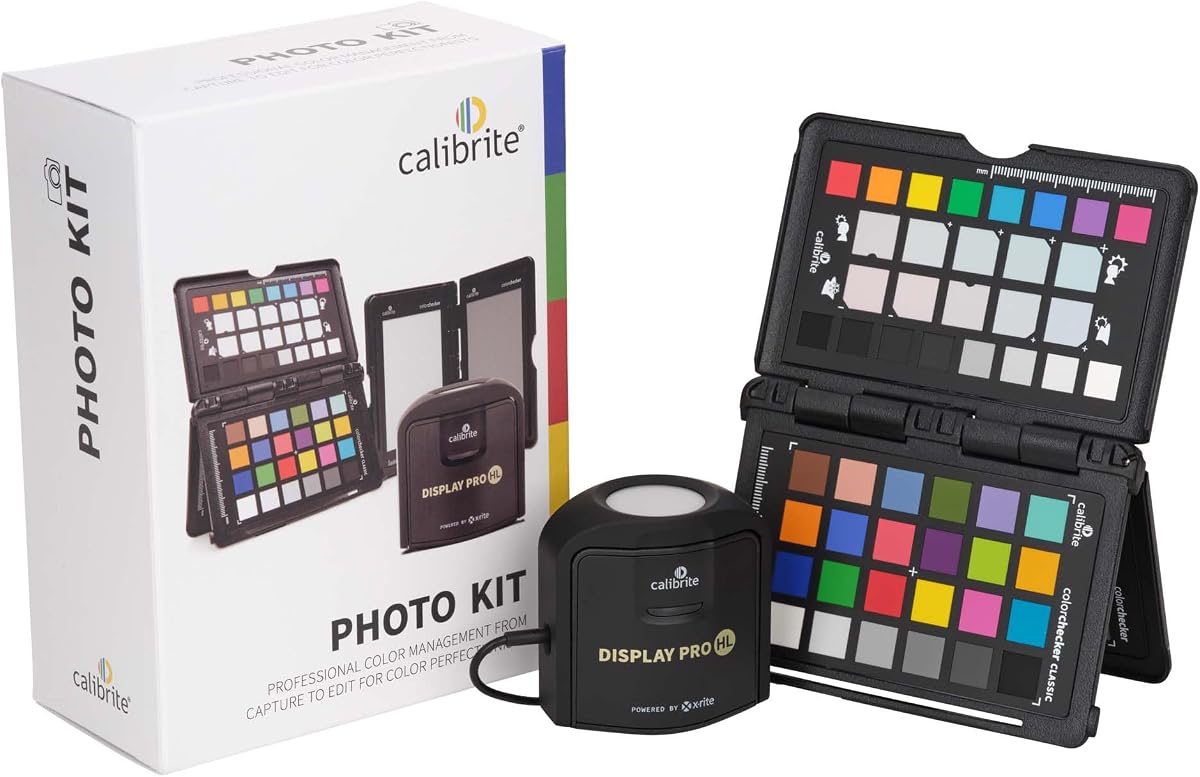
The Calibrite Photo Kit offers the highest supplied rating in this roundup at 4.5, and its appeal comes from combining two parts of the photographic color process. It includes the Display Pro HL colorimeter and a ColorChecker Passport Photo 2, allowing photographers to address both the camera capture stage and the display used for editing.
We may earn a commission when you buy through this link, at no additional cost to you.
The Display Pro HL measures up to 3000 nits and supports modern mini-LED, OLED, and Apple XDR panels along with conventional displays. Its PROFILER software gives users control over white point, luminance, contrast ratio, gamma, and custom targets. The ColorChecker Passport Photo 2 supports custom camera profiles for RAW workflows and provides a repeatable reference for white balance and exposure.
This broader package introduces a learning consideration. Photographers who only need to correct one standard monitor may find the camera-profiling functions unnecessary, and users should understand the difference between a camera profile and a display profile. The bundle is more valuable when consistency across capture, editing, and multiple sessions is the main objective. It also means the buyer receives a more complete photographic workflow rather than a single-purpose accessory.
The kit is a strong recommendation for RAW photographers, studio owners, and educators who want a repeatable capture-to-edit process. It is especially relevant for teams moving between locations or lighting conditions, where an inconsistent starting point can create color shifts before editing even begins. For a user who strictly needs a display colorimeter and no camera workflow, the standalone Display Pro HL is the more focused choice.
Combining display calibration with a camera reference reduces the need to compensate for two separate sources of variation. The result is a more repeatable workflow from RAW capture through selection, grading, and final output.
Custom camera profiles allow photographers to build a more dependable starting point for RAW files. The ColorChecker Passport Photo 2 serves as a practical reference for white balance and exposure, supporting consistency when conditions change.
We may earn a commission when you buy through this link, at no additional cost to you.
The Datacolor Spyder X Elite is designed for expert photographers and motion image makers, and its supplied 4.4 rating indicates strong user reception. Compared with the X Pro, it expands into professional territory through unlimited calibration settings, TV and video standards, projector support, and the StudioMatch Assistant for bringing multiple displays closer together.
We may earn a commission when you buy through this link, at no additional cost to you.
Its lens-based color engine is intended to improve the accuracy of color, shadow detail, and white balance across multiple monitors. Room-light monitoring and automatic profile changing add practical value, while a step-by-step assistant and expert console let users move between guided and detailed control. SpyderProof again provides a clear before-and-after view using full-screen images and personal files.
The important drawback is its age within the category. Although the supplied description says it supports newer screen types, resolutions, and gamuts, the X Elite does not advertise the extreme-luminance measurements associated with current high-end HDR colorimeters. It may also be difficult to find depending on inventory. Buyers who need the latest high-luminance hardware or the cleaner X2 Elite interface should compare newer alternatives, while photographers who value its mature professional feature set may still find it compelling.
This model is best for professionals who work across both photography and motion imaging, use projectors, or need to match several displays. Its combination of room-light monitoring, StudioMatch, and unlimited settings offers meaningful workflow depth. It is less compelling for HDR specialists shopping around the 10000-nit class, but for broad traditional creative work it remains a capable professional tool.
StudioMatch Assistant helps users move multiple monitors closer to a common color target. This is important in studios where one display may be used for capture assessment, another for detailed editing, and a third for client presentation.
The combination of a step-by-step assistant and an expert console accommodates different levels of experience. New users can follow the guided path, while experienced operators can choose from unlimited settings and video-oriented standards.
We may earn a commission when you buy through this link, at no additional cost to you.
The Datacolor Spyder4Pro delivers a focused set of color and brightness calibration functions with a supplied rating of 4.2. Its full-spectrum sensor is designed to measure a broad range of visible color, and a single device can calibrate multiple displays. That makes it a practical option for a home studio or office where several screens are used for different tasks.
We may earn a commission when you buy through this link, at no additional cost to you.
The fourth-generation design uses double-shielded color filters intended to bring measurements closer to CIE color standards and improve long-term stability. The supplied specifications also cite better consistency between Spyder units. For users who do not want to run a complex calibration repeatedly, the ReCAL assistant makes it easier to restore the display profile as the panel and viewing conditions change.
This is an older platform, and that is reflected in the narrower feature emphasis. It does not advertise an extreme-luminance range, the dedicated high-brightness sensor found in modern HL devices, or an expansive video-target suite. It is therefore better suited to standard LCD work and conventional color accuracy than to advanced HDR monitoring. The absence of some modern features also makes it more attractive when straightforward operation and established Spyder support matter more than headline specifications.
We recommend the Spyder4Pro for users who need a proven colorimeter for general photo or design work across several displays, particularly if they value automated correction and easy recalibration. It is less compelling for a new studio specializing in high-end HDR video, but it covers the core requirements of display calibration without introducing a steep learning curve.
The ReCAL assistant recognizes that a display profile should not be treated as permanent. It simplifies returning the monitor to its saved state after time, lighting changes, or hardware variations.
One colorimeter can serve several monitors, while double-shielded filters are intended to improve unit-to-unit consistency. These qualities are useful for small teams that want repeatable profiles across several workstations.
We may earn a commission when you buy through this link, at no additional cost to you.
The ASUS ProArt CaliContrO MCA02 stands apart with a three-in-one design that combines a colorimeter, display on-screen display controls, and ASUS Dial functionality. Its supplied rating is 1.5, the lowest in this guide, so the device should be approached more cautiously than the established alternatives. The hardware specification itself is ambitious, including measurement up to 10000 nits for HDR calibration.
We may earn a commission when you buy through this link, at no additional cost to you.
For ASUS ProArt users, combining calibration with monitor controls can be convenient. A five-way navigator and shortcut key provide access to display settings, while the integrated ASUS Dial can be assigned shortcuts within creator software. The reversible USB-C connection simplifies setup, and the package includes a counterweight cable, quick-start guide, and warranty card. Compatibility is listed with LED, OLED, mini-LED, and other modern panels.
The main concern is the low marketplace rating, which may reflect setup issues, software maturity, compatibility limits, or other experiences not explained in the supplied data. The information also provides fewer details about calibration software, validation tools, custom targets, and multi-display workflows than the other products. The ASUS integration may be most compelling within an ASUS-based creator setup rather than as a universal choice.
This product may be worth considering for an ASUS ProArt studio that values integrated hardware and display control, but the 1.5 rating makes it difficult to recommend without qualification. Buyers should review current customer feedback, confirm their operating system and applications are supported, and verify that the advertised workflow meets their needs. A more established colorimeter package remains the safer general recommendation.
The three-in-one approach can reduce desk clutter by combining a measuring device with physical controls for the display and connected creator applications. That convenience is most meaningful for users already invested in the ASUS ecosystem.
The stated 10000-nit range places the hardware among the most capable options listed. However, measurement range alone does not establish overall software flexibility, validation depth, or multi-display reliability.
We may earn a commission when you buy through this link, at no additional cost to you.
The Datacolor Spyder X2 Elite targets photographers, video professionals, and digital designers who work across media types. It carries a supplied rating of 4.0 and improves on earlier Spyder models with a cleaner, more concise software interface. Video and cinema targets include Rec.709 and Rec.2020, while advanced display mapping, unlimited calibration settings, soft proofing, and StudioMatch broaden its professional scope.
We may earn a commission when you buy through this link, at no additional cost to you.
Soft proofing is particularly useful for designers who need to preview how an output will appear, and StudioMatch helps align multiple monitors within a production environment. The tool provides recommended presets for less experienced users while still allowing experienced operators to define their own parameters. A native USB-C connection and included USB-A adapter make it convenient for newer and older computer systems.
As with the other Spyder models in this group, the X2 Elite does not advertise an extreme-luminance range comparable with dedicated HL devices. It may therefore be less suitable for the newest super-bright HDR reference panels, particularly in demanding cinema environments. Buyers should also consider whether advanced mapping and soft-proofing functions are relevant to their own output process, since a simpler model may serve them more effectively.
The X2 Elite is a strong fit for hybrid creative professionals who need both photographic and video-oriented calibration in one device. Its broad target selection and refined interface provide useful depth without abandoning guided workflows. It is less compelling for extreme-luminance mastering, but for traditional photography, design, and video monitoring it offers a balanced and capable package.
Rec.709 and Rec.2020 targets let users move between photographic and motion workflows without relying on separate tools. This makes the X2 Elite especially useful for creators whose responsibilities span stills, motion, and digital design.
The remade user interface is designed to reduce visual clutter while retaining professional functionality. Easier navigation benefits occasional users, while advanced mapping and unlimited settings remain available for detailed studio work.
We may earn a commission when you buy through this link, at no additional cost to you.
The Datacolor Spyder4Elite has a supplied rating of 3.5, making it the least favorably rated of the Spyder products in this guide. Nevertheless, its core specifications cover a wide range of display technologies: LED, OLED, LCD, and CRT screens, laptops, and front projectors. That broad compatibility may be useful for a studio or office with mixed and older equipment.
We may earn a commission when you buy through this link, at no additional cost to you.
Its full-spectrum sensor performs automated color and brightness calibration, while the fourth-generation double-shielded color filters are intended to improve matching to CIE standards and long-term stability. The supplied specifications also state better consistency between Spyder units. ReCAL provides a quick path to restore a saved profile when a display changes over time, reducing the need to repeat the full setup process.
The weaknesses are its age and lower rating. There is no stated maximum-luminance specification, dedicated modern HDR positioning, or detailed high-end video feature list. The supplied information also gives less visibility into display mapping, soft proofing, and multi-screen matching than it does for newer Elite models. A buyer can still obtain core color and brightness correction, but should not expect the same modern workflow breadth found in the X2 Elite.
We would consider the Spyder4Elite for users with older or unusually varied displays, particularly where projector calibration remains important. It is less suitable for a new HDR-focused studio or for buyers who want advanced video and soft-proofing tools. For most modern creative setups, a newer model offers a clearer software roadmap, but the fourth-generation platform can still be effective for fundamental display correction.
Support for LCD, LED, OLED, CRT, laptops, and front projectors makes this model adaptable to mixed equipment. It is a practical consideration for organizations that still operate older presentation or production displays.
The ReCAL assistant makes repeated maintenance easier after a profile has been created. For users who calibrate less frequently, this can reduce the friction of restoring a known display configuration.
We may earn a commission when you buy through this link, at no additional cost to you.
Choose a monitor calibration tool by matching its sensor range, software controls, display compatibility, and validation features to the screens you use and the type of work you perform. The most expensive or advanced device is not automatically the right choice, just as a basic tool may be insufficient for HDR or professional video work.
Begin with the panels you actually own or expect to acquire. Every product listed supports common computer displays, but the terminology varies. The Calibrite HL models explicitly mention LCD, mini-LED, OLED, and Apple XDR displays, while the Spyder4 models add CRT and projector coverage. The ASUS device lists LED, OLED, mini-LED, and other modern formats. This matters because a colorimeter must measure your panel accurately; compatibility should be confirmed before comparing software features or measurement ranges.
In summary, verify support for your exact display type rather than assuming every colorimeter handles every panel equally.
Maximum luminance determines how well a tool can measure highlights on exceptionally bright displays. The Calibrite Display 123 and Spyder devices are positioned primarily around conventional creative workflows, while Display Pro HL reaches 3000 nits. Display Plus HL and the ASUS CaliContrO MCA02 state measurement capabilities up to 10000 nits. A high ceiling is valuable for HDR reference displays but is unnecessary for a standard office panel, and a sensor cannot improve the underlying quality of the monitor it measures.
In summary, match the luminance range to the brightest screen in your setup rather than choosing the largest advertised number automatically.
Software determines much of the real-world experience. Calibrite PROFILER provides Basic and Advanced modes with controls for white point, luminance, contrast ratio, and gamma. The Spyder X2 Elite adds advanced mapping, unlimited settings, and soft proofing, while the X Pro focuses on a more approachable wizard. The Display 123 uses a guided one-two-three process. Consider whether you want a clear, mostly automatic routine or the ability to define and save custom targets for specialized work.
In summary, beginners benefit from guided workflows, while advanced users should prioritize custom controls, saved presets, and detailed target options.
A photo editing tool and a video monitoring tool may emphasize different standards. The Calibrite Photo Kit focuses on RAW capture and editing, while Display Plus HL includes Rec.709, Rec.2020, and BT.1886 options. The Spyder X2 Elite also includes video and cinema targets, and the X Elite advertises TV and video standards. If you grade video, match displays, or prepare print and web output, look for targets that align with your deliverables rather than choosing solely on sensor specification.
In summary, choose a product whose built-in standards correspond to the media you create, especially for video and professional color work.
Multi-display support can save considerable effort in a studio with a laptop, editing display, and presentation screen. Display 123 supports up to two displays, and several Calibrite and Spyder products can profile multiple screens or share presets. StudioMatch in the Spyder Elite and X2 Elite is designed to bring displays closer together. The number of devices is only one factor; also check whether software can save profiles, change them automatically, and share them across workstations.
In summary, look for reliable multi-screen profiling, preset sharing, and profile switching if your work regularly crosses multiple displays.
A successful calibration run is only the beginning. Display Pro HL includes Quick Check, Profile Validation, Uniformity Check, and flare correction, while Display Plus HL adds Profiler Manager. The Spyder family provides before-and-after assessment and ReCAL functionality for restoring profiles later. These tools help determine whether a profile is still valid and whether brightness, color consistency, or panel uniformity has changed. They are especially useful for displays that are adjusted frequently or used by several people.
In summary, favor products with validation and fast recalibration features if your screen settings change or you need to monitor profile stability.
USB-C is the dominant connection across the newer products, often accompanied by a USB-A adapter. The Display 123 is compact and uses an adjustable counterweight to remain stable against a screen, while the Calibrite HL models include a built-in one-quarter-inch mount and travel pouch. The ASUS device adds a reversible USB-C cable and integrated display controls. Check the connector included with your computer and ensure the device can rest securely on the panel during measurements.
In summary, confirm computer compatibility and choose a stable, portable design that makes repeated calibration easy.
Published specifications tell only part of the story. Marketplace ratings can provide a useful signal about setup experience, software behavior, and long-term reliability, but they are not controlled laboratory measurements. The products here range from a 4.5 rating for the Calibrite Photo Kit to a 1.5 rating for the ASUS CaliContrO MCA02. That lower score deserves caution and suggests that buyers should inspect recent customer feedback, while the higher-rated products still deserve their own due diligence.
In summary, use ratings to identify potential concerns, but compare them alongside compatibility, warranty information, software support, and current user feedback.
Install the manufacturer’s current software, connect the colorimeter with the supplied cable, and let both the computer and display stabilize. Before calibrating, choose a realistic brightness target for the room and the way you work. Many workflows benefit from controlled ambient lighting, since strong room light can change how the display appears even when the underlying profile is accurate.
Place the sensor in the manufacturer-specified position and keep it motionless while the software displays test patches. Do not move the colorimeter, adjust the monitor, interrupt the profile generation, or use another color-managed application that changes the screen during measurement. If the process reports an error, check the connection and display stability, then repeat the recommended step rather than forcing an incomplete profile.
After calibration, open an image or run the included validation tool and compare the result with the pre-calibration view. Save the generated profile under a clear name, but avoid casually changing monitor settings later because a profile may no longer represent the display's actual condition. Recalibrate when the display is serviced, its settings change, or its performance drifts, and keep the device in its case to protect the sensor.
A new monitor can still benefit from calibration because factory settings are usually designed for broad viewing conditions rather than one specific room and workflow. Calibration creates a more dependable profile for a particular display, brightness target, and working environment. It is especially useful for photo editing, video, graphic design, and other work where predictable color matters.
The right interval depends on the display, environment, and frequency of use. Recalibrate when the screen is adjusted, serviced, moved, exposed to changing lighting, or when colors begin to look inconsistent. A regular monthly or quarterly check may be appropriate for a frequently used creative display, while occasional users can calibrate when their workflow changes.
A colorimeter measures the light emitted by a display so software can build a display profile. A color checker is a physical reference target that can capture scene or camera color information and support custom camera profiles. The Calibrite Photo Kit includes both types of equipment because photographers may need to control the capture and editing stages separately.
Several products in this guide can calibrate multiple displays, and some can share presets or assist with matching them. Two displays may become more similar, but hardware differences, aging, factory settings, and panel limitations mean they will not necessarily become perfectly identical. Users should calibrate each screen individually and then verify the match with the software's analysis tools.
Usually not. A device with a 3000-nit range, such as the Display Pro HL, is more than sufficient for many professional photo and general HDR workflows. The 10000-nit capability becomes most relevant for exceptionally bright reference displays, advanced HDR monitoring, and high-end grading environments. The correct choice is the capability that matches your display rather than the highest number available.
Yes. Ambient light changes the light reaching your eyes and can influence how a display appears, even if the colorimeter creates an accurate profile. Products with room-light monitoring can help account for changing conditions, but controlled lighting remains valuable. A neutral environment and consistent habits are especially important for photographic and video color decisions.
Compatibility depends on the model. The Calibrite Display Pro HL and Display Plus HL explicitly include PROFILER software for Mac and Windows, while the supplied information for other products does not detail every supported platform. Check the current manufacturer's system requirements before purchasing, particularly if you use an older operating system or a less common display configuration.
It depends on the profile and your workflow. A profile is normally created for a particular display setting and luminance target, so changing brightness can alter how the output looks even if the profile remains active. For routine work, choose a stable brightness target and avoid unnecessary adjustments. If you change brightness regularly, use the tool's supported presets or recalibrate when conditions materially change.
The Calibrite Display Pro HL is the most versatile all-round selection, combining modern display support, a 3000-nit sensor, flexible PROFILER controls, multi-display profiling, and useful validation features. The Display 123 is the practical choice for creators who want a straightforward calibration process without a large professional feature set, while the Display Plus HL leads for high-end HDR, extreme brightness, and professional video work.
Prioritize compatibility with your actual displays, the accuracy range your hardware requires, and the software controls that match your experience. Photographers may favor the guided tools or the complete Calibrite Photo Kit, while video professionals should examine Rec.709, Rec.2020, tone curves, and luminance targets. Multi-display support and fast recalibration can prove more valuable day to day than a specification that is rarely used.
Marketplace ratings and product details offer useful guidance, but they do not replace a current software and compatibility check. Prices, bundles, software revisions, and availability can change, so review the latest listing and manufacturer information before purchasing. With the correct target, room conditions, and realistic expectations, a quality calibration tool can make color decisions more consistent across displays, sessions, and creative projects.