
ASRock Intel Arc B570 Challenger 10GB OC
4.7Editor score
10GB GDDR6 memory
2600MHz factory clock
Dual-fan 0dB cooling
Four modern display outputs
Explore the best Intel Arc GPU options for gaming, AI, content creation, and compact workstations, with key specifications, features, and use cases compared.
Intel Arc GPUs span a broad range of gaming, content creation, professional visualization, and local AI applications. A useful card balances graphics memory, compute capability, cooling, power requirements, display support, and physical fit rather than focusing on a single specification.
This guide compares ten Intel Arc models designed for 1440p gaming, everyday graphics, multi-display systems, low-profile workstations, and high-memory AI workloads. It examines each card's stated architecture, memory, connectivity, cooling, power, dimensions, and intended software environment.
The selections include a versatile B570, memory-focused B580, professional B60 options, dual-GPU 48GB models, a compact B50 LP, and lower-power A-series alternatives. Product availability and pricing can change, so verify current listings and computer compatibility before buying.
4.7Editor score
4.7Editor score

3.9Editor score
The table below compares the ten Intel Arc GPUs by their core memory configuration, graphics architecture, cooling approach, and primary hardware role, from compact low-profile and gaming cards to high-memory professional and AI systems.



The ASRock Intel Arc Pro B60 Creator is a professional graphics card built around 24GB of GDDR6 memory, making it a compelling option for local AI inference, 3D rendering, generative design, and demanding visualization work. Its supplied rating is 3.9, but the technical specification points to a specialized card rather than a conventional gaming GPU. The combination of high memory capacity, workstation drivers, and a compact blower-style cooler distinguishes it from most entries in this guide.
We may earn a commission when you buy through this link, at no additional cost to you.
Its Intel Xe2-HPG architecture provides 20 Xe cores, 160 XMX engines, and a stated 197 INT8 TOPS of AI acceleration. Memory bandwidth reaches 456 GB/s across a 192-bit bus, giving the card more headroom for large models, complex scenes, and memory-intensive workflows than the 8GB and 10GB gaming options. Two dedicated media engines support AV1, H.264, and HEVC, while four DisplayPort 2.1 connections can support expansive multi-monitor arrangements and high-resolution displays.
The main trade-offs are physical and acoustic. This is a 200W, two-slot card with a single blower fan, a nickel-plated copper base, and an ultra-fit heatpipe. It can stop the fan at low loads for 0dB Silent operation, but sustained workstation use will require the cooler to exhaust heat from the enclosure. Buyers must also verify that the case has 39mm of available card clearance and a suitable power supply with room for its single 8-pin connector.
The B60 Creator is best suited to users who need more memory than a gaming card offers and value professional software validation, scalable Linux deployments, and modern media engines. It is less compelling for a conventional gaming-only system where a B570 or B580 provides a more natural balance of features. For a workstation that handles both accelerated applications and professional displays, however, this is the most focused premium recommendation in the roundup.
The 24GB allocation can accommodate heavier models, detailed scenes, and high-resolution creative projects without the tight memory limits associated with smaller gaming cards. Capacity also allows the operating system and applications to coexist with GPU workloads more comfortably.
Four DisplayPort 2.1 outputs and workstation-oriented drivers make this card practical for design, engineering, and manufacturing desks. Its certified software environment is more relevant to professionals than to users seeking a simple gaming upgrade.
We may earn a commission when you buy through this link, at no additional cost to you.
The ASRock Intel Arc B570 Challenger is the strongest general-purpose choice in this guide. It pairs 10GB of GDDR6 memory with a 2600MHz clock and 19 Gbps memory speed, positioning the card for smooth 1440p gaming and capable content-creation workflows. Its 4.7 supplied rating also makes it one of the best-reviewed products here, while the dual-fan cooler and 0dB Silent mode add practical thermal management.
We may earn a commission when you buy through this link, at no additional cost to you.
Intel Xe2-HPG architecture and Xe Matrix Extensions support AI-accelerated features, while Intel Xe Super Sampling 2 can improve supported titles through AI-powered upscaling. The card includes three DisplayPort 2.1 outputs and one HDMI 2.1a connector, providing good flexibility for high-resolution or high-refresh-rate displays. AV1 encoding, DirectX 12 Ultimate support, a metal backplate, and a single 8-pin power connection round out a modern gaming package.
Its 10GB memory buffer is the main limitation when compared with the 24GB B60 Creator, 48GB dual-B60 designs, or 16GB B50 LP. Heavy AI models, very large textures, and professional scenes may eventually need more capacity. The card also depends on a single 8-pin connector, so buyers should not assume it is suitable for a system with only a low-power graphics option.
For a gaming PC built around 1440p output, the B570 Challenger is easy to recommend. It offers more memory than many similarly positioned cards, modern media and upscaling support, a strong cooling design, and broad display compatibility. It is the most balanced Intel Arc GPU here for mainstream gamers and creators who do not need professional memory capacity.
The 10GB memory allocation and high-speed GDDR6 configuration make the B570 Challenger a natural fit for modern 1440p gaming. XeSS 2 support can further improve performance and image quality in games that implement the technology.
Two striped axial fans provide active cooling for gaming sessions, while 0dB Silent Cooling stops them during lighter or idle periods. A metal backplate adds rigidity and helps protect the card from GPU sag.
We may earn a commission when you buy through this link, at no additional cost to you.
The ASRock Intel Arc A580 Challenger delivers a useful mix of memory bandwidth, affordability, and modern features. Its 8GB GDDR6 configuration sits on a wide 256-bit interface, and the 4.6 supplied rating indicates strong buyer reception. Although it uses PCIe 4.0 rather than PCIe 5.0, the card remains well suited to 1440p gaming, multimedia, and lighter content-creation tasks.
We may earn a commission when you buy through this link, at no additional cost to you.
The factory overclock raises the engine clock to 2000MHz, while 384 XMX engines provide AI acceleration for supported workloads. Dual striped axial fans and an ultra-fit heatpipe manage temperatures, and the fans can stop completely when temperatures are low. Display connectivity includes three DisplayPort 2.0 ports with up to UHBR 10 support and one HDMI 2.0b port, with support for up to four displays and resolutions as high as 7680 by 4320.
The physical requirements deserve careful attention. This is a 2.4-slot card measuring 271 by 132 by 48mm, uses two 8-pin PCIe power connectors, and calls for a recommended 650W power supply. Those demands are more substantial than they may initially appear, so the buyer should check case clearance, connector arrangement, and PSU headroom before ordering.
The A580 Challenger is a sound value choice for 1440p gaming, general creative work, and systems that want a wide memory bus without moving into the newest B-series tier. It is less attractive for heavy local AI or professional rendering because of its 8GB capacity, and it is not ideal for compact builds. For a standard full-size desktop with adequate power, it offers a compelling balance.
The 256-bit bus and 16 Gbps memory speed provide ample bandwidth for 1440p gaming and multimedia. This wider interface is one of the card's most attractive specifications relative to its general-purpose positioning.
DirectX 12 Ultimate, OpenGL 4.6, and Intel Xe Super Sampling support give the A580 useful modern capabilities. The included metal backplate and Super Alloy components also improve its physical construction.
We may earn a commission when you buy through this link, at no additional cost to you.
The Sparkle Intel Arc B580 Titan OC stands apart from the standard B570 and B580 Challenger options through its 12GB GDDR6 allocation and 2760MHz boost clock. Its supplied rating is 4.5, indicating favorable user feedback, while the included metal backplate and sag bracket suggest attention to physical durability. It is an attractive option for builders who want extra memory headroom and a higher factory clock.
We may earn a commission when you buy through this link, at no additional cost to you.
Torn Cooling 2.0 is the card's principal thermal feature, using an axial-fan cooling design intended to manage the B580's power demands. The blue breathing light provides visible status feedback, although it has no bearing on performance. More importantly, 12GB of memory gives the Titan OC an advantage over 10GB models when working with detailed textures, several demanding applications, or moderately sized local AI models.
The supplied product information is much less detailed than for the ASRock cards. It does not provide a memory-bus width, memory speed, exact dimensions, power connector arrangement, or display connector list. Buyers should therefore treat the listing details and the manufacturer's specifications as necessary verification points rather than assume parity with similarly named models.
This card is best for a 1440p gaming system where 12GB is a meaningful reserve and the user prefers Sparkle's industrial design and cooling package. It may also appeal to creators who want more memory than the 10GB B570 without moving to a professional 24GB card. Confirm power, dimensions, and outputs before purchase, but its core specification is well positioned for enthusiast users.
The 12GB configuration offers more headroom than 8GB and 10GB alternatives. This can be valuable for high-detail textures, multitasking, and applications that keep larger working sets in graphics memory.
A 2760MHz boost clock provides a higher starting point than the 2600MHz ASRock B570 Challenger. The metal backplate and included sag bracket help support the card and improve the installation experience.
We may earn a commission when you buy through this link, at no additional cost to you.
The WEELIAO MAXSUN Intel Arc Pro B60 48G Turbo is a specialized dual-GPU workstation card built around a stated 48GB of combined GDDR6 memory. It is designed primarily for local AI inference and other parallel-computing workloads rather than ordinary desktop graphics. Its lack of a numerical customer rating means buyers should evaluate the listed specifications and platform requirements especially carefully.
We may earn a commission when you buy through this link, at no additional cost to you.
The design combines two Intel Arc Pro B60 GPUs, each described as operating at 2400MHz with 20 Xe cores and 197 INT8 TOPS. Together, the card claims 394 TOPS and 456 GB/s aggregate bandwidth across a 192-bit memory bus. The stated software support includes PyTorch, IPEX-LLM, vLLM, and standard professional applications, with compatibility listed for models including Qwen3-32B, Qwen3-VL, and DeepSeek families.
Its PCIe configuration is unusual. The card uses PCIe 5.0 x8 plus PCIe 5.0 x8 and can reach full bandwidth when installed in a motherboard that supports x16 lane bifurcation. A suitable consumer platform, BIOS, application support, and workload-specific configuration are therefore essential. Triple cooling with a blower fan, vapor chamber, and metal backplate is intended to sustain long inference sessions.
This is the roundup's most ambitious local-AI option. It is appropriate for a developer or research system specifically configured to handle large quantized models and high-concurrency inference, not for a typical gaming upgrade. The memory and compute figures are compelling, but buyers should confirm that their software stack recognizes both GPU dies and that their motherboard supplies the required lanes.
The combined 48GB allocation is intended to accommodate large quantized models and eliminate some dependence on multi-card or cloud configurations. That makes the card particularly relevant to users who want more local memory than a single professional GPU can provide.
Native support for PyTorch, IPEX-LLM, and vLLM is important because AI acceleration depends on compatible frameworks. SR-IOV support can also aid flexible resource allocation in multi-tenant or virtualized environments.
We may earn a commission when you buy through this link, at no additional cost to you.
The MAXSUN Intel Arc Pro B60 Dual 48G Turbo combines two Arc Pro B60 GPUs and 48GB of dedicated graphics memory in a dual-slot card. It targets AI, machine learning, rendering, and complex visual-computing tasks that benefit from high memory capacity and parallel execution. Unlike the preceding WEELIAO product, this listing emphasizes a compact two-slot format and straightforward dual-GPU operation.
We may earn a commission when you buy through this link, at no additional cost to you.
The 48GB allocation provides substantial room for large-scale rendering, AI inference, and data-heavy projects. Two GPU dies can distribute work in parallel, potentially improving throughput when the application and operating system are configured to recognize both accelerators. The card's single large-diameter turbo fan is designed to exhaust heat from the chassis, making it especially relevant to workstation enclosures with directed airflow.
Compared with the more detailed WEELIAO listing, the available information does not state compute TOPS, memory bandwidth, exact dimensions, connector requirements, or supported AI frameworks. Those omissions matter for a specialized product. Users should review the manufacturer's documentation and current listing to confirm power delivery, lane configuration, cooling clearance, and software compatibility before making a substantial system investment.
The MAXSUN dual B60 is best considered a workstation accelerator for an already compatible platform. It is not a conventional gaming recommendation, and its value depends on whether the intended software can make effective use of two GPUs and 48GB of memory. For appropriately configured AI and visualization systems, it can offer a powerful and more space-conscious route into high-memory computing.
Two Arc Pro B60 GPUs can process independent tasks concurrently or contribute to a larger workload. Actual gains vary by application, so software support and task granularity must be evaluated alongside the raw capacity.
The stated dual-slot format preserves more expansion space than a larger multi-slot workstation card. A turbo cooler still requires a case with adequate clearance and suitable airflow for sustained operation.
We may earn a commission when you buy through this link, at no additional cost to you.
The ASRock Intel Arc B570 Challenger 10GB OC and PRO-650G bundle combines a capable gaming card with a 650W 80 PLUS Gold power supply. Its 5.0 supplied rating is the highest numerical score among the products in this guide. For someone building or upgrading a gaming system, the bundle offers a convenient way to address both graphics performance and power-delivery requirements at once.
We may earn a commission when you buy through this link, at no additional cost to you.
The graphics card retains the B570's 2600MHz clock, 10GB of GDDR6 memory, Intel Xe2-HPG architecture, XMX engine support, and XeSS 2 capability. Its dual striped axial fans and 0dB Silent Cooling provide active performance cooling and quiet idle behavior. The included PRO-650G supply is 80 PLUS Gold certified and ATX3.1 ready, which helps simplify a new build's power plan.
A bundle is not automatically the most economical or flexible route. Builders who already own a modern, adequately sized PSU may gain little by replacing it, and some users may prefer to select a different case, motherboard, or power supply independently. The graphics card also needs to be checked for fit and connector compatibility, just as with a standalone purchase.
This package is best for a new 1440p gaming build where a reliable 650W unit is needed alongside a modern Arc card. Its combination of strong supplied rating, efficient power supply, and capable GPU simplifies procurement. Existing system owners should compare the bundle's included PSU with their current unit before deciding that it is the more suitable choice.
The included 650W Gold-rated PSU is designed to support a gaming configuration centered on the B570. ATX3.1 readiness also makes it suitable for current motherboard standards when cables and form factors are checked.
XeSS 2 and XMX support can improve compatible games through AI-assisted upscaling and frame generation. AV1 encoding and a 10GB memory buffer further broaden the card's usefulness for everyday multimedia tasks.
We may earn a commission when you buy through this link, at no additional cost to you.
The GUNNIR Intel Arc Pro B50 LP is built for compact workstations that cannot accommodate a full-height, multi-slot gaming card. Its single-slot low-profile body measures 167 by 69 by 18.4mm, and its 70W power draw eliminates the need for an external PCIe power connector. Despite the small enclosure, the card includes a substantial 16GB of GDDR6 memory.
We may earn a commission when you buy through this link, at no additional cost to you.
Memory is arranged on a 128-bit bus with 224 GB/s of bandwidth. The Intel Xe2 architecture provides 16 Xe cores and 128 XMX engines, with up to 170 INT8 TOPS of compute capability. The stated uses include AI inference, deep learning, complex 3D rendering, and large dataset workloads, making the card more specialized than a typical low-profile office graphics solution.
The listing repeats its AI and compute specifications several times and does not provide a detailed display-output list. Buyers should therefore verify the exact output configuration and supported resolutions directly. A robust metal shroud and turbo fan help cooling within the constrained design, but system builders should also check bracket orientation, riser support, airflow, and whether a low-profile mounting bracket is included.
This B50 LP is an excellent fit for small-form-factor PCs, mini-towers, and edge workstations that need substantial memory without a high power draw. It is not designed to replace a high-end gaming card in a performance-first desktop, and professional applications still need appropriate drivers and software support. Its main appeal is the rare combination of 16GB, low-profile construction, and connector-free installation.
The 16GB allocation provides more capacity than most compact graphics cards, allowing larger models, scenes, and datasets to remain resident in local memory. This is a major advantage for constrained workstations that otherwise rely on system memory.
Drawing 70W without an external PCIe connector simplifies both power planning and cable management. The single-slot profile also leaves more room for other expansion cards in a compact chassis.
We may earn a commission when you buy through this link, at no additional cost to you.
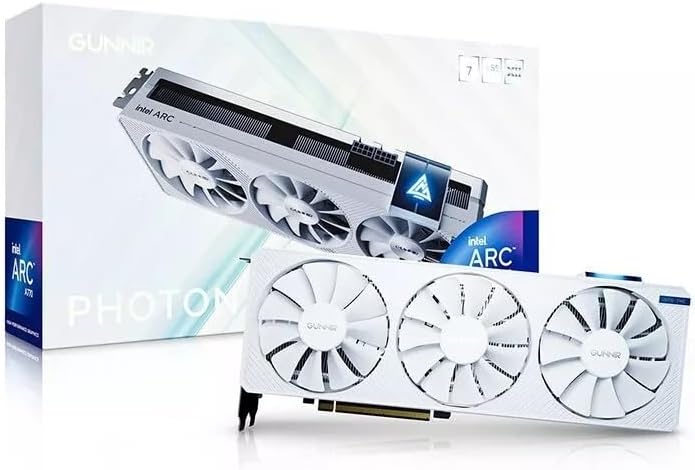
The GUNNIR Intel Arc A770 Photon is a visually distinctive white graphics card with 8GB of GDDR6 memory, a 256-bit interface, and a 2400MHz clock. Its 4.5 supplied rating is favorable, and the triple-fan cooler is designed to maintain stable performance during intensive graphics workloads. The card also supports 4K display use through its HDMI and DisplayPort connectivity.
We may earn a commission when you buy through this link, at no additional cost to you.
The combination of a broad memory bus and triple-fan cooling gives the A770 Photon a performance-oriented appearance that suits a gaming build. It should appeal particularly to buyers who want their hardware to match a white-themed system, while the metal-style shroud and three fans create a more substantial physical design than a minimalist low-profile card.
Its 8GB memory buffer is increasingly constrained for heavyweight gaming, large creative scenes, and local AI. The A770 also belongs to an older A-series generation than the B570 and B580 options, so buyers should weigh platform features and memory capacity rather than assuming it is automatically equivalent to the newer cards. Exact power and physical requirements are not fully described in the supplied information.
The Photon is best for a 1440p-oriented gaming system where appearance and strong memory bandwidth matter. It can be a sensible match for a white-themed build and remains suitable for content creation. Users who prioritize maximum memory, newer architecture, or professional validation should favor the B570, B580, or Arc Pro models instead.
Three axial fans spread cooling across the card and support stable operation under sustained gaming loads. The design also gives the A770 Photon a clean, balanced appearance suited to visible windowed systems.
HDMI and DisplayPort outputs support modern 4K monitor setups, giving users flexibility for high-resolution gaming and productivity. Exact port counts and versions should be confirmed in the current listing before installation.
We may earn a commission when you buy through this link, at no additional cost to you.
The Sparkle Intel Arc A310 Omni View is a compact graphics card designed around four HDMI outputs, a single fan, a single-slot form factor, and a 50W total board power rating. Its supplied rating of 4.6 is strong for a product with such a specialized purpose. It is most relevant to users who need to drive several displays or build a multi-screen information station.
We may earn a commission when you buy through this link, at no additional cost to you.
Four integrated HDMI outputs make the card unusual among the gaming-oriented options in this guide. That arrangement can simplify digital-signage, office monitoring, kiosk, analytics, and multi-display productivity systems without requiring a collection of adapters. The 4GB of GDDR6 memory is sufficient for display output, general desktop work, and modest graphical applications, but it is not intended for modern gaming or heavy rendering.
The 50W operating limit and single-slot design also make the A310 easier to integrate into compact and low-power systems. However, users should confirm that the card fits the available space, that the chassis can provide appropriate airflow, and that the desired display refresh rates and resolutions are supported by the system. The supplied information focuses on the core configuration rather than detailed port specifications.
The Omni View is best suited to a dedicated multi-monitor workstation, digital display system, or low-power general-purpose PC. It is not the right choice for a 1440p gaming upgrade because its memory and graphics positioning are far below the B-series alternatives. Its value comes from efficient, uncomplicated multi-display operation in a small package.
Four native HDMI outputs provide a clean way to connect a bank of compatible monitors. This is particularly useful for display walls, control rooms, and office productivity setups with multiple screens.
The 50W power target reduces electrical and cooling demands, while the single-slot format preserves expansion space. It is a practical option for compact builds that do not need gaming-level graphics performance.
We may earn a commission when you buy through this link, at no additional cost to you.
The most suitable Intel Arc GPU depends on whether the priority is gaming, AI inference, professional rendering, compact installation, or multi-display operation. Review the card's memory, architecture, power draw, cooling, connectors, and dimensions against your actual system and software before choosing.
Graphics memory determines how much data a card can hold locally. The A310 has 4GB, the A580 and A770 Photon have 8GB, the B570 and B580 Titan have 10GB and 12GB respectively, the low-profile B50 LP has 16GB, and the professional B60 options range from 24GB to a combined 48GB. More memory can improve texture handling, multitasking headroom, scene complexity, and the size of locally hosted AI models. Capacity does not guarantee speed, so bus width and memory bandwidth also deserve attention.
Memory bandwidth influences how quickly the GPU can exchange data with its VRAM. The professional B60 Creator provides 456 GB/s across a 192-bit bus, the B50 LP lists 224 GB/s across 128 bits, and the A580 and A770 use wide 256-bit interfaces. The B570 uses a 160-bit bus with 19 Gbps memory. Wider interfaces and faster memory can help feed the graphics processor, especially in texture-heavy games and compute workloads.
The B570 and B580 generation supports Intel Xe Super Sampling 2, while the A580 supports Intel Xe Super Sampling. XMX engines can accelerate AI-related functions in compatible games and applications. These features are useful, but support varies by title and software. Check the requirements of the games you play rather than assuming every game benefits equally from upscaling, frame generation, or matrix-extension workloads.
Arc Pro cards are oriented toward AI inference, engineering, manufacturing, media, and visualization. The B60 Creator adds workstation drivers, ISV validation, media transcoding, and scalable Linux deployment support. The dual-B60 cards combine 48GB and 394 TOPS for specialized local AI systems. Framework support is just as important as hardware: PyTorch, IPEX-LLM, vLLM, model quantization, and multi-GPU recognition must all align with your workflow.
Power requirements range dramatically across the list. The B570 uses one 8-pin connector, the A580 uses two and recommends a 650W PSU, and the professional cards have substantially higher thermal targets. The A310 operates at 50W, while the low-profile B50 LP draws 70W and needs no external PCIe power connector. A ready-made 650W Gold-rated bundle can simplify a new gaming build, but existing owners should first check their current unit.
Dual- and triple-fan cards suit conventional gaming cases and distribute cooling across wider boards. Blower-style coolers exhaust air toward the rear of a workstation enclosure and can be preferable in multi-card server-like systems, although they are not silent during sustained loads. The A310 and B50 LP use single-fan designs suited to compact and lower-power installations. Fan-stop behavior, thermal design, room airflow, and expected workload duration should all influence the decision.
The B570 provides three DisplayPort 2.1 outputs and one HDMI 2.1a port, while the B60 Creator offers four DisplayPort 2.1 connections. The A580 includes three DisplayPort 2.0 and one HDMI 2.0b connection, and the A310 has four HDMI outputs. The A310 is especially useful for multi-display productivity and signage. For gaming, check refresh rate, HDR, adaptive-sync, resolution, and the exact display standard supported by both the card and monitor.
Intel Arc cards range from a 18.4mm-thick single-slot B50 LP to a 48mm-thick 2.4-slot A580 and 39mm-thick B60 Creator. A low-profile card can still require a different bracket for a specific chassis, while long cards may conflict with drive cages or front fans. Measure the available length, height, and slot clearance rather than relying on the general form factor. Also consider riser cables, motherboard layout, and the position of power connectors.
Before installation, power down the computer, disconnect the power cable, and confirm that the case, motherboard, and PSU can support the selected card. Install the appropriate power connectors, seat the card firmly in the PCIe slot, secure the bracket or support bracket, and connect the required display cables. For dual-GPU or bifurcation-based products, consult the motherboard documentation and configure the correct PCIe lane arrangement before operating the card.
After installation, update the operating system, install the current Intel graphics driver, and install any professional application, AI framework, or runtime software required by your workflow. For a new Windows installation, complete the operating-system setup before the display is transferred to the new graphics card if practical. After updating, confirm that the operating system identifies the correct amount of graphics memory and that both GPUs are visible on a dual-card system.
Monitor temperatures, fan behavior, power consumption, and application stability during sustained workloads. Keep intake and exhaust paths unobstructed, clean accumulated dust from the case and cooler, and avoid placing a card in an enclosure that traps hot air. Use a supported driver version when an application behaves incorrectly, and consult the manufacturer's support resources for workstation, virtualization, or multi-GPU configuration questions.
The ASRock Intel Arc B570 Challenger is the most balanced 1440p-oriented recommendation in this guide. It combines 10GB of GDDR6 memory, a 2600MHz clock, dual-fan cooling, and support for Intel XeSS 2. The Sparkle B580 Titan OC offers 12GB and a higher factory clock, while the A580 Challenger provides a 256-bit bus and strong value-oriented performance.
An 8GB card can work well for 1440p gaming and general creative tasks, especially with a wide memory bus. Modern games and demanding applications can still create pressure on that capacity. Buyers who expect very high-detail textures, professional scenes, or local AI models should consider 12GB, 16GB, 24GB, or a 48GB design.
The choice depends chiefly on model size, framework support, and how much memory must remain on the GPU. The B60 Creator provides 24GB, the B50 LP provides 16GB in a compact enclosure, and the dual-B60 products provide a combined 48GB for larger quantized models. Validate PyTorch, IPEX-LLM, vLLM, or your required runtime before making a purchase.
Yes, if you select a model designed for compact systems. The GUNNIR Arc Pro B50 LP is 18.4mm thick, uses a single slot, draws 70W, and requires no external PCIe power connector. The Sparkle A310 Omni View is also single-slot and rated at 50W, although its four HDMI outputs favor display-oriented use rather than gaming.
It depends on the card and your existing system. The B570 uses one 8-pin connector, while the A580 uses two and calls for a recommended 650W PSU. The B50 LP and A310 need no external graphics power connector, while the professional B60 products demand more substantial power. Check connector type, PSU capacity, and manufacturer recommendations before installation.
These cards are primarily positioned for AI, rendering, and parallel professional workloads rather than ordinary gaming. They can improve throughput when supported software divides work between both GPUs, but memory and driver behavior vary by application. Gaming buyers should consider whether a single modern B570 or B580 provides a better and simpler experience.
Intel Xe Super Sampling 2 uses AI-assisted upscaling to increase displayed resolution while rendering at a lower internal resolution, which can improve performance in supported games. It also includes broader image-quality and latency-related features depending on the game and driver implementation. Availability varies by title, so check each game's support and settings.
Compare the card's exact dimensions with the case's maximum graphics-card length and width. For a low-profile card, verify that the correct bracket is included or available. Also check available power connectors, nearby fans or drive cages, and whether the PSU has enough capacity. Dual-GPU cards may additionally require motherboard lane bifurcation.
The ASRock Arc B570 Challenger is the most broadly useful choice for 1440p gaming because it combines 10GB of memory, modern XeSS 2 support, a strong cooling design, and versatile display connectivity. The ASRock A580 Challenger serves as a value-focused alternative for standard desktops, while the B60 Creator is the stronger choice for professional workloads that need 24GB of memory and workstation-oriented features.
Specialized needs deserve specialized hardware. The 48GB dual-B60 cards are compelling for compatible local AI systems, the B50 LP serves compact workstations with 16GB and minimal power demands, and the A310 Omni View is ideal for straightforward four-display operation. Prioritize memory capacity for large models and scenes, physical fit for compact systems, and framework support for professional software.
Finally, confirm the current specification, connector layout, dimensions, power requirements, and product availability before ordering. Intel Arc graphics and workstation products occupy different price and performance tiers, and current prices can change. A careful fit and software check will help you choose the right Intel Arc GPU for your particular system.