
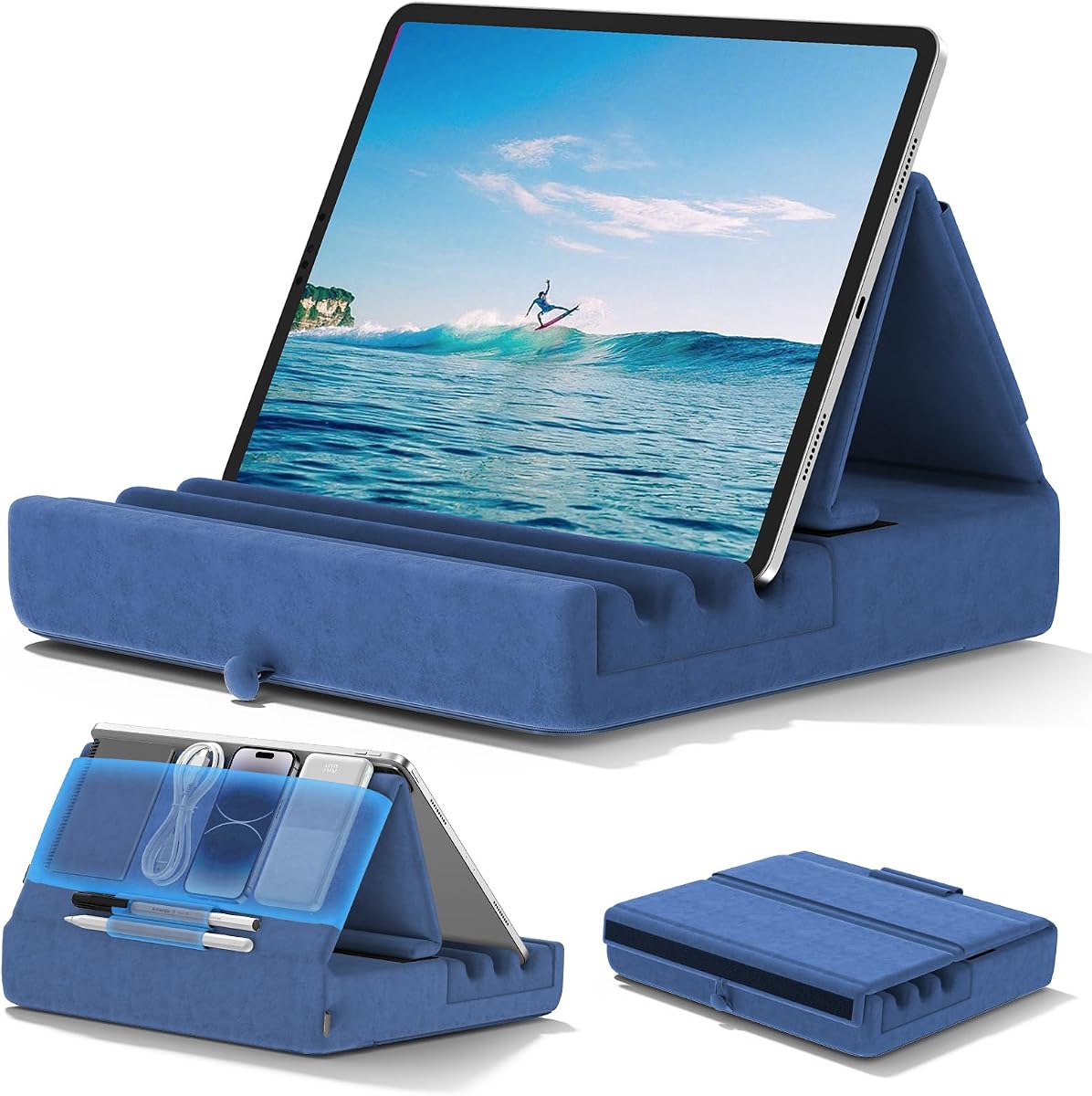
Lamicall Tablet Pillow Stand
4.4Editor score
Supports six viewing angles
Fits devices from 4.7 to 13 inches
Uses detachable pillowcase
Tablet Pillow Holder guide comparing support, viewing angles, portability, storage, compatibility, and comfort for bed, desk, lap, and travel.
A tablet pillow holder combines a cushioned support surface with an adjustable device cradle, making it easier to watch videos, read books, attend video calls, or work comfortably in bed, on a sofa, or during travel. The best model should hold a device securely without forcing your arms to remain raised.
This guide compares ten popular holders across the features that matter most: foam construction, viewing-angle options, device compatibility, portability, storage, surface care, and stability. It includes foldable designs, memory foam lap cushions, multi-device stands, and feature-rich models with removable arms or snack trays.
Each recommendation reflects the supplied product specifications and customer ratings, with particular attention to practical differences among the designs. The top picks show why portability, everyday versatility, and adjustable support can be especially valuable. Prices and promotions can change, so shoppers should verify current availability and terms before purchasing.
4.4Editor score
4.6Editor score

4.7Editor score
The comparison below highlights the core design differences across all ten tablet pillow holders, including support type, angle adjustments, storage, portability, and device compatibility.


The KDD Tablet Pillow Holder is a strong all-around choice for readers, travelers, and anyone who alternates between a bed, sofa, lap, and desk. It carries a 4.6 customer rating and stands out for combining a foldable design with unusually practical storage. Its wide and deep fixing slots help keep a tablet from sliding, while the high-elasticity sponge base is designed to resist deformation.
We may earn a commission when you buy through this link, at no additional cost to you.
Three adjustable angles allow the user to select a more comfortable viewing position for sitting or lying down. The supplied specifications also identify a large pouch for AirPods, phones, power banks, or charging cables, plus two pen pockets. That organization makes the model feel more like a compact personal media station than a simple wedge, particularly useful on long trips or flights where accessories need to remain close at hand.
Compatibility is another major strength. The holder is listed for 4- to 13-inch tablets and other devices, including numerous iPad sizes, Galaxy Tab models, e-readers, phones, and the Nintendo Switch. The soft polyester cover can be wiped with a damp cloth, making routine maintenance straightforward. The trade-off is that three angle settings offer less adjustment than the Lamicall's six, while the soft construction may not provide the same rigid positional precision as a mechanical arm.
This is the recommendation for shoppers who want one holder capable of handling home relaxation, travel, and lighter desk use. The foldable format reduces bulk, the compartments solve small storage problems, and the broad compatibility list minimizes the chance of buying a model that will not fit an existing device. It is the most complete general-purpose option in this guide without moving into the more mechanically complex premium category.
The large pouch and two pen pockets separate accessories from the tablet surface, reducing the need for a separate organizer during travel. They can also keep frequently used items such as a phone, earbuds, charging cable, power bank, or stylus within reach.
The folding design makes this holder easier to place in luggage or carry between a sofa, bed, and desk. Its broad device range also reduces the need to buy separate stands for different tablets or e-readers.
We may earn a commission when you buy through this link, at no additional cost to you.
The Lamicall Tablet Pillow Stand delivers the broadest selection of viewing positions in the group, offering six adjustments for bed, sofa, or table use. Its 4.4 rating is slightly lower than the leaders' ratings, but the design offers substantial practical value for shoppers who prioritize adjustment and device flexibility over extra storage features.
We may earn a commission when you buy through this link, at no additional cost to you.
Vertical and horizontal viewing options make the stand suitable for reading, browsing, typing, video recording, gaming, and watching videos. The description also notes that the pillow can support two tablets at the same time, which is a distinctive benefit for families, couples, or users who follow content on separate screens. Compatibility extends across 4.7- to 13-inch tablets, Kindle Fire HD sizes, e-readers, Surface Pro, Galaxy tablets, Switch devices, and many phones.
There are two practical considerations. Because the pillow is vacuum-compressed, it may need six to 24 hours to recover its normal shape; the manufacturer also suggests a short tumble-dryer session to restore loft. The detachable pillowcase is helpful for cleaning, but the stand does not advertise dedicated pockets for a phone, earbuds, cable, or stylus. Buyers who regularly carry many small accessories may find the KDD model more convenient.
For readers, travelers, and families seeking flexible viewing positions without a complicated mechanical setup, this is a well-rounded budget pick. Its six angles and two-tablet capability compensate for the lack of integrated storage. Users should simply allow the compressed foam to regain its shape before judging the fit or stability.
Six listed settings allow users to change the device orientation without moving a rigid arm. The support for both portrait and landscape viewing is particularly useful for switching between books, videos, and web browsing.
The ability to hold two tablets gives this model an unusual role for shared entertainment. It can reduce the need to crowd around a single screen, provided both devices fall within the stated compatibility range.
We may earn a commission when you buy through this link, at no additional cost to you.
The Brookstone Tablet Lap Cushion in pink is built around soft memory foam and a hands-free format. It has a 4.6 rating and is positioned for extended reading or streaming, with support for Kindle Paperwhite, iPad, iPad Pro, Samsung Galaxy tablets, and phones. Its broad device approach makes it a practical choice for households that use more than one type of mobile screen.
We may earn a commission when you buy through this link, at no additional cost to you.
The cushioned form is intended to rest comfortably on the lap or a desk while keeping the display at a suitable viewing height and angle. That approach can reduce the need to hold a heavy tablet for an extended period, which may also ease wrist and neck discomfort associated with poor positioning. The product description emphasizes ergonomic support rather than a rigid, fixed viewing mechanism.
Travel is the clearest use case. A lightweight lap cushion that raises a screen and provides hands-free support can be especially useful during flights, road trips, or commutes. The trade-off is that the specification does not list multiple numerical viewing angles or a dedicated compartment system. It is therefore a more purpose-built comfort accessory than an all-in-one organizer, and users who require precise mechanical positioning may prefer a clip-based model.
This Brookstone cushion is well suited to anyone who reads, watches videos, or follows media while reclining and wants softer contact than a conventional desk stand provides. It also works for people who need a shared, general-purpose surface for an e-reader, tablet, or phone. Its appeal lies in uncomplicated comfort and portability rather than extensive adjustment hardware.
The cushioned base is designed for relaxed use during long reading or streaming sessions. Soft support around the device can feel more natural than resting a tablet directly on a hard desk or on top of the legs.
Compatibility with e-readers, tablets, and phones makes this holder useful for a mixed-device household. It can move from a Kindle reading session to tablet video without requiring another support system.
We may earn a commission when you buy through this link, at no additional cost to you.
This KDD Tablet Pillow Holder shares the core strengths of the top-ranked model, including three viewing angles, broad compatibility, and a foldable format. It has a 4.6 rating and is particularly distinguished by the described wide and deep fixing slots, which are intended to keep the device from sliding while the user watches or reads.
We may earn a commission when you buy through this link, at no additional cost to you.
The base uses high-quality, high-elasticity sponge intended to resist deformation, while the outer surface is soft plush polyester. That cover can be wiped with a damp cloth, which is convenient for a product used in bed, on a sofa, or while traveling. The 4- to 13-inch compatibility range includes many iPad, Galaxy Tab, Surface Pro, Switch, e-reader, and phone models.
Its three angle options are sufficient for different seated and reclined positions, though not as granular as the Lamicall's six. The soft construction may also feel less mechanically precise than an adjustable clip attached with metal screws and joints. Those limitations are reasonable for shoppers seeking a straightforward, cushioned holder rather than a precise monitor arm.
This version is a solid alternative for anyone particularly concerned about tablets moving inside the support. The deep grooves, resilient foam, wipe-clean cover, and foldable design all contribute to practical everyday use. It is especially relevant for travel, bedside reading, and casual streaming where portability and secure placement matter more than extensive storage or rigid adjustment.
Wide and deep grooves create physical boundaries around the lower portion of a device. This can help prevent unwanted sliding during touch interactions or when the surface is used on a lap.
The polyester covering can be wiped with a damp cloth, reducing the inconvenience of maintaining a fabric accessory near pillows, sheets, and other soft furnishings. Spot care should still follow any additional instructions supplied with the product.
We may earn a commission when you buy through this link, at no additional cost to you.
The Brookstone Tablet Lap Cushion in black is a soft, travel-oriented holder designed to support reading and hands-free viewing. Its 4.6 rating reflects a generally favorable reception, while the two angled positions make it easy to change between different reclining and seated activities without dealing with a complex adjustment system.
We may earn a commission when you buy through this link, at no additional cost to you.
The memory foam cushion is intended to support a tablet, phone, Kindle Paperwhite, iPad, iPad Pro, or Samsung Galaxy device over longer sessions. It can rest on the legs or a desk and keep the screen at a more useful height and angle. That makes it relevant to travel days, bedside use, and casual work or entertainment where a rigid desk stand would be inconvenient.
Compared with the six-position Lamicall, the Brookstone offers less granular control. It also lacks the storage pockets found on the KDD models and the mechanical precision of the ERGONOV. These are meaningful limitations for buyers who need to keep a phone, cable, or stylus organized or who require exact screen positioning. The tradeoff is a straightforward cushion that prioritizes soft comfort and portability.
This black model is a sensible choice for users who regularly read on a Kindle, stream on a tablet, or travel with a phone and want one lightweight object to raise the screen. It may be especially attractive to travelers who prefer uncomplicated support that can move easily between a lap, bed, and desk. The two angles cover the essential positioning needs without making the product overly complicated.
The pair of angled positions provides enough variation for common reclining and seated activities. It offers a middle ground between a fixed cushion and a holder with numerous adjustment points.
Memory foam and a cushioned profile can feel more comfortable during long reading or viewing sessions. The black finish also blends easily with common bedroom and office furnishings.
We may earn a commission when you buy through this link, at no additional cost to you.
The Flippy Original Tablet Pillow Stand in Greyster combines a compact foam construction, three viewing positions, and small-item storage. Its 4.6 rating places it among the stronger-rated products in this roundup, and the design is aimed at users who want one accessory for reading, streaming, browsing, calls, and content creation in bed, on a couch, or at a desk.
We may earn a commission when you buy through this link, at no additional cost to you.
The listed angles of 49, 70, and 61 degrees are designed for a mix of reading, video, and browsing. The stand is compatible with Kindle, Fire, iPad models, Samsung Galaxy Tabs, and phones, allowing it to serve as more than a tablet-specific accessory. Lightweight foam and a soft, durable cover support the product's portability and home-use positioning.
Storage is present, but the description specifically frames it for small items rather than a full travel organizer. The holder also lacks the continuously adjustable joints found in the ERGONOV and the six-position flexibility of the Lamicall. Buyers who require exact millimetric positioning or extensive accessory capacity may need a more specialized design. Those who want a simple, attractive, and versatile pillow stand will find the three fixed angles more approachable.
The Greyster Flippy is a compelling option for book lovers, students, and casual entertainers who want the device supported without a bulky arm. It can serve as a tablet holder, Kindle stand, book pillow, or phone pillow stand. Its range of uses and compact construction make it an easy gift for someone whose tablet habits span reading, streaming, calls, and browsing.
The defined viewing positions provide practical choices without complicated hinges. They are suitable for common activities such as reading a book, watching a video, or browsing while seated in bed or at a desk.
Compatibility with e-readers, phones, iPads, Fire devices, and Galaxy Tabs increases the holder's usefulness over time. The same basic support can serve different screens as a reader's device collection changes.
We may earn a commission when you buy through this link, at no additional cost to you.
This KDD Foldable Pillow Dock is another strong version of the brand's well-reviewed tablet pillow design. It carries a 4.6 rating and follows the same proven combination of a foldable soft support, three viewing angles, wide device compatibility, and organized storage. Its particular strength is the large pouch, paired with two pen pockets, for travel accessories.
We may earn a commission when you buy through this link, at no additional cost to you.
The holder can accommodate a large range of devices from 4 to 13 inches, including many iPad generations, Galaxy Tab models, Surface Pro devices, phones, e-readers, books, and the Nintendo Switch. Wide and deep grooves are designed to keep the device from sliding, while the resilient sponge base and plush polyester cover are suited to repeated home and travel use.
Folding makes the product easier to pack, but the pouch and expanded base create more bulk than a minimalist pillow stand. The three angle settings also provide less flexibility than a six-position or continuously adjustable model. Buyers who need precise orientation for video calls or professional content work may find a rigid clip more suitable, while casual readers and travelers will benefit more from the integrated organization.
This dock is a compelling pick for anyone who wants a tablet stand and a small travel organizer in one object. Carrying a phone, power bank, charging cable, earbuds, and stylus becomes less scattered when the pouch and pen slots are used. With three angle choices, a wipe-clean cover, and compatibility across major device families, it covers the core needs of bed, desk, lap, and travel use.
The oversized pouch and two pen slots can reduce loose cables and accessories during a trip. This is a meaningful advantage when the holder is being used in a bed, on a plane, or anywhere space is limited.
The foldable format allows the soft stand to be packed more easily than a rigid fixed-angle holder. It is especially suitable for travelers who alternate between hotel, airplane, and vehicle environments.
We may earn a commission when you buy through this link, at no additional cost to you.
The Flippy Original in Smokey offers the same multi-angle, multi-device concept as the other Flippy variants, with a neutral color that can blend naturally into a bedroom, living room, or office. Its 4.6 rating makes it a credible choice for readers, students, and casual users who want a soft holder that can handle several types of screens.
We may earn a commission when you buy through this link, at no additional cost to you.
Three defined angles support reading, streaming, browsing, video calls, and content creation. Compatible devices include Kindle, Fire, iPad models, Samsung Galaxy Tabs, and iPhones, so the holder can move easily between an e-reader and a tablet. Lightweight foam, a soft durable cover, and a compact form support the product's easy-to-move design.
The Smokey version is less mechanically adjustable than the ERGONOV, which uses dual joints and a rotating clip, and it offers fewer positions than the Lamicall. The storage feature is described as convenient for small items, but no detailed capacity is given, making it less suitable for users who need to organize a full travel accessory kit. Its simplicity is also part of the appeal.
This model is best for shoppers who appreciate understated styling and want one uncomplicated accessory for multiple activities. It works well for bedside reading, couch streaming, casual browsing, and desk use. The dark neutral finish may also be easier to coordinate with modern electronics and home decor than a brightly colored accessory.
The Smokey finish is designed to blend into a range of settings without drawing attention. It is appropriate for bedrooms, living rooms, offices, and other spaces where a bright novelty color might feel out of place.
Because the design supports e-readers, tablets, and phones, users can change devices without moving to a separate stand. This makes it convenient for homes where different people use different screens.
We may earn a commission when you buy through this link, at no additional cost to you.
The Flippy Original in True Blue is the color-focused option among the three Flippy models in this guide, but it retains the same versatile 4.6-rated design. It offers three viewing positions, lightweight foam construction, a soft durable cover, and compatibility with tablets, phones, Kindle devices, Fire devices, and Samsung Galaxy Tabs.
We may earn a commission when you buy through this link, at no additional cost to you.
The three defined angles accommodate reading, streaming, video calls, browsing, and content creation, making the stand useful in bed, on a sofa, and at a desk. A storage compartment for small items adds convenience, while the compact construction allows it to move between locations. The blue finish gives shoppers a more expressive alternative to neutral home accessories.
Its primary limitation is the absence of a continuous mechanical adjustment system. The fixed positions may not be ideal for every body position or task, especially if a user wants very precise screen height or angle. Storage is also not quantified, so buyers should not expect the organizer capacity of a dedicated travel pillow with multiple pockets. The simple trade-off is fewer moving parts and easier portability.
This is a good recommendation for readers and families who want a cheerful, compact tablet pillow for everyday use. It can support an e-reader during a morning session, a tablet for evening streaming, or a phone for a bedside video call. Users who value visual style and broad device compatibility will find it appealing, while those requiring exact positioning should consider the premium mechanical model.
The True Blue color adds personality to a practical accessory. It can make a reading setup feel more intentional while remaining suitable for ordinary bedroom, lounge, and office use.
The lightweight construction makes it easy to carry the stand from a desk to a sofa or bed. Its compatibility with several device categories lets the same accessory support reading, calls, and entertainment.
We may earn a commission when you buy through this link, at no additional cost to you.
The ERGONOV Tablet Pillow Stand is the most mechanically adjustable product in this guide and carries the highest listed rating at 4.7. It replaces the fixed grooves used by many pillow stands with a detachable arm, dual 180-degree joints, metal screws, and a rotating clip. That construction gives users a more precise way to position a screen for reading, viewing, or calls.
We may earn a commission when you buy through this link, at no additional cost to you.
The 360-degree rotating clip makes it easy to switch between landscape and portrait modes, while the dual joints allow fine changes in position and stability. A wrench is included for adjusting the metal screws. The clip supports devices from 4.7 to 9.8 inches and is described as suitable for tablets, phones, portable monitors, and 4.7- to 13-inch Kindle devices, although the wording indicates that the adjustable clip itself has a smaller stated range than the largest e-readers.
The removable arm can be detached so the base functions as a sofa cup holder. A removable silicone snack bowl contains three compartments for snacks, drinks, or small items such as remotes and glasses. The silicone construction is described as easy to clean, which is useful for a tray intended to hold food. The main drawback is complexity: the joints, screws, arm, and removable components create more parts than a simple foam wedge.
This stand is the premium recommendation for buyers who prioritize control, modularity, and exact positioning. It is less appropriate for someone seeking the smallest or simplest travel accessory, and users with a large tablet should check the clip dimensions carefully. Even so, the combination of precise joints, rotation, cup-holder conversion, and a divided snack tray gives it a distinctive level of everyday versatility.
Dual 180-degree joints allow the device arm to be repositioned more precisely than a fixed-angle foam cradle. Metal screws and the included wrench add a more durable method of locking the chosen position.
Removing the arm turns the base into a cup holder, while the three-compartment silicone bowl organizes snacks, drinks, glasses, or a remote. This makes the stand useful during long viewing sessions beyond merely holding a screen.
We may earn a commission when you buy through this link, at no additional cost to you.
The right tablet pillow holder depends on where it will be used, how precisely the device must be positioned, and whether portability, storage, or shared-device support matters most. These factors help narrow the field before comparing individual models.
A useful pillow holder should create a stable, comfortable platform without pressing awkwardly into the lap or forcing the user to support the device by hand. Soft memory foam and plush covers are well suited to reclining, reading, and extended viewing, while a mechanical arm can offer more precise elevation. Consider whether the holder will be used on bare legs, over bedding, or on a desk, because each surface changes the amount of cushioning and stability needed.
Viewing angles determine how comfortably a device can be used while sitting upright or lying down. Models with several positions are more adaptable than fixed supports, while continuously adjustable joints offer the greatest precision. Check whether portrait and landscape orientations are both available, especially if the holder will be used for reading, video calls, gaming, or following video tutorials.
Compatibility should be checked against the actual dimensions of your device rather than only a brand name. Some models support wide ranges spanning small phones through 13-inch tablets, while premium adjustable clips may have narrower limits. Look for the holder's stated minimum and maximum size, confirm whether the device fits in portrait and landscape orientations, and account for cases or accessories that may add thickness.
A foldable pillow is easier to place in luggage than a rigid arm or a bulky tray, while a lightweight cushion is convenient for commutes and flights. Travel users should also consider whether the holder needs to support accessories such as a charging cable, earbuds, power bank, phone, or stylus. A model that folds flat but lacks organization may save luggage space yet still require a separate pouch.
Storage can include a large pouch, small-item compartment, pen slots, cup holder, or divided snack bowl. Larger pouches are useful for phones, power banks, and cables, while narrow slots suit styluses. Removable silicone trays are easier to clean than fabric compartments, and convertibility matters: a product whose arm can become a cup holder may be more useful than a fixed-design stand with the same basic device support.
The holder should keep the screen from sliding during touch interactions, typing, or streaming. Deep grooves suit soft wedge designs, while a clipped mechanical arm generally restrains a device more firmly. Joint locks, metal screws, and wide bases add another layer of stability. As a general rule, choose a support with enough resistance to hold the device at the intended angle without requiring constant correction.
Materials affect the practical care required. Plush polyester can generally be wiped with a damp cloth, while removable covers are easier to wash. Silicone snack bowls are described as easy to clean, and a detachable arm can be removed to reach areas underneath. Vacuum-compressed foam may also need time to recover its shape after delivery, so unpack it fully and follow the supplied restoration instructions before evaluating performance.
The most useful model is the one that fits your actual routine rather than the one with the most features. A simple multi-angle stand may be ideal for bedside reading, while a foldable organizer is better for travel. Mechanical joints and snack storage make sense when precise positioning and hands-free relaxation are priorities. Before purchasing, weigh the extra complexity against the activities you expect to perform most often.
Place the holder on a stable, clean surface before inserting the device. For lap use, sit back and position the cushion over your thighs with the screen centered in front of you. Adjust the angle after checking your posture rather than choosing a setting by appearance alone; the goal is to keep your neck relatively relaxed and your hands free.
For a foldable model, expand the base fully and ensure any hinged sections are securely positioned. For models with a mechanical arm, loosen the screws only enough to make the adjustment, then tighten them with the supplied tool. When switching orientation, rotate or reposition the holder as intended instead of forcing the device against a fixed groove. Remove the device before folding the base for transport.
Clean according to the material. Wipe plush polyester with a damp cloth, remove and wash detachable covers according to their care instructions, and wash silicone bowls separately. Keep food and drinks away from electronic devices, avoid soaking foam or mechanical joints, and allow every part to dry fully before use. Allow compressed foam to regain its shape as directed by the manufacturer.
A tablet pillow holder supports a tablet, e-reader, or phone at a comfortable viewing angle while you relax, read, stream, or video chat. It can rest on your lap, a bed, a sofa, or a desk. The main benefit is hands-free support, which can reduce the need to hold a heavy device for long periods.
They can be well suited to reading, especially when the viewing angle keeps the screen in front of the eyes and the device is held securely. E-reader users should verify the holder's size range, while video users may prefer a model with portrait and landscape rotation. A soft lap cushion is especially useful for long bedside reading sessions.
Yes, provided the holder complies with the airline's carry-on rules. Foldable soft models are generally easier to pack than rigid articulated stands, although travelers should check dimensions and confirm that a separate snack tray or accessory does not create a problem. A built-in pouch can also keep cables, earbuds, and a power bank together.
It depends on the model's stated compatibility range and the size of the particular iPad model. Many options support broad ranges that include common iPad, iPad mini, and iPad Pro sizes, while some adjustable clips have narrower limits. Buyers should compare the model's minimum and maximum dimensions and allow for the thickness of a protective case.
A pillow stand primarily cradles and props up a device, while a lap desk may provide a broader flat work surface for a keyboard or writing. Some hybrid models can support a device while also offering a tray or snack bowl, so consider whether you need a writing surface, full keyboard support, or only a raised and stable screen.
Look for wide and deep grooves or a secure adjustable clip. The device should fit fully within the support area without force, and any mechanical locks should be tightened enough to prevent movement without creating pressure on the screen. Soft wedge designs benefit from stable placement on a flat lap or firm surface rather than a deeply uneven blanket.
Wipe wipe-clean polyester or plastic surfaces with a slightly damp cloth, and remove detachable covers or silicone trays for cleaning according to their instructions. Do not soak foam, pour liquid into joints, or spray cleaner directly onto the product. Always remove the device and allow cleaned parts to dry completely before reassembly.
Many models support phones, Kindles, Fire tablets, and other e-readers in addition to full-size tablets. Compatibility depends on screen size and the design of the support. A model with a rotating clip or deep grooves may be especially versatile, while a narrow tablet-specific groove could restrict larger or smaller devices.
The KDD Tablet Pillow Holder is the strongest general recommendation because it combines a foldable soft support, three angle settings, wide device compatibility, deep grooves, and useful storage for cables, phones, earbuds, and styluses. For shoppers who want more angle choices at a budget-friendly level, the Lamicall provides six positions and can support two tablets.
Prioritize the features that match your routine: choose soft memory foam for long, relaxed sessions, a foldable design with pockets for travel, or an articulated model when precise positioning matters. The ERGONOV stands apart with dual adjustable joints, 360-degree rotation, a modular arm, and a removable divided snack bowl, making it the premium option for flexible hands-free use.
Before ordering, confirm the device size, orientation, case clearance, cleaning method, and whether the support suits your main location. Ratings and customer feedback can help identify common strengths, but the most important criteria remain comfort, stability, and the viewing position you will actually use. Prices, promotions, and availability may change, so check current product information before making a final purchase.