
JSAUX Ultra HD Screen Protector
4.6Editor score
Two tempered-glass protectors
Supports LCD and OLED
Includes installation frame
Steam Deck Accessories can transform a capable handheld into a more comfortable, protected, and versatile gaming system. The most useful additions improve everyday handling, cooling, display visibility, transportation, or the ability to connect the console to a larger screen.
This guide compares ten popular accessories across essential categories, including tempered-glass protectors, modular cases, docking stations, cooling fans, carrying cases, and hands-free gaming pillows. Each pick is evaluated using the supplied compatibility information, design features, ratings, and practical use cases.
The list shows why the leading products stand out and where simpler options may be preferable. Ratings and product configurations can change over time, and current prices vary, so readers should confirm the latest listing, compatibility, included components, and warranty before purchasing.
4.6Editor score

4.8Editor score

4.1Editor score
As an Amazon Associate we earn from qualifying purchases.
This side-by-side comparison covers ten accessories for protecting, cooling, transporting, positioning, and expanding a Steam Deck, with each product best suited to a particular need.






The JSAUX 2-Pack Ultra HD Screen Protector is a straightforward, high-value way to guard the Steam Deck display. It carries a 4.6 rating and supports both the LCD and OLED versions, making it useful for owners who may move between handheld generations or want a spare for future replacement. Its defining features are edge-to-edge coverage, high transparency, and a guided installation frame.
We may earn a commission when you buy through this link, at no additional cost to you.
The two-pack provides useful redundancy, allowing one sheet to be installed while the other remains available if alignment goes wrong or a replacement is needed later. According to the product information, the glass is extra-reinforced at 500 degrees Celsius for several hours and is described as five times sturdier than protectors reinforced only once. The 99.99% transparency specification supports the goal of preserving the original visual clarity rather than adding a noticeably cloudy layer.
Installation remains the main practical concern with any full-screen tempered-glass product. This protector addresses that concern with a guiding frame intended to reduce repeated edge alignment, although careful cleaning and application remain important. A glass layer can also create a slight change in perceived brightness or reflectivity, and the supplied information does not specify a special coating for reducing glare, so buyers who work in bright environments may prefer the matte alternative later in the list.
This is an excellent first accessory for a new Steam Deck owner because it protects the component most exposed to scratches without adding bulk or changing the console's controls. It is especially suitable for anyone who carries the handheld in a bag, plays away from a desk, or wants a spare protector available. For shoppers prioritizing a straightforward protective layer, clear visibility, and broad LCD/OLED compatibility, it is an easy recommendation.
The protector's stated 99.99% transparency is designed to maintain the original screen appearance. That makes it a sensible option for players who value color clarity and a smooth-looking surface more than a matte finish.
The included guiding frame helps position the sheet across the seven-inch display. Although dust and bubbles still require care, the frame reduces the need for repeated manual alignment.
We may earn a commission when you buy through this link, at no additional cost to you.
The JSAUX PC0104 ModCase Basic Set combines a body shell, detachable front cover, metal kickstand, and modular strap in one coordinated protection package. Its 4.7 rating reflects a well-received accessory set designed for both the original LCD Steam Deck and later OLED models. The case is aimed at players who want more than a simple skin and need protection for both the display and controls.
We may earn a commission when you buy through this link, at no additional cost to you.
The front cover snaps over the screen and thumbsticks, offering useful defense against scratches and pressure when the console is placed in a bag. When gaming, it can be removed, while the rear body shell remains attached. A zinc-alloy kickstand provides a more rigid tabletop platform than a flexible built-in support, and its detachable design lets the player reduce bulk during handheld sessions.
The modular strap is another versatile component, because it can hold compatible accessories such as a power bank, USB-C hub, or JSAUX cooling fan. This expands the value of the set for users who already own compatible add-ons. The stated PC-ABS and TPU construction seeks a balance of impact resistance and grip, while textured edges are intended to reduce slipping and hand fatigue. The trade-off is that a case with several removable pieces is inherently bulkier and less minimalist than a bare console.
The set is best for owners who regularly travel, play in tabletop mode, or want one accessory that covers several protection needs. It is less appealing if uninterrupted handheld use is the priority and taking off a rigid front cover before each session would be inconvenient. Even so, the combination of screen coverage, grippy materials, a sturdy stand, and accessory attachment makes it one of the most complete non-cooling solutions in this guide.
The front cover and body shell can be used together for storage or separated for play. This adaptable approach protects more of the console without requiring a permanently bulky enclosure.
The detachable zinc-alloy bracket offers a stable surface for menu navigation or lighter games. Removing it leaves the player with a slimmer handheld setup.
We may earn a commission when you buy through this link, at no additional cost to you.
The JSAUX ModCase Cooler Set is the most complete package in the selection, combining a protective case, detachable front cover, cooling fan, metal bracket, and strap. Its 4.8 rating is the highest among the ten listed products. For an owner who wants protection and active cooling without assembling several unrelated accessories, this set delivers an unusually cohesive solution.
We may earn a commission when you buy through this link, at no additional cost to you.
The case is designed around the Steam Deck's controls and ports, with the supplied information describing aligned cut-outs and a modular back cover. Its front cover protects the screen and thumbsticks when the device is not in use, while the PC-ABS and silicone materials are intended to resist scratches and cracks. The cooling fan can be attached through the modular slider and directs additional airflow toward the handheld.
The main trade-off is complexity. Compared with buying only a slim case, a screen protector, and a separate fan, the cooler set is easier to coordinate but generally places more material between the player and the console. A powered fan may also produce audible sound, particularly at higher output, and the case itself may not satisfy anyone seeking the lightest possible handheld experience. Buyers who travel frequently must also consider the dimensions of the assembled system.
This is the strongest all-in-one recommendation for a stationary or mixed-use Steam Deck setup. It gives a new owner protective coverage, a place to carry compatible accessories, a rigid stand, and an integrated cooling option in one package. Choose it when convenience and modularity matter more than minimum size; for the lightest travel arrangement, one of the slimmer screen or cooling accessories may be more appropriate.
The included fan adds airflow without requiring a completely separate desktop accessory. Combining it with the case creates a coordinated setup for extended tabletop sessions.
The front cover, bracket, strap, and fan can be configured around different play styles. That flexibility makes the package useful for both handheld and docked gaming routines.
We may earn a commission when you buy through this link, at no additional cost to you.
The JSAUX 6-in-1 Docking Station is designed for players who regularly move their Steam Deck from handheld play to a television or desktop monitor. Its 4.3 rating reflects a useful combination of modern video output, wired networking, charging, and multiple USB connections. The centerpiece is HDMI 2.1 support for 4K resolution at a 120Hz refresh rate.
We may earn a commission when you buy through this link, at no additional cost to you.
The dock includes three USB-A 3.0 ports, a gigabit Ethernet connection, and up to 100W Power Delivery. Those features support common desktop needs: connecting a controller, using a stable wired network, charging the handheld, and sending video to a larger display. The 120Hz capability is especially relevant to fast games, provided the game, display, and graphics output all support the target resolution and refresh rate.
Compatibility is broad but not universal. The listing includes Steam Deck LCD and OLED models, ROG Ally and Ally X, Legion Go and Go S, and MSI Claw, while explicitly excluding ROG Xbox Ally and Xbox Ally X. The 100W charging specification also does not mean a 100W power adapter is included; the product information recommends one for certain high-power handheld modes, so buyers should check what arrives in the box.
This is a good pick for a compact desk setup where video, power, peripherals, and networking need to reach the Steam Deck through one connection. It is less useful for users who only play on the built-in screen or already maintain a full desktop PC. Within that niche, however, the high-refresh HDMI output and broad handheld compatibility make it a concise and capable upgrade.
HDMI 2.1 support can carry 4K video at 120Hz, a meaningful improvement over standard 60Hz docks. The actual result still depends on game and monitor support.
Power delivery, Ethernet, and three USB-A ports reduce the number of separate connections needed at a desk. A stable wired network can also improve multiplayer consistency.
We may earn a commission when you buy through this link, at no additional cost to you.
The Mechanism Gaming Pillow is a premium comfort accessory designed to hold a Steam Deck without requiring constant hand support. Its 4.1 rating is the lowest in this selection, but the product serves a distinctive use case: creating a flexible, hands-free position for reclining, bed-based, or casual gaming sessions. Its Deckmate grip is designed specifically for the Steam Deck.
We may earn a commission when you buy through this link, at no additional cost to you.
The key mechanism is a 360-degree ball-socket mount. It allows the console to be positioned at a preferred height and angle, then tightened in place for a stable view. The mount can also be loosened enough to accommodate gyroscope-controlled games that benefit from some movement. A soft, lightweight beaded filling and Lycra fabric conform to the player's body, while the machine-washable construction makes care more convenient.
Another useful feature is the extra Mechanism mounting point. It is intended to accept compatible items such as a battery or phone mount, opening the door to dual-screen arrangements and longer-session accessories. The trade-offs are bulk and rating. A pillow-style support occupies more space than a rigid stand, and a 4.1 rating suggests that buyer satisfaction is more varied than for the highly rated case and cooling products in this guide.
This accessory is best for players who game in bed, on a sofa, or at any point where holding the console becomes tiring. It also suits users experimenting with gyroscope mechanics who want the screen within easy view. It is less practical for a compact desk where a conventional stand is more appropriate. For the specific comfort-focused use case, the adjustable mount and washable materials provide clear value.
The cushioned body supports the player's arms while the mounted console remains raised. This can reduce fatigue during long story-driven or streaming sessions.
The ball joint offers broad positioning freedom for different postures. Its adjustability can also support controlled movement for gyroscope-oriented games.
We may earn a commission when you buy through this link, at no additional cost to you.
The JSAUX 2-Pack Anti Glare Screen Protector is designed for players who often use the Steam Deck in bright rooms or under strong lighting. It has a 4.5 rating and shares several practical traits with the clear protector, including full seven-inch coverage, compatibility with LCD and OLED models, a two-pack format, and a guiding installation frame. The defining difference is its matte texture.
We may earn a commission when you buy through this link, at no additional cost to you.
The anti-glare finish is intended to reduce harsh reflections and make content easier to see under ambient light. An oleophobic coating helps the surface resist fingerprints and remain clean, which is particularly valuable for frequently touched screens. At 0.33mm, the protector is described as thin enough to maintain responsive input, avoiding one of the concerns associated with thicker layered films.
As with any matte screen layer, visual vibrancy and the glossy appearance of the display may appear slightly different from the uncovered screen. Some players prefer maximum brightness and a glass-like finish, making the clear JSAUX option a better fit for darker environments. Installation still requires care to avoid dust and bubbles, even though the frame helps position the sheet consistently.
This protector is best for travel, commuting, outdoor use, or any situation where overhead lights can create distracting reflections. It offers the same broad model compatibility and two-sheet convenience as the clear version, but it prioritizes readability over a pristine glossy finish. Players who spend long sessions near a window or in a shared room may find that advantage especially noticeable.
The matte texture diffuses reflected light that would otherwise compete with the display. That can make menus and darker game scenes easier to view under strong ambient lighting.
At a stated 0.33mm, the protector is designed to preserve touch sensitivity. The thin format also adds less visual bulk than many conventional layered films.
We may earn a commission when you buy through this link, at no additional cost to you.
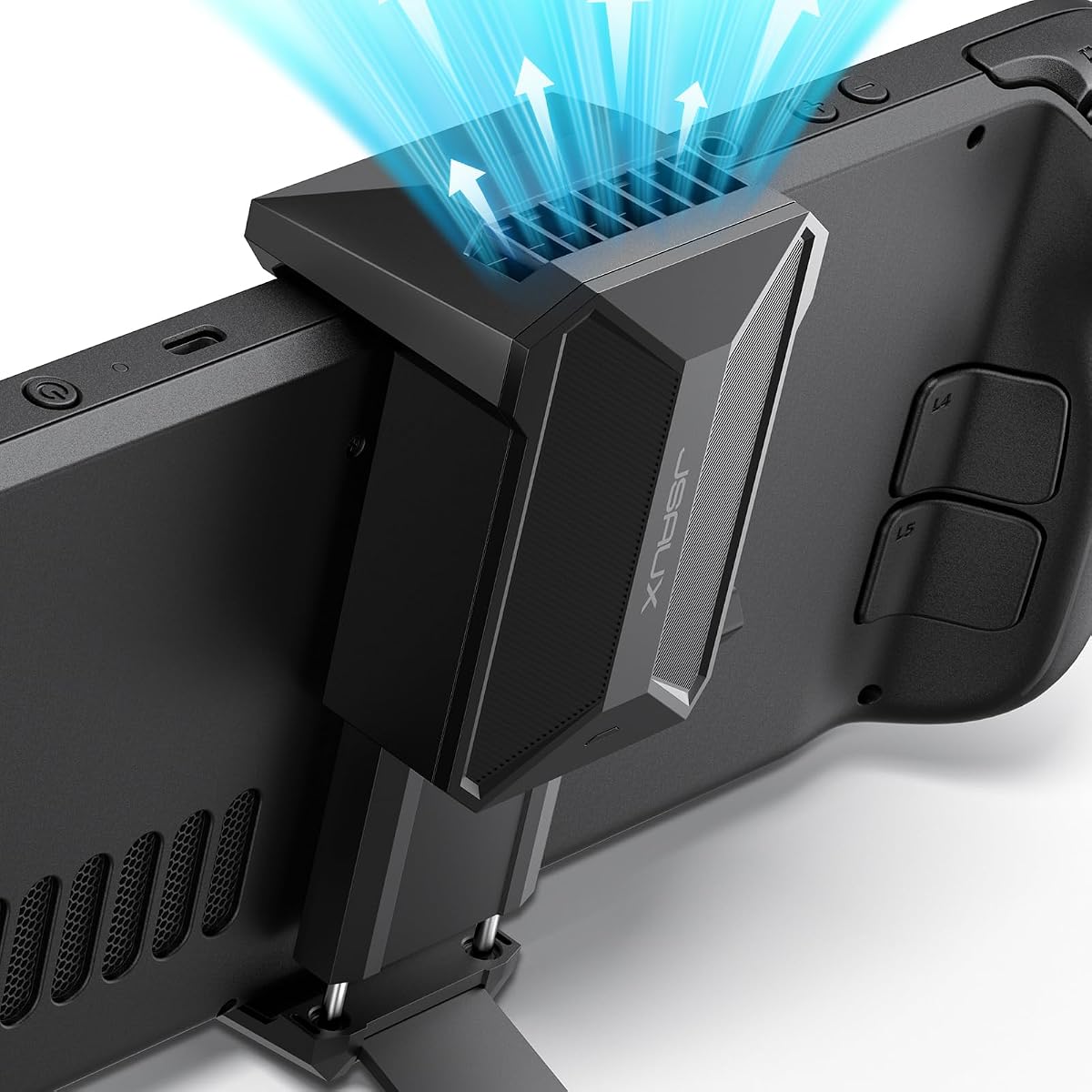
The JSAUX Cooling Fan is a dedicated accessory for players who want extra airflow without building a complete docking setup. It carries a 4.7 rating and is tailored to the Steam Deck LCD and OLED. The fan directs moving air toward the console's vents while also serving as a stand, reducing the need to purchase a separate basic support.
We may earn a commission when you buy through this link, at no additional cost to you.
The product information claims that four to eight minutes of operation can reduce the device temperature by 8 to 15 degrees Celsius. While the practical result will vary with ambient conditions, game demand, and the console's own cooling system, the accessory offers a clear operational benefit for sustained gaming. A front control knob adjusts output from zero to 100%, allowing the user to balance cooling needs against sound levels.
Noise is the main trade-off. The listing notes that higher wind speeds result in louder operation, which is normal for a fan. A full-speed setting may therefore be less desirable in a shared room, during late-night gaming, or while using voice chat. A lower setting can provide quieter operation, and the stand's integrated design still keeps the console in a stable raised position.
This is a strong recommendation for players who game at a desk, run demanding titles for extended periods, or want a simple cooling and stand solution in one accessory. It is less essential for short handheld sessions, where adding another powered component can be inconvenient. For stationary play, the adjustable controls and purpose-built vent alignment make it more focused than a general-purpose external fan.
The fan's shape is tailored to the Steam Deck so airflow reaches the intended ventilation area. This focused design makes it more practical than an arbitrary USB fan.
The adjustment knob lets users reduce output when quiet operation matters. Higher speeds can provide stronger cooling, though the product information notes increased sound.
We may earn a commission when you buy through this link, at no additional cost to you.
The YCE 12-in-1 Steam Deck Dock is built for users who want one hub to handle display output, networking, charging, storage, peripherals, and cooling. Its 4.2 rating reflects a broad feature set, although it operates in a different performance tier from the JSAUX dock's 120Hz HDMI mode. The two five-centimeter cooling fans help address heat while the console is used in the dock.
We may earn a commission when you buy through this link, at no additional cost to you.
Connectivity is extensive: HDMI 2.0 with 4K at 60Hz, gigabit Ethernet, three USB 3.0 ports, three USB 2.0 ports, and Type-C PD 3.0 supporting up to 100W charging and 40Gbps data. A dedicated slot accommodates handhelds up to 27mm thick, including Steam Deck LCD and OLED models, several ROG Ally and Legion Go variants, and other listed devices. Laptops and tablets can use the included Type-C cable without occupying the slot.
The main limitation is the stated 60Hz video ceiling, which may matter to owners with high-refresh gaming monitors. Nintendo Switch USB data restrictions also remain, as the product information explains that console-side limitations apply to docks generally. The included Type-C extender is intended to protect the device's original port during repeated plug cycles, while four silicone joystick caps improve grip and help keep dust out.
This dock is a compelling choice for a multi-device desk where the number of connections matters more than high-refresh gaming. Its aluminum construction and open cooling area distinguish it from simpler plastic hubs, while the dual fans add value for extended docked sessions. Players who need 4K at 120Hz should choose a dock explicitly designed for that output instead.
A dozen connections cover the most common peripheral, network, video, and charging needs. This reduces cable clutter and avoids relying on a limited selection of console ports.
The paired five-centimeter fans move more air than very small cooling attachments. A rear switch disables the fans and RGB lighting when they are not needed.
We may earn a commission when you buy through this link, at no additional cost to you.
The JSAUX Carrying Case is built for Steam Deck owners who travel regularly and want more than a simple sleeve. It has a 4.6 rating and fits both the LCD and OLED versions. A hard exterior, soft padded lining, secure straps, and a recessed joystick groove provide protection, while a two-level interior organizes the console with essential travel gear.
We may earn a commission when you buy through this link, at no additional cost to you.
The upper layer stores the Steam Deck and microSD cards, and the lower area can hold a charger, power bank, cables, dock, earbuds, and other small accessories. A removable hook-and-loop divider allows the layout to be adjusted. The case includes a right-angle USB-C to USB-C cable and a built-in port that can connect to a power bank while the case remains open, though the power bank itself is not included.
For desk use, the center panel folds into a stand, adding a practical benefit beyond transportation. The main drawback is bulk: a structured hard-shell case occupies more space than a pouch and is less convenient for quick, one-handed removal. The included component list also should not be mistaken for a complete travel kit, because chargers, power banks, and other accessories must be supplied separately.
This case is best for commuters, travelers, and owners who carry a fuller accessory load. It keeps small parts organized and provides several ways to transition between mobile and tabletop gaming. For users who usually leave the console at home or carry it without accessories, a lighter sleeve may be easier. For frequent travelers, however, the added organization and charging access are particularly valuable.
Separate levels keep the console apart from cables and smaller accessories. The adjustable divider makes it easier to accommodate changing travel loads without loose items shifting.
The case's cable port allows a connected power bank to charge the Deck while it remains inside the open case. The included right-angle cable helps reduce connector bending.
We may earn a commission when you buy through this link, at no additional cost to you.
The LULULOOK Gaming Pillow Stand is a multifunctional support for Steam Deck and tablet gaming. Its 4.4 rating reflects a generally useful design that combines a cushioned base, an adjustable arm, and two clamps. Unlike a basic pillow-style mount, it also includes a compartment for snacks and small accessories, giving it a broader role in long gaming sessions.
We may earn a commission when you buy through this link, at no additional cost to you.
The clamp system is designed for both the Steam Deck and a universal clamp suitable for many phones, tablets, and Kindle devices within the stated size range. This allows a second screen to sit alongside the main display, which could be useful for guides, videos, or communication applications. The adjustable arm uses customizable damping resistance to remain stable without the loose feel of a basic hinged mount.
Comfort comes from a high-density memory foam core wrapped in soft, breathable fabric. The entire outer cover is removable and machine washable, helping manage sweat and food spills. A dedicated storage area keeps snacks, earbuds, chargers, and controllers close at hand. The important compatibility limitation is that the clamps do not work with a Steam Deck fitted with a protective case, silicone sleeve, or other third-party attachment.
This stand is best for relaxed gaming in bed, on a sofa, or anywhere the player wants the screen raised without holding it. It is less suitable for a compact workstation because it occupies more space than a conventional rigid stand, and owners using a cased Steam Deck should choose another mount. For compatible setups, the combination of stable positioning, washable comfort, and a second-screen option is especially useful.
The memory foam core is designed to support the player's body without the collapsing behavior associated with loose bean-bag supports. Breathable fabric helps maintain comfort over longer periods.
The universal clamp can hold a compatible phone or tablet beside the Steam Deck. That creates room for a guide, video, or another application without requiring a separate stand.
We may earn a commission when you buy through this link, at no additional cost to you.
The right Steam Deck accessory depends on how and where the console is used. Protection, cooling, desktop connectivity, transportation, and hands-free comfort solve different problems, so the most useful purchase is the one that addresses a recurring need without creating unnecessary bulk.
Compatibility should be the first checkpoint because Steam Deck accessories do not all fit the same hardware revisions. The LCD and OLED versions share the familiar handheld form, but some accessories are specified for one model family while others explicitly support both. The JSAUX Ultra HD and anti-glare protectors, for example, cover the full seven-inch display and are listed for LCD and OLED models, while the cooling fan is also tailored to both. By contrast, certain docks support a wider ecosystem of handhelds but exclude specific Xbox-branded Ally variants. Review the exact model year, port arrangement, physical dimensions, and any notes about screen size before ordering.
Protection priorities differ depending on whether the Deck mostly stays at home, travels in a bag, or spends time in shared spaces. A screen protector addresses direct contact with the display, while a case can also shield the body, controls, and thumbsticks. Hard-shell travel cases add impact resistance and organization, whereas the ModCase products use a front cover to protect the screen and joysticks when the console is not being played. Consider the daily handling pattern rather than simply buying the most substantial option: an overbuilt setup can be inconvenient for frequent handheld use, while a screen-only setup may be insufficient for regular travel.
Clear and matte screen protectors serve different environments. The JSAUX Ultra HD protector emphasizes 99.99% transparency and a smooth glass appearance, making it suitable for players who want the original display look preserved as closely as possible. The anti-glare version uses a matte texture to reduce harsh reflections under bright lighting, although that finish can slightly alter color vibrancy or the glossy appearance. Both are thin tempered-glass options with two-sheet packs and installation frames. The best selection depends on where the console is used: clear glass for controlled rooms and visual purity, or matte texture for commuting, travel, and bright ambient light.
Cooling accessories are most useful for sustained, demanding play, particularly when the console is resting on a surface rather than being held with natural airflow around it. The dedicated JSAUX fan directs air toward the Deck's vents, offers a zero-to-100% adjustment knob, and doubles as a stand. Its information states that higher wind speed produces more noise, so buyers should think about their environment as well as thermal performance. Docks with integrated fans offer another route, but those are generally more appropriate for a permanent desk. Quiet operation may matter more during late-night sessions, shared rooms, or voice communication than maximum cooling output.
A dock is a desktop conversion accessory, so port selection and display performance matter more than basic compatibility. The JSAUX 6-in-1 model prioritizes HDMI 2.1 output at up to 4K and 120Hz, gigabit Ethernet, three USB-A 3.0 ports, and up to 100W power delivery. The YCE 12-in-1 option offers a much larger port selection, 4K at 60Hz, a 40Gbps Type-C data connection, and dual cooling fans. Check the refresh rate required by the target game and monitor, confirm the charger needed for the desired power mode, and note restrictions associated with specific handheld models or console-side USB limitations.
Portability depends on more than the case dimensions. A suitable travel setup should protect the console, organize cables and memory cards, and remain manageable when carried. The JSAUX hard-shell case uses two storage levels, a removable divider, secure straps, and a folding stand, but its structured build occupies more room than a simple sleeve. It includes a right-angle USB-C cable, yet a power bank and other accessories remain separate. In contrast, the pillow-based stands are designed for comfort and may be less convenient to carry. Buyers should list the items that genuinely travel with the console and avoid paying for stored features that will remain unused.
A gaming pillow or flexible stand is useful when the player wants to relax without holding the console for long periods. The Mechanism pillow emphasizes a 360-degree ball joint, soft Lycra fabric, washable construction, and an additional mounting point. The LULULOOK stand uses memory foam, adjustable damping, dual clamps, a washable cover, and a storage compartment. Stability is critical: a mount that droops or shifts can disrupt play, while gyroscope games may require a small amount of intentional movement. Also check physical restrictions, because some clamps cannot hold a Steam Deck while a protective case or third-party attachment is installed.
Begin by confirming compatibility and reviewing every included component before attaching an accessory. Clean the Steam Deck and the contact surfaces with a soft, dry microfiber cloth, and remove dust from ports or vents. For screen protectors, work in a clean area, follow the frame's alignment process, and avoid pressing trapped particles toward the edges after placement. Cases and cooling attachments should be fitted without forcing connectors or blocking the console's openings.
Use each accessory for its intended role. Run a dock's display at a resolution and refresh rate supported by the game, monitor, dock, and Steam Deck, and connect the appropriate power source for the desired charging mode. Adjust a cooling fan according to room noise and thermal needs. For pillow stands, tighten the joints gradually, position the screen at a comfortable viewing angle, and confirm that the clamp is not pressing against controls or a protective case.
Care routines should follow the materials supplied by the manufacturer. Remove washable pillow covers and clean them according to their care instructions, and avoid immersing electronic docks, fans, or case hardware. Keep cooling vents free of dust, protect charging contacts from moisture, and store the console in a dry place. If a protector develops bubbles, a case becomes loose, or a dock connection becomes unstable, replace or inspect the affected item rather than continuing to use a compromised setup.
A screen protector and a basic protective solution are sensible starting points because they help preserve the display and console during everyday handling. Owners who game at a desk may prioritize a dock or cooling fan, while frequent travelers may want a structured carrying case. The best combination depends on the player's habits rather than a universal accessory list.
Some accessories support both models, while others are designed for a specific form factor or model year. The screen protectors and cooling fan in this guide are listed for both LCD and OLED versions, but buyers should still verify dimensional and port compatibility. Always check the product listing for explicit exclusions before ordering.
A clear protector best preserves the glossy appearance and high transparency of the original display. An anti-glare protector is usually easier to view in bright rooms or during travel because its matte texture reduces reflections. The matte finish may slightly change perceived vibrancy, so the preferred choice depends on lighting and visual priorities.
It is not essential for every session, but it can be useful during sustained demanding games, particularly when the console is resting on a desk. A purpose-built fan can direct additional airflow toward the vents while acting as a stand. Users should balance cooling against the increased noise associated with higher fan speeds.
Start with video output, charging power, Ethernet speed, and the number and type of USB ports. High-refresh users should confirm that the dock supports their monitor's target resolution and refresh rate. It is also important to check whether a charger is included and whether any game, handheld model, or console-side data restrictions apply.
The JSAUX hard-shell carrying case is designed with two storage levels, and the lower area is described as suitable for a charger, power bank, cables, dock, earbuds, and similar items. Accessories are not included, however, so buyers must provide those items separately. The adjustable divider helps organize the available space.
It depends on the pillow's clamp design. The LULULOOK Gaming Pillow Stand explicitly states that its clamps are not compatible with a Steam Deck that has a protective case, silicone sleeve, or third-party accessory installed. The Mechanism Gaming Pillow uses a separate Deckmate grip, so its fit should be checked against the current product details before use.
No. Many owners need only a few complementary additions, such as a screen protector and a dock, or a carrying case and an anti-glare protector. Adding a case, cooling fan, pillow, and dock without a clear use case can create clutter and unnecessary bulk. Prioritize the accessories that solve problems in the player's regular routine.
The JSAUX ModCase Cooler Set stands out as the most complete option, combining case protection, a front cover, cooling, a metal stand, and a modular strap. The JSAUX Ultra HD Screen Protector is the most straightforward starting point for display protection, while the Mechanism Gaming Pillow offers a distinctive premium solution for comfortable, adjustable hands-free play.
Prioritize the need that appears most often in your routine. Choose a protector for screen contact, a ModCase for comprehensive protection, a cooling accessory for sustained play, a dock for desktop connectivity, a carrying case for travel, and a pillow for relaxed viewing. Compatibility should always come first, followed by attention to size, noise, included components, and the way each accessory fits your routine.
Ratings, bundles, and product configurations can change, and prices are subject to change as well. Before buying, confirm the current listing, exact model compatibility, included accessories, charging requirements, and warranty information. Those checks help ensure that the selected Steam Deck accessory delivers the function you actually need.