
iFixit Laptop Cleaning Kit
4.9Editor score
Purpose-built laptop care tools
Includes dust blower and brush
Screen and surface cleaning
Organized storage pouch
Discover the best laptop fan cleaning kit options by comparing airflow, brushes, nozzles, attachments, portability, and overall cleaning versatility.
A laptop fan cleaning kit should remove trapped dust without forcing debris deeper into vents, damaging delicate components, or leaving liquids near electronics. The right toolkit may combine powered airflow, precision brushes, anti-static tools, swabs, cloths, and picks, so matching the kit to the cleaning job matters more than simply choosing the largest bundle.
This guide compares ten cleaning kits and electric air dusters based on their supplied tools, airflow options, attachment range, portability, display features, and intended uses. It includes dedicated laptop-cleaning pouches, compact brush sets, precision tools, and rechargeable blowers for vents, keyboards, fans, ports, screens, and other electronic surfaces.
The recommendations show how each product fits a particular routine: iFixit kits emphasize careful device care, brush sets provide inexpensive manual control, and electric dusters offer stronger airflow for maintenance. Ratings and specifications reflect the supplied product information, while current prices and availability can change at any time.
4.9Editor score
4.4Editor score

4.6Editor score
This side-by-side comparison highlights the main differences in cleaning method, accessory range, airflow, portability, and device coverage, helping readers distinguish between manual cleaning pouches, precision brushes, and powerful electric dusters.




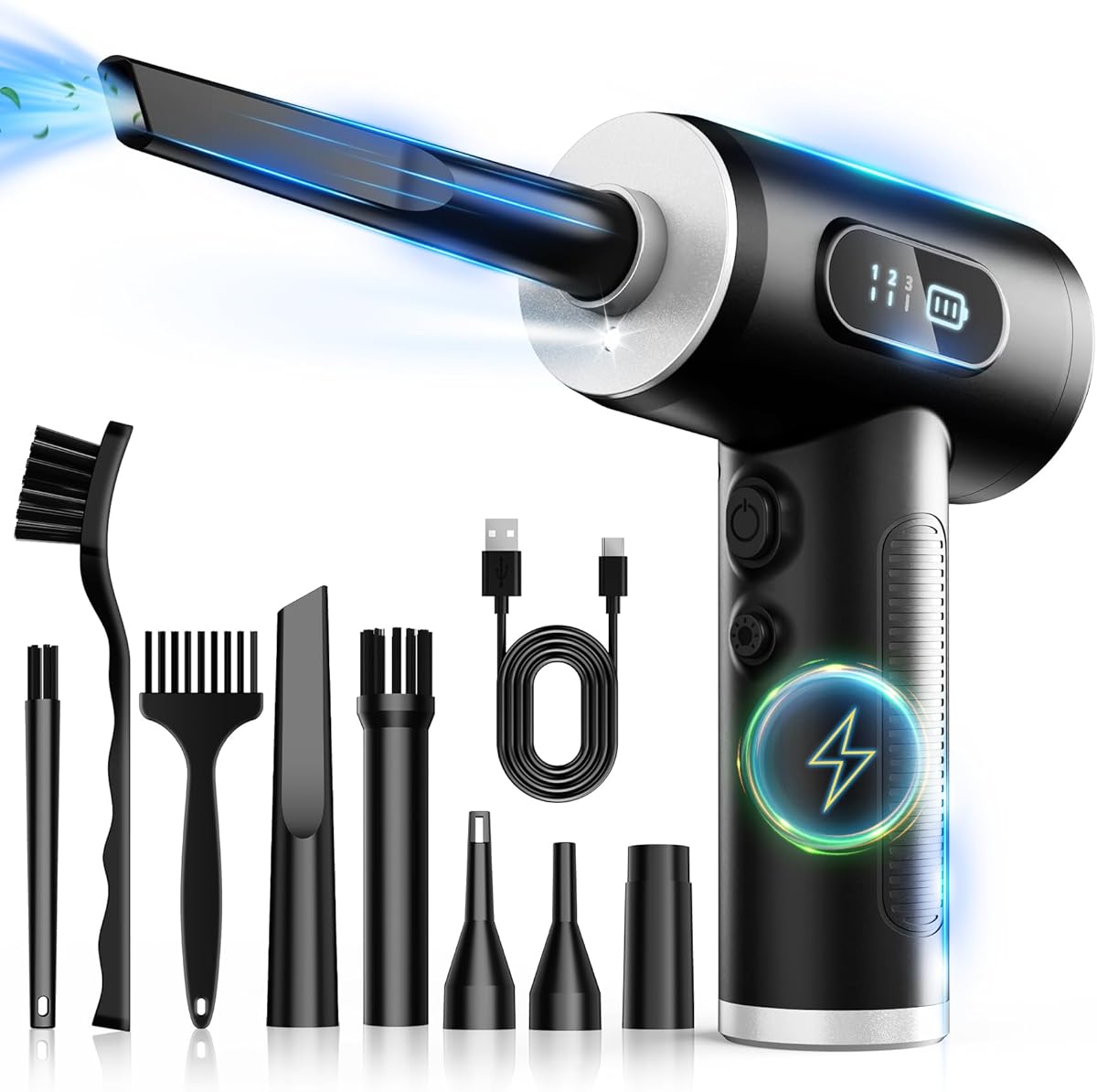
The FRESMOL Compressed Air Duster is the most versatile overall choice in this guide, combining a rechargeable electric blower with five nozzles and three brushes. Its supplied rating is 4.4, and its 100,000 RPM motor offers enough stated power for keyboard gaps, PC fans, car vents, camera equipment, and other narrow spaces where dust has become difficult to remove.
We may earn a commission when you buy through this link, at no additional cost to you.
Three adjustable speeds are particularly useful because they let the user begin gently around delicate areas and increase airflow when deeper debris needs to be dislodged. The LED display provides a quick view of the selected mode and remaining battery, reducing the chance of losing power partway through a maintenance session. A built-in light also makes it easier to inspect dark vents and recesses.
The accessory package is what separates this model from a simple blower. Narrow nozzles can direct air into ports and fan openings, while the three brushes provide additional ways to lift dust from grilles, keys, and other confined areas. The cordless design avoids a cable obstructing the work area, and the included safety protections support regular use. However, the product does not provide screen-cleaning cloths or a general-purpose precision tool pouch.
This is a strong recommendation for laptop owners who want one powered tool for fans, vents, keyboards, peripherals, and household electronics. The airflow controls and LED illumination make it more adaptable than a fixed-speed blower, while the brushes compensate for places where air alone cannot gather loose debris. Buyers who need extensive screen-care accessories may prefer the iFixit laptop pouch instead.
Using a lower setting around screens, loose keys, and visible fan grilles reduces unnecessary force, while a stronger setting is better suited to stubborn debris inside deeper vents. This control makes one blower useful across several levels of laptop maintenance.
Five nozzles and three brushes offer more ways to reach laptop ports, keyboard gaps, cooling vents, and camera gear. The combination is particularly helpful when dust clings to a grille rather than sitting directly in the airflow path.
We may earn a commission when you buy through this link, at no additional cost to you.
The iFixit Laptop Cleaning Kit earns the budget recommendation with a supplied rating of 4.9, the highest among the ten products, and a collection focused directly on everyday laptop care. It includes a dust blower, anti-static brush, microfiber cloths, alcohol wipes, specialized swabs, picks, brushes, and a screen saver, all stored in a compact tool pouch.
We may earn a commission when you buy through this link, at no additional cost to you.
Unlike an electric air duster, this kit does not rely on a high-speed motor to dislodge debris. That makes it appropriate for routine exterior cleaning, particularly when the goal is to wipe a display, collect visible keyboard dirt, reach around keys, or gently work dust from a fan grille. The anti-static brush can handle loose particles without introducing the static concerns associated with ordinary household dusters.
The screen-care component is one of the kit's main advantages over most blowers. Microfiber cloths and the included screen saver are intended to help keep displays clean, while alcohol wipes handle surfaces that can tolerate them. The specialized swabs, picks, and brushes make the kit useful for ports and other hard-to-reach areas. One limitation is that manual tools cannot match the reach of sustained powered airflow in a clogged cooling assembly.
The recommendation is strongest for laptop owners who want an organized, inexpensive care kit covering the screen, keyboard, vents, and general surfaces. It is also convenient to keep in a desk drawer or travel bag. Serious technicians who regularly service internally exposed fans may prefer the broader precision tools in the iFixit Precision Cleaning Kit or the airflow of an electric duster.
The inclusion of cloths, wipes, swabs, and a screen protector means this kit supports more than fan maintenance. It can handle the surrounding surfaces that determine how clean a laptop looks after the internal vents and keyboard receive attention.
The compact pouch keeps the dust blower, anti-static brush, wipes, and small precision tools together. That organization reduces the chance of leaving tiny swabs or brushes scattered near a computer while performing maintenance.
We may earn a commission when you buy through this link, at no additional cost to you.
The Compressed Air Duster-280000 RPM is the premium option because it combines the highest stated motor speed in the list with four adjustable settings, an LCD display, LED illumination, and a broad accessory package. Its supplied rating is 4.5, and the reusable design is aimed at owners who regularly maintain computers, gaming hardware, cameras, and car interiors.
We may earn a commission when you buy through this link, at no additional cost to you.
A brushless motor reaching up to 280,000 RPM produces the product's strongest selling point: high-pressure airflow for stubborn debris in PC components, premium electronics, and industrial equipment. Four speed levels give users a way to tailor that performance, while the LCD reports battery status and the active setting. The LED light helps illuminate dark areas inside towers and around laptop vents.
The stated runtime is between 90 and 150 minutes, depending on use, and the battery supports Type-C charging in approximately 2.5 to three hours. Four precision nozzles and two cleaning brushes extend its reach into keyboards, consoles, camera gear, dashboards, and other confined locations. It can also serve as a handheld fan or inflate an air mattress, adding value for buyers who want more than a dedicated electronics tool.
This premium duster is best for frequent maintenance work where deep airflow and precise controls justify a more specialized tool. The tradeoff is that its extreme stated performance is unnecessary for occasional screen wiping or light keyboard cleaning. Those tasks are better served by the iFixit Laptop Cleaning Kit, while routine users may find the FRESMOL model more balanced.
The 280,000 RPM brushless motor is designed for stubborn debris rather than only loose surface dust. Its four settings let the user reserve maximum power for deep or stubborn buildup and use gentler airflow elsewhere.
The LCD provides a visible speed mode and battery reading, which is convenient during longer cleaning sessions. The integrated LED adds another layer of visibility when the target vent or interior is poorly lit.
We may earn a commission when you buy through this link, at no additional cost to you.
The WOLFBOX MegaFlow 50 stands out for its strong airflow, portability, and long stated runtime. It has a supplied rating of 4.6, reaches up to 110,000 RPM, and offers three speed settings for laptops, keyboards, PCs, home surfaces, and car interiors. At only 0.45 pounds, it is also designed to remain easy to carry between workspaces.
We may earn a commission when you buy through this link, at no additional cost to you.
The battery is the defining feature for extended maintenance sessions. WOLFBOX states up to 240 minutes of use on the lowest setting, and the included lanyard makes the unit convenient to hold while directing a nozzle into a fan grille. Four nozzles allow the airflow to be adapted to different openings, reducing the need to improvise with an unsuitable attachment.
Charging takes approximately 3.5 hours with a Type-C cable, and the manufacturer advises fully charging the battery before use. That charging time is reasonable for a reusable device but means the product is less convenient for spontaneous cleaning than a small manual brush kit. It also lacks cloths, wipes, and precision picks, so it is better viewed as a powerful blower than an all-around device-care pouch.
The MegaFlow 50 is a compelling recommendation for users who clean several computers or electronic devices at once and want fewer battery interruptions. Its light weight and long runtime make it particularly practical for workstations, repair benches, and mobile maintenance routines. For light cleaning, the smaller brush set is more economical and easier to control.
A stated runtime of up to 240 minutes on the lowest setting supports larger cleaning sessions. This is useful for technicians, students maintaining several devices, or anyone who prefers not to interrupt a task when the battery indicator falls.
The compact 0.45-pound body and included lanyard balance portability with handling. Its cordless format also avoids having a cable catch on a desk or restrict access while working around a laptop.
We may earn a commission when you buy through this link, at no additional cost to you.
The Ordilend Keyboard Cleaner & Laptop Cleaning Kit is the broadest manual bundle in the list, with a supplied rating of 4.6. Its accessories include a retractable large brush, a keycap puller, metal pen tip, flocking sponge, thin soft brush, soft plastic lens cleaning pen, and numerous microfiber cloths for screens, cameras, earbud cases, and other electronics.
We may earn a commission when you buy through this link, at no additional cost to you.
Its greatest strength is keyboard versatility. The keycap puller supports cleaning gaming and mechanical keyboards, while the retractable brush handles broader surfaces and the mini high-density brush reaches between flatter laptop keys. A metal pen tip is included for targeted stain removal, and the soft plastic pen can work on delicate screens and camera lenses.
The package includes a right-angle cleaning cloth designed to fit screen corners, along with replacement cloths and a recyclable cleaning spray. Although the product does not include a powered blower, its manual brushes can dislodge crumbs and surface dust before they enter a keyboard or laptop fan. The number of included pieces may be more than some users need, but it reduces the need to buy separate tools for several device-care tasks.
This kit is best for users who clean both laptops and peripherals, especially mechanical-keyboard owners who want a keycap puller alongside screen and camera accessories. Its limitation is obvious when a fan is heavily clogged and needs sustained airflow. In that case, an electric duster would be more effective, while this kit remains useful for detailed surface work.
The keycap puller, retractable brush, and mini high-density brush provide several levels of access. This makes the kit well suited to gaming keyboards, mechanical keyboards, and the flatter gaps found in many laptop keyboards.
The lens pen, flocking sponge, cleaning spray, and replacement cloths extend the kit toward camera screens, earbud charging cases, and general office surfaces. That wider coverage gives it value for users who maintain several types of electronics.
We may earn a commission when you buy through this link, at no additional cost to you.
The 130,000RPM Electric Air Duster combines substantial airflow with the largest accessory collection in the guide. It has a supplied rating of 4.6, a brushless motor producing 52 m/s airflow, four gear settings, six nozzles, and ten detail brushes. The result is a flexible maintenance tool for keyboards, sensitive electronics, cars, home surfaces, and inflation tasks.
We may earn a commission when you buy through this link, at no additional cost to you.
Its four levels cover gentle dusting, precision cleaning, routine maintenance, and heavy-duty work. A long press activates the storm mode mentioned in the supplied information, giving users a separate high-intensity option for stubborn buildup. This range is useful because even a powerful blower benefits from gentler airflow around delicate components or screens.
The 8000mAh battery is stated to provide 120 minutes on speed one, while Type-C charging takes approximately 2.5 hours. Safety features include overcharge and overheat protection, and the package includes a lanyard and storage bag. At 0.62 pounds, the unit remains portable despite carrying a relatively large battery and extensive accessory assortment.
The recommendation is strongest for owners who want one powered tool with many attachment options and frequently clean different electronics around the home. The tradeoff is bulk and complexity: users who only need a few gentle brushes may find the 10-brush set excessive. Manual kits are quieter and simpler for surface debris, while this product is better for dislodging stubborn dust.
Six nozzles and ten detail brushes create a toolkit for many different gaps and surfaces. Narrow nozzles can target ports and fan vents, while the brushes offer a more tactile way to lift clinging debris from grilles and keyboards.
The separate gentle, precision, daily, and heavy-duty levels make it easier to match airflow to the sensitivity of the task. Users can begin conservatively and increase power only where the surface and buildup allow it.
We may earn a commission when you buy through this link, at no additional cost to you.
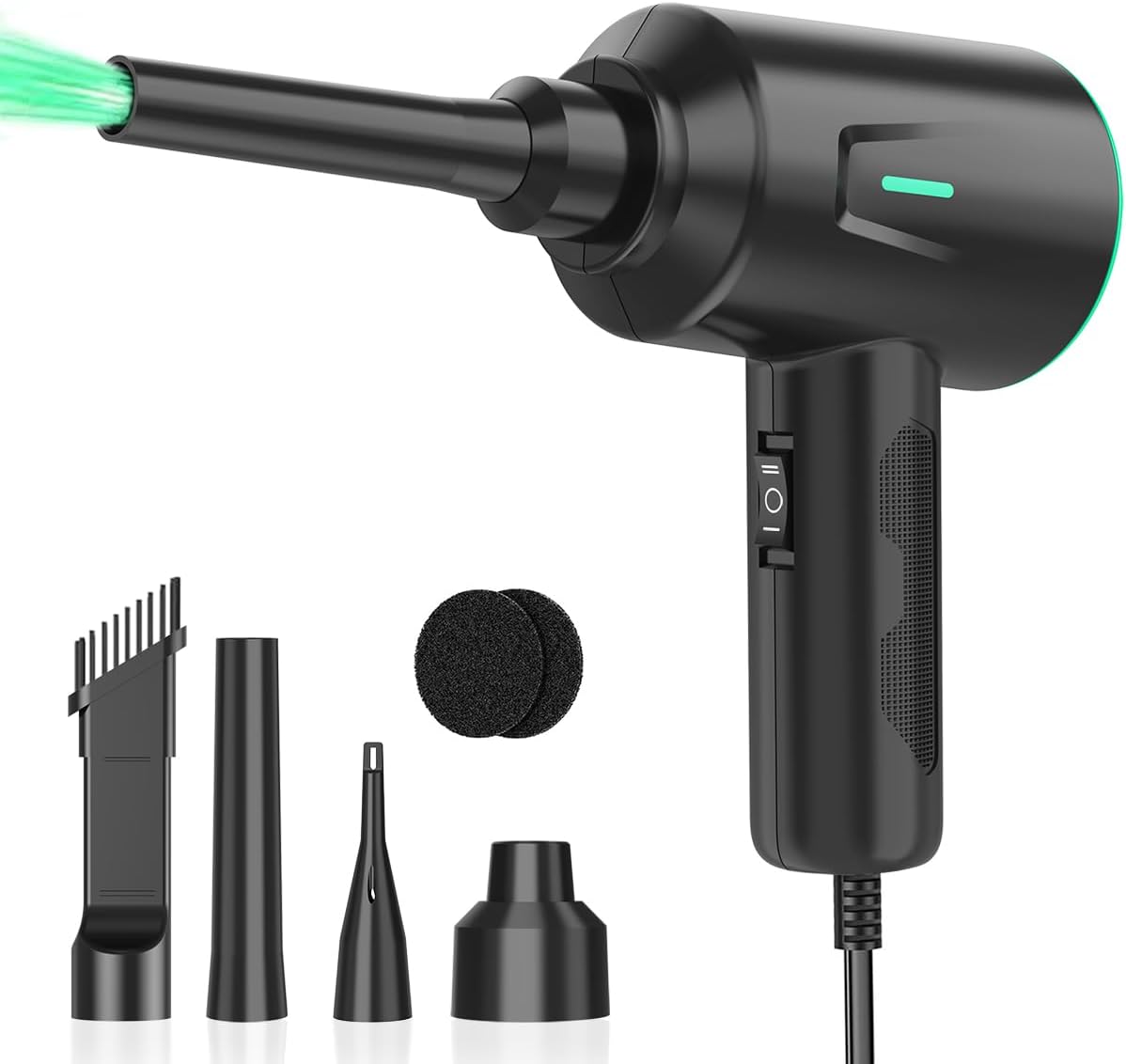
The Meudeen Air Duster is the leading corded option in this roundup, offering continuous mains-powered operation without a rechargeable battery. Its supplied rating is 4.5, and it combines two speed settings with a claimed maximum of 200,000 RPM. The 8.2-foot cord allows the blower to remain connected while reaching a laptop, desktop tower, camera, vehicle interior, or nearby household surface.
We may earn a commission when you buy through this link, at no additional cost to you.
Its 500W motor and stated airflow of up to 50 m/s provide continuous high-pressure cleaning. The lower setting reaches 100,000 RPM and the higher setting reaches 200,000 RPM according to the supplied information. Four brushes and two sponge filters expand the range of cleaning tasks, including computer equipment, keyboards, laptops, copiers, medical equipment, cameras, model vehicles, and blinds.
Because it operates directly from mains power, there is no charging schedule and no risk of a battery running down during a larger cleaning project. That makes it practical for a fixed repair desk or workstation. The tradeoff is reduced mobility: unlike cordless dusters, the attached cord must remain within reach, and it cannot easily be carried into a vehicle or used far from an outlet.
This product is a good recommendation for buyers who prioritize uninterrupted airflow and work in one main location. Users who clean in different rooms or outdoors may favor a cordless model such as the FRESMOL blower. The Meudeen also includes fewer speed levels, so it offers less nuanced control than premium kits with four separate gears.
Mains-powered operation means the blower does not need to stop for recharging during an extended session. This is advantageous at a repair bench, office, or home workstation where the tool is used repeatedly.
The two settings offer a practical division between light dusting and more forceful cleaning. Although less granular than four-gear systems, the controls remain straightforward for regular use.
We may earn a commission when you buy through this link, at no additional cost to you.
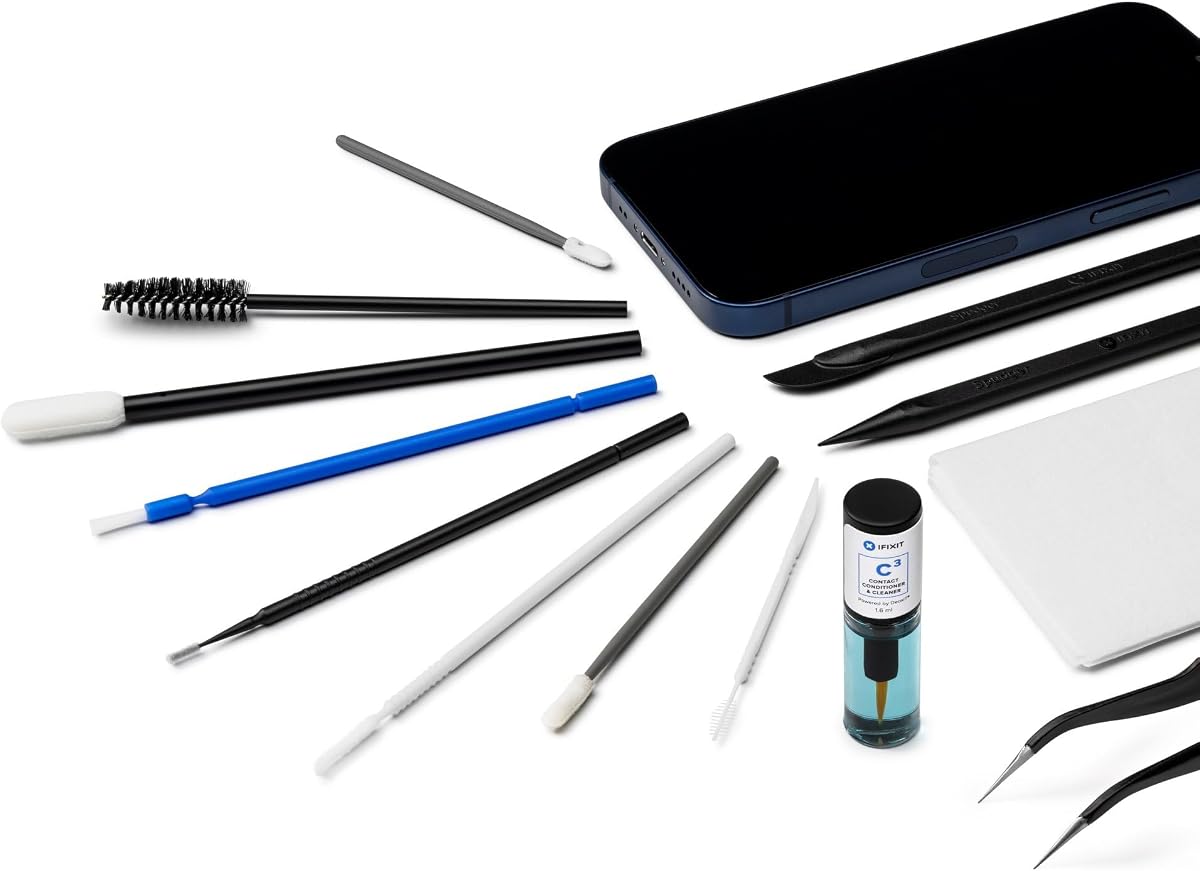
The iFixit Precision Cleaning Kit is tailored to detailed work around phones, laptops, and tablets. Its supplied rating is 4.3, and the tool list includes a spudger, halberd spudger, angled tweezers, DeoxIT D100L, cylindrical brush, foam-tipped swabs, precision micro brushes, a small detailing brush, a plastic pick-and-brush combination, and lint-free cleanroom wipes.
We may earn a commission when you buy through this link, at no additional cost to you.
This is a different proposition from the other iFixit pouch. Instead of emphasizing screen wiping, it concentrates on reaching awkward areas and working around small components. The picks can help free dust or debris from confined spaces, while tweezers, swabs, and micro brushes offer precise control. DeoxIT D100L provides a purpose-built lubricant for suitable electronic applications when used according to its instructions.
The included wipes support cleaning tasks without the need for ordinary lint-producing cloth, and the variety of brush shapes helps match different gaps. However, the kit has no powered blower and does not include a screen protector or broad collection of microfiber cloths. It is therefore most useful for careful localized work rather than blasting debris from a clogged exhaust vent.
The recommendation is strongest for repair-minded users who clean phones, tablets, laptops, and electronic assemblies and value a broad set of precision implements. The instruction to keep tools clean between projects also reflects the reusable nature of the set. Users whose primary goal is routine fan cleaning may prefer the simpler iFixit Laptop Cleaning Kit or a powered blower.
Angled tweezers, picks, swabs, and micro brushes allow a user to work around small components without relying on broad, imprecise movements. These tools are especially useful for dust lodged near ports, speaker openings, or internal edges.
Although designed with laptops in mind, the kit is explicitly suitable for phones and tablets as well. That makes it practical for owners who maintain several portable devices and prefer a single organized set of specialized implements.
We may earn a commission when you buy through this link, at no additional cost to you.
The 10-Piece Anti-Static Brush Set is the most straightforward manual option, using ten nylon brushes of different sizes rather than a powered motor or liquid cleaner. Its supplied rating is 4.4, and the set includes seven hard-bristled brushes and three soft-bristled brushes for cleaning keyboard gaps, computer fans, motherboard areas, camera components, car vents, and other small spaces.
We may earn a commission when you buy through this link, at no additional cost to you.
Size variety is the main advantage. A broad brush can cover a larger fan grille, while narrow tools can enter keyboard gaps and recessed openings. Soft bristles are intended for delicate surfaces such as monitors, car screens, and camera lenses. The anti-static nylon construction is also useful around sensitive electronic components because it is designed to minimize the static concern associated with ordinary brush materials.
One important detail is that the supplied product information states that the yellow bristle brush is not anti-static. Users working directly on motherboards or other sensitive parts should identify the correct brush before proceeding. The kit is also limited to manual debris removal, so it cannot produce sustained airflow or reach as deeply into a heavily obstructed cooling passage as an electric duster.
This set is a practical recommendation for light maintenance, travel, desktops with accessible fans, and anyone who prefers a quiet, uncomplicated tool with no battery or charging requirements. It also works beyond computers, including door tracks, window channels, and razors. For routine external laptop care and excellent value, it is difficult to justify a more complicated purchase.
Ten different sizes reduce the need to force a single brush into openings of different shapes. The range supports both broad grille cleaning and precise work around tightly packed keyboard keys.
Three brushes use softer bristles for screens, camera lenses, and other surfaces that may not tolerate aggressive contact. Harder brushes remain available for stubborn debris in deeper or more durable spaces.
We may earn a commission when you buy through this link, at no additional cost to you.
The Cordless Electric Air Blower is a flexible multi-purpose option with a supplied rating of 4.4. It produces airflow up to 110,000 RPM and offers three adjustable speeds, making it suitable for laptops, keyboards, PCs, PS5 consoles, cameras, car vents, sofas, window tracks, and other difficult-to-reach corners.
We may earn a commission when you buy through this link, at no additional cost to you.
Five nozzles and four brushes provide a generous selection of cleaning and inflation accessories. The LED light illuminates dark or narrow spaces, while the cordless design allows the blower to move between a computer, vehicle, storage area, or outdoor space without depending on a nearby outlet. Its broader purpose makes it appealing for users who want one tool for household and electronics maintenance.
The rechargeable battery supports Type-C charging, and the product description positions the tool as a reusable alternative to disposable canned air. It can also handle balloons, air mattresses, and swim rings, which extends its usefulness beyond cleaning. That flexibility does come with a tradeoff: the blower lacks the detailed LCD information and large precision-tool assortment offered by some premium models.
This is a good recommendation for generalists who need a portable air blower for more than one type of device. Its three-speed control is simpler than the four-gear systems on competing premium dusters, but the combination of nozzles, brushes, and illumination covers most routine jobs. Users focused exclusively on delicate screen work may still prefer the dedicated iFixit manual kit.
The same airflow and attachments can address consoles, cameras, car interiors, sofas, and window tracks. This makes the blower a useful household tool for anyone who already owns several types of electronics and wants one compact maintenance device.
The rechargeable, cordless format eliminates the need to remain near a fixed outlet. That portability is useful for moving between a home office, living room, vehicle, or outdoor workspace without changing cleaning methods.
We may earn a commission when you buy through this link, at no additional cost to you.
The best laptop fan cleaning kit depends on the type of buildup, the parts of the computer being cleaned, and the user's comfort with opening devices. Airflow, attachment control, static protection, screen-care accessories, portability, and safe handling should be considered together.
A powered air duster is most useful when dust sits inside exhaust vents, cooling grilles, keyboard gaps, or other recessed areas. Strong, sustained airflow can dislodge particles that a small brush can only gather from the surface. The products in this guide range from 100,000 to 280,000 RPM, while the 130,000RPM model also states 52 m/s airflow. More speed is not automatically better, however, because sensitive surfaces benefit from gentler settings.
The shape of the nozzle affects how accurately air reaches a vent or port. Narrow precision nozzles suit tight laptop openings, while broader nozzles cover larger PC and console vents. Kits with several nozzle shapes are more adaptable than models offering only one. Confirm that the supplied attachments can cover both the main fan exhaust and smaller secondary openings rather than assuming one universal tip will fit every device.
Brushes are valuable when dust clings to a grille, sits around keys, or does not respond to airflow alone. Anti-static nylon brushes are better suited to internal electronic work because they are designed to minimize static discharge. The 10-piece brush set includes three soft options for delicate surfaces, but its yellow bristle brush is specifically not anti-static. Always identify the correct brush before approaching sensitive components.
A fan-cleaning kit focused only on vents may leave the rest of a laptop looking neglected. The iFixit Laptop Cleaning Kit includes microfiber cloths, wipes, and a screen saver, while the Ordilend bundle adds several cloths, a lens pen, and a cleaning spray. Manual surface kits are quieter and more controlled than powered blowers, but users should follow device and cleaner manufacturer guidance and avoid allowing liquid to reach openings.
Adjustable airflow lets the user match the tool to the task. Lower settings are appropriate for visible dust, delicate peripherals, and cautious surface cleaning, while higher settings are useful for stubborn material deeper inside a vent. Products range from two gears to four, and the premium 280,000 RPM model also includes a storm mode. More control can improve versatility, but simple controls may be preferable for occasional users.
Cordless operation is valuable when the laptop, car, console, or camera is not near an outlet. Battery runtime, charging time, weight, and storage size should all influence the decision. The WOLFBOX MegaFlow 50 lists up to 240 minutes on its lowest setting, while the 130,000RPM model includes an 8000mAh battery. The Meudeen avoids charging entirely but uses an 8.2-foot cord, which limits where it can be used.
Good maintenance often begins by shutting down the device, unplugging power, and using manual tools to remove loose surface dust. A blower can then clear deeper vents, while swabs or picks address remaining clumps. This staged approach reduces the chance of pushing debris inward and allows the user to inspect each area before moving on. Combination kits are convenient because they support several stages with the same set of implements.
A laptop fan should not be forced to spin while powered because accumulated dust can affect the blades or bearings. Before using a blower, power the device down completely and disconnect it. Keep liquids away from openings, use gentle airflow near screens, and do not push brush bristles or tools into a running cooling fan. For internal cleaning beyond accessible vents, a repair guide and appropriate tools are safer than improvising.
Begin by shutting down the laptop completely, disconnecting the charger, and allowing the device to cool. Place it on a stable, dry surface with the screen protected from dust and moisture. Before opening the chassis, consult the manufacturer's guidance and confirm that doing so will not affect the warranty or require specialized tools.
For routine exterior care, start with a soft brush to lift loose debris from keyboard gaps and fan grilles. Use a narrow nozzle to direct controlled airflow into accessible vents, beginning on a lower setting and increasing only when necessary. Hold the blower away from the screen and do not allow a brush or attachment to contact a spinning fan.
After cleaning, let the laptop remain powered off briefly and inspect the exhaust openings for remaining dust. Store rechargeable dusters fully charged and dry, clean removable nozzles according to their instructions, and keep manual tools organized in the pouch. Wash reusable cloths only when their care labels permit it, and avoid using liquid cleaners directly on vents.
It is safer to shut the laptop down completely and disconnect the charger before cleaning a fan or vents. A running fan can draw loose debris into its bearings, and powered accessories may make it harder to control the direction of the airflow. If the system must remain on, avoid directing tools or air into an exposed fan and follow the manufacturer's service guidance.
An electric duster provides reusable, adjustable airflow without the liquid concerns associated with some canned products. It can also include lights, brushes, and several nozzles for targeted work. Manual brush kits remain useful for light surface cleaning and precise debris removal, so the best choice depends on how much buildup is present and how deeply it must be reached.
A soft or anti-static brush is suitable for lifting dust from an accessible grille, while a narrow blower nozzle can dislodge particles held deeper inside the vent. Do not insert hard implements into the fan itself. If the grille must be removed, follow the device's official instructions and avoid pulling dust inward during the process.
Only use alcohol wipes if the laptop manufacturer says the display surface is compatible with them. The iFixit Laptop Cleaning Kit includes wipes, but the screen-care materials and screen saver should still be used according to their instructions. Never spray liquid directly onto a display or allow moisture to collect along bezels, ports, speakers, and keyboard openings.
Anti-static brushes are designed to reduce static discharge when used around electronic components, making them preferable to ordinary brushes for internal work. They do not make the cleaning process completely risk-free, and the correct brush still matters. In the 10-piece set supplied here, the yellow bristle brush is specifically not anti-static.
The ideal interval depends on the environment, workload, and how quickly dust accumulates. Devices used in dusty, smoky, or pet-heavy spaces may need more frequent attention than those kept in a clean office. Inspect accessible vents periodically and clean when visible buildup appears or when fan noise and thermal behavior suggest restricted airflow.
Exterior grille cleaning can often be performed without opening the chassis, but internal fan maintenance requires access to the cooling assembly. Opening a laptop may involve delicate cables, battery connectors, adhesive, and warranty considerations. If the machine is under warranty or the procedure is unfamiliar, consult the manufacturer or a qualified repair professional.
A brush kit is useful for gentle surface work, keyboard debris, and delicate grilles, while an electric duster is better for deeper vents and stubborn dust. A dedicated screen-care pouch adds cloths and wipes that neither category fully covers. Owning both can create a more controlled process, but one well-chosen kit is sufficient for many casual users.
The FRESMOL Compressed Air Duster is the strongest all-around recommendation because it combines three airflow levels, an LED display and light, five nozzles, and three brushes in a cordless design. The iFixit Laptop Cleaning Kit is the best budget and most complete manual option for screens, keyboards, surfaces, and routine vent care, while the WOLFBOX MegaFlow 50 stands out for long battery life and high-output airflow.
When choosing, prioritize the job you actually need to perform. Manual precision tools are better for controlled detail work, brush sets are ideal for accessible debris, and electric blowers handle deeper vents more efficiently. Also consider nozzle shapes, speed controls, static protection, screen accessories, charging needs, and whether a corded design is acceptable for your workspace.
Current prices, availability, and product details can change, so check the latest listing before buying. Use the supplied product page links to review the complete specifications, included accessories, and current customer feedback, then select the kit that best matches your laptop and cleaning routine.
