
PlayStation DualSense Wireless Controller
4.8Editor score
Official PlayStation controller
Bluetooth and wired PC use
Four-device pairing support
Our expert guide compares the best cheap PS5 controllers for PS5, PS5 Pro, Slim, PC, features, battery life, connectivity, and value for modern gaming.
A cheap PS5 controller can still deliver responsive sticks, useful vibration, dependable wireless connectivity, and the features players expect from a modern gamepad. The right choice depends on your console, preferred platforms, tolerance for setup procedures, and whether extras such as Hall Effect controls, rear paddles, RGB lighting, or a 3.5 mm headset connection matter more than strict first-party simplicity.
This guide compares ten official and third-party DualSense-style controllers using the information supplied for each listing. We examine compatibility, connection methods, battery claims, motion sensing, audio hardware, programmable controls, lighting, and platform-specific setup requirements. The roundup includes wireless and wired models for PS5, PS5 Pro, PS5 Slim, and Windows PCs, with several options also supporting other platforms.
Each review explains the strongest reasons to consider a controller, along with practical limitations such as required firmware updates, initial USB-C pairing, missing microphones, and unsupported PS4 compatibility. Ratings and product details reflect the supplied listing data, while prices can change at any time. Check the current listing and its latest instructions before making a final purchase.
4.8Editor score

4.3Editor score

4.4Editor score
The comparison below highlights the differences that matter most: connection style, platform support, control technology, programmable features, motion sensing, battery configuration, and audio hardware.


The Midnight Black DualSense is the straightforward premium option in this roundup, combining official PlayStation hardware with broad support for PC and other devices. Its supplied rating of 4.8 is the highest in the group, reflecting a strong overall reception. The included USB cable also makes it a particularly practical choice for players who want to use the controller with a Windows PC while charging.
We may earn a commission when you buy through this link, at no additional cost to you.
The controller offers precise control across more than 10,000 supported Steam games and can pair with a Windows PC by Bluetooth or connect by cable while charging. It can remain paired with up to four Bluetooth devices, covering a PS5 console, Mac, PC, and smartphone without repeated manual reconnection. The free PlayStation Accessories app provides access to controller firmware, while PS Remote Play support lets players stream games from a PS5 or PS4 to a PC.
The important trade-off is that this official controller does not offer the extensive programmable feature set found among several third-party alternatives. There are no listed Hall Effect sticks, remappable rear paddles, macro controls, RGB mode selection, or adjustable trigger stops. Its appeal instead rests on predictable operation, native design, multi-device pairing, and the confidence associated with first-party hardware and software support.
Choose the DualSense if you want one controller for PlayStation and PC without navigating a more involved third-party setup. It is particularly suitable for buyers who prioritize direct PlayStation integration, easy device switching, Remote Play, and firmware updates over customizable extras. For most PS5 owners, it remains the most complete general-purpose recommendation in the guide.
Bluetooth pairing for up to four devices makes the DualSense convenient for mixed-console and desktop gaming sessions. The supplied PC cable adds another connection route and allows charging while the controller is wired.
The PlayStation Accessories app provides firmware access from a PC. This official update route is a meaningful advantage for buyers who want a straightforward long-term ownership experience.
We may earn a commission when you buy through this link, at no additional cost to you.
This BETMI controller delivers a broad collection of features at a budget-focused tier, including Hall Effect joysticks, linear triggers, six-axis motion sensing, vibration, RGB lighting, turbo, and a 3.5 mm headset jack. Its supplied 3.7 rating reflects a mixed reception, but the hardware specification makes it a credible option for players who want more customization than the official DualSense provides.
We may earn a commission when you buy through this link, at no additional cost to you.
Bluetooth 5.3 and wired modes support PS5, PS5 Pro, PS5 Slim, and Windows systems. The joysticks have a claimed lifespan of up to five million cycles, while the 800mAh battery is said to support as much as eight hours of play. A multicolor light bar provides player identification and low-battery notifications, and the controller includes a speaker, vibration motors, and a TRRS headphone connection.
First-time users must connect the controller to the PS5 with a USB-C data cable before pressing the Home button to establish Bluetooth pairing. The controller also lacks its own microphone, so voice communication requires an external headset. These caveats make it less seamless than an official controller, but they are understandable considerations for a lower-cost alternative.
This is a good match for PS5 and PC players who value Hall Effect sticks, trigger response, motion controls, and familiar PlayStation-style handling without needing rear paddles. It is less suitable for buyers who want plug-and-play pairing or a controller-integrated microphone. Follow the first-time connection instructions carefully to get the strongest start.
Hall Effect joysticks and sensitive linear triggers are central to the BETMI proposition. These components appeal to players concerned about stick wear and want more consistent analog input.
The 3.5 mm jack supports a wired headset, and the built-in speaker can provide game audio in supported titles. Because there is no integrated microphone, communicators should plan to use an external headset.
We may earn a commission when you buy through this link, at no additional cost to you.
The Akalyptra controller stands out because it combines Hall Effect joysticks and triggers with two rear paddles, making it appealing to action, fighting, and competitive players. Its 3.9 rating places it above several other third-party options, while the eight RGB modes and ten-hertz turbo function add a more competitive-gaming flavor than a standard replacement controller.
We may earn a commission when you buy through this link, at no additional cost to you.
The supplied information lists compatibility with PS5, PS5 Pro, PS5 Slim, PC, and Steam Deck. Paddles can be programmed or mapped for complex actions without moving the thumbs away from the sticks. Dual vibration provides tactile feedback, and the 3.5 mm jack allows a headset to be connected for focused audio and private team communication.
The first-time setup is not entirely plug-and-play: the controller must remain powered off while connected to the PS5 by USB, after which the Home button is used to power it on and complete pairing. The listing also notes that a nonworking speaker may require an upgrade tutorial and package. These are meaningful caveats that deserve attention before purchase.
Pick the Akalyptra when rear paddles and extensive control programming matter more than having an integrated microphone or a highly polished official update process. It offers an unusually ambitious feature set for the budget category and should particularly interest players who regularly use face buttons, secondary actions, and remappable combinations.
The two back buttons can be assigned to complex actions and combos. They are more useful in games that reward extra bindings than in straightforward console experiences.
Eight RGB modes let players select steady colors or changing effects. The customization adds personality, although lighting requirements can affect the original DualSense-style visual footprint.
We may earn a commission when you buy through this link, at no additional cost to you.
The Xexvyrin LED controller earns the second-place rating in the roundup at 4.4 and offers one of the most extensive feature sets. It supports programmable keys, macro and turbo functions, motion sensing, customizable lighting, dual vibration, a speaker, and a 3.5 mm TRRS headset connection. That combination makes it a strong budget pick for players who want more than a basic replacement.
We may earn a commission when you buy through this link, at no additional cost to you.
Compatibility covers PS5 series consoles and Windows PCs, including PS5 Pro and PS5 Slim. The supplied cable can be used for the first PS5 connection, after which the Home button provides one-click wake-up. The controller supports up to 16-key programming, a ten-times-per-second turbo function, and eight-axis-style input possibilities through its 3D accelerometer and gyroscope.
The most important limitation is that the listing explicitly requires users to follow an update guide before using the controller. Failing to complete this process may affect vibration, speaker, or headphone-jack functions. The controller also has a speaker but no microphone, and its TRRS jack does not support Apple headphones. These conditions should be considered before buying.
This controller is a compelling choice for budget-conscious players who want programmable controls and a polished look without moving to a higher-cost official option. It works best for owners who will spend a few minutes completing the guided setup and use a compatible wired headset for communication. Those comfortable with third-party update procedures will get considerable functionality for the category.
Macro support and programmable combinations extend beyond the standard console layout. The turbo function and sixteen-key mapping make the controller more adaptable for specialized game workflows.
The manufacturer specifically asks buyers to download and follow the update guide. Completing that process should help enable the controller's vibration, speaker, and audio features.
We may earn a commission when you buy through this link, at no additional cost to you.
The NBCP controller takes a deliberately simple approach with a ten-foot USB connection, making it especially suitable for desktop gaming and players who prefer not to manage wireless pairing or battery charging. Its supplied 3.8 rating is modest but understandable for a wired third-party model offering broad console compatibility and useful integrated audio hardware.
We may earn a commission when you buy through this link, at no additional cost to you.
It supports PS5, PS5 Pro, PS5 Slim, PS4, and PC/Steam, which is broader than several wireless alternatives in the guide. A linear Hall-effect trigger, turbo burst, customizable buttons, dual vibration, and a six-axis gyroscope support more advanced input needs. Unlike many third-party PS5-style controllers, it includes a built-in microphone alongside a 3.5 mm audio jack.
A wired controller necessarily restricts movement and remains tethered to the console or computer. Audio also requires a setting change: the PS5 Communication Method must be set to Use USB Cable. The headset jack accepts standard TRRS gaming headsets but not Apple EarPods because of the CTIA and OMTP difference. Buyers should therefore treat it as a gaming-headset-focused connection.
Choose this controller for competitive PC sessions, couch gaming with a reliable cable, or PS4 backward compatibility. It is best for people who actively prefer wired input and do not need a wireless controller's freedom or an RGB lighting system. Its practical advantages make it a useful alternative to the battery-powered crowd.
The fixed USB design removes wireless pairing, radio interference, and battery management. That simplicity can be valuable in a stationary gaming setup.
The built-in microphone and 3.5 mm jack cover two common communication preferences. Compatible gaming headsets work, while Apple EarPods do not.
We may earn a commission when you buy through this link, at no additional cost to you.
The purple linhugame controller provides a particularly balanced mix of battery capacity, control technology, and customization. Its supplied rating of 4.3 is the third-highest overall, and the listed 1500mAh battery, Hall Effect sticks and triggers, rear paddles, macros, adjustable vibration, and RGB lighting give it substantial value for a broad range of players.
We may earn a commission when you buy through this link, at no additional cost to you.
Compatibility extends across PS5, PS5 Slim, PS5 Pro, Windows PC, iOS, Android, and Mac. The 1500mAh battery is stated to deliver more than ten hours of play, with a two-to-three-hour full charge and potentially longer endurance when RGB lighting is disabled. The sticks and triggers use Hall Effect technology, and the back paddles support programmable macros and turbo functions.
The controller may require a reset-button press when first charging. On some console versions, plugging in a headphone is necessary to activate vibration, microphone, and speaker functions. A calibration procedure is also provided for drifting: hold the Share and Options buttons, press the triggers, rotate the sticks, and finish by holding X. These are useful diagnostics, but they add setup complexity.
This is the most versatile choice for a player who wants the same controller across consoles, desktop systems, and mobile devices. It is also a strong pick for longer sessions because of the high stated battery capacity. Avoid it if PS4 support is essential, and follow the startup, charging, and calibration instructions before judging its performance.
The large battery is the controller's defining practical advantage. Its listed runtime exceeds that of several similarly positioned alternatives, particularly when RGB lighting is switched off.
Four vibration levels and programmable paddles help tailor the controller to different games. The manual calibration sequence provides a direct response to stick-drift concerns.
We may earn a commission when you buy through this link, at no additional cost to you.
The black and clear BETMI controller emphasizes visual personalization and programmable input. Its supplied rating of 3.6 is among the lower results in the guide, but the hardware list is substantial: five RGB modes, Hall Effect joysticks and triggers, macro programming, three turbo speeds, four vibration levels, a mute button, and a 1500mAh battery.
We may earn a commission when you buy through this link, at no additional cost to you.
The controller supports PS5 Pro, PS5 Slim, and Windows PCs running Windows 8, 10, or 11. Its battery is stated to support up to 13 hours of gameplay, the strongest listed runtime among the controllers here. A 3.5 mm audio jack supports a headset, while the mute control can silence the microphone and speaker to reduce disturbance in shared spaces.
As with the other BETMI options, first-time Bluetooth users must first connect by USB-C and then press the Home button. That process is manageable but adds a step that official hardware avoids. The supplied rating also suggests that buyers should inspect current owner feedback for recurring concerns rather than relying only on the feature list.
Choose this model if RGB styling, long battery life, and configurable macro or turbo behavior are priorities. It is well suited to players who enjoy tuning third-party hardware and do not mind the initial pairing procedure. Those seeking the simplest possible experience should compare it closely with the official DualSense.
Breathing, flashing, gradient, and constant-color modes cover both subtle and dramatic looks. The clear shell makes the lighting especially noticeable during play.
The 1500mAh battery is rated for up to 13 hours. Macro programming and turbo speeds from four to sixteen presses per second add competitive flexibility.
We may earn a commission when you buy through this link, at no additional cost to you.
The white BETMI controller offers a clean, familiar alternative to a standard black gamepad. Its supplied rating of 3.7 places it in the middle of this group, while Hall Effect joysticks, linear triggers, six-axis sensing, vibration, an LED player light, and a 3.5 mm headset jack create a well-rounded specification sheet.
We may earn a commission when you buy through this link, at no additional cost to you.
The controller connects by Bluetooth 5.3 or cable to PS5, PS5 Pro, PS5 Slim, and compatible Windows systems. Hall Effect sticks are stated to last for as many as five million cycles, and the trigger design is intended to provide smooth, responsive input. The 800mAh battery is listed at up to eight hours of play and supports USB-C charging and original charging stations.
The speaker can output supported game audio, but the controller does not contain a microphone. Players who communicate during games will need an external headset connected through the 3.5 mm jack. First-time PS5 Bluetooth setup also requires a USB-C data connection and a Home button press, making the initial process less immediate than plugging in a wired official controller.
This model is a sensible choice for players who like white hardware and want Hall Effect sticks without paying for programmable rear paddles. It works for both PS5 and Windows gaming, but buyers should verify their need for voice chat before purchase. Its main appeal is a familiar layout and useful control hardware at a budget-oriented tier.
Hall Effect sticks and linear triggers target smooth, long-lasting input. The anti-wear design is useful for players who value control stability over decorative extras.
The white finish and standard DualSense-style layout make this controller approachable. It offers practical extras without the learning curve of extensive remapping.
We may earn a commission when you buy through this link, at no additional cost to you.
The camo red linhugame controller is a more restrained alternative to many of the RGB-focused models in this roundup. Its rating of 4 is among the strongest third-party results, and the supplied feature set focuses on the essentials: Hall Effect joysticks, linear triggers, six-axis motion sensing, adjustable vibration, turbo, and two connection modes.
We may earn a commission when you buy through this link, at no additional cost to you.
The controller works with PS5, PS5 Pro, PS5 Slim, and Windows PCs. It can use Bluetooth 5.3 or a USB-C cable, with the first Bluetooth connection again requiring a brief wired setup. Its 800mAh battery is stated to last for up to eight hours, and it supports USB-C charging as well as the original PlayStation wireless charging dock.
The reset button behind the controller may need to be pressed during the first charge, and the included troubleshooting notes advise fully charging the controller if it disconnects after its battery drains. The sticks can also appear pushed outward after shipping and should be pressed down firmly. These are simple handling checks, but they are worth completing before use.
Choose this controller if you want a distinctive camo finish, strong control components, and broad console support without paying for a large number of remapping features. It is especially useful for players who already understand third-party controller setup. The lack of an advertised lighting-selection system and moderate battery figure are the main reasons it does not lead every category.
Hall Effect sticks and linear triggers provide the main technical attraction. Six-axis sensing broadens support for motion-oriented games without adding rear paddles.
Support for the original wireless charging dock helps owners reuse an existing accessory. A reset-button check may be required if the controller does not begin charging immediately.
We may earn a commission when you buy through this link, at no additional cost to you.
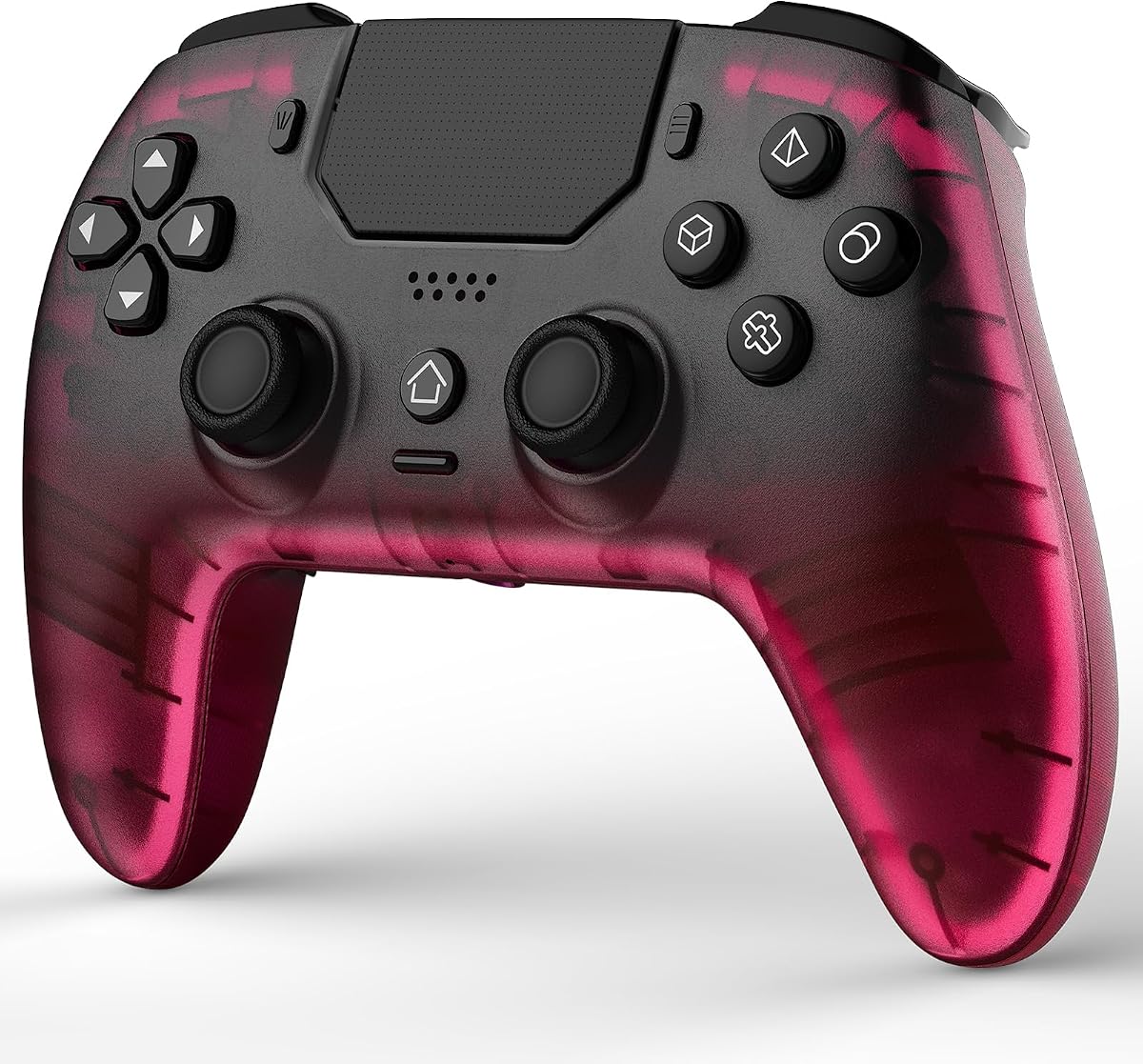
The black, hot pink, and clear BETMI controller is the most visually distinctive option in the guide. Its rating of 3.6 is tied for the lowest supplied result, but the combination of transparent housing, vivid accent color, RGB modes, Hall Effect sticks and triggers, and a large battery could make it especially appealing for a personalized gaming setup.
We may earn a commission when you buy through this link, at no additional cost to you.
It supports PS5 Pro, PS5 Slim, and Windows PCs on Windows 8, 10, or 11. The controller includes five lighting patterns, macro programming, three turbo rates, dual vibration with four intensity levels, a mute button, a 3.5 mm headset jack, and a 1500mAh battery stated to last for up to 13 hours.
The audio arrangement is not entirely clear from the listing, which mentions muting the microphone and speaker but does not explicitly identify an integrated microphone in the same way as other descriptions. Buyers needing guaranteed voice input should verify the current product page and package. First-time Bluetooth use also requires a USB-C connection to the PS5.
Choose this model for gamers who want their controller to stand out and value long battery life, remapping, and adjustable feedback. It may also appeal to buyers seeking a gift with a more colorful appearance. For a conservative black-and-white design or a guaranteed official support path, one of the more conventional alternatives is the safer choice.
The hot pink accent and transparent shell give the controller a distinctive appearance. Five RGB modes further personalize the look for desktop and console setups.
The listed 1500mAh capacity and 13-hour runtime support extended sessions. Four vibration levels and programmable macros allow the controller to adapt across different game types.
We may earn a commission when you buy through this link, at no additional cost to you.
The best inexpensive PS5 controller is not automatically the one with the longest feature list. Prioritize platform support, reliable controls, connection preferences, battery needs, audio requirements, and the setup process you are willing to manage.
Confirm that the controller supports the exact hardware you own. Every product here targets PS5 or the PS5 family, but compatibility varies for PS4, Steam Deck, Mac, iOS, Android, and Windows. The NBCP model uniquely lists PS4 support, while the linhugame Purple extends to mobile and Mac. The official DualSense supports Windows, Mac, PS5, and smartphones, but its remote-play function does not turn a non-supported game into a native PC game.
Wireless controllers offer freedom from the console and generally suit living-room play, but they require charging and often a one-time pairing process. Wired models remove those requirements and can provide a consistent connection for stationary setups. The NBCP is a dedicated wired option with a ten-foot cable, while the BETMI, linhugame, Xexvyrin, and official DualSense support wired and wireless operation.
Hall Effect joysticks use magnetic sensing rather than direct physical contact between internal components. Several controllers in this guide advertise a five-million-cycle joystick lifespan, and some also specify Hall Effect triggers. These features may appeal to players concerned about wear and drift, but control feel, dead zones, and calibration quality remain important. Review current owner feedback and use any provided calibration procedure if movement feels inconsistent.
Rear paddles, macros, and turbo functions can save time in games with repeated or complex inputs. The Akalyptra and purple linhugame include programmable rear paddles, while the BETMI Black Clear and Hot Pink Clear support macro programming. These features are useful for competitive and action titles but are less necessary for single-player adventures. Check whether the preferred game supports standard controller input before investing in advanced mappings.
Battery estimates vary because lighting, vibration, connection strength, and game demands affect runtime. The listed BETMI 1500mAh models and purple linhugame offer the strongest stated durations, while the 800mAh BETMI and camo red linhugame models claim up to eight hours. USB-C charging is common, and several controllers work with the original charging dock. The official DualSense listing does not provide a battery capacity figure, so compare its practical features rather than treating missing data as a weakness.
A 3.5 mm jack supports many wired gaming headsets, while an integrated microphone provides a more convenient option for communication. However, the BETMI Hall Effect, linhugame Purple, and Xexvyrin descriptions explicitly state that they lack a microphone, meaning an external headset is required. Apple EarPods are not compatible with the Xexvyrin or NBCP TRRS connections because Apple uses a different headset standard.
Six-axis motion sensing can translate tilting and steering into game actions, while dual vibration and adjustable intensity make impacts more noticeable. The BETMI Black Clear, linhugame Purple, and camo red linhugame specify four vibration levels, while other models provide simpler rumble. These features add immersion, but they are not substitutes for accurate sticks and triggers in games that demand precision.
Third-party controllers commonly require a first-time wired connection before wireless use. The Xexvyrin also requires buyers to follow a dedicated update guide so that vibration, speaker, and audio functions work correctly. Reset buttons, calibration routines, and troubleshooting videos appear on several linhugame and BETMI listings. Account for this extra setup when comparing value, particularly if you prefer hardware that is immediately ready after unpacking.
Before first use, read the included manual and the current product listing. Charge the controller fully, then perform the required first-time USB-C connection to the PS5 if it uses Bluetooth. Most third-party models require the controller to remain powered off during that initial connection. After pressing the Home button and completing the console's pairing process, disconnect the cable and test the buttons, triggers, sticks, vibration, lighting, and headset connection.
Firmware and setup instructions should be completed before evaluating features that depend on software. The Xexvyrin specifically requires its update guide to be downloaded and followed, while other models include calibration or reset procedures. If a stick drifts, use the supplied calibration sequence rather than repeatedly disconnecting the controller. For charging or connection issues, fully charge the controller and use the reset pinhole before removing the back paddles or changing any screws.
For storage, keep the controller in a dry environment away from direct heat, moisture, and crushing pressure. Clean the shell and control surfaces with a soft, dry or lightly dampened cloth, avoiding liquid cleaners inside the ports. Charge the controller before long sessions, and use the original charging dock or a compatible USB-C charger. Do not leave a depleted battery connected indefinitely, and periodically check for stick movement, loose triggers, or new firmware notices.
They can be worthwhile when you want features such as Hall Effect sticks, programmable paddles, RGB lighting, or broader mobile compatibility. The official DualSense is generally the simplest option for PS5 and PC because it has direct PlayStation integration and an established firmware process. Third-party controllers vary considerably in setup complexity, so the best value comes from matching the model to your platform and feature needs.
Most models require an initial connection using the included USB-C data cable. Keep the controller powered off, connect it to the PS5, press the Home button, select the appropriate user, and then unplug the cable. After the first successful pairing, press Home to reconnect wirelessly. Follow the exact instructions for your model because the sequence can differ slightly.
Most of the models in this guide are designed for PS5, PS5 Pro, PS5 Slim, and Windows PC rather than PS4. The NBCP Wired Controller is the notable exception because its supplied information explicitly lists PS4 compatibility. Do not assume a PS5 controller will work with PS4, since platform support varies by model and the DualSense's own platform list differs from third-party controller lists.
Only if you prefer not to use a separate headset for voice communication. Several budget models have a 3.5 mm headphone jack and speaker but explicitly lack a microphone. The NBCP lists a built-in microphone, while the official DualSense normally uses a headset for player communication. Confirm the current package details if voice chat is essential.
Hall Effect sensing can reduce the mechanical wear associated with conventional potentiometer sticks, but it does not guarantee that every controller will feel perfect. Production tolerances, firmware, calibration, debris, and physical damage can still affect behavior. Use the provided calibration method when necessary, test the controller in multiple games, and keep the return window in mind if the input does not meet your expectations.
These features are most valuable in action, fighting, shooting, and competitive games where repeated inputs or extra bindings can improve convenience. They may have little effect in games built around exploration or narrative. Players should also verify that their preferred title works correctly with third-party programmable buttons, since game-specific support can vary.
The official DualSense in this guide is explicitly designed for Windows PC use and can connect by Bluetooth or the included USB cable. Most third-party models also list Windows compatibility, and some additionally support Mac, iOS, Android, or Steam Deck. Individual games must support the relevant controller type, and some PC games may require Steam input or a third-party utility.
A wired model is a strong choice for a stationary desk or couch setup because it avoids both battery maintenance and wireless pairing. The NBCP includes a ten-foot USB cable, vibration, a 3.5 mm headset jack, and a built-in microphone. It is less convenient for players who want to move around freely or play away from the console, where a wireless model is more comfortable.
The official PlayStation DualSense is the strongest all-purpose recommendation for buyers who value simple integration, reliable firmware access, four-device Bluetooth pairing, and one controller for PS5 and PC. The Xexvyrin is the most convincing budget-feature option, while the purple linhugame offers the best balance of large stated battery capacity, Hall Effect controls, programmable paddles, and broad platform support.
Prioritize the factors that affect your daily use rather than choosing solely by accessory count. Wired gamers may prefer the NBCP, while competitive players can look for rear paddles, macros, and Hall Effect sticks. Long-session owners should examine battery capacity, and anyone using voice chat should confirm whether a microphone is actually included. Buyers must also be willing to complete the required update, pairing, or calibration steps.
Ratings provide a useful snapshot, but they do not replace checking the latest listing, package contents, firmware instructions, and compatibility details. Product availability, features, and prices can change, so review the current Amazon page before purchasing. Choose the controller whose connection method, platform coverage, and control features best match the way you actually play.