
Metal Switch Wall Mount Shelf Kit
4.8Editor score
Stores dock and five game cards
Includes four Joy-Con hooks
Foam pads improve dock stability
Open vent supports cooling
Nintendo Switch wall mount guide comparing ten options for console storage, charging, cooling, controller organization, installation, and compatibility.
A Nintendo Switch wall mount can turn a crowded entertainment center into a cleaner, more practical gaming space while keeping the console, dock, controllers, and game cards organized. The right mount should secure the hardware without blocking vents or ports, provide convenient access, and complement the placement of your television and furniture.
The ten products in this guide were compared using the supplied specifications, emphasizing console compatibility, mounting style, ventilation, storage capacity, charging functions, included hardware, and ease of installation. The list covers simple metal shelves, concealed dock mounts, open-frame organizers, and multifunction charging stations.
Each review explains the strongest feature, practical trade-offs, and the type of gamer who may prefer that design. Ratings reflect the supplied marketplace feedback rather than personal testing, and product details or availability can change. As with any mount, current prices and the latest console dimensions should be verified before purchasing.
4.8Editor score

4.8Editor score

4.8Editor score
The comparison highlights each mount's core design, storage, cooling, and installation features so shoppers can distinguish a simple dock holder from a comprehensive charging and accessory organizer.


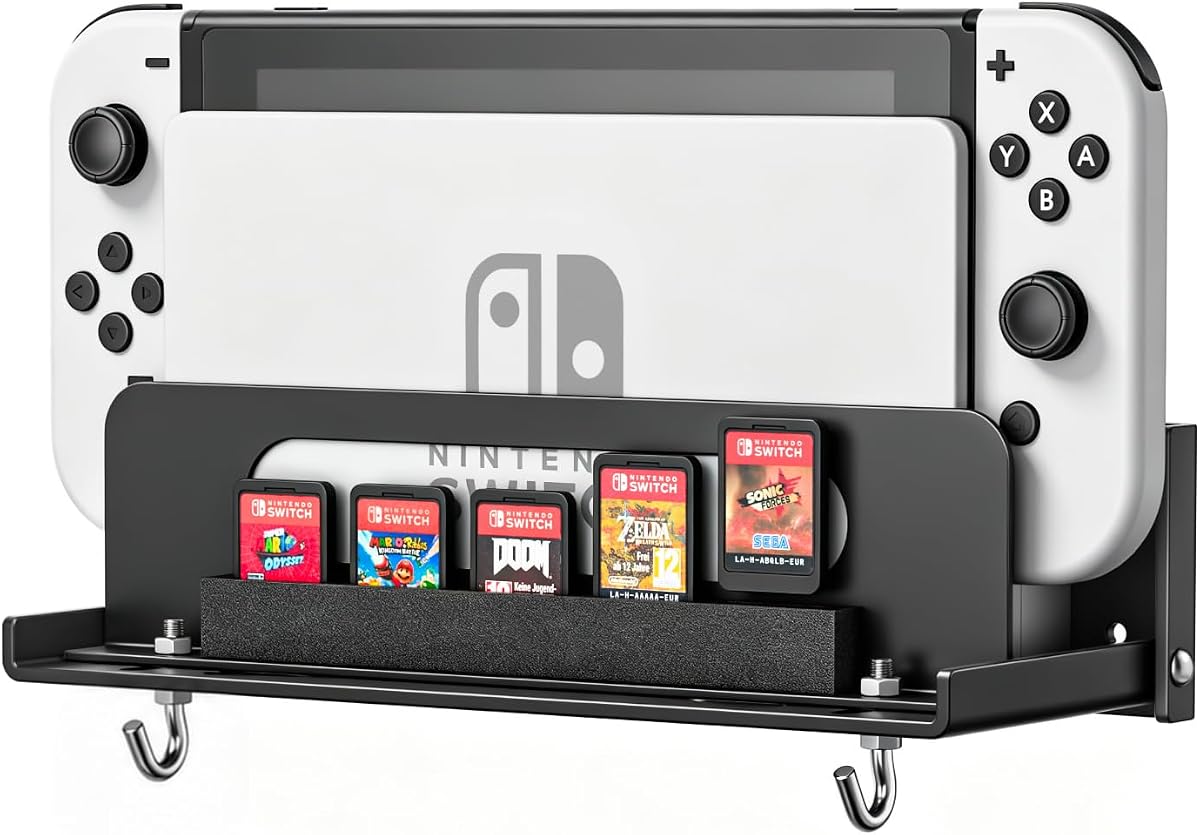


The black metal wall mount shelf combines a secure dock position with useful storage for game cards and detached controllers. It holds a rating of 4.8 and stands out for delivering several organization benefits without turning into a large entertainment center. Its compact shelf format is particularly useful when the goal is to reclaim desk or cabinet space while keeping frequently used items visible.
We may earn a commission when you buy through this link, at no additional cost to you.
The most thoughtful detail is its use of foam strips. Foam around the dock helps hold it in position, while the five front-facing card slots keep cartridges from rubbing directly against the metal frame. Four T-shaped Joy-Con hooks provide dedicated hanging points that are designed to reduce accidental slipping. A large bottom opening supports heat dissipation during active play.
The main limitation is that this is primarily a storage shelf rather than a charging station. It holds only five game cards, which may not suit a large library, and the included installation process requires placing three screws into the wall. Buyers seeking concealed storage or charging indicators will need to consider more specialized options in the list.
This is the strongest general-purpose choice for owners of a standard Switch or Switch OLED who want an affordable, visible organizer. It suits bedrooms, dorm rooms, and entertainment centers where quick access to a few favorite games and controllers matters more than keeping the console completely hidden.
The combination of a console shelf, five game-card positions, and four controller hooks keeps the most frequently used accessories in one defined area. This makes the mount practical for players who regularly swap games or attach Joy-Cons without leaving loose hardware around the television.
Foam strips stabilize the dock and help protect it from shifting or rubbing against the frame. The spacing also preserves a small gap behind the console, supporting airflow while the system is mounted near or behind a television.
We may earn a commission when you buy through this link, at no additional cost to you.
The HIDEit mount specializes in a clean, nearly invisible presentation by securing the Nintendo Switch Dock behind a television or other compatible display. Its 4.8 rating reflects a focused design built around the dock rather than a broad collection of shelves and charging accessories. The result is especially effective for minimalist gaming rooms.
We may earn a commission when you buy through this link, at no additional cost to you.
Ventilation receives careful attention. The offset construction creates room around the console, while cutouts align with the Switch vents so air can circulate. Heavy-gauge, cold-rolled steel provides the structural support required for a mounted dock, and the powder-coated finish is intended to resist scratching, rust, and chipping during normal use.
Because the design concentrates on concealing the dock, it does not provide dedicated spaces for game cards, wrist straps, or additional controllers. Installation also depends on having a secure surface or suitable bracket arrangement behind the display. Those constraints are reasonable for buyers seeking a hidden setup, but less convenient for anyone who wants an all-in-one accessory station.
The HIDEit is ideal for gamers who want the entertainment center to look television-first and plan to keep controllers on hand. Its combination of discreet placement, dock-specific fit, and deliberate airflow makes it one of the most refined options in this roundup.
Moving the dock behind the display removes it from view without requiring a large shelf. The result is a less cluttered wall arrangement that keeps the television and room décor as the visual focus.
The mount's offset shape and vent-aligned openings help maintain airflow around the Switch. This is especially relevant when the console is enclosed on several sides or remains connected for extended play sessions.
We may earn a commission when you buy through this link, at no additional cost to you.
The FASTSNAIL RGB 8-in-1 is the most feature-rich option here, combining a wall-mounted charging stand with storage for a console, controllers, game cards, wrist straps, and cables. It supports Nintendo Switch 2, Switch 1, and Switch OLED, and its 4.8 rating places it alongside the strongest products in the guide.
We may earn a commission when you buy through this link, at no additional cost to you.
The charging section accommodates four Joy-Con controllers, with an orange indicator during charging and a blue indicator when charged or in standby. A button can disable charging so the unit functions only as a stand. It also provides two USB 2.0 ports for suitable low-current charging and data-transfer uses, while storage sections hold ten game cards, six Joy-Cons, four wrist straps, two Pro Controllers, and one console.
Lighting is a prominent feature rather than a necessity. Seven monochrome and eight dynamic modes create a more decorative appearance, and a short press changes the effect while a longer press can memorize or turn it off. This extra functionality also means more depth, more cables, and a larger overall footprint than a simple metal shelf.
This mount is best for a gamer who wants a visible charging and storage hub rather than a concealed dock. It is particularly attractive for newer Switch 2 owners or households that want one station to handle several controller and accessory categories.
Four Joy-Con charging positions and broad accessory storage reduce the need for separate stands. The indicator colors make charging status easy to identify, and disabling the charging function offers flexibility when the system is not in active use.
Fifteen lighting modes range from fixed colors to animated effects. Players who prefer a subtle appearance can memorize an off setting, while those who enjoy a colorful gaming area can select a mode that complements the television and room.
We may earn a commission when you buy through this link, at no additional cost to you.
This FASTSNAIL charging wall mount combines four Joy-Con charging positions with storage for ten game cards, wrist straps, and up to two Pro Controllers. It carries a 4.8 rating and is designed for the original Switch and Switch OLED, making it a feature-heavy alternative for those two console generations.
We may earn a commission when you buy through this link, at no additional cost to you.
A red indicator shows charging and blue indicates a completed charge, while a control can turn the charging function off. Two additional USB ports support low-current charging and data-transfer devices. Seven fixed-color and eight dynamic lighting modes allow the station to become a decorative focal point, and anti-slip silicone pads help stabilize the charging dock.
Compared with the newer 8-in-1 model in this list, this version does not explicitly mention Switch 2 compatibility. That distinction matters for buyers considering a current-generation console. Its wall mounting also requires adequate space behind the television or on a wall, while the lighting and charging functions add cables and depth that a basic holder would avoid.
For owners of a Switch or Switch OLED who want visible charging and broad storage in a single station, this remains a well-rounded option. It is best suited to gamers who regularly use detached Joy-Cons and want those controllers ready when the console is.
Four dedicated charging positions keep the most commonly used Joy-Cons together. Switching the charging function off also allows the unit to operate as a conventional display and storage stand.
Game cards, wrist straps, Pro Controllers, cables, and the console itself can all be assigned dedicated places. This makes the unit practical for users who want a single visible hub instead of several separate storage accessories.
We may earn a commission when you buy through this link, at no additional cost to you.
The metal mount for Switch 2, Switch 1, and Switch OLED offers broad compatibility with a clean hollow-frame design. Its 4.7 rating and range of mounting options make it a logical option for households considering a console upgrade or maintaining more than one supported Nintendo Switch model.
We may earn a commission when you buy through this link, at no additional cost to you.
EVA strips reduce shaking, while the hollowed structure supports heat dissipation and can be mounted behind a television or placed on a desktop. Storage for eight game cards and four Joy-Con hangers creates a practical combination for a visible gaming station. The powder-coated steel construction adds a durable appearance and should help protect the console from scratches.
This is a storage mount rather than a charging solution. The four hanging points also leave accessories more exposed than an enclosed or shelf-based organizer, which may be inconvenient in homes where children or pets could reach the wall. Buyers expecting a powered charging dock will need to consider a different product.
The mount is best for someone who values cross-generation compatibility, flexible placement, and straightforward organization. It works particularly well when the console should be visible, stored close to the television, or occasionally positioned on a desktop.
Explicit support for Switch 2, the original Switch, and Switch OLED simplifies future-proofing a gaming room. Buyers can retain a familiar installation arrangement when moving between supported console versions.
Eight game-card positions accommodate a larger selection than compact five-slot shelves, while four Joy-Con hangers keep controllers close. This is useful for players who alternate among several games and multiplayer sessions.
We may earn a commission when you buy through this link, at no additional cost to you.
The universal wall mount is a straightforward way to free desk or entertainment-center space while keeping the Switch dock and frequently used accessories organized. It supports Switch 2, Switch OLED, and the original Switch, and its 4.6 rating reflects a practical approach without extra lighting or charging features.
We may earn a commission when you buy through this link, at no additional cost to you.
Integrated storage provides positions for controllers and game cards, reducing the chance that these small items disappear behind furniture. An open-air structure promotes airflow around the console, which is useful when the mounted dock is surrounded on several sides. Mounting hardware and installation instructions are included for a simpler setup process.
The supplied description does not specify exact storage counts, so buyers who need to know how many cartridges or controllers can be stored should check the current listing. The open construction also leaves accessories more exposed than a fully enclosed mount, and there is no built-in charging or lighting system.
This option best serves buyers who want broad compatibility, reduced clutter, and easy access to basic accessories. It is a sensible choice for bedrooms, dorms, and compact entertainment centers where conserving space matters more than decorative effects.
Moving the dock and its related accessories to the wall removes a substantial amount of visual clutter from the shelf. The result is a more open playing area without giving up a dedicated console location.
The open structure allows air to move around the console rather than enclosing it in a tight cavity. This open layout is a sensible starting point for installations close to a wall or entertainment center.
We may earn a commission when you buy through this link, at no additional cost to you.
This Switch and Switch OLED charging dock combines a four-Joy-Con charger, extensive accessory storage, and RGB lighting in one wall-mounted or desktop unit. Its 4.7 rating makes it a compelling option for gamers who want their console organized and visible rather than completely concealed.
We may earn a commission when you buy through this link, at no additional cost to you.
Red and blue LEDs indicate charging and full-charge status, and users can switch from charging to stand mode. Storage positions accommodate Joy-Cons, game cards, wrist straps, Pro Controllers, and the console itself. Two extra USB ports handle suitable low-current devices, while fifteen fixed and dynamic light modes allow the appearance to be adjusted.
The system requires power and adequate depth around the television or desk. It also lacks explicit compatibility with Switch 2, so buyers with that console should examine fit information carefully. Its numerous storage sections and lighting hardware make it larger and more involved than a basic wall shelf.
This dock is best for a gaming nook where a colorful, functional command center fits the style. It suits owners of Switch or Switch OLED systems who regularly use multiple detached controllers and want them charged in an organized location.
Separate red and blue indicator states make it easy to see whether a Joy-Con is charging or ready to use. The ability to disable charging also provides a simple stand-only mode when charging is unnecessary.
The RGB lighting and visible accessory layout can make the mounted station part of the room's décor. It is more noticeable than a concealed dock, but that visibility also keeps charging status and frequently used gear easy to reach.
We may earn a commission when you buy through this link, at no additional cost to you.
The white metal wall mount offers the same useful shelf-and-hook format in a light-colored finish. It supports the original Switch and Switch OLED and carries a 4.7 rating. For a gaming room with white furniture, pale walls, or a coordinated media center, the finish can blend more naturally than a black bracket.
We may earn a commission when you buy through this link, at no additional cost to you.
Five foam-lined game-card slots help keep cartridges separated from the metal surface, while four T-shaped hooks offer visible storage for detached Joy-Cons. Foam strips on the sides and back help steady the dock and preserve breathing room. A large vent beneath the shelf supports heat dissipation during active use.
As a non-powered organizer, it does not charge controllers and has less storage than several RGB charging stations. Five game-card positions may also feel limited for collectors. The mount's useful attributes are its simplicity, visible access, and relatively restrained visual footprint.
This shelf is best for owners who want a light-colored, always-visible setup around a television. It suits gamers who only need a small rotating game selection and prefer straightforward metal storage over a powered, illuminated station.
The white powder-coated surface is designed to coordinate with lighter entertainment furniture and interior palettes. It provides a clean alternative to the heavier visual appearance of black metal mounts.
Foam around the console and card areas reduces direct rubbing and helps keep items in place. This adds practical protection while retaining an open structure around the dock.
We may earn a commission when you buy through this link, at no additional cost to you.
The metal console holder combines a wall-mounted dock position with controller hooks and integrated cable routing. Designed for the Switch and Switch OLED, it holds a 4.7 rating and targets buyers whose main concern is a secure, organized installation rather than a large game library.
We may earn a commission when you buy through this link, at no additional cost to you.
Side hooks keep Joy-Cons and Pro Controllers accessible while helping protect their analog sticks from unwanted pressure. Routed channels manage charging and HDMI cords, reducing the loose cable clutter that commonly forms behind a television. The open back and targeted vent cutouts encourage airflow around the console during longer sessions.
The listing does not specify dedicated game-card slots, and the product has no charging electronics. Its value therefore depends heavily on cable management and controller placement rather than comprehensive accessory capacity. Mounting hardware and wall anchors are included, but installers must confirm that the anchors suit their wall type.
This holder is best for a clean entertainment center where cables and controllers need secure places to live. It works especially well for console owners who leave the dock connected and want the surrounding area to remain orderly.
Integrated routing gives charging and HDMI cables a defined path instead of allowing them to hang freely. This keeps the area behind or beside the television easier to service and visually cleaner.
Dedicated side hooks separate controllers from the console and nearby surfaces. This is useful for protecting analog sticks and keeping both attached and detached controllers within easy reach.
We may earn a commission when you buy through this link, at no additional cost to you.
The VIVO MOUNT-ALL02 is an open-frame steel holder with adjustable width, designed for Nintendo Switch 1 and Switch 2. Its 4.6 rating reflects a durable, uncomplicated approach for gamers who want the dock secured and the surrounding area decluttered without purchasing a large organizer.
We may earn a commission when you buy through this link, at no additional cost to you.
Width can be adjusted from 1.9 to 3 inches, allowing installers to find a snug fit for the supported dock. The open frame promotes cooling and airflow, while the lightweight steel construction balances support with easier handling during installation. Hardware and instructions are included, and the dock slides into the mount for a secure fit.
The minimal design does not include controller hooks, game-card slots, cable channels, or charging functions. Buyers who want those conveniences should look to one of the shelf or multifunction models. Adjustment should also be checked against the current dock and installation space before drilling.
This mount is best for someone seeking a small, sturdy holder for a supported console generation. It suits minimalist setups where reducing visual clutter is more important than displaying a collection of games and accessories.
The 1.9-to-3-inch adjustment range helps the frame accommodate different supported dimensions. This makes the mount easier to align with the available wall space and dock position.
The open frame leaves the console surrounded by open space, supporting airflow while reducing visual bulk. It is an effective alternative to enclosed shelving when a compact, understated installation is preferred.
We may earn a commission when you buy through this link, at no additional cost to you.
The most useful mount balances console compatibility, secure support, airflow, access to accessories, and the way your television is installed. Consider whether you want a hidden dock, a visible shelf, or an all-in-one charging station before comparing the available features.
Start by confirming that the mount supports the exact console or dock you own. The products in this guide variously mention the original Switch, Switch OLED, and Switch 2, but support should be checked against the current listing and physical dimensions. Also consider whether you expect to replace or upgrade your console, since a mount that handles more than one supported generation can reduce the need for future hardware.
Choose a model explicitly designed for your console generation and confirm that it holds the dock rather than only the tablet or handheld unit.
Decide whether the console should disappear behind the television or remain visible on a wall shelf. A concealed dock creates a cleaner entertainment center and keeps the screen as the focal point. A visible organizer makes game cards and controllers easier to identify and can work well as part of a deliberate gaming-room display.
Hidden mounts suit minimalist rooms, while visible shelves and RGB stations prioritize convenient access and a gaming-center aesthetic.
A wall-mounted dock has less open space than one placed on a cabinet, so airflow deserves careful attention. Look for offset construction, vent-aligned cutouts, open frames, or hollowed structures that allow warm air to escape. Avoid designs that press the dock tightly against a solid backing or obstruct the console's ventilation openings.
Prefer an open, spaced design whenever the mount will sit behind a television or inside a partially enclosed entertainment center.
If you regularly detach Joy-Cons, a wall mount with a built-in charging dock can keep the controllers ready between sessions. Check the number of charging positions, indicator behavior, included cable, and whether charging can be disabled. A non-powered holder is simpler and does not require a nearby outlet, but it cannot recharge controllers.
Choose a powered charging station for convenience, or a passive metal shelf for a simpler installation with fewer cables.
Game-card storage ranges from a small number of front-facing slots to larger dedicated sections. Think about how many games you play regularly rather than your entire collection. If the wall mount also handles controllers, wrist straps, Pro Controllers, and cables, compare those storage areas carefully because their dimensions differ.
A five-slot shelf is adequate for a small rotation, while a ten-card or larger organizer is better for frequent game switching.
A secure wall mount should support the dock without wobbling and should include the necessary screws, anchors, and instructions. The provided information lists mounting hardware across the products, but the correct anchor type depends on the wall construction. Confirm that the mounting surface is suitable before drilling into drywall, wood, masonry, or another material.
Use anchors appropriate for your wall and verify the product's included quantities before beginning installation.
A mounted dock generally needs power and display cables, and a charging organizer may need an additional cable for its controller dock. Consider the distance to the nearest outlet and the space behind the television. Integrated routing is useful for keeping cords orderly, while a compact concealed mount may leave more cable management to the installer.
Plan the cable path and outlet location first so the finished mount remains tidy and fully functional.
A plain steel shelf prioritizes function and can blend into a neutral entertainment center. RGB lighting creates a more decorative gaming area and offers several fixed or animated modes, but it requires a powered design and may be less suitable for a minimalist room. White and black finishes also differ in how prominently they stand out against walls and furniture.
Choose a clean metal finish for understated utility or an illuminated organizer when color and visible charging are central to the setup.
Begin by deciding where the dock will be mounted and checking the clearance around the television, outlet, cables, and ventilation path. Remove the console and controllers from the dock, mark the mounting position using the supplied level where applicable, and confirm that the wall surface is appropriate for the included anchors. Measure twice before drilling, particularly behind a large television.
Attach the dock to the mount according to its instructions, then guide the charging and display cables into the available space without bending them sharply. If the product has a charging function, connect the included cable to a suitable power source before placing controllers on it. Confirm that the dock is stable and that none of the console vents or ports are obstructed before returning it to normal use.
For routine care, gently wipe the metal surfaces with a soft, dry or lightly damp cloth and avoid harsh cleaners. Check the fasteners periodically, especially if the console is frequently removed or the wall experiences vibration. Keep game cards dry, remove controllers from charging positions when they are not needed, and check that vents remain clear so the mounted console continues to receive adequate airflow.
Yes, many of the listed mounts are designed specifically for placement behind a television. Check that the television's wall bracket and the mount's depth leave enough room for the dock and cables. Also make sure the mount does not block the television's ventilation or the Switch's own vents.
It depends on the design. Open frames, hollow structures, offset brackets, and vent-aligned cutouts are intended to preserve airflow. A mount that holds the console too tightly against a backing or covers its vents can trap heat, so adequate spacing should be a priority.
Only multifunction models that include a charging dock perform that function. Several basic metal shelves and concealed mounts are storage-only. If charging is important, look for Joy-Con charging positions, status indicators, an included cable, and a nearby power outlet.
Some products explicitly support Switch 2, while others are listed only for the original Switch and Switch OLED. Because dock designs can differ by generation and availability changes, verify the current product listing and physical fit before buying an older or more specialized mount.
A five-card shelf suits players who keep only a small selection close by, while stations offering ten or more positions are better for frequent swapping. The best capacity is the amount you can use without turning the wall into a display of unused cartridges.
The proper anchor depends on the wall material and the load placed on the mount. The listed kits include anchors, but buyers should confirm that the supplied type is appropriate for their specific wall. If the surface is unusual or installation is uncertain, professional installation can reduce the risk of an incorrect fix.
Several products support both wall mounting and desktop placement. The FASTSNAIL charging models are explicitly described as usable as desktop stands, while the hollow metal design for Switch 2, Switch 1, and Switch OLED also allows desktop positioning. A freestanding use still requires a stable surface and proper cable management.
Yes, removing the console and controllers reduces the chance of accidental movement or impact. Wipe the metal frame with a soft cloth, avoid abrasive pads and harsh chemicals, and ensure everything is fully dry before reinstalling the console. Check that no dust or debris has entered the ventilation openings.
The metal wall mount shelf with five game-card holders and four Joy-Con hooks offers the best balanced combination of storage, stability, and affordability. The HIDEit mount is the leading choice for a concealed, minimalist installation, while the FASTSNAIL RGB 8-in-1 station is the most complete option for charging and organizing several accessory categories.
Your priorities should determine the rest of the shortlist. Favor an open frame or ventilated structure for cooling, a visible shelf for quick access, or a charging dock for frequently used Joy-Cons. Console generation, outlet placement, wall type, and the amount of game-card storage should be confirmed before installation.
Marketplace ratings, product details, and pricing can change over time, so review the current listing and recent customer feedback before purchasing. Comparing the mount with the intended console and television setup is the most reliable way to choose a design that remains convenient, secure, and visually appropriate.