
ASRock B650I Lightning WiFi
4.1Editor score
AM5 processor support
Dual PCIe storage slots
WiFi 6E and 2.5G LAN
This Mini Itx Motherboards guide compares ten compact boards for gaming, productivity, connectivity, expansion, memory support, and small builds.
Mini Itx motherboards bring full-size PC capabilities into a compact 170 by 170 millimeter footprint, making them ideal for small-form-factor gaming PCs, discreet workstations, and capable media centers. A good board balances processor support, power delivery, memory compatibility, storage options, networking, expansion, and practical cooling rather than focusing on headline specifications alone.
The ten boards in this guide were compared using their supplied specifications, covering AMD AM5 and AM4 platforms as well as Intel LGA 1700. The evaluation considers socket generation, VRM design, memory support, M.2 and SATA connectivity, networking, USB, graphics output, wireless features, BIOS utilities, and physical Mini Itx compatibility, with each product reviewed independently.
The selections show that the right Mini Itx motherboard depends on the build rather than simply on the newest chipset. Some excel as balanced everyday choices, some favor gaming with fast networking and PCIe 5.0 support, while others target premium systems with stronger power stages and advanced control features. Product availability and prices change frequently, so check current listings before buying.
4.1Editor score

5.0Editor score
4.3Editor score
This side-by-side comparison highlights processor compatibility, power design, memory support, storage, networking, and connectivity across ten Mini Itx motherboards for compact desktop builds.


The ASRock B650I Lightning WiFi is a compact AM5 board that combines current processor support with the networking and storage features many builders want without moving to a premium model. Its 4.1 rating reflects a broadly capable platform, while the 170 by 170 millimeter layout makes it suitable for genuinely space-conscious systems.
We may earn a commission when you buy through this link, at no additional cost to you.
The board's 8+2+1 power design uses Dr.MOS components for a practical foundation in compact builds. It supports Ryzen 9000, 8000, and 7000 series processors, dual DDR5 memory, a PCIe 5.0 x4 M.2 slot, a second PCIe 4.0 M.2 slot, and two SATA ports. That gives a new system room for fast primary storage, a secondary drive, and conventional storage without requiring a large motherboard.
Connectivity is one of its strongest arguments. Phantom Gaming 2.5G LAN, Intel WiFi 6E, front and rear USB Type-C connections, and multiple USB 3.2 Gen2 ports cover common gaming, office, and media-center requirements. Realtek ALC897 audio and Nahimic support add basic entertainment functionality, although the audio codec is not aimed at high-end audiophile installations.
This is a sensible recommendation for builders who want AM5 support, modern networking, and flexible storage in a small chassis. Check case clearance, particularly with a large air cooler, and accept that Mini Itx normally means one graphics slot and limited expansion. For most compact systems, however, the feature balance is difficult to criticize.
The combination of current platform support and essential connectivity makes this board a strong all-around value. It is particularly suitable for a small gaming PC that needs fast networking and NVMe storage but does not require the elaborate power systems, extra cooling, or premium aesthetics found in more expensive Mini Itx models.
The inclusion of 2.5G Ethernet and WiFi 6E makes the board more versatile than many similarly compact alternatives. It can support fast wired networks, wireless peripherals, and common modern accessories without requiring add-in cards that would occupy scarce expansion space.
One PCIe 5.0 M.2 slot and one PCIe 4.0 M.2 slot allow a high-speed system drive and a secondary NVMe drive to coexist. Two SATA3 connectors further improve flexibility for users who still rely on hard drives or inexpensive SATA SSDs.
We may earn a commission when you buy through this link, at no additional cost to you.
The ASUS TUF Gaming B850I WiFi NEO stands out as the most complete mainstream recommendation in this guide. It carries a 5.0 rating and combines a robust 10-layer power design with polished installation features, modern networking, and enough storage flexibility for most Mini Itx builds.
We may earn a commission when you buy through this link, at no additional cost to you.
Its 8(80A)+2(80A)+1(80A) DrMOS power stages and eight-pin ProCool connectors provide a strong platform for Ryzen 9000, 8000, and 7000 series processors. ASUS also includes AI Cache Boost, AI Advisor, AI Cooling II, and AEMP to assist setup and system management, although experienced builders can still use conventional manual controls.
Storage is handled by an onboard PCIe 5.0 M.2 slot and a PCIe 4.0 M.2 slot. The rear USB 20Gbps Type-C port and front-panel USB 10Gbps Type-C header are useful for contemporary cases and fast external drives. WiFi 6E and Realtek 2.5Gb Ethernet cover both wireless and high-speed wired networking.
The trade-off is that this board offers more than a basic compact build may need. Its advanced software, elaborate power design, and gaming-oriented feature set may be unnecessary for office use, while a Mini Itx system still limits expansion to a single graphics card. The pre-mounted I/O shield nevertheless reduces assembly friction.
Choose the TUF B850I WiFi NEO when you want a well-rounded board without stepping into the highest premium tier. It is especially attractive for a compact gaming computer where power delivery, fast storage, modern USB, reliable networking, and straightforward diagnostics are all important.
The pre-mounted I/O shield and visible Q-LED diagnostics are particularly helpful in a tight chassis, where access to the rear ports and identifying a POST problem can be inconvenient. BIOS FlashBack and a Clear CMOS button also reduce the need to remove the board during basic troubleshooting.
The high-current DrMOS stages and multilayer PCB provide a reassuring foundation for power-hungry Ryzen processors. This matters in a small enclosure because a weak VRM can become a limitation even when the case itself has adequate airflow.
We may earn a commission when you buy through this link, at no additional cost to you.
The ASRock B550M-ITX/AC remains a relevant compact choice for builders committed to AMD's AM4 platform. It supports Ryzen 3000, 3000 G-Series, 4000 G-Series, 5000, and 5000 G-Series desktop processors, offering a mature ecosystem without requiring the newest memory or storage standards.
We may earn a commission when you buy through this link, at no additional cost to you.
Its DDR4 support can reduce the total cost of building a new compact system, particularly for users who already own compatible memory. A rating of 4.3 indicates generally favorable owner feedback, and the board includes DisplayPort, HDMI, and Realtek ALC887 7.1-channel audio for systems that may use integrated or discrete graphics.
This is not the right choice for a new enthusiast system that prioritizes PCIe 5.0 NVMe storage or future platform expansion. The supplied specifications do not claim PCIe 5.0 support, and AM4 represents an older generation. Prospective buyers should also confirm the exact processor and memory compatibility list before ordering.
The board makes sense for an affordable office PC, a compact home theater computer, or a system that can reuse AM4 components. It is particularly attractive when wireless connectivity and integrated graphics outputs are needed without adding expansion cards. Those use cases benefit more from compatibility than from cutting-edge interfaces.
For an AM4-focused build, the ASRock B550M-ITX/AC is a compact and established option with a favorable rating. It is less future-facing than the AM5 alternatives, but it can deliver a capable small PC when the processor, memory, and storage are selected with current availability in mind.
AM4 can be attractive when compatible DDR4 memory and a supported Ryzen processor are already available. That makes the board useful for upgrading an existing compact system instead of requiring an entire platform change.
DisplayPort and HDMI simplify connections to compact office displays or televisions. The integrated 7.1-channel audio codec also provides more output options than a barebones entry-level board.
We may earn a commission when you buy through this link, at no additional cost to you.
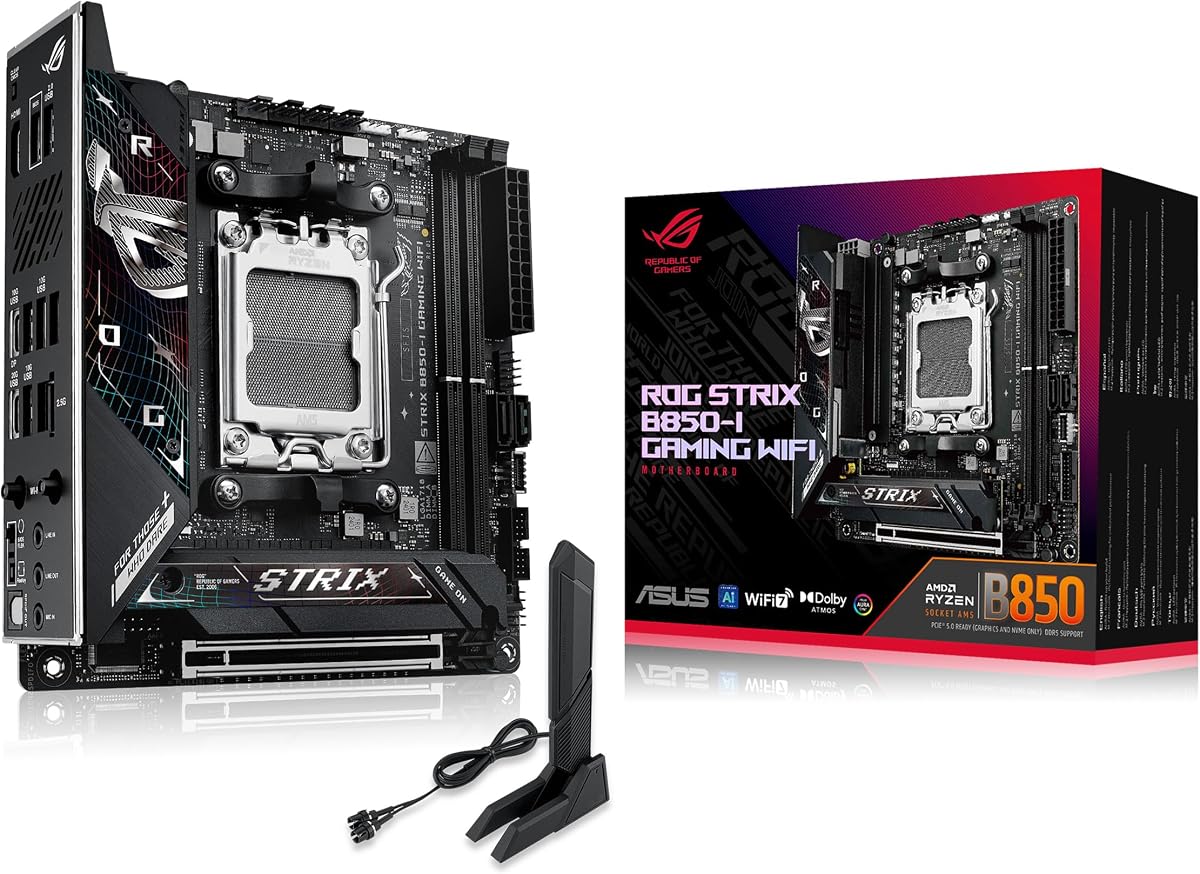
The ASUS ROG Strix B850-I Gaming WiFi is the premium choice for an enthusiast who wants a current AM5 platform in the smallest standard motherboard format. Its 4.3 rating and extensive specification sheet reflect a board designed for high-performance compact systems, strong networking, and advanced storage.
We may earn a commission when you buy through this link, at no additional cost to you.
The 10+2+1 power solution is rated for up to 70A per stage and uses ProCool connectors. Large heatsinks, an integrated I/O cover, and high-conductivity thermal pads address the difficult task of cooling a substantial processor and power system inside a restricted enclosure.
Two onboard PCIe 5.0 M.2 slots are a major strength, with one covered by a large heatsink for sustained drive performance. The board also provides 2.5G LAN, WiFi 7, DDR5 memory, a PCIe 5.0 x16 graphics slot, and a USB 20Gbps Type-C connection.
The trade-offs are the obvious ones that accompany a premium board: some of its software and cooling features may be unnecessary, and the ROG platform asks buyers to pay for capabilities that a simpler AM5 system will not use. The advanced AI Advisor, AI Overclocking, AI Networking II, and AEMP features are conveniences rather than substitutes for careful component selection.
This board is best for a compact high-end gaming PC, a powerful small workstation, or a builder who wants both PCIe 5.0 storage and modern wireless networking. Those who prioritize the fundamentals can choose a less elaborate board, but this model gives a premium build a well-rounded foundation.
Having two onboard PCIe 5.0 M.2 connectors is unusually useful in a compact system because it avoids occupying the only graphics slot with storage. The heatsink-equipped slot is a sensible place for a hot, high-performance primary drive.
The large VRM heatsinks, integrated I/O cover, and high-conductivity pads address a central Mini Itx challenge. These cooling provisions are especially relevant when the processor operates at high power in a small enclosure with restricted airflow.
We may earn a commission when you buy through this link, at no additional cost to you.
The ASRock B850i Lightning WiFi targets compact builders who want aggressive memory speeds and a current B850 feature set. Its 3.8 rating is the lowest among the listed boards, so owner feedback deserves attention, but the specifications indicate a capable platform for compatible high-speed hardware.
We may earn a commission when you buy through this link, at no additional cost to you.
The board supports Ryzen 9000, 8000, and 7000 series processors through AM5, with a 10+1+1 phase design led by a 110A Smart Power Stage. Two DDR5 DIMM slots can support overclocked speeds up to 8200+ in dual-channel configurations, making this one of the most ambitious specifications in the guide.
Storage and expansion include a PCIe 5.0 x16 slot, a Blazing M.2 PCIe 5.0 x4 connector, and a Hyper M.2 PCIe 4.0 x4 connector. Killer 2.5G LAN, WiFi 6E with Bluetooth, USB Type-C with DisplayPort Alt Mode, HDMI, and multiple USB 3.2 Gen2 connections make it well connected for a compact system.
Its lower rating means this recommendation comes with a clear caveat. The board may not offer the same polished software and installation conveniences as some ASUS alternatives, and its high-end specifications can be harder to exploit without compatible memory, cooling, and components. Case and cooler clearance must be checked because Mini Itx does not guarantee that every large cooler fits.
For a builder interested in fast DDR5 memory, Gen5 storage, and current AMD processing, the board offers a strong specification package. It is best suited to enthusiasts who understand the value of matching components carefully rather than first-time builders who prioritize simpler setup and broader brand familiarity.
Support for DDR5 speeds up to 8200+ distinguishes this model. Such figures are overclocking specifications rather than guaranteed performance with every memory kit, so users should verify the board's supported list and build a matched two-DIMM set.
HDMI and USB Type-C with DisplayPort Alt Mode provide more ways to connect a compact system to modern displays. Killer 2.5G LAN, WiFi 6E, Bluetooth, and numerous USB ports reduce reliance on scarce expansion slots.
We may earn a commission when you buy through this link, at no additional cost to you.
The ASUS ROG Strix X870-I Gaming WiFi is a feature-rich premium board built around AMD's X870 chipset. It supports Ryzen 7000, 8000, and 9000 series processors and brings a dense collection of tuning, networking, cooling, and management tools to the 170 by 170 millimeter format.
We may earn a commission when you buy through this link, at no additional cost to you.
Its 10+2+1 power solution is rated for 110A per stage and uses ProCool II connectors, alloy chokes, and durable capacitors. Dynamic OC Switcher, Core Flex, Asynchronous Clock, and PBO Enhancement give overclocking enthusiasts several approaches to tuning, while AI Overclocking, AI Cooling II, AI Networking, and AEMP simplify selected tasks.
The platform includes two M.2 slots, PCIe 5.0 support, WiFi 7, and USB4, covering the principal requirements of a modern high-end system. Q-Release Slim is also included, reflecting ASUS's continuing effort to make compact motherboard installation and maintenance more convenient.
These strengths come with a more demanding feature and cost profile than a mainstream board requires. AI-assisted controls cannot guarantee ideal settings for every component, and advanced tuning options may be unnecessary for general productivity or gaming. As with all Mini Itx boards, the single graphics slot and small surface area place a firm ceiling on physical expansion.
This model is most appropriate for an enthusiast compact system that benefits from the newest AMD platform, high-current power delivery, and extensive software. Choose it when those advanced tools matter; otherwise, the B850 alternatives in this guide may deliver a more restrained and potentially more practical build.
Dynamic OC Switcher, Core Flex, asynchronous clocking, and PBO Enhancement let experienced builders choose between different tuning strategies. This flexibility is useful for maximizing processor performance, though it also requires knowledge and careful monitoring.
WiFi 7 and USB4 provide a high-speed path for compatible devices, while the two M.2 connectors and PCIe 5.0 support address a modern desktop's core data requirements. Q-Release Slim reduces the physical work involved in servicing certain components.
We may earn a commission when you buy through this link, at no additional cost to you.
The ASRock A620AI WiFi is a practical AM5 option for compact builders who prioritize current processor support, networking, and storage over premium expansion interfaces. Its 4.0 rating suggests a broadly satisfactory board, and the supplied feature set covers the essentials of a modern small desktop.
We may earn a commission when you buy through this link, at no additional cost to you.
An 8+2+1 phase design with 80A DrMOS components handles the processor, SoC, and miscellaneous power delivery. Two DDR5 DIMM slots support overclocked speeds up to 8200+, while one PCIe 4.0 x16 slot provides a conventional graphics interface. This is a suitable foundation for a compact system built around a mainstream GPU.
Dual LAN is a distinctive feature here. Realtek 2.5G LAN and Gigabit Ethernet can provide flexible network arrangements, including link aggregation as the supplied specifications note. WiFi 6E with Bluetooth, a USB 3.2 Gen2 Type-C port, and multiple high-speed USB connections make the board practical for everyday networking and peripherals.
The important limitation is that the primary graphics slot is PCIe 4.0 rather than PCIe 5.0. This is unlikely to constrain many current gaming systems, but it is a consideration for future graphics hardware. Two M.2 slots using PCIe 4.0 x4 and PCIe 3.0 x4, plus two SATA3 ports, provide sensible storage options without demanding the newest bus standard.
Choose this board for an AM5 office, gaming, or general-purpose compact PC that values dual wired networking and flexible storage. Check case and cooler clearance before purchase. For builds requiring PCIe 5.0 graphics or storage, one of the B650 or B850 alternatives may be a closer match.
Realtek 2.5G and Gigabit Ethernet give this board unusual flexibility for a compact system. The dual ports can serve different networks or support link aggregation, making the board useful in setups that prioritize reliable connectivity.
The pair of M.2 connectors handles compact systems with no room for multiple add-in cards. A PCIe 4.0 x4 slot serves a fast primary drive, while the PCIe 3.0 x4 slot and SATA ports cover secondary and conventional storage.
We may earn a commission when you buy through this link, at no additional cost to you.
The Gigabyte B550I Aorus Pro AX is a well-equipped AM4 board that brings more visible features to the Mini Itx format than many basic models. Its 4.3 rating is among the stronger results here, while support for Ryzen 5000, 4000, and 3000 series processors gives the platform a broad processor range.
We may earn a commission when you buy through this link, at no additional cost to you.
A pure digital direct eight-phase power design, an eight-layer PCB, premium chokes and capacitors, an extended VRM heatsink, and an aluminum backplate form the board's power and thermal foundation. The integrated I/O shield also streamlines assembly, and Q-Flash Plus offers a way to update the BIOS without relying entirely on an installed operating system.
Storage includes a PCIe 4.0 M.2 slot and a PCIe 3.0 M.2 slot, along with DDR4 support across two DIMM positions. Connectivity includes 2.5GbE LAN, WiFi 6, a USB 3.2 Gen2 Type-C port, a USB 3.2 Gen2 Type-A port, and four USB 3.2 Gen1 Type-A ports.
The central limitation is platform age. AM4 and DDR4 remain practical, but they do not provide the forward-looking memory and PCIe 5.0 options found on current AM5 boards. RGB Fusion is useful for coordinated lighting, though aesthetic features should remain secondary to cooling, memory, and processor compatibility.
This motherboard is a good AM4 choice for a compact gaming or productivity system that values networking, integrated installation features, and a mature platform. It is less appropriate for a new build intended to accommodate several future hardware generations, where a current AM5 model offers more obvious headroom.
The 2.5GbE connection is a meaningful advantage in a board designed for a smaller footprint, because it avoids consuming an expansion slot. WiFi 6, USB Type-C, and Q-Flash Plus further reduce the need for add-in accessories.
An integrated I/O shield, extended VRM heatsink, and aluminum backplate improve the installation and cooling experience. The backplate also adds structural support, though the case must still provide suitable airflow and the chosen CPU cooler must clear the board's components.
We may earn a commission when you buy through this link, at no additional cost to you.
The ASUS Prime H610I-Plus D4 provides an Intel alternative for builders who do not need the newest AMD platform. It uses the LGA 1700 socket for 12th Gen Intel processors, has a 4.2 rating, and delivers a straightforward set of features for compact office, media, and general-purpose systems.
We may earn a commission when you buy through this link, at no additional cost to you.
The board includes PCIe 4.0 support, DDR4 memory, a 32Gbps M.2 slot, Realtek 1Gb Ethernet, and USB 3.2 Gen1 connectivity. A dedicated M.2 Key E slot accepts a compatible wireless module, allowing WiFi capability to be added without using a PCIe expansion card.
Its cooling provisions include a VRM heatsink, PCH heatsink, and Fan Xpert. DisplayPort, HDMI, and VGA output provide broad monitor compatibility, which is useful for office PCs and compact systems that may use integrated graphics. Q-LED diagnostics help identify startup problems, while the SPI TPM header supports compatible security hardware.
The main limitations are the modest networking and relatively restrained connectivity specification. A 1Gb Ethernet port is sufficient for basic browsing and many office uses but does not match the 2.5G or faster connections available on several other boards. The USB specification is also less advanced than the fastest Type-C options in this guide.
Choose this board for a straightforward compact Intel build where low-cost components, integrated graphics support, and physical size matter most. Confirm the exact processor generation and memory requirements before purchase, and budget for a wireless module if the built-in network connection is insufficient.
DisplayPort, HDMI, and VGA outputs make the board useful with a wide range of displays. This is advantageous in office and media-center systems that may rely on a processor with integrated graphics.
The M.2 Key E slot creates a straightforward path to add a compatible WiFi module. In a small case where every expansion slot may be reserved for graphics, onboard-style wireless support is a practical feature.
We may earn a commission when you buy through this link, at no additional cost to you.
The MSI MPG B850I Edge TI WiFi is a premium current-platform board whose standout specification is its combination of 5G Ethernet and WiFi 7. Its 4.4 rating is the highest among the products that do not carry a perfect score, making it an attractive high-end choice for compact networked systems.
We may earn a commission when you buy through this link, at no additional cost to you.
The direct eight-phase 90A Smart Power Stage VRM supports Ryzen 9000, 8000, and 7000 processors through AM5. Cooling hardware includes 7W/mK MOSFET thermal pads, extra choke thermal pads, an extended heatsink, and an M.2 Shield Frozr. A three-amp combo fan header can also serve a pump or system fan.
Two DDR5 slots support advertised overclocked speeds up to 8200+ in a one-DIMM, one-rank configuration. The PCIe 5.0 x16 slot uses Steel Armor II, while storage includes a PCIe 5.0 x4 M.2 connector and a PCIe 4.0 x4 connector. These specifications make the board suitable for a high-end compact gaming build.
The networking is the primary attraction. A full-speed WiFi 7 module with Bluetooth 5.4 and 5Gbps Ethernet supports demanding transfers, high-speed storage access over a local network, and modern wireless devices. Rear USB Type-C at 20Gbps and Audio Boost 5 with S/PDIF output add useful peripheral and media options.
This board suits a premium compact workstation or gaming PC that will benefit from the fastest networking in the comparison. The high-end category and advertised memory speeds are potential drawbacks for modest builds. For most users, the actual value of 5G networking depends on matching routers, switches, and other hardware that can deliver those speeds.
The 5G Ethernet port offers substantial headroom for fast local storage, large file transfers, and high-bandwidth networks. WiFi 7 and Bluetooth 5.4 complement it with a wireless path, though actual results depend on the router, interference, and client device.
A Gen5 M.2 connector and PCIe 5.0 x16 graphics slot support the newest high-speed components. The reinforced Steel Armor II slot adds physical protection, while the M.2 Shield Frozr helps manage drive temperatures in a compact system.
We may earn a commission when you buy through this link, at no additional cost to you.
A Mini Itx motherboard purchase should begin with the complete system, including processor, memory, graphics card, case, cooler, storage, and networking. Matching platform and physical constraints is more important than chasing isolated headline specifications.
Start with the processor socket and chipset generation because these decisions determine motherboard, memory, and potentially operating-system support. AMD AM5 models in this guide support Ryzen 7000, 8000, and 9000 series desktop processors, while AM4 boards support selected Ryzen 3000, 4000 G-Series, and 5000 families. The ASUS Prime H610I-Plus D4 uses Intel LGA 1700 and is listed for 12th Gen Intel processors. Check the exact board specification before purchasing, particularly when a processor includes integrated graphics or unusual power requirements.
Mini Itx boards commonly use two DDR5 or DDR4 DIMM slots, which limits total capacity compared with larger models but can also simplify memory configuration. DDR4 is the more established path on AM4 and H610 boards, while AM5 boards use DDR5. Advertised speeds such as 8200+ or 7200+ represent supported overclocking targets and generally require compatible CPU memory controllers, a matched two-module kit, and a qualified BIOS. For stable everyday use, focus first on supported capacity and the memory list rather than the largest headline speed.
Power stages, current ratings, VRM layers, heatsinks, and connector design indicate how comfortably a board can handle a processor. All the AM5 boards use multi-phase DrMOS or SPS designs, but they range from 80A stages to 110A ratings. The premium ASUS models and ASRock B850i Lightning WiFi place particular emphasis on high-current power delivery and cooling. Match the board to the processor's power behavior rather than assuming every compact board is suitable for unrestricted maximum settings.
A Mini Itx board usually has one full-length graphics slot, so storage should mostly be placed on onboard M.2 connectors. Two M.2 slots are standard across most selections, while SATA ports provide compatibility with older drives. PCIe 5.0 storage appears on several AM5 boards, but the ASRock A620AI and older AM4 models rely on PCIe 4.0 or lower. Confirm physical drive sizes, heatsink clearance, and whether an M.2 slot shares PCIe lanes with another connector before finalizing the build.
Networking can be more important in a compact system because a dedicated network card or WiFi adapter would consume scarce expansion space. The list spans Gigabit Ethernet, 2.5G LAN, and 5G LAN, along with WiFi 6, WiFi 6E, and WiFi 7. The ASUS Prime includes an M.2 Key E slot for a wireless module rather than integrated wireless hardware. Match the board to the speed of your router, switch, and internal storage network; faster interfaces cannot improve a network that only offers slower local or internet throughput.
If the system will use processor-integrated graphics, the board's rear outputs determine monitor compatibility. HDMI, DisplayPort, USB Type-C with DisplayPort Alt Mode, and even VGA appear among the supplied specifications. A dedicated graphics card may make these outputs less relevant, but having the correct connector can simplify troubleshooting and temporary setup before driver installation. Do not assume every processor associated with a socket includes integrated graphics.
External USB speed and internal headers determine which drives, cameras, controllers, and case accessories can operate at their intended rates. Several boards include front-panel Type-C headers, while premium models offer rear USB 20Gbps or USB4. These features are most useful when the case itself has matching ports and the included cable or adapter is used correctly. A compact chassis may also need headers for a pump, RGB controller, or temperature sensor, so list required accessories before selecting a board.
Mini Itx is a fixed 170 by 170 millimeter size, but that does not mean every case accepts every board and cooler. Check CPU socket clearance, M.2 heatsink height, rear I/O positioning, and the case's motherboard support. The ASRock B850i and A620AI listings specifically advise checking chassis and cooler clearance. BIOS Flashback, Q-Flash Plus, Q-LED, and Clear CMOS buttons can improve maintenance, while integrated I/O shields and pre-mounted shields reduce assembly work. Software quality should complement, not replace, sound component selection.
Before assembly, compare the board with the case mounting pattern, processor socket, memory standard, and M.2 drive dimensions. Install the processor and cooler according to the manual, confirm that the CPU and cooler do not conflict with tall memory modules or an M.2 heatsink, and make sure every power, fan, and front-panel connector reaches its intended header.
Begin with a minimal boot using one memory module in the recommended slot, the processor, and the graphics output selected in the BIOS. Update the motherboard firmware before installing an operating system if a newer revision is available, using the board's designated update method. After confirming stability, add storage, network hardware, peripherals, and case fans one at a time so any problem can be isolated.
Mini Itx systems need deliberate airflow because their compact dimensions can trap heat around the VRM, processor, and M.2 drives. Use the case's supported fan configuration, keep intake and exhaust paths unobstructed, monitor system temperatures, and make sure the processor power profile is appropriate for the cooler. Periodically clean dust, check connectors, and update BIOS or driver software when doing so improves stability or compatibility.
Yes, a Mini Itx motherboard can support a capable gaming PC when paired with an appropriate graphics card, processor, memory, cooling, and storage. The boards in this guide support high-speed networking, NVMe drives, and modern graphics interfaces. The main limitation is expansion: most Mini Itx systems offer only one full-length graphics slot and a small number of headers, so parts must be selected with case compatibility in mind.
These names identify different CPU sockets and motherboard platforms. AM4 supports selected AMD Ryzen 3000, 4000 G-Series, and 5000 processors with DDR4 memory, while AM5 supports Ryzen 7000, 8000, and 9000 series processors with DDR5. LGA 1700 is Intel's platform for 12th Gen processors in this guide and also uses DDR4. Processor, memory, and chipset support must match one another.
A modern discrete graphics card requires a suitable PCIe slot, sufficient case clearance, and enough power from the case or power supply. Several boards here provide PCIe 5.0 x16, while others use PCIe 4.0 x16, which remains suitable for many graphics cards. Check the physical length and power requirements of the card against the case, and confirm that the motherboard's slot spacing will not interfere with large coolers or storage.
Two DIMM slots are standard on many Mini Itx boards and can provide a straightforward dual-channel configuration. Capacity limits vary by board and processor, and some may offer more support than the specifications summarized here. Using a matched kit can make memory management easier and improve stability. For heavily used workstations, verify the board's maximum capacity and operating system support before buying memory.
Choose 5G Ethernet when the rest of the local network and destination devices can sustain those speeds, such as with high-speed NAS or NVMe storage equipment. A 2.5G connection is often more practical for a gaming PC or home network and may allow reuse of existing infrastructure. A Gigabit connection remains sufficient for ordinary browsing, office work, and many online applications. In compact builds, onboard networking also saves an expansion slot.
Wireless support is useful when running a network cable is inconvenient or unnecessary. WiFi 6E adds the 6GHz band, while WiFi 7 targets higher throughput and improved efficiency with compatible equipment. Neither standard automatically guarantees faster internet service because the router, signal conditions, and client device determine performance. Boards with a wireless module slot, such as the ASUS Prime H610I-Plus D4, also allow the user to choose a module separately.
Mini Itx assembly is similar to a standard desktop build but requires more attention to cable routing, cooler clearance, and component dimensions. Some boards simplify installation with an integrated or pre-mounted I/O shield, while BIOS Flashback, Q-Flash Plus, and diagnostic LEDs can make maintenance easier. Planning the complete parts list and confirming case compatibility before opening the box prevents most avoidable problems.
An upgrade is worthwhile when the current system limits performance, storage speed, connectivity, or future component options. Moving from AM4 to AM5 usually requires a new motherboard, processor, and DDR5 memory, so the expense extends beyond the board. An existing AM4 system can remain practical if it performs well and the platform still meets the user's needs. Compare the full platform cost rather than judging the old and new motherboards alone.
The ASUS TUF Gaming B850I WiFi NEO is the strongest overall choice because it combines a 5.0 rating, robust power circuitry, current AM5 support, modern storage, fast networking, and practical installation features. The ASRock B650I Lightning WiFi offers a more restrained feature set for value-focused builders, while the ASUS ROG Strix B850-I Gaming WiFi is the premium pick for dual PCIe 5.0 storage, stronger cooling provisions, and advanced controls.
Before choosing, prioritize the processor and memory platform, then confirm physical clearance and the features the build genuinely needs. A current AM5 board offers the strongest foundation for a new enthusiast system, while AM4 and LGA 1700 remain relevant when compatible components are already owned or the complete build cost is lower. The best board is the one that supports the intended hardware and fits the case without compromising cooling.
Product listings, component compatibility, and prices change over time, so review the current specifications and marketplace details before ordering. Check the case and CPU cooler dimensions, memory support list, M.2 lane arrangement, display outputs, and available headers. Those final checks prevent small Mini Itx details from creating expensive compatibility problems.