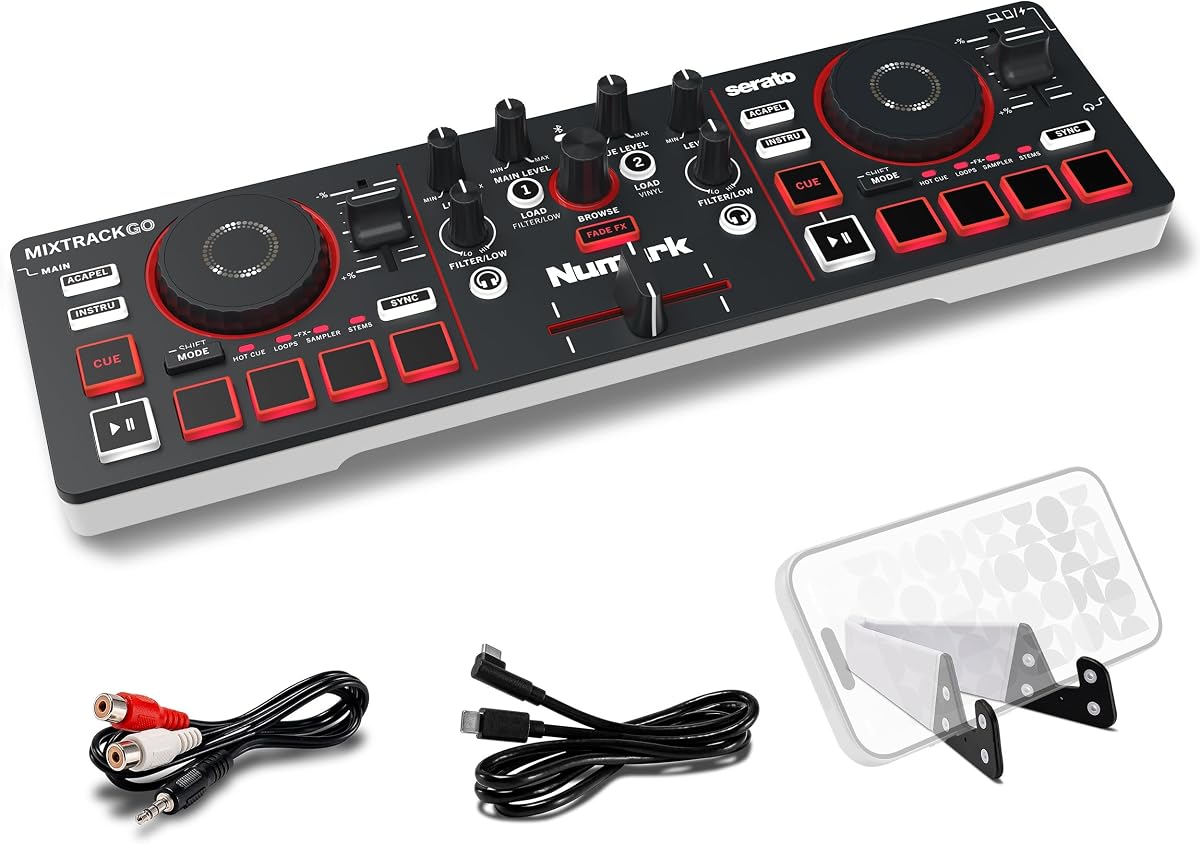
Numark MixTrack Go
4.4Editor score
Compact USB-C powered design
Real-time stems control
Eight pads per deck
Includes DJ software access
Explore the best Bluetooth DJ mixer options for parties, streaming, karaoke, and live events, with detailed feature, control, and connectivity comparisons.
A Bluetooth DJ mixer can turn a phone, tablet, or laptop into the center of a portable performance setup, but the best option depends on how you plan to mix. Dedicated controllers suit track-based DJing, while analog-style mixers are better suited to microphones, instruments, karaoke, podcasts, and live sound reinforcement.
We compared all 10 products by examining their control layouts, input options, wireless capabilities, software support, recording functions, portability, and suitability for different users. The list includes two-deck DJ controllers, smartphone controllers, and multichannel sound boards, allowing readers to distinguish dedicated mixing tools from general-purpose audio mixers.
Each selection below highlights the most useful strengths and practical limitations identified from the supplied product information. Ratings and feature availability can change over time, product configurations may vary, and current prices should always be checked before purchasing, but the comparisons provide a clear starting point for your search.
4.4Editor score

4.7Editor score

4.4Editor score
The comparison covers dedicated DJ controllers and multichannel sound boards, highlighting the number of inputs, wireless workflow, audio connections, performance controls, and creative features that matter most when choosing a Bluetooth DJ mixer.




The Numark Party Mix III combines a two-deck DJ controller, wireless MIDI control, and a synchronized LED light show in a compact package. Its 4.4 rating reflects a well-rounded design for casual DJs and party hosts who want music and visual energy without assembling a complicated professional rig.
We may earn a commission when you buy through this link, at no additional cost to you.
Its strongest attraction is the built-in light system, which projects beat-synchronized patterns to create a party atmosphere. The controller also includes 3-band EQ, channel filter knobs, touch-capacitive jog wheels, a crossfader, and eight backlit pads on each deck. Those controls support familiar DJ techniques while helping new users trigger Hot Cues, loops, samples, effects, and real-time stems control.
The trade-offs are worth considering. This is a software-driven controller rather than a standalone analog mixer, so it needs a compatible computer, tablet, or phone and the appropriate DJ application. Its main connection is a single RCA output, and the included 1/8-inch-to-stereo-RCA adapter may be necessary when connecting to a particular speaker or sound system.
Choose the Party Mix III when you want the most visibly engaging presentation in this roundup. It is a strong fit for home parties, casual events, and beginner DJs who value wireless control, visual effects, and performance pads more than a large collection of physical audio inputs. For that use case, it is our most party-ready controller.
The controller brings together the elements required for a basic digital DJ workflow, including two decks, an integrated audio interface, performance pads, beat alignment aids, automatic fade effects, and starter software access. This makes it easier for a first-time user to begin mixing tracks instead of buying separate components.
Bluetooth MIDI allows compatible iOS and Android devices to control the controller wirelessly through the Algoriddim djay app, while the included USB-C cable supports a connected workflow. The synchronized lighting adds a visual layer that traditional controller-only products cannot provide.
We may earn a commission when you buy through this link, at no additional cost to you.
The Numark MixTrack Go is built for DJs who need a capable controller that travels well. Its 4.4 rating, compact two-deck design, and broad software compatibility make it a practical option for coffee shops, outdoor gatherings, and other mobile situations where carrying a full-size controller would be inconvenient.
We may earn a commission when you buy through this link, at no additional cost to you.
Despite its small footprint, it includes eight backlit performance pads per deck, capacitive touch jog wheels, per-channel filter knobs, channel gain, master volume, a crossfader, and automatic fade effects. Its real-time stems control can isolate or remove vocals, drums, and instruments, giving users more creative options than a basic four-control mobile controller.
The principal limitation is output flexibility. The built-in sound card provides a 1/8-inch main output and a separate 1/8-inch headphone output, and the package includes a 1/8-inch-to-stereo-RCA adapter for many speaker arrangements. It also omits the Party Mix III's built-in lights, so the atmosphere depends entirely on the venue and playback system.
The MixTrack Go is best for mobile DJs, beginners, and listeners who want to practice and perform without carrying a large controller. It supports Bluetooth MIDI with compatible devices and USB-C power from a laptop, tablet, smartphone, or power bank, making it one of the more flexible options in the guide.
The controller provides more than simple playback and volume controls. Backlit pads support Hot Cues, loops, samples, and stems, while automatic fade effects help create smoother transitions. These features make it useful for learning basic mixing as well as preparing more engaging sets.
A universal USB-C power connection eliminates the need for a dedicated power supply when the controller is used with a compatible device or standard power bank. Its stated backpack-friendly dimensions and light construction further support travel-focused use.
We may earn a commission when you buy through this link, at no additional cost to you.
The Pioneer DJ DDJ-FLX4 stands out with the highest listed rating in this collection at 4.7. Its familiar Pioneer DJ layout is designed to help new users begin while leaving room for further development, and the Smart Fader feature provides an approachable way to blend tracks without requiring advanced beatmatching skills immediately.
We may earn a commission when you buy through this link, at no additional cost to you.
The controller offers two channels, two decks, and 16 performance pads for Hot Cues, Pad FX, Beat Jump, and Sampler. It connects to PC, Mac, iPhone, iPad, or Android devices through USB or Bluetooth, with a built-in sound card for speaker connections. Streaming support also allows DJs to mix from Apple Music, Tidal, and Beatport and live-stream or MC from one device.
This is not the simplest option for someone who wants only two physical knobs and one fader. Its wider feature set, multiple pad modes, and support for several device classes create a steeper learning curve, but those same qualities offer more room for progression. The Smart Fader remains especially relevant for users who want assistance without giving up manual control.
The DDJ-FLX4 is our top selection for an aspiring DJ who wants a capable controller with wireless and streaming support. It balances accessibility with professional-style performance features, making it a compelling choice for practice sessions, home mixing, streaming, and live events.
Smart Fader automatically adjusts volume, bass, and BPM as the fader moves, allowing users to blend different genres with less manual intervention. Experienced DJs can still work with the underlying controls as their skills develop.
USB and Bluetooth connectivity allow the controller to work with computers, tablets, and phones. Streaming-service compatibility and live-stream support make it relevant to creators who want their performance setup to serve more than a room full of speakers.
We may earn a commission when you buy through this link, at no additional cost to you.
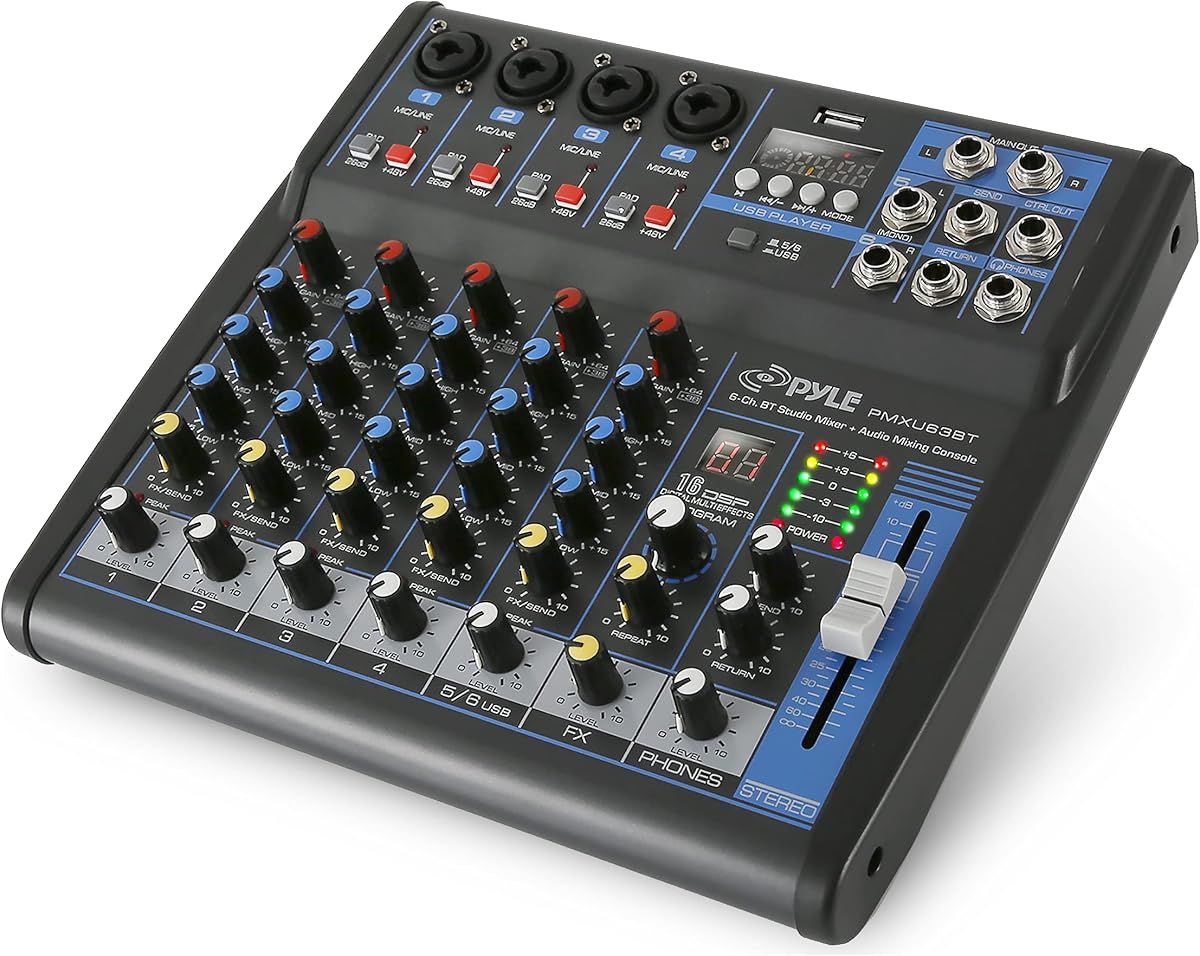
The Pyle PMXU63BT is a six-channel analog-style mixer designed more for live sound, karaoke, bands, and general audio mixing than for track-based DJing. Its 4.3 rating reflects a versatile feature set that combines Bluetooth playback, USB computer input, XLR and quarter-inch connections, 48V phantom power, three-band EQ, and 16-bit DSP effects.
We may earn a commission when you buy through this link, at no additional cost to you.
The mixer accepts external USB storage, computers, flash drives, and Bluetooth devices, with built-in controls for playback, track skipping, and source switching. Each channel supports XLR and unbalanced quarter-inch input, and the 48V phantom-power control accommodates compatible condenser microphones. LED peak-level indicators help users keep signal levels under control.
A steel chassis and sealed rotary controls distinguish it from plastic tabletop boards, while the multi-voltage power supply makes it more flexible for travel. The limitation is fundamental: it has no jog wheels, deck structure, performance pads, or track-level software workflow. A DJ seeking beatmatching and digital library control would need separate hardware and software.
Choose the PMXU63BT for live musicians, hosts, teachers, karaoke organizers, or small-event technicians who need several physical inputs and Bluetooth playback. It is a practical sound board for amplifying microphones and instruments, not a replacement for a dedicated two-deck DJ controller.
XLR and unbalanced quarter-inch inputs support microphones, line sources, and instruments, while phantom power broadens microphone compatibility. The three-band EQ and channel gain controls provide essential tonal shaping for live performance.
Bluetooth streaming lets a phone supply music without a physical cable, while USB and flash-drive options cover computer input and direct MP3 playback. This makes the board useful for background music, rehearsals, and small events.
We may earn a commission when you buy through this link, at no additional cost to you.
The FULUODE CT-80S is an eight-channel mixer aimed at karaoke, conferences, campus activities, band performances, and family KTV. Its 4.4 rating reflects a generous channel count and a feature set that includes Bluetooth 5.0, MP3 and USB input, a large LED display, reverb, and 48V phantom power.
We may earn a commission when you buy through this link, at no additional cost to you.
Each channel has a three-segment equalizer and supports cable, wireless, or capacitive microphone and instrument connections. The large LED area can display song information and provides visual feedback during operation. Its 1.57-inch profile makes it considerably slimmer than many eight-channel boards, which is useful for transport and compact stages.
One important constraint is electrical: the supplied information specifies a 110-volt product with an American plug. That makes it less convenient for users in regions using other supply standards unless an appropriate arrangement is available. It also lacks the jog wheels, cue controls, performance pads, and two-deck structure found in dedicated DJ controllers.
The CT-80S is best for users who need many analog input channels and wireless music in situations such as KTV, small conferences, and live music. Choose it as a general-purpose sound board rather than a controller designed for beatmatching digital tracks.
The eight-channel layout can accommodate microphones, instruments, and playback devices in a single board. Per-channel equalization gives operators a way to balance different sources instead of treating every input identically.
At a stated thickness of 1.57 inches, the mixer is designed to occupy less space than many conventional sound boards. That makes it easier to carry between venues, although the 110-volt specification should be checked before use in another electrical region.
We may earn a commission when you buy through this link, at no additional cost to you.
The Hercules DJControl Mix reduces a DJ setup to a smartphone, a compact controller, and the included djay app. Its 4.3 rating reflects a focused approach: provide the essential physical controls that a touchscreen cannot deliver comfortably, while using Bluetooth for a cable-free mobile workflow.
We may earn a commission when you buy through this link, at no additional cost to you.
The controller supplies two decks, jog wheels, faders, knobs, and pads, with a foldable stand included for positioning a compatible phone. It supports iOS and Android devices, making it attractive to beginners, travelers, and users who do not want to carry a laptop.
The tradeoff is limited depth. Unlike the Numark and Pioneer controllers in this guide, it is not described as providing stems, automatic transitions, extensive streaming-platform support, or a broad selection of pad modes. The phone's performance, battery life, operating system, and app compatibility become especially important because the hardware has fewer dedicated features.
The Hercules DJControl Mix is a good choice for someone beginning with smartphone DJing or wanting an uncomplicated wireless controller for casual sessions. It prioritizes portability and the direct feel of physical faders, knobs, and jog wheels over the advanced feature set found in larger two-deck models.
Faders, knobs, pads, and jog wheels give a phone-based DJ direct access to common mixing actions. The included foldable stand keeps the device visible while the controller occupies the user's hands.
Bluetooth communication with the included djay app removes the need for a full-size computer at the performance position. Users should verify their device and app are compatible before relying on the controller for an important event.
We may earn a commission when you buy through this link, at no additional cost to you.
The Four-Channel DJ Audio Mixer is designed for small-scale streaming, podcasting, karaoke, and mobile production. Its 4.0 rating reflects a capable but compact feature set centered on a USB audio interface, Bluetooth input, four channels, and a stated size of 7.87 by 6.7 by 1.57 inches.
We may earn a commission when you buy through this link, at no additional cost to you.
Its USB interface supports plug-and-play computer recording and live streaming without extra drivers or complicated software, while USB flash-drive playback adds another source option. XLR and 6.35-millimeter inputs accommodate condenser microphones, dynamic microphones, electric guitars, basses, and electronic keyboards, with 48V phantom power for compatible condenser microphones.
The important Bluetooth limitation is explicit: Bluetooth is input-only and cannot connect to speakers. The mixer also has only four channels, so it is less adaptable to a full band or large event than the six- and eight-channel alternatives. Its compact size, however, makes it particularly convenient for mobile creators.
This mixer is best for a solo creator, home karaoke user, or podcast host who wants direct Bluetooth music input and straightforward computer recording. It should not be chosen by someone expecting wireless audio to be sent from the mixer to a loudspeaker.
The built-in USB audio interface is designed for plug-and-play recording and live streaming. This reduces setup complexity for users who want to capture a performance or adjust computer audio without adding another interface.
Bluetooth is used to bring sound into the mixer from a compatible phone, tablet, or laptop. It does not transmit the mixer's output to speakers, so a conventional speaker connection remains necessary for playback.
We may earn a commission when you buy through this link, at no additional cost to you.
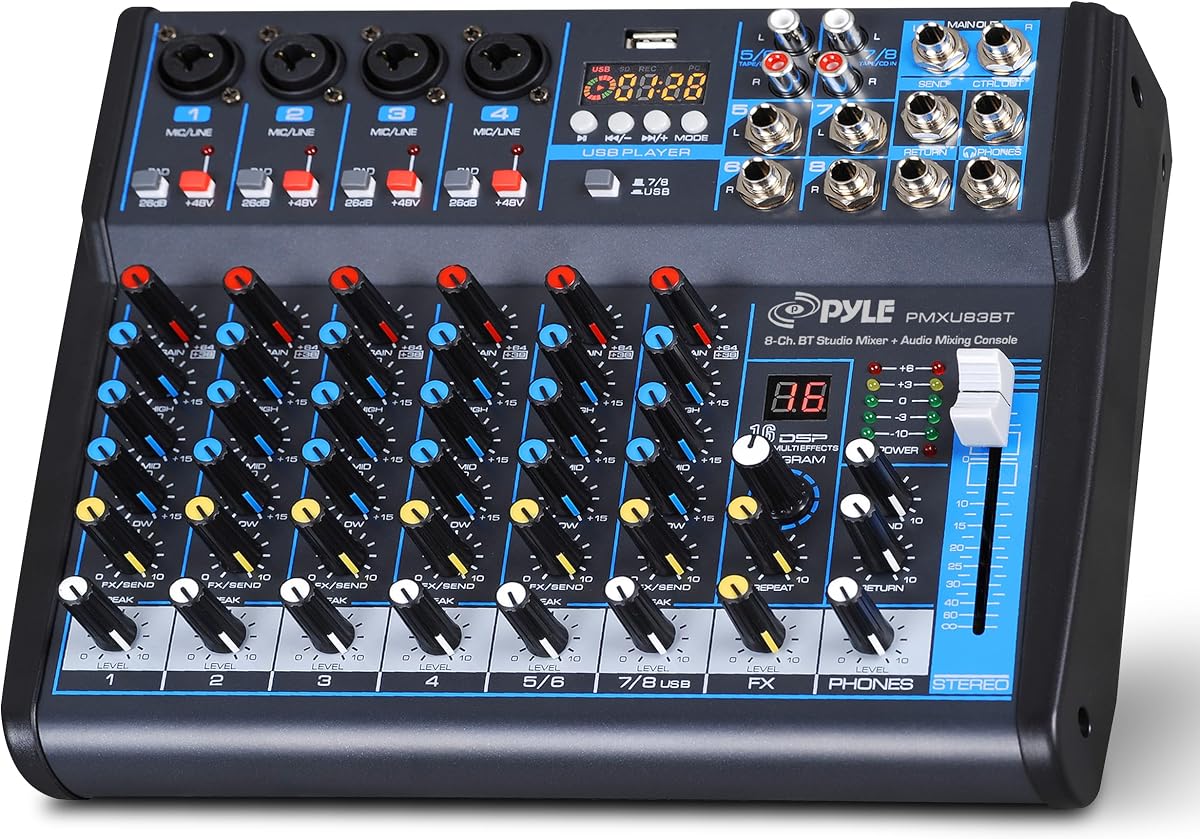
The Pyle Eight-Channel DJ Audio Mixer combines a substantial channel count with Bluetooth streaming, USB, an audio interface, and DSP effects. Its 4.4 rating makes it a strong option for live performers, karaoke hosts, and small venues that need more analog flexibility than a standard DJ controller offers.
We may earn a commission when you buy through this link, at no additional cost to you.
All channels support XLR and unbalanced quarter-inch inputs, while 48V phantom power expands microphone compatibility. Three-band EQ, channel gain, LED peak-level indicators, and low-noise operation support practical sound balancing. The steel chassis and sealed rotary controls are intended to withstand regular handling, dust, and grime more effectively than a lightweight plastic board.
Its multi-voltage power supply supports use across a broad range of electrical environments, an advantage for traveling operators. It remains a conventional mixer rather than a track-based DJ system: there are no jog wheels, hot cues, deck pads, or software-oriented performance controls. Its title references DJ and audio-interface use, but its core value is flexible channel mixing.
Choose this Pyle mixer for stage performance, live gigs, karaoke, or any event where microphones and instruments need individual control. Users focused on blending recorded tracks should look toward one of the dedicated controllers instead.
A rugged steel chassis and sealed controls are meaningful advantages for equipment that is transported and used frequently. The design prioritizes durability and straightforward operation rather than portability at the smallest possible size.
Bluetooth streaming allows a connected smartphone to provide music to the board without a physical source cable. The mixer still needs conventional output connections to send its combined audio to speakers or amplification.
We may earn a commission when you buy through this link, at no additional cost to you.
The Six-Channel Bluetooth Mixer offers a balanced set of analog inputs, USB and Bluetooth playback, three-band equalization, and 16 DSP effects. Its 4.3 rating makes it a practical option for karaoke, studio work, streaming, recording, and small live performances where several source types need to meet in one console.
We may earn a commission when you buy through this link, at no additional cost to you.
Four XLR inputs support condenser microphones, dynamic microphones, vocals, and instruments, with selectable 48V phantom power. The remaining channels provide unbalanced quarter-inch connections, including support for wireless microphones, electric guitars, direct boxes, and other musical equipment. The USB interface can connect a storage device or compatible computer for playback and recording.
This is a traditional analog mixer, so users must manage gain and levels manually. It also lacks the app-based deck controls, jog wheels, beat synchronization, and performance pads found in dedicated DJ controllers. The built-in effects— including delay and reverb—can add character to vocals and instruments but do not replace more specialized DJ software.
This mixer is best for users who need a compact general-purpose console with several real audio inputs and creative onboard effects. It is particularly relevant to karaoke and home studio sessions, while digital DJs should consider a controller designed around two decks and software integration.
The four XLR channels provide a practical foundation for microphones and other balanced sources. Selectable 48V power supports compatible condenser microphones, while quarter-inch inputs expand the board's usefulness for instruments and consumer audio gear.
Sixteen DSP effects provide onboard treatments such as delay and reverb, with channel-level high, mid, and low adjustment. These controls are useful when a live performance requires quick changes without navigating a complex software interface.
We may earn a commission when you buy through this link, at no additional cost to you.
The Pyle PMX466 is a six-channel sound mixer with a metal chassis, four XLR mic or line inputs, a USB interface, an MP3 player section, 16 digital effects, AUX, and a headphone jack. Its 4.1 rating places it at the lower end of this group, but it remains a feature-rich choice for live DJ-style mixing and event sound.
We may earn a commission when you buy through this link, at no additional cost to you.
The physical mixer offers a range of effects, including six selectable sound styles identified as Normal, Rock, Pop, Classical, Jazz, and Country. A dedicated sub output and equalization for the MP3 player section add control over specific sources, while flexible connectivity supports external equipment. The metal housing and finished side panels provide a more substantial feel than basic plastic consoles.
The product does not offer the app-linked deck controls, jog wheels, or performance pads found in the leading controllers. Its 4.1 rating may also reflect the broad range of functions in a comparatively conventional layout, so buyers should pay close attention to the connection requirements of their existing equipment.
The PMX466 is best for a performer who wants DJ-style sound-board controls, multiple microphones, MP3 and USB sources, and built-in effects. It is more appropriate for live mixing and karaoke than for beat-synced transitions between digital music files.
The metal chassis and four XLR mic or line inputs make the mixer suitable for performers who need balanced connections and a durable physical surface. AUX and headphone connections also help with monitoring and additional signal routing.
Sixteen digital effects and six named sound styles provide immediate changes for different musical contexts. The MP3 player section includes its own equalization and the mixer includes a dedicated sub output for flexible speaker management.
We may earn a commission when you buy through this link, at no additional cost to you.
The right Bluetooth DJ mixer depends on whether you are blending recorded tracks, operating a live sound system, creating content, or combining several of those roles. Start by separating dedicated DJ controllers from analog sound boards, then match inputs, outputs, software, and portability to your setup.
Dedicated DJ controllers are built around two decks, jog wheels, performance pads, crossfaders, and software integration. They are appropriate when you want to beatmatch tracks, trigger samples, control cues, or perform with DJ applications such as the software identified for the Numark and Pioneer products. Analog sound boards focus instead on channel gain, equalization, microphone inputs, effects, and output routing. They are usually better for karaoke, live instruments, podcasts, and general event amplification.
Bluetooth terminology can be misleading because wireless input and wireless output are very different. A controller may use Bluetooth MIDI to receive commands from a phone or tablet while its audio still travels through a wired speaker connection. A sound board may accept streamed audio from a phone while providing only analog outputs to speakers. The Four-Channel Bluetooth Mixer explicitly states that Bluetooth is input-only and cannot connect the mixer to a speaker, so check the data path rather than assuming every device behaves like a wireless speaker.
Count the sources you expect to connect rather than focusing only on the advertised channel total. XLR inputs are useful for microphones and balanced equipment, while quarter-inch inputs can accept instruments, direct boxes, and line-level sources. USB may provide computer recording, storage playback, or a direct audio interface, and MP3 support can be convenient for less demanding playback. Products with 48V phantom power can power compatible condenser microphones, but the control is generally channel-specific and should be used only with appropriate equipment.
A controller's features often depend on the connected computer, tablet, phone, and application. The Numark products include access to Serato DJ Lite and Algoriddim djay, with further application support noted for the MixTrack Go. The Pioneer DDJ-FLX4 supports several computer and mobile device types and streaming services, while the Hercules controller is designed around the djay app. Before purchasing, confirm operating-system support, app availability, and whether your preferred music or streaming service works with the required software.
Jog wheels, faders, filters, crossfaders, beat-alignment aids, automatic effects, and performance pads determine how expressive a dedicated controller feels. The Party Mix III and MixTrack Go each offer eight backlit pads per deck, capacitive touch jog wheels, channel filters, and automatic fade effects. The Pioneer DDJ-FLX4 has 16 pads and Smart Fader assistance. If you are just playing background music for a party, these controls may be unnecessary, but they become important for learning beatmatching, remixing, and building a performance.
The output connections determine how easily the mixer can work with your speakers, amplifier, computer, or headphones. The Party Mix III uses a main RCA output and a 1/8-inch headphone output, while the MixTrack Go uses 1/8-inch main and headphone connections. Analog boards typically provide conventional speaker outputs and a headphone jack for cueing. Check the supplied adapter list as well, because the Party Mix III and MixTrack Go include a 1/8-inch-to-stereo-RCA adapter, and the mixer you own may use a different connector.
Portable controllers are easier to carry but may use smaller controls and fewer analog connections. The MixTrack Go is explicitly designed to fit in a backpack, and the four-channel board is similarly compact. Conversely, the Pyle six- and eight-channel boards use metal or rugged steel-style construction for repeated live use. Consider the size of the device, its weight, available power, and the conditions it will encounter. A studio board that is easy to operate at home may be awkward to transport, while a travel controller may not provide enough microphone inputs for a live band.
Extra features can make a mixer more engaging, provided they serve your needs. The Party Mix III adds a beat-synchronized LED show, automatic fade effects, and real-time stems control. The MixTrack Go includes stems, essential performance pads, and automatic fade effects without lighting. The Pioneer model emphasizes Smart Fader, streaming, and live-streaming capabilities. Analog boards instead offer DSP effects, reverb, USB recording, and multiple sound presets. Consider whether these tools will be used regularly; onboard extras cannot compensate for missing inputs or software compatibility.
Before the first performance, read the included quickstart guide and verify that the mixer, computer or mobile device, application, and output equipment are compatible. Connect the mixer according to the workflow specified by the manufacturer, install the required software, and confirm that the device appears in the application's controller or audio settings. For analog mixers, connect microphones and instruments one at a time, switch on phantom power only for compatible condenser microphones, and confirm output levels before adding the full group of sources.
During use, begin with moderate channel gain, equalization, and master output. On a DJ controller, load two tracks, use the beat-alignment and performance features to prepare a transition, and raise the crossfader gradually. On a sound board, check the LED peak indicators frequently, bring each microphone or instrument to an appropriate level, and move through the EQ and effects without allowing multiple channels to compete at the same frequencies. Keep Bluetooth devices nearby and maintain a stable software or app connection.
For care and storage, unplug the mixer before moving it, route cables without sharp bends, and keep liquids away from control surfaces and input sockets. Clean the panel with a dry or lightly damp cloth rather than spraying a cleaner directly onto the equipment. Store mobile controllers in a padded case, close or protect the folding stand, and avoid placing heavy objects on touch jog wheels or performance pads. For analog boards, keep controls sealed against dust and grime, and inspect cables and connectors before each event.
That depends on the model and the meaning of Bluetooth in its design. Some controllers use Bluetooth only for wireless control, while the four-channel board explicitly supports Bluetooth input but not Bluetooth output to speakers. Check whether the product has a wired main output, such as RCA, 1/8-inch, or another connector, and use that route to reach speakers or amplification.
It depends on whether the product is a dedicated controller or an analog sound board. Controllers such as the Numark, Pioneer, and Hercules products are designed to work with a compatible computer, tablet, or phone and the relevant DJ application. Analog boards can mix microphones, instruments, and connected playback sources without a computer, although USB recording and computer features naturally require one.
A DJ controller is organized around decks, jog wheels, crossfaders, cue controls, performance pads, and DJ software. A sound mixer is organized around individual input channels, microphones, instruments, equalizers, effects, and master output. Choose a controller for beatmatching digital music and a sound board for live performers, karaoke, podcasts, and general event sound.
No. Phantom power is intended for compatible condenser microphones and should be activated only when the connected microphone requires it. Dynamic microphones and many ribbon microphones do not need phantom power. Check the microphone requirements and the mixer's channel controls before engaging the 48V switch.
Several models include USB audio-interface or recording features, including the Four-Channel Bluetooth Mixer, the Six-Channel Bluetooth Mixer, the Pyle PMXU63BT, and the Pyle PMX466. The exact USB behavior can differ, so confirm whether the port is for recording, storage playback, or both, and follow the included setup instructions for the operating system and application.
They can be, but the model and connection path must match the stream. The Pioneer DDJ-FLX4 is explicitly designed for live-streaming and MC use, while several analog boards support USB recording and live-stream functions. A conventional Bluetooth connection may carry incoming phone audio rather than the final program output, so verify the board's audio routing before an important broadcast.
The most appropriate beginner option depends on whether the goal is digital track mixing or live sound. The Numark Party Mix III offers visual guidance, automatic effects, and party lighting, while the Pioneer DDJ-FLX4 provides Smart Fader assistance. For a physical sound board, the Pyle models provide familiar channel gain, EQ, and effects controls, but they do not automate beatmatching.
Usually, yes, as long as the output connector and signal requirements match. The supplied information includes RCA, 1/8-inch, USB, and other connections across the selections, and some packages include adapters. Check the mixer's main output, the speaker or amplifier input, and whether the speakers need their own power before making a connection.
The strongest all-round dedicated option in this guide is the Pioneer DJ DDJ-FLX4, whose 4.7 rating, Smart Fader assistance, 16 pads, streaming support, and USB or Bluetooth connectivity give it broad appeal for developing DJs. The Numark MixTrack Go stands out for portable two-deck mixing and stems control, while the Numark Party Mix III adds synchronized lighting for users who want an immediate party atmosphere.
For live sound, karaoke, instruments, or multiple microphones, the multichannel Pyle and FULUODE boards offer more suitable input structures, with channel counts ranging from four to eight. Prioritize the number and type of connectors your event actually requires, the direction of Bluetooth functionality, the software or device compatibility, and the output path to your existing speakers. Extra effects and convenience features are useful only when they support your real workflow.
Ratings, software, compatibility, and prices can change, so confirm current product details and pricing before ordering. Compare the supplied package contents as well, since adapters, device stands, cables, and included software access can affect how quickly the mixer is ready to use in your first rehearsal or performance.