Aveek DAC-200
4.4Editor score
Five flexible audio inputs
Three-band front-panel EQ
16–100Ω headphone support
24-bit, 96kHz processing
Our DAC for PS5 guide compares 10 digital-to-analog converters for gaming audio, connectivity, headphone power, EQ features, and ease of use.
A DAC for PS5 can improve control over how digital game audio reaches your headphones or powered speakers. The right unit may add stronger amplification, balanced output, customizable EQ, surround processing, lower-noise conversion, or simply a more convenient connection than the console's standard audio options.
We compared ten current options across input compatibility, output formats, amplifier power, resolution support, gaming effects, controls, and intended system configuration. The list covers compact adapters, desktop DAC-amplifier combinations, and specialized converters for PS5, PCs, televisions, and home audio equipment.
Each review identifies the most useful features and realistic compromises of its product. The top picks range from a budget-friendly multi-input unit to advanced desktop models, while price and availability can change, so confirm the current specifications and connection requirements before buying.
4.4Editor score

4.7Editor score

4.5Editor score
This side-by-side comparison highlights the most important distinctions among the ten products, including PS5 connection methods, digital input support, headphone output formats, amplification capability, resolution limits, and gaming-specific processing.


The Fosi Audio K7 receives a 4.7 rating and stands out as the most complete DAC-amplifier in this guide. It combines an AK4493S converter, XMOS XU208 USB processor, TPA6120 headphone amplification, a high-resolution status display, and an all-metal enclosure. For a PS5 owner who wants more than a simple adapter, it combines serious desktop-audio facilities with broad compatibility.
We may earn a commission when you buy through this link, at no additional cost to you.
Its most valuable feature is the range of connections. USB-C supports direct digital audio from the PS5, while optical, coaxial, Bluetooth with aptX HD and LL, and a 3.5mm microphone input make it useful across a larger entertainment system. Headphones can use the 4.4mm balanced output or 3.5mm single-ended connection, and powered speakers or an amplifier can use the RCA outputs.
The K7 supports PCM up to 384kHz/32-bit and DSD256, with listed output power reaching 2100mW. That makes it better suited than many compact alternatives to demanding high-impedance or low-sensitivity gaming headphones. Dual large knobs, five shortcut buttons, and an angled aluminum chassis help make its extensive feature set approachable, although the number of modes and inputs can feel elaborate for a console-only setup.
Choose the K7 when you want one box to serve PS5 gaming, PC listening, Bluetooth music, and a larger desktop audio setup. It is especially attractive for users with balanced headphones or speakers, while the simpler Aveek DAC-200 may make more sense for a smaller system. Overall, its connectivity, power, and feature mix make it the strongest all-around recommendation here.
The 4.4mm balanced output gives compatible headphones a more symmetrical signal path, while USB-C keeps PS5 setup straightforward. Optical and coaxial inputs are valuable when the console is connected to a television rather than directly to a computer.
The stated 2100mW output provides meaningful headroom for headphones that need more voltage or current than a basic controller can supply. That makes the K7 useful for demanding models as well as conventional wired gaming headsets.
We may earn a commission when you buy through this link, at no additional cost to you.
The Fosi Audio C3 holds a 4.5 rating and is built specifically for listeners who want game-focused processing rather than only audiophile playback. Its headline features include StepSense footstep detection, native 7.1 surround processing with HRTF, intelligent microphone noise cancellation, custom EQ profiles, and support for stereo gaming headsets.
We may earn a commission when you buy through this link, at no additional cost to you.
The CS43131 converter can handle 32-bit/384kHz PCM and DSD256 when the device operates in UAC 2.0 mode. The important console consideration is UAC 1.0, which provides plug-and-play compatibility with PS5 and Switch at 16-bit/48kHz. A single USB-C connection keeps the desktop setup tidy and allows easy switching between console and high-resolution computer modes.
Its 320mW per-channel output is suitable for a wide range of 16–300Ω headphones, while the desktop volume control provides more convenient adjustment than a headset's inline controller. Browser-based settings and gaming, music, and streaming EQ presets add flexibility. The trade-off is that its headline surround and footstep tools are designed around stereo output rather than a full multi-speaker home theater arrangement.
The C3 is a compelling choice for competitive PS5 players who regularly use wired stereo headphones and want easy access to footstep enhancement, virtual surround, EQ, and voice-chat processing. Users seeking the highest-resolution USB operation should understand that the most advanced mode is aimed at PC and Mac rather than the PS5 compatibility mode.
StepSense is designed to emphasize enemy footsteps while balancing gunfire and explosions, making it more specialized than a conventional flat converter. HRTF-based 7.1 rendering also gives stereo headsets a sense of depth without requiring multiple speakers.
Using USB-C for both power and audio reduces cable clutter at the console. The UAC 1.0 mode is the relevant setting for straightforward PS5 use, while UAC 2.0 unlocks higher-resolution playback on compatible computers.
We may earn a commission when you buy through this link, at no additional cost to you.
The SteelSeries GameDAC Gen 2 has a 3.8 rating and focuses on a straightforward console-and-PC audio hub. Its headline attraction is the ability to connect two systems at once, allowing a PS5 and PC to share one unit and switch between them with a button. It also supports standard 3.5mm wired headsets.
We may earn a commission when you buy through this link, at no additional cost to you.
The internal ESS Sabre quad-DAC design provides 96kHz/24-bit playback and is paired with 360-degree spatial audio. SteelStates that the feature is compatible with Tempest 3D Audio on PS5 and Microsoft Spatial Sound on PC. ClearCast AI provides microphone noise cancellation on PC, including filtering of background sound and incoming chat.
Its simplicity is also the main limitation. The playback resolution tops out at 96kHz/24-bit, which remains practical for games but trails newer converters in this list. There is also no 4.4mm balanced output, and the gaming tools center on spatial processing and microphone cleanup rather than deep parametric EQ. Those constraints make it feel less flexible for a mixed high-end audio system.
GameDAC Gen 2 makes the most sense for a gamer who regularly switches between PS5 and PC and wants one uncomplicated box. Its two-system design and familiar SteelSeries features are genuinely convenient, though buyers seeking modern codec flexibility, balanced outputs, or extensive sound shaping may prefer the Fosi Audio C3 or Topping DX1 II.
The multi-system input is the defining convenience. Instead of reconnecting cables each time, the user can retain PS5 and PC connections and switch between them from the unit.
Compatibility with PS5 Tempest 3D Audio and Microsoft Spatial Sound adds console-appropriate spatial cues. ClearCast AI is particularly relevant to PC players who communicate through their headset microphone.
We may earn a commission when you buy through this link, at no additional cost to you.
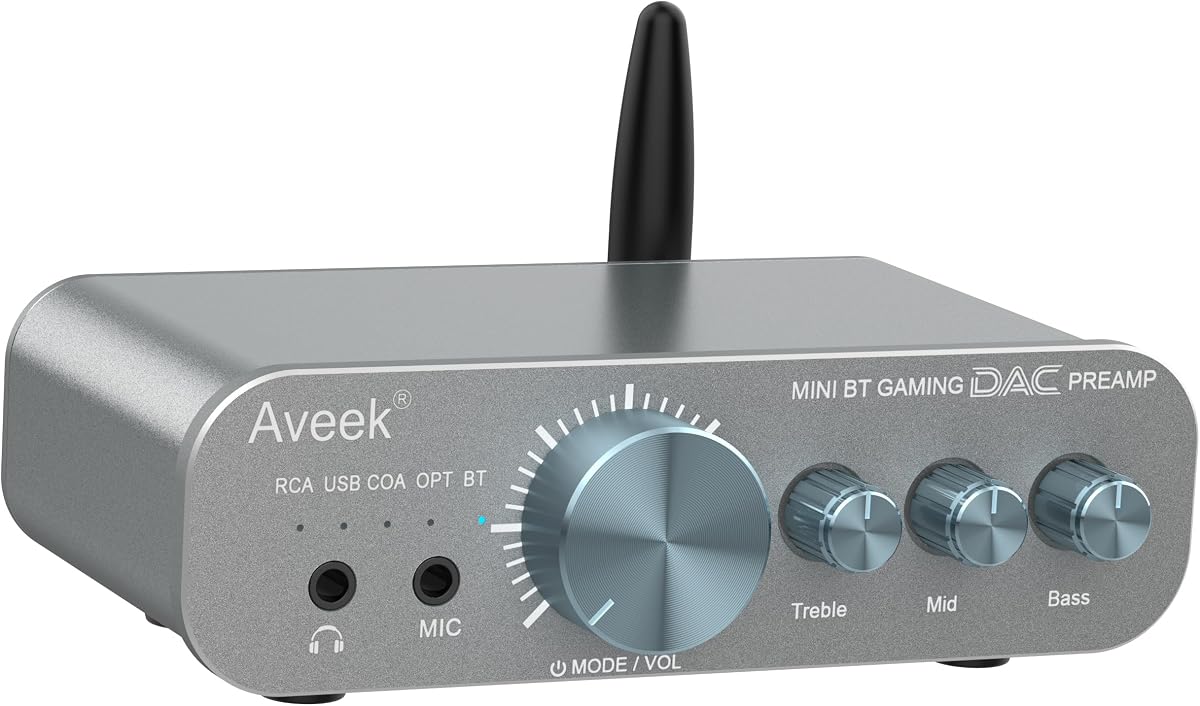
The Aveek DAC-200 earns a 4.4 rating and is the best budget-oriented choice in the guide. It combines a digital-to-analog converter, headphone amplifier, and compact preamp in a metal desktop enclosure. Despite its accessible positioning, it supports five input types: Bluetooth, USB, optical, coaxial, and RCA.
We may earn a commission when you buy through this link, at no additional cost to you.
For PS5 use, USB and optical provide the most practical paths, while the additional inputs let the same device serve a PC, television, smartphone, tablet, or CD player. A three-band front-panel EQ independently adjusts bass, mids, and treble, making it easier to adapt game audio, dialogue, and music without software. Its 3.5mm output, front microphone input, and monitoring support are practical for chats and streaming.
Audio processing supports 24-bit/96kHz, 113dB SNR, and distortion below 0.003%. The headphone amplifier is designed for 16–100Ω models, covering many gaming headsets, IEMs, and ordinary desktop headphones. Its limits are clear when compared with the K7 and DX1 II: there is no balanced 4.4mm jack, maximum output is less substantial, and the resolution ceiling is lower.
The DAC-200 is best for a PS5 player who wants clean headphone audio, physical EQ controls, and several source options without moving into premium desktop hardware. It also has a rear 3.5mm preamp output for compatible downstream equipment. For someone with only one console and a basic headset, it may be more than necessary, but its flexibility makes it an easy recommendation.
Separate bass, mid, and treble controls offer quick adjustments directly on the enclosure. This is especially helpful for PS5 users who do not want to configure complicated equalizer software for every headset.
Five inputs allow the DAC-200 to serve several entertainment sources. Bluetooth and analog RCA broaden its role beyond the PS5, while optical and coaxial inputs support digital sources with minimal cable confusion.
We may earn a commission when you buy through this link, at no additional cost to you.
The Topping DX1 II has a 4.5 rating and is the most premium-focused recommendation here. Built around the ESS ES9039Q2M DAC and XMOS XU-316 processor, it supports PCM up to 384kHz and DSD256. Its four-channel balanced architecture, selectable gain, and output power up to 1000mW per channel target demanding headphones.
We may earn a commission when you buy through this link, at no additional cost to you.
Gaming customization is unusually thorough. A ten-band parametric equalizer offers independent left and right control, with frequency, gain, and Q-factor adjustment. Up to three presets can be stored on the device, while the TOPPING Home web platform supports drag-and-drop editing, AutoEQ profiles, and importing or sharing EQ files. A PS5 player can therefore create separate settings for competitive shooters, cinematic games, and general media.
The connection options extend beyond standard gaming use. USB-C provides power and audio, optical input adds EQ to external sources, and digital output can send USB audio to another converter. Preamp mode uses the RCA or balanced outputs with full volume control for powered speakers, while the 3.5mm TRRS jack supports headset microphones. Listed specifications include a noise floor below 0.9µVrms, THD+N below 0.00007%, 128dB dynamic range, and −140dB crosstalk.
The DX1 II is ideal for an enthusiast who wants a premium DAC, balanced headset output, and genuinely granular equalization. Its controls are more sophisticated than a console-only buyer needs, and the web workflow may take time to learn. Even so, it offers exceptional measurement claims, flexible routing, and enough power for both sensitive IEMs and demanding gaming headphones.
Ten bands allow narrow, deliberate corrections rather than only broad bass and treble changes. Separate left and right controls can also address channel differences, making the tool useful for both game presets and long-term headphone matching.
The balanced architecture extends through the DAC and output stages, rather than merely providing a balanced connector. The 4.4mm output is paired with selectable gain and substantial power for compatible high-end headphones.
We may earn a commission when you buy through this link, at no additional cost to you.
The Fosi Audio DS3 carries a 3.9 rating and offers a portable alternative to a full desktop DAC. Its USB-C dongle design weighs 16 grams and combines an ES9039Q2M converter, XMOS POWERED processor, 7.1 spatial processing, an FPS sound mode, and both 3.5mm and 4.4mm headphone outputs.
We may earn a commission when you buy through this link, at no additional cost to you.
It supports PCM up to 32-bit/768kHz and native DSD512, with listed signal-to-noise ratio of at least 122dB and distortion below 0.0003%. UAC 1.0 and UAC 2.0 modes support different source capabilities, while eight digital filters and an eight-band hardware-level parametric EQ provide additional control through a web panel.
The major compromise is power. Listed balanced output reaches 220mW at 32Ω, which is lower than the desktop-focused K7, DX1 II, and K5 Pro. It may suit many lightweight gaming headsets and earphones, but it is not the strongest choice for difficult high-impedance headphones. Its 3.9 rating also places it behind the more consistently favored options in the list.
The DS3 is appealing for PS5 players with limited desk space or for users who want a portable DAC that can move between a console, PC, phone, or Switch. Its gaming effects and balanced output add value beyond basic high-resolution conversion. For heavier headphone loads or an established desktop system, one of the larger amplifiers will offer more headroom.
The compact enclosure reduces cable clutter and is easy to carry. Built-in spatial and footstep-oriented effects provide gaming features without requiring installation of a desktop control application.
The ES9039Q2M, high PCM rates, and native DSD support bring serious conversion specifications to a portable format. Actual game resolution on PS5 will depend on the console's UAC mode and the selected input configuration.
We may earn a commission when you buy through this link, at no additional cost to you.
The Sound Blaster G8 has a 4.2 rating and is built around a distinctive premise: two USB-C inputs with audio mixing. It can receive digital audio from two USB devices simultaneously, making it especially interesting to PC users who want game, chat, music, or communication sources combined through one output.
We may earn a commission when you buy through this link, at no additional cost to you.
Native playback reaches 32-bit/384kHz, while the custom Xamp discrete bi-amplifier drives the left and right headphone channels individually. Its stated 130dB dynamic range sits among the strongest figures in this guide, and the Sound Blaster Acoustic Engine adds gaming enhancements intended to improve battlefield awareness.
Although the G8 can serve a PS5, its defining dual-USB design is more naturally aligned with computers. The supplied information does not describe the same breadth of digital inputs, spatial modes, or equalization found on the K7, C3, and DX1 II. It is therefore better viewed as a specialized desktop mixer than a console-first hub.
The G8 is a strong recommendation for a gamer who needs to combine two computer audio sources or use a wider mix of game and communication software. A PS5 owner with one console and one preferred headset may gain less from its headline feature. For direct console gaming, the Fosi Audio C3 or SteelSeries GameDAC Gen 2 presents a clearer gaming-oriented proposition.
The dual-input mixer allows two connected USB devices to contribute to the same headphone output. That can simplify workflows involving games, voice chat, music, and alerts on separate computers.
The discrete Xamp architecture separately drives each stereo channel. The stated design goal is cleaner, more precise amplification, while the high dynamic-range specification targets both quiet environmental cues and louder effects.
We may earn a commission when you buy through this link, at no additional cost to you.
The Topping DX1 II appears twice in this guide because it genuinely suits multiple buying priorities. Beyond its premium recommendation, it is notable for combining a console-friendly USB-C connection with advanced balanced headphone amplification and detailed parametric equalization. Its 4.5 rating reflects a feature set aimed at enthusiasts.
We may earn a commission when you buy through this link, at no additional cost to you.
Its ES9039Q2M converter and XMOS XU-316 processor support PCM up to 384kHz and DSD256. A four-channel balanced architecture feeds both the 3.5mm and 4.4mm outputs, with gain switching for sensitive or demanding headphones. The listed 1000mW per channel through the balanced connection gives it more headroom than many compact gaming DACs.
Its editing tools separate it from simpler adapters. The 10-band parametric EQ includes independent left and right adjustment, three onboard presets, browser-based profile import, and AutoEQ support. Optical input, optical output, and preamp modes make it possible to process audio from a console or television and then send the result to another system.
For a PS5 gamer who wants a permanent desktop hub, the DX1 II can be more rewarding than a small adapter because it grows with different headphones and sources. The trade-off is complexity: ten-band PEQ, multiple operating modes, gain selection, and web-based setup demand more attention than a conventional volume-and-input box. Those seeking simplicity should favor the Aveek DAC-200.
Users can select 3.5mm single-ended or 4.4mm balanced output without moving to another device. This makes it easier to compare the same headset across wired configurations and accommodate different gaming systems.
Optical input, digital output, and preamp functions extend the DX1 II beyond a basic game adapter. These modes are useful when connecting it with an amplifier, powered speakers, a television, or another external converter.
We may earn a commission when you buy through this link, at no additional cost to you.
The SMSL PO100 PRO earns a 4.6 rating, but it serves a different role from most entries in this guide. It is a compact USB digital interface and digital-to-analog converter with digital outputs rather than a conventional headphone amplifier. Its purpose is to capture high-resolution audio from a source and route it to another DAC or digital audio device.
We may earn a commission when you buy through this link, at no additional cost to you.
The XMOS XU316 processor supports asynchronous transmission and PCM up to 32-bit/768kHz. Inputs include USB Type-C, IIS, optical, and coaxial, while outputs cover I2S, optical, and coaxial. Native DSD and DOP64 are supported, along with MQA decoding without additional software when the player can output through ASIO or WASAPI.
For PS5 use, the listed method involves selecting DOP64 output in the playback software and connecting optically or coaxially to a compatible DOP64 receiver. That makes the PO100 PRO less convenient for a basic console-and-headset installation than products with a front headphone jack. It is most appropriate for users who already own or intend to add a separate DAC or amplifier.
Choose the PO100 PRO when your goal is a high-resolution bridge in a larger digital system rather than direct gaming amplification. Its 4.6 rating and broad format support reflect strong technical capability, but the need for another output stage narrows its audience. Most PS5 gamers wanting a self-contained solution should favor the Aveek DAC-200, Fosi Audio C3, or SteelSeries GameDAC Gen 2.
Optical, coaxial, and I2S outputs let the unit pass audio to compatible equipment. This is useful for users who want a modern USB interface while retaining an established external DAC or home theater chain.
Native DSD, DOP64, and MQA support distinguish this converter from basic PS5 adapters. These formats are most useful in a carefully configured digital playback system rather than everyday console gaming.
We may earn a commission when you buy through this link, at no additional cost to you.
The SMSL PS100 has a 4.2 rating and is a straightforward converter for extracting digital audio from a television or other source into stereo analog output. Its most relevant feature for PS5 owners is HDMI ARC support, allowing audio from a connected television to be routed through the converter.
We may earn a commission when you buy through this link, at no additional cost to you.
Optical and coaxial inputs provide alternatives for digital equipment, while a USB interface can accept digital audio from a computer or mobile device. Maximum signal resolution is 192kHz, and an independent ES9023 DAC handles conversion. The output consists of left and right RCA connections for an amplifier, powered speakers, or another analog input.
This design is notably different from a gaming DAC with a 3.5mm headphone jack. The PS100 does not directly power headphones, so it needs an additional amplifier. Its 192kHz ceiling and lack of balanced output also place it below several newer options for high-end desktop listening. Its strength lies in straightforward home-cinema integration rather than competitive gaming enhancement.
The PS100 is best for someone whose PS5 is connected to a television and who wants to improve the TV's analog audio output for a stereo system. If the goal is to drive a gaming headset directly, choose an integrated DAC-amplifier such as the Aveek DAC-200 or Fosi Audio K5 Pro. If the goal is simply cleaner PS5 audio through headphones, the SteelSeries GameDAC Gen 2 may be more direct.
HDMI ARC lets the converter receive audio from a television, including a connected PS5. This is useful when the television lacks a convenient analog output or when a stereo system needs a line-level feed.
Left and right RCA outputs provide a familiar connection to powered speakers or an amplifier. Since there is no headphone stage, the PS100 is best viewed as the first stage in a larger audio system.
We may earn a commission when you buy through this link, at no additional cost to you.
The right PS5 DAC depends on how you listen, which output equipment you own, and how much control you want over game audio. Connection compatibility, amplification, format support, and setup complexity matter more than headline resolution alone.
Check whether the console sends audio digitally through USB-C, optical audio, or a television's HDMI ARC connection. USB-C is the simplest direct route for many DAC-amplifiers, while optical is useful with televisions and older audio chains. Some gaming DACs also need a specific UAC mode for PS5 compatibility, so confirm that the device supports console operation before expecting game audio to appear.
Choose the connection that matches your setup without unnecessary adapters, and verify whether the same cable also supplies power.
A 3.5mm single-ended jack supports most wired gaming headsets and earphones, while a 4.4mm balanced jack can benefit compatible higher-end headphones. Balanced output is not automatically better for every headset; the headphone's impedance, sensitivity, and cable arrangement determine whether it is appropriate. Some users may also prefer RCA output to a separate amplifier or powered speakers.
Match the connector to your existing headphones and speakers rather than paying for unused outputs.
A headphone amplifier supplies enough voltage and current to drive your headset cleanly. Low-impedance gaming headsets are usually easy to power, while high-impedance or low-sensitivity headphones may need more output voltage for adequate volume and bass control. The products here range from modest portable stages to desktop amplifiers with substantially higher listed power.
For ordinary gaming headsets, 16–100Ω support is often sufficient; look for higher output power when using demanding audiophile headphones.
Specifications such as 32-bit/384kHz PCM, DSD256, and DSD512 show the converter's theoretical capabilities, but the source must provide a compatible signal. PS5 games generally do not create a reason to chase the maximum rate advertised by every DAC. Optical connections and console USB modes can also impose practical limits, making compatibility more meaningful than an isolated maximum figure.
Prioritize clean conversion, low noise, and reliable operation over a headline rate your PS5 cannot use.
Footstep enhancement, virtual surround, HRTF rendering, and preset EQ can make stereo headset cues easier to identify. These effects are not universally beneficial: some players prefer a neutral sound for comparing audio or using a headset's own tuning. Hardware processing is convenient because it can work directly with console audio, whereas deeper equalizer software may require a computer.
Choose processing that matches your competitive priorities and verify whether it can be disabled.
Two-band or three-band controls offer quick bass and treble changes from the front panel. Parametric equalizers provide more precise frequency, gain, and Q adjustments, making them useful for correcting headset frequency response or creating game-specific profiles. Browser-based editors are convenient on a PC but add setup complexity, while onboard presets are convenient during PS5 play.
Choose simple controls for quick adjustments and parametric tools for a more involved tuning process.
Optical, coaxial, Bluetooth, RCA, and multiple USB inputs allow one device to serve a console, television, computer, phone, and traditional audio equipment. A preamp output can feed powered speakers or another amplifier, while digital output can send a processed signal to an external DAC. Greater flexibility is helpful in a multi-device setup but adds controls and may increase the unit's size.
List the devices you actually plan to connect before choosing a multi-purpose model.
Low noise is particularly important for sensitive earphones because hiss is easiest to hear during quiet passages. Low total harmonic distortion and high signal-to-noise ratio help the DAC preserve the original signal, while a metal chassis can provide durability and electromagnetic shielding. These specifications should support—not replace—a practical assessment of compatibility, outputs, and controls.
For a quiet gaming environment or music use, prioritize a low noise floor and clean, well-built unit.
Start by identifying the correct PS5 audio path. Connect the DAC according to its instructions, select the matching USB or optical input, and set the console's audio output to the appropriate digital device. If the unit has UAC 1.0 and UAC 2.0 modes, use the console-compatible mode first. Keep the console and DAC volume controls coordinated so one source does not unexpectedly mute the other.
Install any required control software on a computer before creating EQ presets, particularly for a DAC with a browser-based editor. Begin with a neutral profile, make modest adjustments, and save separate configurations for different games, headsets, and listening levels. Test voice chat, menu sounds, music, and gunfire to ensure the settings work across every application rather than optimizing for one scene.
Keep the converter and connected cables dry, stable, and away from strong magnetic or electrical interference. Avoid inserting connectors while devices are powered when the manufacturer advises otherwise, and do not force a plug into a port whose shape does not match. Clean removable dust carefully with a dry method, update control software when offered, and preserve the included cables and manual for future setup changes.
A DAC is not required for normal PS5 operation, because the console can already send digital audio to a television, headset, or compatible display. It becomes useful when your existing output lacks the connections you need, your headphones need dedicated amplification, or you want more control over EQ and spatial processing. The improvement depends on the rest of the audio chain and the specific features you use.
USB-C is usually the simplest option when the DAC supports console-compatible USB audio and can draw power through the same cable. Optical is valuable when the PS5 is connected to a television, when you want to avoid USB compatibility issues, or when the DAC is part of a larger digital system. Check the DAC's required UAC mode and ensure the PS5 recognizes the selected output.
A balanced output can provide a cleaner or more symmetrical signal for compatible headphones, but it does not automatically improve every setup. The headset must support the appropriate balanced connection, and its internal design determines how much benefit is audible. A good single-ended DAC with adequate power may satisfy many players more effectively than a balanced model they cannot use properly.
Some gaming DACs create virtual surround or HRTF-based effects for stereo headphones, while others simply provide a cleaner digital signal. The Fosi Audio C3 and DS3 include dedicated spatial or FPS-oriented processing. The SteelSeries GameDAC Gen 2 also supports console spatial-audio standards, but users should compare effects with the original game mix because processing can change the intended balance.
It depends on whether the DAC itself includes Bluetooth. The Aveek DAC-200 and Fosi Audio K7 list Bluetooth connectivity, allowing a source to send audio wirelessly to the DAC before it reaches wired headphones. A DAC without Bluetooth generally requires a wired headset or another separate wireless transmitter.
For normal gaming, the console's native game-audio format is more important than the largest rate advertised by a DAC. High rates such as 384kHz or 768kHz are mainly useful with compatible computer sources, high-resolution music files, or specialized digital workflows. Users should prioritize a stable connection, low noise, adequate headphone power, and features they will actually use.
An integrated amplifier is usually the most convenient choice because you can connect a wired gaming headset directly. A digital converter without a headphone stage, such as the SMSL PS100 or PO100 PRO, requires an amplifier or powered speakers downstream. Integrated models reduce cable count and make the unit easier to use as a complete PS5 audio hub.
Set the digital source and DAC volume appropriately for the device, then raise the downstream amplifier until it reaches a comfortable level without distortion. If the amplifier has a gain switch, select the range appropriate for the headphone's impedance and sensitivity. Avoid making both stages louder than necessary, since extra amplification does not improve the sound and can leave less clean headroom.
The Fosi Audio K7 is the strongest overall choice because it combines broad connectivity, balanced output, high-resolution conversion, and substantial headphone power. The Aveek DAC-200 provides the best budget route into a dedicated gaming DAC, while the Topping DX1 II is the premium pick for users who value a balanced architecture, detailed measurements, and ten-band parametric EQ.
The right secondary choice depends on the setup. Fosi Audio C3 emphasizes competitive FPS tools, SteelSeries GameDAC Gen 2 favors effortless PS5-to-PC switching, and the DS3 prioritizes portability. The PS100 is most appropriate when extracting television audio for an external stereo system, while the PO100 PRO and Sound Blaster G8 serve specialized digital-routing and dual-source workflows.
Before ordering, verify the PS5 connection method, headphone impedance, available outputs, and required operating mode. Current prices and availability can change, so check the latest listing and recent customer feedback rather than relying only on a past deal or an outdated configuration guide.