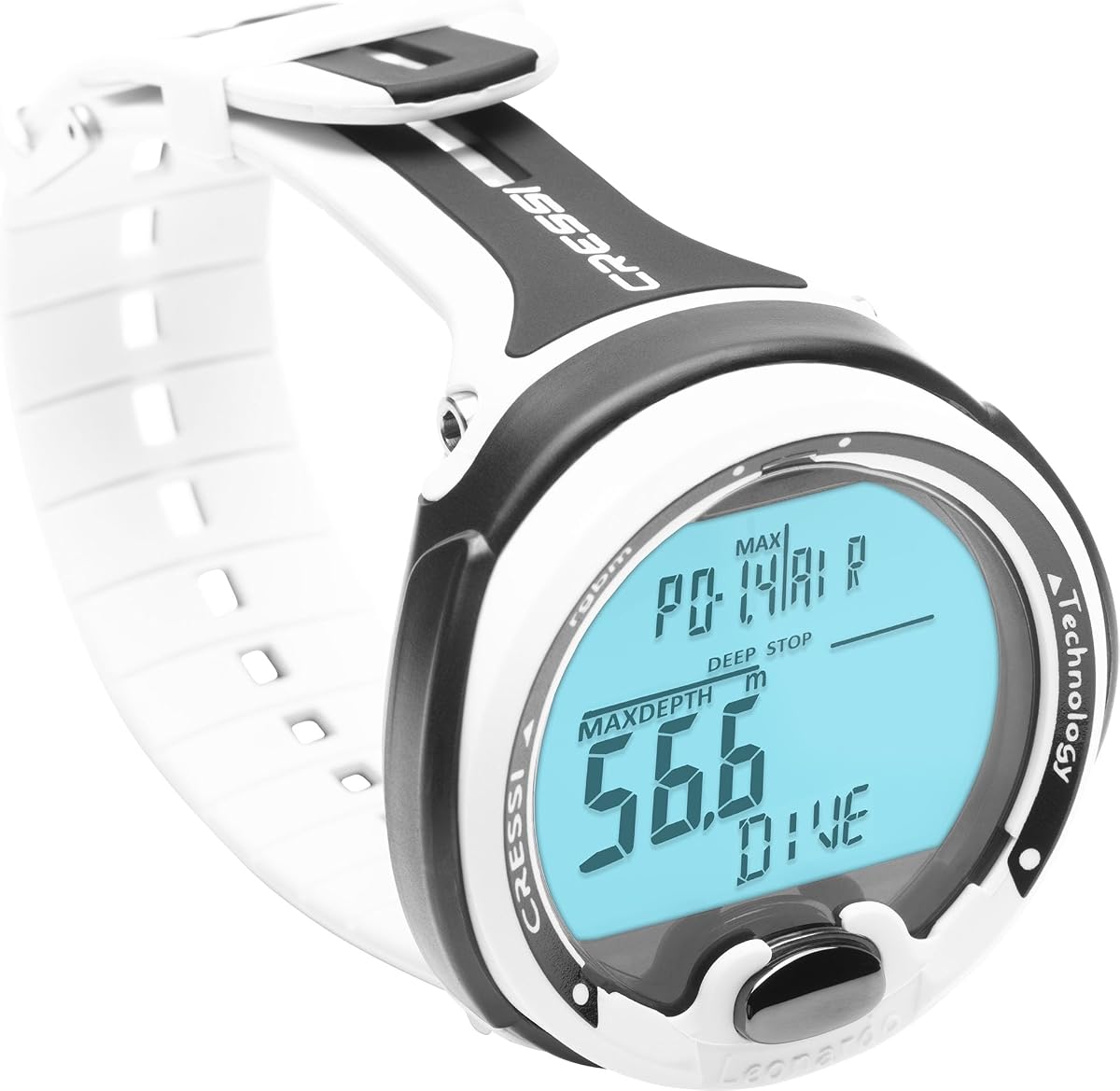
CRESSI Leonardo 2.0 G2
4.2Editor score
Air, Nitrox, Gauge modes
One-button menu control
Mobile device connectivity
Our Dive Computer for Beginners guide compares ten leading models for readability, dive modes, navigation, connectivity, comfort, battery life, and ease of use.
A dive computer is one of the most important pieces of safety equipment for a new diver, but choosing one does not require memorizing every technical specification. The best options make essential information easy to read underwater, support the dive styles you expect to use, and provide understandable menus and alerts without unnecessary complexity.
We compared ten dive computers across the supplied specifications, focusing on display visibility, control interfaces, supported gas and dive modes, navigation features, connectivity, battery considerations, and practical setup. The list covers wrist computers, watch-style models, an underwater unit, and a dedicated freediving watch for readers with different interests.
Each review explains what stands out, where compromises may appear, and which type of beginner could benefit most from the product. Product ratings are included for reference, while pricing and availability can change, so readers should confirm current details and take a guided course before making a final safety-related decision.
4.2Editor score

4.7Editor score

4.7Editor score
This side-by-side comparison highlights the main differences in interface design, display, supported activities, navigation, connectivity, and battery approach. It provides a quick way to identify the model that best matches a beginner's preferred type of diving.


The Shearwater Research Peregrine combines a focused interface with a well-regarded 4.7 rating, making it a strong overall recommendation for divers who are learning to read and operate a dive computer. Its state-aware menu structure is designed to keep navigation predictable, while the two physical buttons reduce the learning curve for someone who has never used a wrist computer before.
We may earn a commission when you buy through this link, at no additional cost to you.
The most useful feature for a beginner is the deliberately restrained control scheme. Instead of presenting a dense collection of functions without context, the interface guides the user through relevant choices and returns to a familiar screen. The buttons are made from 316 stainless steel, adding a sense of durability in an environment where gloves, cold water, and movement can make small controls difficult to operate.
Battery life is listed at up to about 30 hours on a medium brightness level, which is meaningful for divers organizing multiple dives in a single day. The included USB wireless charging station reduces cable clutter, although the rechargeable design means the battery should be charged fully before a trip. Users should also account for the fact that display visibility and charging needs can vary with settings and conditions.
This is a good choice for a recreational diver who values clear operation over smartwatch extras. It is less suitable for someone wanting a broad set of fitness functions, surface mapping, or extensive group communication. Even so, the Peregrine focuses on the fundamentals that matter most to a beginner: readable information, straightforward menus, physical controls, and dependable charging. It is our most balanced recommendation in the guide.
The two-button, state-aware menu reduces guesswork because the interface is designed around the current task. A novice can learn the control sequence without carrying a separate technical background into every dive.
With up to 30 hours on medium brightness, the Peregrine can support a full day of planned dives. Charging at the included wireless station before departure is the simplest way to avoid arriving with an unexpectedly depleted battery.
We may earn a commission when you buy through this link, at no additional cost to you.
The CRESSI Leonardo 2.0 G2 is a practical first dive computer for someone who wants core scuba functions without moving into a feature-heavy smartwatch. It carries a 4.2 rating and supports Air, Nitrox, and Gauge modes, giving new divers the principal modes they are most likely to encounter during introductory recreational dives.
We may earn a commission when you buy through this link, at no additional cost to you.
Its single-button interface is the defining benefit for beginners. Menus can be operated using one control, which makes the watch easier to learn and reduces the number of controls that must be located while wearing dive gloves. Visual and audible alarms provide important warnings, while compatibility with iOS and Android devices expands the value of the computer beyond the dive itself.
The model also supports USB and infrared data transfer for moving dive logs to a computer or compatible device. This is useful for reviewing profiles after a dive, although newer divers may find a phone-based workflow more familiar. The trade-off is that the Leonardo 2.0 is a straightforward traditional dive computer, not a full sports watch, so it does not aim to replace fitness tracking, payments, or general-purpose apps.
For a cost-conscious beginner who will use the device primarily for recreational scuba, this is a strong choice. It covers the key operating needs, uses a simple control method, and provides clear alerts without forcing the user to learn a complicated interface. Divers should confirm the exact gas settings, download method, and relevant operating details through certified training before relying on the device.
Air, Nitrox, and Gauge modes cover common recreational configurations. A beginner can start with one mode and learn the display before adding more options as training and experience progress.
Visual and audible alarms make critical information harder to miss, while USB and infrared transfers support later review. The optional mobile connection adds useful tracking without turning the watch into a complex smartwatch.
We may earn a commission when you buy through this link, at no additional cost to you.
The SUUNTO D5 is a compact, colorful option for divers who want a straightforward computer with wireless capabilities. Its 4.0 rating reflects a generally positive customer reception, while the 100-meter water resistance and digital compass make it suitable for a broad range of recreational activities beyond basic pool practice.
We may earn a commission when you buy through this link, at no additional cost to you.
Wireless tank-pressure support is the standout feature for divers who own compatible equipment. Instead of treating the computer as an isolated wrist display, it can receive relevant pressure information from a transmitter. Vibration alarms provide another alert method, which can be helpful in situations where an audible tone is less noticeable, and wireless mobile connection supports post-dive use.
The main limitation is that several advanced features depend on compatible accessories or setup. A new diver may not yet own a transmitter, and the built-in compass should not be confused with full surface navigation. The smaller color screen also offers less visual space than large premium models, although it can still present core information in a compact form.
The D5 makes sense for a beginner who values a small profile, wireless integration, and a modern color display without moving to a large smartwatch. It is a better fit than a simple freediving-only watch for scuba divers, but its most impressive features are most useful once the diver's equipment and skills become more established.
Wireless tank pressure can add useful context during compatible setups, while mobile connectivity helps bring dive information into a more familiar software environment. Neither feature should be assumed to work without compatible hardware and proper pairing.
The color screen gives the D5 a more modern appearance and can make changing data fields easier to distinguish. Its smaller size also makes it less bulky on smaller wrists than some full-size adventure watches.
We may earn a commission when you buy through this link, at no additional cost to you.
The Garmin Descent X30 is the premium choice in this guide, combining a rugged 2.4-inch color display with 10-ATM dive capability and surface GPS. Its 4.7 rating reflects a strong reception, and the oversized screen provides an immediately understandable advantage for divers who want depth, time, and decompression information visible at a glance.
We may earn a commission when you buy through this link, at no additional cost to you.
The housing and bezel use recycled ocean-bound plastics, while four large metal leakproof buttons are positioned on top of the housing. The flip-screen orientation can make top-mounted buttons easier to access, and up to three data fields can be customized per page. Dive profiles support single-gas and multi-gas configurations, including trimix, giving the device considerable flexibility.
Surface GPS is useful for locating dive sites and marking entry and exit points. A three-axis digital compass supports underwater orientation, the water-temperature sensor helps identify thermoclines, and surface-interval tracking assists with planning multiple dives in one day. NDL Aware depth metrics connect changes in depth with the current no-decompression limit, which can make future planning more intuitive.
The trade-off is size and feature density. The X30 is physically large, and some capabilities go beyond what a first dive requires. Even so, beginners who can comfortably wear it gain an unusually readable display, excellent surface positioning, and a feature set that can grow with their experience. It is best viewed as a long-term premium dive computer rather than a minimal first watch.
The 2.4-inch display leaves room for larger characters and multiple data fields. During a dive, that extra visual space can reduce the temptation to squint or repeatedly cycle through screens.
Surface GPS, compass, temperature, and interval tracking create a more connected picture of the dive day. These features are particularly useful for boat-based divers who want to return to a marked entry location.
We may earn a commission when you buy through this link, at no additional cost to you.
The Mares Puck Pro EZ stands out with the highest supplied rating in the group at 4.8. It is a focused wrist dive computer with a high-contrast screen, one-button control, and clear presentation of depth, time, temperature, and no-decompression limits, making it especially appealing to readers who prioritize readability.
We may earn a commission when you buy through this link, at no additional cost to you.
Its decompression calculations use the Buhlmann ZH-L16C algorithm with dual gradient factors. That is meaningful technical information, but the single-button interface is what stands out for a novice: settings, modes, and displayed information can be reached without learning a complicated multi-button arrangement. The screen is designed to keep the most important dive data visible rather than hiding it behind elaborate visual effects.
Single-gas Nitrox compatibility from 21 to 50 percent covers an important recreational configuration. The limitation is that the stated support does not extend to multi-gas diving. The replaceable power source is listed as supporting up to 100 dives, and Bluetooth enables direct log uploads and sharing, although users will still need compatible software or devices for the full workflow.
This model is a strong match for a recreational diver who wants a traditional, highly readable computer and may use Nitrox. It is less suitable for someone planning technical multi-gas dives. For a beginner, the combination of visibility, straightforward operation, and a strong customer rating creates a convincing reason to consider the Puck Pro EZ.
The high-contrast display emphasizes depth, elapsed time, temperature, and no-decompression limits. Keeping core information visible helps a new diver build confidence in checking the screen without navigating through several menus.
Supporting Nitrox from 21 to 50 percent covers a useful recreational range. The one-button setup keeps the configuration process approachable while leaving room for future Nitrox experience.
We may earn a commission when you buy through this link, at no additional cost to you.
The Cressi Donatello is an approachable computer that earns its place through simplicity and versatility. Its 4.4 rating indicates a favorable reception, while a single-button interface makes it easy for a beginner to learn basic navigation without memorizing several physical controls.
We may earn a commission when you buy through this link, at no additional cost to you.
Air and Nitrox modes cover standard recreational scuba, and the included freediving and Gauge modes expand its usefulness beyond one activity. User-selectable deep stops allow divers to adjust ascent planning to their preferences, offering more control than the most minimal computers. The optional infrared interface supports data transfers to both Windows and Mac systems.
The main drawback is the lack of built-in wireless connectivity. Newer divers accustomed to phone apps may find infrared transfer less convenient, and it requires the appropriate receiver or compatible computer setup. The Donatello is therefore better viewed as a dependable dedicated dive watch than an integrated smartwatch, which may be a positive for users who want fewer distractions.
It is a good choice for a beginner planning recreational scuba with possible freediving interest. The straightforward interface reduces training friction, while the additional modes make the device adaptable. Divers should learn ascent-stop settings and gas configuration with their instructor rather than experimenting casually, because ease of operation does not replace proper instruction.
Air, Nitrox, Gauge, and freediving modes make the Donatello adaptable. A new diver can begin with one mode and use the others as training and travel plans become more varied.
The optional infrared connection supports log transfer to Windows and Mac computers. It is less fluid than Bluetooth but offers a straightforward path for reviewing dives without requiring a full smartwatch ecosystem.
We may earn a commission when you buy through this link, at no additional cost to you.
The Cressi Raffaello offers a balanced middle ground for divers who want more capability than a basic watch without moving to a large smartwatch. It has a 4.4 rating, a built-in digital compass, mixed-gas planning, and both Bluetooth and USB connectivity for managing dive records.
We may earn a commission when you buy through this link, at no additional cost to you.
Its RGBM-based mixed-gas planning system supports preparation for multiple gas mixes. This can be valuable for divers pursuing more advanced configurations, although beginners should not enable advanced gas settings without appropriate training. Four operating modes, including apnea and Gauge, broaden the device's range for freediving and alternative underwater activities.
The built-in compass removes the need to carry a separate compass on dives where orientation is important. A user-replaceable battery has an expected life of four years, reducing the recurring inconvenience associated with sealed rechargeable devices. Bluetooth and USB options also make log transfer more flexible than models that offer only one connection method.
The Raffaello is best for a diver who wants a dedicated computer with navigation and growing technical capability. It may feel excessive for someone taking only introductory pool or open-water courses, but it can remain useful as skills progress. The mixed-gas planning and compass features distinguish it from simpler recreational models.
A built-in digital compass is useful when heading direction matters during a dive. Beginners should still learn conventional navigation and practice the compass before relying on it in unfamiliar conditions.
Mixed-gas planning gives the Raffaello room to grow beyond a single recreational gas configuration. The feature should be introduced gradually through proper technical training rather than treated as a simple menu option.
We may earn a commission when you buy through this link, at no additional cost to you.
The Garmin Descent Mk3i is a feature-dense, premium watch-style dive computer with a 4.6 rating. Its 1.4-inch AMOLED display, sapphire lens, titanium bezel, and 200-meter dive-rated case give it an unmistakably high-end construction, while the 51-millimeter dimensions make wrist size an important consideration.
We may earn a commission when you buy through this link, at no additional cost to you.
SubWave technology can exchange preset messages with nearby divers and, when paired with the separately sold Descent T2 transceiver, monitor tank pressures and depth for up to eight divers. The built-in flashlight offers variable brightness and strobe modes in white or red. These are impressive features, but a beginner may not need them for ordinary recreational dives.
Dive readiness, DiveView maps with more than 4,000 listed sites, multi-band GPS, a compass, and storage for up to 200 dives create a broad planning and review platform. The watch also provides sports apps, health tracking, and other smartwatch functions. These features increase usefulness between dives but also create a deeper menu structure that may be challenging for a first-time user.
The Mk3i is best suited to a committed diver or technical-oriented buyer who values premium materials, communication, mapping, and smartwatch functions in one device. It is less suitable for someone seeking the simplest possible introduction. Its deeper dive rating and advanced features should be viewed as future capability, while a beginner can focus initially on the core display and training-supported settings.
Preset SubWave messages can improve awareness between nearby divers. The optional group-monitoring setup adds another layer, although the separate transceiver and the need for proper communication procedures make this a specialized feature.
The sapphire lens, titanium bezel, AMOLED display, flashlight, maps, GPS, and health tools create a device that works well above and below water. The large case and broad feature set require more setup than a conventional dive watch.
We may earn a commission when you buy through this link, at no additional cost to you.
The Garmin Descent G2 combines a 1.2-inch AMOLED display and 10-ATM dive rating with a 46-millimeter watch-style body. Its 4.6 rating makes it one of the strongest-rated products here, while the support for recreational, advanced, technical, freediving, and pool apnea modes gives a new diver room to explore different activities.
We may earn a commission when you buy through this link, at no additional cost to you.
Multi-GNSS support allows divers to mark surface entry and exit points, providing useful context for boat and shore dives. The sapphire lens and leakproof buttons suit frequent outdoor use, and the housing, bezel, and buttons are made entirely from recycled ocean-bound plastics according to the supplied specifications. Dive logs can be stored on the device and reviewed through the Garmin Dive smartphone app.
Smartwatch features include notifications, supported contactless payments, and Connect IQ personalization. Fitness, training, heart rate, sleep, and readiness tools can help describe readiness, though the stated information is an estimate and is not intended as medical guidance. These extras make the G2 useful between dives, but they also create a more complicated interface than a dedicated computer.
For a beginner who wants one watch for diving and everyday use, the G2 is a compelling option. Divers who want the simplest possible experience may prefer a traditional single-button model. The G2's strengths are its bright screen, broad mode support, surface marking, and seamless integration with a broader Garmin device ecosystem.
Marking entry and exit points helps divers identify where a surface interval began or ended. This is particularly valuable for boat operators and divers exploring unfamiliar shore-access locations.
Notifications, payments, training metrics, and health features reduce the need to switch between a dive watch and an everyday device. Users who prefer fewer menus can leave the optional features unused and concentrate on the diving display.
We may earn a commission when you buy through this link, at no additional cost to you.
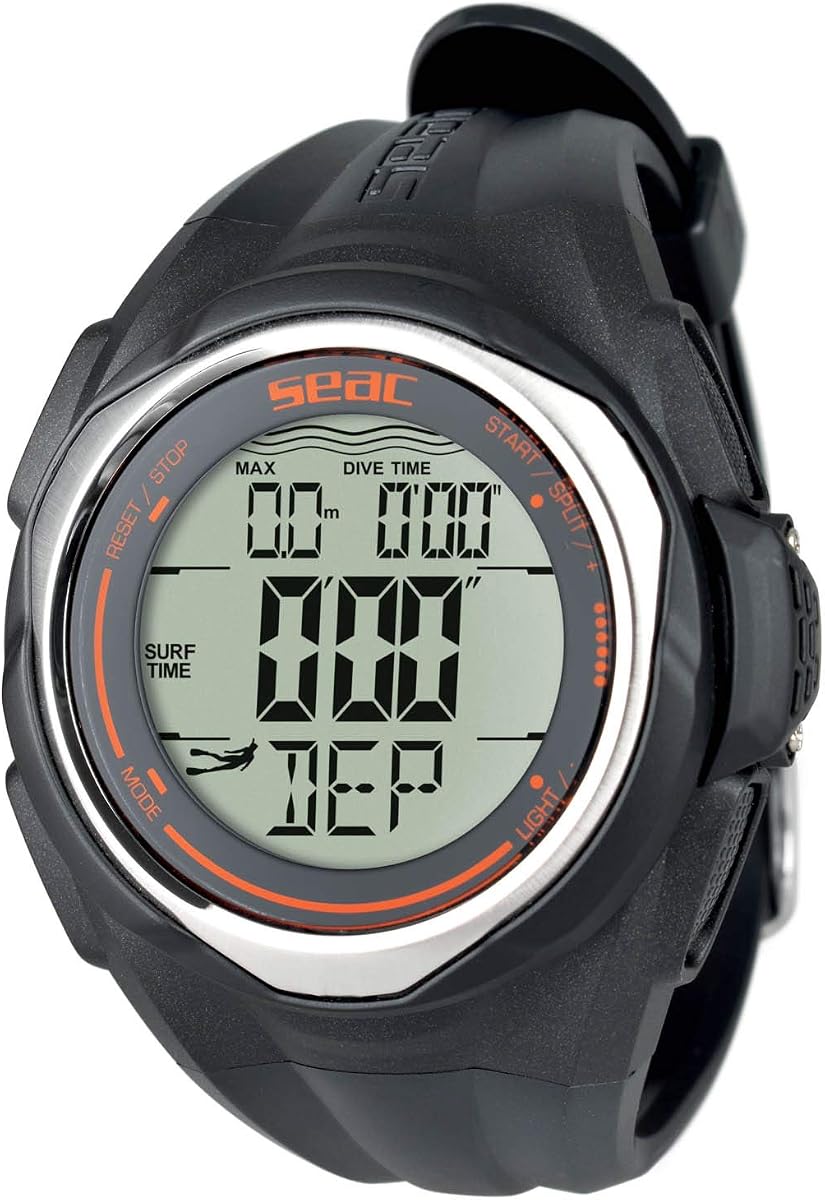
The SEAC Partner is a dedicated freediving computer rather than a general scuba diving watch. It earns a place in this guide because freediving is one of the most natural entry points into diving, and the 4.0-rated device offers a simpler path for people interested specifically in breath-hold sessions.
We may earn a commission when you buy through this link, at no additional cost to you.
A stopwatch, countdown function, and recording for up to 99 dives make it possible to monitor an entire freediving session. The backlit display helps in dim underwater conditions or low-light environments, while 100-meter water resistance suits submerged use. A standard CR2032 battery keeps the power system familiar and allows replacement without relying on a proprietary rechargeable pack.
The obvious limitation is its narrow purpose. The SEAC Partner is not the appropriate choice for scuba gas management, decompression planning, or multi-gas dives, and its feature set does not include the larger displays and advanced planning tools found in the dedicated scuba computers in this list. Its one-size wrist format may also not suit every wearer.
A snorkeler or freediving beginner who wants session tracking without unnecessary complexity should consider the Partner. It is a useful companion for pool apnea and recreational freediving, but scuba divers should choose a computer explicitly designed and configured for their dive modes and training requirements.
The ability to record up to 99 dives makes the Partner useful for structured pool sessions and repetitive surface-interval practice. Stopwatch and countdown functions support different training approaches.
Using a standard CR2032 battery makes maintenance straightforward for users familiar with common coin cells. Divers should still follow the manufacturer's guidance and confirm the correct battery orientation and installation.
We may earn a commission when you buy through this link, at no additional cost to you.
The right dive computer should be easy to operate, readable underwater, and appropriate for the activities you already plan to undertake. Beginners should balance essential safety information with simplicity rather than choosing solely by feature count.
A dive computer must communicate depth, time, remaining gas information where applicable, and decompression status without requiring prolonged screen study. Look for a display with strong contrast, clearly separated characters, and enough space for the data you use most. Larger screens can be easier for some people to read, but brightness, viewing angle, glare, and personal eyesight matter more than size alone.
Choose a display that remains clear in the conditions where you dive. A high-contrast screen is valuable, while a backlight can help in dark water. Practice reading every essential field before entering the water.
A one-button or two-button interface can be easier to learn than a crowded multi-button arrangement. Physical buttons that can be identified by touch are particularly useful with gloves, while screen touch controls may offer a modern layout but require more attention during active diving. The best beginner interface makes accidental changes difficult and provides clear confirmation when a setting changes.
Favor fewer controls and a predictable menu structure. Learn the sequence for mode selection, date and time setup, and returning to the dive display before your first open-water dive.
Consider the activities you expect to perform. Recreational scuba divers generally need Air and often Nitrox, while freedivers need apnea timing and technical divers may require multi-gas or trimix profiles. Gauge mode is useful for activities such as plein-water or instrument-focused diving, but it does not necessarily provide the same managed-dive information as Air or Nitrox modes.
Do not select advanced modes simply because the computer supports them. Begin with the mode matching your current certification and training, and move to additional configurations only when your instructor or dive professional explains them.
A digital compass, GPS, or marked entry and exit points can help orient a diver before and after the dive. Surface GPS is different from underwater positioning, and a compass still requires familiarity with its calibration and directional conventions. For beginners, these features are useful supplements to established navigation skills rather than replacements for them.
Boat-based and shore divers may value surface waypoints more than technical divers. Confirm whether the feature uses a standalone GPS, multi-GNSS positioning, or connected-device data before deciding which model fits your usual entry style.
Bluetooth, USB, infrared, and mobile connections can make it easier to save and review dive profiles. Wireless transfer is usually the most convenient, while infrared remains useful with older computers or in environments where pairing is inconvenient. Before buying, confirm which devices and operating systems are supported, since connectivity claims do not always mean every feature works with every platform.
Log transfer is most valuable when it supports regular review. Choose the connection method you will actually use, and ensure the necessary app or receiver is available before your trip.
Battery design affects both convenience and long-term ownership. A replaceable cell can be useful when recharging is inconvenient, while a rechargeable model avoids disposable batteries but requires access to a charger or charging base. Compare stated runtime under realistic brightness settings with the number of dives planned in a day.
Create a pre-dive charging or battery-check routine. Treat battery capacity as a planning tool rather than a guarantee, since settings, temperature, age, and use can affect actual performance.
A dive computer should fit securely without obstructing movement, remain easy to read, and withstand exposure to salt water, sun, pressure, and repeated button use. Large watch-style cases may feel stable but can be uncomfortable on smaller wrists. Strap adjustability, case size, screen visibility with a wetsuit sleeve, and button shape all influence practical comfort.
Try wearing the computer with the type of wetsuit and gloves you normally use. A secure fit is more important than matching a particular style, especially when a poor strap adjustment causes the display to shift underwater.
A computer should serve your current training while leaving room for the next level of activity. Beginners often benefit from moving between a simple dedicated watch and a more capable model after gaining experience. Features such as multi-gas planning, communication, detailed maps, and smartwatch functions should be treated as future tools rather than reasons to bypass training.
Prioritize the dive modes and navigation tools required by your current certification. If advanced features are likely soon, note that you may need to learn and configure them under professional guidance.
Begin by reading the complete manual supplied with your chosen model and completing the setup away from the water. Enter the correct date, time, altitude assumptions, personal limits, and other required information, then verify every selection by cycling through the menus. Watch a training video for the exact model, and compare its button sequence with the written instructions so you can locate the controls without hesitation.
Before every dive, perform a pre-dive check. Confirm that the display reads correctly, the battery has adequate charge, the active mode and gas values match your plan, and the computer is not showing an unexpected warning or error. Check that the date and time remain accurate, particularly after travel. If the device is new, perform the prescribed self-test and make sure your instructor knows when you last charged or changed its battery.
After the dive, rinse the computer with fresh water, especially after exposure to salt, sand, chlorine, or mud. Avoid pushing water into any pressure-contact points, and do not use harsh chemicals or abrasive tools. Dry the unit before opening any compartment, remove moisture from the strap, and store it away from direct heat and prolonged sunlight. Download or transfer the log when practical, and bring backup navigation and timing instruments as appropriate for your training and environment.
The easiest model is the one that presents core data clearly and has a menu system you can learn quickly. The Shearwater Research Peregrine and CRESSI Leonardo 2.0 G2 are strong starting points because their two-button and one-button interfaces limit control complexity. Your training environment and planned dive modes should ultimately guide the decision more than button count alone.
A dedicated wrist computer usually provides a more focused experience with fewer distractions. A watch-style model can be attractive when surface navigation, fitness tracking, maps, or everyday smartwatch functions matter, but it may also have a more complex menu. Beginners who want one device for every activity should consider the additional training and battery-management demands.
Only if you plan to dive with enriched air and have received the appropriate training. Air mode is sufficient for many introductory recreational dives, while Nitrox mode provides the computer with the correct gas information for your plan. Never change gas settings or use a computer mode without understanding the configuration and the limits involved.
It is helpful but not a replacement for basic navigation training. Several models include a compass, while surface GPS can mark entry and exit points for boat and shore dives. Learn conventional navigation, compass use, and the specific functions of your computer before relying on them in unfamiliar conditions.
Follow the manufacturer's guidance and check the battery before each dive. Replaceable-battery models should be checked for correct installation and expected life, while rechargeable models should be placed on the charger after dives. Do not wait for a low-battery warning before preparing for a day of multiple dives.
A regular fitness watch should not be assumed to calculate dive information, manage gas, or provide appropriate dive alarms. A dive computer is designed for underwater use and must be configured for the relevant dive mode. If your diving program requires a computer, use an appropriate model and confirm the requirement with your instructor or dive operator.
Most beginners can begin with clear depth and time displays, Air mode, reliable warnings, and straightforward navigation. Multi-gas planning, trimix profiles, advanced group communication, and extensive fitness features are not essential for an introductory course, although they may become useful later. Paying for complexity too early can make training and daily operation harder.
No, but regular transfers make it easier to review your profiles and preserve records. Confirm the app, cable, receiver, or computer compatibility before relying on the transfer method. Keep the device charged and maintain the original log until a successful transfer is complete.
The Shearwater Research Peregrine is the most balanced overall recommendation because its state-aware two-button interface, readable presentation, solid rating, and included charging station reduce the learning burden. The CRESSI Leonardo 2.0 G2 is a sensible budget-oriented choice with Air, Nitrox, and Gauge modes, while the Garmin Descent X30 leads the premium group with a large display, surface GPS, and extensive dive options.
Prioritize the features you will actually use: clear data, simple controls, the correct dive mode, a comfortable fit, and dependable battery management. Dedicated models such as the Mares Puck Pro EZ, Cressi Donatello, and Cressi Raffaello may suit divers who want a focused computer, whereas Garmin watch-style models make more sense for people who also value navigation, training, and everyday smartwatch functions.
Finally, check current product details, compatibility requirements, ratings, and prices before ordering, since availability and pricing can change. Whichever model you choose, use a reputable instructor, configure the computer under supervision, and carry the redundant equipment required by your training and dive plan. A well-chosen computer is an important safety tool, but sound training and disciplined procedures remain the foundation of every dive.