
VCELINK VDV Impact Tool
4.3Editor score
Reversible dual-standard blades
Adjustable impact control
Integrated wire puller
Included mini stripper
Compare the 10 best Ethernet Punch Down Tool options for Cat 5e to Cat 8, 66 and 110 blocks, keystone jacks, blade systems, impact control, and installation
An Ethernet punch down tool seats and trims twisted-pair conductors inside IDC terminals, making it essential for keystone jacks, patch panels, and 66 or 110 wiring blocks. A dependable model should deliver clean cuts, consistent pressure, comfortable handling, and compatibility with the terminals found in your installation.
The products in this guide were compared using their stated blade types, supported Ethernet categories, termination systems, impact controls, ergonomic features, storage provisions, and intended applications. The list includes general-purpose 66 and 110 tools, specialized keystone tools, and a broader coax installation kit.
Each review identifies what distinguishes the tool and where its design is less appropriate. Ratings and product details reflect the supplied listings, while current prices can change at any time. Readers should compare present availability, terminal compatibility, and included accessories before purchasing.
4.3Editor score

4.8Editor score

4.7Editor score
The comparison covers general-purpose impact tools, manual models, specialized 90-degree keystone tools, and a multi-function installation kit, with emphasis on terminal standards, blade handling, force control, ergonomics, and included utilities.


The Klein Tools VDV427-300 is an impact-style punch down tool built for technicians and serious home-network installers who need dependable 66 and 110 termination. Its 4.8 rating reflects a particularly strong combination of practical features, including a spring-loaded action, selectable impact force, a cushioned nonslip handle, and a metal-injection-molded blade.
We may earn a commission when you buy through this link, at no additional cost to you.
Its most useful strength is efficient single-step termination. The tool seats and cuts wires in CAT3, CAT5e, CAT6, and CAT6A cable, reducing the need to alternate between punching and trimming. Compatibility with both 66 and 110 panels and blocks broadens its usefulness for both new installations and repairs, while the high and low impact lever lets the user tune the action for different wire gauges and applications.
The included pick and spudger improve the ownership experience because they can be used to untangle and position conductors before the blade is engaged. The ergonomic handle is also well suited to extended patch-panel work, where a slippery or sharply contoured grip becomes tiring. The trade-off is that this is a general-purpose tool rather than a specialized one-motion keystone system, so it does not offer the same speed as a product designed exclusively around one jack family.
This is the most broadly useful selection in the guide for technicians, installers, and advanced DIY users who may work across mixed 66 and 110 environments. It combines the strongest supplied rating with adjustable force, a well-described ergonomic design, and broad cable support. For those who need one dependable tool for multiple conventional termination tasks, it is the leading recommendation.
Although the tool is not explicitly presented as compatible with Cat 7 or Cat 8, those higher categories should not be assumed compatible merely because the tool resembles models that support them. Confirm the blade geometry, wire type, and manufacturer instructions before using a punch down tool with any cable category not stated in its listing.
The combined punch-and-cut action is especially valuable when installing patch panels or maintaining a wall of outlets. A selectable high or low impact setting further helps balance seating force across different cable sizes and connector types.
The traditional punch down shape, cushioned handle, and nonslip surface are intended to reduce hand fatigue. Included pick and spudger accessories help with cable arrangement before each termination.
We may earn a commission when you buy through this link, at no additional cost to you.
The Cable Matters B0072K1QHM is a 110-blade punch down tool aimed at users who work with modern Ethernet categories and want more coverage than a basic Cat 5e or Cat 6 model. With a 4.3 rating, it stands out for its removable twist-and-lock blade, adjustable impact, and stated compatibility from Cat 5 through Cat 8.
We may earn a commission when you buy through this link, at no additional cost to you.
The blade retention system is a particularly thoughtful detail. Aligning the blade groove with the handle detent helps keep it from loosening during repetitive punchdowns, while the reversible design combines cutting and seating functions. Low and high force settings let technicians adapt the tool to jacks, blocks, and patch panels using 110 IDC terminals, and the spring-action mechanism seeks consistent terminations with less hand effort.
Its principal limitation is terminal scope. This model includes a 110 blade, not a 66 blade, so installers who regularly work with legacy 66 blocks may need another tool. The listing also recommends a separate keystone punch down stand for stable jack installation. That stand is useful for protecting a jack and improving alignment, but it adds another item to the installation setup.
The tool is well suited to installers and advanced enthusiasts who need a dedicated 110 solution across Cat 5e, Cat 6, Cat 6A, Cat 7, or Cat 8 cable. Buyers should verify that the specific jack or block uses 110 IDC terminals and that the conductor arrangement matches the blade. For that use case, the secure blade system, broad stated category support, and adjustable spring action provide a compelling package.
Because the product is designed for Cat 8 as well as lower categories, it may appeal to users working with shielded high-speed cabling. As with every punch down tool, terminal design, conductor positioning, and manufacturer instructions remain more important than the category label alone.
The twist-and-lock arrangement makes the removable blade easier to retain and replace. A secure fit can improve consistency during repeated terminations while reducing the chance of blade movement.
Stated support for Cat 5, Cat 5e, Cat 6, Cat 6A, Cat 7, and Cat 8 makes this a versatile 110-specific option. Confirm jack and blade compatibility before beginning a nonstandard installation.
We may earn a commission when you buy through this link, at no additional cost to you.
The TRENDnet TC-PDT combines 110 and Krone blades in a general-purpose punch down tool for installing common twisted-pair terminations. Its 4.7 rating reflects a balanced design that includes a comfort grip, twist-and-lock blade holder, precise reversible blades, and stated support from Cat 5 through Cat 6A.
We may earn a commission when you buy through this link, at no additional cost to you.
The defining advantage is blade flexibility. Users can move between 110 and Krone systems without replacing the entire tool, while the twist-and-lock holder supports fast changes and helps prevent blade pullout. The tool inserts and cuts terminations in one operation, making it suitable for telephone sockets, faceplates, and patch panels using the supported Ethernet categories.
Blade storage adds practical value for technicians who carry tools between jobs. The listing describes a holder designed to store a spare blade, reducing the chance of losing a small component in a tool bag. The tool is also backed by three years of TRENDnet manufacturer protection, and the company advertises technical support during normal business hours.
This is a sensible choice for a network installer who encounters both 110 and Krone terminals. It may be less attractive for someone working primarily with 66 blocks, because the supplied information does not list a 66 blade. Users should also remember that compatibility is about the IDC layout and blade standard, not just the cable category printed on the jacket.
Overall, the TC-PDT is a well-rounded tool with a strong supplied rating, useful blade storage, and two widely encountered termination formats. It gives installers a practical balance of versatility, handling, and support without moving to a brand-specific jack system.
Interchangeable reversible blades let the tool address 110 and Krone terminals. This is useful for mixed installations, provided the selected blade matches the connector precisely.
The twist-and-lock holder doubles as storage for a spare blade and helps resist pullout. That makes the tool more practical for technicians working from a mobile toolkit.
We may earn a commission when you buy through this link, at no additional cost to you.
The Cable Matters B0CW7MB965 is a dual-blade impact tool for users who need both 66 and 110 termination formats. Its 4.4 rating and combination of removable blades, adjustable impact, secure body storage, and broad stated Ethernet support make it a versatile middle-ground option in this guide.
We may earn a commission when you buy through this link, at no additional cost to you.
Unlike the earlier Cable Matters entry, this model includes both 66 and 110 blades. That expands its usefulness for wiring blocks and patch panels containing either IDC layout. The removable blade uses twist-and-lock sockets, and the blades can be stored within the tool body during transport. Low and high impact settings accommodate different termination requirements, while the spring action supports quick, low-effort seating.
The reversible cut and punch blade is another practical element, consolidating two required actions in the termination cycle. The tool is stated to work with Cat 5, Cat 5e, Cat 6, Cat 6A, Cat 7, and Cat 8 network or voice cable. As with any multi-category tool, installers should still ensure that the jack design, conductor arrangement, and blade geometry agree before punching.
This model is a good fit for an installer who wants one impact tool for common 66 and 110 blocks without carrying separate bodies for each standard. It is less specialized than the VCE and Rapink speed tools, which is an advantage when a technician may encounter several termination systems over time. The lack of a listed Krone blade is the main difference from the TRENDnet model.
For a broad 66 and 110 installation kit, the combination of dual standards, in-body storage, adjustable force, and stated high-category support is persuasive. Users should pair it with an appropriate keystone stand when terminating a loose jack for maximum stability.
Including both 66 and 110 blades covers two common IDC formats while keeping the tool body consistent. Switch blades according to the terminal markings and manufacturer instructions.
Storing removable blades inside the body helps protect them and reduces the chance of separation from the tool. It is especially convenient for mobile installers.
We may earn a commission when you buy through this link, at no additional cost to you.
The VCELINK B08XK752YK is a multi-function impact punch down tool that includes 66 and 110 blades, a reversible double cutter head, adjustable impact, and several built-in utilities. Its 4.3 rating reflects a feature-rich design aimed at network installers and DIY users who want more than a bare punch down body.
We may earn a commission when you buy through this link, at no additional cost to you.
The double cutter head performs the punch and cut together, helping reduce repetition at a jack or patch panel. Blades are interchangeable and reversible between 110 and 66 standards. A bottom opening stores an extra blade, while side-mounted pullouts include a wire puller and flat blade for cleaning up stray conductor ends. The package also includes a mini wire stripper.
Low and high impact settings provide some control over different cable types and termination applications. The ergonomic design and integrated accessories make this a convenient grab-and-go option, particularly for users who do not want to carry separate stripping and cleanup tools. Dedicated customer assistance is advertised for 18 months after purchase, with ongoing technical guidance also mentioned.
The trade-off is that multifunction construction can make a tool bulkier and more crowded than a straightforward punch down model. The supplied information does not explicitly list Cat 7 or Cat 8 compatibility, so the broadest stated Ethernet support among conventional impact tools in this guide should not automatically be assumed. Installation systems should be checked for exact compatibility.
The VCELINK is best for budget-conscious DIY users and technicians who want a 66/110 tool with useful extras. It offers a convincing package for common Cat 5e and Cat 6 work, provided the user pays attention to blade standards and keeps the included stripper and pullout functions organized.
A wire puller, flat blade, extra-blade storage, and mini stripper extend the tool beyond basic termination. These extras can reduce the number of separate items carried into a job.
The reversible 66 and 110 cutting heads combine seating and trimming in one motion. Their interchangeable design allows a single body to serve common wiring-block formats.
We may earn a commission when you buy through this link, at no additional cost to you.
The VCELINK B0DKHMS92R is a specialized speed tool designed exclusively for VCE's C265 series 90-degree keystone jacks. Its 4.6 rating comes with an unusual capability: the sharp blade head can punch and cut eight wires in a single smooth operation, potentially handling eight conductors at once instead of working one at a time.
We may earn a commission when you buy through this link, at no additional cost to you.
The specialized geometry eliminates the need for a separate punch down stand and allows the jack to be terminated directly in a patch panel or wall plate. The listing says this can make installation up to eight times faster than a traditional punch down approach. The result is particularly useful for multi-port wall plates, where holding a loose jack in a stand while seating each conductor is awkward and slow.
The replaceable blade head is made from SK5 steel and is described as resistant to rust. When the edge eventually wears from repeated use, only the head needs replacement rather than the entire tool. The listing also identifies compatibility with 90-degree Cat 6A, Cat 6, and Cat 5E VCE keystone jacks, including slim UL-listed models that can sit side by side in decora plates or patch panels.
The obvious limitation is the strict brand and model restriction. This is not a universal 66 or 110 punch down tool, and it will not suit installers whose projects contain a mixed assortment of jacks. Attempting to use the geometry with an incompatible keystone could produce an improper termination or damage the connector.
For someone installing many VCE C265 90-degree keystones, this tool can deliver a major productivity advantage. Its value comes from precise specialization: one-motion wire seating, direct in-place operation, and a replaceable head. Confirm the exact jack model before ordering, and treat the speed benefit as a reason to choose this tool only when its intended terminal is actually part of the project.
The multiwire blade head is designed to seat and trim all eight conductors in one action. That dramatically reduces repeated motions when the compatible keystone is correctly aligned.
Because the jack can be held directly against a wall plate or patch panel, installers do not need to transfer it to a separate support. This improves control in confined installation spaces.
We may earn a commission when you buy through this link, at no additional cost to you.
The Rapink B0CJ5GC6TD is another purpose-built speed termination tool, but it is limited to compatible Rapink Cat 6 90-degree keystone jacks. Its 4.2 rating reflects a design focused on faster installation, reduced hand fatigue, and a housing that helps control the jack while conductors are punched.
We may earn a commission when you buy through this link, at no additional cost to you.
The tool combines conductor seating and excess-wire cutting, eliminating much of the repetitive work associated with a regular punch down tool. A built-in housing keeps the jack in position, allowing termination in the air or against a patch panel. This is particularly convenient where using a conventional 110-style tool would require placing the jack on a flat surface and dealing with it rolling away.
Construction details include a carbon steel body and alloy steel termination head, with the listing stating a capability of more than 10,000 presses. The depth of the wire trim is adjustable through a central nut. That adjustment matters because too little trimming leaves an untidy conductor end, while excessive trimming can damage the jack.
Compatibility is the defining constraint. The product is not a universal fit and is designed for the specified Rapink 90-degree speed keystone, identified in the listing as B0BJW38P54. It therefore does not replace a general-purpose 66 and 110 tool, and its speed cannot be used with a physically similar jack from another manufacturer unless that manufacturer explicitly supports it.
The Rapink tool is a strong choice for installers who standardize on the matching keystone and repeatedly need fast, clean terminations. The adjustable trim depth and jack housing distinguish it from a simple blade holder. Confirm the exact jack model and avoid treating specialized speed tools as universal accessories.
The built-in housing keeps the compatible jack from moving during termination. It can make direct patch-panel and wall-plate work more controlled.
A central adjustment changes the trim depth. Correct calibration helps leave a clean wire end without cutting too deeply into the compatible keystone.
We may earn a commission when you buy through this link, at no additional cost to you.
The Fluke Networks D914S is a professional-oriented impact punch down tool for 66 and 110 wiring blocks. Its 4.7 rating is supported by a feature set centered on automatic impact selection, an EverSharp 66/110 cut blade, a rubber handle, built-in accessories, and a lifetime warranty.
We may earn a commission when you buy through this link, at no additional cost to you.
The automatic spring handle selects low impact for 24 and 26 gauge wire or high impact for 22 gauge wire. That automatic behavior removes the need to manually remember which setting corresponds with a conductor gauge, helping maintain consistent force across a varied job. The special ergonomic shape and rubber grip are designed to improve control and reduce hand fatigue during sustained termination work.
Hook and spudger tools are integrated into the handle, while blade storage is also built in. This keeps small accessories close at hand and reduces the chance of leaving essential tools behind. The included EverSharp blade is intended for 66 and 110 wiring blocks, and the product listing directs buyers to a separate replacement blade when the installed blade eventually wears.
This is not a universal solution for every Ethernet keystones or termination format. The supplied information names 66 and 110 wiring blocks but does not explicitly list Cat 6A, Cat 7, or Cat 8 support, so compatibility should be confirmed for higher-category installations. Users should also understand that a premium positioning does not make an incompatible blade geometry safe for another connector family.
The D914S is best for professionals who repeatedly terminate 66 and 110 blocks, value automatic force selection, and want a long-term ownership package. The lifetime warranty and integrated storage reinforce its professional appeal. For that defined use case, it is the most premium-oriented conventional option in the guide.
Its main strength is not specialized speed but controlled, repeatable operation across different wire gauges. That makes it well suited to established network-installation workflows where consistency, handling, and warranty support matter.
The spring handle distinguishes 22 gauge from 24 and 26 gauge wire and selects the corresponding impact range. Users can focus on conductor positioning rather than repeatedly changing a setting.
Integrated hook, spudger, and blade storage reduce tool-bag clutter. The lifetime warranty is a major addition for technicians who depend on their tools professionally.
We may earn a commission when you buy through this link, at no additional cost to you.
The Klein Tools VDV026-212 is a modular and coax installation kit rather than a dedicated punch down tool. Its 4.8 rating makes it one of the highest-rated products listed, while the package combines a 110-type punch down tool with a ratcheting crimper, stripper, radial stripper, cable cutter, F connectors, RJ45 Cat5e plugs, and a zippered storage pouch.
We may earn a commission when you buy through this link, at no additional cost to you.
The included 110 punch down tool uses Klein's DuraBlade precision cutting edge for clean wire termination. The ratcheting modular crimper and stripper cuts, strips, and crimps data cables, while the radial stripper automatically adjusts to cable diameters and is intended to protect conductors from damage. Together, these tools cover several stages of cable preparation and termination.
Its broad appeal comes from consolidation. A technician or advanced DIY user can organize the components in one pouch instead of purchasing each tool separately. The presence of six RJ45 Cat5e modular plugs also makes the kit more immediately useful for projects requiring plug-terminated data cables, while the coax cutter and F connectors support video or antenna cabling tasks.
This breadth can also be a disadvantage for a buyer who only needs a punch down tool. The full package occupies more space and includes functions unrelated to IDC termination. The included punch down component is a 110-type tool, and the supplied data does not describe adjustable impact, a 66 blade, or compatibility with high-category keystone systems.
The kit is best for installers building a general-purpose cabling toolkit or working across coax, modular plugs, and 110 terminations. It is less appropriate for someone who wants a lightweight, high-output punch down tool for dense Cat 6A patch panels. Still, as an all-in-one termination solution, it delivers exceptional utility and organization.
The storage pouch is a meaningful benefit for transport and inventory control. For professional users, keeping compatible tools together can reduce lost components and make job-specific kits easier to assemble.
The pouch brings together cutting, stripping, crimping, and punching tools. That consolidation is useful for mixed cabling jobs and for technicians who value a ready-to-carry setup.
The radial stripper, ratcheting crimper, modular plugs, and 110 punch tool cover multiple stages of data-cable work. Each component has a distinct role in preparing and terminating the cable.
We may earn a commission when you buy through this link, at no additional cost to you.
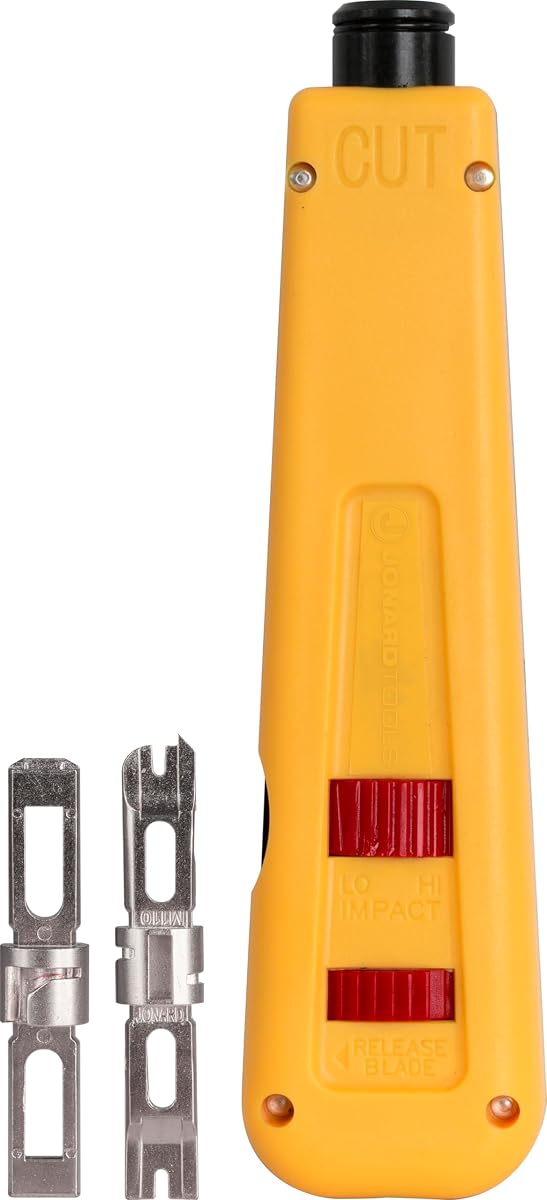
The Jonard Tools EPD-91461 is a manual punch down tool offering a deliberate alternative to spring-loaded impact designs. It receives a 4.5 rating and includes both 66 and 110 blades, adjustable high and low impact settings, an ergonomic body, and a combination hook and spudger stored in the chassis.
We may earn a commission when you buy through this link, at no additional cost to you.
Manual operation gives the user direct control over the seating stroke. The high and low settings allow the tool to be configured for different termination requirements, while the color-coded body distinguishes the yellow cut side from the blue side. This visual cue can reduce handling errors and is particularly useful while learning the orientation of the blade.
Durability is a major focus. The blades are described as hardened alloy steel with nickel plating, and the tool is listed as tested for up to 100,000 cycles at high impact. The enlarged blade storage compartment is a practical detail for technicians who need to retain spare or optional blades, and the tool can use EPB-series blades as well as compatible blades from other brands sold separately.
The main trade-off is speed. A manual design generally involves more deliberate hand movement than a spring-loaded impact tool or a specialized simultaneous keystone puncher. It may also feel less efficient for large patch panels, although direct pressure can be desirable when a user wants to control exactly how forcefully a conductor is seated.
This tool is well suited to technicians, installers, and serious DIY users who want long-lasting 66 and 110 termination equipment with manual control. The included blades cover common wiring blocks, while blade compatibility offers a path to broader use. It is a durable, straightforward choice for careful work rather than maximum throughput.
Unlike a spring-driven tool, this model lets the installer regulate the seating stroke by hand. High and low settings add another layer of adjustment for different tasks.
Hardened, nickel-plated alloy steel blades and stated cycle testing support long-term professional use. The enlarged storage area helps organize optional EPB-series blades.
We may earn a commission when you buy through this link, at no additional cost to you.
The right Ethernet punch down tool depends on terminal style, cable category, installation volume, and preferred level of control. Compatibility should always be confirmed before purchase, because a similarly shaped blade may not match the conductor layout of a particular jack or block.
Blade standard is the most important compatibility decision. A 66-style blade, 110-style blade, and Krone blade fit different IDC arrangements, and a tool body does not automatically make every blade interchangeable. General-purpose tools may include two standards, while specialized speed tools commonly support only one. Check the exact markings on the jack or block, compare them with the blade configuration, and avoid assuming that a visually similar keystone will accept the same blade.
A punch down tool intended for loose keystone jacks should hold the connector securely while the conductors are seated. A conventional impact tool often works best with a separate punch down stand, whereas specialized tools may include a housing that grips the jack and allow termination directly against a patch panel or wall plate. If a project includes many loose keystones, this support can materially affect speed, accuracy, and hand comfort.
Impact tools use a spring-loaded mechanism to deliver a consistent punch, while manual tools let the installer regulate pressure directly. High and low settings can accommodate different wire gauges, with the Fluke Networks model automatically distinguishing 22 gauge from 24 and 26 gauge wire. Manual control may be useful for learning or unusual terminals, but impact assistance is generally faster for repetitive work. Users should select a tool whose force range suits the conductors and terminal design they will encounter.
Cable support must be considered alongside blade and terminal compatibility. Several products in this guide state support from Cat 5 or Cat 5e through Cat 6A, while two Cable Matters models extend to Cat 7 and Cat 8. Higher categories are often associated with larger or more specialized conductors, and not every terminal can accept them. Users should look for explicit compatibility rather than inferring support from a generic Ethernet label, especially for shielded high-speed cable.
A secure blade holder helps maintain alignment and prevents the blade from loosening during repeated use. Twist-and-lock systems are common on conventional tools, and several models offer internal storage for a spare blade. Replacement capability is also useful because cutting edges eventually wear. The VCE speed tool uses a replaceable SK5 steel head, while the Fluke Networks listing points buyers toward a separate replacement blade. A robust retention system and accessible replacement path are valuable for professional use.
Comfort becomes important when a technician terminates dozens of ports. Rubber or cushioned handles, nonslip grips, color-coded sides, and integrated hook or spudger tools can improve control and reduce setup time. Specialized keystones can terminate eight conductors at once, but only when the exact compatible jack is used. Traditional impact tools are more versatile, while manual tools provide greater control. The right balance depends on whether the priority is maximum throughput, broad compatibility, or precise individual seating.
Some punch down tools are supplied as focused tools, while others include a wire stripper, puller, flat blade, pick, spudger, modular plugs, or a storage pouch. Built-in accessories are convenient because they reduce the number of loose items in a tool bag, but they can also make the body larger. A complete installation kit makes sense for users beginning a general cabling toolkit. A dedicated punch down tool is usually easier to organize for technicians who already own strippers, crimpers, and cable-management accessories.
Professional tools benefit from durable blades, comfortable handles, secure storage, and clear replacement options. The Jonard model highlights hardened nickel-plated alloy steel and high-cycle testing, while the Fluke Networks D914S includes a lifetime warranty. TRENDnet also lists a three-year manufacturer protection plan, while VCELINK advertises customer assistance and technical guidance. These details matter when a tool will be used repeatedly, since blade condition and support can affect long-term ownership as much as the initial purchase.
Start by identifying the terminal type, selecting the correct 66, 110, Krone, or brand-specific blade, and installing it according to the tool instructions. Prepare and untwist the conductors only as far as required, maintain the proper color and pin mapping for the standard being used, and place each wire fully against its IDC. Hold the jack or block securely in a suitable support if the tool does not include a jack housing.
Set the impact or operating mode for the cable and terminal. Position the blade squarely over the conductor group and actuate the tool in one controlled motion, allowing the punch and cut features to seat and trim the wires. Inspect the termination for a secure connection, clean excess conductor ends, and confirm that no blade or wire fragments remain inside the jack. For a specialized tool, check that the connector is one of the explicitly supported models before proceeding.
After use, wipe away cable clippings and dust, retract or lock the blade as appropriate, and store the tool in a dry place. Inspect the cutting edge for nicks, deformation, or a dull cut, and keep replacement blades protected in the tool or their original packaging. Do not use a punch down tool on live electrical circuits, and follow the wiring standard and manufacturer instructions for the specific network installation.
An Ethernet punch down tool seats twisted-pair conductors into insulation-displacement contacts on keystone jacks, patch panels, and wiring blocks. Its cutting edge usually trims the excess conductor at the same time. The correct tool and blade must match the terminal layout and cable being installed.
No. General 66 and 110 tools may still require the exact blade, conductor order, and cable diameter expected by a particular jack. Specialized speed tools are even more restrictive, with some listing only one compatible brand and model. Always check the connector and tool documentation before punching.
The two blade styles correspond to different wiring-block IDC layouts and conductor positions. A 66-style blade will not automatically terminate a 110-style terminal correctly, even if the connector looks similar. Look for a tool with both blades if your work regularly includes the two systems.
Impact tools are usually faster and more consistent during repetitive installations because a spring mechanism delivers a repeatable stroke. Manual tools provide more direct control and can be useful for learning or specialized tasks. The better choice depends on workload, terminal type, and installer preference.
Only when the tool and blade are explicitly compatible with those cable and terminal combinations. Some products in this guide list support through Cat 8, while others stop at Cat 6A. Cable category, conductor size, shielding, jack design, and blade geometry all need to be considered before installation.
A stand can make loose keystone installation safer and more consistent by stabilizing the jack during termination. Conventional tools often benefit from one, while tools with integrated jack housings are designed to hold compatible keystones directly. Follow the recommended support method for the selected tool.
Use the correct blade, seat all conductors against the IDC, and select a suitable impact setting. Avoid overworking a termination or forcing a misaligned wire into place. Inspect the result and follow the connector manufacturer’s instructions, especially with specialized or brand-specific tools.
Look for incomplete cuts, frayed wire ends, increased force required, or visible wear and nicks on the cutting edge. Dull blades can make rough terminations and add unnecessary stress to the connector. Replace the blade or blade head when the tool’s specified cutting performance is no longer consistent.
The Klein Tools VDV427-300 is the strongest all-around recommendation because it combines 66 and 110 blades, adjustable impact, single-step punch and cut, a comfortable grip, and a 4.8 rating. The VCELINK multi-function model stands out for useful integrated accessories, while the Fluke Networks D914S is the premium conventional choice with automatic impact selection and a lifetime warranty.
Your priority should be exact terminal compatibility before speed or extra features. A conventional impact tool with the right blade is more useful than a specialized puncher for an incompatible jack. For large keystone jobs, consider the VCE C265 or Rapink speed tools only when their exact compatible connectors are part of the installation, and add a stable stand for conventional loose-jack work.
Product details, ratings, availability, and prices can change, so check the current listing before making a final decision. Compare the blade standard, supported cable category, included accessories, and intended jack type, then select the tool that best matches the terminations you actually expect to install.