
Vantec CB-ST00U3
4.6Editor score
Compact SATA-to-USB adapter
Supports optical drives and storage
Hot-swappable plug-and-play design
An external optical drive enclosure can restore disc access without requiring a new internal drive. The right model depends mainly on the size and interface of the drive you already own: slim laptop mechanisms need a narrow 9mm or 9.5mm case, while desktop optical drives require a full 5.25-inch enclosure. Connection style, power requirements, and intended portability also matter.
We compared all ten products by drive fitment, SATA support, USB interface, power arrangement, enclosure material, operating-system claims, portability, and installation method. The list covers full-size desktop enclosures, slim laptop-drive cases, and a compact SATA-to-USB adapter, allowing you to compare practical formats rather than treating every optical-drive enclosure as the same kind of product.
Each review explains where a product fits best, along with its main advantages and limitations. Ratings are included only where the supplied product information provides one, and unrated products are evaluated from their stated specifications rather than assigned a fabricated score. As with all buying guides, prices and availability change over time, so confirm the current listing before purchasing.
4.6Editor score
4.6Editor score

4.4Editor score
As an Amazon Associate we earn from qualifying purchases.
The comparison below organizes each enclosure by drive format, connection, power, and portability so buyers can quickly identify the model that matches their existing optical drive and computer setup.




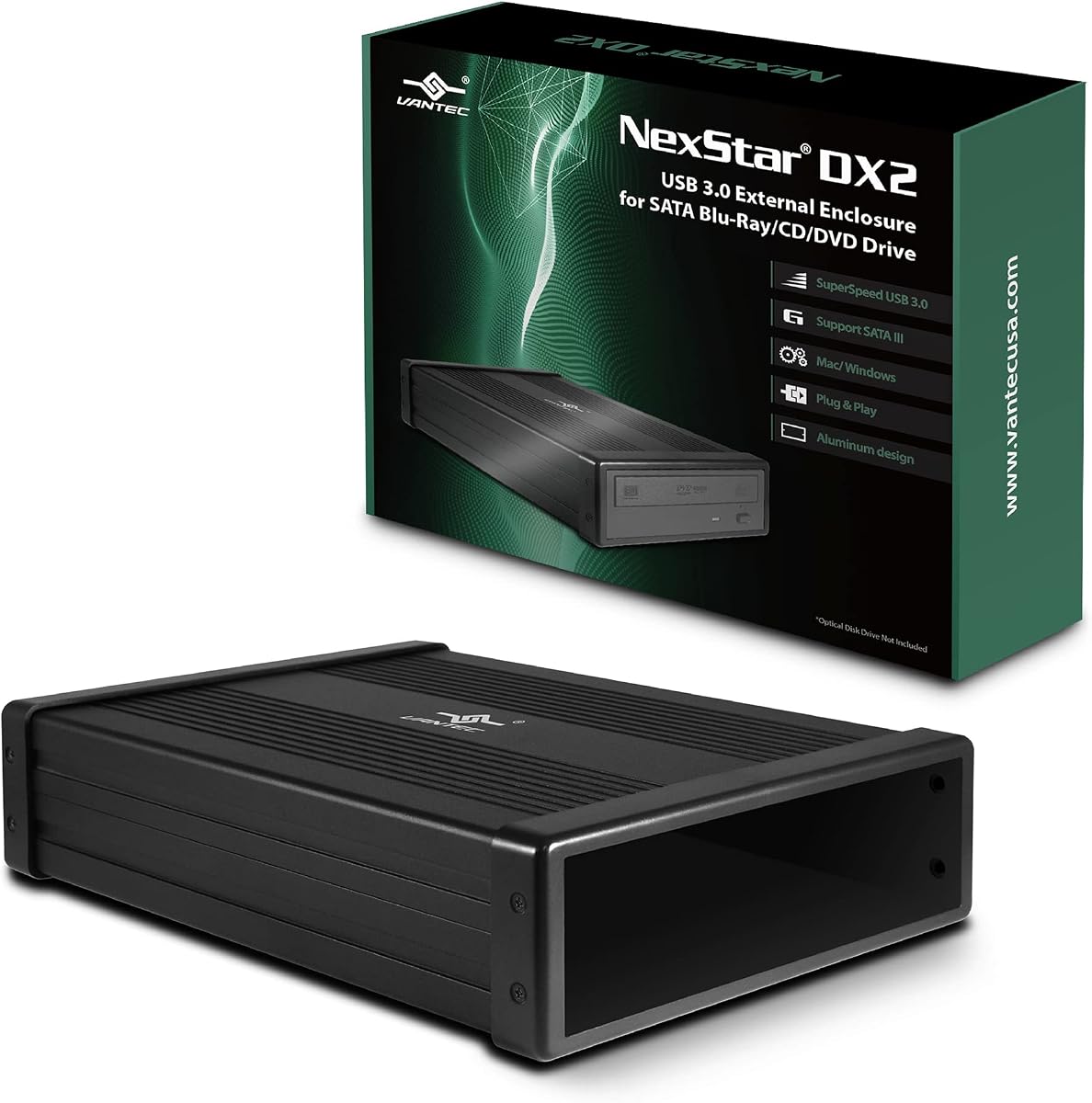
The NexStar DX2 is the strongest all-around choice in this guide, particularly for owners of full-size 5.25-inch desktop optical drives. Its supplied rating is 4.6 out of 5, and the specification sheet emphasizes broad mechanical fit, a USB 3.0 interface, external power, and compatibility with drives up to 185mm deep. Those qualities address the practical problems that appear when a desktop mechanism is moved outside the computer case.
We may earn a commission when you buy through this link, at no additional cost to you.
Its standout feature is the flexible internal SATA cable. Rather than forcing the installer to position a drive solely around a fixed connector, the enclosure lets the SATA connection accommodate different drive and interface positions. The listed maximum depth of 185mm also exceeds the 171mm limit stated for the other full-size aluminum enclosure in the group, making the DX2 a compelling option for unusually deep Blu-ray, DVD, or CD mechanisms. The included 12V, 3A AC adapter supplies the external power that full-size optical drives often need.
The aluminum-alloy casing is useful because it helps reduce heat, noise, and vibration, all of which can affect a disc mechanism during reading or writing. The enclosure also supports hot swapping on appropriately equipped systems, and its second-generation design can use an optional 5.25-inch mounting bracket to hold a SATA 3.5-inch or 2.5-inch hard drive or solid-state drive. That versatility extends its value beyond optical media, although the bracket is not stated as included.
This is the recommendation to prioritize when the goal is converting a desktop optical drive into a dependable external unit. It is larger and less travel-friendly than the 9mm, 9.5mm, or 12.7mm cases, and buyers still need to supply the optical drive themselves. Even so, the combination of a 185mm depth range, included power, flexible installation, USB 3.0, and an aluminum shell makes the NexStar DX2 the most complete general-purpose option here.
A generous 185mm stated depth range and flexible internal SATA cable reduce the chance that a large desktop mechanism will fail to fit. Buyers should still compare their drive's dimensions and mounting holes with the enclosure instructions before ordering.
The included 12V, 3A adapter is a meaningful advantage for optical drives that draw more current than a laptop port can reliably provide. It also makes the enclosure better suited to extended reading, writing, and playback sessions.
We may earn a commission when you buy through this link, at no additional cost to you.
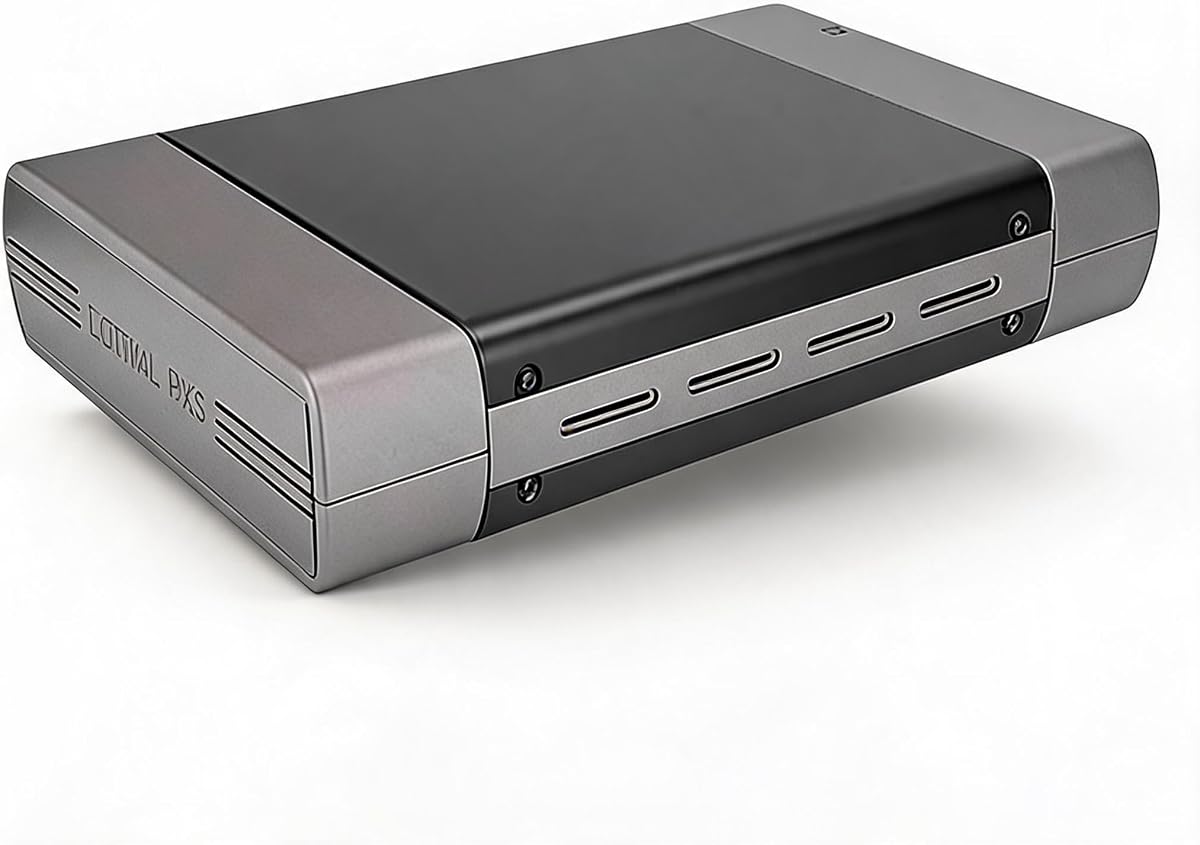
This 5.25-inch enclosure is the most premium-styled full-size option in the list, with a supplied 4.4 rating, an aluminum-alloy shell, and both USB-A and USB-C 3.0 connection choices. It is intended for SATA-based Blu-ray, CD, and DVD drives rather than an older IDE mechanism, making drive-interface confirmation essential before purchase. The optical drive itself is not included.
We may earn a commission when you buy through this link, at no additional cost to you.
The major selling point is connection flexibility. A desktop with USB-A can use that connection, while a laptop or modern system with USB-C can avoid carrying a separate adapter. The stated USB 3.0 throughput is 5Gbps, and the description gives a practical file-transfer example of moving 1GB in roughly three to five seconds. As with every enclosure, real disc performance is generally limited by the installed optical mechanism rather than the theoretical interface rate.
The enclosure also distinguishes itself with a heat-conscious aluminum housing. The manufacturer states that the material reduces heat, noise, and vibration, which can contribute to steadier operation when reading or burning media. Its depth allowance reaches 171mm, and it can accommodate optical drives that lack side mounting holes, according to the product details. The installation video referenced on the listing is also a sensible aid for users unsure about aligning the drive.
Choose this model if you want a full-size enclosure with modern USB-C convenience and a metal housing. It is an excellent fit for standard desktop optical mechanisms, but the DX2 is more accommodating if your drive is unusually deep. IDE drives are not supported, and you must provide the optical drive and confirm its SATA connector and dimensions before installation.
Having both USB-A and USB-C options reduces desk clutter and makes the enclosure easier to use across different computers. The included connection approach is especially convenient for newer laptops that lack full-size USB-A ports.
The aluminum-alloy construction is intended to dissipate heat while limiting vibration and noise. That makes the enclosure visually and functionally appropriate for a permanent desktop setup rather than occasional travel.
We may earn a commission when you buy through this link, at no additional cost to you.
The Zunate enclosure is designed for a very specific but common drive category: 9mm ultra-slim SATA CD, DVD, and Blu-ray mechanisms originally found in many laptops. It has no supplied customer rating, so its appeal must be evaluated from the stated compatibility and physical design. The central attraction is an extremely slim profile that makes the converted drive easy to carry between locations.
We may earn a commission when you buy through this link, at no additional cost to you.
Unlike a desktop optical enclosure, this model needs no separate external power supply. The slim SATA mechanism is expected to draw enough power from the computer connection for plug-and-play use. The enclosure offers a 5Gbps USB 3.0 interface and includes USB-C connectivity, with backward compatibility to USB 2.0. Its integrated cable folds into the body, eliminating the need to carry a loose lead when the enclosure is not being used.
Installation is based on swapping the original laptop face panel and placing the mechanism into the supplied housing. The listing also mentions an eject control intended to reduce the chance of a disc becoming stuck inside the mechanism. A woven data cable is included to reduce interference and signal loss, while the brushed exterior is designed to resist visible scratching. Windows versions from Vista through 10 and OS X are listed as supported.
This is the right recommendation for someone who already owns a 9mm SATA laptop optical drive and wants a small, self-contained external unit. It is not suitable for 9.5mm, 12.7mm, or desktop 5.25-inch mechanisms, and IDE interfaces are not supported. Measuring the drive and checking its SATA connector before buying will prevent the most likely compatibility mistake.
The 9mm target is significantly narrower than the 12.7mm standard and especially practical for owners of older ultraportable laptops. Its stored cable design keeps the complete unit compact enough for a laptop bag.
No external adapter is required, so the enclosure can be used with a laptop without carrying a separate power brick. This simplicity is one of its strongest advantages over full-size desktop cases.
We may earn a commission when you buy through this link, at no additional cost to you.
The JOTEC enclosure combines a slim 9.5mm drive format with an aluminum-alloy housing, making it a practical middle ground between a plastic travel case and a larger desktop enclosure. There is no supplied rating, but the specification sheet is unusually detailed. It identifies the INIC1618 solution, power-saving sleep mode, dual cables, SATA interface support, operating-system compatibility, and accepted disc formats.
We may earn a commission when you buy through this link, at no additional cost to you.
Two data cables are included: one USB 3.0 and one Type-C. The enclosure also exposes a USB micro interface and a 3.5mm power port, although no external power supply is identified as part of the package. The 5Gbps interface is backward compatible with USB 2.0 and USB 1.1, with a stated fallback rate of up to 480Mbps. That range of connections is useful when moving between older and newer systems.
The aluminum shell is intended to dissipate heat and support stable long-duration operation, while four non-slip feet help keep the unit stable on a desk. A ventilated design adds another layer of thermal management. The enclosure supports 9.5mm-thick SATA DVD-RW mechanisms and states compatibility with SATA-I at 1.5Gbps and SATA-II at 3.0Gbps. Its listed disc support includes CD, DVD, dual-layer formats, VCD, and EVD.
Choose the JOTEC model if your old drive is exactly 9.5mm thick and you want a durable, ventilated enclosure with both USB-A and USB-C. Windows 2K through 11, Linux, and Mac OS are listed as compatible. The critical caveat is dimensional and electronic: the listing expressly limits the product to 9.5mm SATA drives, so it should not be selected for a 9mm, 12.7mm, or 5.25-inch mechanism.
The 9.5mm format preserves the low profile expected of a laptop drive, while the aluminum shell adds sturdiness and heat dissipation. It is a sensible option for a frequently used external installation.
Separate USB-A and Type-C cables, broad operating-system claims, and extensive disc-format support make the enclosure practical across different equipment. Buyers should still verify their software and disc types before relying on a specific task.
We may earn a commission when you buy through this link, at no additional cost to you.
The Tbest enclosure stands out because it accommodates both 12.7mm and 9.5mm SATA DVD-RW drives, giving it more dimensional flexibility than the enclosures designed for one exact slim size. Its supplied rating is 3.4 out of 5, the lowest scored product in the group, so buyers should pay close attention to the physical fit and included accessories. The drive is not part of the enclosure package.
We may earn a commission when you buy through this link, at no additional cost to you.
The stated interface is USB 3.0 at up to 5Gbps, with full backward compatibility for USB 2.0 connections. Both Type-A and Type-C are represented in the product title, making it useful for a mix of desktop and laptop systems. Internally, it supports 1.5Gbps SATA I and 3.0Gbps SATA II standards. The INIC3609 chipset solution includes automatic sleep mode, which can reduce unnecessary power consumption when the drive is idle.
Compatibility claims cover Windows 2K, XP, 2003, Vista, 7, and 10, plus Linux and OS X. This broad operating-system range makes it viable for an older computer that lacks built-in optical media. The enclosure does not claim support for full-size 5.25-inch mechanisms, however, and its fitment remains limited to the two listed slim formats. A SATA interface is required.
The Tbest is worth considering when you own one of the two supported drive thicknesses and want both USB-A and USB-C access. Its fitment flexibility is its primary advantage, but the lower supplied rating makes it less compelling when a highly reviewed model will fit your drive. Measure both the mechanism and its connector, then compare the package contents carefully before making a final choice.
Supporting 12.7mm and 9.5mm mechanisms reduces the chance of buying the wrong slim case. It does not make the enclosure universal, since 9mm and desktop drives remain outside its stated range.
The combination of legacy operating-system support and modern Type-C connectivity is useful for extending an older computer. Automatic sleep also helps the enclosure avoid constant power draw during idle periods.
We may earn a commission when you buy through this link, at no additional cost to you.
The Vantec CB-ST00U3 is less like a box and more like a compact SATA-to-USB bridge, making it the best budget-oriented approach for an optical drive already installed in a computer. It carries a 4.6 rating and supports SATA optical, hard-drive, and solid-state devices. Rather than forcing the mechanism into a precisely sized shell, this adapter provides a simpler connection route for a drive that is already secured in place.
We may earn a commission when you buy through this link, at no additional cost to you.
Its USB 3.0 interface is stated at 6Gbps, and it supports UASP, which can improve command efficiency when the host and drive combination permit it. The adapter also works with SATA I, SATA II, and SATA III optical or storage devices. A non-slip mat helps dampen noise and protect the connected drive, while the compact, lightweight form makes the unit easier to position than a 5.25-inch desktop enclosure.
There are two important limitations. First, the product documentation notes that a SATA-to-USB bridge controller may limit certain SATA drive commands. Second, the included adapter supplies 12VDC and 2A; an optical drive that requires more power may need a higher-capacity adapter. Neither issue prevents normal use, but they are important when the goal is reliable disc writing or use with a particularly power-hungry desktop mechanism.
Choose the CB-ST00U3 when your priority is a compact, well-rated way to access an installed SATA optical drive without a full enclosure. It is especially appealing for a laptop optical bay or a desktop with a removable drive that is already mechanically secured. It is less protective during transport than a fitted case, and users should test that the included power supply satisfies the drive's requirements.
This adapter avoids the need to align a drive with case mounting holes. It can be a practical solution when the optical mechanism is already mounted securely and only needs an external connection.
Support for hard drives and solid-state devices makes the adapter useful beyond disc reading. UASP support can also make data transfers more responsive on compatible systems.
We may earn a commission when you buy through this link, at no additional cost to you.
This external enclosure is a straightforward option for standard 5.25-inch desktop optical drives. Its 4.5 rating reflects a generally well-received product, while the USB 2.0 interface makes it most appropriate for basic disc reading, writing, software installation, backup, and movie playback rather than modern high-speed storage workflows. It cannot accept slim laptop mechanisms.
We may earn a commission when you buy through this link, at no additional cost to you.
The installation kit includes the enclosure, user manual, four screws, a USB cable, an adapter, and a power cable. A desktop optical drive usually needs dependable external power, and the supplied power equipment is a major practical advantage over attempting to power a full-size mechanism entirely from a laptop. The aluminum housing is lightweight while offering everyday protection from bumps and scratches.
The enclosure also supports 3.5-inch hard drives, which broadens its usefulness beyond optical media. Its installation is based on securing the drive with the included screws, so it is a traditional enclosure rather than a tool-free portable shell. The stated USB 2.0 connection remains widely compatible, although transfer speed is substantially lower than the USB 3.0 alternatives in this guide.
This model makes sense for a desktop optical drive that will remain in a fixed workspace and whose main purpose is conventional disc access. The lower interface speed is the trade-off for the straightforward package and stable powered setup. Buyers who frequently transfer large files should favor a USB 3.0 enclosure, while anyone with a laptop drive should choose a slim model instead.
The included screws, data cable, power components, and manual remove much of the guesswork from setup. Buyers still need their own compatible 5.25-inch drive.
Desktop optical mechanisms can place meaningful demands on a power source. The included adapter and power cable support more dependable reading and writing than a bus-powered approach would.
We may earn a commission when you buy through this link, at no additional cost to you.
The Bewinner enclosure is built for 9.5mm CD, DVD, and BD mechanisms and emphasizes easy conversion of a removed laptop drive into an external unit. It has no supplied customer rating, so buyers should judge it from its stated 9.5mm fitment, connector options, installation process, and compatibility claims. The optical drive is explicitly not included.
We may earn a commission when you buy through this link, at no additional cost to you.
Installation is described as straightforward: replace the original face panel, insert the old mechanism, and slide it into the enclosure. This makes the product appealing to users who want to reuse a familiar drive without adapting to a full-size desktop case. The enclosure is plug-and-play and requires no additional drivers, while its eject key is intended to prevent discs from becoming trapped inside the drive.
The integrated Type-C and USB 3.0 cable folds into the body for storage, so the enclosure does not require a separate cable during routine travel. Its brushed ABS shell is lighter than a metal desktop enclosure and is described as resistant to scratches. A woven data cable is included to minimize interference and signal loss, with a stated transfer rate of up to 5Gbps.
The product lists support for Windows 2003, Vista, 7, 8.1, and 10, as well as macOS X. It is best for a 9.5mm SATA mechanism used in a portable setup. It is not a universal enclosure: desktop 5.25-inch drives, 12.7mm mechanisms, and the particularly narrow 9mm drives are outside the stated target. Confirm the thickness and interface before ordering.
Converting an existing mechanism can preserve the disc format and eject-button layout the user already knows. The swap-in installation avoids the need to reposition a desktop drive inside a large case.
The integrated folding cable keeps the unit tidy and reduces the chance of leaving a required lead behind. The woven construction also supports stable data transfer between the enclosure and computer.
We may earn a commission when you buy through this link, at no additional cost to you.
This enclosure is another compact solution for 9mm ultra-slim SATA optical mechanisms, with a design centered on portability and straightforward swapping. There is no supplied customer rating, so its evaluation depends on the stated fitment, connection capability, and compatibility. The included front panel helps users insert and secure the old laptop drive inside the shell.
We may earn a commission when you buy through this link, at no additional cost to you.
The enclosure is designed for 9mm CD, DVD, and BD drives and operates without additional drivers or an external power supply. A USB 3.0 interface provides a stated 5Gbps transfer rate and remains backward compatible with USB 2.0 ports. The detachable cable includes USB-C and USB-A connectors and folds into the bottom of the enclosure when the unit is not in use.
The listed operating-system support covers Windows Vista, 7, 8.1, and 10, along with OS X. An eject function is included to help prevent disc jamming. The brushed exterior is described as scratch resistant, and the slim, lightweight construction makes the product suitable for a travel bag. A woven data cable is intended to reduce signal loss and interference during transfers.
Choose this product if your old optical mechanism is exactly 9mm and SATA-based and you value a compact body with a stored cable. The exact fitment requirement is a meaningful limitation, so measure before purchasing. It does not suit 9.5mm, 12.7mm, or desktop drives, and users should confirm that their operating system and intended disc tasks are included in the stated support.
The 9mm target is ideal for certain ultraportable laptop drives but requires exact measurement. It is not an interchangeable shell for the more common 9.5mm slim size.
The detachable lead folds neatly into the enclosure, balancing connector choice with a compact footprint. A woven cable adds a layer of protection against signal interference.
We may earn a commission when you buy through this link, at no additional cost to you.
The Tool-Free Optical Enclosure is designed around 12.7mm Serial ATA CD, DVD, and Blu-ray drives and prioritizes quick installation. Its front panel detaches without screws, allowing a standard slim drive to slide into place before the cover snaps back on. There is no supplied rating, but that installation approach and the stated connector options make the product worth considering for users who do not want a screw-based case.
We may earn a commission when you buy through this link, at no additional cost to you.
The integrated cable provides both USB 3.0 Type-A and Type-C connections and stores in the base of the enclosure. No external power adapter is required. The stated 5Gbps transfer rate is supported by a reinforced woven cable designed to reduce interference, while backward compatibility with USB 2.0 makes the enclosure usable on an older computer. The design is described as plug-and-play with no additional driver requirement.
The premium brushed ABS body resists scratches and fingerprints, and its slim, lightweight construction is intended for travel. A dedicated eject key helps release discs smoothly and avoid stuck-disc situations. The package includes the enclosure, instruction manual, and necessary mounting accessories. The product also states compatibility with Windows and macOS, although some operating-system names are omitted in the supplied listing.
This model is a good fit for a 12.7mm SATA mechanism and for buyers who value quick, tool-free swapping over a permanent desktop installation. It cannot accommodate 9mm, 9.5mm, or 5.25-inch drives, and the absence of a supplied rating makes fit and feature confirmation especially important. Measure the mechanism, check the SATA connector, and review the included instructions before ordering.
The detachable panel reduces setup time and avoids the need to align small screws. It is particularly useful when moving the same mechanism between different computers.
USB-A and USB-C are integrated into one stored cable, while bus power removes the need for a separate adapter. The result is a clean setup for a laptop or compact workstation.
We may earn a commission when you buy through this link, at no additional cost to you.
The most important decision is mechanical and electrical fit: the enclosure must accept the exact dimensions and interface of the optical drive you already own. After that, connection type, power, portability, and disc performance determine which enclosure fits your setup best.
Measure the optical drive before choosing an enclosure. Full-size desktop CD, DVD, and Blu-ray mechanisms normally use a 5.25-inch form factor, while laptop mechanisms are commonly 12.7mm, 9.5mm, or 9mm thick. These slim sizes are not interchangeable. A full-size enclosure that supports up to 171mm or 185mm refers to the maximum mechanism depth and remains a different category from a slim laptop case.
Most optical drives sold in recent years use SATA, but older mechanisms may use IDE. Several products in this guide expressly support SATA only, including the 5.25-inch USB A/C model, the Zunate 9mm case, and the JOTEC 9.5mm enclosure. A SATA connector and an IDE connector have different pin layouts, so a case that physically fits the mechanism may still be electrically incompatible.
USB 3.0 provides the best balance for current optical-drive use, while USB-C makes laptop connections more convenient. A 5Gbps or 6Gbps interface rating describes the connection ceiling, not guaranteed disc throughput, because an optical mechanism is usually much slower. The included USB 2.0 enclosure remains suitable for basic playback, software installation, and conventional disc tasks but is not ideal for large file transfers.
Slim laptop mechanisms are generally intended to draw power through USB, which explains why most portable cases need no external adapter. Full-size desktop drives can require more current, so the NexStar DX2 includes a 12V, 3A supply and the 5.25-inch USB 2.0 enclosure includes an adapter and power cable. The compact Vantec adapter includes 12V, 2A, but its documentation advises using a higher-capacity adapter if the connected drive requires it.
A slim enclosure should have a low profile and a cable that stores with the unit. The Zunate, Bewinner, Detachable USB-C, and Tool-Free models use integrated or folding leads, reducing the chance of leaving a cable behind. Aluminum-alloy housings, found on the NexStar, full-size USB A/C, and JOTEC cases, add sturdiness and heat dissipation, while ABS constructions remain lighter and often easier to carry.
Screw-secured cases provide a firm mechanical mount, while removable front panels make swapping faster. The Tool-Free model specifically fits 12.7mm SATA drives and uses a snap-on panel, while the Tbest enclosure accommodates 12.7mm and 9.5mm drives but may use a more conventional mounting arrangement. Full-size desktop cases require the installer to align the drive with its screw holes.
Most current enclosures claim plug-and-play operation without additional drivers across several versions of Windows, Linux, and macOS. Older systems may still encounter application-level disc burning or playback software issues even when the enclosure is recognized. Check the product's operating-system list, and separately confirm that your preferred playback, backup, or authoring software supports the enclosure and disc formats you intend to use.
An optical-drive enclosure should support the formats required by the installed mechanism, including CD, DVD, dual-layer DVD, and Blu-ray where applicable. The JOTEC listing gives a particularly detailed disc-format list. Several full-size or adapter-style products can also accept SATA hard drives or solid-state drives with suitable mounting support, which can extend the life of the enclosure as a general storage device.
Begin by identifying the drive type, connector, and dimensions. Compare those details with the enclosure's stated compatibility, then install the mechanism according to the manual. Tool-free or panel-based cases usually require removing the front panel, aligning the SATA connector, sliding the mechanism into place, and securing the panel. Screw-mounted cases require the supplied fasteners and correctly aligned mounting holes.
Connect the enclosure to the computer using the appropriate USB-A or USB-C cable, or attach the included AC power supply for a full-size desktop mechanism. Allow the operating system to detect the drive before inserting a disc. If the computer does not recognize it, reseat the drive, try another USB port, confirm that the system supports the enclosure's connection standard, and verify that the optical mechanism is operating correctly.
Handle removable media carefully by the edges, close the tray before moving the enclosure, and use the hardware eject control rather than repeatedly forcing discs out. Keep the vents unobstructed, protect the case from impact and moisture, and avoid moving a full-size powered setup while it is reading or writing. For portable cases, store the integrated cable neatly and do not leave a disc mounted if the enclosure will remain unused for an extended period.
No, these products are generally enclosures or adapters for a drive you already own. The optical drive is not included in the listings for the full-size USB A/C model, JOTEC, Tbest, or Bewinner. Make sure your existing drive is SATA-based and matches the enclosure's stated thickness, form factor, and depth.
No. The small differences between slim laptop-drive standards matter, and a case designed for 9mm mechanisms should not be assumed to fit a 9.5mm drive. Measure the drive and check its interface before ordering. The Tbest enclosure is one of the listed options that states support for both 12.7mm and 9.5mm drives.
Desktop 5.25-inch mechanisms usually draw more current than a laptop USB port can consistently provide. Enclosures such as the NexStar DX2 and the 5.25-inch USB 2.0 model include external power specifically for this reason. A drive that starts but stalls, resets, or fails to eject may be receiving insufficient power.
It can remove connection-speed as a bottleneck, but the installed optical mechanism usually determines actual read and write performance. A 5Gbps or 6Gbps interface does not mean an optical drive will transfer files at that rate. USB 3.0 is still the preferable connection for responsiveness and larger file transfers.
No. SATA and IDE use different connectors and signaling methods. Several slim and full-size options in this guide expressly support SATA only, so a physically compatible IDE drive will not work without an appropriate adapter and suitable power arrangement. Always verify the interface before making a purchase.
Some can, but not all. The NexStar DX2 can use a SATA 3.5-inch or 2.5-inch drive with an optional 5.25-inch mounting bracket, and the Vantec adapter supports optical drives, hard drives, and SSDs. The full-size USB 2.0 enclosure also states 3.5-inch hard-drive support. Confirm the connector, dimensions, power requirements, and included mounting hardware.
All of the listed products describe plug-and-play operation or state that no additional drivers are needed, although the compatible operating-system versions vary. Even when the enclosure is detected automatically, disc playback and burning applications may need to be installed or updated separately. Check the product's operating-system support and your software requirements.
Use a padded case that prevents pressure on the disc tray and keep the connector or folding cable from being bent. Before packing it, eject the disc and close the tray. Avoid moisture and excessive heat, and do not place the enclosure where the drive mechanism could be knocked against another object.
The NexStar DX2 is the strongest overall option for a full-size desktop optical drive because it combines a broad 185mm depth range, flexible SATA positioning, an aluminum housing, and included 12V, 3A power. The full-size USB A/C enclosure is the best premium choice for a modern desk setup, while the compact Vantec CB-ST00U3 is the best budget-oriented adapter for an already mounted drive.
For slim laptop mechanisms, physical measurement is decisive. Choose the Zunate for 9mm, the JOTEC or Bewinner for 9.5mm, the Tbest for either 9.5mm or 12.7mm, and the Tool-Free enclosure for 12.7mm. Prioritize a SATA interface, no-external-power operation when portability matters, and the connector type used by your computer.
The most expensive option is not automatically the most suitable, and a drive that does not fit or lacks the correct interface cannot be made usable through a different cable. Before ordering, verify the drive's form factor, thickness, depth, SATA connector, power needs, and operating-system requirements. Then check the current product listing and price, since availability and pricing can change over time.
