
20-in-1 Laptop Cleaning Kit
4.5Editor score
Twenty included cleaning accessories
Extension tools improve access
Covers phones and earbuds
Discover the best laptop cleaning kits for screens, keyboards, earbuds, and delicate electronics, with expert feature comparisons and practical buying advice.
Laptop cleaning kits help remove dust, fingerprints, crumbs, and grime from screens, keyboards, ports, and other delicate surfaces. A useful set combines soft microfiber cloths, precision brushes, dust-removal tools, and screen-safe cleaning agents without forcing owners to assemble separate supplies one piece at a time.
We compared the ten featured kits by examining their included tools, cleaning methods, portability, organization, and stated device compatibility. The list covers comprehensive keyboard-and-screen bundles, screen-focused sprays and cloths, compact brush tools, and multi-purpose electronics kits designed for laptops, phones, tablets, cameras, and earbuds.
Each pick highlights a distinct balance of capabilities, from extensive accessory collections to focused designs that are easier to keep on a desk or carry while traveling. Ratings and product details reflect the supplied information, while current prices and availability can change, so confirm the latest listing before purchasing.
4.5Editor score

4.6Editor score

4.9Editor score
This side-by-side comparison highlights each kit's core tools, cleaning focus, device coverage, and portability to help you identify the option that best fits your devices and routine.



The Ordilend Keyboard Cleaner & Laptop Cleaning Kit combines a broad collection of brushes, cloths, precision implements, and screen-cleaning supplies in a portable package. Its 4.6 rating reflects a strong overall reception, while its varied tool selection makes it a compelling all-around choice for laptop owners who want more than a basic cloth and spray.
We may earn a commission when you buy through this link, at no additional cost to you.
The retractable large brush can sweep across a keyboard or desk, while the mini high-density brush targets narrow spaces between flatter laptop keys. A keycap puller and metal pen tip support deeper cleaning of mechanical and gaming keyboards, giving users multiple approaches to embedded crumbs and grime. Two polishing cloths, five replacement cloths, a large microfiber cloth, a flocking sponge, and a soft plastic lens pen extend the set beyond basic keyboard maintenance.
The screen-cleaning component is particularly useful for routine laptop care. Its widened cloth is designed to fit screen corners and is paired with recyclable cleaning spray, while the product information states that it is intended to absorb stubborn stains without leaving discoloration, streaks, or fiber shedding. The set also includes tools suited to camera screens, lenses, earbud charging cases, and other delicate surfaces.
The main drawback is that a large assortment can become difficult to keep organized without the supplied storage arrangement. Liquid products also call for sensible application rather than spraying directly onto a screen. Even so, this is the most well-rounded pick in the list for a user who regularly cleans a laptop, keyboard, phone, camera, or earbuds and prefers having the appropriate tool for each job.
Choose the Ordilend kit when comprehensive coverage matters more than a minimalist design. It is especially attractive for students, office workers, creative professionals, and frequent travelers who want one portable collection to handle several kinds of electronics.
The combination of broad sweeping, narrow-brush, keycap-removal, and metal-tip cleaning supports a progressive approach. Start with loose debris, then address the spaces around and beneath keycaps rather than forcing one tool to handle every type of keyboard.
The flocking sponge, lens pen, replacement cloths, and precision implements extend the set beyond laptops. These additions make the kit relevant to anyone who also owns headphones, cameras, phones, or other electronics with seams and openings that can trap dirt.
We may earn a commission when you buy through this link, at no additional cost to you.
The iFixit Laptop Cleaning Kit stands out with a 4.9 rating, the highest among the ten products in this guide. It combines purpose-built screen care, keyboard and fan debris removal, precision implements, and organized storage in a compact pouch, making it a particularly polished choice for regular device maintenance.
We may earn a commission when you buy through this link, at no additional cost to you.
The iFixit Screen Saver and microfiber cleaning cloths address display surfaces, while a dust blower clears debris from keyboards and cooling fans. An anti-static brush is included for grime that does not shift as easily, and the wipes provide another option for surface freshening. Specialized swabs and picks make it easier to work around tight areas that a general-purpose brush may miss.
Its defining advantage is organization. Rather than asking users to track many small implements, the kit stores its essentials in a compact iFixit Tool Pouch. That design is particularly helpful for a work desk, travel bag, or shared family device where tools need to be both accessible and protected. It also offers a balanced feature set without trying to cover every possible electronic accessory.
The trade-offs are that it does not include a keycap puller, so it is less suited to deep cleaning beneath mechanical keyboard caps, and it has fewer dedicated phone or earbud pieces than some competitors. Its cleaning wipes also call for care on the devices involved. These limitations are modest given the kit's strong rating, careful organization, and focus on laptops.
This is the recommendation for someone who values a tidy, cohesive toolkit and dependable laptop-focused components more than the largest possible accessory count. It also makes a practical gift for an office or student who wants professional-feeling tools without buying brushes, wipes, cloths, and storage separately.
The included tool pouch keeps the screen saver, cloths, blower, brush, wipes, swabs, and picks together. A complete set is easier to use consistently when the tools remain visible, organized, and protected between cleaning sessions.
The dust blower is not limited to visible key surfaces; the product information specifically mentions clearing debris from keyboard areas and cooling fans. That makes it a useful companion to routine screen wiping for devices that collect dust in confined openings.
We may earn a commission when you buy through this link, at no additional cost to you.
The All-in-1 Keyboard Cleaner Laptop Cleaning Kit offers a versatile blend of keyboard tools, screen supplies, and precision accessories. Its 4.6 rating and broad device coverage make it a strong choice for people who clean more than just a laptop, including phones, tablets, cameras, and earbuds.
We may earn a commission when you buy through this link, at no additional cost to you.
Two retractable brushes serve different cleaning needs: the larger brush handles broader surfaces and keyboard gaps, while the mini high-density brush works between shallow laptop keys. A keycap puller helps remove caps for deeper access, and the metal pen tip is designed for stubborn material in confined spaces. The included polishing cloths are widened to fit screen corners, with microfiber materials intended to lift marks without fiber shedding.
Its versatility continues with a soft plastic lens-cleaning pen, mini brush, flocking sponge, five replacement cloths, and a large microfiber cloth. The supplied information positions these tools for camera displays, lenses, earbud charging cases, sound outlets, smartphones, and other delicate accessories. That makes the kit appealing for households or workspaces where several brands of electronics are used.
The disadvantage is the potential for loose small parts, especially when the kit is used in a shared environment or during travel. The listing also advises turning off and unplugging a computer, avoiding excessive pressure, and wiping screens in one direction. These reminders are sensible because even a comprehensive kit should not encourage aggressive scrubbing or direct spraying.
Choose this option if you want one set to cover keyboards, displays, phones, headphones, and camera accessories with a mix of broad and precision tools. It is a particularly practical pick for students, mobile users, and creative professionals whose devices have many seams, openings, and frequently touched surfaces.
Begin with the retractable brush to dislodge loose material, use the mini brush for key gaps, and reserve the metal tip for stubborn residue. The layered approach reduces the need to press harder or use a harsher method on delicate keyboard surfaces.
The flocking sponge and soft lens pen provide gentler options than hard brushes for charging cases and delicate screens. These accessories make the kit relevant to earbud and camera owners who want more targeted care than a standard microfiber cloth offers.
We may earn a commission when you buy through this link, at no additional cost to you.
The Altura Photo Keyboard Cleaner & Laptop Cleaning Kit is a focused five-piece set for laptop screens, keyboards, and other electronics. Its 4.5 rating indicates solid consumer appeal, while the limited bundle offers an uncomplicated alternative to kits packed with numerous precision attachments.
We may earn a commission when you buy through this link, at no additional cost to you.
The set includes a two-ounce screen-cleaner spray, cleaning brush, air blower, 100-gram dust-cleaning gel, and a large 16-by-16-inch Magicfiber microfiber cloth. The cloth provides ample coverage for a laptop display or monitor, while the brush, blower, and gel address different forms of loose debris. This division of labor makes the kit easy to understand and use.
The product information describes the set as safe for laptops, computers, keyboards, and display screens when used as directed. The screen spray and microfiber cloth are intended to remove dust and leave a clean finish, while the brush and blower focus on dry debris. The gel is positioned as another way to lift dust from keyboard gaps and other confined areas.
Its main limitation is that it does not offer a keycap puller, swabs, picks, or the large assortment of earbud and camera accessories seen in higher-count kits. Users with extensive electronic accessories may need additional tools, but laptop owners who want a straightforward screen-and-keyboard routine may find this scope more convenient than a crowded pouch.
Choose Altura Photo when simplicity, coordinated components, and a generous microfiber cloth are your priorities. It is well suited to home offices, shared workstations, and users who regularly wipe down a primary laptop without needing a specialized electronics-repair toolkit.
The 16-by-16-inch microfiber cloth offers substantial coverage when cleaning a laptop, desktop monitor, or other sizeable display. Its size makes it useful for spreading wiping pressure across a broader area rather than concentrating repeated strokes on one small section.
A brush, blower, and cleaning gel each offer a different way to address dust. Their combined presence can make it easier to choose a suitable method for broad surfaces, keyboard gaps, or debris that requires a gentle lifting approach.
We may earn a commission when you buy through this link, at no additional cost to you.
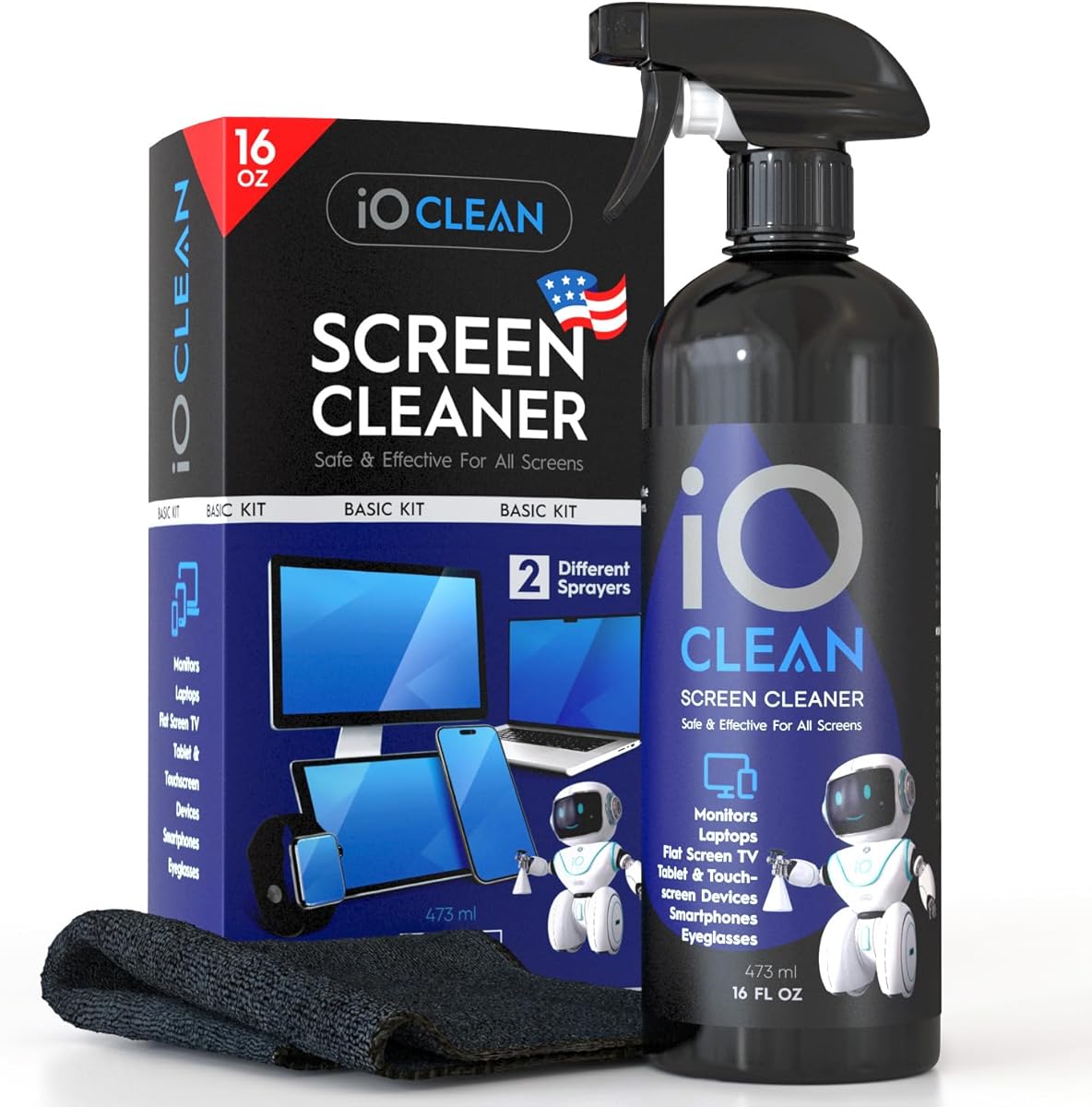
The iO CLEAN 16oz Screen Cleaner Spray is designed for high-volume screen care and includes two interchangeable nozzles, a microfiber cloth, and a recyclable bottle. Its 4.6 rating makes it one of the stronger-rated options, particularly for households or offices that regularly clean multiple displays.
We may earn a commission when you buy through this link, at no additional cost to you.
Its broad compatibility list covers LCD, LED, and OLED televisions, laptops, MacBook models, monitors, smartphones, tablets, touchscreens, e-readers, projectors, screen protectors, and car touchscreens. The formula is described as biodegradable, non-toxic, and free from alcohol, ammonia, and phosphates, while also offering anti-static and anti-glare benefits.
The two nozzle choices are a practical distinction: a push-button sprayer suits smaller devices, while a trigger sprayer is intended for larger screens. The included premium microfiber cloth supports the product's streak-free, smudge-free finish claim. This configuration emphasizes repeat use and broad surface coverage rather than the extensive brush and keycap accessories offered by larger multi-tool kits.
The limitation is scope. This product does not present itself as a comprehensive keyboard-disassembly kit, so buyers who need a keycap puller, precision swabs, or a blower may need another solution. The sixteen-ounce bottle also takes up more space than a pocket spray, even though the recyclable packaging and simple design keep it manageable in a home or office setting.
Choose iO CLEAN if your priority is frequent, screen-focused maintenance across many types of electronics. It is especially attractive for shared offices, classrooms, photography-related workspaces, or any setup where several monitors and touchscreens need regular attention.
The large bottle is designed to reduce the frequency of refills when cleaning several screens. That makes it more useful for high-traffic workspaces than a small travel spray, particularly when a laptop, monitor, tablet, and television are all maintained regularly.
A targeted push-button sprayer offers control for smaller electronics, while the trigger sprayer provides broader coverage for larger displays. Choosing the appropriate nozzle helps keep application controlled without changing the underlying cleaning solution.
We may earn a commission when you buy through this link, at no additional cost to you.
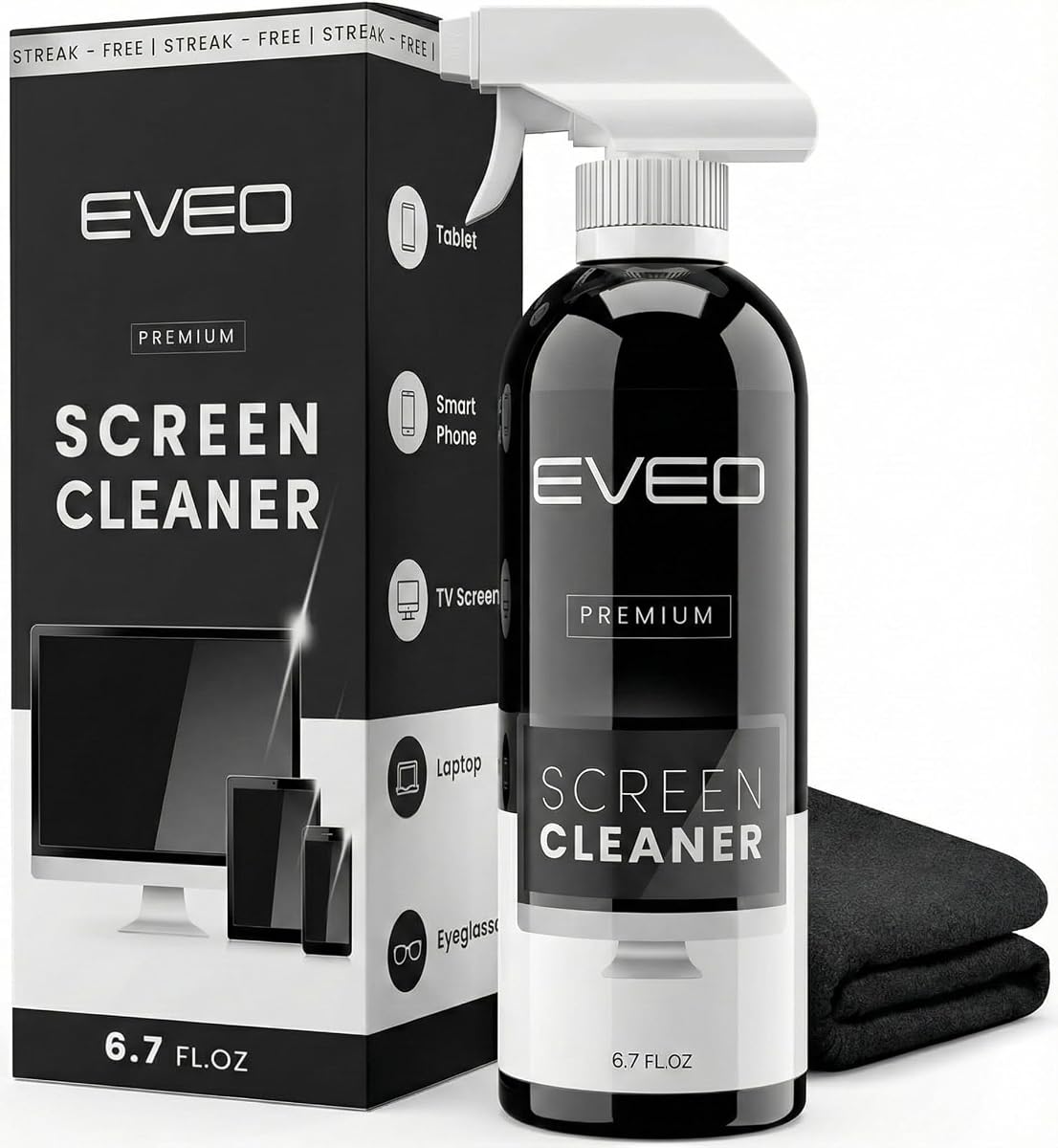
The EVEO Screen Cleaner Spray package is a dedicated display-care solution with a large cleaning bottle, trigger sprayer, and plush microfiber cloth. Its 4.6 rating indicates strong satisfaction among users who want an uncomplicated way to remove fingerprints, dust, and smudges from frequently touched screens.
We may earn a commission when you buy through this link, at no additional cost to you.
The listing identifies compatibility with LCD, LED, CRT, and OLED displays when used properly, including screens from major brands such as LG, Sony, Samsung, Sharp, and Apple, as well as Android devices, Kindles, and PC monitors. That broad range makes it useful beyond laptops for anyone maintaining a mixed collection of household or office electronics.
The included cloth is described as super-soft and designed to absorb stubborn stains without streaks or fiber shedding. The application method is straightforward: attach the sprayer, apply cleaning liquid to the microfiber cloth, and wipe until the surface reaches the desired finish. Spraying the cloth rather than the device is a controlled approach that helps avoid excessive moisture.
As with any spray-and-cloth set, the kit does not address every aspect of laptop maintenance. It lacks brushes, a blower, swabs, and a keycap puller, so dust trapped between keys would require a separate keyboard tool. The large bottle and trigger sprayer are also less convenient for travel than a compact dual-nozzle product, although they suit a stationary desk well.
Choose EVEO if screen appearance is the main concern and you want a straightforward bottle-and-cloth pairing for laptops, monitors, phones, tablets, or televisions. It is a sensible option for users who wipe displays frequently but do not need a broad electronics-cleaning arsenal.
The supplied method calls for spraying the cleaner onto the microfiber cloth before wiping. This controlled application helps keep liquid away from the display while still allowing the cloth to lift fingerprints, dust, and other surface grime.
The kit is listed for laptops, phones, tablets, monitors, and several television technologies. Its screen-focused versatility can be useful in mixed-device homes, although owners should always follow the cleaning guidance for each device.
We may earn a commission when you buy through this link, at no additional cost to you.
The EDGLTE Keyboard Cleaner & Laptop Cleaning Kit balances screen care, keyboard maintenance, and small-electronics cleaning in a portable bundle. With a 4.6 rating, it is a versatile option for users who want multiple specialized tools without moving to a very large twenty-piece collection.
We may earn a commission when you buy through this link, at no additional cost to you.
Its retractable anti-static brush and detail keyboard brush are intended for dust, crumbs, and fingerprints, while the keycap puller offers deeper access for mechanical keyboards. A thick polishing cloth, microfiber cloths, and a 15-milliliter spray handle routine display cleaning, with the product information describing the result as streak-free and residue-free.
The kit extends to phones and earbuds through a three-in-one earbuds pen, metal tip, soft high-density brush, and flocking sponge. The metal component is designated for small crevices, sound holes, and charging ports, while the soft brush addresses speaker mesh and the sponge is suited to charging cases. These tools distinguish it from screen-only bundles.
The relatively small spray bottle may need more frequent refilling than a large screen-cleaning bottle, particularly if several devices are cleaned at once. The assortment also includes several small components that should remain together in a pouch or drawer. Neither issue undermines the kit's balance, but they are worth considering if portability and quick access are priorities.
Choose EDGLTE for a user who cleans a laptop alongside phones and earbuds and values the anti-static brush and keycap puller. It is a versatile everyday kit for students, commuters, and office workers who want targeted tools in a compact package.
The retractable anti-static brush helps move debris from keyboard surfaces, while the detail brush reaches narrow spaces between laptop keys. The keycap puller adds a deeper maintenance option for compatible mechanical keyboards.
The three-in-one earbuds pen combines precision access with brush and sponge functions suited to speaker mesh, sound openings, charging ports, and cases. It is a meaningful advantage for users whose earbuds collect visible grime in small areas.
We may earn a commission when you buy through this link, at no additional cost to you.
The WHOOSH Screen Shine Duo combines a larger bottle for home or office use with a pocket-sized bottle for travel and quick touch-ups. Its 4.6 rating and two-container format make it especially useful for people who maintain electronics in more than one location or want screen supplies close at hand.
We may earn a commission when you buy through this link, at no additional cost to you.
The product is designed for screens ranging from glossy tablets to anti-glare laptops and is stated to be suitable for sensitive surfaces and protective films. Its formula is alcohol-free and non-toxic, with no ammonia, which provides a gentler option for users who prefer to avoid those common harsh ingredients. The kit includes two ultra-soft PROTX2 microfiber cloths.
The main strength is flexible scale. A full-size bottle can remain beside a desk or monitor, while the smaller bottle fits into a travel bag or pocket for on-the-go cleaning. Two cloths also make it possible to dedicate one cloth to routine screen wiping and keep another available for separate tasks, reducing the need to handle the same cloth repeatedly.
Its limitation is its narrow focus. The set does not include a keyboard brush, blower, keycap puller, or precision swab, so users with significant debris between keys will need a separate keyboard kit. The pocket bottle is convenient but naturally provides fewer uses between refills than a larger container.
Choose WHOOSH for frequent screen touch-ups, travel, or a split between home and office. It is a strong pick for laptop owners who want a coating-conscious cleaner, a travel option, and dedicated microfiber cloths without the bulk of a comprehensive multi-tool bundle.
The 3.4-ounce bottle can stay in a main workspace while the 0.3-ounce bottle travels with you. This arrangement reduces the need to move one cleaner between a desk, living room, and travel bag.
The absence of alcohol and ammonia makes the formula a notable consideration for users who prefer milder screen cleaners. The supplied information also emphasizes compatibility with glossy and anti-glare screens and protective films.
We may earn a commission when you buy through this link, at no additional cost to you.
The OXO Good Grips Sweep & Swipe Laptop Cleaner is a compact, double-sided tool for laptops, tablets, and smartphones. Its 4.5 rating reflects a straightforward design that prioritizes portability and ease of use rather than the large accessory count found in comprehensive cleaning kits.
We may earn a commission when you buy through this link, at no additional cost to you.
One end uses a soft brush to sweep away dust and dirt, while the other features a microfiber pad for fingerprints and smudges. The retractable brush and storage cover protect the cleaning ends when the tool is not being used, reducing the chance of leaving the brush exposed in a drawer or travel bag.
Its simplicity is also its main convenience. There is no separate spray bottle to carry, refill, or apply, and no collection of small swabs and brushes to organize. A user can move from loose surface debris to fingerprint removal by flipping the tool, which makes it useful for quick touch-ups in a coffee shop, office, classroom, or meeting room.
What it cannot do is deep keyboard maintenance. There is no keycap puller, blower, metal tip, or narrow brush for crumbs trapped below keys, so this option is best for surface care rather than periodic disassembly. It also does not offer dedicated screen-cleaning liquid, which some users may prefer for heavily marked displays.
Choose the Sweep & Swipe if portability, simplicity, and dual-ended design matter most. It is a particularly good fit for frequent travelers, students, and anyone who wants a dependable small tool for wiping and sweeping a laptop without carrying a full pouch of accessories.
The soft brush and microfiber pad address different forms of surface contamination without requiring separate implements. Flipping between them gives users a straightforward dust-then-smudge cleaning sequence.
The retractable brush and protective storage cover help keep the tool compact and shielded between uses. That makes it easier to place in a laptop sleeve, desk drawer, or travel pouch without exposing the cleaning surface.
We may earn a commission when you buy through this link, at no additional cost to you.
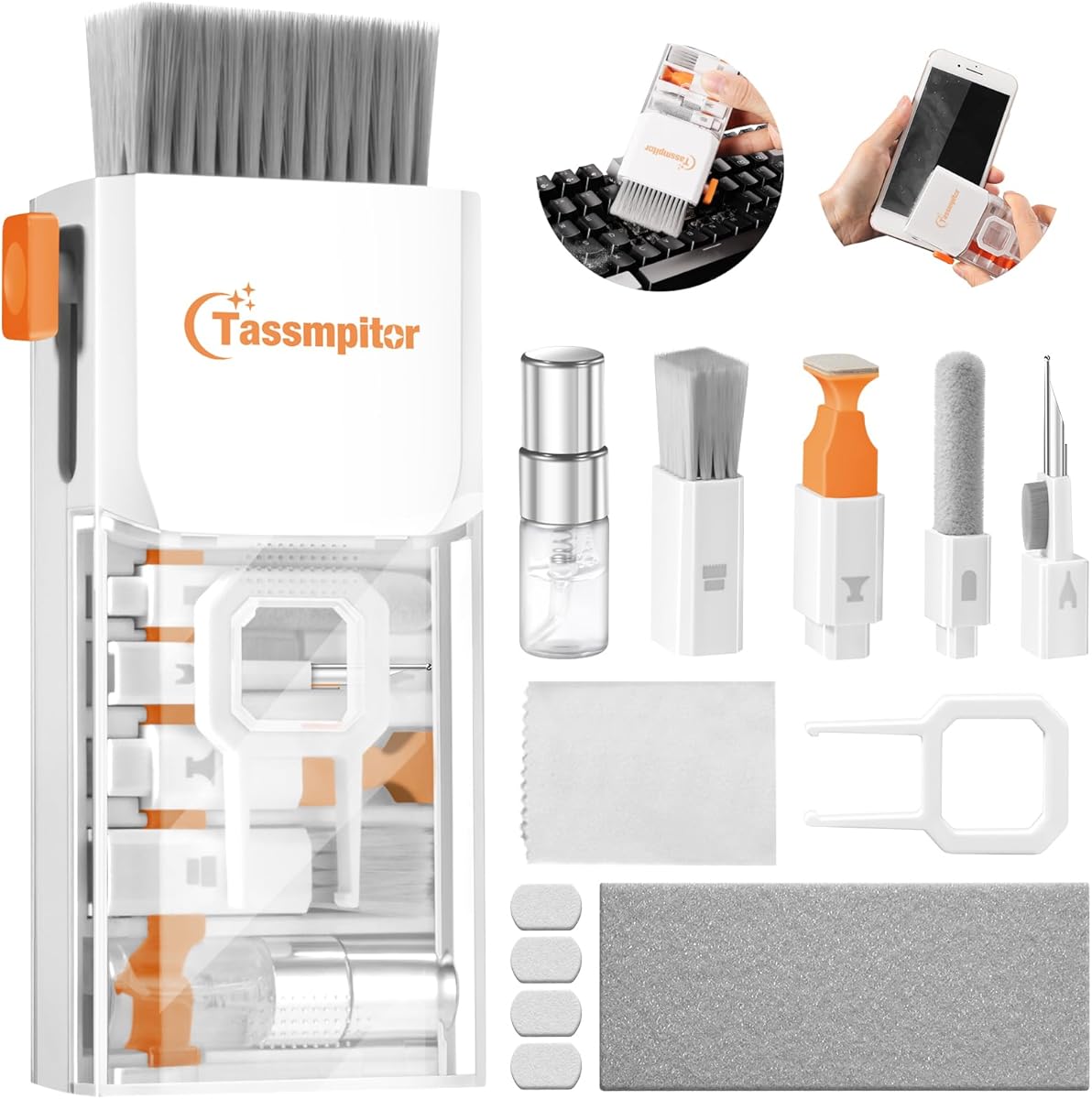
The 20-in-1 Laptop Phone Screen Earbud Cleaning Kit provides one of the broadest accessory collections in this guide. Its 4.5 rating indicates solid appeal for buyers who want to cover many types of electronics, while its mix of brushes, extension rods, cloths, picks, and extractors supports tasks ranging from routine screen wiping to detailed crevice cleaning.
We may earn a commission when you buy through this link, at no additional cost to you.
The keyboard tools include a retractable brush for broad surfaces, a small brush with soft and hard bristles for laptop and keyboard gaps, a keycap extractor, and a shaft extractor. The set also contains a blower for moving debris, a card removal pin, two extension poles, and several extension-equipped brushes. These additions are particularly useful for reaching small openings without forcing a larger brush into them.
For phones and earbuds, the package includes a metal clip, charging-port brushes, a camera screen brush, an AirPods crevice pen, and a headphone-case brush. A screen-cleaning spray and microfiber cloth handle fingerprints and oils on phones, tablets, laptops, monitors, televisions, lenses, and cameras. The range makes it a practical all-device kit rather than a laptop-only bundle.
The obvious trade-off is organization. Twenty accessories can create small loose pieces and duplicated functions, and some tools are more relevant to owners of particular devices than others. Users who mainly clean a laptop may not use the card pin or several earbud brushes, while those with a mixed collection of devices may find nearly every component useful.
Choose this kit for extensive coverage, especially if you maintain phones, earbuds, cameras, keyboards, and displays. It is a strong budget-oriented choice for a shared household or a tech enthusiast who wants a portable assortment and prefers to have a dedicated tool for each narrow crevice.
Two extension poles and extension-equipped brushes help carry cleaning tools into narrow gaps and small ports. The approach can provide steadier access than trying to angle an ordinary brush directly into a confined area.
The collection spans laptops, phones, tablets, monitors, cameras, televisions, earbuds, and headphones. That breadth is its defining benefit for users who want a shared toolkit instead of separate cleaning products for each category.
We may earn a commission when you buy through this link, at no additional cost to you.
The right laptop cleaning kit depends on the surfaces you maintain, the debris you encounter, and how much portability or organization matters. Consider tool coverage, screen compatibility, material safety, and storage before choosing a set.
A useful kit should address more than fingerprints if you want to maintain the entire device. Retractable and soft brushes sweep loose dust from broad surfaces and keyboard gaps, while narrow precision brushes reach between shallow keycaps, around ports, and into charging cases. A blower moves debris without moisture, and a keycap puller provides deeper access to compatible mechanical keyboards. Screen cloths and a suitable spray address visible marks on displays. Choosing by task prevents you from paying for a large assortment that lacks the one implement your devices actually need.
For most laptop owners, a cloth, soft brush, narrow detail brush, and spray cover routine care. Mechanical keyboard users should add a keycap puller, while owners of earbuds or cameras benefit from metal tips, soft brushes, and flocking sponges. Match the kit to your device collection rather than judging it only by its headline count.
Display cleaning requires more care than simply putting a damp cloth on a screen. Look for microfiber materials, screen-safe wording, and compatibility information for the display technologies and coatings you own, such as LCD, LED, OLED, glossy panels, anti-glare finishes, or protective films. Some kits state that they are safe for all electronics, while others identify a broad list of supported brands and device types. The more specific the guidance, the easier it is to use the product responsibly.
Also pay attention to how the cleaner is applied. A kit that instructs users to spray the cloth rather than the display gives more control over moisture. When coatings or manufacturer instructions are uncertain, start with a dry microfiber surface and test the cleaner on a small, inconspicuous area.
Cleaning formulas differ in their ingredients and intended uses. The featured products include alcohol-free, ammonia-free, biodegradable, and non-toxic options, as well as kits using wipes or sprays. These attributes may matter to users who share a space with family members or pets, work around sensitive coatings, or simply prefer a milder formulation. A pleasant scent or a strong claim of streak removal should not replace compatibility guidance or careful application.
Avoid assuming every electronics cleaner is appropriate for every screen. Check the device manufacturer's recommendations, especially for specialty displays or screens with protective layers. Apply only the amount needed, keep liquid away from openings, and use a clean cloth rather than spraying directly over a keyboard.
A compact kit is easier to use consistently because it can remain near the device instead of disappearing in a storage drawer. Screen-only sets with one bottle and cloth take up little space, while multi-tool kits need a pouch or divided container to prevent brushes, swabs, and extension rods from becoming scattered. The iFixit kit stands out for its dedicated tool pouch, whereas many other comprehensive products emphasize portability without specifying a complete storage system.
Think about where you clean. A desk kit can prioritize capacity and bottle size, while a travel kit should be small enough for a laptop sleeve or bag. If you keep several devices in multiple rooms, separate screen cleaner and brush sets may be more convenient than carrying one densely packed toolkit.
Soft bristles, fine tips, and lint-resistant microfiber cloths are valuable for delicate surfaces. The featured kits variously include retractable brushes, high-density detail brushes, anti-static brushes, flocking sponges, lens pens, and metal tips. Each has a different role, so look for a combination that matches the surfaces you plan to clean. A hard brush can be useful on a keyboard, but it should not be applied directly to a screen or delicate camera lens.
Retractable mechanisms and storage covers add protection by keeping brush fibers from contacting other objects. Replaceable cloths are another useful feature because a cloth that has collected grit should not be returned to a screen. Establish a habit of folding dirty cloths inward and replacing them before they lose cleaning performance.
Screen-focused products are economical and straightforward when your only goal is keeping displays clear. Broad multi-tool kits offer greater utility when you also clean phones, earbuds, cameras, charging cases, and mechanical keyboards. The highest-count bundles can feel complete, but extra tools do not guarantee that every included implement suits your devices. A smaller coordinated set may be more convenient if you already own brushes or swabs for other gear.
Make a simple list of the devices in your routine. Add screen cloths and spray for displays, a soft brush and narrow detail tool for keyboards, and specialized pens or sponges for earbuds and charging ports. That list provides a more realistic standard than a headline accessory number.
Light users who wipe a laptop occasionally may find a compact dual-ended tool sufficient. Frequent cleaners, shared-device offices, and users who travel may prefer a pouch with separate cloths, brushes, and wipes. Large spray bottles are useful for frequent screen cleaning across several monitors, while pocket-size versions are better for quick touch-ups. The iO CLEAN dual-nozzle design addresses both large-screen application and smaller-device control in one package.
The likely frequency also affects cloth replacement needs. A kit with several cloths lets you rotate them and keep dusty cloth fibers away from sensitive displays. Users who clean daily should prioritize a consistent, comfortable routine over an extensive but cluttered collection.
Begin with the least invasive step. Power off and unplug the laptop, then use a soft brush or blower to remove loose dust from the keyboard, ports, and other openings. Tipping the laptop may help release larger crumbs, but avoid shaking liquid-cleaning tools over the device. Work from broad surfaces toward narrow gaps so debris is not pushed farther into the keyboard.
For the screen, apply the cleaning liquid to a clean microfiber cloth rather than spraying it directly onto the display. Wipe gently in one direction without circular scrubbing or excessive pressure, and use dry sections of the cloth to buff away remaining moisture. Follow the laptop and screen manufacturers' instructions, especially when the display has a specialty coating or protective film.
After use, return brushes to their covers, close wet components, and store the kit in a dry drawer or pouch. Fold used cloths with dirty surfaces inward, replace them when they become worn or heavily soiled, and keep metal tools clean and dry. Proper storage prevents loose bristles, moisture, and grit from undermining the next cleaning session.
A routine kit should include a soft brush, a narrow detail brush, a clean microfiber cloth, and a screen-cleaning solution approved for your display. A blower is helpful for moving crumbs, while a keycap puller is worthwhile only if you maintain mechanical or gaming keyboards. The most useful set is one you can store near the computer and use without searching for individual tools.
Many of the featured kits are designed for several types of electronics, but you should confirm that the specific tool and formula are compatible with each surface. Use a soft brush or sponge on earbud cases, a metal tip only where appropriate, and screen-safe cleaner on displays. Avoid introducing liquid into ports and follow each device manufacturer's care instructions.
It is generally safer to spray the cleaner onto a clean microfiber cloth instead of the display. This gives you better control over moisture and keeps cleaner from seeping into bezels or keyboard openings. Test the product in a small inconspicuous area first, especially on specialty coatings or screens protected by films.
Turn off and unplug the laptop, invert it gently, and use a soft brush or blower to dislodge loose crumbs. A narrow detail brush can reach between shallow keycaps. Avoid forceful metal tools unless the device documentation specifically supports that use, and do not pour liquid into the keyboard to wash away debris.
A keycap puller is most useful for compatible mechanical or gaming keyboards because it allows keycaps to be removed for deeper cleaning. Standard laptop keys are generally not designed to be pulled off. If your devices do not have removable keycaps, prioritize brushes, a blower, precision swabs, and screen-care supplies instead.
There is no single universal answer, but alcohol-free and biodegradable formulas may be preferable for users who want milder ingredients or work around family members and pets. Compatibility with the target display remains essential. Check the formula description and the laptop or screen manufacturer's recommendations before applying any cleaner.
Light fingerprints can usually be wiped as they appear, while keyboards and dusty areas benefit from periodic attention. Cleaning frequency depends on use, environment, and whether the laptop is shared. Keep liquid away from openings, use clean cloths, and perform deeper keyboard or port cleaning only when the device is powered off and appropriate tools are available.
Look for a compact case, protected brush ends, a microfiber cloth, and enough precision tools to cover your usual devices. A dual-ended brush-and-pad tool can serve routine touch-ups, while a larger kit suits mixed electronics. The most portable option is not always the one with the most accessories; choose the smallest set that covers your actual cleaning routine.
The Ordilend all-in-one kit is the strongest overall choice because it combines keyboard, screen, camera, and earbud tools in a portable collection. The iFixit kit leads on organization and carries the highest featured rating, while the 20-in-1 electronics kit offers the broadest accessory coverage for users maintaining many kinds of devices.
Prioritize the cleaning jobs you perform most often. A screen-focused spray and cloth are enough for simple fingerprint removal, a compact brush-and-pad tool suits travel, and a comprehensive kit becomes more useful when you also need keyboard debris removal, charging-case cleaning, or deeper access around ports. The right kit should feel convenient enough to use regularly and compact enough to stay within reach.
Before purchasing, compare the included tools with your devices, check the stated screen and material compatibility, and read the current product listing and manufacturer guidance. Ratings provide a useful reference, but features, care requirements, prices, and availability can change, so confirm the latest details before making a final decision.