
H/D 30-Pin eDP Controller
4.4Editor score
Supports 1366×768 resolution
Works with 30-pin eDP
Accepts 12V 2A power
An LCD controller board can restore a compatible laptop panel or turn it into a standalone display, but choosing the wrong board can lead to blank screens, flickering, or persistent signal errors. A useful controller must match the panel resolution, connector type, supported timing format, power requirements, and intended video inputs.
The selections in this guide cover controller boards for 1366×768 and 1920×1080 laptop panels, as well as several larger desktop-style LCD panels. We compared the documented screen models, connector configurations, resolution support, video inputs, power specifications, installation guidance, and available ratings to show where each board fits.
Each review explains the hardware most relevant to a particular repair or DIY project, along with compatibility limits and troubleshooting considerations. The list includes budget, general-purpose, and feature-rich choices, but product availability and current prices can change, so verify the panel specifications before purchasing.
4.4Editor score

4.6Editor score

4.0Editor score
As an Amazon Associate we earn from qualifying purchases.
This side-by-side comparison highlights each controller's target resolution, display size, connector standard, video inputs, and important compatibility boundaries. Use it as a starting point, then confirm the exact panel model and electrical interface before ordering.


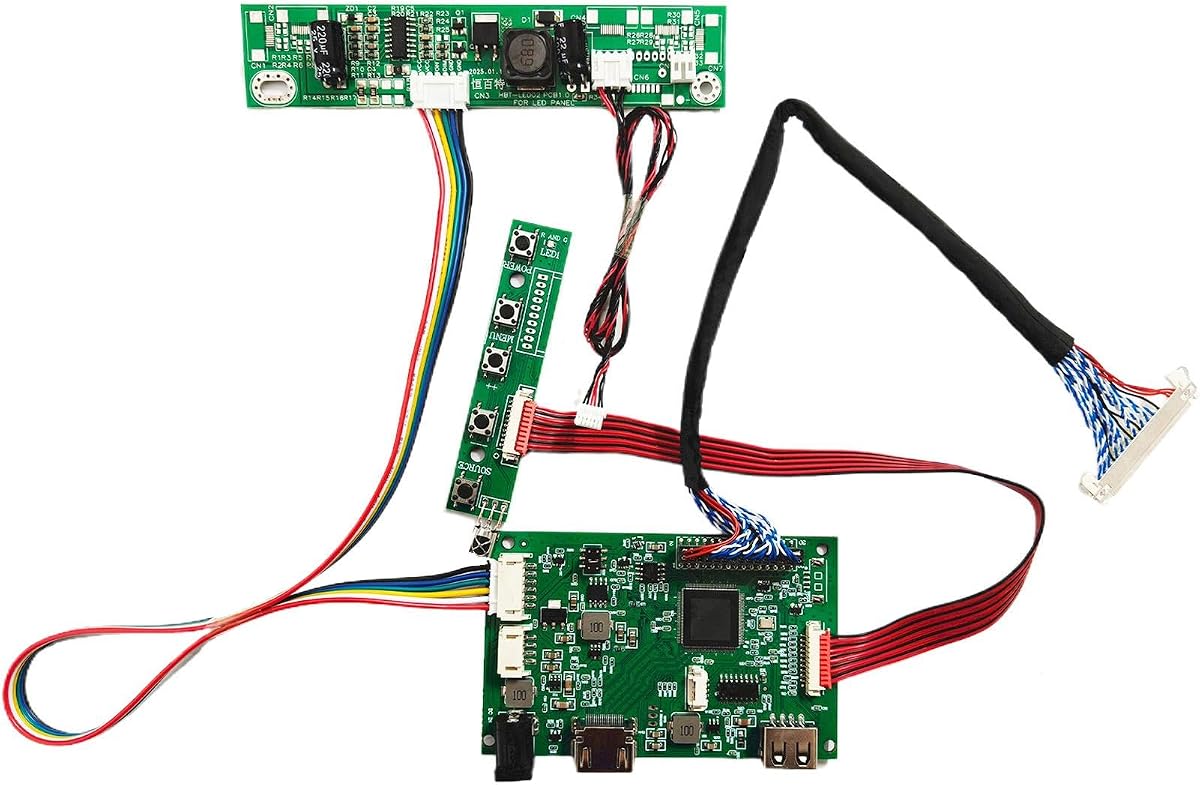


This board is a focused solution for 1366×768 LCD panels using a 30-pin eDP connection. It has a 4.4 rating and supports common laptop panel sizes from 11.6 through 15.6 inches. Its strongest selling point is clarity: the product is explicitly designed for HD resolution and is not intended to drive 1920×1080 screens.
We may earn a commission when you buy through this link, at no additional cost to you.
Compatibility is documented across several popular panels, including NT156WHM-N42, B156XTN04.1, LP156WHU-TPA1, N140BGE-E33, B140XTN02.1, N133BGE-E31, and B116XTN02.3. The signal cable is preconnected, and Pin 1 is visibly marked with a red circle, which makes the physical connection more approachable for a first repair project.
The board expects a 12V DC source delivering at least 2A through a 5.5mm by 2.1mm connector. Adequate current matters because an undersized supply can contribute to flickering, no-signal messages, or repeated restarts. Standby consumption below 0.3W is also useful when the panel is not actively displaying an image.
This is the best budget-oriented option when the target screen is a confirmed 1366×768, 30-pin eDP panel. It is not a universal answer for every laptop screen, so verify the panel model, resolution, connector count, and pin arrangement before buying. Within that clearly defined category, it combines useful documentation with installation guidance.
The board concentrates on a common laptop-panel configuration rather than trying to cover every interface. That focused design makes it a sensible first stop for restoring a 1366×768 screen or building a compact standalone monitor from a compatible panel.
Its LED and display-color indications can help separate board-power problems from signal issues. Matching the signal cable correctly, confirming the source resolution, and using a sufficiently powerful adapter can resolve many common startup problems.
We may earn a commission when you buy through this link, at no additional cost to you.
This 40-pin LVDs controller is aimed at 15.6-inch 1366×768 WLED panels and carries a 4.4 rating. It offers VGA and DVI video inputs, making it suitable for projects in which the source device may not have a modern digital interface. A four-pin speaker connection adds basic audio support for compatible displays.
We may earn a commission when you buy through this link, at no additional cost to you.
The listed compatibility set is extensive for this size class. It includes LP156WH2 TL, LP156WH3 TL, LP156WH4 TL, LP156WHB TL, BT156GW02, N156B6, B156XTN03, B156XW02, and B156XW04. That range is valuable for hobbyists who may encounter several common 15.6-inch panels rather than one carefully identified model.
Installation follows a conventional connect-and-power sequence. The board needs a 12V DC adapter with more than 2A, using the standard 5.5mm by 2.1mm power connector. The seller recommends increasing current if the screen repeatedly restarts, which is a useful clue when the power supply is adequate for ordinary electronics but marginal for both controller and backlight.
Choose this option for a specifically identified 15.6-inch 1366×768 panel that uses the documented 40-pin LVDs arrangement. It is less suitable for eDP-based laptop panels because those use a different signal and connector architecture. Confirm the panel number, input availability, and the need for an external power source before ordering.
The broad model list gives this board an advantage for repairers handling several popular 15.6-inch panels. Matching the exact suffix and revision remains important, because visually similar panels can have different connector and timing arrangements.
VGA, DVI, and speaker connections make the board convenient for a simple monitor build. Its self-check sequence also gives users observable indications for testing power, signal paths, resolution, and jumper configuration.
We may earn a commission when you buy through this link, at no additional cost to you.
This controller targets 1920×1080 WLED laptop panels connected through 30-pin eDP. It carries a 4.0 rating and covers screen sizes from 11.6 to 17.3 inches. That makes it a notable option for users who need more flexibility than a board dedicated to one physical display size.
We may earn a commission when you buy through this link, at no additional cost to you.
The supported list includes several N116, N133, B140, B156, LP156, N156, NV156, N173, and B173-series panels. Specific entries include B156HAN01.1, B156HAN01.2, LP156WF4-SP, N156HGE-EA1, NV156FHM-N31, NV156FHM-N41, B173HAN01.0, B173HAN01.1, and several N173 variants.
The board accepts a 12V DC supply above 2A through a 5.5mm by 2.1mm port. It does not require driver installation: after connecting the appropriate cables, power on the board and select the correct source and resolution. The documented troubleshooting distinguishes a black screen from a white screen and connects both to cable, signal, or resolution errors.
This controller is most appropriate for a compatible 1080p eDP laptop panel when VGA is an acceptable source. It lacks the DVI and HDMI options found on some alternatives, so modern computer users may need an appropriate signal converter. Verify the complete panel number, eDP pin count, target resolution, and source connection before buying.
Covering 11.6, 13.3, 14, 15.6, and 17.3-inch panels is useful for tinkerers who want a repeatable solution across multiple laptops. Exact model matching remains essential because the shared size does not guarantee a shared connector or timing profile.
The straightforward power-and-signal workflow reduces software setup. Most installation issues are therefore centered on physical alignment, input selection, output resolution, and providing enough current for the entire system.
We may earn a commission when you buy through this link, at no additional cost to you.
This controller is designed for 30-pin 5V LVDs panels operating at 1280×1024. It supports both 17- and 19-inch screens, and its 4.6 rating is the highest numerical rating among the ten products included here. It combines VGA and DVI input with an 8-ohm, 2-watt speaker connector.
We may earn a commission when you buy through this link, at no additional cost to you.
Compatible panels include common LTM170, M170, LM170, LM190, M190, G190, HSD, and LTM190 families. Listed examples include LTM170EU, LTM170EH, M170EG01, M170EG02, M170EN01, M170EN04, M170EN05, M170EN06, LM170E03, LM190E02, LM190E03, LM190E08, G190EG01, M190EG02, and M190EN01.
A 12V DC supply delivering more than 3A is recommended, with a 5.5mm by 2.1mm power connector. The higher current recommendation reflects the combined needs of the controller and backlight. Users should follow the board's connection illustrations, select the appropriate source, and ensure the computer outputs the panel's supported resolution.
This is the most balanced pick for restoring a compatible 17- or 19-inch 1280×1024 panel, especially when a straightforward VGA or DVI source is desired. It may also suit some larger monitor conversions, but the connector, voltage, and timing must match. Confirm the panel model and jumper configuration before installation.
The board fills a useful gap between compact laptop panels and full-size desktop controllers. Supporting two large panel classes makes it attractive for salvaging a retired laptop display or creating a dedicated secondary screen.
Powering the board before attaching a panel provides an initial indication of its condition. Subsequent checks focus on the signal cable, source resolution, 5V jumper setting, and other connected equipment, helping narrow down installation faults.
We may earn a commission when you buy through this link, at no additional cost to you.
This controller is intended for larger 30-pin LVDs panels at 1920×1080. It supports 21.5- and 23.8-inch models, including T215HVN01.0, M215HW03 versions 1 and 2, M215HGE-L23, M215HTN01.1, and LM238WF1-SLE3. Its 4.2 rating reflects a generally capable package with clearly defined exclusions.
We may earn a commission when you buy through this link, at no additional cost to you.
Unlike a bare board, the package includes a new 68676.3 controller board, a USB cable for the LM238WF5-SSA1 touch screen, an inverter board, a 30-pin signal cable, and a keyboard with cable. The inverter is particularly relevant when the display's backlight arrangement requires separate control, while the keyboard allows on-screen menu adjustment.
Video inputs include VGA and DVI, and the board provides a speaker connection. A 12V DC adapter delivering more than 3A is recommended. The power supply is not included, which should be considered as part of the complete project cost and setup rather than an overlooked accessory.
This board is a compelling choice for converting a compatible larger LCD panel into a standalone 1080p monitor. It is less relevant to a conventional internal laptop repair because of its desktop-style size and LVDs interface. Make certain the panel is not the explicitly unsupported LM215WF3-SLA1 and verify the inverter, cable, and touch requirements.
The included inverter, 30-pin cable, and keyboard make the package more practical for a new display build. Buyers should still confirm that the supplied parts match the exact panel and any backlight requirements.
At 21.5 and 23.8 inches, the target panels can provide a practical desktop monitor. VGA and DVI cover many source devices, while the documented exclusions help prevent an incompatible purchase.
We may earn a commission when you buy through this link, at no additional cost to you.
This board provides a 1920×1080 solution for 30-pin eDP laptop panels. It is clearly restricted from use with 1366×768 screens, and that distinction is important because buying the wrong resolution board is a common cause of disappointing results. Its 4.1 rating places it in the middle of this guide's numerical range.
We may earn a commission when you buy through this link, at no additional cost to you.
Compatibility information covers B156HAN01.1 and B156HAN01.2, LP156WF4-SP, NV156FHM-N31 and N41, B140HAN01.0 through 01.2, N133HSE-EA1 and EB1, N173HCE-E31, and N173HGE-E11. These entries span 11.6- through 17.3-inch displays, giving the board useful coverage for common modern laptop panels.
The signal cable is preconnected, and the board identifies Pin 1 with a red circle. A 12V DC source of at least 2A uses the standard 5.5mm by 2.1mm connection. The installation guidance recommends replacing the original laptop cable with the supplied one and checking source resolution if the screen remains black or white.
This is a sensible dedicated option for a confirmed 1080p, 30-pin eDP panel. It offers a simpler installation path than a bare board with a loose connector and supports technical compatibility verification for models not explicitly listed. It is less flexible than the universal board and cannot be chosen solely by screen size.
The explicit exclusion of 1366×768 panels is useful because some competing boards support only one of those two common laptop resolutions. Buyers can narrow the decision by identifying the native panel output first.
A fixed signal cable and visible Pin 1 marker reduce one common source of installation errors. The user must still orient the panel-side plug carefully and avoid forcing it into a reversed position.
We may earn a commission when you buy through this link, at no additional cost to you.
This universal LVDS controller is the broadest selection in the guide, advertising support for displays from 10 to 65 inches. It uses the NT68676 UFG chipset and accepts HDMI, DVI, and VGA sources. That combination makes it appealing for makers who want one platform for multiple salvaged panels rather than a model-specific controller.
We may earn a commission when you buy through this link, at no additional cost to you.
The board provides an on-screen display system with Simplified Chinese, Traditional Chinese, English, French, German, Italian, Spanish, Portuguese, Japanese, and Korean options. Its physical controls include power, menu, volume up, volume down, and adjust or exit. These controls make the board more suitable for a finished monitor or embedded display than a minimal test setup.
Its wider scope also places the burden of configuration on the user. Panel resolution, connector pinout, signal type, backlight arrangement, and electrical requirements must all be compatible. A large display can demand more backlight power than a small one, so the board's suitability should be evaluated against the complete panel and inverter arrangement.
This is the best premium pick for experienced builders seeking flexibility across numerous LCD panels and source formats. It is less attractive as a guaranteed drop-in repair for a single unknown laptop screen. Before buying, inspect the panel label, research its timing and connector details, and confirm that the included configuration method supports the target display.
The advertised 10-to-65-inch range and multiple source inputs provide a reusable foundation for display experiments. Flexibility is most valuable when the builder can match timing, voltage, and connector details for each panel.
A multilingual OSD and dedicated adjustment buttons make image calibration more convenient. They add usability for a permanent monitor installation, where relying only on source-computer controls would be inconvenient.
We may earn a commission when you buy through this link, at no additional cost to you.
This controller targets 21.5- and 23.8-inch 1920×1080 LCD panels and carries a perfect 5.0 numerical rating. It supports the same broad panel families as the earlier 30-pin VGA/DVI board while adding USB video playback and a useful 180-degree image rotation feature for installations with unusual orientation.
We may earn a commission when you buy through this link, at no additional cost to you.
Compatibility entries include T215HVN01.0, M215HW03 V1, M215HW03 V2, M215HGE-L23, M215HTN01.1, LM238WF1-SLE3, and LM238WF5-SSA1. The product explicitly states that it does not work with the LM215WF3-SLA1 display. That exclusion should be checked carefully when the target panel has a similar name.
The listed inputs are H/D and USB. H/D supports version 1.4, while USB can handle video, picture, and text playback. Audio can feed a speaker through an 8-ohm 2-watt or 4-ohm 2-watt connection. The package includes the 30-pin board, inverter, signal cable, and keyboard, but buyers must supply a 12V DC power source above 2A.
This board stands out for creative or specialized installations where rotation or USB media playback matters. It is a strong 1080p conversion option for compatible large panels. Verify the model number, source type, and backlight requirements first, and note that the lack of listed DVI input may influence the source device.
The 180-degree rotation feature can make overhead, portrait-adjacent, or custom-mounted displays easier to use. The correct source orientation and menu setting should be confirmed during installation.
Supporting video, picture, and text playback over USB makes the board more versatile than a basic computer-input controller. The included keyboard provides a practical way to operate the board and its OSD.
We may earn a commission when you buy through this link, at no additional cost to you.
This controller is designed around a specific common configuration: a 15.6-inch 1366×768 LCD LED panel with a 40-pin LVDs interface. It supports LP156WH4, LTN156AT17, B156XW02, and LP156WH2, making it a practical candidate for a repair involving one of those documented families.
We may earn a commission when you buy through this link, at no additional cost to you.
HDMI and VGA inputs distinguish it from some older controller boards in the list. The HDMI option is useful for modern source hardware, while VGA remains convenient for computers and embedded systems without a digital display output. The board is also described as suitable for set-top boxes and gaming consoles, provided their output resolution is supported by the panel.
The product information emphasizes stable signal reception and decoding, adjustable brightness, contrast, and color, quick remote-control response, and operating-status monitoring. These claims describe the intended functions of the controller, but the listing does not provide a numerical customer rating or a detailed power specification, so buyers should request missing technical information before installation.
Choose this board when the panel matches its 15.6-inch, 1366×768, 40-pin target and modern HDMI or VGA sourcing is important. The absence of published power requirements and a rating makes it a less transparent choice than several alternatives. Confirm connector pinout, supported timing, required power, and included cables before committing to the installation.
Dual HDMI and VGA support simplifies source selection across newer and older devices. The computer must still output a resolution that the target panel can accept.
Brightness, contrast, and color controls are useful when repurposing a laptop panel in a new enclosure. Careful adjustment can compensate for panel differences, although the acceptable range depends on the physical display.
We may earn a commission when you buy through this link, at no additional cost to you.
This is a highly specialized controller for 17.3-inch 1920×1080 panels in the B173HW family. It supports B173HW01 V0, B173HW01 V5, B173HW02 V0, and B173HW02 V1, with the title specifically highlighting B173HW02 V1. Its 5.0 numerical rating complements a concise, technically focused design.
We may earn a commission when you buy through this link, at no additional cost to you.
The board accepts VGA and HDMI input while driving a 40-pin LVDs panel. Its stated purpose is to convert the host's video output into a format recognized by the display, process brightness and color adjustments, and manage the screen's operating requirements. That makes it a candidate for a matched laptop-screen repair rather than a universal converter.
Compatibility discipline is essential. The host output must match the board input, the board output must match the screen connector, and the screen's resolution and panel type must agree with the controller's timing requirements. A mismatch can cause abnormal display behavior, even when each component appears suitable in isolation.
For a builder who has one of the specified B173HW panels and wants VGA or HDMI connectivity, this board is a focused solution with a strong numerical rating. It is not an appropriate general recommendation for unrelated laptop panels. Confirm the full panel suffix, connector layout, supported timing, and power arrangement before installation.
The board's narrow supported family makes model verification essential. A 17.3-inch size and 1920×1080 resolution alone are not enough to establish that the panel is compatible.
Processing brightness and color commands allows control from the connected source. This reduces the need for extra equipment when the panel must reproduce the intended image accurately.
We may earn a commission when you buy through this link, at no additional cost to you.
Selecting a controller requires matching several intertwined details rather than relying on screen size alone. The panel model, native resolution, connector, signal type, timing, backlight, source inputs, and power requirements should all be confirmed before making a purchase.
Start with the complete panel number printed on the back of the display, including every letter, number, and revision suffix. Controller listings in this guide include families such as B156HAN, LP156WF4, N173HGE, LM190, and B173HW, and closely related names do not always share the same connector, voltage, or timing. Size and resolution can match while critical electrical details differ.
The controller and display should agree on native resolution. Several options here are limited to 1366×768, while others are built specifically for 1920×1080 or 1280×1024. Installing a 1080p controller on a 1366×768 panel, or the reverse, can lead to a blank screen, unstable output, or an unusable image. This restriction is a core specification, not a minor preference.
A 30-pin or 40-pin label alone does not reveal the full electrical interface. Some boards use eDP for internal laptop panels, while others use LVDs for salvaged or larger LCD screens. The connector's physical appearance, lane arrangement, logic voltage, and supported panel timing must be compatible. Use the original service information for the panel when available.
A board may support several display sizes, but that statement still depends on resolution and model compatibility. The broad boards in this guide cover combinations ranging from 11.6-inch laptop panels to 23.8-inch desktop displays, while others are restricted to one size. Screen size helps narrow the search, but it should never replace exact model verification.
The source connection determines how the finished display will be used. VGA and DVI appear on several selections, HDMI appears on modern and universal boards, and one option supports H/D and USB playback. Consider both the source device and the desired image resolution. A high-resolution computer output may need a suitable converter if the controller only accepts VGA.
Controller boards in this category generally specify a 12V DC supply through a 5.5mm by 2.1mm connector, but required current varies. Some call for at least 2A, while larger-panel boards recommend more than 3A. Backlighting, inverter operation, and the controller all contribute to demand. An inadequate supply may cause flickering, no-signal behavior, or repeated restarts.
The controller processes video, but the backlight may require an inverter or a separate backlight driver. Some packages include an inverter board, while others assume the panel's existing backlight arrangement will work. Confirm the screen's backlight interface and included components before assembly. A perfect video signal cannot illuminate a panel whose backlight system is unsupported.
Preconnected signal cables, marked Pin 1 positions, included keyboards, and on-screen controls can make assembly easier. Diagnostic LEDs and documented failure symptoms are also valuable. However, these conveniences cannot compensate for an incompatible panel. Favor straightforward features only after the electrical specifications have been confirmed.
Begin with the panel disconnected from power. Identify its model number, native resolution, connector, and signal type, then compare those details with the controller's compatibility list. Inspect the board and cable for damage, confirm the Pin 1 orientation, and install any required inverter or backlight driver before attaching the display.
Connect the video source using a supported interface and set the computer or other host to the panel's native resolution. Connect the specified 12V DC adapter with adequate current, power the board, and use its diagnostic indicators or on-screen controls to check the signal. If the screen is black, white, flickering, or restarting, disconnect power and recheck the cable orientation, source resolution, jumper settings, and supply capacity.
After successful operation, adjust brightness, contrast, color, and OSD settings gradually while viewing familiar content. Keep the controller and connections away from moisture, conductive objects, excessive heat, and high-voltage components. Loosen connectors are a common source of intermittent faults, so periodically inspect the signal plug and power connection without forcing or bending the cable.
No. A controller must match the panel's resolution, connector, signal type, timing, and often its backlight arrangement. Screen size alone is not enough, so identify the full panel model and compare it with the manufacturer's compatibility list before purchasing.
The number refers to the panel connector, but the connector count must be considered together with eDP or LVDs signal type and pin arrangement. A 30-pin eDP board and a 30-pin LVDs board may look similar while serving different panels. Confirm the connector specification and voltage before connecting a screen.
The signal cable may be reversed or improperly seated, the source may be using an unsupported resolution, or the display may not be receiving a valid signal. White-screen descriptions also point to cable orientation in some listings. Disconnect power, inspect the connection, and confirm the source settings before replacing the board.
It should not be assumed to work. The native resolutions and timing requirements differ, and the product descriptions in this guide expressly limit several boards to one resolution. Use a controller specified for 1366×768 unless the manufacturer explicitly confirms dual-resolution support and provides compatible settings.
Most boards listed use a 12V DC supply with a 5.5mm by 2.1mm connector. Recommended current ranges from at least 2A for several laptop-panel boards to more than 3A for certain larger displays. Check the individual listing, use the correct connector, and allow sufficient current for the controller and backlight.
Most of the external boards described here are designed to operate without a dedicated driver. The computer still needs an appropriate video output and resolution, and some systems may require a separate adapter for HDMI, DVI, USB, or other input formats. Follow the board's connection guide and source-device requirements.
No. This guide includes boards with VGA, DVI, HDMI, H/D, and USB-capable inputs, depending on the product. The universal NT68676 board supports several input standards, while other options are limited to one or two. Match the controller to the output available on the intended source device.
Confirm the panel model, resolution, connector, eDP or LVDs interface, backlight system, power requirements, and controller compatibility. You also need a suitable video source, the correct 12V adapter, and possibly an inverter, mounting hardware, and an enclosure. Only then should you plan the electrical connections.
The strongest general repair choice in this guide is the H/D 30-pin eDP controller for confirmed 1366×768 panels, while the 30-pin VGA and DVI board stands out for 17- and 19-inch 1280×1024 screens. The universal NT68676 board offers the greatest flexibility for experienced builders working with many panels and source formats.
Prioritize exact panel compatibility over any general feature claim. Verify the full model suffix, native resolution, connector, signal type, backlight arrangement, and power requirement before purchasing. A controller that is simple to install but electrically mismatched is less useful than a feature-rich board that matches the panel precisely.
Finally, compare current product listings and prices at the time of purchase, since availability and pricing can change. Confirm the included cables, inverter, keyboard, adapters, and any stated exclusions. Those final checks will help ensure that the selected controller is ready for the intended repair or DIY display project.