
TP-Link TL-SG108
4.7Editor score
Eight Gigabit Ethernet ports
Fanless metal construction
Plug-and-play operation
Our network switch for Google Fiber guide compares ten options for speed, port count, management, fiber links, and easier home networking.
A network switch for Google Fiber should expand wired connectivity without introducing unnecessary complexity or bottlenecks. The right choice depends on your number of devices, desired port speeds, fiber requirements, and whether you need basic switching or advanced network management features.
We compared ten switches using their stated port configurations, switching capacities, management capabilities, installation options, and intended use cases. The list covers straightforward Gigabit models, Multi-Gig options, PoE systems, smart-managed equipment, and dedicated 10G fiber switches.
Each pick highlights a different way to build a more capable home or small-office network, while still showing the practical compromises involved. Product ratings and availability can change, and current prices should be checked before purchasing, so the most important consideration is compatibility with your specific setup.
4.7Editor score

4.8Editor score

4.6Editor score
The comparison covers port speed, capacity, management, and installation requirements, helping distinguish straightforward expanders from Multi-Gig, PoE, and fiber-focused systems.


This eight-port 10G SFP+ managed switch carries a 4.6 rating and stands out as the most technically advanced option in the guide. It gives a Google Fiber home or creative office a dense collection of high-speed fiber connections, backed by 160Gbps switching capacity and a compact fanless chassis. Its appeal lies in performance, segmentation, and control rather than simple plug-and-play expansion.
We may earn a commission when you buy through this link, at no additional cost to you.
Layer 3 features include static routing, RIP v1 and v2, and OSPF v2, allowing selected networks to communicate directly through the switch. A web interface and console port provide management options, while ERPS supports rapid loop recovery. DAI and ACLs add security controls that are uncommon in basic unmanaged models, making the device particularly useful for structured NAS, workstation, and advanced access-point environments.
The important qualification is that all eight ports use SFP+ connections and compatible optical or copper modules are not necessarily included. The switch also has two global rate modes, 10G/1G and 10G/2.5G, and changing one port's mode changes the entire unit. Every attached module must therefore match the selected mode, or users may encounter disconnections. This system is less convenient than a copper-only expander.
Despite those constraints, it is the premium choice for users who genuinely need 10G fiber, advanced routing, and controlled network design. Buy it when a NAS, server, access point, or distributed office can benefit from dedicated 10G links. For ordinary computers, printers, and a handful of everyday devices, a simpler Multi-Gig switch will usually be easier to maintain.
Eight dedicated 10G SFP+ ports make this model useful for aggregating multiple fiber links rather than simply adding copper Ethernet jacks. It is especially relevant to users connecting high-speed storage, advanced access points, or separate network segments.
Static routes, OSPF, ERPS, DAI, and ACLs provide a level of operational control that plug-and-play switches cannot match. These features support deliberate network design, although they also reward users who understand routing and port modes.
We may earn a commission when you buy through this link, at no additional cost to you.
The TRENDnet TEG-S562 has a 4.4 rating and offers one of the most balanced port arrangements in this roundup. Four 2.5GbE RJ45 ports handle ordinary local devices, while two 10G SFP+ ports provide fast uplinks or fiber links. That mix makes it a practical bridge between a Google Fiber router and a mixed collection of modern and legacy equipment.
We may earn a commission when you buy through this link, at no additional cost to you.
The 2.5G copper ports use auto-negotiation across 100Mbps, 1Gbps, and 2.5Gbps, working over Cat5e or better. The switch can therefore accelerate compatible Wi-Fi access points, NAS devices, and modern computers without requiring a new structured-cabling plan. Its 60Gbps switching capacity provides ample headroom for a home network, and installation simply involves connecting devices.
Users needing VLANs, traffic prioritization, link aggregation, or detailed monitoring will find the unmanaged approach restrictive. The SFP+ ports are not useful until suitable modules and the necessary fiber or copper connections are in place. The stated lifetime protection also applies specifically to the TRENDnet TEG-S562, making the model and its coverage worth verifying at purchase.
This switch is a strong choice for someone who wants a few 2.5G connections and a high-speed uplink without navigating a management interface. Choose it when simplicity, flexible cabling, and a compact fanless design matter. It is less appropriate as the central control point for a segmented or heavily monitored enterprise-style network.
The four 2.5G ports are ready for immediate use with compatible devices, while the two SFP+ slots can serve as expansion or aggregation links. This mix is especially useful when the local network is moving beyond Gigabit Ethernet.
The unmanaged design removes setup complexity and avoids another interface to learn. It is well suited to straightforward expansion where the primary router already handles the advanced routing responsibilities.
We may earn a commission when you buy through this link, at no additional cost to you.
The TP-Link TL-SG108 has a 4.7 rating and delivers the most uncomplicated way to add wired ports to a Google Fiber network. Its eight Gigabit RJ45 ports support 10, 100, and 1000Mbps connections, covering typical computers, printers, televisions, consoles, and other Ethernet devices without requiring special modules.
We may earn a commission when you buy through this link, at no additional cost to you.
The durable metal housing, shielded ports, and fanless design make it appropriate for a home office, media area, or quiet living space. IEEE 802.3x flow control helps manage congestion, while energy-efficient operation adjusts consumption according to link status and cable length. Setup requires no software or configuration, so it can be connected and put into service quickly.
Its main limitation is speed. Every access port tops out at Gigabit Ethernet, so it cannot exploit a 2.5G or 10G connection even if the upstream service and connected devices support faster speeds. It also provides no VLAN controls, port-level monitoring, or routing functions. Those omissions are acceptable for a single flat network but may be limiting for advanced segmentation.
This is the budget recommendation for users who need more basic Ethernet outlets and value reliability, quiet operation, and quick setup over future-proof speed. It can serve as a secondary access switch while a more capable router or managed device handles the rest of the network. For a new installation involving Multi-Gig NAS or access points, consider the TL-SG108S-M2 instead.
Eight auto-negotiating Gigabit ports are enough to connect numerous common household or office devices. Because no configuration is required, the switch is a low-friction way to overcome limited router ports.
The shielded metal housing improves heat dissipation and resists electromagnetic interference. A fanless chassis keeps operation silent, which is valuable in bedrooms, offices, and entertainment areas.
We may earn a commission when you buy through this link, at no additional cost to you.
With a 4.8 rating, the TP-Link TL-SG108S-M2 is the strongest all-around recommendation for a modern Google Fiber household. Its eight 2.5Gbps RJ45 ports provide a generous amount of Multi-Gig capacity, and the 40Gbps switching capacity ensures that the ports are not the limiting factor when several fast devices operate together.
We may earn a commission when you buy through this link, at no additional cost to you.
Auto-negotiation recognizes 100Mbps, 1Gbps, and 2.5Gbps links, allowing ordinary Gigabit devices and faster components to coexist. It is an especially natural fit for a 2.5G Wi-Fi 6 access point, a Multi-Gig NAS, a gaming desktop, a server, or a PCIe network adapter. The stated support for Cat5e wiring also means many homes can gain speed without a full cabling renovation.
The design remains deliberately simple. It is unmanaged, so there are no VLAN controls, traffic policies, or status dashboards, and its access ports do not offer a native 10G uplink. Users whose bandwidth demands already extend beyond 2.5G should examine a switch with 10G SFP+ connectivity. Even so, the SG108S-M2 covers the needs of most homes far better than a purely Gigabit model.
Choose it as the central access switch for a home with several wired devices, especially when one or two of those devices can actually operate above 1Gbps. Its combination of strong rating, eight ports, broad device compatibility, and silent construction makes it the most versatile recommendation here. It is an excellent middle ground between basic expansion and specialist fiber equipment.
The 2.5G ports are large enough for future-oriented access points, storage, and high-bandwidth transfers. They can also negotiate down to 1Gbps for existing equipment without requiring manual configuration.
Cat5e compatibility reduces the barrier to adopting Multi-Gig switching. Users can connect compatible devices over qualifying existing wiring, subject to the distance and installation requirements of their cabling.
We may earn a commission when you buy through this link, at no additional cost to you.
The TP-Link TL-SG105 carries a 4.7 rating and is a compact option for users who need only a few additional wired connections. Five 10/100/1000Mbps RJ45 ports cover common devices while keeping the physical footprint modest enough for a desk, shelf, or wall-mounted location.
We may earn a commission when you buy through this link, at no additional cost to you.
Although fundamentally unmanaged, it includes port-based 802.1p and DSCP QoS along with IGMP snooping. Those features can help prioritize suitable voice or video traffic and support more efficient handling of multicast traffic. Auto-negotiation and Auto MDI/MDIX simplify connections, and no software installation or configuration is required. The fanless metal casing supports quiet operation and flexible placement.
The trade-off is modest capacity and a Gigabit ceiling. Five ports may be enough for a compact office, media shelf, or secondary network area, but it leaves less room to grow than the eight-port TL-SG108. It also cannot accelerate 2.5G devices, making it less future-oriented for high-performance NAS equipment or modern access points.
This model makes sense for straightforward expansion where port count and physical compactness matter more than advanced speed. It is particularly attractive for a small office, study area, or home entertainment zone with a limited device count. If you already own compatible 2.5G hardware, the TL-SG105S-M2 offers a more appropriate upgrade path.
Five Gigabit ports are sufficient for focused groups of computers, printers, and entertainment devices. The small chassis simplifies placement where a full-size eight-port switch would be unnecessary.
Port-based QoS and IGMP snooping provide useful traffic handling without requiring a full managed interface. These are helpful additions, although they do not transform the switch into a configurable enterprise platform.
We may earn a commission when you buy through this link, at no additional cost to you.
The TP-Link TL-SG105S-M2 has a 4.7 rating and brings five 2.5Gbps connections to a compact form factor. Its 25Gbps switching capacity is suitable for a home office, small server room, or media center where a few high-speed devices need direct Ethernet access.
We may earn a commission when you buy through this link, at no additional cost to you.
The ports automatically negotiate among 100Mbps, 1Gbps, and 2.5Gbps, making the switch compatible with both conventional and Multi-Gig equipment. Potential beneficiaries include a 2.5G Wi-Fi 6 access point, a fast NAS, a gaming computer, or a server. Its support for Cat5e wiring also makes it easier to introduce Multi-Gig connectivity without immediately replacing existing runs.
As an unmanaged model, it does not offer VLAN segmentation, traffic dashboards, or configurable routing. It also has only five ports, so it may need to be paired with another access switch in a larger home. The metal case measures approximately 5.45 by 4.96 by 3.98 inches and supports desktop or wall placement, giving it flexibility despite its limited port count.
This is a strong fit for users who need a small number of genuine 2.5G links rather than a large collection of basic Gigabit connections. Choose it for a compact workstation area, a targeted storage and access-point segment, or a home office with only a few performance-sensitive devices. For broader expansion, the eight-port SG108S-M2 offers more room to grow.
Five 2.5G ports focus bandwidth where it is likely to be useful. This is a sensible approach when only a NAS, access point, workstation, or server can use speeds above Gigabit Ethernet.
The compact metal enclosure works on a desk or wall. That flexibility makes it easier to place near the connected equipment without consuming excessive space or introducing fan noise.
We may earn a commission when you buy through this link, at no additional cost to you.
The MokerLink 8-Port SFP+ switch has a 4.1 rating and is a specialized option for users who want an entirely fiber-oriented expansion layer. All eight slots support 1G and 10G SFP modules, making it possible to build a flexible high-speed backbone using suitable optical or copper modules.
We may earn a commission when you buy through this link, at no additional cost to you.
Its 160Gbps switching capacity, support for 10K-byte jumbo frames, and non-blocking 10G forwarding are well suited to demanding storage, access, core, and aggregation roles. The stated forwarding delay is below 10 microseconds. A metal enclosure, status LEDs, and desktop or wall-mounting support simplify deployment and routine maintenance.
It is unmanaged, so the simplicity comes at the expense of advanced traffic control and remote management. SFP modules are explicitly not included, and the stated use of open-standard modules means buyers must source compatible parts carefully. The included industrial-grade fan assists heat dissipation but introduces a noise consideration that fanless models avoid. The 4.1 rating is also lower than every other option in the guide.
Despite those drawbacks, this switch is compelling for a technically confident user connecting multiple 10G fiber runs. It is not the best general-purpose option for a normal Google Fiber household, where most clients need RJ45 Ethernet. Purchase it for deliberate fiber aggregation, high-bandwidth transport, or a compact home lab that is already equipped with appropriate SFP hardware.
Every port is a 1G or 10G SFP+ connection, allowing the switch to act as a focused transport layer. It avoids the mixed-port layout of general access switches and suits installations designed around fiber.
The 160Gbps capacity and non-blocking 10G forwarding provide substantial headroom. Jumbo frame support can also help with large transfers, although the full network path and connected devices must support those frames.
We may earn a commission when you buy through this link, at no additional cost to you.
The YuanLey 6-Port 2.5G switch has a 4.4 rating and combines four 2.5GbE copper ports with two 10G SFP ports. This arrangement is well suited to a home network that needs a few Multi-Gig device connections, a faster uplink, and basic separation of selected traffic.
We may earn a commission when you buy through this link, at no additional cost to you.
One-key VLAN mode isolates communication between the four RJ45 ports, reducing unnecessary traffic and adding a degree of network separation without a full management interface. The 60Gbps switching capacity helps accommodate demanding local traffic. The SFP ports accept compatible 1G or 2.5G modules, although those modules are not included in the package.
The metal case includes 6KV lightning protection, double-sided cooling holes, and a stated operating range of minus 10 to 50 degrees Celsius. Its fanless construction favors quiet homes and offices, while wall mounting and desktop placement provide installation flexibility. The main limitations are the small number of access ports and the absence of granular monitoring or per-port controls.
Choose this switch when wireless access points, NAS equipment, and a few computers need 2.5G connections and simple VLAN separation. It is a good compact bridge between a router and a small high-speed LAN segment. If your priority is maximum local port count or full remote management, one of the larger managed alternatives will be a better fit.
The one-key VLAN function can keep the four copper ports from communicating directly with one another. This helps organize access points, personal computers, and other equipment without requiring extensive switch configuration.
Metal construction, cooling holes, and a fanless design support stable, quiet operation. Lightning protection is another useful safeguard for a home network connected to wiring that may extend beyond the building.
We may earn a commission when you buy through this link, at no additional cost to you.
The NETGEAR GS724TP carries a 4.6 rating and is built for users who need many wired endpoints with centralized power and management. It provides 24 Gigabit Ethernet ports, all identified as PoE+ capable, along with two 1G SFP ports for fiber connectivity and network expansion. The compact metal design supports desktop or rack placement.
We may earn a commission when you buy through this link, at no additional cost to you.
A 190W total PoE budget makes the switch appropriate for demanding installations with numerous powered access points, cameras, VoIP phones, or other compatible equipment. The smart management interface adds control over setup, access, and SNMP through NMS 300. One year of NETGEAR Insight remote management is also included, allowing network oversight away from the physical location.
There is no 2.5G or 10G on the copper access ports, so high-speed NAS or workstation connections may be limited to Gigabit performance. PoE capability can also be unnecessary overhead for a basic household. Users with a large number of ordinary Ethernet clients and no powered endpoints may find the simpler unmanaged or Multi-Gig options more economical and easier to operate.
This is a strong recommendation for a small office, larger smart home, or compact business environment with many access points and other PoE devices. Smart controls make it more adaptable than an unmanaged switch, while the SFP ports leave room for a fiber uplink. Confirm that your endpoint voltage and power requirements align with PoE+ before installing it.
Twenty-four PoE+ ports simplify deployments involving powered network equipment by reducing the need for local power adapters at every endpoint. The 190W budget provides meaningful capacity for a dense installation.
Smart software, SNMP support, and NETGEAR Insight make the switch more suitable for networks that need visibility and controlled access. This added capability matters most when the number of users and devices makes manual troubleshooting difficult.
We may earn a commission when you buy through this link, at no additional cost to you.
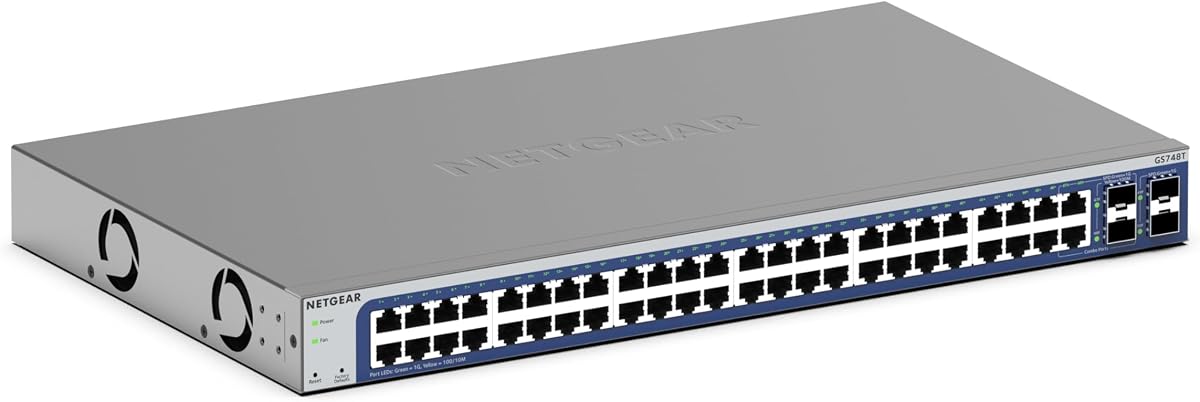
The NETGEAR GS748T has a 4.4 rating and provides 48 Gigabit Ethernet ports, making it the most port-dense conventional access switch in the guide. It is intended for larger offices, shared workspaces, hospitality environments, or technically advanced homes where a large number of wired endpoints must be consolidated into one unit.
We may earn a commission when you buy through this link, at no additional cost to you.
Four 1G SFP ports, with two shared, provide options for fiber connections and network expansion. The smart interface supports controlled setup, access, and SNMP management, while the included year of NETGEAR Insight enables remote monitoring. This makes the switch more suitable than an unmanaged model for a network whose users, devices, and access policies are expected to change.
Its fanless design provides silent operation, and IEEE 802.3az Energy Efficient Ethernet reduces power usage as supported. However, 48 copper ports can be excessive for a typical residential Google Fiber installation, and there are no 2.5G or 10G access ports for modern high-speed clients. Cable management and physical installation also require more thought than with a compact eight-port model.
The GS748T is best for a large organization or sophisticated home lab that prioritizes port count and remote administration over Multi-Gig access. It may serve as a central aggregation point in a building with many wired offices, classrooms, or rooms. For a smaller network, a TP-Link Multi-Gig model offers a more practical balance of speed, size, and simplicity.
Forty-eight ports remove the need for several smaller switches when many rooms or devices require Ethernet. The result is simpler physical organization and fewer separate power connections.
The fanless chassis eliminates operational noise, which is useful in offices and quiet workspaces. Energy Efficient Ethernet also reduces consumption on links where it can be applied without compromising performance.
We may earn a commission when you buy through this link, at no additional cost to you.
Start with the devices that actually need Ethernet, then match the switch's port speed, port count, power features, and management level to the role it will play in your network.
The speed available at the router or optical network terminal does not guarantee that every wired client will receive the same throughput. A switch must have a sufficiently fast uplink to the router, and both ends of that link need matching capabilities. For example, connecting a 2.5G switch to a router with only Gigabit Ethernet will limit the shared uplink even if individual computers support faster rates.
Count not only current wired devices but also access points, game consoles, televisions, printers, cameras, and likely additions. An eight-port model offers comfortable room for a typical household, while five ports may be sufficient for a compact office. A 24- or 48-port switch is intended for substantially denser installations and can be unnecessary in a small home.
RJ45 ports use twisted-pair Ethernet cabling and work directly with most consumer devices. SFP+ ports accept removable modules and are appropriate for fiber uplinks, long links, or specialized equipment. They may also support direct-attach copper cables, but compatible modules and cabling must be purchased separately. Users wanting the simplest setup should favor RJ45 access ports.
Gigabit Ethernet remains sufficient for many common household tasks, but 2.5G is valuable for fast NAS transfers, modern access points, high-resolution media workflows, and capable workstations. Ten-gigabit switches are primarily useful for aggregation, servers, and high-end professional environments. Faster ports only improve performance when connected devices, cables, and the upstream path support the same speed.
Unmanaged switches are faster to install and generally easier to maintain because they perform basic frame forwarding without extensive configuration. Managed or smart-managed switches add features such as VLANs, traffic prioritization, access control, monitoring, and remote administration. These capabilities are valuable in a segmented business network but can be unnecessary for a flat home network.
Power over Ethernet can supply compatible access points, cameras, phones, and other network devices through their data cables. A PoE switch can reduce the need for local power adapters, but users should verify each device's power standard and the switch's total budget. PoE adds complexity and may be unnecessary when every endpoint already has reliable power nearby.
Multi-Gig switches can work with Cat5e or better wiring, but cable length, installation quality, and environmental conditions still matter. Desktop models suit entertainment centers and offices, while wall-mountable and rackmount options help organize larger installations. Check available space, cable-management needs, and whether fanless operation is important in the intended location.
Switching capacity describes the theoretical internal throughput of the device and should comfortably exceed the aggregate traffic it may handle. The included models range from 25Gbps in the five-port 2.5G model to 160Gbps in the 10G fiber switches. Capacity is not the same as internet speed; it indicates how much simultaneous internal traffic the switch can process.
Start by identifying the role of the switch. Connect the Google Fiber router or another upstream network device to one suitable switch port, then connect each wired endpoint to the remaining ports. Use a port rated for the device's link speed, confirm link and activity LEDs illuminate, and avoid forcing a module or connector that does not match the hardware.
For an unmanaged model, the installation is generally complete once power and cables are connected. For a smart-managed or Layer 3 model, connect through the stated web interface or console, apply a current administrator password, review the default configuration, and adjust VLAN, routing, access, and loop-protection settings before connecting critical equipment. Save the configuration after verified changes.
Keep the unit in a cool, dry, ventilated location with the airflow openings unobstructed. Route cables neatly, avoid placing the switch under heavy objects, and leave room for maintenance. Periodically check LEDs, inspect connectors, update management software when appropriate, and restart the device only after confirming that a brief interruption will not disrupt an important task.
For most homes, an unmanaged switch is sufficient when the goal is simply to add wired Ethernet ports. A managed or smart-managed switch becomes more useful when you need VLANs, traffic prioritization, access controls, remote monitoring, or multiple network segments. The added flexibility also introduces configuration work, so complex management should have a clear purpose in your setup.
It can improve performance between compatible devices inside your local network, but it does not automatically increase the internet speed delivered by Google Fiber. A 2.5G switch helps when a NAS, workstation, access point, and router can all support 2.5G links. If the router uplink is only 1Gbps, that connection can remain the bottleneck for all devices sharing it.
A 10G SFP+ switch is most suitable for users with a NAS, server, professional workstation, or fiber uplink that can genuinely use 10G. It requires compatible SFP+ modules and appropriate cabling, which increases cost and complexity. A 2.5G RJ45 switch is usually easier for a typical home because most modern devices connect over copper Ethernet.
The appropriate connection depends on the equipment provided by Google Fiber and the way your network is designed. A switch normally connects to the router or another upstream switch rather than directly to the optical terminal. The port speed and mode must match, and some provider equipment may use a specific gateway arrangement that should be confirmed before installation.
Only if a specific access point is designed for PoE and does not have another reliable power method. Many access points include a power adapter, so a non-PoE switch can work perfectly well. For a dense installation with cameras, phones, or multiple access points, PoE can simplify cabling, but endpoint power standards and the switch's total budget must be compatible.
Count every wired device, including access points, printers, televisions, consoles, cameras, and office equipment. Add room for a few likely additions, but avoid buying a 48-port switch for a small home where it would be difficult to fill. An eight-port model is a common balance, while a five-port unit suits smaller focused networks.
Switching capacity is the maximum internal traffic the hardware can process, not the internet service speed. It becomes relevant when many devices exchange data at once, especially large NAS transfers. For ordinary home internet use, the router uplink, device speed, and network congestion usually have a greater visible effect than the switch's advertised aggregate capacity.
They are usually simpler and have fewer settings that can be configured incorrectly, but that does not mean every unmanaged model is more reliable. Reliability depends on thermal design, construction, power behavior, firmware quality, and environmental conditions. Managed switches add visibility and recovery features that can improve uptime in larger or business-critical networks.
The TP-Link TL-SG108S-M2 is the most balanced recommendation because eight 2.5G ports support modern devices, existing cable standards, fast transfers, and quiet operation. The TRENDnet TEG-S562 is an alternative for users wanting a mixture of 2.5G copper and 10G SFP+ connections, while the eight-port 10G managed switch is the specialist choice for advanced fiber routing.
Prioritize the link between devices rather than the largest number printed on a box. Match switch and router speeds, confirm whether you need 2.5G at the access point, decide whether VLANs and PoE solve real problems, and verify that any SFP+ modules are included. Basic Gigabit models remain effective for basic expansion, but they offer less future headroom.
Finally, check current prices, product availability, warranty terms, and the exact specifications of the Google Fiber router before buying. Ratings and configurations can change over time, and a listing may be updated. The best network switch for Google Fiber is the one that matches your real endpoints and cabling without adding features you will never use.