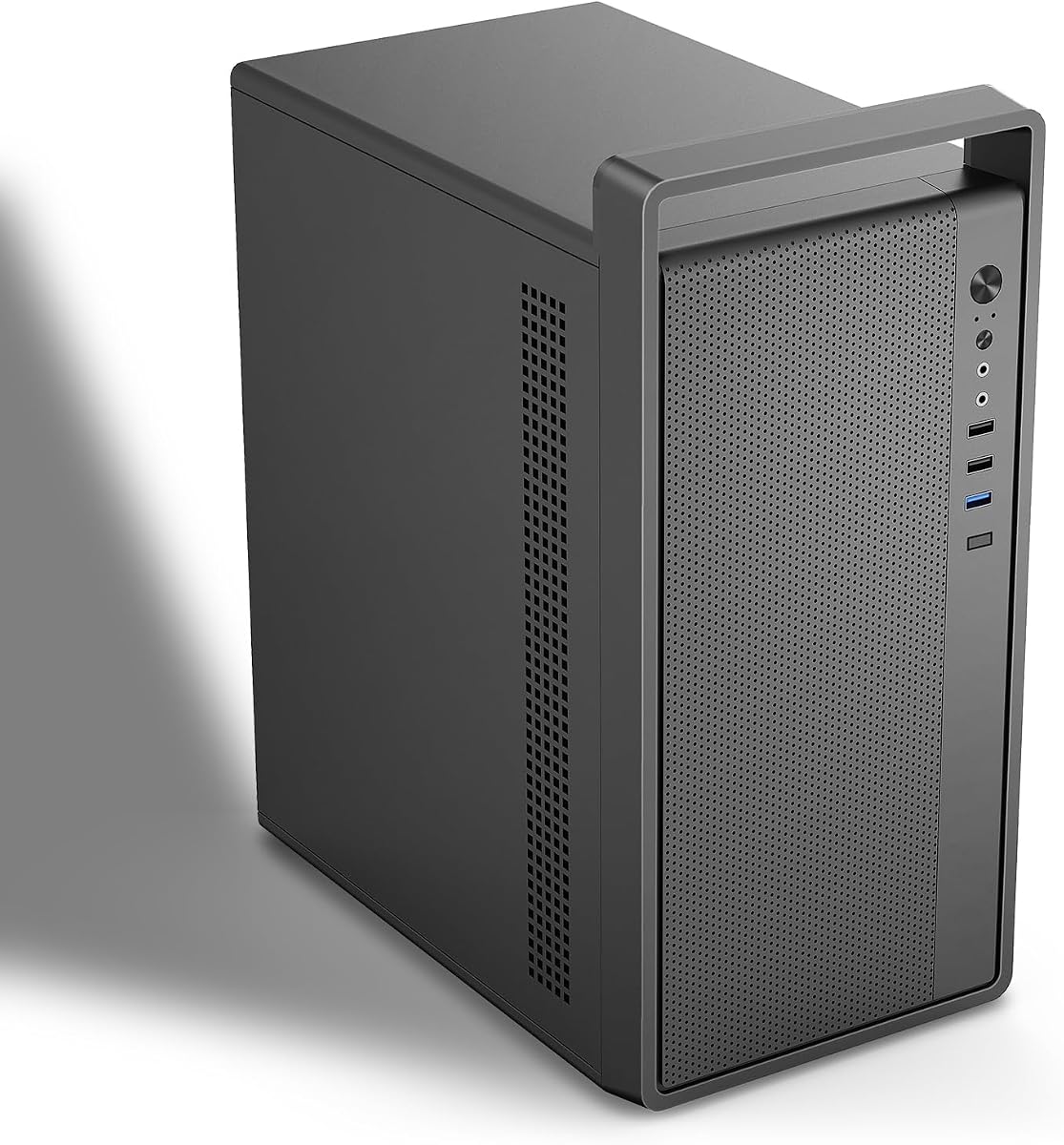
M5 Portable Micro-ATX Case
4.2Editor score
Integrated top handle
0.7mm SPCC steel
Preinstalled 120mm fan
Portable PC Case with Handle guide compares ten travel-ready towers, compact chassis options, rolling bags, and a monitor case for protection and portability
A portable PC case with handle should do more than provide a grip. It needs to protect a valuable desktop during transport, fit the hardware inside, cool the components, and make moving the system between rooms, offices, studios, or events manageable. The right choice depends on whether you need a complete travel bag or a compact chassis with an integrated handle.
We compared all ten products by examining handle style, enclosure material, internal compatibility, cooling support, storage, front connectivity, and the practical use cases described in the product information. The list includes padded tower bags, rolling cases, mini PC enclosures, and a portable-monitor case that is relevant for mobile workstation setups.
Each review shows which product fits a particular need, from spacious moving and travel to compact builds and understated design. Ratings reflect the supplied customer feedback, while product details and compatibility should always be checked before ordering. As with any hardware purchase, current prices, availability, and manufacturer updates can change over time.
4.2Editor score

4.7Editor score

4.6Editor score
This side-by-side guide covers two different approaches: protective bags designed to carry an assembled computer and compact PC chassis built around a carrying handle. Compatibility, cooling, storage, and portability options differ substantially, so the most useful choice depends on whether the system must travel as a complete desktop or be built into a smaller enclosure.


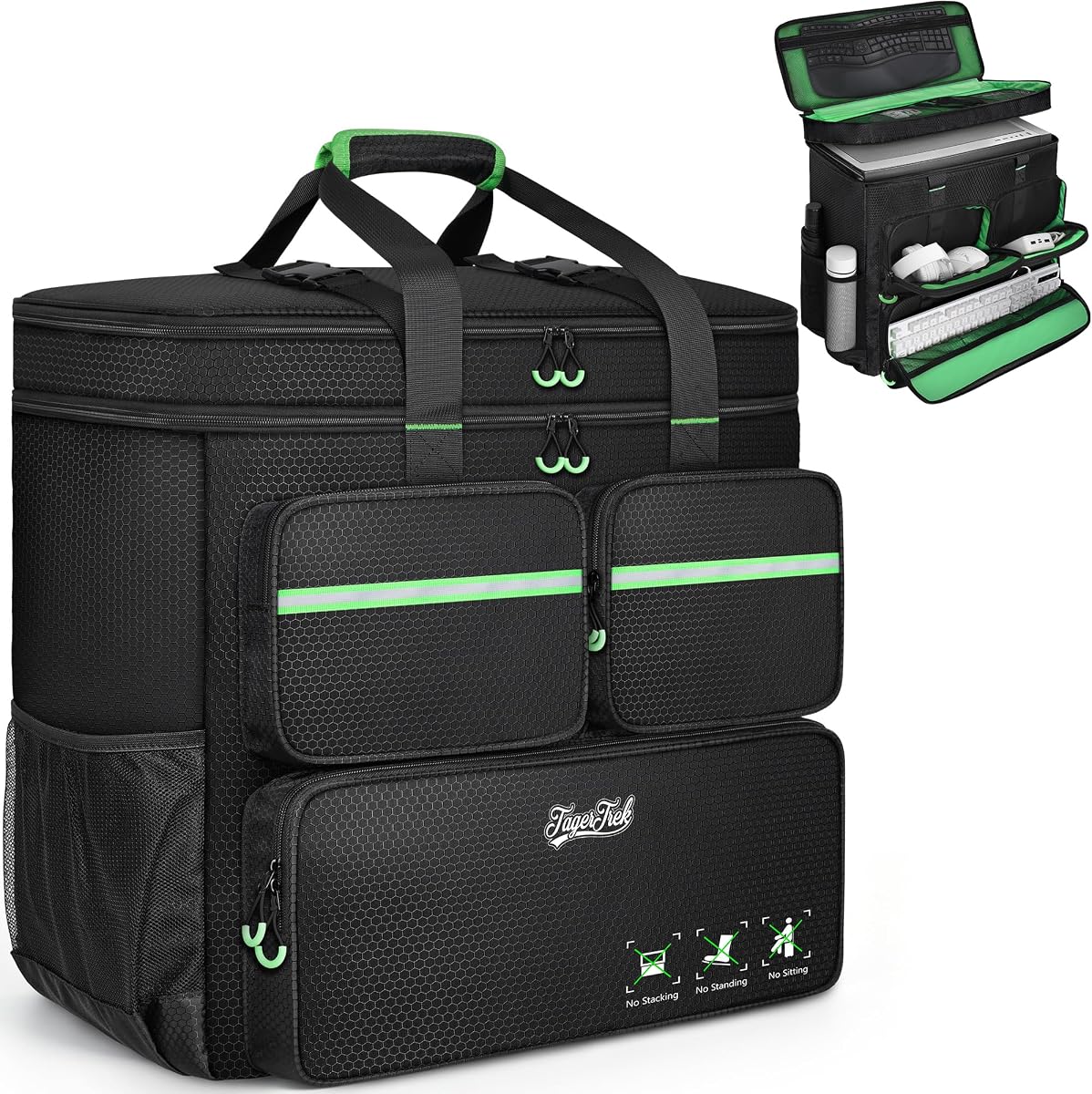


This large carrying case is the most complete travel-oriented option in the guide, combining a roomy tower compartment with extensive protection and storage for peripherals. Its supplied rating is 4.6, reflecting generally favorable customer feedback. Unlike a compact chassis, it lets an existing desktop remain assembled while being moved from one location to another.
We may earn a commission when you buy through this link, at no additional cost to you.
Protection comes from a high-density five-millimeter EPE inner lining and a wear-resistant 600D Oxford exterior. The dimensions are listed as 20.67 by 9.8 by 18.9 inches, and the description identifies compatibility with mainstream ATX and M-ATX motherboard form factors. Three front zippered pockets provide distinct storage for a keyboard, cables, and a mouse or power bank, while side mesh pockets can hold bottles. An internal top-cover mesh pocket offers another place for a keyboard and mouse.
The carrying system is unusually flexible for a tower bag. It can be held by hand or worn on both shoulders, and a releasable plastic chest buckle helps stabilize the load and distribute weight across the shoulders. The trade-off is size: a padded bag around a full-size tower will be more cumbersome than one of the compact enclosures in this list, particularly when stairs, airports, or crowded venues are involved.
This is a strong recommendation for anyone moving a full desktop, attending gaming events, or traveling with a tower that must remain assembled. It is especially useful when cables and peripherals need dedicated compartments. Buyers should still measure their tower against the listed dimensions, particularly if it has protruding feet, a tall cooler, or a large power supply.
The thick EPE lining is the defining feature for transport use. It is intended to absorb impact and vibration while the Oxford fabric handles abrasion during repeated moves.
Separate pockets keep cables, a mouse, a power bank, and larger accessories from shifting around the main chamber, reducing pressure on the computer during transit.
We may earn a commission when you buy through this link, at no additional cost to you.
The JONSBO/JONSPLUS Z20 combines a genuinely compact footprint with a detachable handle and broad component support. Its supplied rating of 4.7 is the highest among the ten products. At approximately 20 liters, the enclosure is intended for Micro-ATX systems and offers enough room for a substantial graphics card, modern cooling, and several storage devices without approaching a full-tower footprint.
We may earn a commission when you buy through this link, at no additional cost to you.
The case is built around 2mm integrated bent-steel panels and large square ventilation openings. GPU clearance reaches up to 363 millimeters, subject to the installed hardware, and the removable PCIe fixing piece simplifies installation of longer cards. Power supply support includes ATX, SFX, and SFX-L options, while the top position can accept a 240mm AIO with a 60mm-thick radiator. Air coolers can reach 164mm with Intel processors or 163mm with AMD processors.
Its four expansion slots and 20-liter scale make it more specialized than a general-purpose desktop tower. Users should also account for the listed front I/O configuration: one USB 3.2 Gen1 Type-A port, one USB 3.2 Gen2 Type-C port, and separate audio and microphone connections. These are modern and practical, but there are not multiple USB-A ports for extensive peripheral collections.
This is the most balanced selection for a builder who wants a small but capable system that can be relocated regularly. It works especially well for a compact gaming or performance build that benefits from a 240mm liquid cooler and long GPU. Those who need more expansion slots or a full ATX motherboard should choose a larger enclosure instead.
The Z20 preserves room for long graphics cards, sizable air coolers, and flexible storage arrangements despite its small stated volume. This makes it more practical than cases limited to laptop-scale components.
Because the handle detaches, the owner can remove it when the case is parked permanently and attach it for LAN parties, studio changes, or other frequent movement.
We may earn a commission when you buy through this link, at no additional cost to you.
The darkFlash WD200 stands apart visually with a walnut wood front panel and a minimalist, furniture-like appearance. Its supplied rating is 4.3, and its defining appeal is the combination of that design with an integrated heavy-duty carry handle. It is aimed at creators, gamers, and studio users who want a Micro-ATX system that looks less industrial in professional spaces.
We may earn a commission when you buy through this link, at no additional cost to you.
Its full mesh airflow architecture supports cooling, and the included ARGB PWM fan provides airflow from the box. The case can also accommodate a 240mm liquid-cooling radiator. Graphics card support extends to 335 millimeters, allowing many modern performance GPUs to fit without requiring a full-size chassis. Front connectivity includes USB Type-C, USB 3.0, and audio ports for common accessories.
The interior is designed for cable management and flexible SSD or HDD placement, though the product information does not provide exact drive counts. It also carries a one-year brand assurance for computer cases. Compared with darker, purely industrial cases, the walnut panel will be polarizing, and owners who prefer a completely uniform enclosure may find it less versatile.
This is an appealing choice for a compact workstation or gaming system that will appear on camera, in a studio, or on a desk where appearance matters. It is less compelling for a builder focused on maximizing every cooling position. Verify the graphics card, radiator, and motherboard dimensions before assembling the system.
The walnut front panel gives the enclosure a warmer, more decorative appearance than typical metal PC cases, making it easier to incorporate into a studio or professional workspace.
Support for graphics cards up to 335 millimeters and 240mm liquid cooling allows the WD200 to serve compact builds that still use substantial performance components.
We may earn a commission when you buy through this link, at no additional cost to you.
The M5 offers one of the clearest ways to add a portable PC case with handle without committing to one of the more elaborate compact designs. Its supplied rating is 4.2. The enclosure is described as a mini tower measuring 313 by 185 by 350 millimeters, and it supports both Micro-ATX and ITX motherboards.
We may earn a commission when you buy through this link, at no additional cost to you.
Durability comes from 0.7mm SPCC steel, which the product description identifies as thicker than a 0.6mm alternative. A 120mm rear fan is preinstalled to begin moving heat out of the case. The handle allows the system to be moved around a home office, studio, or event space, while the steel body provides a firmer structure than a lightweight fabric shell.
The main limitation is graphics card clearance, which tops out at 260 millimeters. That leaves less room than the JONSBO Z20 and darkFlash WD200, so builders should check the exact card and any end-mounted power connector. The listed fan support is also written as two 120mm front positions plus a preinstalled rear fan, which should be confirmed against the current product diagram before purchase.
This case makes sense for a straightforward Micro-ATX or ITX build that values a handle, basic cooling, and storage support over maximum expansion. It supports two 3.5-inch hard drives, two 2.5-inch solid-state drives, CPU coolers up to 160mm, standard ATX power supplies, and up to four PCI slots.
The M5 covers the essentials for a movable desktop: steel construction, motherboard support, graphics card room, a power supply allowance, and a preinstalled cooling fan.
The 260-millimeter ceiling is workable for many cards, but it leaves less tolerance than the roomiest compact models in the guide. Measure the actual card rather than relying only on its advertised model name.
We may earn a commission when you buy through this link, at no additional cost to you.
The Rolling PC Carrying Case is the guide's easiest option for moving a full desktop across longer distances without bearing all the weight by hand. Its supplied rating is 4.4. The bag measures 21 by 21 by 11 inches and is stated to accommodate tower cases up to 21 by 18.5 by 11 inches, with specific examples including the LIAN LI O11D MINI V2, LIAN LI LANCOOL 207, LIAN LI A3, and MONTECH XR-B.
We may earn a commission when you buy through this link, at no additional cost to you.
Its standout feature is the detachable wheeled cart. The cart folds flat, uses smooth swivel casters, and has an aluminum pull handle with three height adjustments. A cushioned top handle secured with hook-and-loop straps also provides a hand-carry method, making the product adaptable to stairs, loading areas, and stationary setups.
The exterior uses wear- and water-resistant 600D polyester, while thick internal padding helps absorb shock and vibration. Storage is extensive: side mesh pockets hold bottles, a top zippered section and mesh pockets accommodate a keyboard and mouse, and three front pockets organize a keyboard, cables, and a mouse or charger. The keyboard pocket is intended for models under 19.7 inches long.
Choose this case when doors, corridors, and event venues make carrying a tower burdensome. Its limitations are size and weight, especially with the cart attached. A smaller rolling option may be easier to store, but this model prioritizes full-tower capacity, accessory organization, and flexible transportation.
The folding cart and adjustable pull handle are especially useful when moving between rooms, offices, hotels, or LAN-party areas. The top handle remains available for stairs and other sections where wheels are inconvenient.
Dedicated compartments for a keyboard, mouse, cables, and charger help separate peripherals from the tower. Buyers should confirm that their keyboard fits the stated length restriction.
We may earn a commission when you buy through this link, at no additional cost to you.
The PC Carrying Case provides a straightforward way to transport a large desktop while keeping both hands available for stairs, doorways, and station platforms. Its supplied rating is 4.4. The bag measures 21 by 21 by 11 inches and is described as fitting tower cases up to 21 by 18.5 by 11 inches, including several listed ATX and M-ATX models.
We may earn a commission when you buy through this link, at no additional cost to you.
It can be carried as a backpack or by the handle, and the description says both shoulder straps and the handle are designed to support the weight of most towers. A chest strap helps keep the backpack balanced, while a buckle at the top is intended to stop internal items from shifting. This makes the design useful for travel, office relocation, LAN parties, and gaming at another location.
The exterior is made from water- and wear-resistant polyester with reinforced stitching. Thick internal padding provides shock and vibration protection. Organization is similar to the rolling case, with side mesh bottle pockets, a top zippered area and mesh compartments for a keyboard and mouse, and three front pockets for larger accessories, cables, and a mouse or charger.
This is a good alternative for travelers who prefer one bag to function as both backpack and hand-carry case. Compared with the wheeled model, it is simpler and avoids a permanently attached cart. The trade-off is that the full weight remains on the user's shoulders over long distances, so a rolling cart may be preferable for particularly heavy systems.
The backpack configuration leaves the hands free to manage doors, luggage, or stairs. The chest strap supports balance and reduces side-to-side movement during a walk.
The top buckle adds a second point of control around the packed computer, complementing the internal padding intended to reduce shifting and vibration.
We may earn a commission when you buy through this link, at no additional cost to you.
The S300 is designed for users who prioritize the smallest practical enclosure with a handle. Its supplied rating is 4.4. The case measures 12.2 by 5.3 by 7.6 inches and has an internal volume of only 8.1 liters, making it far smaller than the tower bags and most Micro-ATX cases in this guide.
We may earn a commission when you buy through this link, at no additional cost to you.
Despite its size, it supports standard 170 by 170mm Mini-ITX motherboards and graphics cards up to 305 millimeters long. The included graphics card configuration uses a PCIe 3.0 16x riser cable, and the product information specifically instructs owners to set the motherboard BIOS PCIe speed to Gen3 when using that cable with a 3.0 graphics card.
Cooling and power are the important constraints. The CPU fan height limit is 60mm, and the power supply must be an SFX or SFX-L unit between 100 and 130 millimeters long. Three-sided mesh panels encourage hot and cold air exchange. A small leather handle sits on top, while the front panel provides USB 3.0 Type-C connectivity.
This is best suited to a deliberately small portable gaming or productivity build using a low-profile CPU cooler and an SFX power supply. It is less appropriate for a conventional Micro-ATX system or a builder expecting easy access to large tower coolers. Confirm the riser setting, cooler height, and power supply dimensions before purchasing parts.
An 8.1-liter volume and integrated top handle make the S300 attractive for small workspaces, temporary gaming stations, and highly compact portable systems.
The 60mm CPU cooler limit and SFX power requirement narrow component choices. Checking these constraints before buying hardware avoids the need to replace parts later.
We may earn a commission when you buy through this link, at no additional cost to you.
The Micro ATX Handle Case is a flexible compact enclosure for builders who want a portable system but do not need the extreme density of the S300. Its supplied rating is 4.0, the lowest among the compact chassis in the guide. It supports both standard ITX and Micro-ATX motherboards within a stated area of 245 by 245 millimeters.
We may earn a commission when you buy through this link, at no additional cost to you.
Graphics card support reaches 310 millimeters, while CPU coolers can be up to 135 millimeters high. Cooling positions include top and rear fans of different listed sizes, bottom fan options, and a 240mm water-cooled radiator. The case uses 0.8mm SPCC steel in black or white and includes a sturdy aluminum handle for easier movement.
Power supply flexibility is one of its strongest features because it supports standard ATX, SFX, and SFX-L options. There is an important configuration caveat: installing a 240mm liquid cooler limits the system to an SFX power supply. The product is supplied without fans, so a complete cooling setup requires separate purchases or components already in the builder's possession.
This case works for a Micro-ATX workstation or gaming build that must be moved occasionally. It may suit someone who values a standard power supply and flexible storage more than a minimal footprint. Buyers should finalize the radiator and power supply choice first, then confirm that the selected combination fits the chassis.
Supporting ATX, SFX, and SFX-L power supplies gives builders more choice than cases limited to one form factor. The radiator placement still determines which option is practical.
The case supports a 240mm radiator and multiple fan locations, but it arrives without fans. A planned cooling and airflow layout is necessary for a complete build.
We may earn a commission when you buy through this link, at no additional cost to you.
The Large Computer Desktop Tower Carrying Case focuses on keeping a standard ATX mid-tower stable and protected. Its supplied rating is 4.3. External dimensions are listed as 20.08 inches long by 9.06 inches wide by 19.69 inches high, with internal maximum dimensions of 19.88 by 8.86 by 19.69 inches.
We may earn a commission when you buy through this link, at no additional cost to you.
A rear buckle fastener and internal securing straps help prevent the computer from tipping or shifting. Protection is provided by five-millimeter high-density EPE foam, while a reinforced base and anti-slip feet add stability when the case is placed on a surface. The Oxford exterior is described as water-repellent and resistant to dust and everyday wear.
Six storage areas are listed: two front zippered pockets, one front buckle-flap pocket, two expandable side mesh pockets, and one top inner mesh pocket. Adjustable chest straps distribute weight, while padded handles support quicker hand-carrying. Unlike the larger top-pick bag, however, it does not appear to provide a dedicated full-length keyboard compartment, so peripheral planning may be necessary.
This is a convincing choice for relocating a mid-tower while keeping it assembled, particularly when internal movement needs to be minimized. It is less convenient for carrying a full keyboard and a complete peripheral set in the same bag than the premium tower case. Measure both the case and the computer, including any exterior protrusions, before ordering.
The combination of a rear buckle and internal straps addresses a common transport risk: a heavy desktop moving inside its bag and placing uneven pressure on the components.
A reinforced base and anti-slip feet make the bag more stable when parked in a vehicle, office, studio, or event space while the system is not in use.
We may earn a commission when you buy through this link, at no additional cost to you.
The Portable Monitor Carrying Case is not a PC tower enclosure, but it is relevant to portable workstation setups that pair a compact computer with a separate display. Its supplied rating is 4.7. It is designed for many 15.6- and 16.1-inch portable monitors, with a list of compatible brands and models included in the product information.
We may earn a commission when you buy through this link, at no additional cost to you.
The case has a reinforced interior with thickened edges, a side zipper for easier access, and a large front pocket for chargers, cables, hubs, power adapters, earphones, cards, and an iPad. Two internal mesh pockets help organize smaller accessories. Its water-, scratch-, and wear-resistant 900D fabric is paired with SBS zippers and a padded PU leather handle.
The extendable handle can be carried comfortably or tucked away, allowing the case to slide into a larger travel bag. Internal dimensions are 15.35 by 9.84 by 1.26 inches. Because the shell is tailored to a portable monitor rather than a computer tower, users should compare their exact monitor dimensions with the listed interior before purchasing.
This is the right companion case for a mobile productivity setup that uses a small PC and a portable display rather than a full desktop. It offers a secure handle and useful accessory storage but cannot replace one of the tower bags or compact chassis in this guide. The high supplied rating makes it a strong specialized addition, not a direct substitute for a PC case.
For users who carry a small computer separately, this case keeps the display and its cables together without requiring a full-size tower bag.
The large front pocket and internal mesh pockets organize charging equipment and small daily essentials while the case remains slim enough for travel luggage.
We may earn a commission when you buy through this link, at no additional cost to you.
The phrase portable PC case with handle can describe a padded travel bag, a rolling carrier, or a compact computer chassis with an integrated handle. Start by deciding whether the priority is transporting an existing full-size tower or building a smaller system that is easier to carry.
A carrying bag is the simplest choice when you already own a compatible desktop and need to move it intact. These products prioritize padding, straps, fasteners, and accessory storage rather than motherboard mounting points. A buildable PC case is a different category: it has an internal layout for components, cooling options, drive bays, front ports, and a handle designed to become part of the finished system.
Choose a bag for moving, relocation, travel, and LAN events. Choose a chassis when building a new portable system or when desk space, component size, and recurring movement matter more than transporting a preassembled tower.
Measure the complete computer, including its width, depth, height, feet, and any protruding handles. Tower bags in this guide are generally around 20 to 21 inches in their largest dimensions, while compact chassis range from the 8.1-liter S300 to the roughly 20-liter JONSBO Z20. For a new build, check motherboard form factor, graphics card length and width, power supply format, CPU cooler height, and radiator thickness.
Do not rely on a vague statement such as “fits most towers” when exact dimensions are available. Match the product's published limits with every critical component, and leave enough clearance for cables.
A fixed handle is convenient because it cannot be misplaced, while a detachable handle offers flexibility when the case is parked. For bags, padded hand grips, shoulder straps, chest straps, and secure buckles can make a heavy computer more manageable. Rolling options add a cart and caster wheels for level floors but take up more space.
Consider where the system will be carried. A robust backpack arrangement may matter more than a rigid handle for stairs, while a folding cart is valuable for long walks through airports or convention centers.
Padding helps absorb impact and vibration, but a complete protective design also keeps the computer from shifting inside the bag. Look for thick EPE foam, reinforced stitching, water-resistant outer fabric, internal straps, and exterior buckles. A reinforced base with anti-slip feet adds stability when the bag is set down.
The best protection comes from combining cushioning with restraint. A well-padded but loosely fitted bag can still allow the tower to move, so verify the closing system and internal securing arrangement.
Compact cases need more deliberate airflow planning than full towers. Look for mesh panels, vented steel, fan positions, radiator support, and CPU cooler clearance. Some products include a rear or ARGB fan, while others are supplied without fans. ATX and SFX power supply options can influence how much space remains for cooling hardware.
Match the case to the thermal design of the system. A large air cooler, multiple fans, and a 240mm radiator may not fit together, so check every cooling dimension and the power supply restriction that applies to the chosen layout.
Front-facing connectors make a portable case much easier to use when it is moved between locations. The compact models in this guide provide combinations of USB Type-A, USB Type-C, and audio connections. Connectivity should match the peripherals and accessories you use most often, especially when the enclosure offers only one port of a particular type.
Also account for where the ports are located in relation to the handle and orientation. A setup that is carried frequently is more convenient when frequently used connectors remain accessible without rotating the entire system.
A PC bag can function as a complete mobile workstation if it has room for a keyboard, mouse, cables, charger, headphones, and possibly a water bottle. Separate zippered and mesh compartments keep smaller accessories organized and reduce movement. Compact chassis options usually provide less internal room for peripherals because their purpose is to hold computer components only.
Check keyboard length limits and the number of drive bays or storage positions. If the bag cannot hold the full peripheral set, plan a separate accessory case rather than forcing oversized equipment into the main compartment.
Steel mini towers offer rigidity but may be visually industrial, while wood-accented or fabric-covered designs can better complement a living room, office, or studio. Material thickness is one useful indicator, though it does not reveal every aspect of assembly quality. Product guarantees, included accessories, and the availability of replacement parts can also affect long-term ownership.
Choose an appearance and construction method that suit the setting. A decorative case may be ideal for a visible workstation, while rugged padding and reinforced stitching are more relevant for repeated transportation.
Before placing a desktop into a carrying bag, shut it down fully, disconnect peripherals, and allow the system to cool. Secure graphics cards, remove or protect protruding accessories, and use the internal straps or buckles so the tower cannot shift. A buildable chassis should be assembled with all cables routed away from fans and the handle, making sure no component blocks access to an airflow opening.
Lift and carry a loaded bag with the weight supported from underneath, and use the shoulder or chest straps when walking a long distance. A rolling cart is best on smooth surfaces; switch to the padded top handle for stairs. Do not lift a full system by a detachable case handle, an accessory strap, or the front panel, and avoid pulling the bag by a cable that protrudes from an open pocket.
Let the case dry before storing it if it has been exposed to rain, and wipe the exterior with a damp cloth rather than soaking it. Check the zippers, stitching, buckles, padding, and handle attachments periodically. For a PC chassis, clean dust from mesh and fan filters, keep the intake and exhaust paths clear, and confirm that the handle fasteners remain secure before each move.
A portable PC bag is designed to carry an already assembled computer and usually includes padding, straps, fasteners, and accessory pockets. A PC case with a handle is an empty enclosure into which compatible components are installed. The first is mainly a transport solution, while the second defines the size, cooling, and internal layout of a portable computer.
You can if the bag's published dimensions and shape fit the exact tower, including feet, handles, and protruding accessories. Measure both the case and the computer before ordering. Also account for the weight, because a larger padded enclosure can be difficult to carry even when it fits.
Mini-ITX is the smallest common option and produces the most compact portable systems, but component restrictions are often strict. Micro-ATX provides more room for expansion, storage, cooling, and power supplies while remaining manageable. Choose based on the graphics card, CPU cooler, power supply, and drive layout you actually need rather than motherboard size alone.
They often need more deliberate cooling planning than full-size towers because their internal volume is smaller. Check included fans, supported fan positions, radiator thickness, and CPU cooler clearance. Make sure intake and exhaust fans work together and that cables do not obstruct the mesh panels or airflow paths.
A rolling case is usually easier over long distances on smooth floors because the cart supports much of the weight. A backpack-style case is more versatile around stairs and tight spaces, and it can be stored more easily. Some users may also prefer to avoid adding a cart to a large travel load.
For an existing tower, check external length, width, height, and weight. For a new build, check motherboard form factor, graphics card dimensions, power supply format, CPU cooler height, drive positions, and radiator support. Cables attached to a graphics card can also require additional clearance beyond the card's published length.
A portable monitor case is designed for a display and its accessories, not a Mini-ITX or Micro-ATX computer. A compact computer would need a purpose-built chassis or another protective bag. A monitor case can complement that setup by carrying the screen, charger, hub, and cables separately.
Use all available internal straps, rear fasteners, and exterior buckles, and place peripherals in separate pockets so they cannot press against the tower. Keep the computer fully shut down before moving it, and lift the bag from underneath. On a rolling cart, secure the bag so it cannot slide or tip.
The JONSBO/JONSPLUS Z20 is the strongest all-around compact chassis, combining a detachable handle, modern connectivity, strong GPU clearance, and flexible cooling support. The M5 Portable Micro-ATX Case is the value-oriented option for a more straightforward build, while the large Computer Desktop Tower Carrying Case offers the most complete protection and organization for moving an assembled desktop.
Prioritize the type of portability you need. Full-size PC bags are best for relocating a complete tower and its accessories, rolling cases reduce strain over smooth floors, and compact chassis are better for building a smaller system from the ground up. Component compatibility should come before appearance: verify dimensions, power supply format, cooling limits, and graphics card clearance first.
Ratings and product configurations can change as customer feedback develops and manufacturers update their products. Before purchasing, check the latest compatibility information, included accessories, warranty details, and current price directly on the product page, then choose the case that matches your hardware and most common travel environment.