
AR Glasses HDMI to USB C Adapter
4.5Editor score
4K at 60Hz output
Compact aluminum construction
Included power cable
Our Rayneo HDMI Adapter guide compares ten options for AR glasses, highlighting video modes, power needs, device compatibility, portability, and setup ease.
A Rayneo HDMI adapter can transform AR glasses into a portable cinema, gaming display, or large-screen workstation, but the right model depends heavily on your glasses, source device, and preferred display mode. The best adapters combine the correct video standards, dependable power delivery, one-way signal conversion, and a connection process simple enough for travel.
We compared ten dedicated RayNeo-compatible HDMI adapters and closely related HDMI-to-USB-C converters, focusing on supported resolutions, HDR capability, simultaneous charging, source compatibility, portability, and setup requirements. The list includes native RayNeo models, multi-brand AR glasses adapters, and one option intended for Lightning-equipped iPhones.
Each review identifies the adapter’s strongest use case and important limitations, from external power requirements to model-specific display settings. The top three selections represent our strongest overall, best budget, and best premium choices, while detailed specifications and buying guidance help readers match the right connector to their setup.
4.5Editor score
4.6Editor score

4.1Editor score
The comparison below covers output modes, connection direction, power requirements, supported hardware, and portability across ten HDMI adapters suitable for RayNeo and other compatible AR glasses.


This HDMI-to-USB-C adapter earns our Editor's Choice position because it combines strong 4K at 60Hz performance with broad support for RayNeo Air 2s XR and other major AR glasses brands. Its 4.6 rating is the highest among the ten products in this guide, although ratings should still be considered alongside device requirements and intended use.
We may earn a commission when you buy through this link, at no additional cost to you.
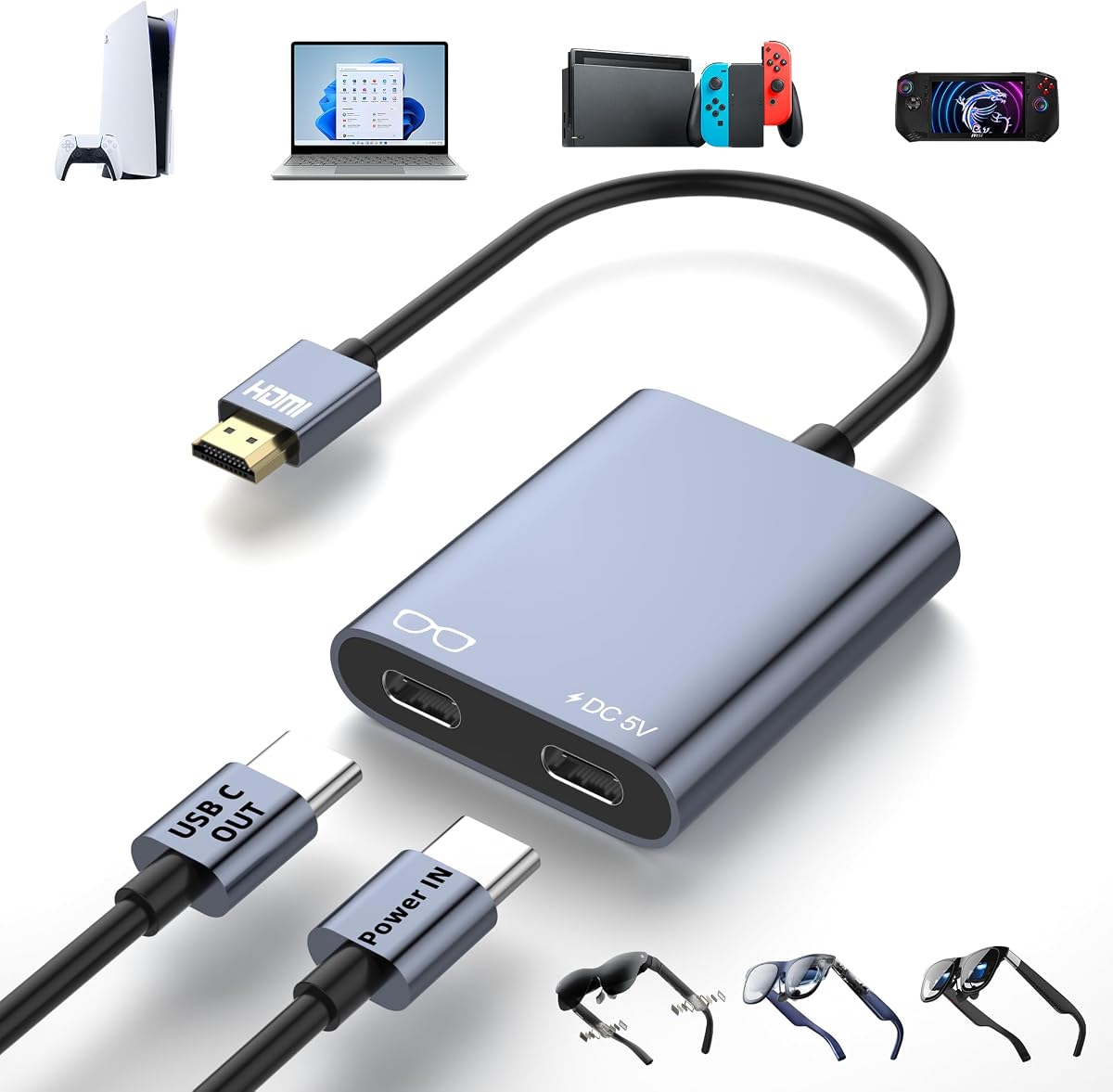
The adapter carries video in one direction from an HDMI source to a USB-C display. That makes it suitable for game consoles, laptops, media players, and streaming devices feeding compatible glasses or portable monitors. Its separate Type-C power input can supply the connected display, while the included USB-A to USB-C cable supports use with a wall charger or suitable power bank.
The main compromise is that this is not a self-powered universal adapter. External 5V power is mandatory, and inadequate power may lead to flicker, black screens, or signal loss. Some RayNeo and XREAL configurations may also require a DisplayPort mode change, while source-side DHCP settings can influence whether the display appears.
This is a strong recommendation for anyone who wants a flexible converter for a console, laptop, and AR glasses setup. The adapter is especially compelling for owners of RayNeo Air 2s XR who also use XREAL, Rokid, or VITURE hardware. Check DP Alt Mode support, verify the source’s output settings, and keep a suitable 5V power supply close at hand.
Support for 4K at 60Hz makes this adapter well suited to modern consoles, compatible laptops, and streaming hardware. Actual resolution still depends on the source device, connected glasses, and full-function USB-C cable.
The dedicated power port is especially useful during long viewing or gaming sessions because it can help the connected display maintain a stable signal. A compatible external supply and a secure USB-C connection remain essential.
We may earn a commission when you buy through this link, at no additional cost to you.
This native RayNeo adapter is designed for Air 3, Air 2, and GT Series glasses, making it a straightforward option for owners of those models. It supports 4K at 30Hz, 2K at 30Hz, and 1080p at 120Hz, while simultaneous charging helps preserve battery life during extended viewing.
We may earn a commission when you buy through this link, at no additional cost to you.
Its strongest selling points are simplicity and portability. The adapter is described as plug-and-play, with no required downloads or configuration, and its compact construction is intended to fit easily into a pocket or bag. It can create a 201-inch virtual display for films, series, gaming, and other large-screen experiences.
The critical limitation is model compatibility. It is explicitly not intended for the Air 4 Pro and does not offer HDR10 output. Buyers seeking a 4K at 60Hz presentation or HDR performance should look at one of the more general-purpose HDMI-to-USB-C adapters instead.
Choose this product if you own an Air 3, Air 2, or supported GT Series headset and value a dedicated, uncomplicated accessory. It is less suitable for mixed-device ecosystems because its listed target is narrower than several multi-brand converters in the guide. Confirm the exact model of your glasses before ordering.
A model-specific adapter removes some of the uncertainty involved in multi-brand converters. It is a sensible match for owners who know their glasses belong to the Air 3, Air 2, or supported GT Series lineup.
The lightweight, pocket-oriented format and direct setup make this useful for travel. A separate media device and a compatible charging arrangement complete the minimal kit.
We may earn a commission when you buy through this link, at no additional cost to you.
This AR glasses adapter offers an appealing combination of 4K at 60Hz support, broad device compatibility, and a compact aluminum body. Its 4.5 rating makes it one of the strongest-reviewed products here, particularly for users who want a single converter across RayNeo, XREAL, Rokid, VITURE, consoles, and portable displays.
We may earn a commission when you buy through this link, at no additional cost to you.
Video travels from the HDMI source toward the USB-C display, and the adapter can be powered through its dedicated Type-C input. The package includes a three-foot USB-A to USB-C cable, making it easier to establish a powered setup with a charger or suitable power source. No drivers or special software are required.
Its limitations are common to this category: the signal path is not reversible, and external power is required. The adapter cannot serve as a docking station or capture card, and it is not intended for Meta Quest, PICO, HTC Vive, or similar VR headsets. Some devices may also need DP Alt Mode or a firmware update.
This is our Best Budget selection because it delivers a wide feature set without the need to own a RayNeo-specific adapter. It is a particularly good fit for RayNeo Air 2s XR users who also play on consoles or use portable monitors. Buy it if you need 60Hz video and a powered, travel-ready adapter.
The compatibility list covers AR glasses, game consoles in TV mode, streaming devices, laptops, projectors, and portable monitors. That breadth makes it useful beyond a single headset-and-console pairing.
The listed dimensions and low weight support easy packing without sacrificing the aluminum housing’s heat-dissipation benefits. A full-function cable and suitable power supply are still needed.
We may earn a commission when you buy through this link, at no additional cost to you.
This HDMI-to-USB-C hub is built for AR glasses and portable displays, with support for 4K at 60Hz, 1080p at 120Hz, and 1080p at 144Hz. Its compatibility includes RayNeo, VITURE, XREAL, and Rokid glasses, making it a versatile option for mixed entertainment setups.
We may earn a commission when you buy through this link, at no additional cost to you.
The package includes a 60-centimeter 4K HDMI cable and a 50-centimeter power cable, reducing the need to find suitable accessories separately. The power connection can support displays and glasses up to 10W, while a portable charger may be useful during travel. The hub also supports laptops, consoles, TV boxes, and media sources with HDMI output.
There are several setup caveats. The power output cannot charge the source device, and portable displays may need their own external power connected first. Some laptops, PS4, and PS5 systems use a DHCP feature that can interfere with the hub and may need to be disabled. Compatibility with higher refresh rates also depends on both the source and display.
This is an attractive choice for users who prioritize high refresh rates and want both necessary cables in the box. It suits portable gaming, private cinema, and productivity setups, particularly when the connected glasses support the required USB-C video mode. Review the device-specific instructions before installation.
The adapter can support up to 1080p at 144Hz when every connected device also supports that standard. This gives fast-paced games more potential headroom than a 60Hz-only connection.
Included HDMI and power cables reduce setup friction. A compact portable charger can be added when the hub must operate away from a wall outlet.
We may earn a commission when you buy through this link, at no additional cost to you.
This compact HDMI-to-Type-C adapter delivers 4K at 60Hz and supports an extensive list of smart glasses, including RayNeo Air 2s XR, XREAL, Rokid, VITURE, and Thunderbird AR. Its 4.4 rating reflects a strong balance of features for users who move between AR and conventional USB-C displays.
We may earn a commission when you buy through this link, at no additional cost to you.
The aluminum housing measures 2.3 by 1.2 by 0.4 inches, with a listed cable length of 6.1 inches and weight of 0.08 pounds. A dedicated power port allows the adapter to send power to compatible glasses or displays, while the same USB-C connection can carry video and audio when the target supports those functions.
The adapter is strictly one-way, so it cannot accept a USB-C video source and transmit it to an HDMI display. It also cannot be connected to another adapter. XREAL One users receive specific guidance for entering DP mode, and all users should update their glasses firmware and reconnect the USB-C output if problems occur.
This model is a good middle ground for RayNeo Air 2s XR owners who also use XREAL glasses or USB-C portable monitors. Choose it for a small, durable adapter with broad device support. Make sure the source can output HDMI and the destination supports the required DP Alt Mode functionality.
The included XREAL One instructions are useful because the adapter may need to be placed in a specific DP mode. Similar checks should be made for any glasses model that exposes multiple display modes.
The small aluminum enclosure is easy to carry and provides a practical surface for heat dissipation. Its light weight is helpful when the adapter accompanies a portable gaming or viewing kit.
We may earn a commission when you buy through this link, at no additional cost to you.
The Hagibis adapter is designed to move HDMI video to compatible AR glasses, portable monitors, projectors, and other displays at up to 4K at 60Hz. It specifically supports RayNeo Air 2s XR alongside XREAL, Rokid, VITURE, and Thunderbird AR glasses, making it relevant to a broad range of users.
We may earn a commission when you buy through this link, at no additional cost to you.
Its stated use cases range from office presentations and hotel television connections to large-screen gaming and portable entertainment. The adapter includes a power supply port that accepts 5V at 1A, and the instructions state that this port must be connected while the adapter is in use.
A modern cable is important because the product requires USB 3.1, USB 3.2, USB 4, or Thunderbolt 3 or 4 connections for proper operation. A full-function USB-C cable is also needed between the adapter and the display. The HDMI plug connects to the source, while the USB-C side connects to the display rather than a docking station or hub.
This is a versatile pick for business travelers and mixed-device households. It works particularly well when a laptop needs to feed a USB-C projector or portable display, while the same hardware can support RayNeo and other AR glasses. Budget for an appropriate full-function cable and ensure external power is always available.
The adapter can connect a laptop to a hotel television, projector, or portable monitor. That makes it more versatile than an adapter intended strictly for a single glasses ecosystem.
The product depends on modern, full-function USB-C connections rather than charging-only cables. Using the specified cable generations reduces the chance of missing video, audio, or power.
We may earn a commission when you buy through this link, at no additional cost to you.
The Guermok converter supports up to 4K at 60Hz and 1080p at 120Hz on compatible AR glasses and USB-C displays. It is positioned as a low-latency solution for gaming, movies, screen mirroring, presentations, and mobile work, making it useful for users who want responsive feedback from compatible glasses.
We may earn a commission when you buy through this link, at no additional cost to you.
The HDMI end serves as the source input, while the USB-C end is display-only. Compatible sources include PS5, PS4, Xbox Series X/S, desktop PCs, laptops, media players, and consoles used with a suitable dock. The converter requires no software or drivers and does not add spatial, 3D, or companion-app functionality.
A major operational requirement is external 5V power. The source should provide between 5V and 1.5A, and the instructions advise against using a source above 5V or a multi-port fast charger. Without adequate power, the adapter can flicker, disconnect, or show no signal. A full-function USB-C video cable is also required but not included.
This model is a strong choice for mobile gaming and presentations where low latency and portability matter. It is less suitable for users expecting bidirectional conversion, capture-card features, or broad spatial-computing functions. Confirm the glasses’ video-input support and acquire a proper video cable before use.
The low-latency design supports a more immediate viewing experience when the source, glasses, and network setup are otherwise suitable. Adapter latency cannot compensate for incompatible hardware or high-latency source devices.
Stable operation depends on a 5V supply within the specified range. Avoiding excessive voltage and unsuitable fast chargers helps protect the adapter during long sessions.
We may earn a commission when you buy through this link, at no additional cost to you.
This adapter stands apart with a built-in 3000mAh rechargeable battery and support for iPhone 14, 13, 12, and earlier Lightning devices. It also handles standard HDMI sources and USB-C-equipped AR glasses, making it a potentially portable option for users whose phones lack a native HDMI output.
We may earn a commission when you buy through this link, at no additional cost to you.
The listed output modes include 4K at 60Hz and 2K at 120Hz. Compatible glasses include Viture, XREAL, Rokid, and RayNeo models, while HDMI sources include consoles, PCs, laptops, TV boxes, streaming sticks, DVD players, and devices such as Apple TV, Fire TV Stick, and Chromecast.
The main caveat concerns the Lightning path: the product requires the official Apple Lightning Digital AV Adapter, which is not included. The built-in battery can power AR glasses or Type-C mobile phones, but users should account for charging and battery capacity during extended use. The signal is also one-way, from HDMI to USB-C.
This model is a practical pick for travelers who value cable independence and already own an official Apple adapter. Its lower customer rating makes it less compelling as a universal first choice, but the internal battery adds genuine value where wall outlets are scarce. Confirm Lightning and glasses compatibility before purchasing.
The internal rechargeable battery reduces reliance on a wall charger and can help keep compatible glasses or phones powered. It makes the adapter more useful for flights, commutes, and other mobile situations.
Lightning iPhone users need the official Apple Digital AV Adapter for the specified connection path. Third-party adapters that merely claim compatibility may not provide the required behavior.
We may earn a commission when you buy through this link, at no additional cost to you.
This adapter supports 4K at 60Hz and includes a one-meter full-function USB-C cable, which simplifies the connection between the converter and compatible AR glasses or portable monitors. Its stated compatibility includes RayNeo Air 2s XR, XREAL, VITURE, Rokid, and Thunderbird AR devices.
We may earn a commission when you buy through this link, at no additional cost to you.
The aluminum housing is designed for heat dissipation and portability. A dedicated Type-C power input accepts a 5V supply, allowing the adapter to power a connected display while carrying video. The package also includes a user manual, giving buyers clear access to setup and compatibility information.
External 5V power is essential, and devices needing more than the specified output may fail to operate. The adapter cannot reverse USB-C video to HDMI, does not work with headphones or docks, and is not intended for VR headsets. Studio Display users are advised to use external audio because the adapter does not support its audio path.
This is a well-rounded option for a RayNeo Air 2s XR owner who wants a compact converter, a ready-made cable, and broad compatibility. It is a particularly good travel option when a small power bank can accompany the adapter. Always enable the correct display mode and use only compatible sources.
The included one-meter full-function cable removes the need to identify a separate video-capable USB-C lead. It should still be connected directly to the glasses or display.
The small aluminum body and dedicated 5V input create a portable package for gaming and media use. The external supply is necessary for a stable picture and can be shared with other travel electronics.
We may earn a commission when you buy through this link, at no additional cost to you.
This native RayNeo HDMI 2.0 adapter is the only product in the guide with explicitly listed HDR10 support. It is designed for Air 4 Pro and GT Series glasses, making it the top option for users who want a model-specific connection and a high dynamic range presentation when the source supports it.
We may earn a commission when you buy through this link, at no additional cost to you.
Video output reaches 4K at 30Hz, with additional support for 2K at 30Hz and 1080p at 120Hz. Simultaneous charging helps maintain the connected device during long gaming or streaming sessions. The adapter can also produce a 201-inch virtual display, creating a large-screen experience for movies and games.
Its limitations are equally important. HDR10 only works when the source provides compatible HDR10 content, and 4K is limited to 30Hz rather than the 60Hz offered by several USB-C converters. Lightning devices also require an Apple Digital AV Adapter, which is not included.
This is our Best Premium recommendation for Air 4 Pro owners who prioritize HDR10 and native RayNeo integration. It is less suitable for users seeking 4K at 60Hz, reverse USB-C-to-HDMI conversion, or compatibility with every AR glasses model. Verify your exact headset and media source before ordering.
HDR10 can provide richer contrast and more vibrant color when the source, adapter, and glasses all support it. Ordinary SDR content will not gain a true high-dynamic-range presentation.
Direct Air 4 Pro compatibility is a meaningful advantage for owners who do not want to navigate generic converter settings. The GT Series is also included in the stated target range.
We may earn a commission when you buy through this link, at no additional cost to you.
The right RayNeo HDMI adapter depends on your exact glasses model, source connection, power arrangement, and desired display mode. Reviewing these factors before buying helps prevent compatibility problems, unstable signals, and unnecessary accessories.
RayNeo adapters are not interchangeable across the entire product line. The native RayNeo HDMI 2.0 option is designed for Air 4 Pro and GT Series glasses, while another dedicated model targets Air 3, Air 2, and GT Series but explicitly excludes Air 4 Pro. Several generic HDMI-to-USB-C adapters instead list RayNeo Air 2s XR among their compatible models. Always match the exact model number rather than relying on the RayNeo name alone.
Choosing by exact headset model is the safest way to avoid a connector or signal-mode mismatch. If the glasses use USB-C video input, confirm that they support DisplayPort Alt Mode before considering a generic converter.
Most adapters in this category convert an HDMI source into a USB-C display signal. The source can be a game console, laptop, media player, or streaming device, while the receiving side must be compatible AR glasses or a USB-C display. This one-way design should not be confused with a bidirectional USB-C-to-HDMI adapter.
Reversing the cables will not produce a picture. If you need to send video from a USB-C laptop or phone to an HDMI television, choose the correct directional product or a cable designed for that path.
Output specifications provide only the adapter’s ceiling. To achieve 4K at 60Hz, the source device, glasses, display, and full-function USB-C connection must all support that mode. Native RayNeo options list 4K at 30Hz, while several multi-brand converters support 4K at 60Hz. Some products also advertise 1080p at 120Hz or 144Hz.
Prioritize the mode you actually need. Fast-paced games may benefit from a higher refresh rate, while HDR-capable content and cinematic viewing may matter more for the RayNeo HDMI 2.0 adapter.
Most HDMI-to-USB-C converters require an external 5V power source. This extra power can feed the connected glasses or display and helps prevent flicker, black screens, and dropped signals during long sessions. Use a compatible wall charger or power bank and observe the stated current limits, especially with multi-port fast chargers.
The built-in battery model is the exception that provides greater independence from wall outlets. It suits travelers and Lightning iPhone users, although the requirement for an official Apple Digital AV Adapter adds complexity.
A charging-only USB-C cable cannot carry display input. Full-function USB-C cables supporting USB 3.1 or newer, USB 4, or Thunderbolt are generally required for reliable video and audio. Some adapters include an appropriate cable, while others require buyers to supply one.
Check the package contents before ordering. A compact, travel-oriented adapter is less convenient if it also requires finding a specialized video cable and a suitable power source.
Some AR glasses expose multiple operating modes and may need to be switched to DisplayPort or a dedicated glasses mode. XREAL devices receive specific configuration guidance in several product descriptions, while other brands may behave differently. Updating the glasses firmware can also improve compatibility.
Audio support depends on the glasses, adapter, and source configuration. If a model provides video but no sound, select the appropriate source audio output or connect external speakers rather than assuming the adapter is defective.
Travelers benefit from an adapter that is small, lightweight, and easy to pack with a cable and charger. Several options use aluminum housings, which provide a practical surface for heat dissipation during extended use. The built-in battery adapter offers a different portability advantage by reducing dependence on wall power.
Build quality alone does not guarantee compatibility. The product still needs the correct direction, display modes, power, and source support to deliver a stable image.
For a private cinema, simultaneous charging, a large virtual display, and broad source support may matter most. For gaming, 60Hz output, low latency, and stable external power are more important. For business travel, a compact body, included cable, and battery option can reduce setup friction.
For mixed RayNeo and non-RayNeo equipment, a converter with a broad compatibility list provides more flexibility. For a single supported headset, a native RayNeo adapter may offer clearer model targeting and specialized features such as HDR10.
Begin by identifying the source and display ends. Plug the HDMI male connector into the source device, such as a console, laptop, media player, or streaming box. Connect the USB-C output to the RayNeo glasses or portable monitor using a full-function video cable. Do not reverse the cable path, because the listed adapters are designed to transmit in only one direction.
Next, connect external power to the adapter’s dedicated Type-C or USB power input. Use the cable specified in the instructions or a suitable 5V source within the stated current range. For portable displays, connect their own power first if required. Then power on the source, select the correct display output, and change the glasses to DP or glasses mode if the manufacturer’s instructions call for it.
For setup problems, reconnect both ends, confirm that the source is outputting through HDMI, and verify that the destination supports DP Alt Mode. Update the glasses firmware, disable any source-side DHCP feature if the product instructions recommend it, and move to a different cable or power source when the display remains blank. Store the adapter in a protective pouch, keep the power port free of debris, and avoid cables or supplies that exceed the specified voltage.
No. The connector shape alone is not enough to confirm compatibility. The source must provide HDMI output, the glasses must support USB-C video input through DP Alt Mode, and the adapter must match the required signal direction. Some products specifically list RayNeo Air 2s XR, while the native RayNeo options target other Air and GT Series models.
The native RayNeo HDMI 2.0 adapter is tailored to specific RayNeo models and explicitly supports HDR10 output, although its maximum listed 4K mode is 30Hz. Generic HDMI-to-USB-C adapters may support a wider range of glasses and 4K at 60Hz, but they usually require external power and careful DP Alt Mode configuration. The better choice depends on your headset and resolution priorities.
The glasses may be in the wrong display mode, the source may not be routing audio through HDMI, or the connected adapter may not support that audio path. Switch the glasses to DisplayPort or glasses mode according to their manual, select the appropriate audio output on the source, and confirm that the USB-C display accepts audio. Some devices require external speakers.
Most of them do. The generic HDMI-to-USB-C options require a 5V power source, and a lack of adequate power can cause flicker, black screens, or signal dropouts. The built-in battery adapter is the notable exception, although it still has its own recharging needs. A suitable wall charger or power bank is recommended for extended use.
Not with the products in this guide. They transmit from an HDMI source toward a USB-C display. Sending video in the opposite direction requires a specifically designed USB-C-to-HDMI adapter or cable whose capabilities match the source device, since many USB-C ports support data but not video output.
Use a full-function USB-C cable that supports video and audio, ideally one meeting the adapter’s stated requirements, such as USB 3.1 or newer, USB 4, or an appropriate Thunderbolt standard. A charging-only cable will not work. Check whether the adapter includes a suitable cable before purchasing another one.
Yes, when the destination accepts USB-C DisplayPort Alt Mode video and the source provides HDMI output. Many products also include a power port for the connected display. Portable monitors may need their own external power connected first, and projectors must support compatible USB-C video input and audio.
No. Among the products reviewed, the native RayNeo HDMI 2.0 adapter explicitly includes HDR10 support. The other dedicated RayNeo model does not, and the generic converters do not list HDR10 as a supported feature. HDR output also requires compatible source content, so ordinary SDR video will not display in high dynamic range.
The HDMI to USB-C Adapter for AR Glasses is the strongest all-around choice in this guide because it combines 4K at 60Hz support, wide RayNeo and multi-brand compatibility, a compact aluminum build, and a dedicated power input. The AR Glasses HDMI to USB C Adapter is an excellent budget-oriented alternative with a strong rating, broad hardware support, and an included charging cable.
For Air 4 Pro owners who want native RayNeo integration and HDR10, the RayNeo HDMI 2.0 Adapter is the most feature-specific premium option. Before buying any adapter, verify the exact glasses model, confirm DP Alt Mode support, check whether the source has true HDMI output, and prepare suitable external power if the product requires it.
Compatibility is more important than headline resolution, so confirm every part of the connection before ordering. Product specifications and prices can change over time, and current listing details should be checked before purchase to verify the supported models, included accessories, output modes, and power requirements.