
Razer Reclusa X Mini
4.8Editor score
Hot-swappable 65% design
Razer Orange tactile switches
Advanced competitive input features
Compare 10 Razer Gaming Keyboard options for speed, switch type, wireless use, RGB lighting, build quality, and competitive gaming performance.
A Razer gaming keyboard should do more than illuminate a desk. The right model can improve response consistency, make complex controls easier to reach, reduce fatigue during long sessions, and complement a mouse-centric setup. Key considerations include switch behavior, polling rate, layout size, connectivity, programmability, lighting, acoustics, and the included wrist support.
This guide compares ten Razer gaming keyboards across mechanical, tactile, linear optical, analog optical, and Hall effect magnetic designs. It includes full-size, tenkeyless, 65%, and 60% layouts, along with wired, wireless, and multi-device models. Rather than treating every specification as equally important, the comparison highlights the features that most directly affect play, productivity, comfort, and everyday convenience.
Each numbered review explains who the keyboard is best suited for and identifies meaningful trade-offs based on the supplied product information. The top picks cover budget, overall, and premium priorities, while the detailed list shows how the remaining models differ. Product prices and promotions can change at any time, so compare the current listing, feature set, and warranty information before making a final purchase.
4.8Editor score

4.6Editor score

4.3Editor score
The table below compares the ten keyboards by switch technology, layout, connectivity, competitive features, and key extras, making it easier to identify the model that best matches a particular gaming or productivity routine.

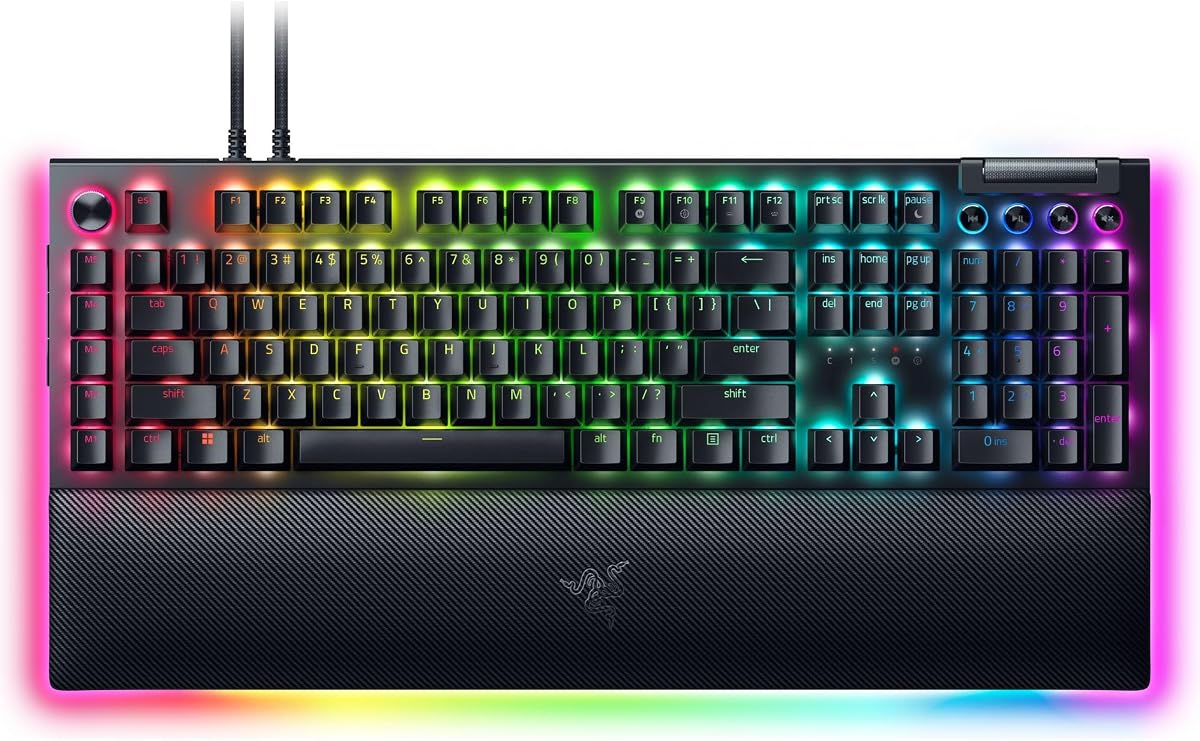
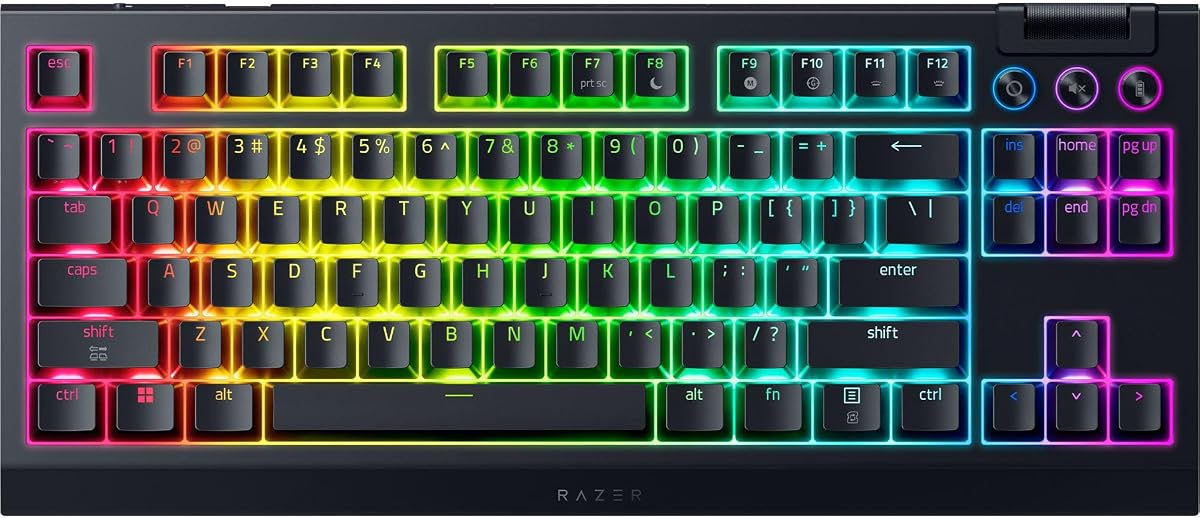



The Razer BlackWidow V4 X is a strong all-around choice for gamers who want responsive inputs, familiar mechanical construction, and convenient controls without moving into the more specialized design territory of the latest magnetic or analog keyboards. It carries a 4.6 rating, with the strongest appeal coming from its yellow linear switches, which register at 1.2 mm and require 45 grams of force. The result is a fast, relatively quiet action suited to games that depend on repeated movement and firing inputs.
We may earn a commission when you buy through this link, at no additional cost to you.
Its practical feature set is one reason it works so well as a general recommendation. Six dedicated macro keys provide accessible shortcuts for complex commands, while a multifunction roller and secondary media keys give quick access to playback, brightness, and volume controls. Chroma RGB illuminates each key with more than 16.8 million available colors, and the switch construction supports even light distribution. For everyday use, doubleshot ABS keycaps resist worn legends and have extra-thick walls intended to handle frequent gaming sessions.
The keyboard also pays attention to sound and feel. Foam beneath the circuit board and lubricated stabilizers help minimize resonance, making the board more pleasant during long work sessions as well as matches. The compromise is its full-size format and wired nature. A number pad and dedicated controls can be invaluable for productivity, but they consume more desk space than a compact or tenkeyless model. There is no listed wireless option, so the board is best suited to a stationary gaming desk with a dependable cable connection.
This is the most balanced recommendation in the guide for players who want fast mechanical switches, programmable controls, robust lighting, and a polished typing experience. It may not offer adjustable analog actuation or an 8000Hz polling rate, but those specialized features are unnecessary for many users. Choose the BlackWidow V4 X when the priority is reliable, versatile gaming performance in a conventional full-size format.
The yellow linear switches actuate at 1.2 mm and require 45 grams of force, combining quick travel with the smooth, consistent response expected from a linear switch. That makes them practical for players who want minimal hesitation during rapid movement commands.
Six dedicated macro keys, a multifunction roller, and separate media controls put frequently used actions close to the main typing area. These controls are especially useful for games with unwieldy keybinds or for productivity shortcuts that would otherwise require software navigation.
We may earn a commission when you buy through this link, at no additional cost to you.
The Razer Ornata V3 is built around a lower-profile experience rather than the deep travel associated with many full-size mechanical gaming keyboards. It has a 4.5 rating, and its slim keycaps and shorter switches are the defining characteristics. The design aims to keep the hands in a natural position, which can be useful during extended gaming, office work, or media use. It is a particularly relevant option for users who find tall keycaps uncomfortable.
We may earn a commission when you buy through this link, at no additional cost to you.
Instead of conventional mechanical switches, the Ornata V3 uses mecha-membrane switches to combine a crisp, clicky response with the familiar feel of a membrane keyboard. UV-coated keycaps are designed to resist fading and everyday wear, while dedicated backlit media keys provide direct control over playback, brightness, and volume. The included magnetic soft-touch wrist rest attaches to the keyboard and adds support without introducing a separate, loosely positioned accessory.
The main trade-off is that the Ornata V3 does not offer the same type of switch travel or customization depth as a hot-swappable mechanical model. It is better viewed as a polished alternative for those who prioritize low height, familiar feedback, and a restrained full-size footprint. Its full-size layout still includes a number pad, so buyers wanting maximum desk space should consider a compact model. The wrist rest also adds to the overall desk footprint, even though its magnetic attachment keeps it visually cohesive.
The Ornata V3 is most appropriate for gamers, students, and office users who spend long periods at the keyboard and want a low-profile design with dedicated media controls. It also works well as a general-purpose keyboard because the switch feel is approachable and the UV-coated keycaps are intended for frequent use. For competitive players who specifically want adjustable actuation or extremely high polling rates, a Huntsman model offers a more specialized feature set.
Slimmer keycaps and shorter switches help the hands rest in a more natural position than a traditional tall mechanical keyboard. The low-profile format may be especially appealing for users who spend hours gaming, writing, or browsing without changing workstations.
The mecha-membrane construction delivers crisp, clicky feedback while retaining the familiar feel of a conventional keyboard. It is a middle-ground experience for people who like mechanical-style response but do not need deeper switch travel.
We may earn a commission when you buy through this link, at no additional cost to you.
The BlackWidow V4 Pro is a feature-rich full-size keyboard for gamers who want substantial control options and a more traditional mechanical feel. Its 4.3 rating reflects a capable design centered on green tactile switches, which provide noticeable feedback as each key is pressed. The tactile bump gives typing and gaming a defined sensation, making the model a good fit for people who prefer confirmation that a command has registered.
We may earn a commission when you buy through this link, at no additional cost to you.
Control and lighting are the standout categories. A programmable command dial can handle a custom function, and eight dedicated macro keys provide quick access to assigned commands. Per-key Chroma RGB combines with three-side underglow when the included wrist rest is attached, creating a more layered lighting effect than a basic per-key board. The magnetic plush leatherette wrist rest is softly cushioned and also carries Razer Chroma RGB illumination.
Doubleshot ABS keycaps use a molded labeling process intended to prevent legends from wearing away, while their extra-thick walls are designed for repeated gaming use. The trade-offs come from its size and the nature of tactile switches. A full-size frame and attached wrist rest require meaningful desk space, and the tactile event is not as unobtrusive as the feel of a linear switch. Players who want the lightest possible action may find yellow or orange linear options more immediately familiar.
The BlackWidow V4 Pro is best for gamers who want a full-size board, dedicated macros, a command dial, wrist support, and dramatic lighting in one package. It is also a strong choice for productivity because the number pad and function controls complement a gaming setup. Choose it over the V4 X if tactile feedback, more macro keys, and a dial are more important to you than a lighter, more subdued switch feel.
Green tactile switches provide a noticeable press event that helps confirm input without changing the general mechanical response. They suit players who value deliberate feedback during both gameplay and extended typing.
Eight macro keys and a programmable command dial make frequently used actions easier to reach. Rather than opening software for every adjustment, these controls can serve as persistent shortcuts tailored to a particular game or workflow.
We may earn a commission when you buy through this link, at no additional cost to you.
The Razer Huntsman V3 Pro 8KHz is the premium choice for competitive gamers who want maximum control over input timing. It has a 4.3 rating and centers on second-generation analog optical switches with a 0.1–4.0 mm adjustable actuation range. Rapid Trigger resets a key as soon as the finger begins to lift, while the stated 8000Hz hyperpolling rate increases how frequently the keyboard reports input to the computer.
We may earn a commission when you buy through this link, at no additional cost to you.
Razer Snap Tap prioritizes the newest press between two assigned keys without requiring the previous key to be released. This is particularly relevant to FPS movement, where quick directional changes and counter-movement can depend on precise timing. A digital dial and dedicated buttons provide access to volume, analog settings, media controls, and custom macros. Players can also adjust actuation height and Rapid Trigger sensitivity using the onboard LED array and save those settings directly to the keyboard.
The physical design supports the advanced electronics. Textured doubleshot PBT keycaps resist shine and fading, and each switch is individually lubricated for smoother travel. Dense switch foam helps create a cleaner acoustic profile, while a magnetic firm leatherette wrist rest provides support without the softer cushioning of some other Razer boards. The analog and optical systems carry more complexity than a standard mechanical keyboard, so users should be comfortable adjusting settings and understanding the difference between actuation and reset behavior.
The Huntsman V3 Pro 8KHz is best suited to competitive shooters, esports players, and enthusiasts who intend to exploit adjustable actuation and high polling. It is overkill for casual gaming, but for that audience the ability to tune each key's response can be the defining benefit. Its full-size frame also includes a number pad and dedicated controls, making it more versatile than a competition-only compact board. Buyers should ensure that their computer and games can benefit from the advanced input features.
The 0.1–4.0 mm actuation range allows each analog optical switch to trigger at a different point. Onboard controls and the LED array make it possible to adjust those settings quickly and retain preferred profiles without relying on software for every change.
Rapid Trigger and Razer Snap Tap are designed for games where movement changes must happen quickly. Together, they offer more ways to manage the timing of opposing directional inputs than a conventional digital mechanical switch.
We may earn a commission when you buy through this link, at no additional cost to you.
The Razer Reclusa X Mini stands out with a 4.8 rating, the highest in this guide, and combines a compact 65% layout with features usually associated with more advanced gaming keyboards. Its socketed PCB accepts both three-pin and five-pin mechanical switches, making it approachable for first-time switch customization as well as experienced enthusiasts. The pre-installed Razer Orange Tactile Mechanical Switches Gen-3 provide quieter actuation and clear tactile feedback.
We may earn a commission when you buy through this link, at no additional cost to you.
Despite its smaller footprint, the keyboard includes Razer Snap Tap, Snap Flex, and Dual-Keypress Priority. Those software-assisted features can improve execution and directional responsiveness in competitive games. A 1000Hz polling rate, N-key rollover, and anti-ghosting support cover the core input fundamentals, while the detachable USB-C connection makes the compact board easier to position and carry between locations.
The sound and feel system is unusually considered for a compact model. A PPS plate, custom stabilizers, and dual-layer silicone dampening reduce resonance and create a plush bottom-out. Durable doubleshot ABS keycaps use fade-resistant legends and south-facing RGB LEDs that improve compatibility with a wider range of aftermarket keycap sets. The trade-off is the 65% layout, which removes the dedicated function row and number pad. Those omissions save considerable desk space but may frustrate users who rely on function keys or rapid numeric entry.
The Reclusa X Mini is an excellent value-oriented choice for a gamer who wants compact dimensions, hot-swappable switches, useful competitive features, and polished acoustics. It also works well for productivity because the 65% format preserves essential navigation keys while eliminating unnecessary peripherals. It is the top budget pick in this guide, although the absence of a wrist rest and dedicated function row makes it more of a portable, enthusiast-friendly option than a complete desktop control center.
The socketed PCB supports three-pin and five-pin switches, so users can change the feel without soldering. This makes the Reclusa X Mini suitable for experimenting with linear, tactile, or clicky switch options while retaining a compact everyday layout.
Snap Tap, Snap Flex, and Dual-Keypress Priority extend the software feature set beyond what many compact keyboards offer. Combined with a 1000Hz polling rate, these features make the board more serious for competitive play than its compact dimensions might suggest.
We may earn a commission when you buy through this link, at no additional cost to you.
The Razer BlackWidow V4 TKL is the guide's most practical wireless option. It has a 4.1 rating and combines 2.4 GHz Razer HyperSpeed Wireless with Bluetooth support for three devices. A compatible Razer mouse can share the same dongle through multi-device support, reducing the number of receivers occupying a gaming setup. The tenkeyless format keeps navigation and function keys while removing the number pad to create more room for mouse movement.
We may earn a commission when you buy through this link, at no additional cost to you.
Its socketed PCB accepts three-pin or five-pin switches, allowing the supplied orange switches to be replaced with alternatives. A top-mounted stainless-steel plate, tape-enhanced PCB, lubricated stabilizers, and two layers of sound-dampening foam are intended to create a clean typing profile. The multi-function roller and three dedicated buttons for audio, media, and battery settings are remappable, while Chroma RGB provides per-key illumination.
The stated battery life reaches up to 980 hours in either HyperSpeed Wireless or Bluetooth mode, although actual results can depend on lighting, activity, and usage patterns. Fast charging helps limit downtime, but a wireless keyboard still introduces a charging routine that wired models do not require. The 4.1 rating is also the second-lowest among the featured models, so prospective buyers should consider current customer feedback and their own priorities carefully.
This TKL model fits gamers who want wireless freedom without giving up hot-swappable switches or a broad set of dedicated controls. It is particularly suitable for desks shared with a laptop or multiple Bluetooth devices. The absence of a number pad may frustrate office users, but the extra desk space can benefit competitive mouse positioning. It is not the choice for users who want the absolute lowest latency capabilities of an 8000Hz wired keyboard, but its wireless convenience is difficult to overlook.
The keyboard can use Razer HyperSpeed Wireless for gaming, connect to three Bluetooth devices, and share its dongle with a compatible Razer mouse. This flexibility suits setups that move between gaming, work, and everyday computer use.
Hot-swappable three-pin and five-pin sockets preserve the freedom to change switch feel while retaining wireless connectivity. The included orange switches provide a starting point rather than locking the user into one tactile profile.
We may earn a commission when you buy through this link, at no additional cost to you.
The Huntsman Mini 60% is built for players who want the smallest possible keyboard footprint in the guide. Its 4.6 rating reflects a distinct combination of linear optical switches, Chroma RGB lighting, a matte aluminum top frame, and a highly compact layout. By removing the function row, navigation cluster, and number pad, the board creates substantial space for a mouse or other desk equipment.
We may earn a commission when you buy through this link, at no additional cost to you.
Linear optical switches register at a 1.0 mm actuation point, with Razer describing the beam-based system as operating faster than traditional mechanical switches. Razer Hypershift enables keys and combinations to be remapped, and Razer Snap Tap can prioritize the latest input between two assigned keys when enabled through Razer Synapse 4. Chroma RGB supports individual key lighting and synchronization with popular games, other Razer hardware, Philips Hue, and a broad group of compatible partners.
The compact layout requires adjustment because it has no dedicated function row or separate arrow-key cluster. Users accustomed to a conventional keyboard may need to memorize alternate layer positions for navigation. Oil-resistant doubleshot PBT keycaps offer a textured, durable surface that is less prone to long-term grime buildup. The aluminum top frame improves structural integrity, but there is no included wrist rest or adjustable analog actuation to add extra convenience or control.
The Huntsman Mini 60% is a strong choice for competitive players, streamers, and desk-space enthusiasts who are comfortable with a layered layout. It is also useful for travel because of its compact proportions. It should not be selected by someone who depends on a visible function row, dedicated arrows, or a number pad. For those users, the Reclusa X Mini offers a slightly more conventional 65% arrangement, while the BlackWidow V4 TKL offers wireless operation.
The 60% layout removes every key that is not essential to the primary typing area. That creates an uncluttered gaming surface and makes the keyboard especially attractive for low-sensitivity setups that require substantial mouse room.
Textured doubleshot PBT keycaps resist grime and maintain a more consistent finish over time, while the matte aluminum top frame adds rigidity. These details suit a board intended to remain part of a frequently used gaming setup.
We may earn a commission when you buy through this link, at no additional cost to you.
The Razer Huntsman V3 Pro is an esports-focused full-size keyboard built around analog optical switches and precise movement controls. It shares a 4.3 rating with the 8KHz version but emphasizes Rapid Trigger, adjustable actuation, and Razer Snap Tap. These features allow players to influence exactly when a key registers and resets, which is particularly valuable in competitive shooters where tiny timing differences can affect movement.
We may earn a commission when you buy through this link, at no additional cost to you.
Second-generation analog optical switches offer a 0.1–4.0 mm actuation range and a stated lifespan of 100 million keystrokes. Rapid Trigger resets keys at the slightest lift of a finger, while Snap Tap prioritizes the latest of two inputs without requiring the earlier key to be released. An onboard LED array provides visual guidance for changing actuation height and Rapid Trigger sensitivity, and settings can be saved directly to the keyboard.
A multifunction digital dial handles volume and analog switch settings, and three dedicated buttons cover media controls and custom macros. Textured doubleshot PBT keycaps are intended to withstand regular competitive use, and a magnetic firm leatherette wrist rest provides wrist support. As with other full-size boards, the footprint is substantial, and the advanced controls may initially feel complicated to players who have only used standard mechanical switches.
Choose the Huntsman V3 Pro when analog control, rapid reset behavior, and onboard tuning are priorities but an 8000Hz polling rate is not essential. It is a compelling esports option for players who understand the benefits of adjustable actuation. The wrist rest improves comfort during long sessions, and the physical controls make important settings accessible without opening the software every time.
Rapid Trigger allows a key to reset before it has fully returned, reducing the delay associated with a conventional fixed reset point. Snap Tap then helps players change direction while keeping the newest movement input prioritized.
The onboard LED array and saved keyboard settings make actuation adjustments accessible during practice. A digital dial and three control buttons add further convenience for volume, media, and custom macro actions.
We may earn a commission when you buy through this link, at no additional cost to you.
The BlackWidow V4 is the option for gamers who specifically enjoy a pronounced click from each mechanical key. It has a 4.0 rating, tied for the lowest listed score in the guide, but that figure should be considered alongside its distinct acoustic character. The green clicky switches actuate at 1.9 mm and require 50 grams of force, providing a clear tactile event and audible confirmation.
We may earn a commission when you buy through this link, at no additional cost to you.
Six dedicated macro keys provide direct access to programmable commands, while Chroma RGB per-key lighting and two-side underglow create a more visible battlestation effect. The lighting system offers more than 16.8 million colors and supports dynamic effects in numerous integrated games. A magnetic plush leatherette wrist rest attaches to the keyboard and supplies soft support for longer sessions.
Doubleshot ABS keycaps use molded legends that are intended not to wear off, and their extra-thick walls are designed for repeated gaming use. The primary trade-off is sound. Clicky switches are intentionally louder than the linear, tactile, optical, and membrane options elsewhere in the list, which can be disruptive in shared rooms, streamed environments, or offices. The 4.0 rating may also prompt buyers to examine recent customer comments for details about their individual experience.
The BlackWidow V4 is best for players who want unmistakable audio feedback, a full-size layout, and easy macro access. It can also serve as a satisfying mechanical typing board for those who enjoy clicky keyboards. Buyers sharing a quiet workspace should consider a quieter option such as the BlackWidow V4 X, while users wanting maximum esports control should examine the Huntsman V3 Pro family.
The green clicky switches produce a distinct sound at the 1.9 mm actuation point. That feedback can make every command feel unmistakable, although it is considerably more audible than quieter mechanical or optical designs.
Per-key Chroma RGB combines with two-side underglow to illuminate both the keycaps and the edges of the board. The result is more dimensional than standard top lighting and is designed to coordinate with integrated games.
We may earn a commission when you buy through this link, at no additional cost to you.
The Razer Huntsman V3 HE Magnetic TKL is a specialized wired keyboard for competitive players who want extensive control over individual key behavior. It has a 3.7 rating, the lowest among the ten products, but its Hall effect magnetic switches provide a distinctive set of features. The actuation point is adjustable from 0.1 to 4.0 mm, and Rapid Trigger allows a key to reset as soon as the finger begins to lift.
We may earn a commission when you buy through this link, at no additional cost to you.
Razer Snap Tap prioritizes the latest directional input between two assigned keys, while Dynamic Keystroke can assign as many as four actions to one key. Snap Flex provides key-release activation for advanced control of movement and keybind sequences. Combined with a true 8000Hz hyperpolling rate, these options create a high-refresh input system intended for competitive shooters and esports play.
The tenkeyless layout removes the number pad to create more mouse space while retaining essential navigation keys. A 5052 aluminum alloy top case, detachable USB-C cable, hybrid onboard storage for up to six profiles, anti-ghosting, and Chroma RGB round out the platform. Textured doubleshot PBT keycaps resist shine and fading. Synapse Web provides browser-based access for adjusting Hall effect settings, actuation points, and Rapid Trigger performance with a compatible browser.
This model is best for a dedicated competitive setup where precise magnetic input behavior matters more than portability or wireless convenience. It can also support complex productivity macros, though its tenkeyless format and gaming-oriented configuration make it less natural as a conventional office keyboard. The 3.7 rating calls for careful attention to current customer feedback, but the underlying feature set is among the most advanced in the guide.
Dynamic Keystroke can assign up to four actions to a single magnetic key. This allows players to layer commands based on press depth or timing, reducing the number of physical inputs needed for complicated sequences.
The tenkeyless format creates additional space for mouse movement while retaining the keys needed for navigation. A 5052 aluminum alloy top case, detachable cable, and storage for up to six onboard profiles support a stable tournament or practice setup.
We may earn a commission when you buy through this link, at no additional cost to you.
The most useful Razer gaming keyboard is the one whose switch feel, layout, connectivity, and competitive features match your games and desk. Consider how you play, which controls you use, and how much desk space you can devote to the keyboard before comparing detailed specifications.
Switch technology determines the feel, sound, speed, and degree of control available from each key. The BlackWidow V4 X uses fast yellow linear switches for smooth, rapid inputs, while the BlackWidow V4 Pro and BlackWidow V4 use tactile or clicky green switches that create a more noticeable press event. The Ornata V3 uses low-profile mecha-membrane switches, and the Reclusa X Mini supplies quieter tactile switches in a hot-swappable format. The Huntsman Mini uses linear optical switches, the Huntsman V3 Pro family uses analog optical switches, and the Huntsman V3 HE uses Hall effect magnetic switches. Analog and magnetic systems go further by allowing the actuation point to be adjusted and enabling Rapid Trigger behavior.
Choose a familiar mechanical or membrane feel if comfort and consistency matter most. Choose linear switches for unobtrusive movement, tactile switches for clear feedback, and clicky switches for maximum audible confirmation. Consider analog or magnetic options when competitive timing control is the main reason to upgrade.
Polling rate describes how often a keyboard reports its state to the computer, while actuation determines how far a key must travel to register. The Reclusa X Mini provides a 1000Hz polling rate, which is also a common baseline across the list. The two Huntsman V3 Pro models and the Huntsman V3 HE TKL claim a true 8000Hz hyperpolling rate and offer adjustable actuation. The latter adds Hall effect magnetic controls, Dynamic Keystroke, and Snap Flex on top of Rapid Trigger and Snap Tap.
A higher polling rate can reduce the interval between keyboard sampling and computer reporting, but practical differences vary with the game, system, and user. Adjustable actuation is especially useful for players who want very short trigger points. Focus on features that solve a real input problem rather than treating the largest number as automatically necessary for every game.
Layout is one of the most visible decisions. Full-size models such as the BlackWidow V4 X, Ornata V3, BlackWidow V4 Pro, and both Huntsman V3 Pro keyboards include a number pad. The BlackWidow V4 TKL and Huntsman V3 HE TKL use a tenkeyless format, and the Reclusa X Mini uses 65%. The Huntsman Mini 60% removes the function row and separate navigation cluster for maximum compactness. More keys can improve productivity, while smaller layouts create more room for mouse movement.
Choose a full-size board if you enter numbers regularly. Select tenkeyless if you want a balance of gaming space and familiar navigation. A 65% board is ideal for compact desks, and a 60% layout suits experienced users who are comfortable navigating alternate layers. Always consider the width of a mouse and the space occupied by a wrist rest.
The BlackWidow V4 TKL is the featured model with both Razer HyperSpeed 2.4 GHz wireless and Bluetooth connectivity. It can pair with three Bluetooth devices and share its dongle with a compatible Razer mouse. Most other models in the guide are wired, including the two 8000Hz Huntsman V3 Pro versions and the tenkeyless Huntsman V3 HE. Wired operation removes battery management and keeps the desk visually cleaner, but a cable can occupy space or restrict placement.
Wireless is valuable for clean setups, shared desks, and use across multiple computers. Choose it when the freedom to reposition outweighs the need for a permanent cable. A wired model is the simpler choice for a stationary gaming station where consistent low-latency communication and uninterrupted power are priorities.
Razer keyboards in this guide provide different levels of built-in control. The BlackWidow V4 X, BlackWidow V4 Pro, and BlackWidow V4 include six or eight dedicated macro keys, while the BlackWidow V4 Pro and Huntsman V3 Pro add a command or digital dial. The BlackWidow V4 TKL includes a multifunction roller and three remappable control buttons. The Huntsman Mini supports complete remapping through Razer Hypershift, and the Reclusa X Mini provides advanced actions such as Snap Tap, Snap Flex, and Dual-Keypress Priority.
Dedicated controls are valuable when a game has complex or frequently changing commands. A dial is useful for gradual adjustments, while macro keys provide one-touch access. Before purchasing, check whether the desired controls are physical, available through software, or both, and confirm how many profiles can be stored on the keyboard.
Razer Chroma RGB is the common lighting platform across the guide, with per-key illumination and access to more than 16.8 million colors. The BlackWidow V4 Pro adds three-side underglow through its wrist rest, while the BlackWidow V4 has two-side underglow. Lighting can synchronize with supported games and compatible ecosystem devices, adding visual coherence to a gaming setup. The Reclusa X Mini also uses south-facing LEDs, which improve compatibility with a wider variety of aftermarket keycap sets.
Lighting is not a substitute for performance, but it matters for a device that remains visible on the desk. If a customized keycap set is planned, verify switch and LED orientation before buying. If synchronized effects are important, use a current Razer device or game with confirmed Chroma support rather than assuming every third-party application will interact with the keyboard.
Keycap material affects legends, texture, and long-term appearance. Doubleshot PBT caps on the Huntsman models are designed to resist shine, fading, and wear, while doubleshot ABS caps on several BlackWidow and Reclusa models use molded legends and thicker walls. The Ornata V3 uses UV-coated keycaps, and the Huntsman Mini uses oil-resistant doubleshot PBT caps. Comfort is influenced by switch travel, keyboard height, and wrist support. The BlackWidow V4 Pro and V4 include plush leatherette rests, the Huntsman V3 Pro models use firmer rests, and the Ornata V3 has a soft-touch magnetic rest.
Choose a wrist rest if you already know it suits your posture, but do not assume a stock rest is mandatory. Evaluate keycap texture and switch feedback together because they strongly shape perceived quality. For frequent use, durable molded legends and stable construction should carry more weight than decorative extras.
Keyboard sound depends on switch type, case construction, stabilizers, dampening, and personal sensitivity. The BlackWidow V4 X uses board foam and lubricated stabilizers, the BlackWidow V4 TKL uses a steel plate, tape, lubricated stabilizers, and two layers of foam, and the Reclusa X Mini uses a PPS plate, custom stabilizers, and dual-layer silicone dampening. Clicky green switches will be louder than the quiet tactile, linear, or membrane alternatives. A quiet office calls for dampening, while shared rooms may benefit from a model with a softer acoustic profile.
A gaming keyboard can also serve as a typing board if the switch feel is comfortable. Linear switches generally feel smoother, tactile switches offer a pronounced event, membrane switches are familiar and quiet, and optical or magnetic switches prioritize speed and control. Consider how much typing you do and whether a sharper sound would be distracting before finalizing your choice.
Begin by installing the keyboard in its intended position and connecting it through the specified cable or wireless receiver. For wireless models, pair the keyboard through Razer Synapse or the relevant device software, update its firmware, and confirm that the connection remains stable before entering a match. Set the operating system layout to match the physical key positions, especially for compact and tenkeyless boards, and use the available device layers to access functions that are not printed on the main keycaps.
Configure profiles for the games and applications you use most. Assign macros carefully, set actuation and Rapid Trigger behavior for the title in front of you, and adjust lighting only after the essential controls are working. Onboard profiles are useful for carrying settings between computers, but they should be backed up through the current configuration software when important changes are made. For a shared or public computer, avoid storing personal shortcuts that could be triggered accidentally.
Keep the keyboard free of dust, crumbs, and sticky residue by disconnecting it before cleaning. Use a soft brush or microfiber cloth, apply moisture only to the cloth rather than directly to the switches, and avoid abrasive cleaners. If the keyboard is hot-swappable, power it down before removing keycaps or switches and confirm that replacement parts are compatible. Charge wireless models regularly enough to avoid unexpected shutdowns, and store the wrist rest and connection cable in a way that prevents stress on the cable or magnetic attachment points.
The Razer Huntsman V3 Pro 8KHz is the strongest all-around choice for competitive FPS play because it combines 8000Hz hyperpolling, analog optical switches, adjustable actuation, Rapid Trigger, and Razer Snap Tap. The Huntsman V3 HE TKL is another advanced option with magnetic switches, Dynamic Keystroke, and Snap Flex. Players who prefer a simpler setup can consider the Reclusa X Mini, which includes several competitive software features in a compact format.
Mechanical keyboards are familiar and provide consistent physical switch behavior, while optical switches use light-based detection and magnetic switches allow analog control of actuation and reset. Mechanical models are generally easier to understand, optical models emphasize fast response, and magnetic systems offer the greatest tuning potential. The best choice depends on how much competitive control you need and how comfortable you are configuring advanced settings.
A tenkeyless keyboard can be better for gaming because it leaves more desk space for mouse movement while retaining the navigation keys found on a full-size board. The BlackWidow V4 TKL and Huntsman V3 HE TKL are the tenkeyless choices in this guide. A full-size keyboard remains more useful for productivity tasks involving frequent number entry, so consider how you use the keyboard outside games.
A 60% layout can take time to learn because it removes the dedicated function row, arrow cluster, and number pad. Shortcuts are generally moved to alternate layers, which may be uncomfortable until muscle memory develops. The Huntsman Mini 60% rewards users who value desk space and are comfortable with compact layouts, while the Reclusa X Mini offers a more familiar 65% alternative for a gentler transition.
A higher polling rate can reduce the time between keyboard samples and computer reports, but the visible benefit depends on the game, system, frame rate, and player. The 8000Hz models are aimed at competitive users who want the lowest possible reporting interval. Other features, such as actuation, Rapid Trigger, and key feel, may have a more noticeable effect on an individual player's experience.
Rapid Trigger resets a key as soon as a finger starts to lift, which can allow a new directional press to register sooner. Razer Snap Tap prioritizes the newest input between two assigned keys without requiring the earlier key to be fully released. They serve related movement-focused goals, but they are not identical controls, and both should be tested in the specific game and with the player's preferred key bindings.
Hot-swappable sockets make it easier to replace switches without soldering, which is valuable if you want to experiment with switch feel or replace a faulty component. The Reclusa X Mini and BlackWidow V4 TKL support both three-pin and five-pin switches, increasing the range of compatible options. Users should still confirm switch dimensions, pin configuration, and intended key positions before making a custom installation.
Many Razer gaming keyboards work well for everyday productivity because they combine programmable controls, durable keycaps, wrist support, and comfortable typing characteristics. A full-size model is preferable for frequent number entry, while a compact board can be useful on a smaller desk. Choose based on layout, switch preference, and required shortcuts rather than assuming a gaming label limits non-gaming use.
The Razer BlackWidow V4 X is the most balanced recommendation, combining fast yellow linear switches, six macro keys, a multifunction roller, Chroma RGB, and considered acoustic construction. The Reclusa X Mini is the value pick for compact setups and hot-swappable customization, while the Huntsman V3 Pro 8KHz is the premium option for players who want adjustable analog actuation, Rapid Trigger, Snap Tap, and an 8000Hz polling rate. Each serves a different need, but all three provide more purposeful features than a basic keyboard.
Prioritize the factor that can have the greatest effect on your experience. Competitive shooters may benefit most from fast switches, adjustable actuation, and quick resets. Multitaskers may prefer full-size navigation, a number pad, macro keys, and wrist support. Compact-desk users should balance mouse space against the need for a visible function row, and wireless shoppers should think carefully about charging routines and multi-device use. Switch feel, layout, and connection method usually deserve more attention than decorative lighting.
Before purchasing, check the current product listing, available configuration software, operating-system compatibility, warranty details, and any recent customer feedback. Prices, promotions, firmware capabilities, and bundled accessories can change over time, so the final decision should be based on the complete package available when you buy. Use the linked listings to verify the latest details and select the keyboard that best matches your priorities.