
ScanSnap iX2500 Premium Wireless High-Speed Document Scanner
4.5Editor score
Four-year protection plan
45 ppm duplex scanning
100-sheet document feeder
Explore the best Scansnap Document Scanner options, comparing speed, wireless connectivity, feeder capacity, OCR, file handling, and value for home and office.
A dependable document scanner turns filing cabinets, receipt piles, and signed paperwork into organized digital files. The strongest ScanSnap models balance fast duplex capture, accurate image cleanup, flexible destinations, and dependable paper handling, while also serving users who value wireless freedom and large touchscreens.
This guide compares ten scanners based on the supplied specifications, including scan speed, feeder capacity, connectivity, automatic corrections, included software, and document-management features. It covers current ScanSnap iX models, the IX500, a renewed older ScanSnap, the sheet-fed S1500, and the Epson Workforce ES-400 II for comparison.
The recommendations reveal three distinct paths: the iX2500 family leads in speed and touchscreen control, the iX1300 emphasizes compact wireless convenience, and the iX2400 provides a streamlined one-touch experience. As with all shopping categories, prices and availability can change, so compare current listings and features before purchasing.
4.5Editor score

4.3Editor score

4.3Editor score
This side-by-side comparison highlights the major differences in speed, feeder capacity, connectivity, paper handling, and file destinations across the ten shortlisted scanners.


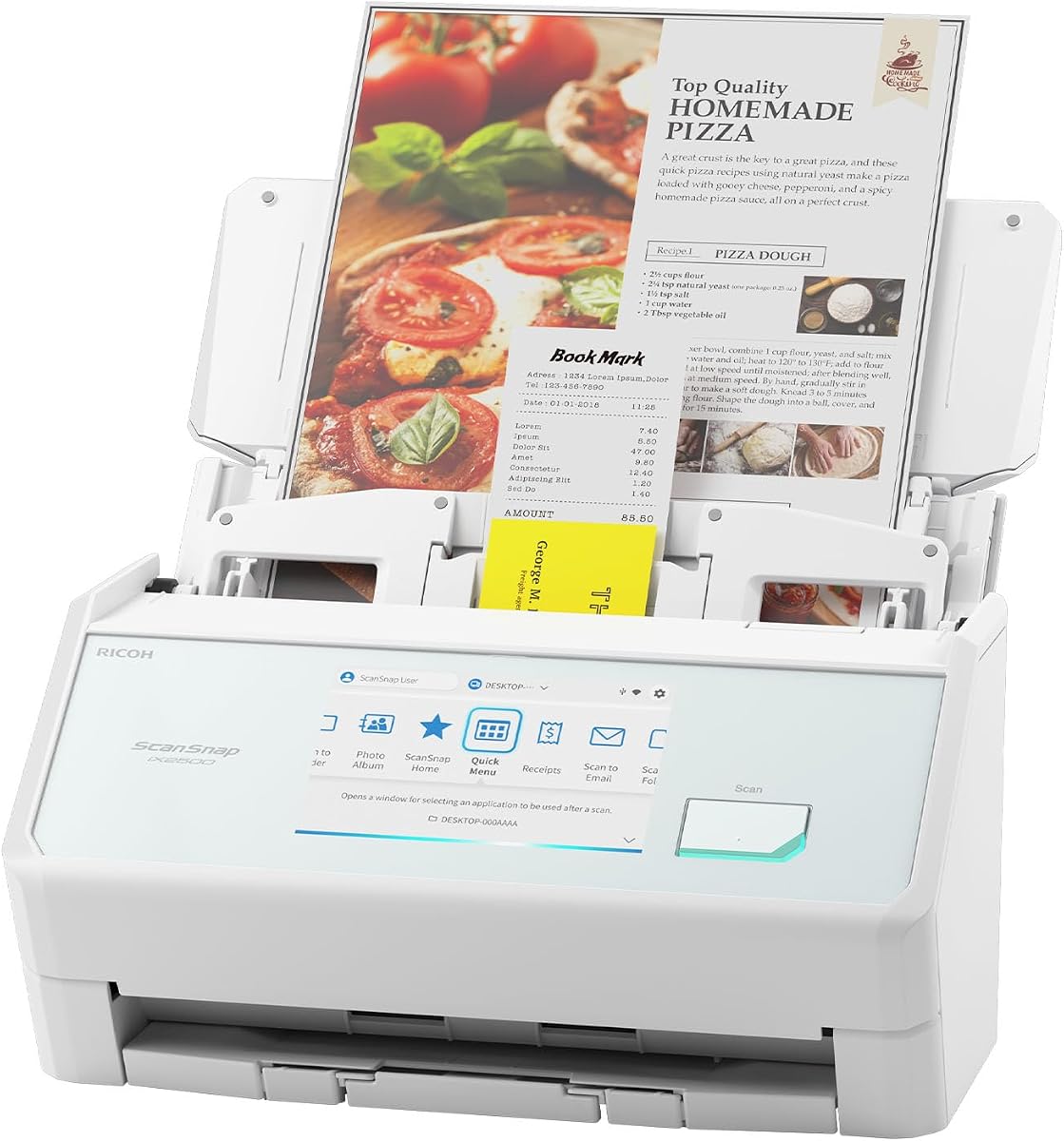


The ScanSnap iX2500 Wireless or USB High-Speed Document Scanner, Black, combines a 45 pages-per-minute duplex rate with a 100-sheet automatic feeder and a large touchscreen. Its 4.3 rating reflects a strong overall balance of speed, connectivity, automatic image optimization, and paper-handling safeguards. It is positioned as an upgraded replacement for the discontinued iX1600.
We may earn a commission when you buy through this link, at no additional cost to you.
Its strongest features address the realities of a busy scanning routine. The touchscreen lets users select personalized profiles and send scans to PCs, Macs, mobile devices, and cloud services. Wi-Fi 6 and USB-C provide two different connection methods, while Quick Menu supports a scan, drag, and drop workflow into favorite computer applications. ScanSnap Home brings document, receipt, photo, and business-card organization into one interface.
Paper handling receives equal attention. A brake roller system is designed to feed pages smoothly, a multi-feed sensor detects pages stuck together, and skew detection helps prevent paper damage and missing data. Automatic optimizations can handle the scanned output, while the large feeder reduces the need for repeated loading. These protections are particularly valuable for mixed stacks of receipts, photographs, and standard documents.
This is the most well-rounded option for someone who wants rapid scanning without giving up extensive file destinations or hands-on touchscreen control. It is less compelling for a very limited workspace or a user who strictly prefers a simple physical button, but its speed, capacity, and protective features justify a place at the top of the list. It earns the Editor's Choice recommendation for users who want a capable all-purpose ScanSnap.
With 45-page-per-minute duplex scanning and a 100-sheet feeder, the iX2500 is well suited to routine office batches. It reduces manual page loading and can handle both sides of a document in one pass.
The large touchscreen makes saved profiles and destinations easier to select. Built-in Wi-Fi 6, USB-C, cloud support, and mobile-device destinations make the scanner adaptable to different filing systems.
We may earn a commission when you buy through this link, at no additional cost to you.
The ScanSnap iX1300 Wireless or USB Double-Sided Color Document Scanner, Black, is built around a space-saving design that remains practical when placed on a crowded desk. It delivers up to 30 pages per minute in duplex mode and has a 4.1 rating. The central appeal is its combination of compact construction, wireless flexibility, and automatic image correction.
We may earn a commission when you buy through this link, at no additional cost to you.
Users can connect by USB or Wi-Fi and send scans to a Mac, PC, mobile device, or cloud service. It can also scan without a computer and can work with a Chromebook through the mobile app. That makes it a practical option for shared offices, home workspaces, and users who do not want scanning tied to one connected workstation.
Its document capabilities extend beyond standard pages. The scanner handles photos, cards, thick items, and plastic cards, while a single touch starts scanning. Automatic de-skew, color optimization, and blank-page removal improve consistency without requiring driver setup. Quick Menu provides a direct route to favorite computer applications, and ScanSnap Home centralizes the management of scanned files.
Choose the iX1300 when desk space, wireless access, and media flexibility matter more than maximum throughput. It is a strong fit for a home office or a compact corporate workspace, and the ability to scan without a computer is especially useful. Its lower duplex speed and more modest overall capacity make the faster iX2500 the better choice for large batches, but the iX1300 remains a capable and flexible scanner.
The iX1300 is designed to free desk space and stay out of the way while in use. That makes it a strong fit for home offices, reception desks, and shared workstations where every inch matters.
Wi-Fi, USB, mobile-device support, cloud destinations, and computer-free operation allow users to scan without remaining tethered to a particular laptop. A Chromebook can be included through the mobile app.
We may earn a commission when you buy through this link, at no additional cost to you.
The ScanSnap iX2400 High-Speed One-Touch Button Color Document Scanner, Black, delivers up to 45 pages per minute through a straightforward one-touch workflow. It includes a 100-sheet feeder and earns a 4.3 rating. This model is especially compelling for users who want flagship-level speed and capacity without the complexity of a large touchscreen or wireless connection choices.
We may earn a commission when you buy through this link, at no additional cost to you.
Pressing the button initiates scanning, cleanup, and organization. ScanSnap Home manages documents, receipts, photos, business cards, and other scanned data, while Quick Menu supports the familiar scan, drag, and drop process. The iX2400 also handles envelopes, making it more versatile than a basic office-only scanner.
Automatic image processing is a major advantage. The scanner detects document size and color depth, removes streaks and blank pages, corrects skew, and rotates pages as needed. These features reduce manual cleanup and are particularly helpful when scanning mixed paper piles. A stable wired USB connection supports consistent operation when a simple, dependable link to a computer is sufficient.
The iX2400 is our Best Budget recommendation within the broader ScanSnap range because it preserves the important high-volume fundamentals: speed, a large feeder, duplex capture, and automatic enhancement. It is best for a desk-based workflow with a computer nearby. Those wanting Wi-Fi, a touchscreen, or direct mobile and cloud flexibility should examine the iX2500 or iX1300 instead.
The defining benefit is simplicity. One button starts the scan-and-organize process, while Quick Menu and ScanSnap Home keep the resulting files easy to route and manage.
Automatic size and color-depth detection, streak removal, blank-page deletion, de-skewing, and rotation reduce the need to correct imperfect scans manually.
We may earn a commission when you buy through this link, at no additional cost to you.
The ScanSnap iX1300 Wireless or USB Double-Sided Color Document Scanner, White, offers the same core capabilities as the black iX1300 in a light-colored housing. It reaches up to 30 pages per minute for duplex color scanning and carries a 4.1 rating. Its distinctive appeal is the combination of a compact footprint, wireless freedom, and flexible media handling.
We may earn a commission when you buy through this link, at no additional cost to you.
The scanner is designed to stay out of the way when space is limited. It can operate over USB or Wi-Fi, send files to a Mac, PC, mobile device, or cloud service, and scan without a computer. Chromebook support through the mobile app broadens its usefulness in mixed-device environments where a traditional USB connection would be inconvenient.
A single touch starts the workflow, and automatic de-skew, color optimization, and blank-page removal help produce consistent results without driver setup. The iX1300 can also handle thick items and plastic cards, making it useful for more than standard office documents. ScanSnap Home brings scanned documents, receipts, business cards, photos, and other material into a unified organization environment.
This white version is a sensible choice for users who prefer a lighter visual style or want a compact, wireless-capable scanner for a home office. Its performance characteristics are the same as the black model, so the decision should focus on color preference, current availability, and workspace needs. For larger routine batches, however, the 100-sheet feeders in the iX2400 and iX2500 offer greater capacity.
The iX1300 combines USB and Wi-Fi connectivity in a space-saving form. It can also scan without a computer, which is useful for quickly sending a document to a phone or cloud destination.
Automatic de-skewing, color optimization, and blank-page removal simplify the process. The scanner also accepts documents, photos, thick items, and plastic cards.
We may earn a commission when you buy through this link, at no additional cost to you.
The ScanSnap iX2500 Wireless or USB High-Speed Document Scanner, White, combines a 4.4 rating with the iX2500 family's 45-page-per-minute duplex speed and 100-sheet feeder. The large touchscreen, Wi-Fi 6, USB-C, cloud support, and automatic image optimization make it one of the most capable scanners in this comparison. Its light finish may also suit a modern or bright workspace.
We may earn a commission when you buy through this link, at no additional cost to you.
Personalized profiles can be selected directly from the touchscreen, giving users a way to tailor recurring jobs. Scans can be sent to PCs, Macs, mobile devices, and clouds, while Quick Menu supports direct delivery to favorite computer applications. The scanner can therefore function as part of a local filing routine or a more distributed digital workflow.
Its document-protection systems are especially notable. A brake roller system helps feed paper smoothly, while a multi-feed sensor identifies pages stuck together. Skew detection is intended to prevent paper damage and data loss. Combined with automatic optimization, naming, and sorting, these features support a hands-off workflow for batches containing documents, receipts, photos, and business cards.
This is a strong recommendation for users who want flagship ScanSnap performance and prefer a white enclosure. It is especially suitable for organizations digitizing a steady stream of paperwork where reliable feeding and flexible destinations matter. The standard iX2500 in black offers the same major capabilities, while the separately packaged premium version adds a protection plan. Choose based on color preference and the current listing.
The large touchscreen provides direct access to customized scan settings. This is useful for users who repeatedly scan different document classes or need to change destinations quickly.
A brake roller system, multi-feed detection, and skew detection work together to promote smooth feeding and reduce the chance of damaged or missing pages.
We may earn a commission when you buy through this link, at no additional cost to you.
The IX500 Fujitsu ScanSnap Duplex Document & Receipt Scanner for Mac and PC combines USB 3.0 connectivity with wireless scanning convenience. Its 4.2 rating reflects a favorable balance of useful features, while the product description emphasizes high-speed document handling, advanced scanning technology, and a user-friendly interface.
We may earn a commission when you buy through this link, at no additional cost to you.
The IX500 is designed to serve routine document and receipt workflows rather than serve as a specialized photo or oversized-media scanner. Its USB 3.0 connection is suited to a fixed desk setup, while wireless connectivity adds flexibility for scanning to supported devices or cloud workflows. Compatibility with both Mac and PC broadens its audience across mixed personal and professional environments.
Advanced scanning technology is intended to produce sharp, clear results, and the straightforward interface is useful for users who do not want to navigate a complicated control panel. As a duplex scanner, it can capture both sides of a document, while receipt support aligns it with common expense and administrative tasks.
The IX500 is a credible option for a home office or small business that values ScanSnap convenience without moving to a touchscreen-centric model. It may appeal particularly to users who appreciate fast USB throughput and wireless flexibility. However, the newer iX2500 and iX2400 offer clearer information about speed and feeder capacity, while the iX1300 provides a more compact design. Prospective buyers should compare those documented specifications against their own workflow.
The IX500 is built for high-speed duplex capture, making it suitable for common documents and receipts that users need to convert into organized digital files.
USB 3.0 provides a fast wired option, while wireless connectivity supports more flexible placement. This makes the scanner relevant to mixed-device offices.
We may earn a commission when you buy through this link, at no additional cost to you.
The ScanSnap iX2500 Premium Wireless or USB High-Speed Document Scanner pairs the iX2500's advanced feature set with a four-year protection plan. It has a 4.5 rating, reaches 45 pages per minute in duplex mode, and includes a 100-sheet feeder. It is the premium choice in this guide because it adds tangible coverage to an already capable scanning platform.
We may earn a commission when you buy through this link, at no additional cost to you.
The large touchscreen is the centerpiece of the interface. Users can choose personalized profiles, route scans to PCs, Macs, mobile devices, and cloud services, and use Quick Menu to send files into favorite applications. Wi-Fi 6 and USB-C support both wireless and wired workflows, while automatic optimization helps prepare documents, receipts, photos, and business cards for use.
The four-year protection plan is the most product-specific advantage over the standard iX2500 listings. It is presented as a way to support uninterrupted productivity and add peace of mind, making the package potentially attractive for organizations that rely on a scanner for routine, high-volume work. Buyers should still read the protection terms before deciding that the added coverage matches their needs.
This premium package is our Best Premium recommendation because it preserves the high-speed iX2500 experience while including extended protection. It makes sense for a dedicated home office, small business, or administrative team that values dependable operation and minimizes the inconvenience of an unplanned scanner issue. Users who do not need the protection plan can focus on the standard black or white iX2500 configurations.
The included four-year protection plan differentiates this package from the standard iX2500 listings. It may be especially relevant to offices that depend on uninterrupted document capture.
The scanner retains 45-page-per-minute duplex speed, a 100-sheet feeder, a large touchscreen, and flexible Wi-Fi and USB-C connectivity. Protection adds value without changing the core feature set.
We may earn a commission when you buy through this link, at no additional cost to you.
The renewed Fujitsu IX500 Scansnap Document Scanner, model PA03656-B305-R, delivers a 25-page-per-minute duplex speed and a 50-page automatic feeder. Its 3.9 rating is the lowest in this list, but it remains a capable option for buyers seeking a renewed ScanSnap with wireless flexibility and straightforward searchable-PDF creation.
We may earn a commission when you buy through this link, at no additional cost to you.
One-button operation simplifies the central task: turning physical pages into searchable digital files. The scanner supports color, grayscale, and monochrome modes, while its advanced paper-feeding system is paired with a 50-page ADF. It can scan wirelessly to a Mac, PC, iOS device, or Android device, or connect through USB to a Mac or PC.
The ability to scan to the cloud without a computer or mobile device is a valuable convenience. It allows a user to initiate a scan and place the result in a cloud workflow without first routing it through a local workstation. Combined with the one-button searchable-PDF feature, this makes the renewed IX500 relevant for routine records, receipts, and administrative paperwork.
This renewed model is most appropriate for cost-conscious buyers who are comfortable with refurbished equipment and do not need the newest interface or fastest throughput. Its 50-page feeder is smaller than the 100-sheet feeders offered by the iX2400 and iX2500, and its 25-page duplex rate is also lower. Prospective buyers should review the renewed condition, available warranty information, and current listing details carefully.
One-button searchable PDF creation is a practical advantage for users who routinely need text-based documents rather than simple image files.
The IX500 can send scans wirelessly to Mac, PC, iOS, or Android devices, and it can also scan to the cloud without a computer or mobile device.
We may earn a commission when you buy through this link, at no additional cost to you.
The Epson Workforce ES-400 II High-Speed Color Duplex Desktop Document Scanner is a non-ScanSnap alternative with a 4.5 rating and a feature set centered on searchable PDFs, direct sharing, and document-management integration. Its 50-sheet automatic document feeder and duplex color scanning make it relevant for anyone comparing established desktop scanners beyond the ScanSnap family.
We may earn a commission when you buy through this link, at no additional cost to you.
Epson ScanSmart Software allows users to preview scans, email files, upload to the cloud, and benefit from automatic file naming. The included TWAIN driver supports integration with most document-management software, helping the scanner fit established office workflows. Direct scanning to email and services such as Dropbox, Evernote, Google Drive, and OneDrive can reduce the steps required to share a document.
Optical Character Recognition can create searchable PDFs and convert scans into editable Word or Excel files. Automatic cropping, blank-page removal, and background removal are also included. Ultrasonic double-feed detection and dynamic skew correction help prevent missed pages, a useful combination for offices that regularly process multi-page paper stacks.
The ES-400 II is an excellent comparison for buyers who prioritize OCR and business software integration over ScanSnap's touchscreen ecosystem. It is particularly attractive for users already invested in Epson ScanSmart, TWAIN-compatible tools, or popular cloud services. It does not carry the ScanSnap name, so buyers specifically seeking the ScanSnap software experience should choose an iX model, while organization-focused users may find this alternative more aligned with their workflow.
Searchable PDF creation and conversion to editable Word or Excel files make the ES-400 II useful when scanned records must become working documents rather than static images.
Email, Dropbox, Evernote, Google Drive, OneDrive, automatic naming, and TWAIN support give the scanner a strong role in connected document-management workflows.
We may earn a commission when you buy through this link, at no additional cost to you.
The Fujitsu ScanSnap S1500 Deluxe Bundle Sheet-Fed Scanner combines a 4.5 rating with a 20-page-per-minute color scanning rate, a 50-page ADF, and one-button searchable PDF creation. Although it is an older design in this comparison, its included software collection and straightforward document workflow remain meaningful for users who value established utilities.
We may earn a commission when you buy through this link, at no additional cost to you.
Intelligent paper-feed detection helps the scanner recognize feeding conditions, while the 50-page automatic document feeder supports routine batches. The sheet-fed format is centered on conventional documents, making the S1500 most relevant for home offices, small businesses, and users creating a digital archive from paper records rather than scanning unusually varied media.
The deluxe bundle includes Adobe Acrobat X Standard, Rack2-Filer V5.0, CardMinder business-card software, ScanSnap Organizer, and ABBYY FineReader for ScanSnap. That collection covers PDF creation, filing, business-card management, document organization, and text recognition. For buyers evaluating an older package, the included tools can make the setup more versatile than a bare scanner alone.
The S1500 is best for users who value a simple one-button scanner and useful bundled software more than wireless flexibility, a large display, or the highest speed. It should not be chosen for a large modern office workflow that demands 45-page-per-minute throughput or a 100-sheet feeder. For a contemporary ScanSnap purchase, the iX2400 or iX1300 may align more closely with current needs, but the S1500 remains a recognizable option for a software-oriented setup.
The S1500 emphasizes a direct path from paper to searchable PDF. This keeps the core process approachable for users who do not want to manage many device-specific settings.
Adobe Acrobat X Standard, Rack2-Filer, CardMinder, ScanSnap Organizer, and ABBYY FineReader provide a broad set of PDF, filing, card-management, organization, and recognition tools.
We may earn a commission when you buy through this link, at no additional cost to you.
The right document scanner depends on how much you scan, where the device must sit, which destinations you use, and how much interface complexity you want to manage.
Duplex scanning captures both sides of a sheet in one pass, which can substantially reduce handling time for contracts, reports, and multipage records. The iX2500 and iX2400 are documented at up to 45 pages per minute, the iX1300 at up to 30 pages per minute, the renewed IX500 at up to 25 double-sided pages per minute, and the S1500 at 20 pages per minute in color. Epson is described as a high-speed duplex model, although a specific numerical rate is not included in the supplied data.
Choose a higher documented rate when you routinely process large stacks. For occasional personal filing, a lower rate may still be sufficient if the overall workflow and file-management features better match your needs.
ADF capacity determines how many pages you can load before returning to the scanner. The iX2500 family and iX2400 each accept up to 100 sheets, while the iX1300, Epson ES-400 II, renewed IX500, and S1500 use 50-page feeders. A larger capacity is valuable for uninterrupted batch processing; a 50-page feeder can still handle routine personal and small-office jobs.
Prioritize the larger feeder when scanning time is a major concern. Otherwise, weigh capacity against the physical size and overall placement of the scanner.
The most flexible models support both Wi-Fi and USB, giving users a wired option for fixed setups and wireless access for mobile or distributed workflows. The iX2500 adds Wi-Fi 6 and USB-C, while the iX1300 and IX500 support wireless scanning to computers, mobile devices, or clouds. The iX2400 focuses on stable wired USB connectivity, which can be beneficial for a straightforward desk-based installation.
Confirm that your computer, phone, network, and preferred destinations are supported before buying. Wireless convenience is valuable only if it matches the devices and services you actually use.
A touchscreen can make recurring scan jobs faster by providing direct access to profiles, destinations, and settings. The iX2500 models use a large touchscreen to support personalized profiles and customizable workflows. The iX1300 provides a one-touch start and Quick Menu, while the iX2400 focuses on a dedicated physical button. The Epson model relies on Epson ScanSmart Software, and the older S1500 centers on one-button operation.
A large interface is advantageous for complex workflows, but a straightforward button can be preferable when routine jobs follow the same pattern. Choose the control style you will understand and use most often.
Automatic corrections can save substantial time when source pages vary in orientation, color, and background. The iX2500, iX2400, and iX1300 families provide features such as de-skewing, color optimization, blank-page removal, document-size detection, streak removal, and rotation. These tools are particularly useful for receipts, photographs, business cards, and mixed stacks.
Look for the specific corrections that address your documents. A scanner that reliably straightens, cleans, and removes empty pages can produce a more consistent digital archive with less manual attention.
Reliable feeding matters because a jam, skew, or missed page can interrupt a batch and potentially damage the source document. The iX2500 includes a brake roller system, a multi-feed sensor for detecting pages stuck together, and skew detection intended to protect paper and data. The Epson ES-400 II uses ultrasonic double-feed detection and dynamic skew correction. Other models use automatic feed detection, including the S1500's intelligent paper-feed detection.
For valuable records, fragile paper, or mixed stacks, prioritize multi-feed and skew protection. For straightforward standard paper, speed and output workflow may matter more.
OCR turns scanned pages into searchable PDFs and can enable editable Word or Excel output, making documents easier to organize and retrieve. The Epson ES-400 II explicitly supports searchable PDF creation and editable document conversion. The S1500 offers one-button searchable PDFs alongside Adobe Acrobat X Standard, ABBYY FineReader, Rack2-Filer, CardMinder, and ScanSnap Organizer. ScanSnap Home organizes documents, receipts, photos, and business cards across the modern iX range.
Consider how you use files after scanning. Cloud archiving, searchable records, card management, and business-document integration each favor different software combinations.
Some users want to send a document directly to a phone, tablet, or cloud service without first creating a file on a nearby computer. The iX1300 can scan without a computer, and the renewed IX500 can scan to the cloud without a computer or mobile device. The iX2500 can also connect to smart devices or cloud services without a computer, with USB-C available as an alternative.
Check the destination workflow your software stack supports. A direct-to-cloud process can be ideal for immediate organization, provided it aligns with the services and devices you use.
Begin by setting up the supplied software, choosing a USB or wireless connection where supported, and deciding where completed files should go. Newer ScanSnap iX models use ScanSnap Home, while the Epson uses Epson ScanSmart. Select a destination such as a computer folder, mobile device, email destination, or supported cloud service before loading a large batch.
Clean the glass and feed path with an appropriate lint-free cloth, inspect rollers for debris, and make sure the feeder is not overfilled. Load clean, unfolded pages and orient them according to the scanner's guides. One-touch models can begin with a single press, while touchscreen models can use a saved profile for recurring tasks.
After scanning, review the output for legibility, orientation, and missing pages. Automatic de-skewing, blank-page removal, color optimization, streak removal, and rotation are useful safeguards, but unusual documents may still require attention. Store the scanner on a stable surface, keep the feed path clean, and use the device within the documented paper and feeder limits.
The ScanSnap iX2500 and iX2400 are the strongest choices in this group for high-volume work. Both are documented at up to 45 pages per minute and include a 100-sheet feeder. The iX2500 adds a large touchscreen, Wi-Fi 6, and USB-C, while the iX2400 provides a simpler one-touch workflow and stable wired USB connectivity.
It depends on the model and workflow. The iX1300 and iX2500 can scan without a computer to supported smart devices or cloud services. The renewed IX500 can also scan to the cloud without a computer or mobile device. The iX2400, Epson ES-400 II, and S1500 are more naturally used with software running on a connected computer.
The iX2500 features a large touchscreen, Wi-Fi 6, USB-C, and customizable profiles for different destinations. The iX2400 emphasizes a dedicated one-touch button and stable wired USB operation. Both offer up to 45 pages per minute, a 100-sheet feeder, automatic image cleanup, and ScanSnap Home document organization.
Yes. Its space-saving design is particularly appropriate where desk space is limited, and it supports both USB and Wi-Fi connections. It can scan to computers, mobile devices, and cloud services and can operate without a computer. Its 30-page-per-minute duplex rate and automatic image corrections make it a versatile compact option.
Double-feed detection helps identify two or more sheets entering the scanner together. The iX2500 uses a multi-feed sensor, while the Epson ES-400 II uses ultrasonic double-feed detection. This can reduce missed pages, protect the source stack, and make unattended or lengthy scanning jobs more dependable.
The Epson ES-400 II explicitly supports OCR-based searchable PDFs and conversion to editable Word or Excel files. The Fujitsu S1500 also offers one-button searchable PDF creation and includes recognition software. ScanSnap models are designed primarily around document and receipt organization, so buyers needing a specific editable format should verify support in the current software version.
A renewed model can be sensible when the primary goal is obtaining an established scanner platform at a lower commitment. In this list, the renewed Fujitsu IX500 includes a 50-page feeder, wireless and USB connectivity, and one-button searchable PDF creation. Buyers should review condition, warranty coverage, included accessories, and the current listing before ordering.
It can be, provided the document does not require special handling. The S1500 includes CardMinder business-card software, while the iX2400, iX1300, and iX2500 families explicitly support business cards among their managed media. The iX1300 also handles plastic cards and thick items, making it broader for mixed materials.
The ScanSnap iX2500 stands out as the most complete choice because it combines 45-page-per-minute duplex speed, a 100-sheet feeder, a large touchscreen, Wi-Fi 6, USB-C, flexible destinations, and strong paper-protection features. The iX2400 delivers the same core speed and capacity in a simpler one-touch design, while the iX1300 is ideal for compact spaces and wireless flexibility.
Prioritize the features tied to your actual routine. Frequent large batches favor a 100-sheet feeder and higher speed. Small desks favor the iX1300's compact form. Users who want simple computer-based operation can consider the iX2400, while the Epson ES-400 II deserves attention for OCR and document-management integration. The renewed IX500 and S1500 may suit buyers seeking established features or bundled software.
Before purchasing, verify the current listing, software compatibility, connectivity options, and included protection or accessories. Product prices, configurations, and ratings can change, so the most current details should guide the final decision. Each recommendation in this guide remains grounded in the supplied product information rather than claims of personal testing.
