
Flipper Big Button TV Remote for Seniors
4.2Editor score
Four oversized color-coded buttons
Controls TV and cable boxes
Stores up to 25 channels
Our Simple TV Remote Control guide compares 10 easy-to-use remotes for seniors, large buttons, smart TVs, setup needs, and device compatibility.
A simple TV remote should make watching television easier, not create a new puzzle. The most useful models reduce clutter with oversized buttons, clear labels, tactile controls, and straightforward setup. They are especially valuable for seniors, anyone with low vision or limited dexterity, and households that want easier access to everyday TV functions.
We compared these ten remotes by examining their button layouts, supported devices, programming requirements, navigation capabilities, physical dimensions, battery needs, and accessibility features. The list includes dedicated TV remotes, universal models, a four-button Flipper design, and backlit options for smart TVs, with a clear focus on practical everyday use.
Each review explains what a product does best, where its limitations matter, and which type of viewer may find it most suitable. Ratings and product details reflect the supplied listings, while availability and prices can change over time. Always verify the television model and connected devices before ordering.
4.2Editor score

4.5Editor score

4.2Editor score
The table below compares all ten remotes across their principal design, device support, setup method, and intended use. It makes the distinction between TV-only replacements, universal controls, cable-box controllers, and smart-TV navigation models easy to see.




The EZclicker TV Remote for Seniors, Extra Simple Big Button Remote in Black carries a 4.2 rating and focuses on reducing the number of tasks a viewer must manage. Its universal design is intended for conventional televisions from major brands, while large controls and tactile feedback make the physical interface easier to understand. The result is a practical option for anyone who finds a standard remote crowded or visually confusing.
We may earn a commission when you buy through this link, at no additional cost to you.
Its strongest feature is the uncomplicated programming process. After turning on the television, the user points the remote toward the screen and holds the Mute and Volume Up buttons together until the volume changes. Releasing them completes programming. This avoids the more complex code-entry routine associated with many universal remotes, although the instructions do recommend checking the compatible television list before purchase.
The remote is limited to television functions. It is expressly not designed for cable boxes, Firestick, Roku Stick, or streaming applications, and there is no app-navigation keypad. That restriction keeps the physical layout simple but means households with connected set-top boxes may still need the original equipment remote or a model designed for multiple device types.
At 6 by 2 by 1 inches, the black EZclicker is compact and light enough to hold comfortably. Two AAA batteries are required and are not included. It is an especially sensible choice for a senior who watches broadcasts or uses a television directly, values large buttons, and does not need streaming navigation. Buyers should confirm their television model against the listing's compatibility images.
Overall, this is a focused, uncomplicated remote that succeeds by doing less. Its accessible button layout and short programming process are more important than broad smart-TV functionality for the intended user.
The oversized buttons and tactile feedback are central to the product's value. A viewer can often identify a function by touch, which is helpful when vision is limited or when the television interface requires precise selections.
This model fits homes where the television is the only controlled device. It avoids streaming clutter and offers a short setup routine, but it is not a substitute for a remote with navigation controls or set-top-box support.
We may earn a commission when you buy through this link, at no additional cost to you.
The Flipper Big Button TV Remote for Seniors, Dementia – Easy to Feel Buttons is defined by its unusually restrained interface. It has a 4.2 rating and places only four everyday functions on the visible face: power, volume up, volume down, and channel movement, with mute included in the listed color-coded controls. The philosophy is simple enough that a new user can understand it without instruction.
We may earn a commission when you buy through this link, at no additional cost to you.
Large, distinct colors make the primary controls easier to identify, while their tactile shape supports users with low vision, arthritis, or other dexterity limitations. Additional controls can be revealed for customization, but they stay hidden until needed. This design allows the remote to support independence without presenting the complexity of a full smart-TV controller during ordinary viewing.
Flipper is unusually practical for households that rely on cable or satellite service. It can control both the television and a compatible cable or satellite box, and the listing names major television brands and service providers. Up to 25 favorite channels can be programmed so a user can move among preferred stations without browsing hundreds of channel numbers. That setup work is worthwhile for caregivers who can program the remote once.
The tradeoff is clear: this remote cannot navigate streaming applications such as Netflix, YouTube, Prime Video, Hulu, Roku, Google TV, Apple TV, or Fire TV. It supports basic functions on smart televisions, including power, volume, and channels, but it is not a smart-screen navigator. Two AA batteries are required and not included. For a household centered on traditional broadcast, cable, or satellite viewing, this is one of the strongest choices in the guide.
Flipper stands out because it treats simplicity as a complete design philosophy rather than merely enlarging the buttons on a conventional remote. Caregivers should confirm that the service provider and television are compatible before programming the favorite channels.
The limited visible layout reduces the chance of accidental changes and lowers the learning curve. Everyday functions can be found quickly, while hidden customization remains available when it is genuinely needed.
Programming up to 25 favorite stations turns channel browsing into a short, predictable action. This is particularly useful for viewers who want independence without navigating long channel lists or remembering station numbers.
We may earn a commission when you buy through this link, at no additional cost to you.
The EZclicker Samsung TV Remote Big Button holds a 4.5 rating, the highest among the ten products in this guide. It is built specifically for Samsung televisions, which allows it to avoid the programming and pairing process that universal remotes often require. Insert two AAA batteries and the remote is ready to use.
We may earn a commission when you buy through this link, at no additional cost to you.
Accessibility is the central design priority. An extra-large Enter button sits among the other enlarged controls, and tactile feedback helps users identify functions by touch. The layout is deliberately less crowded than a standard Samsung remote, making it a strong candidate for seniors, viewers with impaired vision, and anyone who prefers not to manage a dense keypad.
Its dedicated compatibility also defines its limitation. This is not a universal remote and is not intended for cable boxes, streaming devices, or unrelated television platforms. Someone who watches primarily through a streaming stick or set-top box may find that the original manufacturer remote remains necessary. Buyers should confirm that their television is a compatible Samsung model.
The remote measures 7 by 2 by 1 inches, making it compact and lightweight, and it requires two AAA batteries that are not included. For a Samsung household that wants a simple replacement and values immediate use, the trade-offs are highly favorable. It offers a particularly short path from opening the box to changing the channel.
Among dedicated replacements, this model is a compelling balance of simplicity, accessibility, and customer rating. It does not try to be a multi-device Swiss Army knife; it focuses on making a Samsung television easier to operate.
The absence of a code search or pairing process is valuable for caregivers and older adults. Setup involves adding batteries rather than learning a programming sequence.
Replacing a crowded original remote with oversized controls can make routine viewing feel more manageable. The model is particularly appropriate when the television itself, rather than an external device, handles the viewing.
We may earn a commission when you buy through this link, at no additional cost to you.
The EZclicker Big Button Universal TV Remote, Easy to Use for All Ages in black has a 4.1 rating and combines a universal television design with an accessibility-oriented layout. It is intended to work with major television brands, making it more flexible than a model dedicated to one manufacturer, while preserving the oversized controls and tactile feedback valued by senior users.
We may earn a commission when you buy through this link, at no additional cost to you.
Programming is performed by pointing the remote at the powered-on television and holding the Mute and Volume Up buttons together for as long as necessary. When the volume changes, the user releases the buttons. The process is short and does not require manually researching a code, though the compatible television models should still be checked before purchase.
Like other simplified universal remotes, this product controls televisions only. It is not designed for cable boxes, Firestick, Roku Stick, or streaming applications. That makes it a good fit for direct television viewing but a poor match for homes where the user must also open streaming services or navigate set-top-box menus.
The 7-by-2-by-1-inch body is compact, and the enlarged Enter button provides a useful visual and tactile target. Two AAA batteries are required but not included. The product's broad television compatibility and relatively straightforward setup make it a practical option for households with more than one television brand, as long as the extra devices in the room do not need control.
This EZclicker is a middle-ground choice between a single-brand remote and a full universal controller. It delivers simple television operation for multiple brands without adding the button density that may create confusion for the intended user.
Universal compatibility is useful for relatives who own different television brands. The same accessible layout can serve multiple homes without requiring separate brand-specific replacement remotes.
The hold-and-release programming routine is easier to describe than a code-entry process. A caregiver can set up the remote and then focus on familiarizing the user with the large controls.
We may earn a commission when you buy through this link, at no additional cost to you.
The Big Button Universal Remote for All TV Remote carries a 4.4 rating and lists compatibility with Samsung, LG, VIZIO, Sony, Hisense, Philips, Panasonic, Sharp, and other televisions. That broad manufacturer list makes it appealing for families, caregivers, or hospitality settings where equipment brands may vary.
We may earn a commission when you buy through this link, at no additional cost to you.
The control layout follows the accessible-design pattern used by several EZclicker-style products: large buttons, an extra-large Enter key, and tactile feedback. These features are intended to make routine actions easier for seniors and people with limited vision or dexterity. The remote is described as usable by all ages, so it can also serve adults who simply prefer fewer, clearer controls.
The listing states that users can insert batteries and begin using the remote with a Samsung television without setup or pairing. It also emphasizes broad compatibility, although the wording of that specific no-programming statement names Samsung. Users should therefore treat the brand list as the primary guide and confirm their own model before relying on the remote.
The exclusions are as important as the supported brands. This product does not work with streaming devices, cable boxes, or unrelated platforms. It is a television replacement rather than a complete entertainment hub controller. A home using a Roku television may have a dedicated Roku remote or a compatible streaming interface, but the listed functions for this model remain focused on the television.
After-sales support is another strength: the listing offers a free replacement within 90 days and states that questions receive a response within 12 hours. With a strong rating, broad brand support, and large controls, this is a good option for users who want more television compatibility than a dedicated replacement can offer.
Supporting numerous major manufacturers reduces the chance of buying the wrong remote for a second television. The compact, simple interface is especially useful for shared family environments.
A stated 90-day replacement policy can ease concern about setup or compatibility. Buyers should still confirm the exact television model because universal support can include limitations within a brand.
We may earn a commission when you buy through this link, at no additional cost to you.
The EZclicker LG TV Remote Big Button Easy to Use Remote for LG TV Only shares the guide's highest listed rating at 4.5. It is designed for LG television models and emphasizes an extra-large Enter button, larger universal controls, and tactile feedback. These elements make it a strong option for viewers who need a less crowded replacement.
We may earn a commission when you buy through this link, at no additional cost to you.
As a dedicated model, the remote removes the uncertainty associated with broad universal compatibility. It is intended to work with LG televisions and is expressly not intended for streaming devices, cable boxes, or unrelated platforms. That focused approach suits a home where the LG television is the sole device needed for everyday viewing.
The design goals are straightforward: reduce visual clutter, improve tactile recognition, and make common actions easier. An enlarged Enter button provides a clear target, while the other oversized controls help users locate volume, channel, power, and other functions without searching through a dense keypad. The listing specifically identifies seniors, people with dementia, and viewers with impaired vision as intended users.
The body measures 7 by 2 by 1 inches, balancing a substantial button area with a compact shape. Two AAA batteries are required and are not included. The product does not provide a streaming navigation keypad, so users who rely on applications may need to open them through a compatible television process or retain another remote for those tasks.
For an LG television owner seeking an accessible replacement, this model provides a focused alternative to the original remote. Its strong customer rating and simplified layout make it easy to recommend when the viewing setup is compatible.
Buying for a known television brand avoids the need to sort through code lists or universal device modes. The remote is tailored to the type of equipment it will actually operate.
The extra-large Enter button and tactile feedback help make common actions less dependent on precise sight. This design can reduce hesitation when changing settings or navigating a familiar screen.
We may earn a commission when you buy through this link, at no additional cost to you.
The GE Big Button Universal Remote Control for Samsung, Vizio, Lg, Sony, and Roku has a 4.2 rating and offers a more conventional universal-remote experience. Its large simplified keyboard, two-device capacity, and master volume control make it useful for basic home entertainment setups where a television is paired with a soundbar, cable box, or satellite receiver.
We may earn a commission when you buy through this link, at no additional cost to you.
Setup can be performed through an automatic code search or direct code entry. The remote is preprogrammed for Samsung televisions, which may streamline the initial process in homes using that brand. It requires two AA batteries, not included, and the listing emphasizes that programming assistance is available through U.S.-based technical support and online step-by-step videos.
Compared with the most aggressively simplified remotes in this guide, this GE model retains more universal functionality. The trade-off is a fuller keyboard that may not feel as immediately intuitive to someone with severe vision or dexterity limitations. Its description does say the buttons are large, readable, and easy to navigate, so it remains designed for accessibility rather than only for technical convenience.
The title mentions Roku, but the listed device types include a television, soundbar, cable box, satellite receiver, and other compatible devices. Because a Roku streaming stick, television platform, or service can behave differently from a standard set-top box, buyers should check the device list and setup instructions before assuming every streaming arrangement is supported.
This remote is a sensible value-oriented choice for households seeking two-device control and convenient programming methods. It is especially well suited to assisted living, hotel, nursing home, or family setups where replacing several original remotes with one familiar controller would simplify the environment.
Controlling a television and a compatible soundbar or receiver can reduce remote clutter. Master volume control is particularly useful when the user does not need to know which device currently handles the audio.
Automatic search and direct entry give users two ways to configure a device. The stated technical support and online videos provide additional assistance when compatibility is not immediately clear.
We may earn a commission when you buy through this link, at no additional cost to you.
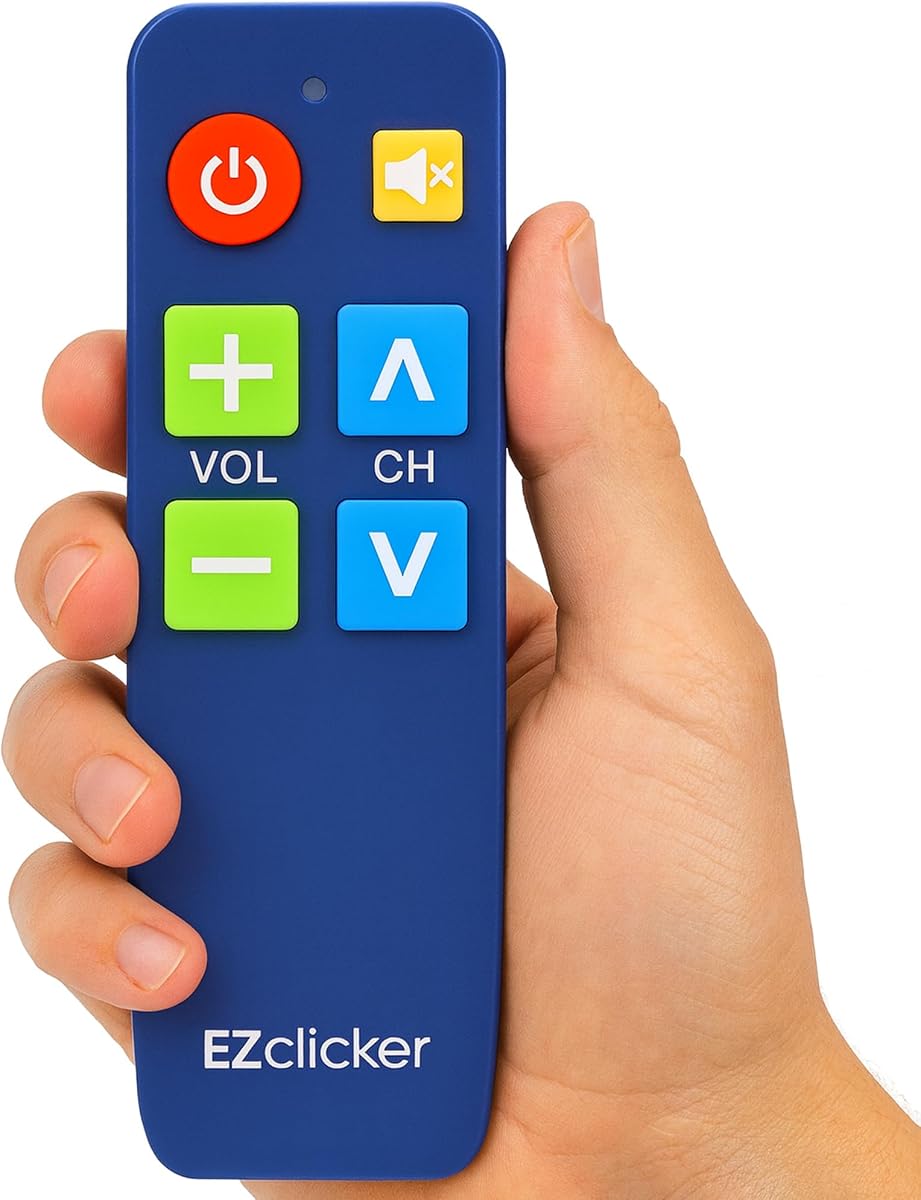
The EZclicker TV Remote for Seniors, Extra Simple Big Button Remote in blue has a 4.2 rating and offers the same core accessibility concept as the black version, with a different housing color. It uses large universal controls, tactile feedback, and a streamlined design intended for seniors and people with limited dexterity or vision.
We may earn a commission when you buy through this link, at no additional cost to you.
The programming method is notably approachable. Point the remote at the switched-on television, hold the Mute and Volume Up buttons together for up to 60 seconds, and release them when the volume display changes. This avoids searching for device codes and makes the setup process easy for a caregiver to guide.
Compatibility is limited to televisions from major brands. The listing specifically excludes cable boxes, Firestick, Roku Stick, streaming applications, and other unrelated platforms. The compatible model list appears in the product images, so checking the television brand and model before ordering is an important part of the buying process.
The remote's 6-by-2-by-1-inch dimensions make it easy to hold and store, while two AAA batteries are required and not included. The blue finish may also help it stand out visually from a collection of black remote controls, which can be a practical household consideration when several people need to find a specific remote quickly.
For direct television viewing, this model delivers the same accessible, uncomplicated proposition as the black EZclicker alternative. It is a good choice when visual distinction matters or when a user simply prefers a different color, but it is not a substitute for a remote that controls external boxes or navigates apps.
The blue casing can make the remote easier to distinguish from ordinary television remotes. In a shared room, that small visual difference may make it quicker to retrieve.
Oversized tactile controls and the short programming routine make this model suitable for a senior who primarily uses a television directly. Its core strengths are clarity, not smart-device flexibility.
We may earn a commission when you buy through this link, at no additional cost to you.
The GE Big Button Universal Remote Control, Replacement Remote for Samsung has a 4.0 rating and stands apart from the minimal senior remotes through its directional pad. The product listing describes a replacement for Samsung televisions that can also control a streaming media player, cable box, satellite receiver, soundbar, or another compatible device.
We may earn a commission when you buy through this link, at no additional cost to you.
The directional pad is the most useful feature for smart televisions. It allows a user to move through menus rather than relying exclusively on channel and volume controls. Dedicated controls for major streaming platforms, including Netflix and YouTube, make it more appropriate for modern viewing habits, although availability of those buttons can depend on the television model.
Programming is handled through automatic code search or direct code entry. The remote is preset for Samsung televisions and includes master volume control, so audio adjustments can be made regardless of which of the two devices is active. Two AAA batteries are required and are not included.
Its large simplified keyboard and ergonomic shape are intended to remain readable and comfortable for impaired viewers. Nevertheless, a directional pad and device controls make it more complex than the four-button Flipper or the television-only EZclicker products. Caregivers may need to spend a little more time explaining mode changes and the functions used most often.
This is a strong option for a Samsung household that wants simple physical controls without abandoning smart-TV menu navigation. The 4.0 rating is the lowest in this group, so buyers should consider the complete feature set and compatible device list rather than focusing on the rating alone.
A directional pad makes it possible to operate smart-TV menus and compatible streaming interfaces. This broadens functionality while keeping the navigation controls grouped in a familiar arrangement.
The ability to manage two compatible devices can reduce the number of remotes in circulation. Samsung preset support also makes it a logical first choice for households centered on that brand.
We may earn a commission when you buy through this link, at no additional cost to you.
The UltraPro OneTouch Backlit Remote Control for Smart TV carries a 4.1 rating and focuses on visibility in low-light rooms. Its fully illuminated keypad makes the buttons easier to locate in bedrooms, media rooms, and other dim environments, offering a different accessibility advantage from large-button remotes designed mainly for seniors.
We may earn a commission when you buy through this link, at no additional cost to you.
The remote supports Samsung, LG, Sony, Vizio, Fire TV, and Roku televisions without programming for most supported models. Some Sharp and Insignia Roku televisions may require programming, so the word most carries an important qualification. Setup otherwise consists of inserting two AAA batteries and selecting the television brand.
Dedicated hotkeys provide direct access to Netflix, Prime Video, Disney+, and YouTube when those applications were installed by the television manufacturer. Support for user-installed applications may vary. This is a smart-TV remote with entertainment shortcuts rather than an oversimplified television controller, making it better suited to users who actively navigate streaming services.
Backlighting is the standout quality. It can help a viewer find the correct control without turning on an overhead light, which is useful at night and for anyone who experiences difficulty locating small labels. The tradeoff is that the feature is not a substitute for oversized buttons, and the supplied information does not describe the dimensions or particular accessibility for arthritic hands.
This model is a good fit for a mixed smart-TV household that values easy brand setup and illuminated controls. It may not be the most immediately understandable option for a person who avoids modern interfaces, but it offers a convenient bridge between a conventional remote layout and current streaming habits.
A fully backlit keypad reduces the need to illuminate the entire room when locating a button. The result is more comfortable viewing during late-night use.
Dedicated application hotkeys shorten the route to common services when the television manufacturer installed them. The benefit is strongest in homes that use streaming every day rather than only traditional broadcasts.
We may earn a commission when you buy through this link, at no additional cost to you.
The most useful simple remote is defined by the equipment it must control and the person who will use it. Compatibility, button size, setup, navigation, lighting, and battery format should be considered together rather than treating one feature as decisive on its own.
Begin with the television brand and model, then list every device the user expects to control. Several remotes in this guide work only with the television, while others also support cable boxes, satellite receivers, soundbars, streaming players, or compatible smart-TV functions. A universal label is not automatically a guarantee that every device or application will work. Check the listing's compatibility list, particularly the model exclusions printed alongside many of the EZclicker products. The GE products are more likely to suit a mixed equipment setup, while the dedicated Samsung and LG models are best for homes with one known television brand. Never assume that a remote advertised for Roku or Fire TV will operate every streaming stick, smart television, or subscription service.
For users with low vision, arthritis, tremors, or reduced dexterity, the size, spacing, contrast, and shape of the controls matter more than a long feature list. Extra-large Enter keys help with menu confirmation, tactile feedback lets a user distinguish functions by touch, and color coding can make primary commands easier to locate. The Flipper takes this approach furthest by showing only four everyday buttons, while several EZclicker remotes enlarge familiar controls without eliminating them. A backlit keypad offers a different benefit, particularly at night, but does not necessarily provide larger targets. The most effective layout is the one the intended user can identify and operate consistently, so consider vision, hand strength, and familiarity with the television interface together rather than choosing solely by appearance.
Simple operation after setup is valuable, but complicated setup can defeat the purpose of an accessible remote. The dedicated Samsung remote is ready to use after batteries are inserted, and the UltraPro generally requires only a brand selection for supported televisions. EZclicker universal models use a hold-and-release process rather than manual code entry. The GE universal remotes offer automatic search and direct entry, which provides flexibility but may require a little more troubleshooting. A caregiver should be willing to complete programming and write down the resulting device mode or favorite channels. If the user will never have assistance, a preprogrammed or genuinely one-button setup method deserves priority over optional features.
A remote that changes channels may be perfectly adequate for broadcast, cable, or satellite viewing, but it cannot provide full smart-TV menu navigation. The GE Samsung replacement includes a directional pad for compatible interfaces, and the UltraPro includes application hotkeys and smart-TV navigation. The Flipper handles basic power, volume, and channel functions on smart televisions but cannot operate streaming application menus. By contrast, the EZclicker television-only models are focused on direct TV functions and explicitly exclude streaming. Before choosing, ask whether the viewer mainly wants to change channels and adjust sound, or whether they routinely enter applications, use search, and adjust picture settings. More control can be useful, but unnecessary complexity can make a remote less simple in practice.
Multiple device support can help a household reduce remote clutter. The GE two-device remotes can operate a television together with a compatible soundbar, cable box, satellite receiver, streaming media player, or another supported device. The Flipper can combine television and cable or satellite control, while its favorite-channel programming makes a set-top-box setup more approachable. Master volume control may be particularly valuable when the television is not the source of sound. However, extra device support does not guarantee that every combination will work, and switching between devices may require an unfamiliar mode button. A viewer with cognitive difficulty may benefit more from one remote that controls the television alone if other equipment is rarely used.
Small differences in power requirements can create avoidable inconvenience. Several EZclicker models require two AAA batteries, the Flipper and GE two-device remote use two AA batteries, and the GE Samsung replacement uses two AAA batteries. None of the listed products includes batteries, so add that requirement to the purchase decision and consider whether a caregiver can replace them easily. Physical size also affects handling. The EZclicker TV-only remotes measure 6 by 2 by 1 inches, while several universal versions are slightly longer at 7 inches in length. A shorter remote may be easier to hold for someone with a weak grip, but button spacing and weight should be considered alongside total length.
A remote that will be used by many people should be durable, easy to explain, and consistent. The GE models mention use in nursing homes, hotels, and assisted living facilities and offer technical support resources. The Flipper's limited interface and programmable favorites can make recurring use predictable for residents and caregivers. Labeling a remote with the television it controls can be helpful in shared rooms, although the product should not be placed near batteries or moisture. When selecting for a care setting, verify institutional rules and provide familiar caregivers with the programming instructions. The objective is a remote that supports independence while remaining easy for staff to reset, identify, and explain.
Useful accessibility features vary by the type of impairment they address. Tactile feedback and oversized controls help viewers who cannot easily read or precisely press small keys. Color coding supports quick recognition for users with low vision, while the Flipper's four-button face further reduces decision-making demands. A backlit keypad helps a user locate controls in a dark room, making the UltraPro valuable for nighttime viewing. None of these features automatically guarantees ease of use; a remote with excellent lighting can still be complicated if it has too many functions, while a minimal remote can still be difficult if the labels are unclear. Prioritize the feature that directly addresses the user's specific difficulty rather than selecting a model simply because it is marketed as senior-friendly.
Start by identifying the television and connected devices, then check the product listing and compatibility images before inserting batteries. For a dedicated or preprogrammed model, select the appropriate television brand or device mode if prompted. For a universal remote, follow the stated automatic search, direct entry, or hold-and-release process, and wait until the television responds before moving to the next step. Test power, volume, channel, mute, and every connected device before considering setup complete.
Teach the intended user the few controls they actually need rather than explaining every button at once. Demonstrate each action, then let the user repeat it without assistance. Label power, volume, and favorite channels if that improves recognition. For the Flipper, pre-program the favorite channel list once and explain the color coding. For smart-TV models, demonstrate the directional pad, streaming shortcuts, and any required device-mode change while the user is watching.
Keep the remote on a stable, dry surface and remove the batteries if it will remain unused for a long period. Replace all batteries together when performance becomes uneven, following the stated battery type. Do not clean the buttons with liquid, and avoid placing the remote where it may be crushed, overheated, or exposed to food. If a universal remote stops responding, repeat setup rather than repeatedly pressing every key, and consult the listed technical-support resources for assistance.
The easiest options are those preprogrammed for the relevant television brand. The EZclicker Samsung model requires no setup after batteries are inserted, while the UltraPro generally asks the user only to select a supported TV brand. EZclicker universal models use a hold-and-release method rather than code entry. Always confirm that the television model appears in the listing before expecting plug-and-play operation.
It depends on the model. The EZclicker television-only products and the Flipper cannot navigate streaming application menus, although the Flipper can handle basic functions on compatible smart TVs. The GE Samsung replacement includes a directional pad for compatible smart-TV navigation, and the UltraPro includes dedicated streaming hotkeys. App shortcut availability also depends on how the application was installed on the television.
The Flipper is the most aggressively simplified choice because it shows only four primary buttons and uses large color-coded, tactile controls. EZclicker models also offer oversized buttons and tactile feedback, while the UltraPro is particularly useful in dark rooms because its keypad is fully illuminated. The right choice depends on whether the priority is fewer choices, larger targets, or better visibility.
Some do, but not all. The Flipper is designed to control a television together with compatible cable or satellite equipment, and the GE universal remotes support several device types. The EZclicker television-only remotes explicitly exclude cable boxes. Check the product's device list carefully, especially when a set-top box rather than the television handles the channel signal.
First confirm that the television or other device appears in the compatibility list and that the correct batteries are installed. Then repeat the programming sequence, pointing the remote directly at the device and allowing enough time for the code search. If another device is controlled through a mode button, make sure the correct mode is active. The GE listings also mention technical support and online programming videos.
No batteries are included with any of the listed products. Most models use two AAA batteries, while the Flipper and the GE two-device remote require two AA batteries. Purchase the correct type and keep a spare set nearby, particularly in a senior household where a depleted battery could interrupt a caregiver's ability to adjust the television.
A four-button remote can be better when the user only needs power, volume, channel, and mute controls and is easily confused by crowded layouts. A universal remote is better when several devices or smart-TV menus must be managed. The best choice is determined by the user's actual viewing behavior, not simply by the number of buttons.
Choose a dedicated Samsung model when the household has one compatible television and the user values setup-free operation. Choose a universal model when the television brand may change, several television brands are present, or the remote must also control a soundbar, cable box, satellite receiver, or other compatible device. Check exclusions carefully because universal does not mean every product is supported.
The Flipper is the standout choice for a user who values the smallest possible set of visible controls, strong tactile differentiation, and programmed favorite channels. The EZclicker Samsung remote is the most straightforward option for a compatible Samsung television because it needs no programming and holds the highest listed rating. For a broader basic setup, the GE two-device universal remote combines large controls with flexible equipment support and helpful programming options.
Start with compatibility, then consider who will actually use the remote. A four-button layout and tactile colors may help a senior with dementia or low vision, while a backlit keypad can be the most useful feature for nighttime viewing. If smart-TV menus and streaming shortcuts matter, select a model with directional navigation rather than a television-only controller. Program and test the remote with the user present whenever possible.
Product details, availability, and prices can change, so check the current listing before purchasing. Confirm the television model, connected devices, required battery type, and compatibility exclusions. Those checks are the best way to avoid a remote that looks easy but cannot operate the equipment in the room.