
WAVLINK 13-in-1 TB5 Dock
4.7Editor score
Built-in PCIe storage slot
Four Thunderbolt 5 connections
Triple high-refresh displays
Up to 140W host charging
Our Thunderbolt 5 Dock guide compares 10 leading docks for display support, speed, power delivery, storage, networking, portability, and overall value.
A Thunderbolt 5 dock turns a compatible laptop into a compact workstation by combining high-speed storage, wired networking, display connections, card readers, USB peripherals, and charging behind one cable. The best model depends on your host computer, monitor arrangement, power requirements, and the balance between portability and full-size connectivity.
We compared the 10 docks using the specifications and feature details supplied for each product, focusing on host bandwidth, downstream port selection, supported displays, laptop charging, wired Ethernet speed, card-reader capabilities, storage expansion, cooling, security, and intended workspace. The list includes compact 10-port designs, multi-port desktop hubs, and models with M.2 NVMe storage.
Each review identifies the dock most likely to suit a particular workflow, from a streamlined dual-screen setup to demanding multi-monitor editing or high-speed local storage. Display modes remain dependent on the laptop, operating system, graphics capabilities, cables, and adapters, so consult the compatibility details before purchasing. Product prices and availability can change, so compare the current listing when you shop.
4.7Editor score

4.8Editor score

5.0Editor score
The table below compares the core expansion, display, charging, and networking characteristics of all 10 docks. It also highlights which models include M.2 NVMe storage, Thunderbolt 4 instead of Thunderbolt 5, or enterprise-oriented management features.




The Anker Prime TB5 Docking Station is a broad desktop expansion hub that combines two downstream Thunderbolt 5 ports, two USB-C ports, three USB-A ports, card readers, 2.5Gbps Ethernet, audio, and a high-bandwidth display connection. Its standout quality is balance: it offers generous connectivity and substantial host charging without narrowing the design to one specialized use case.
We may earn a commission when you buy through this link, at no additional cost to you.
Thunderbolt 5 provides the backbone for fast file movement, external storage, and display expansion. Anker states that a 150GB file can be transferred in 25 seconds through the Thunderbolt 5 connection, while the dock can support one display at up to 8K@60Hz or two 8K@60Hz outputs on compatible Thunderbolt 5 Windows laptops. The active cooling system is particularly relevant for sustained transfers and demanding multi-device use.
Power delivery is another major strength. The upstream Thunderbolt 5 port supports up to 140W under PD 3.1, and the two front USB-C ports share 45W for accessories. The trade-offs are that maximum display modes depend on the exact laptop and operating system, and a dock with this many ports naturally occupies more desk space than a travel-oriented model. Active cooling may also be more audible than a fanless design.
This is a compelling choice for a desk-based Windows professional who wants several high-resolution displays, fast wired networking, card-reader access, and dependable charging through one host cable. It is less suitable for someone who needs an integrated NVMe bay or remote fleet-management tools. For general productivity and content-heavy desktop work, it is one of the strongest balanced options in the list.
The combination of high-resolution display support and 140W upstream charging makes the dock suitable for power-hungry notebooks that need to remain productive while several peripherals are connected. Verify the host's supported display mode and charging requirements before installation.
The included active cooling system is intended to reduce thermal pressure during heavy loads. This can be advantageous during large transfers, external storage work, or extended use with several displays.
We may earn a commission when you buy through this link, at no additional cost to you.
The WAVLINK Thunderbolt 5 Dock offers an unusually flexible mix of four Thunderbolt 5 connections, four USB-A ports, 2.5Gbps Ethernet, an SD 4.0 reader, audio, and a Kensington security slot. It is designed for users who want to connect multiple downstream Thunderbolt accessories while still retaining conventional USB peripherals and wired networking.
We may earn a commission when you buy through this link, at no additional cost to you.
Its upstream port provides 120Gbps bandwidth and up to 140W of host power. The three downstream Thunderbolt 5 ports support 80Gbps data transfer and offer 15W or 30W charging. Display options are impressive, including a single 8K@144Hz arrangement, two 8K@60Hz displays, or three 4K@144Hz displays, although the full three-display arrangement requires a Windows 11 or later computer with Thunderbolt 5.
The main limitation is that macOS is described as supporting only two external displays through this dock. USB-C-to-HDMI or DisplayPort cables and the security lock are also not included. Anti-slip feet help keep the dock stable, which is useful with numerous connections, but buyers who require Apple desktop multi-display support should check the supplied compatibility list carefully.
Choose this dock for a Windows-based professional workstation that needs numerous downstream Thunderbolt devices, high-refresh multi-monitor output, and fast wired networking. It is less compelling for Mac users seeking three displays or for buyers who want a complete out-of-box video-cable package.
One upstream and three downstream Thunderbolt 5 ports allow the dock to act as a central hub rather than merely a peripheral adapter. This is valuable when chaining storage, capture devices, additional displays, and other high-bandwidth accessories.
The highest listed configuration of three 4K@144Hz displays is tied to compatible Windows 11 systems with Thunderbolt 5. Display support on macOS is limited to two external displays, so operating-system requirements deserve close attention.
We may earn a commission when you buy through this link, at no additional cost to you.
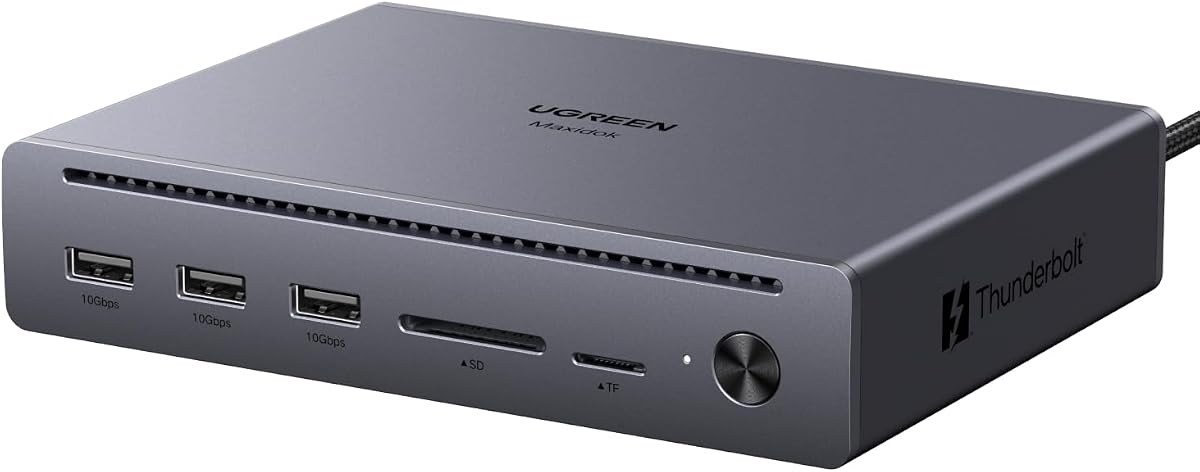
UGREEN's 10-in-1 Maxidok is a streamlined alternative for users who need more than a basic USB-C hub without carrying a full 17-port workstation. It combines three 10Gbps USB-A ports, SD and TF readers, Gigabit Ethernet, DisplayPort 2.1, and two downstream Thunderbolt 5 connections in a relatively focused layout.
We may earn a commission when you buy through this link, at no additional cost to you.
The Intel-certified Thunderbolt 5 platform supports 120Gbps one-directional and 80Gbps bidirectional transfer. UGREEN says a 6GB 4K video can move in about one second under suitable conditions. Display configurations include dual or single 8K@60Hz and triple 4K@144Hz outputs through DP2.1 and the two downstream Thunderbolt 5 ports, subject to host compatibility.
The dock provides up to 100W of laptop charging, which may be sufficient for many systems but falls below the 140W offered by several other models. Its fanless aluminum design is a meaningful advantage in a quiet office. The DP port does not support DP++, so an active DP-to-HDMI adapter or cable is needed for certain HDMI monitors; passive adapters will not work.
This model is a strong fit for creators and developers seeking silent operation, high-refresh displays, and fast Thunderbolt expansion without an integrated storage bay. Choose it over the larger UGREEN when desk space, USB-A availability, and quiet operation matter more than 2.5Gbps networking and maximum system power.
The aluminum enclosure and fanless design make the Maxidok appealing for offices, libraries, studios, and shared workspaces. Its thermal management is intended to sustain performance while avoiding the continuous fan noise associated with actively cooled docks.
This dock focuses on fast USB-A connectivity, card readers, Ethernet, and two downstream Thunderbolt 5 ports. It avoids an M.2 slot and higher-speed Ethernet, making its feature set easier to understand and its footprint more restrained.
We may earn a commission when you buy through this link, at no additional cost to you.
The UGREEN Maxidok 17-in-1 is the most comprehensively connected desktop model in this roundup. Seventeen ports include three 10Gbps USB-A connections, three 10Gbps USB-C connections, SD and TF 4.0 readers, three 3.5mm audio jacks, 2.5Gbps Ethernet, DisplayPort, and two downstream Thunderbolt 5 ports. An internal M.2 PCIe slot adds a different kind of expansion entirely.
We may earn a commission when you buy through this link, at no additional cost to you.
The built-in storage bay accepts compatible 2230–2280 NVMe SSDs up to 8TB, with stated PCIe Gen4x4 performance potential. UGREEN places strict size and heatsink restrictions on the drive, so buyers should verify the exact SSD dimensions before ordering. On Windows, the dock can support three independent displays using the two Thunderbolt outputs and DisplayPort; Mac systems are limited to two displays.
Its 240W total power system supports demanding laptops and connected accessories, while 2.5GbE supports faster file movement over wired networks. The aluminum unibody aids heat dissipation, and a 60mm fan provides active cooling. UGREEN states that the fan remains below 30dB during operation, although the presence of a fan makes it less attractive for a completely silent workspace.
Choose the 17-in-1 for a serious desk that needs high-speed local storage, numerous peripheral types, several independent screens, and abundant power. It is overkill for ordinary travel or a simple two-monitor office. Its storage integration and broad connectivity make it especially compelling to video editors, developers, photographers, and engineers who want a single permanent workstation hub.
The M.2 slot can hold a high-performance NVMe SSD without a separate enclosure, reducing desk clutter and simplifying transfers. Capacity support extends to 8TB, but drive size, key type, and heatsink height must meet the listed compatibility requirements.
A 240W system power budget and 17-port layout suit a stationary setup with many connected devices. The active cooling system helps sustain performance, but fans can be undesirable in recording, quiet conferencing, or acoustically sensitive workspaces.
We may earn a commission when you buy through this link, at no additional cost to you.
WAVLINK's 13-in-1 Thunderbolt 5 Dock combines a full high-speed port array with a built-in PCIe Gen4x4 M.2 storage slot. One upstream and three downstream Thunderbolt 5 ports, four USB-A ports, 2.5Gbps Ethernet, an SD 4.0 reader, audio, and a Kensington slot make it a particularly complete creative-workstation hub.
We may earn a commission when you buy through this link, at no additional cost to you.
The integrated M.2 bay supports up to 64Gbps transfer speeds and is intended for local high-speed caching of RAW footage, layered PSD files, 3D projects, virtual-machine data, repositories, and backups. The supplied information specifies M-key 2280 SSDs, but no NVMe drive is included. That means the purchaser must add compatible storage separately and install it into the dock.
Display capabilities include single 8K@144Hz, dual 8K@60Hz, and triple 4K@144Hz configurations. The full three-display mode requires Windows 11 or later with Thunderbolt 5, while macOS is described as supporting two external displays. Upstream charging reaches 140W, and the three downstream Thunderbolt ports offer 15W and 30W power delivery.
This is an attractive premium choice for editors, photographers, designers, and developers who want direct SSD access alongside a Thunderbolt hub. The principal drawbacks are the need to source a compatible M.2 SSD, the omission of a security lock and display cables, and macOS's lower display ceiling. For the intended Windows creative workflow, it delivers a notably cohesive package.
Directly mounting an NVMe SSD in the dock can shorten the path between active project files and the workstation. The listed 64Gbps capability is particularly relevant to high-bitrate footage, large design files, and containerized development environments.
The highest refresh-rate modes make this dock useful for timelines, color work, stock monitoring, and detailed editing views. Actual output depends on the host graphics system, display capabilities, operating system, and appropriate cables.
We may earn a commission when you buy through this link, at no additional cost to you.
The WAVLINK Thunderbolt 4 Dock is a practical option for buyers who need a modern one-cable workstation but do not require full Thunderbolt 5 bandwidth. Its 40Gbps Thunderbolt 4 connections, dual HDMI outputs, downstream Thunderbolt support, 2.5Gbps Ethernet, SD and microSD readers, and 96W host charging cover many professional desk requirements.
We may earn a commission when you buy through this link, at no additional cost to you.
On compatible Windows systems, it can drive two 4K@60Hz displays through the HDMI ports or a single 8K@60Hz display. A downstream Thunderbolt 4 display can support up to 8K@60Hz or 4K@120Hz. Mac behavior varies significantly by chipset and model: listed Pro and Max systems can mirror two external displays through HDMI, while extending two displays may require using one HDMI output and the downstream Thunderbolt port.
The main trade-off is bandwidth. Although it works with Thunderbolt 4, Thunderbolt 5, and USB4 hosts, its data and display pipeline is built around Thunderbolt 4 rather than the newer platform's 120Gbps dynamic bandwidth. It also offers less host charging than many Thunderbolt 5 docks, although 96W can cover many mainstream and professional notebooks.
Choose this model for a mixed environment that values two HDMI ports, broad computer compatibility, fast card readers, and 2.5GbE. It is a sensible alternative when a Thunderbolt 5 host does not need to be paired with a top-tier Thunderbolt 5 dock, particularly for dual 4K office productivity.
Support for Thunderbolt 4, Thunderbolt 5, and USB4 systems broadens the pool of compatible laptops. Operating-system and chipset limitations still govern how many displays can be extended, especially on Mac.
The SD 4.0 reader is listed at up to 312MB/s, while 2.5Gbps Ethernet accelerates transfers, NAS access, and stable network connections. These features make the dock more than a simple display adapter.
We may earn a commission when you buy through this link, at no additional cost to you.
The Lenovo ThinkPad Thunderbolt 5 Smart Dock 7500 is aimed at commercial users, IT departments, and demanding notebook workstations. Its defining feature is 180W Power Delivery, the highest host charging figure listed here, combined with Thunderbolt 5 data performance and support for multiple high-resolution or high-refresh-rate displays.
We may earn a commission when you buy through this link, at no additional cost to you.
Lenovo lists configurations for up to three 8K 60Hz displays, as well as two 4K 240Hz and two 4K 120Hz displays. The dock includes Thunderbolt 5, HDMI 2.1, DisplayPort 2.1, USB-A and USB-C ports, 2.5Gbps Ethernet, and combo audio. That combination gives enterprise users the flexibility to standardize a desk around either high resolution or high refresh rate.
Its most specialized advantage is Lenovo Accessories Fleet Manager, a cloud-based administration solution powered by AWS that lets IT managers remotely configure, update, and diagnose deployed docks. For an individual buyer, that feature may have little day-to-day impact. For a company managing many workstations, however, centralized administration can be more valuable than an extra connector.
Choose the ThinkPad 7500 for enterprise deployments, mobile workstations with substantial charging requirements, or professional users who prioritize remote dock management. It is less compelling for a home office that will never use fleet tools. Users should confirm exact display arrangements, host compatibility, and management prerequisites with their IT team.
The 180W delivery ceiling provides considerable charging headroom for high-performance notebooks. That makes the dock suitable for organizations replacing a proprietary charger with a standardized Thunderbolt-based desk setup.
Remote configuration, updates, and diagnostics can simplify support across many docks. This is especially relevant to managed business environments where individually troubleshooting every workstation would be inefficient.
We may earn a commission when you buy through this link, at no additional cost to you.
The WAVLINK Intel-Certified 12-in-1 is an especially balanced Thunderbolt 5 dock, combining three downstream Thunderbolt 5 ports, four 10Gbps USB-A connections, 2.5Gbps Ethernet, a UHS-II SD and microSD 4.0 reader, and a 3.5mm combo audio jack. It provides the essential parts of a professional desk hub without an integrated storage bay.
We may earn a commission when you buy through this link, at no additional cost to you.
Thunderbolt 5 provides up to 120Gbps dynamic bandwidth and 80Gbps bidirectional transfer, with Bandwidth Boost for demanding data workflows. Compatible Windows PCs with Thunderbolt 5 can drive triple 4K displays, while supported Mac models can drive dual 6K displays. The supplied compatibility notes stress that many high-resolution or high-refresh combinations require Display Stream Compression support.
Upstream charging reaches 140W, which gives the dock enough power for demanding laptops while leaving a single connection for the entire desk. The downstream Thunderbolt ports also provide charging, while the card reader is listed at up to 312MB/s. As with other models, the most demanding display configurations depend on the exact host chip and operating system.
Choose this dock for a user who wants the main benefits of Thunderbolt 5 without paying for integrated NVMe storage or enterprise fleet software. It is particularly suitable for Windows productivity, creative, and development desks that need three displays and numerous high-speed ports. Mac buyers should confirm the display mode and DSC requirements in advance.
Four USB-A ports, three downstream Thunderbolt connections, fast Ethernet, media-card access, and audio cover the most common desk peripherals. This balance makes the dock convenient without requiring several separate adapters.
The 140W upstream connection supplies ample power for many demanding notebooks while the dock handles displays, storage, networking, and accessories. Confirm that the host's USB-C port supports the required Thunderbolt and display functions.
We may earn a commission when you buy through this link, at no additional cost to you.
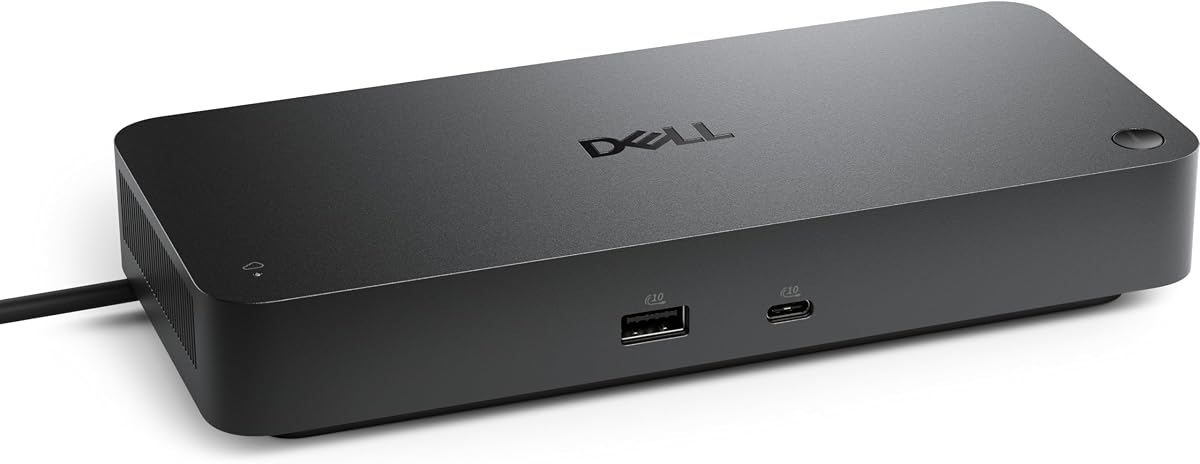
The Dell Pro Thunderbolt 4 Smart Dock SD25TB4 is designed for managed corporate desks, where display flexibility, charging, security, and remote administration may matter more than the newest interface generation. It supports up to four 4K monitors through HDMI 2.1, DisplayPort 1.4, USB-C, and Thunderbolt 4 connections.
We may earn a commission when you buy through this link, at no additional cost to you.
It delivers up to 130W to Dell laptops and up to 96W to other hosts. Two Thunderbolt 4 data ports, two DisplayPort 1.4 ports, HDMI 2.1, and 2.5GbE create a broad wired workstation, while USB-C charging simplifies desk management. The device can also chain as many as six devices through the host according to the supplied information.
Its standout feature is management without the attached PC. Dell Console and Intel AMT can be used over Wi-Fi for remote configuration and diagnostics, while WPA3 encryption, PXE boot, MAC filtering, DMA protection, and a secure enclosure address business security requirements. The enclosure includes 65% recycled plastic and uses 100% recycled packaging.
Choose this dock for business fleets, help desks, or corporate laptop deployments that need standardized remote support. It can also serve a powerful home office when four 4K displays are needed. It is not a Thunderbolt 5 dock, so buyers seeking maximum bandwidth, Bandwidth Boost, or newer downstream topology should consider the newer alternatives.
Managing docks through Wi-Fi without a connected computer can reduce downtime and simplify IT support. The feature is most valuable in environments where many identical stations need configuration, diagnostics, or firmware attention.
WPA3, PXE boot, MAC filtering, DMA protection, and secure-enclosure features target managed deployment risks. Recycled materials and packaging may appeal to organizations with sustainability requirements, although the enclosure is still primarily designed for fixed desks.
We may earn a commission when you buy through this link, at no additional cost to you.
The Belkin 140W Thunderbolt 5 Dock is a polished all-around choice for users who want extensive connectivity, high-resolution displays, and dependable charging in one desktop hub. Its 14-port design spans video, data, power, and Ethernet, with 80Gbps Thunderbolt 5 transfer and Bandwidth Boost support for demanding workflows.
We may earn a commission when you buy through this link, at no additional cost to you.
Belkin lists support for up to three extended 4K@144Hz displays and 8K@60Hz output. The dock provides up to 140W to the host through one USB-C connection, while 2.5Gbps Ethernet offers a dependable alternative to unstable Wi-Fi. Daisy chaining can connect up to six Thunderbolt devices through the host, helping keep a complex desk visually cleaner.
The dock's safety design is another differentiator. A Kensington lock is enabled, and the listed six-point system addresses over-voltage, overload, over-current, over-temperature, short-circuit protection, and fire-resistant materials. The package also uses plastic-free packaging and is backed by three-year coverage. One limitation is that it does not include an internal M.2 slot, so fast local storage requires an external enclosure.
This is an excellent recommendation for MacBook Pro, Chromebook, iPad, and compatible USB-C laptop users who want a clean, full-featured workstation. It is particularly suitable for creators, hybrid workers, and developers balancing three-display output with high-speed accessories. Confirm the host's display capabilities and the requirements for the desired resolution and refresh rate before installation.
Up to 140W of host charging, display outputs, fast networking, card access, and numerous USB connections reduce the need for separate laptop chargers and adapters. The result is a cleaner desk that can be assembled or dismantled quickly.
Support for three extended 4K@144Hz displays and 8K@60Hz output serves demanding creative and analytical workflows. High-resolution modes still depend on the laptop's graphics capabilities, operating system, DSC support, and the cables used.
The listed protection system covers several common electrical and thermal hazards, while the Kensington lock can help deter physical tampering. These considerations make the dock suitable for both a home office and a managed professional desk.
We may earn a commission when you buy through this link, at no additional cost to you.
Choosing the right Thunderbolt 5 dock means matching host compatibility, display ambitions, peripheral requirements, charging needs, and physical workspace. The most capable interface does not guarantee every advertised display mode unless the laptop, operating system, graphics system, and cables all support it.
Summary: confirm host, operating system, chip generation, and display compatibility first.
Summary: choose a display mode your computer and every monitor can realistically support.
Summary: prioritize a useful port mix and accessible placement over headline count alone.
Summary: match charging headroom to your notebook and leave room for powered peripherals.
Summary: confirm drive format and dimensions before paying for an integrated storage feature.
Summary: choose 2.5GbE for modern networks or Gigabit when simplicity matters more.
Summary: balance sustained-load cooling against fan noise and desktop footprint.
Summary: prioritize locks and remote management only when your deployment requires them.
Start by checking the dock's compatibility guidance and identifying the host's correct upstream Thunderbolt or USB-C port. Connect the power adapter first if the dock includes one, then attach the host cable and install the latest operating-system and dock firmware updates recommended by the manufacturer. Connect displays and other peripherals afterward, using cables and adapters that meet the required bandwidth and display specifications.
Install the correct display and storage drivers where the system prompts for them, and confirm that macOS or Windows recognizes the expected number of external displays. For the docks with an M.2 slot, power down or disconnect the host as directed, insert a compatible NVMe SSD with the stated key and size requirements, secure it, and test the storage connection before moving critical files onto it. Never force an unsupported drive or use an adapter that changes the listed dimensions.
Keep the enclosure unobstructed and follow its ventilation guidance, particularly around actively cooled models. Route cables to reduce strain, avoid leaving SSDs or other storage in an unprotected enclosure during transport, and do not use the dock as the sole cooling path for a laptop that is already heavily loaded. Clean the exterior with a soft, dry or lightly damp cloth, disconnect power before maintenance, and periodically update management or firmware software where applicable.
No. Three-display support depends on the host laptop, operating system, graphics capabilities, dock, and connected monitors. Several models list triple-display modes for compatible Windows 11 systems with Thunderbolt 5, while macOS support varies by Apple chip generation. Some docks support dual high-resolution displays more broadly, so always review the compatibility matrix before buying.
Yes, many of the listed docks are backward-compatible with Thunderbolt 4 and some USB4 hosts. You will still receive the dock's full set of ports, but data and display capabilities are ultimately limited by the computer, operating system, cables, and peripherals. For maximum bandwidth and listed high-end display modes, a native Thunderbolt 5 host is preferable.
It covers many demanding notebooks, but not every workstation accepts 140W through a proprietary charger or requires a different protocol. Check the manufacturer's power requirements and compatibility list. The Lenovo ThinkPad 7500 lists up to 180W, while some alternatives provide 96W or 100W, so charging power is an important differentiator.
Only certain models do. The UGREEN Maxidok 17-in-1 and WAVLINK 13-in-1 include NVMe storage slots, but compatible SSDs are not included. Their specifications impose restrictions on supported key type, length, width, and heatsink dimensions, so verify the drive model before ordering the dock.
Some docks provide DisplayPort outputs that do not support DP++, and the desired HDMI mode may exceed what passive conversion can carry. The relevant UGREEN models specifically call for an active DP-to-HDMI adapter or cable. Passive adapters will not work in those cases, so confirm both the dock's video standard and the monitor's supported resolution and refresh rate.
It can be worthwhile for NAS access, large file transfers, high-resolution media workflows, and stable connections on crowded Wi-Fi networks. The speed advantage disappears if the router, switch, storage device, or network infrastructure only supports Gigabit. Evaluate the entire network path rather than judging the dock port in isolation.
Neither is universally better. Active cooling can maintain stable performance during prolonged heavy transfers and multi-device use, while fanless operation is quieter and useful in recording or shared offices. The 10-in-1 UGREEN favors silent fanless construction, whereas the Anker Prime and 17-in-1 UGREEN use active cooling for heavier workloads.
Yes, many of these models provide multiple downstream Thunderbolt 5 ports, and the Belkin lists daisy-chaining support for up to six Thunderbolt devices through the host. Device count, display bandwidth, power budget, and host topology can all affect operation. Use supported cables and check whether a particular downstream port provides data, display output, or both.
The Belkin 140W 14-in-1 stands out as the best-rounded choice, combining broad port selection, three-display potential, 140W charging, 2.5Gbps Ethernet, daisy chaining, and substantial safety provisions. The WAVLINK 13-in-1 is the premium specialist for creators who want built-in NVMe storage, while the WAVLINK Intel-Certified 12-in-1 delivers a balanced core feature set without internal storage.
Prioritize your host and display compatibility first, then choose based on the ports you actually use. High-speed Ethernet matters for local network work, 140W or greater helps demanding laptops, and integrated storage can streamline editing or development. Fanless cooling suits quiet spaces, actively cooled models suit sustained heavy loads, and business deployments may benefit more from remote management than extra consumer-facing ports.
Finally, check the latest host compatibility list, display mode requirements, included accessories, and physical dimensions before ordering. Prices and availability change, so compare current listings and confirm whether a Thunderbolt 5 cable, display adapter, NVMe SSD, security lock, or other accessory is included. The right dock is the one that fits your computer and workflow without paying for features you will never use.