
Logitech Combo Touch
4.5Editor score
Four versatile operating modes
Backlit iPadOS shortcut keyboard
Smart Connector power and pairing
An iPad A16 case with keyboard can transform a tablet into a compact writing, browsing, and productivity setup, but the best option depends on how you work. Important differences include trackpad responsiveness, viewing-angle control, typing layout, backlighting, protection, portability, and whether the keyboard uses Bluetooth or power from the iPad.
This guide compares ten cases designed for the iPad A16 11-inch and iPad 10th generation 10.9-inch models. We evaluated the supplied compatibility details, keyboard features, trackpad functions, viewing mechanisms, protection, battery behavior, portability, and support terms. The list also distinguishes between detachable, floating, and rotating designs.
The recommendations cover budget, premium, portable, illuminated, and highly protective options, with every product rated at 4.1 or above. Logitech, Apple, ESR, Typecase, and other established accessory makers appear alongside more affordable alternatives. Product availability and seller pricing can change, so verify the current listing, model number, and included accessories before buying.
4.5Editor score
4.4Editor score

4.5Editor score
As an Amazon Associate we earn from qualifying purchases.
The table below compares the ten recommended cases across compatibility, trackpad design, viewing mechanism, illumination, portability, power, and protection to make the differences easier to identify.



The Harvopu for iPad A16 11th/10th Generation Case with Keyboard is a feature-dense folio option for users who want more functionality from a conventional iPad keyboard case. It carries a 4.3 rating and supports both the 11-inch iPad A16 and the 10.9-inch iPad 10th generation. Its standout combination is a magnetic detachable keyboard, a gesture-capable trackpad, seven RGB backlight colors, and multiple viewing grooves.
We may earn a commission when you buy through this link, at no additional cost to you.
The magnetic keyboard can remain attached for conventional laptop-style use or be removed when you want to read, browse, or watch video without carrying a separate keyboard. A full row of iPadOS-focused shortcuts helps with common system actions, while the trackpad supports tapping, swiping, scrolling, and app switching. The three internal anti-slip grooves offer more adjustment than a single fixed angle, making the folio useful for typing, writing, drawing, and media viewing.
The trade-offs are that the keyboard is wireless rather than powered directly by the iPad, and initial connection requires Bluetooth pairing using the supplied Fn+C procedure. Its 420mAh rechargeable battery includes a USB Type-C charging cable, while an automatic energy-saving mode is described for periods of inactivity. The protective PU exterior and TPU interior add useful everyday coverage, although a stylus is not included.
This is a strong choice for students, travelers, and home-office users who want illumination and adjustable viewing positions in one package. It is particularly attractive when a detachable keyboard and broad viewing-angle selection matter more than the most compact profile. Verify the model number on the back of your iPad before ordering, and consider the Logitech or Apple options if direct iPad power and a more premium native feel are priorities.
Removing the keyboard changes the case from a work-focused folio into a more conventional tablet cover. That flexibility is useful for reading in bed, attending a meeting without a keyboard in front of you, or sketching with more screen freedom.
Seven backlight colors and three brightness levels make the keyboard easier to use in dim conditions, while the three anti-slip grooves provide separate positions for typing, writing, and viewing media.
We may earn a commission when you buy through this link, at no additional cost to you.
The ESR for iPad (A16) 11th/10th Gen Case with Keyboard, Ultra-Light is designed for buyers who want a compact productivity accessory without giving up a large trackpad or protective coverage. It holds a 4.4 rating and is compatible with the specified 11-inch and 10.9-inch iPad families. At a stated thickness of 6.9 millimeters, it is the most explicitly portable product in this roundup.
We may earn a commission when you buy through this link, at no additional cost to you.
The magnetic detachable keyboard lets you use the cover independently when you only need screen space. When typing, its trackpad is described as 65 percent larger than the trackpad on a regular keyboard, with support for one-finger drag and three-finger scrolling. The triangular support creates two defined positions: 65 degrees for working, watching, or reading and 20 degrees for sketching or writing.
The main limitation is the absence of backlighting, which matters for frequent nighttime typing. ESR also offers fewer angle settings than the Harvopu, Typecase Touch, and FUWANG alternatives. On the other hand, the reinforced Air Guard corners, magnetic closure, and precise cutouts create a well-rounded protective package without adding excessive bulk.
ESR is best for commuters, students, and professionals who regularly move between locations and value portability over illumination. It also suits anyone who prefers a larger pointer area for document navigation. If nighttime visibility is essential, compare the ESR with the backlit Harvopu or Typecase Edge. For users wanting direct iPad power, the Logitech Combo Touch offers a different integration model.
The enlarged trackpad gives cursor movement and scrolling more room than a compact keyboard deck, which is particularly useful for editing text, navigating iPadOS, and managing documents.
The slim enclosure still includes reinforced corners, a magnetic closure, and cutouts that maintain access to buttons, ports, and speakers while the case remains attached.
We may earn a commission when you buy through this link, at no additional cost to you.
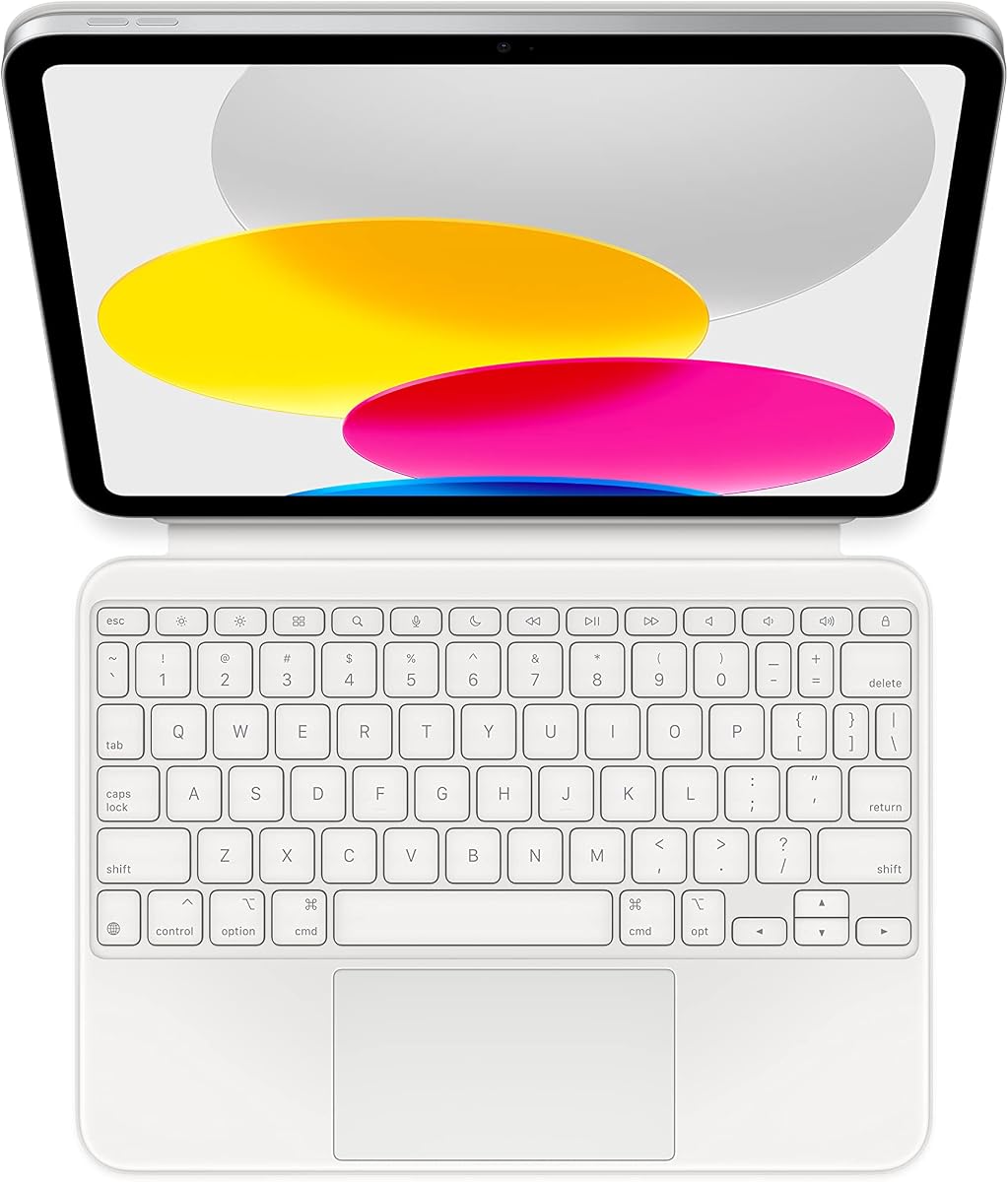
The Apple Magic Keyboard Folio is the most tightly integrated keyboard case in the roundup, pairing a detachable keyboard with a protective back panel for the iPad A16 and iPad 10th generation. It has a 4.4 rating and emphasizes effortless setup: the keyboard attaches magnetically and requires no separate charging or pairing process.
We may earn a commission when you buy through this link, at no additional cost to you.
Its large click-anywhere trackpad supports a cursor and multi-touch gestures, while a 14-key function row provides dedicated controls for common tasks. The two-piece construction gives you more freedom than a permanently attached keyboard case because you can remove the keyboard and retain the back panel as a stand. The back panel also supports front and back protection, and its adjustable stand provides a laptop-like arrangement for typing or viewing.
Compared with many third-party cases, the main advantage is integration. The direct attachment avoids a separate charging routine and the possibility of a depleted Bluetooth keyboard interrupting a work session. The limitation is narrower choice: this listing specifies a US English layout, and the supplied information does not mention keyboard backlighting. Buyers who require another language layout, adjustable RGB colors, or a rugged drop-rated enclosure may need a different model.
This is the most polished recommendation for someone who values a simple connection method, precise trackpad interaction, and an Apple-style accessory experience. It is especially appealing for iPad users who already own Apple devices and want the visual and functional relationship of a purpose-built folio. Confirm the required keyboard language and your exact iPad model before purchase.
Because the keyboard draws power through its magnetic connection, there is no independent battery to recharge and no Bluetooth device-selection process. Attach it and begin using the keyboard.
The keyboard and protective back panel work independently, allowing the iPad to remain supported in stand mode while the keyboard is carried separately or used with another compatible device.
We may earn a commission when you buy through this link, at no additional cost to you.
The Typecase Edge iPad A16 11th/10th Gen Keyboard Case is built around a floating magnetic stand that holds the iPad above the keyboard. That arrangement creates a more traditional laptop-like relationship between screen and keys than a flat folio. It carries a 4.4 rating and includes a multi-touch trackpad, an 11-color backlit keyboard, and a rechargeable Bluetooth connection.
We may earn a commission when you buy through this link, at no additional cost to you.
The stand is intended for typing, studying, remote work, and travel, while the trackpad supports familiar scroll, swipe, edit, browse, and multitask gestures. Palm rejection is a thoughtful addition because it helps reduce accidental cursor movement while your hands rest near the keyboard. The keyboard provides three brightness levels, 11 backlight colors, and shortcut keys for brightness, media, volume, and other iPadOS functions.
As a wireless design, the Edge requires charging and pairing rather than drawing power from the iPad. The floating screen arrangement may also feel less compact than a one-piece folio when placed in a tightly packed bag. Against those considerations, the product provides a stable magnetic display position, a secure magnetic closure, vegan-leather exterior, and an Apple Pencil holder for a complete mobile workstation.
The Edge is an excellent fit for professionals, students, and remote workers who spend substantial time typing and value a raised screen position. It is also appealing for nighttime work because it offers more lighting choices than most alternatives. Choose it over a flatter design if your priority is an open, laptop-like workspace; choose a more compact model if minimizing every millimeter is more important.
Holding the iPad above the keyboard separates the viewing surface from the typing area, reducing the cramped feeling often associated with flat tablet keyboard cases.
Palm rejection helps the trackpad distinguish deliberate gestures from incidental contact, supporting a smoother transition between typing and navigation.
We may earn a commission when you buy through this link, at no additional cost to you.
The Logitech Combo Touch, Detachable iPad Keyboard Case is a premium productivity keyboard for both the iPad 10th generation and iPad A16. Its 4.5 rating reflects a feature set centered on versatility: Type, Read, Sketch, and View modes, a detachable keyboard, a flexible kickstand, and a multi-gesture trackpad.
We may earn a commission when you buy through this link, at no additional cost to you.
The keyboard uses Logitech's Smart Connector for both power and pairing, so there is no independent battery to charge. Its backlit keys include a complete row of iPadOS shortcuts, including dedicated Screenshot and Dictation controls. The trackpad supports familiar multi-gesture navigation, and the kickstand provides a listed 50-degree tilt. Premium materials are also intended to protect against scuffs, scratches, and spills.
The case is more substantial than a very slim folio, which is understandable given its four-mode stand, keyboard, and protection. The supplied information gives one explicit tilt measurement rather than a wide list of numeric positions, although the stand is described as flexible. It also uses Smart Connector integration, so it is less useful as a keyboard for unrelated Bluetooth devices than products that support multi-device pairing.
Logitech's Combo Touch is a strong recommendation for people who alternate among writing, reading, sketching, and presenting. It is particularly attractive for students and professionals who want backlit keys, direct iPad power, and a mature accessory design without managing another rechargeable component. If cross-device wireless use is essential, the CHESONA or ZAGG may be more accommodating.
The dedicated Type, Read, Sketch, and View positions make it easy to reorient the iPad as the task changes, rather than forcing one fixed angle for every activity.
Smart Connector power removes the need for a separate charging cable or Bluetooth pairing routine, while the shortcut row keeps common iPadOS functions close at hand.
We may earn a commission when you buy through this link, at no additional cost to you.
The Typecase Touch iPad A16 11th/10th Gen Case with Keyboard is built around a patented 360-degree rotating hinge and supports seven usage modes. That makes it one of the most adaptable cases in the roundup, suitable for typing, video, calls, reading, presentations, and full tablet use. It holds a 4.4 rating and includes a multi-touch trackpad and backlit keyboard.
We may earn a commission when you buy through this link, at no additional cost to you.
The keyboard uses laptop-style keys, a full row of iPadOS shortcuts, and adjustable 11-color RGB backlighting, giving users more control over the look and visibility of their setup. The hard-shell enclosure protects the sides of the iPad, while auto sleep and wake help conserve battery when the cover is opened or closed. A USB-C rechargeable battery and Apple Pencil holder complete the package.
Flexibility introduces some compromises. A rotating, full-enclosure design is likely bulkier than a slim folio, and the independent keyboard must be recharged separately. Seven modes are convenient, but buyers who only need one stable typing position may not use all of them. Nevertheless, the hinge design provides a more tangible way to move between work and entertainment than a conventional fixed stand.
This is a strong choice for users who regularly switch between laptop and tablet roles, particularly students attending classes, professionals presenting, or anyone using video calls. The rotating hinge and seven modes are more useful than a single laptop-style position. If portability is the priority, ESR is slimmer; if protection from drops dominates, ZAGG provides a more explicitly rugged enclosure.
The hinge allows the tablet to move through several orientations, giving the case value for media viewing, reading, calls, and presentations as well as conventional typing.
The keyboard combines 11 backlight colors with dedicated iPadOS controls, allowing users to adjust illumination while keeping frequent system actions within reach.
We may earn a commission when you buy through this link, at no additional cost to you.
The MoKo Touch Keyboard Case for iPad (A16) 11th/10th Gen, Navy Blue combines a detachable magnetic keyboard, a multi-touch trackpad, and a folio-style protective shell. It has a 4.4 rating and supports both the listed iPad A16 and iPad 10th generation models. Its QWERT keyboard includes practical shortcuts and is described as compatible with iOS, Windows, and Android systems.
We may earn a commission when you buy through this link, at no additional cost to you.
The seven-color backlight offers three brightness levels, while the trackpad provides navigation for editing, browsing, and video control. The keyboard attaches magnetically but can also be repositioned or removed. Its rechargeable 480mAh battery supports extended use, and the case includes auto sleep and wake behavior based on lid position. Two anti-slip viewing slots support writing, reading, drawing, and media viewing.
The protective construction uses a soft-touch PU exterior and flexible TPU interior with a honeycomb grid intended to assist heat dissipation. A built-in pen holder helps keep an Apple Pencil accessible, although the pencil itself is not included. Compared with more complex rotating cases, the two-angle arrangement is simpler, but the detachable keyboard and cross-platform compatibility add useful flexibility.
MoKo is a balanced choice for a student or commuter who wants illumination, a trackpad, and a detachable keyboard in a relatively conventional folio. Its broad operating-system support may be useful for users who also work across Windows or Android devices. Verify the exact iPad model first, and consider the CHESONA if switching between two wireless devices is a higher priority.
The stated iOS, Windows, and Android compatibility broadens the keyboard's usefulness, particularly for people who move between an iPad and a desktop setup.
A PU exterior, flexible TPU interior, honeycomb structure, and Pencil holder create a practical everyday package without relying on a permanently attached keyboard.
We may earn a commission when you buy through this link, at no additional cost to you.
The FUWANG Touch Keyboard Case for iPad A16 11th/10th Gen is a full-coverage hard-shell case with a rotating hinge, multi-touch trackpad, and illuminated keyboard. Its 4.4 rating reflects a combination of flexibility and protection, with the hinge described as supporting 360-degree rotation and more than 20,000 open-and-close cycles.
We may earn a commission when you buy through this link, at no additional cost to you.
The keyboard includes laser-etched laptop-style keys, full iPadOS shortcuts, seven RGB backlight colors, and three brightness levels. The trackpad supports tap, pinch, and swipe gestures, plus an Fn+A control to lock or unlock it and avoid accidental input while typing. Precise cutouts provide access to buttons, ports, and speakers, and a dedicated Apple Pencil holder helps prevent the stylus from being misplaced.
The 500mAh rechargeable battery is supplied with a Type-C charging cable and is described as reaching a full charge in two to three hours while remaining usable during charging. Auto sleep and wake help conserve power. The trade-off is that the hard-shell, rotating structure is less minimalist than a slim folio, and the keyboard requires Bluetooth setup rather than a direct magnetic power connection.
FUWANG is a good match for people who want one accessory to handle typing, media, and physical protection. Its twelve-month manufacturer warranty and stated customer support add reassurance. It is particularly relevant for students, field workers, and frequent travelers who want a full enclosure, although buyers seeking a thinner carry profile may prefer ESR.
The full-coverage shell and reinforced hinge are paired with carefully positioned cutouts, allowing access to essential controls without removing the case from the iPad.
The trackpad lock is useful when your hands rest near the pointer area, preventing accidental taps or swipes from interrupting a writing task.
We may earn a commission when you buy through this link, at no additional cost to you.
The ZAGG Rugged Book iPad 11-inch A16 and 10.9-inch iPad 10th generation Keyboard Case is the most explicitly rugged option in this guide. Its 4.1 rating is the lowest among the ten products, but that figure still reflects a generally favorable customer response. The defining feature is stated drop protection from heights of up to 6.6 feet.
We may earn a commission when you buy through this link, at no additional cost to you.
The keyboard detaches from the protective case, allowing users to remove it for tablet use while retaining coverage on the iPad. A magnetic hinge supports multiple viewing angles and creates a laptop-like setup for typing. The keyboard has backlit, laptop-style keys with seven color options, while multi-device pairing makes it easier to switch between the iPad and another compatible Bluetooth device.
The principal drawback is bulk. A rugged enclosure designed for substantial drop protection will not be as discreet as the ESR's 6.9-millimeter profile or a conventional slim folio. The supplied information also does not detail the exact angle positions, battery capacity, or included accessories. Those details should be confirmed on the current listing if the purchase depends on them.
ZAGG is the most compelling choice for users who place a high value on physical protection, work in demanding environments, or travel with their iPad in less controlled conditions. It combines that durability with detachable typing and useful lighting. For a lighter office-focused setup, Apple or Logitech offer more refined integration; for a compact folio, ESR is the stronger match.
The stated six-and-a-half-foot drop resistance is the roundup's strongest explicit ruggedness specification, making the case suitable for frequent travel and active workspaces.
A removable wireless keyboard and multi-device pairing make it possible to alternate between protected tablet use and typing across more than one connected device.
We may earn a commission when you buy through this link, at no additional cost to you.
The CHESONA Compatible for iPad 11th A16 and 10th Generation Case with Keyboard combines a 4.5 rating with several features usually associated with more expensive accessories. Its magnetic keyboard detaches for tablet use, its backlight offers seven colors and three brightness levels, and the wireless connection can pair with two devices.
We may earn a commission when you buy through this link, at no additional cost to you.
The integrated multi-touch trackpad supports iOS-style clicking, scrolling, and swiping. A row of multimedia and general shortcuts provides quick access to frequent functions, while the keyboard enters sleep mode after 15 minutes of inactivity. The backlight automatically switches off when typing stops for more than 30 seconds, helping conserve power. The case also includes a Pencil holder, cap and adapter slots, and precise openings for ports, sensors, speakers, microphones, and cameras.
Its 500mAh battery is described as offering 120 days of standby time, while automatic sleep further reduces consumption. The trade-offs are that it provides only two stated viewing angles and depends on Bluetooth rather than direct iPad power. The iPad and Pencil are not included, and the case is compatible only with the listed A16 and 10th-generation model numbers.
CHESONA is a particularly strong value for anyone who wants backlighting, a large trackpad, and multi-device switching without choosing a premium integrated folio. It is well suited to students and mobile workers who carry one keyboard between an iPad and a second device. It is also a solid first upgrade over a bare tablet, provided the buyer confirms compatibility and is comfortable with manual wireless pairing.
Pairing with two devices and switching with one click is useful for people who alternate between an iPad and another Bluetooth computer without carrying a separate keyboard.
Seven colors and three brightness levels cover different lighting needs, while automatic backlight shutdown and keyboard sleep help preserve the rechargeable battery.
We may earn a commission when you buy through this link, at no additional cost to you.
Choosing an iPad A16 keyboard case means balancing exact model fit, keyboard behavior, trackpad usefulness, viewing flexibility, protection, and the way you plan to carry and power the accessory.
Compatibility is the first non-negotiable step because the keyboard case, ports, and magnetic attachment points are designed for specific tablet dimensions. The products in this guide support the iPad A16 11-inch 2025 models A3354, A3355, and A3356, and/or the iPad 10th generation 10.9-inch 2022 models A2696, A2757, and A2777. Several listings also mention A3162, but model coverage differs among products. Look for the AXXXX identifier on the back of the tablet and compare every number rather than relying on the words A16 or 10th generation alone.
Apple Magic Keyboard Folio and Logitech Combo Touch use magnetic Smart Connector-style integration, so they require no separate charging or pairing and cannot easily be used with unrelated devices. Bluetooth designs are more portable and often support multi-device switching, but they need an initial pairing process and a charged battery. Consider how often you plan to type away from the iPad. If this is a dedicated tablet workstation, direct power is simpler; if the keyboard will accompany a laptop or other tablet, wireless versatility may be worth the added management.
A usable trackpad changes how an iPad feels for document editing, browsing, presentations, and app navigation. Look for multi-touch support, especially tap, swipe, scroll, and pinch where provided. ESR advertises a trackpad that is 65 percent larger than a regular keyboard's, while Apple uses a large click-anywhere design. Typecase Edge and Logitech also emphasize gesture navigation, and FUWANG includes a lock for preventing accidental input while typing. Palm rejection and gesture locks are particularly useful if your wrists rest close to the pointer surface.
Viewing mechanisms range from simple grooves to fully rotating hinges. Harvopu provides three anti-slip grooves, MoKo two adjustable positions, and ESR two distinct triangular angles. Typecase Touch supports seven configurations through a 360-degree hinge, while FUWANG also offers full rotation. Floating stands such as the Typecase Edge create more separation between screen and keyboard, similar to a laptop. Decide whether you mostly type in one position, alternate between typing and media, or need to move continuously among reading, sketching, presenting, and video-call configurations.
Backlighting is valuable for evening study, travel, and low-light workspaces. Harvopu, Typecase Touch, FUWANG, ZAGG, and CHESONA provide seven-color RGB lighting, while Typecase Edge offers 11 colors and three brightness levels. Apple and ESR do not list backlighting in the supplied information. If you frequently type after dark, illumination should be a firm requirement. If your keyboard is mainly used in a well-lit office, spending that feature budget on a thinner profile, stronger protection, or direct power may be more valuable.
Protection can mean a soft PU folio, a full hard shell, or a rugged enclosure designed to withstand drops. ESR emphasizes its 6.9-millimeter profile and reinforced corners, while ZAGG states drop protection up to 6.6 feet. Typecase Touch and FUWANG use full hard-shell protection around the iPad. More protective construction can add thickness and weight, so consider the device as a whole rather than judging the keyboard alone. Confirm whether the stylus is included, whether a Pencil holder exists, and whether the case keeps buttons, ports, and speakers accessible.
A wireless keyboard that pairs with two devices can be especially useful for people moving between an iPad and a laptop. CHESONA supports two-device switching, and ZAGG offers multi-device pairing. MoKo states compatibility with iOS, Windows, and Android systems, while other keyboards may also work broadly but do not make that claim in the supplied data. Before purchasing a cross-device keyboard, verify its platform support and whether the layout remains appropriate for every device you plan to use. Dedicated tablet users can prioritize iPad shortcuts and a clean connection process instead.
Included accessories can affect the setup experience. Harvopu and MoKo list a Type-C charging cable and user guide, while FUWANG also includes a Type-C cable. Most stylus holders do not include the Apple Pencil, and none of the supplied product information should be read as including an iPad or stylus. Typecase Edge and Typecase Touch list 12-month support, FUWANG lists a 12-month manufacturer warranty, and Harvopu provides after-sales contact for model or function questions. Review these terms and the current package contents before checkout.
Begin by confirming the iPad model number and comparing it with the compatibility list. Install the case carefully, then attach the magnetic keyboard and place the iPad in the intended position. For direct-connection designs such as Apple Magic Keyboard Folio and Logitech Combo Touch, simply opening or attaching the keyboard should establish the connection. For Bluetooth models, charge the keyboard first, open iPad Bluetooth settings, and follow the manufacturer's pairing procedure. Harvopu specifically directs users to hold Fn+C for three seconds and select Bluetooth Keyboard from the available devices.
Learn the iPadOS shortcut row and test the trackpad before beginning a long task. Confirm that taps, clicks, swipes, and scrolling work as expected, and adjust the viewing angle so the screen is stable and the keyboard is not blocking the sound. If a wireless keyboard includes a trackpad lock, learn the listed shortcut, such as FUWANG's Fn+A control, so you can disable accidental pointer input while typing. Backlight controls, Pencil-holder placement, and sleep or wake behavior should also be tested before traveling.
To preserve the case and keyboard, remove the iPad before cleaning the exterior and avoid exposing the openings to dust or liquid. Use a soft, lightly dampened cloth on compatible surfaces, then let them dry fully before reassembling the case. Charge the keyboard with the specified Type-C cable and remove it from a bag if it becomes warm. Inspect the magnetic connections and hinge for accumulated grit, and do not force the iPad into the case. For drop-resistant models, replace the case after a severe impact even if the iPad appears undamaged.
No. Although the cases in this guide often support both the iPad A16 and iPad 10th generation, compatibility varies by manufacturer and exact model number. Confirm that your tablet's AXXXX identifier appears in the product's compatibility list. Check Wi-Fi and cellular model variants individually when the listing provides separate numbers, and do not assume that a case fitting the larger iPad Pro will fit either tablet.
Bluetooth keyboards pair wirelessly and usually require a rechargeable battery. They can be more portable and may support switching between multiple devices. Smart Connector-style designs draw power from the iPad through the magnetic attachment and remove the pairing process. They are simpler for dedicated iPad use, while Bluetooth remains more flexible when you want one keyboard for several devices.
Several do. The Apple Magic Keyboard Folio separates into a keyboard and protective back panel, while the ESR, Harvopu, MoKo, and CHESONA use detachable magnetic keyboards. Other designs, including the rotating Typecase, FUWANG, and ZAGG cases, keep the keyboard integrated with the folio or cover. Check the specific design if your priority is using the iPad as a standalone tablet without carrying a keyboard.
A rotating hinge can be helpful because it gives you more freedom to position the iPad for sketching, note-taking, viewing, or presenting. Typecase Touch and FUWANG support full rotation, while Harvopu and ESR use fixed angle positions. Consider weight and bulk as well as flexibility, since a multi-angle hinge can be more substantial than a simple folio.
It can be, especially when using a physical keyboard for document editing, spreadsheet work, web research, or presentations. A larger surface makes cursor placement and scrolling more comfortable. ESR explicitly advertises an enlarged trackpad, while Apple offers a large click-anywhere surface. Gesture support and palm rejection are also important, since they affect navigation accuracy during sustained typing.
Several products include a holder, but the stylus itself is generally not included. Typecase Edge, Typecase Touch, MoKo, FUWANG, and CHESONA provide Pencil storage in their listed features. The MoKo listing explicitly says the pen is not included, and the CHESONA listing also notes that the iPad and pen are not included. Confirm the package contents for any product where this detail matters.
The FUWANG listing specifically states that its precise cutouts are compatible with screen protectors without interference. Other cases may also accommodate a protector, but that is not confirmed in the supplied information for every product. A thin, properly sized protector is generally less likely to cause fit issues than one with a raised edge. Check the case dimensions and installation arrangement before applying a protector.
Charge the keyboard only with the cable or method specified by its manufacturer, and use automatic sleep or backlight shutdown when those features are available. CHESONA states that its keyboard sleeps after 15 minutes of inactivity and its backlight turns off after 30 seconds without typing. FUWANG says its keyboard can be used while charging. Avoid enclosing a warm keyboard in a tight bag, because heat and restricted airflow can shorten battery life.
The Apple Magic Keyboard Folio is the most integrated choice, with a detachable two-piece design, a large click-anywhere trackpad, and no need for separate charging or pairing. Logitech Combo Touch stands out for its four operating modes, backlit shortcut keyboard, and Smart Connector convenience. CHESONA delivers the strongest budget-oriented feature mix, including seven-color illumination, a detachable keyboard, and one-click switching between two wireless devices.
Your priorities should determine the rest of the shortlist. Choose ESR for a slim 6.9-millimeter profile and large trackpad, Typecase Edge for a raised floating display, or Typecase Touch and FUWANG for rotating hinges. Pick ZAGG when drop protection is the main concern. Harvopu and MoKo are well-rounded illuminated alternatives that combine folio protection, adjustable viewing, and rechargeable wireless keyboards.
Before placing an order, verify the AXXXX model number on your iPad and review the current listing for included accessories, keyboard language, and compatibility details. Availability, seller offers, and prices can change over time, so compare the latest offer rather than relying on a previously seen amount. Whichever model you choose, test the fit, shortcuts, trackpad, lighting, and connection immediately so you can address any setup issue before relying on the case for daily work.