
KODAK Luma 150 Portable Mini Projector
4.2Editor score
Up to 150-inch projection
60 ANSI lumen brightness
2.5-hour rechargeable battery
A portable pocket sized pico projector is designed to bring a large viewing surface almost anywhere, but the smallest models vary considerably in brightness, image clarity, battery life, and connectivity. The best choice depends on whether you prioritize quick phone mirroring, standalone media playback, creative tracing, travel convenience, or simple presentations in dim spaces.
We compared all ten products using the information supplied for this guide, focusing on DLP or LED imaging, native resolution, stated brightness, connection options, built-in speakers, rechargeable battery life, projection size, and practical portability. The list includes compact Kodak models, the tri-fold Aurzen ZIP, and related packages designed for different mobile viewing needs.
Each review explains the features that distinguish its projector and the compromises buyers should consider. Ratings reflect the supplied marketplace feedback, while feature details come from the product information and do not imply that the devices were personally tested. Product specifications and availability can change, so readers should confirm current details and prices before purchasing.
4.2Editor score

5.0Editor score

3.8Editor score
As an Amazon Associate we earn from qualifying purchases.
The comparison highlights each projector’s core hardware, display capability, power system, and connection options. These differences help separate a basic pocket model from a travel-friendly package, a smart projector, and a compact tool designed for creative tracing.




The KODAK Luma 150 combines a genuinely compact body with enough flexibility to serve as a travel projector, casual bedroom cinema, or presentation tool. It carries a 4.2 rating in the supplied marketplace data, placing it among the more favorably reviewed products in this roundup. Its standout combination is a stated 150-inch display capability, wireless mirroring, a built-in speaker, and battery operation without requiring a separate streaming stick or external speaker.
We may earn a commission when you buy through this link, at no additional cost to you.
The projector uses an LED lamp rated at 60 ANSI lumens and has a native resolution of 854 x 480, with support for 4K input and a stated 1000:1 contrast ratio. It accepts HDMI and micro USB-C connections, supports AirPlay and Miracast, and includes cables for linking cameras, storage drives, computers, and laptops. This makes it a sensible general-purpose choice for users who want several methods of playback rather than a single-purpose device.
The limitations are important. A native resolution below 1080p may expose fine detail on a large screen, and 60 ANSI lumens is better suited to dim rooms, shaded outdoor areas, and nighttime viewing than bright daylight. Copyrighted streaming services generally cannot be mirrored or screencast directly; a compatible external streaming device, such as a Firestick or Roku, is needed for those services. The rechargeable battery lasts up to 2.5 hours, which covers many short sessions but not an extended event.
This Luma 150 is most appropriate for budget-conscious buyers who want a flexible pocket projector for movies, slides, and family viewing in controlled lighting. It suits travelers better than a stationary home projector because the rechargeable battery and built-in controls reduce the need for accessories. If your priority is a complete accessory package, the Type 4 kit listed later is more convenient, but this model delivers the broadest combination of viewing size and connection methods in the group.
AirPlay and Miracast make wireless sharing straightforward with compatible devices, while HDMI and USB-C provide dependable wired alternatives. This mix helps users move between phones, laptops, cameras, and storage media without committing to one ecosystem.
The rechargeable battery supports up to 2.5 hours of operation, making the projector practical for short trips and locations where an outlet is inconvenient. Charging before departure helps avoid interruptions during the most important part of a viewing session.
We may earn a commission when you buy through this link, at no additional cost to you.
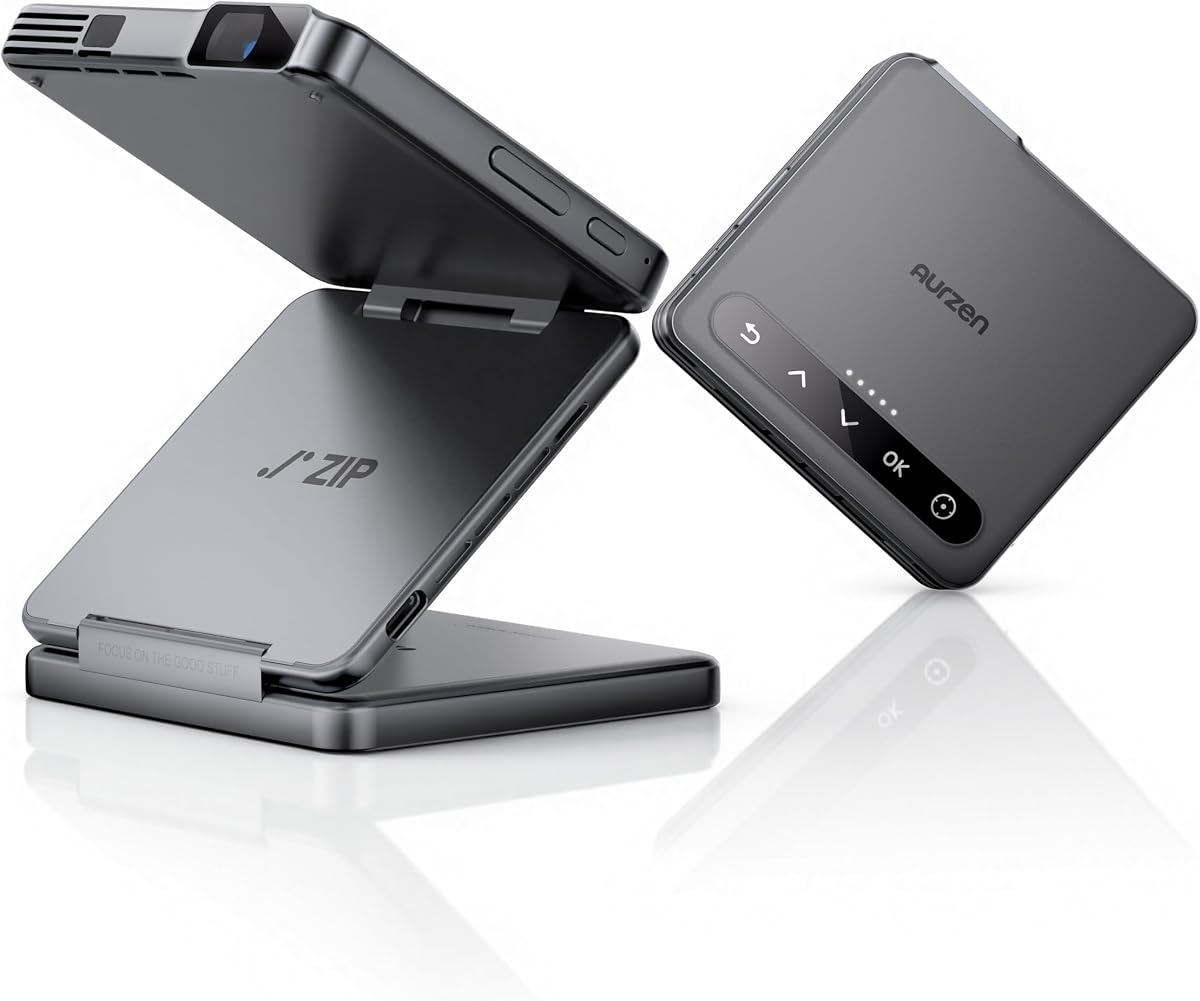
The Aurzen ZIP Tri-Fold is the most design-forward projector in this guide, using a folding structure and built-in Z-shaped stand to distinguish it from conventional rectangular pocket projectors. Its 3.8 rating is lower than those of the leading Kodak models, but the supplied specifications show a capable travel device with 100 ANSI lumens, native 720p resolution, automatic focus, and vertical display support. It is especially compelling for users who value compact industrial design or need a projector for tracing and creative work.
We may earn a commission when you buy through this link, at no additional cost to you.
The tri-fold body weighs 0.62 pounds and folds to a wallet-like form. Aurzen states that its ToF system measures distance 30 times per second to provide zero-lag automatic focus, while automatic keystone correction helps adapt the image to different surfaces. One-click mirroring works with iOS, Android, and Windows without requiring a Wi-Fi network, which is unusually helpful in travel settings, hotels, classrooms, and craft areas where network access may be inconsistent.
There are meaningful limits. The 5,000mAh battery provides up to 1.5 hours in eco mode, shorter than the Luma 150’s stated maximum. Bluetooth is for audio only, not video, and the built-in mirroring system does not directly support DRM-protected content. Displaying supported DRM video requires the separately sold CastPlay Pro USB-C dongle and a source device with DisplayPort Alt Mode. Google Cast is not supported for Pixel, Motorola, and Chromebook devices.
The Aurzen ZIP is a strong choice for travelers, crafters, and vertical-content viewers who value folding portability and automatic setup over long battery life. It may not suit someone expecting to watch protected streaming services immediately through a phone or seeking an all-day portable cinema. Its distinctive stand, fast USB-C charging, and automated image handling make it the most specialized premium entry in the roundup.
Fast automatic focus and keystone correction are particularly useful when projecting onto tables, work surfaces, or other imperfect angles. The product information specifically identifies tracing, sewing, cookie decorating, drawing, and tufting as practical applications.
The tri-fold mechanism reduces the projector to a wallet-size shape while integrating a stand for positioning. That makes storage easier than a rigid mini projector and reduces the need to carry a separate support.
We may earn a commission when you buy through this link, at no additional cost to you.
This black KODAK Luma 150 listing emphasizes straightforward cordless entertainment and presentation use. It has a 4.2 rating, matching the other detailed Luma 150 entry, and includes a 3,800mAh battery, integrated speaker, and wireless mirroring. The projector can create images up to 100 inches, making it a flexible middle ground between a very small personal display and a dedicated home theater.
We may earn a commission when you buy through this link, at no additional cost to you.
Connectivity is one of its stronger features. The supplied information lists HDMI, USB-A, and microSD inputs, along with Miracast and AirPlay for compatible phones and other devices. That gives users several ways to show slides, photographs, videos, or presentation material, whether they prefer a cable or wireless connection. The integrated speaker makes the unit more self-contained for short sessions where carrying a separate audio device would be inconvenient.
The main uncertainty is image performance. While the listing highlights portability, a 100-inch display, and a long rated LED lifespan, it does not provide the same level of native resolution or brightness information as the first Luma 150 listing. Buyers who care about exact picture specifications should compare this listing carefully with the more fully specified variant. The stated 30,000-hour LED life suggests good longevity, but it does not substitute for an in-person assessment of color, contrast, and clarity.
This model is well suited to people who want a simple battery-powered projector for presentations, family viewing, or travel. A buyer who values a clearly documented 150-inch capability and native resolution specification may prefer the first Luma 150 entry, while someone focused on a black finish and a broad set of wired inputs may find this listing more aligned. It is a practical cordless option without requiring a complex setup.
The internal battery removes one of the most persistent obstacles to spontaneous presenting. A presenter can carry the projector in a bag, connect a compatible device, and begin without searching for a nearby outlet.
HDMI, USB-A, microSD, and wireless mirroring cover common source devices and local media. The built-in speaker further reduces the number of accessories needed for a simple movie or slideshow.
We may earn a commission when you buy through this link, at no additional cost to you.
The Kodak Ultra Mini is built around a simple promise: put a functioning entertainment projector in a hand, handbag, briefcase, or pocket. It has a 4.1 rating and uses an LED DLP optical engine, a media player with built-in speakers, and connections for HDMI, USB, and microSD. The listing also identifies support for 1080p input and compatibility with common phones, tablets, and computers.
We may earn a commission when you buy through this link, at no additional cost to you.
Its DLP engine is the central technical attraction. The supplied information emphasizes LED brightness, color accuracy, and picture quality, while also stating that the best results occur in dark or dimly lit rooms. The projector can display 16.7 million colors, which is well suited to video games, films, and photo slideshows. Its simple plug-project-play approach is appealing for anyone who does not want to navigate complicated menus or learn a complex setup process.
The obvious caveat is viewing environment. Even with good color capability, a compact projector is rarely at its best in a bright room, and the listing explicitly directs buyers toward dark or dim-lit settings. Support for 1080p input should not be confused with a stated native 1080p panel. The supplied information also does not state the exact native resolution, measured brightness, maximum image size, or battery runtime, so shoppers should consider this a straightforward compact option rather than a heavily specified one.
This Ultra Mini is a good fit for users seeking a tiny DLP projector for evening movies, gaming, or photo viewing with minimal setup. It works especially well for travel because it combines a media player and speaker with a range of wired inputs. Buyers who need a precisely stated battery duration, native resolution, or larger maximum display may prefer one of the more comprehensively documented Luma models.
The integrated media player and built-in speakers make it possible to use the projector without assembling a more complicated entertainment system. Connecting a source and selecting content is the central workflow.
DLP technology and support for 16.7 million colors are useful for gaming, films, and photographs. Controlled lighting remains essential for preserving the clarity and color impact of a compact projector.
We may earn a commission when you buy through this link, at no additional cost to you.
The grey Aurzen ZIP Tri-Fold shares the same core design as the white model, including a 0.62-pound folding body, built-in stand, 100 ANSI lumens, native 720p resolution, and 1.5 hours of stated battery playback in eco mode. It carries a 3.8 rating. The listing is particularly relevant to users who want a portable projector for art, food decorating, sewing, travel, and short entertainment sessions away from a fixed setup.
We may earn a commission when you buy through this link, at no additional cost to you.
Automatic focus and keystone correction use time-of-flight technology, with the projector measuring distance 30 times per second. This focus is a meaningful feature for creative work because projected patterns need to remain clear on work surfaces. The vertical full-screen mode rotates the image for social media, while Bluetooth 5.4 supports audio from external speakers or use of the projector as a standalone music speaker. USB-C Power Delivery fast charging helps reduce downtime between uses.
As with the white version, the 1.5-hour battery figure is the most significant constraint. The 5,000mAh battery is designed for portable entertainment and tracing sessions rather than full-length movies or all-day events. Protected streaming content cannot be mirrored directly without the separately sold CastPlay Pro dongle, and compatibility depends on the source device supporting DisplayPort Alt Mode. Bluetooth transfers audio only, and Google Cast is not supported for Pixel, Motorola, and Chromebook devices.
This version is a good choice for a buyer who values portability, automatic setup, and creative applications over extended runtime. The grey finish may also appeal to users who want the projector to blend into a travel bag or workspace. It is less suitable for protected streaming without an extra accessory or for long sessions away from a charger, but its focus system and folding stand make it unusually versatile for active, mobile use.
ToF distance measurement allows the projector to focus quickly as its position changes. That is useful when moving between walls, tables, and craft surfaces without making repeated manual adjustments.
Bluetooth 5.4 expands the projector into a portable audio system, while wireless mirroring handles compatible video sources. Keeping those roles separate makes clear that Bluetooth itself is not a video connection.
We may earn a commission when you buy through this link, at no additional cost to you.
The KODAK Luma 350 stands apart from many pocket projectors because it includes onboard Android, Wi-Fi, and Bluetooth. It has a 4.1 rating and combines DLP technology, rechargeable battery operation, built-in speakers, and touch controls. For a buyer who wants to browse, stream, or manage content directly on the projector rather than relying entirely on a phone, this smart functionality is the defining feature.
We may earn a commission when you buy through this link, at no additional cost to you.
The stated Android 6.0 interface provides direct access to app-based entertainment, and the listing describes the ability to download and stream shows. Wi-Fi and Bluetooth broaden the range of possible connections, while the integrated speakers make the unit more suitable for casual home viewing and presentations. It can also serve as a personal theater for movies, games, and slideshows when a larger screen is desired.
Android 6.0 is an important consideration because it is an older operating platform, and app availability or compatibility should be verified before relying on the projector for a particular service. The supplied information also advises keeping firmware updated and understanding content mirroring limitations. Those details make this less of a guaranteed turnkey streaming appliance and more of a compact smart projector requiring a little preparation.
The Luma 350 is a good fit for someone who values standalone navigation and app downloads in a portable DLP device. It is less compelling for buyers seeking a modern phone-first workflow, very long battery life, or a highly specified pocket-sized form factor. Within this list, it remains the clearest option for users who want the projector itself to function as a connected media device.
Onboard Android lets users navigate and open applications directly on the projector. That reduces the need to keep a phone connected throughout a movie or presentation.
Wi-Fi supports network-based functions, and Bluetooth adds wireless accessory or audio possibilities. Buyers should confirm that the apps and services they want are compatible with the stated Android version.
We may earn a commission when you buy through this link, at no additional cost to you.
This KODAK Luma 150 white listing has a 4.8 rating, making it one of the most strongly reviewed products in the supplied data. It is positioned as a pocket-sized projector for travel, outdoor gatherings, presentations, and spontaneous movie nights. Its main attraction is a balanced feature set: a stated 120-inch display, wireless sharing through AirPlay and Miracast, an integrated speaker, and a tripod-mountable design.
We may earn a commission when you buy through this link, at no additional cost to you.
The connection options cover both wireless and wired use. HDMI, USB, and microSD inputs allow a projector to serve as a display for phones, laptops, tablets, and local media, while AirPlay and Miracast eliminate cables for compatible devices. A 3.5mm audio jack supports private listening or a larger amplified system, giving the built-in speaker useful flexibility. The tripod-mountable body should also make placement easier when no suitable shelf or table is available.
The listing does not state native resolution, brightness, or a precise battery runtime, so its technical case depends more on portability and convenience than fully specified image performance. Buyers should also remember that direct mirroring of copyrighted streaming content is generally restricted. A separate streaming device is the more reliable route for protected services. Although a 120-inch image can provide immersion, ambient light will affect perceived clarity and color.
The white Luma 150 is a strong all-around choice for a buyer who wants a compact projector with wireless sharing, flexible inputs, built-in sound, and easy mounting. It is particularly suitable for casual travel viewing and presentations in dimmer settings. Those needing exact native specifications or a complete screen-and-tripod package can compare the more detailed Type 4 and Ultra Mini options elsewhere in this guide.
AirPlay and Miracast support convenient sharing from compatible devices. This reduces setup time at presentations, family gatherings, and travel destinations where cables are inconvenient.
The integrated speaker offers immediate playback, while the 3.5mm jack supports headphones or external amplification. That range works for both shared viewing and private listening.
We may earn a commission when you buy through this link, at no additional cost to you.
The KODAK Luma 150 Type 4 Pocket DLP Pico Projector Kit is the most complete ready-to-go package in the roundup. It has a 5.0 rating in the supplied data and includes a carrying case, tripod, and 60-inch projection screen. At 7.75 ounces, the projector is exceptionally light, while automatic image alignment reduces the amount of manual setup required in unfamiliar locations.
We may earn a commission when you buy through this link, at no additional cost to you.
Wireless mirroring supports content from Android, iOS, and Windows devices, and HDMI, USB, and microSD inputs provide alternatives for laptops, tablets, and storage devices. Automatic alignment is especially useful for travelers who may not have a perfectly level surface. The included tripod and protective case complete a practical mobile package, allowing the projector, screen, and positioning hardware to be carried together rather than assembled from separate purchases.
The included 60-inch screen is smaller than the maximum image sizes described for several full-size Luma listings, so serious buyers should understand whether they want a dedicated portable screen or a larger wall projection. The listing does not provide exact native resolution, brightness, or battery runtime. Those omissions make direct technical comparisons more difficult, but the package remains attractive for someone who values readiness, portability, and simple setup over exhaustive specifications.
This Type 4 kit is the strongest recommendation for a buyer who wants a pocket projector that works immediately after unpacking. It is suitable for travel, hotel-room viewing, outdoor gatherings, demonstrations, and presentations. The included screen is especially useful where no wall is available. Those who need longer battery documentation or larger image specifications should compare the other Luma 150 listings, but this package is the most travel-ready overall.
The carrying case protects the compact projector, the tripod supports steadier positioning, and the screen provides a surface when a blank wall is unavailable. Each included item solves a common mobile-viewing problem.
Auto-alignment helps correct the projected image after placement, reducing setup time. The feature is especially helpful in temporary locations where a perfectly square and level surface may be difficult to find.
We may earn a commission when you buy through this link, at no additional cost to you.
The KODAK Luma 75 is a compact, cordless DLP projector intended for travel, presentations, movies, and gaming. Its 4.1 rating reflects generally favorable marketplace feedback in the supplied dataset. The projector can display images up to 100 inches, supports 1080p input, and includes an integrated media player. Its rechargeable battery provides up to 1.5 hours of viewing or presenting.
We may earn a commission when you buy through this link, at no additional cost to you.
The connection selection is broad for such a small device. HDMI, USB, microSD, and a 3.5mm input allow users to connect phones, laptops, storage media, and audio equipment. The media player can also handle suitable local content without requiring an external source. This makes the Luma 75 adaptable to both planned and spontaneous use, provided media formats are supported.
The 1.5-hour battery runtime is the main limitation. It works well for a short film, a presentation, or a travel session near an outlet, but it may be insufficient for a long event. The listing does not state a native resolution, brightness figure, or exact weight, so buyers seeking more technical transparency may favor the more extensively specified Luma 150. As with all compact projectors, controlled lighting will be important for a clear image.
The Luma 75 is a good choice for users who prioritize cordless freedom, compact storage, and a broad connection selection. It is particularly suitable for brief presentations or travel viewing where an outlet is unavailable. Those planning extended viewing should keep the projector charged or carry a power bank, while buyers who want a fully bundled setup can look to the Type 4 kit.
The rechargeable battery and up-to-1.5-hour runtime are enough for many short presentations. Connecting a laptop or phone through HDMI or USB keeps the setup uncomplicated.
The integrated media player and microSD support are useful for carrying content directly, while HDMI and USB connect external devices. Buyers should verify that their preferred local file formats are supported before relying on standalone playback.
We may earn a commission when you buy through this link, at no additional cost to you.
The KODAK Luma 150 Mini Portable Projector combines a strong 5.0 rating with a clearly pocket-conscious physical design. It measures 3.94 inches on each side and 0.91 inches thick, making it easy to place in a bag or drawer. The included travel case and tripod improve convenience, while AirPlay and Miracast provide wireless options for compatible Android, iOS, and Windows devices.
We may earn a commission when you buy through this link, at no additional cost to you.
For media, the projector offers HDMI, USB, and microSD inputs. This gives buyers a practical mix of wired and wireless connectivity for phones, tablets, laptops, and local storage. The stated 30,000-hour LED life is a strong longevity indicator and suggests that the light source is designed for extended use. The compact white body also maintains the clean appearance expected from a device intended to travel and be set up quickly.
As with several other listings, the supplied information does not state exact brightness, native resolution, maximum image size, or battery runtime. That limits the depth of a direct technical comparison. The product is also likely to perform best in a dim or dark environment, as compact projectors generally have less light output than larger models. Protected streaming applications are best viewed by connecting a compatible external streaming device rather than relying on direct mirroring.
This Luma 150 Pocket is an attractive choice for everyday users who want a highly compact and neatly equipped projector at an accessible product tier. It suits travel, casual home viewing, presentations, and spontaneous group entertainment. It is especially appealing to buyers who want a case and tripod already included, although the Type 4 package offers a larger 60-inch screen for a more defined mobile setup.
The stated dimensions make the projector easy to carry without occupying much bag space. Its compactness is balanced by the included tripod and travel case, which support mobility rather than leaving the user to source accessories.
A stated LED life of 30,000 hours is a useful longevity metric for buyers who intend to keep the projector in regular rotation. It also supports the case for using one compact device across travel, work, and home.
We may earn a commission when you buy through this link, at no additional cost to you.
The right pocket projector balances image output, power, connectivity, and physical size. Comparing these factors against your actual use environment is more useful than focusing on one headline specification, especially because brightness, resolution, and battery figures are not consistently defined across listings.
Brightness determines how easily a projected image remains visible against ambient light. The detailed listings in this guide provide ANSI lumen figures of 60 for the first KODAK Luma 150 and 100 for the Aurzen ZIP, giving a useful basis for comparison. Even at 100 ANSI lumens, a pico projector is best suited to a shaded, dim, or dark environment rather than direct daylight. A larger image also spreads the available light over more surface area, which can make a room look darker than expected.
Choose a model based on where it will be used. For evening movies, hotel rooms, and presentations after sunset, lower stated brightness may be adequate. Daytime events, workshops, and outdoor viewing benefit from the higher figure of the Aurzen ZIP, provided the image is not washed out by sunlight. Always consider the wall or screen color as well; a white or neutral surface reflects more light than a dark, textured one.
Native resolution describes the number of pixels the projector itself creates, while input support indicates what source signal it can accept. These are not interchangeable. The KODAK Luma 150 is listed with 854 x 480 native resolution but supports 4K input, and the Luma 75 and Ultra Mini are described as supporting 1080p input without the supplied information confirming a native 1080p panel.
For smaller screens and casual viewing, the Luma 150’s native resolution can be practical. Detailed text, spreadsheets, and larger projections benefit from the native 720p output of the Aurzen ZIP. If your use involves work documents or fine photographs, prioritize native resolution over a headline input figure and use the largest practical display area. Also consider whether the source device can output a compatible signal over the connection you intend to use.
Battery runtime determines whether a projector can handle an entire activity without a nearby outlet. The first Luma 150 provides up to 2.5 hours, while the Luma 75 and both Aurzen ZIP listings state up to 1.5 hours in the relevant operating mode. Those figures are useful for short sessions, but they do not guarantee the same duration with maximum brightness, continuous audio, or heavy wireless use.
The Aurzen ZIP supports USB-C Power Delivery fast charging and can operate while plugged in when a compatible 24W-or-higher adapter is used. Other models may have charging limitations not covered by the supplied data. A full-length movie or all-day event should be planned around cordless time or a verified charging method. Battery capability is more valuable for occasional travel and presentations than for permanent home-theater use.
The most flexible pocket projectors support both wireless sharing and physical media inputs. AirPlay and Miracast are useful for quickly sharing from compatible phones, computers, and tablets, while HDMI, USB, and microSD remain dependable for laptops, local files, cameras, and storage devices. The Aurzen ZIP adds a useful option because its one-click mirroring reportedly does not require a Wi-Fi network, making it convenient in travel and craft environments.
There are content restrictions to understand. Direct mirroring and screencasting generally cannot display DRM-protected material from services such as Netflix or Hulu. Connecting a compatible external streaming device is the more reliable method for those services. The Aurzen ZIP can also use a separately sold CastPlay Pro USB-C dongle for supported protected content, but compatibility depends on DisplayPort Alt Mode and the individual app. Bluetooth on the ZIP is for audio only.
Portability involves more than headline weight. The Aurzen ZIP weighs 0.62 pounds and folds into a wallet-like form, while the Luma 150 Type 4 weighs 7.75 ounces and includes a carrying case, tripod, and 60-inch screen. A compact body is easier to pack, but accessories can determine whether the projector is genuinely convenient in practice. A case protects the device, while a tripod improves positioning and reduces the need for improvised supports.
Consider where the image will land. A dedicated screen produces a more predictable surface than fabric curtains or a textured wall, but a 60-inch screen is modest compared with the larger images many projectors can create. The tri-fold Aurzen includes a Z-shaped stand, adding positioning hardware without a separate tripod. Compare the whole bundle and its storage footprint rather than deciding from dimensions alone.
A built-in media player can play suitable files from HDMI, USB, or microSD without a phone or laptop. The KODAK Luma 350 goes further with onboard Android 6.0, allowing direct app browsing and downloading, while the Luma 75 and several Luma 150 models include local media-player functions. These options are useful for travel and events where repeated device connections would be inconvenient.
Smart features require compatibility checking. The Luma 350’s older Android version may not support every current service, and users should keep its firmware updated. Local-file playback also depends on accepted formats. For straightforward projection from a phone, the simpler models may be easier to maintain. For direct streaming, verify that the desired applications are available and functional on the onboard operating system before purchasing.
Compact projectors are sensitive to placement, and automatic tools can make a major practical difference. The Aurzen ZIP uses time-of-flight sensing, stated to measure distance 30 times per second, for automatic focus and keystone correction. The Luma 150 Type 4 offers automatic image alignment, making it easier to establish a straight image quickly after positioning the projector.
Manual controls still matter because walls, tables, and screens differ in angle and surface. Look for adjustable focus, keystone correction, and a stable way to hold or mount the unit. A built-in stand or included tripod provides a repeatable starting point. For tracing, sewing, and decorating, automatic focus may be more useful than a larger maximum image because the projected pattern must remain sharp at working distance.
Built-in speakers can provide immediate sound, but their quality and output are not fully detailed in the supplied listings. Several Kodak models include an integrated speaker, and some also provide a 3.5mm audio output for headphones or amplified sound. The Aurzen ZIP includes Bluetooth 5.4 for pairing audio equipment or using the device as a standalone speaker, although Bluetooth cannot carry the projected video itself.
Vertical full-screen mode is a distinctive Aurzen feature. Rotating the projector can fill more of a tall display with short-form social content, reducing distracting black bars. For conventional movie nights, the feature may not be needed, but for travel and social media it adds flexibility. Consider whether your content is horizontal or vertical, and whether the bundled accessories support your intended viewing style.
Before the first use, read the included instructions, fully charge the projector, and confirm that your source device is compatible with its wired and wireless options. Place it on a stable surface or mount, point it toward a blank wall or screen, and power it on before connecting media. If the image looks distorted, use the available keystone correction, then adjust focus and the physical angle until the edges are square.
For streaming, use the appropriate protected-content route rather than assuming every app will mirror. Wired HDMI and USB connections are generally the most dependable method, while AirPlay, Miracast, and the Aurzen ZIP’s no-network mirroring work with compatible devices. The Aurzen’s CastPlay Pro dongle is sold separately, and Bluetooth should be used for audio rather than as a video connection. Keep streaming-device power requirements in mind and test the full setup before an event.
To preserve the light source and electronics, let the projector cool before moving or storing it, keep vents clear, and avoid dusty or damp environments. Clean the lens with a soft, dry cloth rather than abrasive materials, and protect the case and screen from folding, moisture, and direct pressure. Carry the projector in its case or a padded compartment, recharge it before a trip, and use the stated battery figures as session guides rather than guaranteed uninterrupted runtimes.
Yes, provided the content and format are supported. Several models include an integrated media player and microSD or USB access, while the KODAK Luma 350 includes onboard Android for direct app use. Protected streaming services may still require a separate streaming device. Check the device’s media format and application compatibility before relying on fully standalone playback.
It can be suitable for a dim room, shaded outdoor area, or nighttime viewing, but it is not equivalent to a large home projector. Ambient light washes out contrast and color, and the image becomes less visible as the display grows. For regular daytime use or bright event spaces, a more powerful projector is generally more appropriate.
No. Input support describes the maximum signal the projector can accept, while native resolution describes the image it actually creates. The first Luma 150 is listed at 854 x 480 native resolution despite supporting 4K input. Compare native specifications carefully, especially when displaying text, spreadsheets, or detailed images.
Generally, direct mirroring and screencasting cannot display DRM-protected content from services such as Netflix or Hulu. A compatible external streaming device, such as a Firestick or Roku, is the more reliable method. The Aurzen ZIP also supports an optional CastPlay Pro dongle for compatible sources, provided the device supports DisplayPort Alt Mode and the app is compatible.
Both matter, but the right priority depends on the environment. Brightness is essential when some ambient light is unavoidable, while native resolution matters most for text, spreadsheets, and detailed images. For the most reliable result, use a pico projector in a dim room and select the highest native resolution your budget allows.
The stated figures range from up to 1.5 hours in the relevant eco mode for the Aurzen ZIP and Luma 75 to up to 2.5 hours for the first Luma 150. Actual runtime can vary with brightness, audio, wireless use, and battery condition. Charge fully before travel and consider continuous power or a suitable charging solution for longer sessions.
They can be, provided the area is dark and the projector is protected from moisture and impact. The Luma 150’s stated 2.5-hour battery runtime is longer than the Aurzen ZIP’s stated 1.5-hour eco runtime, while the Aurzen offers a more compact folding design. Neither should be left exposed to weather, and a stable surface or tripod is important.
A pico projector is better viewed as a portable companion for travel, presentations, casual viewing, and occasional family entertainment. Its compact light source and limited stated brightness generally make it less suitable as the sole daytime display in a bright living room. A larger dedicated projector or television is usually more practical for frequent, bright-room use.
The KODAK Luma 150 Type 4 stands out as the most complete mobile package because it combines a 5.0 rating with a 60-inch screen, tripod, carrying case, automatic alignment, and a weight of just 7.75 ounces. The first KODAK Luma 150 is a strong budget-oriented alternative with a stated 150-inch capability, 2.5-hour battery, and broad connection options, while the Aurzen ZIP Tri-Fold is the premium choice for folding portability, automatic focus, and creative applications.
Prioritize the conditions in which the projector will actually be used. Choose a brighter model and controlled lighting for clearer images, prioritize native resolution for detailed documents, and verify battery runtime against the length of your sessions. For protected streaming, plan on an external streaming device. For travel, the included accessories can matter as much as the projector itself, making a complete kit more convenient than a bare device.
Marketplace ratings and product information provide a useful starting point, but they are not substitutes for checking the latest manufacturer details, application compatibility, and current availability. Specifications can change between listings or revisions. Before ordering, confirm the native resolution, brightness, charging method, included accessories, and source-device support, and compare current prices at the time of purchase.
