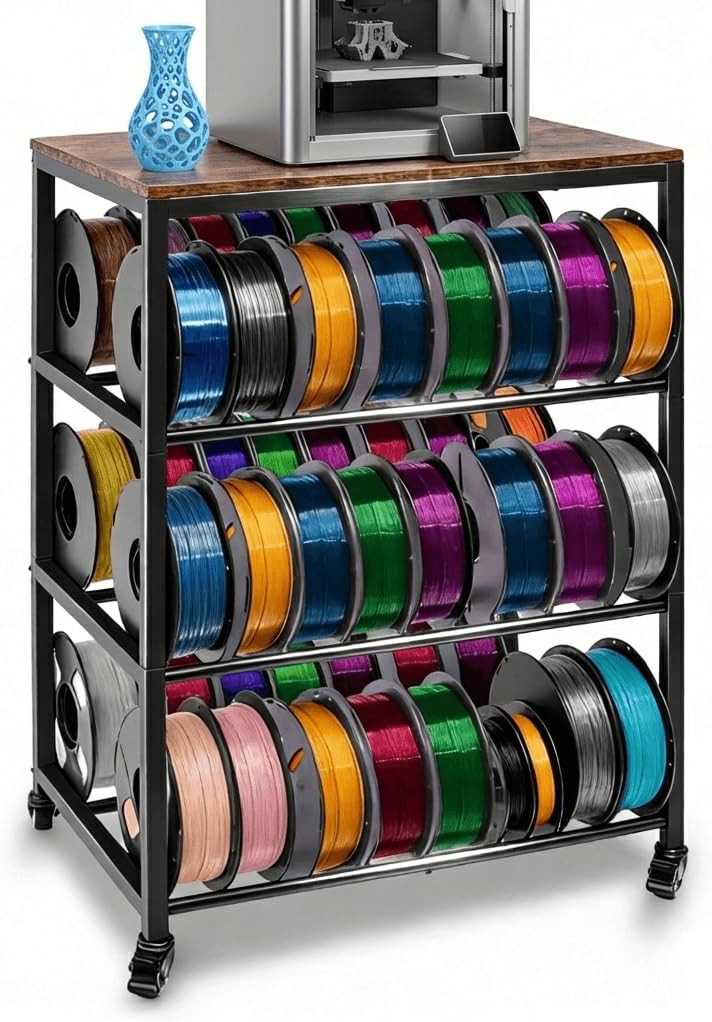
Four-Tier Mobile Printer Table
4.6Editor score
Four practical storage tiers
Adjustable spool spacing
Lockable industrial casters
480-pound stated capacity
A 3D printer table stand with filament storage can transform a crowded corner into a focused maker station, but the best options must balance printer support, vibration control, spool access, and tool organization. The right workstation also needs enough surface area, useful storage zones, and a structure appropriate to the available space.
This guide compares ten stands across load capacity, desktop dimensions, shelf configuration, spool accommodation, power management, mobility, drawer access, and assembly considerations. It covers compact stations for home offices, large dual-printer workbenches, mobile cabinets, and multi-tier racks designed for high-volume filament collections.
Each review highlights the features that distinguish one model from another, including enclosed storage, independent printer zones, integrated charging, and rolling mobility. Ratings reflect the available customer feedback, while current product details and costs can change, so readers should verify the latest listing before purchasing.
4.6Editor score

4.4Editor score

4.6Editor score
As an Amazon Associate we earn from qualifying purchases.
The comparison below covers ten distinct 3D printer storage stands, ranging from compact rolling racks to dual-printer metal workbenches and enclosed mobile cabinets, with emphasis on stability, capacity, storage access, and workspace utility.

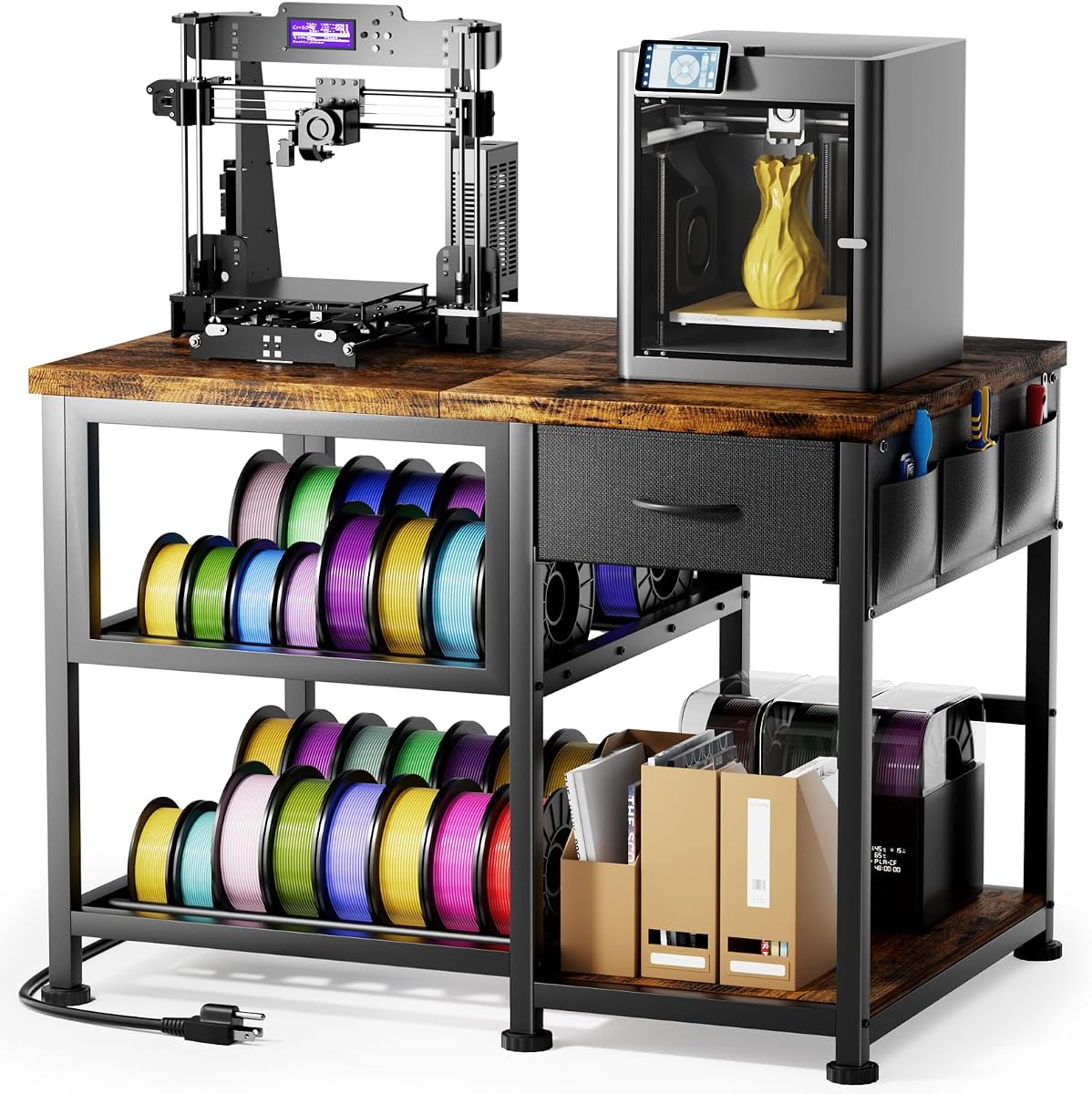


This 36-inch, three-tier 3D printer stand combines a heavy-duty metal structure with open shelving for as many as 56 filament spools. Its 4.3 rating reflects a generally positive customer response, and the strongest feature is the unusually generous material-storage capacity for a station of this general size.
We may earn a commission when you buy through this link, at no additional cost to you.
The stand is designed to absorb mechanical vibration while supporting a stated load of more than 230 pounds, making it relevant to owners of substantial printers and busy workshop setups. A metal drawer keeps scrapers, nozzles, spare parts, and maintenance hardware together, while the lower open shelves turn unused vertical space into a centralized filament hub.
Its footprint is the main compromise. At 36 inches long and 23.6 inches wide, it needs more room than a compact rolling rack, and there is no built-in power hub for connecting a printer, laptop, or task light. The open shelving is also visible rather than protected from dust, so filament requiring extra environmental protection belongs elsewhere.
This is a strong choice for makers who prioritize spool capacity and want a dedicated, heavy-duty home for their equipment. Choose it when your collection is growing faster than your available desk space and you value organized access over built-in charging or enclosed storage.
The open-shelf layout can accommodate up to 56 spools, making this one of the most storage-focused options in the guide. It works particularly well for users who keep many colors or material types sorted by tier rather than stored in small enclosed bins.
A full-width metal drawer adds valuable space for tools and small machine parts. This keeps maintenance items away from the printing surface and reduces the chance that a nozzle, scraper, or hex key will disappear into a general-purpose toolbox.
We may earn a commission when you buy through this link, at no additional cost to you.
This 3D printer workstation combines a wood construction with metal accents and a three-tier filament rack. Its 4.7 rating is the highest among the regular products in this roundup, indicating especially favorable customer feedback, while the mixed-material design gives it a more decorative workshop appearance.
We may earn a commission when you buy through this link, at no additional cost to you.
Storage is thoughtfully divided. The main drawer holds larger accessories, spare parts, and documentation, while side pockets keep frequently used flush cutters, scrapers, and tweezers within immediate reach. The filament shelves are spaced to promote airflow, reducing the risk of spools pressing tightly together and helping users identify materials more quickly.
One limitation is the absence of a clearly stated maximum load, so buyers with exceptionally heavy printers should examine the listed construction and dimensions carefully. Although the product title mentions a power outlet, the supplied feature description focuses on storage, drawers, and assembly rather than detailing integrated electrical specifications.
The stand is best for home offices, studios, and workshops where visual warmth matters alongside utility. Its rating and flexible storage make it an attractive all-around option, particularly for users who frequently switch tools or want filament visibly separated and easy to access.
The natural wood finish helps this stand blend into a home office or studio rather than looking exclusively industrial. Metal components provide visual definition and structural support, giving the workstation a more finished furniture-like appearance.
Side pockets and a full drawer divide commonly used hand tools from bulkier accessories. That separation makes it easier to maintain a clean workflow when changing nozzles, trimming supports, or handling small parts during a print.
We may earn a commission when you buy through this link, at no additional cost to you.
This all-in-one 3D printer workstation is designed around a large three-tier layout that combines a printer table, filament storage, a drawer, and separate compartments. Its 4.4 rating indicates a favorable balance of customer satisfaction, while the integrated power hub gives it a clear advantage for connected workspaces.
We may earn a commission when you buy through this link, at no additional cost to you.
Two AC outlets and two USB ports provide a central connection point for a printer, laptop, and lighting. The heavy-duty steel frame uses X-shaped bracket reinforcement, and the manufacturer states that this arrangement reduces vibration and wobble by as much as 40 percent. With dimensions of 39 by 24 inches, the station offers generous room for desktop and larger printer formats.
The extensive footprint may be difficult to accommodate in a tight room, and its filament compartments are open rather than enclosed. Buyers should also confirm that the integrated power connections meet local electrical requirements and that the supplied cord reaches the intended wall outlet without creating a trip hazard.
This is our Editor's Choice because it addresses the broadest set of daily needs: stable support, power access, filament storage, and tool organization in one structure. It is especially convincing for makers who want a complete workstation instead of adding a separate power strip or mobile organizer.
Built-in outlets and USB connections reduce the need for separate extension strips around the printer. This keeps frequently connected devices organized and makes it simpler to establish a repeatable workstation layout.
The X-bracket structure targets wobble and vibration at the frame level. While users should always place the printer correctly and ensure all feet are stable, the reinforced design is a meaningful consideration for demanding prints.
We may earn a commission when you buy through this link, at no additional cost to you.
This heavy-duty stand uses a compact 23.6-by-23.6-inch format to provide a printer platform and storage for as many as 32 filament rolls. Its 4.8 rating is the highest in the guide, making it an especially well-regarded option among customers who have shared feedback.
We may earn a commission when you buy through this link, at no additional cost to you.
Thick steel tubing supports the MDF top, which is intended to limit movement under heavier printers. Two slotted lower shelves keep spools upright, and the spacing is adjustable to accommodate different roll dimensions. Four rotating leveling feet provide stability on uneven floors while also helping protect wood or tile surfaces from scratches.
The square top offers less continuous work area than the elongated models, so it may not suit two printers or a printer plus a large laptop. There are no wheels, integrated outlets, or enclosed compartments, meaning the design prioritizes stability and compact storage over convenience features.
This is an excellent match for apartment, classroom, or home-office users who need to consolidate a printer and a meaningful filament collection without claiming an entire wall. Its high rating, compact footprint, and adjustable storage make it a particularly balanced choice.
The square frame efficiently uses vertical space to hold up to 32 spools. That makes it substantially more storage-oriented than a small desktop riser without expanding into the footprint of a full workshop bench.
The four adjustable feet let users correct minor height differences between the legs. This is useful in garages, workshops, and older homes where a perfectly level floor may not be available.
We may earn a commission when you buy through this link, at no additional cost to you.
This dual-zoned workstation is built for two side-by-side 3D printers, each with a defined area on a divided tabletop. Its 4.2 rating remains positive, and the major attraction is the specialized layout for operators who run multiple machines rather than switching a single printer between projects.
We may earn a commission when you buy through this link, at no additional cost to you.
Two independent closed-loop metal frames support their respective working zones instead of transferring all loads through shared connecting screws. The structure has a stated static capacity of 300 pounds. Lower shelves and dual-side hanging mesh racks create capacity for more than 48 filament spools, while the separate zones make it possible to service one printer without occupying the other printer's area.
The design is inherently larger and more complex than a single-printer table. Its included illustrated manual is important because the two-frame construction, divided top, shelves, and hanging racks involve more assembly decisions than a straightforward rolling rack. Users should also consider whether mesh storage is sufficient for materials that need dust protection.
This workbench is ideal for a dedicated studio, classroom lab, or small commercial operation with multiple printers. It is less attractive for occasional users, but the independent zones, high load rating, and large spool capacity make it a purpose-built solution for simultaneous production.
Each half of the table has its own closed-loop frame. This design keeps one printer's load from being transferred through the other zone's fasteners, supporting a more consistent and methodical workstation layout.
Side mesh racks can be divided by station, allowing colors or filament types associated with one printer to remain separate from those used by another. Lower shelves add bulk storage without crowding the active printing surface.
We may earn a commission when you buy through this link, at no additional cost to you.
This three-tier workstation combines a particleboard top with a black steel frame and provides storage for more than 50 filament spools. Its 4.1 rating is the lowest among the products here, so buyers should balance its broad feature set against comparatively modest customer feedback.
We may earn a commission when you buy through this link, at no additional cost to you.
The long upper surface provides room for the printer while also serving as a display area for completed models. Side and bottom shelves accommodate 500-gram and one-kilogram spools, and two fabric drawers separate tools such as scrapers, pliers, hex wrenches, and replacement nozzle tips.
Its stated load capacity is more than 150 pounds, which is suitable for many home and hobby setups but lower than several heavy-duty alternatives. Fabric drawers are flexible and may not retain their shape as effectively as rigid drawers, and the open shelving does not protect filament from dust or moisture.
This table is most suitable for hobbyists who print, repair, and store models in the same place and want visible accessories. Its two-drawer system and extensive shelf storage add flexibility, although users seeking a stronger frame or premium rating may prefer one of the reinforced metal alternatives.
Two fabric drawers make it easier to separate frequently used tools from spare components. Their flexible construction also makes them suitable for lightweight items that do not require a rigid cabinet.
The side and lower shelving is specifically structured for common 500-gram and one-kilogram filament rolls. This focus makes the layout practical for a home maker who maintains a broad color selection.
We may earn a commission when you buy through this link, at no additional cost to you.
This four-tier 3D printer station combines a wood-style desktop, metal frame, spool rack, drawer, and integrated power connections. Its 4.3 rating reflects a solid customer response, while the broad collection of practical features makes it appealing to users who want filament and device charging in one unit.
We may earn a commission when you buy through this link, at no additional cost to you.
The rack organizes PLA, PETG, ABS, and other spools across four levels, keeping materials visible and available. Two AC outlets, one USB port, and one Type-C port reduce loose extension cords around the workstation. A pull-out drawer stores nozzles, cutters, pliers, measuring tools, and smaller accessories, while the lower side shelf holds larger supplies.
A numerical load rating is not provided, so buyers should assess the frame and their printer's requirements directly. The open rack is attractive and convenient but offers no protection from dust, and the combination of wood-style surfaces may be less appropriate for a heavily used garage environment.
This station works well for home offices, studios, and maker spaces where modern appearance and convenient power are priorities. It is a particularly useful choice for users who want a visible, frequently accessed filament collection without relying on a separate power strip or mobile tool chest.
Two AC outlets and both USB and Type-C connections place commonly used power sources within the stand. This makes daily setup and teardown more streamlined than routing multiple adapters across the desk.
Four storage levels make it easy to sort materials by type or color. The open presentation also reduces the need to pull out drawers and search behind spools when the next print job begins.
We may earn a commission when you buy through this link, at no additional cost to you.
This multi-function stand provides a broad printer surface, two levels of filament storage, two fabric drawers, and an embedded power strip. Its 4.5 rating is among the strongest in the guide, suggesting that customers are generally pleased with the combination of organization and everyday convenience.
We may earn a commission when you buy through this link, at no additional cost to you.
The metal-tube spool racks occupy the middle and lower shelves, while the fabric drawers hold screws, wrenches, machine parts, and other maintenance items. Two AC outlets and two USB ports allow the printer and supporting devices to connect in one location, and the 140-centimeter power cord provides flexibility when positioning the stand.
The stand does not include wheels, so moving a loaded unit requires lifting or dragging rather than rolling. It also lacks a stated load capacity, and the dimensions of 39.4 by 23.7 inches make it a substantial piece of furniture that needs adequate room around it.
This model suits a home office, classroom, or workshop where users want frequent access to tools and power. It is a balanced all-purpose station, particularly appealing to anyone who wants the convenience of integrated charging and compartmentalized accessories without choosing a tall rolling cabinet.
The extended 140-centimeter cord gives users more freedom in choosing where the station sits relative to a wall outlet. That flexibility can reduce cable tension and help keep the printer area more orderly.
Metal spool racks and fabric drawers create clearly different storage categories. Heavy filament rolls remain supported on tubular rails, while small components stay contained and easier to retrieve.
We may earn a commission when you buy through this link, at no additional cost to you.
This mobile cabinet combines a printer platform, active filament shelf, enclosed lower compartment, and four caster-equipped legs. Its 4.6 rating is among the highest in the roundup, and the protected cabinet distinguishes it from stands that leave every spool fully exposed.
We may earn a commission when you buy through this link, at no additional cost to you.
The cabinet measures 29.5 inches long, 18.9 inches wide, and 59 inches high. The upper surface accommodates most machines, the open middle tier keeps active filament within reach, and the lower enclosed section is intended to protect sensitive spools from dust and moisture. A solid metal frame is designed to absorb vibration and shocks while keeping the equipment level.
Mobility is handled by four 360-degree swivel casters, with two brakes that lock the unit in place during printing. Its tall shape and relatively narrow top take up more visual space than a standard table, and the enclosed lower compartment means frequently used colors may be less immediately visible than on an open rack.
This is our Best Premium pick for users who value environmental protection and the ability to move a complete workstation. It is especially suitable for dedicated studios and offices where a printer can be rolled into position and secured before long printing runs.
The enclosed lower compartment gives sensitive spools a place away from visible dust and ambient moisture. It is a meaningful upgrade for users who store specialty or moisture-sensitive materials.
Full-swivel casters make it practical to reposition the entire cabinet. Locking brakes provide a stable final position once the printer has been placed and the workspace is ready for a print.
We may earn a commission when you buy through this link, at no additional cost to you.
This four-tier rolling stand is one of the most capable options in the guide for load capacity and filament collection. It has a 4.6 rating, a stated overall capacity of 480 pounds, and storage for as many as 48 standard filament rolls across its lower three levels.
We may earn a commission when you buy through this link, at no additional cost to you.
The 24-by-16-inch wooden top is intended for desktop printers and related equipment. Adjustable pipe spacing on the spool shelves accommodates 200-gram, 500-gram, one-kilogram, and two-kilogram rolls. The structure also uses lockable, heavy-duty rotating casters along with adjustable feet, giving users both mobility and a way to stabilize the stand on uneven flooring.
The compact top may be restrictive for a large printer, a laptop, and a broad work area, and the stand offers no integrated outlets or dedicated accessory drawers. Its large stated capacity should be understood in the context of distributed shelf loads rather than assuming every shelf can support the full total.
This is our Best Budget selection because it combines four storage levels, high load support, and mobile positioning without adding the complexity of integrated power or enclosed storage. It is an excellent general-purpose station for users who need substantial filament capacity and flexibility in a relatively compact frame.
Three lower spool levels keep a sizable collection separated and visible. The adjustable pipe spacing helps the shelves adapt to multiple common spool formats rather than requiring a single fixed size.
Rotating industrial-style casters allow the stand to be moved between work areas. Locking wheels and adjustable feet can then be used to keep the printer stable and level during operation.
We may earn a commission when you buy through this link, at no additional cost to you.
The right printer stand should fit the available space, support the chosen machine, and make filament and accessories easier to manage. Comparing footprint, structural design, storage format, power access, and mobility is more useful than focusing on the number of shelves alone.
Summary: Match the full printer footprint, not just its stated build volume.
Summary: Prioritize a rigid frame, level feet, and a credible load rating.
Summary: Choose shelf spacing and capacity around your actual spool sizes.
Summary: Integrated power is convenient, but verify every connection type.
Summary: Match drawer construction to the size and weight of your tools.
Summary: Look for rolling mobility paired with locks and leveling feet.
Summary: Confirm assembly complexity and final clearance before ordering.
Begin by assembling the stand on a level surface near the intended electrical outlet. Install shelves, drawers, spool rails, and any hanging accessories in the positions that match your workflow. Tighten all structural fasteners, set the leveling feet, and verify that every leg or caster is stable before placing a powered printer on the top.
Load the printer according to the manufacturer's placement guidance and keep heavier accessories toward the center of the work surface. Distribute filament spools evenly across shelves, use the intended slots or pipes, and avoid exceeding the stated load of any individual level. If the stand includes integrated power connections, route cords so they do not cross walkways or pull against the frame.
For ongoing care, wipe the top and shelves with a soft, dry or lightly damp cloth and avoid harsh cleaners that could damage wood finishes, powder coating, or fabric drawers. Keep dust away from filament, close enclosed compartments when materials are not in use, check caster locks before printing, and periodically inspect screws, shelves, feet, and drawer runners for looseness.
A compact square stand is often suitable for a home office, especially when the printer is a desktop model and floor area is limited. Look for a footprint that leaves comfortable walking space around the stand, and check that the top is large enough for the complete printer base and any side-mounted accessories. Larger studios can accommodate a long workstation with separate spool shelves and a central tool drawer.
The useful amount depends on how often you change colors or materials. A 24- to 32-spool capacity may be enough for a focused hobby setup, while users with large color collections benefit from racks holding 48 spools or more. Adjustable spool spacing is valuable because standard rolls come in several sizes, and taller spools can otherwise be difficult to fit.
A properly assembled stand with a rigid frame and level feet is generally suitable for desktop printing. Stability improves with thicker steel tubing, reinforced brackets, independent printer zones, and a top that is appropriate for the machine's weight. Users should tighten fasteners, distribute loads carefully, and ensure the casters are locked or the feet are firmly contacting the floor.
Built-in outlets can reduce cable clutter and make it easier to connect a printer, laptop, and lighting in one place. They are especially useful in offices and studios where extension cords would otherwise cross the work area. Check the type and number of AC and USB ports, the cord length, and local electrical requirements before making a final choice.
Enclosed storage is preferable when filament needs protection from visible dust or ambient moisture. Open racks are easier to scan and access, which can be more convenient for frequently used colors. A hybrid layout, with an open active tier and an enclosed reserve compartment, often provides the most useful balance for regular printing.
Only if its design explicitly provides enough surface area and structural support for both machines. A dual-zoned workstation is built for this purpose and uses separate frames and defined work areas for each printer. A standard long table may physically fit two compact units, but buyers should verify its stated load capacity and whether vibration isolation or independent support is important.
MDF and similar engineered wood tops provide a smooth, level surface and blend well into office furniture, while metal tops are often favored in dedicated workshops. The best choice depends on the environment, the printer's weight, and whether the stand needs to move frequently. In all cases, the frame and leveling system remain as important as the top material itself.
Sort spools by material, color, or project and use every available shelf or hanging rack rather than overloading one level. Keep active filament near the top or in the middle tier, reserve enclosed sections for sensitive or infrequently used materials, and place spare tools in drawers or pockets instead of loose on the work surface. This arrangement reduces handling time and protects the printing area.
The All-in-One Power Hub Station is the strongest all-around choice because it combines reinforced construction, a broad three-tier layout, integrated outlets, and several dedicated storage zones. The Four-Tier Mobile Printer Table stands out for high stated load capacity, adjustable spool storage, and flexible movement, while the Mobile 3D Printer Cabinet offers the most specialized premium feature set with an enclosed compartment and locking casters.
Prioritize the factors that affect daily use: adequate surface area, stable construction, room for the actual spool sizes, accessible tool storage, and a footprint that does not obstruct the room. Integrated power is useful for organized device connections, dual zones suit simultaneous printers, and enclosed storage benefits materials that need more protection than open shelves provide.
Customer ratings, product specifications, design details, and costs can change over time, so readers should review the current listing before ordering. Confirming the printer dimensions, available floor space, electrical requirements, and included components will help ensure that the selected stand fits both the equipment and the intended workflow.