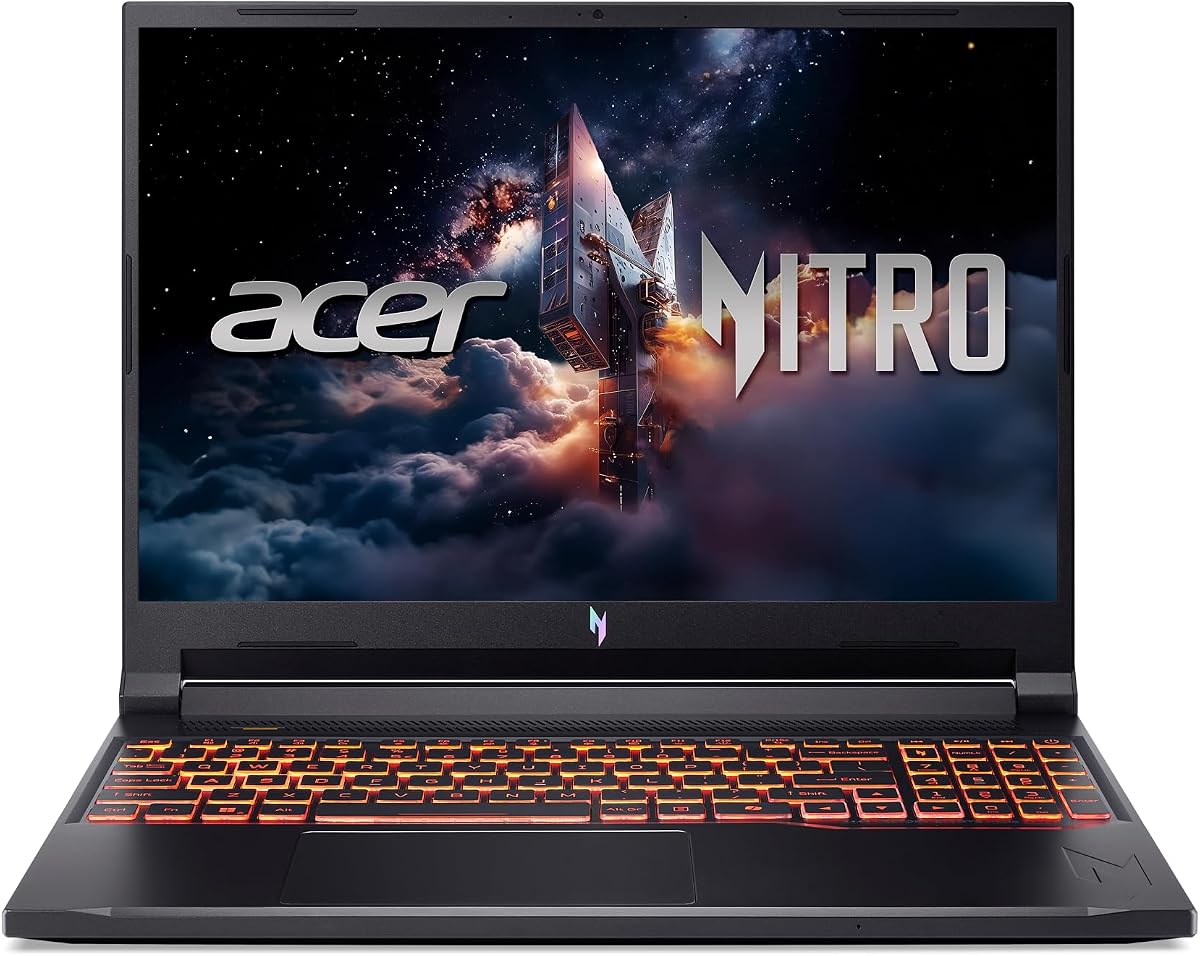
Acer Nitro V ANV16-72-73EW
4.4Editor score
RTX 5050 Blackwell graphics
16-inch 180Hz WUXGA display
16GB DDR5 and 1TB SSD
Acer Predator and Nitro gaming laptops cover two distinct priorities: flagship power in the Predator line and capable, approachable performance in the Nitro range. A worthwhile choice should pair its GPU with a display, cooling system, memory, and build that suit the way you play, whether that means competitive esports, high-settings adventures, or portable sessions away from a desk.
We compared the supplied specifications for ten models, focusing on processor and GPU capability, display resolution and refresh rate, memory, storage, connectivity, thermal design, dimensions, and weight. The list spans 14.5-inch, 15.6-inch, 16-inch, 16S, and 18-inch configurations, with pricing tier references removed in favor of lasting hardware considerations.
Each review identifies the strongest reason to consider that model and the compromises worth considering before buying. Ratings reflect the supplied marketplace feedback, while editorial badges are reserved for three standout picks. Configuration availability and prices can change, so verify the exact model and current listing before making a purchase.
4.4Editor score

4.4Editor score

3.7Editor score
As an Amazon Associate we earn from qualifying purchases.
The comparison below places all ten laptops by processor, graphics, display, memory, and portability, making it easier to identify the model that matches your priorities.


The Acer Predator Helios Neo 18 is the most expansive performance machine in this guide, combining an Intel Core Ultra 9 275HX processor, RTX 5070 Ti Laptop GPU, 18-inch WQXGA display, and generous memory and storage. Its supplied rating is 3.7, the lowest of the group, but the underlying specification makes it a compelling high-end choice for buyers who prioritize maximum gaming power, a large viewing area, and premium connectivity.
We may earn a commission when you buy through this link, at no additional cost to you.
Its NVIDIA Blackwell-based RTX 5070 Ti provides 992 AI TOPS and supports ray tracing, DLSS 4, Multi Frame Generation, enhanced Ray Reconstruction, and Super Resolution. The 240Hz panel adds NVIDIA G-SYNC, Advanced Optimus, up to 100% DCI-P3 color, and 3ms overdrive response. Internally, 32GB of dual-channel DDR5 memory and a 2TB PCIe Gen 4 SSD are unusually generous for a gaming laptop, while dual M.2 slots leave room for additional storage.
Thermal engineering is another major strength. A dual-fan system combines a fifth-generation AeroBlade 3D metal fan with liquid-metal thermal compound, and PredatorSense provides control over performance modes, fan behavior, and RGB lighting. Connectivity includes Thunderbolt 4, USB-C charging and DisplayPort, three additional USB ports, HDMI 2.1, 2.5Gb Ethernet, Wi-Fi 6E, a microSD reader, and a Kensington lock slot. These features make it suitable for a desk-centered setup or gaming at home while connected to multiple accessories.
The central trade-off is portability. At 15.79 by 12.12 inches and 7.28 pounds, it is substantially larger and heavier than the portable 14.5-inch alternatives. Its 3.7 rating also warrants attention, although customer feedback does not override the value of considering every listed specification and configuration. Choose it when uncompromised graphics performance and a huge fast display matter more than a light travel bag. It is our premium pick for high-end gaming and demanding creative work.
Substantial power requires a substantial chassis, so buyers should expect a large power footprint and a setup that is best suited to a desk. The display size can make menus, strategy games, cinematic titles, and creative applications easier to use, while the rapid refresh rate and strong color specification benefit fast competitive and high-fidelity games. Even with the rating caveat, this configuration stands apart as the clear performance flagship here.
The RTX 5070 Ti is the centerpiece for buyers who want advanced ray tracing, DLSS 4 features, and a high ceiling for demanding games. Its 992 AI TOPS specification also makes the system better positioned for graphics-intensive creation than the lower-tier alternatives in the guide.
The 18-inch WQXGA screen combines a 16:10 aspect ratio, 240Hz refresh rate, G-SYNC, and up to 100% DCI-P3 coverage. It is particularly attractive for players who want a large field of view, although the physical footprint remains the decisive drawback.
We may earn a commission when you buy through this link, at no additional cost to you.
The Acer Nitro V 16S is an unusually well-balanced gaming laptop, pairing an AMD Ryzen 7 260 with an RTX 5060 Laptop GPU, 32GB of DDR5 memory, and a 1TB PCIe Gen 4 SSD. Its 4.4 rating reflects solid marketplace feedback, while the specifications suggest a versatile platform for gaming, streaming, content creation, and everyday productivity. It is our Editor's Choice for shoppers who want modern gaming hardware without stepping into the largest or most specialized chassis in the range.
We may earn a commission when you buy through this link, at no additional cost to you.
The RTX 5060 carries 572 AI TOPS and brings Blackwell architecture, fourth-generation RT Cores, fifth-generation Tensor Cores, ray tracing, and DLSS 4 to the configuration. The Ryzen 7 260 is advertised with up to 38 overall AI TOPS and support for 4K HDR streaming. Its 32GB of 5600MHz DDR5 memory is especially notable: it provides comfortable headroom for games, browser tabs, creative applications, and background tasks, while two memory slots and an open M.2 position offer some expansion potential.
The 16-inch WUXGA IPS display runs at 180Hz and covers 100% sRGB, making it well suited to both competitive and ordinary PC gaming. The resolution is less expansive than the WQXGA panels found on several Predator models, but it still provides a practical 16:10 workspace. Wi-Fi 6 is listed for network connectivity, and the standard Nitro design focuses attention on core gaming features rather than premium extras.
The obvious limitation is the 1TB storage capacity, which may feel modest for a large modern game library, 4K video, and other large files. The supplied information also does not list a precise weight, so portability cannot be compared as confidently as it can with models whose dimensions and weight are explicitly provided. Even so, the 32GB memory, capable GPU, and 4.4 rating make the Nitro V 16S an excellent general recommendation. Buy it if balanced specifications and multitasking headroom are your main priorities.
Acer's approach here is refreshingly focused. Rather than relying on a large chassis to deliver extra screen real estate, it combines a capable processor, current-generation discrete graphics, fast memory, and a high-refresh IPS screen. That combination is well suited to a user who wants one machine for play, work, and streaming without needing the very highest-tier GPU. The open SSD slot also reduces the pressure to replace the drive immediately, although the supplied configuration starts with only 1TB.
RTX 5060 hardware brings ray tracing and the DLSS 4 suite into a more mainstream configuration. Combined with the Ryzen 7 260's advertised 4K HDR streaming capability, it is a strong fit for players who also broadcast or record gameplay.
The 32GB DDR5 configuration is a meaningful strength. It gives the laptop more breathing room for demanding games, multitasking, and creative work than the 16GB alternatives, while the available storage slot offers room for expansion.
We may earn a commission when you buy through this link, at no additional cost to you.
The Acer Predator Helios Neo 16 PHN16-73-92B8 brings flagship-class components into a more conventional 16-inch form. Its Core Ultra 9 275HX and RTX 5070 Ti make it one of the strongest performers in the roundup, while the 16-inch WQXGA 240Hz display offers enough resolution and speed for competitive play and detailed visuals. The supplied 4.1 rating is respectable, though not the highest among the group.
We may earn a commission when you buy through this link, at no additional cost to you.
Graphics performance is the principal attraction. The RTX 5070 Ti provides 992 AI TOPS with Blackwell ray tracing, DLSS 4, Multi Frame Generation, Ray Reconstruction, and Super Resolution support. The processor adds up to 13 NPU TOPS for suitable background and optimization tasks. Visuals benefit from a 500-nit WQXGA panel with a 16:10 aspect ratio, up to 100% DCI-P3 color, 240Hz refresh, 3ms overdrive, G-SYNC, and Advanced Optimus.
Compared with the 18-inch flagship, this model retains much of the high-end processing and graphics power in a smaller screen category. That makes it a logical choice for a gaming setup that does not need an enormous display. However, the listed 16GB of DDR5 is modest for a machine at this performance tier, and 1TB of storage is useful but not lavish. A buyer using this laptop for streaming, editing, or heavy multitasking should think about memory and storage needs carefully.
Killer Wi-Fi 6E is listed for low-latency wireless networking, and the 16-inch format should be easier to accommodate than the 18-inch Predator. It is a strong recommendation for players who want top-tier graphics, a very fast high-resolution screen, and modern AI features without moving to the largest available chassis. It is less ideal if maximum memory capacity and storage are immediate requirements. For that reason, the 32GB versions of the Helios Neo 16 deserve especially close consideration.
The 275HX processor also has 24 cores and 32 threads according to the related platform description, a useful foundation for gaming while recording, streaming, or running applications in the background. Intel Application Optimization is designed to allocate resources intelligently, while G-SYNC and Advanced Optimus help synchronize the display and manage graphics output. The result is a specification-focused machine for users who value high refresh rates and premium graphics over entry-level pricing.
The RTX 5070 Ti is the key differentiator, providing enough GPU strength for advanced settings, ray tracing, and DLSS 4 features. Moving to a 16-inch panel preserves a useful amount of screen space without carrying the full weight and footprint of the 18-inch flagship.
A 2560-by-1600-class WQXGA resolution, 500-nit brightness, 240Hz refresh, and 100% DCI-P3 coverage create a display suited to both fast action and visually rich games. G-SYNC and Advanced Optimus add useful synchronization and display-management features.
We may earn a commission when you buy through this link, at no additional cost to you.
The Acer Nitro V ANV16-72-73EW is a value-focused gaming laptop that does not feel drastically underpowered. It combines an Intel Core 7 240H processor with an RTX 5050 Laptop GPU, a 16-inch 180Hz WUXGA IPS display, 16GB of DDR5 memory, and a 1TB PCIe Gen 4 SSD. Its 4.4 rating and capable feature set make it our Best Budget selection among the ten options.
We may earn a commission when you buy through this link, at no additional cost to you.
The RTX 5050 provides 440 AI TOPS and supports Blackwell ray tracing, DLSS 4, Multi Frame Generation, Ray Reconstruction, and Super Resolution. While it sits below the RTX 5060 and RTX 5070 Ti models in this list, it still gives buyers access to the key RTX 50 Series features. Intel Application Optimization is included to help manage resources while gaming, streaming, and creating simultaneously.
The display is one of the strongest aspects of this configuration. Its 1920-by-1200 WUXGA resolution, 180Hz refresh rate, 16:10 ratio, 3ms overdrive response, and 300-nit brightness offer a practical balance for fast-paced games. Dual-fan, quad-intake, quad-exhaust cooling is supported by NitroSense, which provides performance tracking and customizable fan speeds. The backlit keyboard is useful for evening sessions.
Connectivity is unusually thorough for a value-focused model, including Thunderbolt 4 with DisplayPort and charging, USB-C, two USB-A 3.2 ports, one additional USB-A connection, HDMI 2.1, an audio jack, and Ethernet. At 5.29 pounds and up to 0.96 inches thick, it is also considerably easier to carry than the 18-inch Predator. The main limitation is 16GB of memory, and the listed maximum of 32GB is lower than the 64GB ceiling on some Predator configurations.
This is the right choice for buyers who prioritize a modern RTX GPU, a fast screen, strong cooling, and manageable dimensions without paying for top-tier hardware. It should handle mainstream gaming well and remains a capable all-round computer for school, work, and creative tasks. Buy it when a 16-inch display, current NVIDIA features, and a broad port selection matter more than having the fastest possible processor and GPU.
RTX 5050 graphics bring ray tracing and DLSS 4 to an entry configuration. While higher-tier GPUs offer more headroom, this setup still supports the neural rendering and frame-generation features that distinguish NVIDIA's Blackwell generation.
A dual-fan cooling architecture with four intakes and four exhausts helps manage sustained performance, while the 5.29-pound weight keeps the laptop relatively portable. The extensive USB, Thunderbolt, HDMI, and Ethernet selection improves desk versatility.
We may earn a commission when you buy through this link, at no additional cost to you.
The Acer Predator Helios Neo 14 PHN14-71-906J combines a Core Ultra 9 285H, RTX 5070 Laptop GPU, 32GB of LPDDR5X memory, and a 1TB PCIe Gen 4 SSD in a chassis weighing just 4.19 pounds. With a 4.0 rating, it is a strong option for buyers who want premium Predator graphics and a WQXGA display without the bulk of a conventional 16-inch gaming machine.
We may earn a commission when you buy through this link, at no additional cost to you.
The RTX 5070 provides 798 AI TOPS and supports full ray tracing, DLSS 4, Multi Frame Generation, enhanced Ray Reconstruction, and Super Resolution. The Core Ultra 9 285H adds AI capabilities and Intel Application Optimization. Together, they create a platform well suited to high-detail games, creative work, and multitasking, although the 14.5-inch display introduces a tighter viewing area than the larger alternatives.
The matte WQXGA panel uses a 16:10 aspect ratio, refreshes at 165Hz, and covers 100% sRGB. NVIDIA G-SYNC and Advanced Optimus support smooth output, while the matte finish can make the screen easier to use in bright surroundings. Cooling relies on a fifth-generation AeroBlade 3D fan, Vortex Flow, liquid-metal thermal grease, and vector heat pipes. PredatorSense provides control over performance modes, fan speeds, and a three-zone RGB keyboard.
Portability is the defining advantage. Dimensions of 12.75 by 10.03 inches and a weight of 4.19 pounds make this one of the easiest systems here to move between home, school, and offices. Connectivity includes Thunderbolt 4, two USB-C ports, two USB-A 3.2 ports, HDMI 2.1, a high-impedance headset jack, Wi-Fi 6E, and Bluetooth 5.4 or later. The 32GB of onboard LPDDR5X is generous, though it cannot be replaced or expanded.
The trade-offs are clear. A 165Hz screen is less competitive than the 240Hz panels offered by several rivals, and onboard memory protects the slim design at the cost of upgrade flexibility. This laptop is best for users who prioritize a powerful GPU, memory capacity, and low weight. It is a compelling portable gaming choice, especially for someone who wants desktop-class features without carrying a large Predator chassis.
The RTX 5070 provides high-end Blackwell graphics features while the 4.19-pound design preserves mobility. This is a strong combination for gamers who regularly travel but do not want to compromise on GPU class.
The 14.5-inch matte WQXGA screen offers a high resolution, 165Hz refresh, 100% sRGB coverage, G-SYNC, and Advanced Optimus. The matte treatment can be helpful in bright rooms, although some users may prefer the deeper contrast of an OLED panel.
We may earn a commission when you buy through this link, at no additional cost to you.
This Acer Predator Helios Neo 16 configuration stands out because it combines the flagship Core Ultra 9 275HX, RTX 5070 Ti, 32GB of RAM, and a 1TB SSD with a 16-inch 2560-by-1600 IPS display at 240Hz. Its 4.4 rating gives it one of the stronger feedback profiles in the guide, and the supplied specification list makes it a particularly complete high-performance option.
We may earn a commission when you buy through this link, at no additional cost to you.
The 24-core processor provides ample parallel performance for games, streaming, editing, and heavy multitasking. The RTX 5070 Ti contributes 992 AI TOPS, Blackwell ray tracing, and the DLSS 4 suite. The 240Hz IPS panel offers 100% DCI-P3 coverage and 500-nit brightness, combining a wide color gamut with a fast refresh rate. That makes it a good fit for both competitive gaming and visually detailed games where color and motion clarity both matter.
The 32GB of memory is a major advantage over 16GB versions of the same general platform. It supports smoother multitasking and leaves more capacity for modern games, creative applications, and background services. A 1TB SSD provides a practical starting point, although buyers with extensive libraries may eventually want more capacity. The title does not explicitly state total M.2 availability, so expansion should be verified before purchase.
Windows 11 Home, a four-zone RGB backlit keyboard, Intel Killer AX1675i Wi-Fi 6E, and fifth-generation AeroBlade 3D cooling complete the feature set. The listed ports include three USB-A 3.2 ports, two USB-C 3.2 ports, HDMI 2.1, 5Gb RJ45 Ethernet, and a microSD reader. An included authenticated USB-C hub may improve connection flexibility depending on the accessories in use.
The main unanswered question is portability because precise dimensions and weight are not supplied. Based only on the facts provided, it is an excellent desktop-oriented gaming laptop with premium graphics, ample memory, and a high-quality fast display. Choose it over a smaller Helios Neo when the 16-inch format, stronger memory configuration, and 5Gb Ethernet are more important than maximum portability.
The 24-core processor and RTX 5070 Ti form a high-end gaming platform. Their combined capability leaves considerable headroom for demanding games and concurrent streaming or editing tasks.
The 2560-by-1600 IPS panel provides more working space than WUXGA, while 240Hz, 500 nits, and 100% DCI-P3 make it appealing for fast action and color-rich content. Four-zone RGB lighting completes the gaming-focused presentation.
We may earn a commission when you buy through this link, at no additional cost to you.
The Acer Predator Helios Neo 14 PHN14-71-760T combines a Core Ultra 7 255H, RTX 5060, 16GB of LPDDR5X memory, and a 1TB PCIe Gen 4 SSD in a portable 4.19-pound chassis. It carries a perfect supplied rating of 5.0, making it the most positively reviewed option here, although individual customer ratings should still be considered alongside hardware suitability and configuration availability.
We may earn a commission when you buy through this link, at no additional cost to you.
The RTX 5060 offers 572 AI TOPS and brings full ray tracing, DLSS 4, Multi Frame Generation, Ray Reconstruction, and Super Resolution to the compact Predator. The processor supports AI-assisted tasks and Intel Application Optimization, giving the laptop enough capability for gaming, streaming, and general productivity. This GPU level is a middle ground between the entry RTX 5050 model and the RTX 5070-equipped version of the same Helios Neo 14.
Its 14.5-inch matte WQXGA display has a 16:10 aspect ratio, 165Hz refresh rate, and 100% sRGB coverage. G-SYNC and NVIDIA Advanced Optimus are included for synchronized, flexible display output. The matte finish is useful in bright environments, while the compact resolution offers more workspace than a conventional Full HD panel. Cooling uses a fifth-generation AeroBlade 3D fan, Vortex Flow, liquid-metal thermal grease, and vector heat pipes.
Three-zone RGB lighting, a metal-built chassis, and PredatorSense add a polished gaming identity. Connectivity is excellent for the size: two USB-C ports, Thunderbolt 4, two USB-A 3.2 ports, HDMI 2.1, and a headset jack that supports high-impedance headphones up to 600 ohms. Wi-Fi 6E, Bluetooth 5.4 or later, and Bluetooth LE Audio round out the wireless features.
The main limitation is the 16GB of onboard LPDDR5X. It is adequate for many games and normal productivity, but it cannot be upgraded, and it is less generous than the 32GB Helios Neo 14 alternative. The 165Hz refresh rate also trails faster Predator displays. Even so, this laptop is an excellent pick for portability, current graphics features, a strong rating, and a refined 14.5-inch form factor.
The RTX 5060 offers a strong balance of gaming capability and efficiency for a portable laptop. It supports the same headline DLSS 4 and ray-tracing feature set as the higher-tier RTX models.
At 4.19 pounds, the Helios Neo 14 is among the lightest systems in the guide. Its 12.75-by-10.03-inch chassis, matte display, and extensive ports make it suitable for gaming away from a permanent desk.
We may earn a commission when you buy through this link, at no additional cost to you.
The renewed Acer Predator Helios Neo 16S PHN16S-71-91AW stands apart with a 16-inch 2560-by-1600 OLED display at 240Hz and 100% DCI-P3 coverage. It combines that distinctive panel with a Core Ultra 9 275HX, RTX 5060 with 8GB of GDDR7 memory, 16GB of DDR5, and a 1TB NVMe SSD. Its 4.8 rating is the second highest among the supplied products.
We may earn a commission when you buy through this link, at no additional cost to you.
The OLED panel is the main attraction. It can provide deep blacks and rich contrast, while the 240Hz refresh rate supports smooth motion in fast games. The 2560-by-1600 resolution also gives the 16-inch screen ample detail. A 100% DCI-P3 specification is useful for content creation as well as visually rich gaming, making this laptop appealing to users who care about image quality.
Under the display, the 24-core Core Ultra 9 275HX provides strong multitasking and gaming performance. The RTX 5060 supports ray tracing and DLSS, and its 8GB of GDDR7 memory is suitable for modern games with appropriate settings, though it is less of a graphics powerhouse than the RTX 5070 and RTX 5070 Ti alternatives. The 1TB NVMe drive offers fast loading, and 16GB of DDR5 is adequate for a typical gaming and productivity setup.
The chassis is listed as less than 19 millimeters thick and includes a backlit keyboard, balancing portability with a large screen. Because the item is renewed, condition is the main consideration. Buyers should examine the listing details carefully, including warranty information, cosmetic condition, battery health, and return terms. The hardware specification is attractive, but the renewed designation can affect the risk and value calculation.
This is a strong recommendation for someone who specifically wants a fast OLED gaming display in a relatively slim 16S chassis. It is less suitable for buyers who prefer new-condition assurances or need the absolute highest graphics performance. Among renewed systems, however, the 4.8 rating, high-resolution OLED panel, and flagship-class processor form a compelling package.
The 2560-by-1600 OLED panel at 240Hz offers deep blacks, strong contrast, and smooth motion. It is especially compelling for cinematic games and visual content, although OLED characteristics and burn-in considerations may matter to some buyers.
A renewed listing can provide a more favorable route to premium hardware, but condition and warranty terms require careful review. Inspect the product description for cosmetic standards, battery information, included accessories, and return coverage before purchasing.
We may earn a commission when you buy through this link, at no additional cost to you.
The Acer Nitro V ANV15-52-76NK uses a Core i7-13620H processor and RTX 4050 Laptop GPU to deliver a straightforward gaming configuration in a conventional 15.6-inch chassis. Its 4.6 rating is strong, and the combination of a 165Hz Full HD IPS display, 16GB of upgradeable DDR5 memory, and a 1TB PCIe Gen 4 SSD makes it a practical option for established or older game libraries.
We may earn a commission when you buy through this link, at no additional cost to you.
The RTX 4050 provides 194 AI TOPS and supports ray tracing plus DLSS 3.5, allowing supported games to render at higher effective quality while maintaining smooth performance. It is an older generation than the RTX 50 Series models elsewhere in the guide, which is the main reason it is not the first choice for future-facing graphics. It remains a capable option for a broad range of mainstream titles when paired with appropriate settings.
Intel Application Optimization helps the processor manage games alongside recording, streaming, and multitasking workloads. The 15.6-inch Full HD IPS screen has a 165Hz refresh rate, 16:9 aspect ratio, and 82.64% screen-to-body ratio. That is a well-established gaming format, though it offers less workspace and a wider aspect ratio than the 16:10 panels on newer Predator and Nitro models.
Memory is one of the configuration's practical strengths. The 16GB DDR5 capacity uses two slots and can be upgraded to a maximum of 32GB, making it easier to extend than systems with soldered LPDDR5X memory. The 1TB Gen 4 SSD provides a useful starting capacity. Wi-Fi 6, Killer Ethernet E2600 Gigabit Ethernet, and Thunderbolt 4 support networking, accessories, displays, charging, and data transfer.
The backlit keyboard adds everyday convenience, and the overall specification is easy to understand. This laptop makes the most sense for someone seeking a proven midrange configuration rather than the latest GPU architecture. It is less compelling for demanding new releases at maximum settings or for creative users who need a higher-resolution display. Its 4.6 rating nevertheless makes it one of the more reassuringly rated choices in the roundup.
The Core i7 and RTX 4050 pairing is well established in the gaming market and remains useful for mainstream play. DLSS 3.5 and ray tracing add flexibility when the heaviest settings are not required.
Two accessible DDR5 slots allow the listed 16GB to be expanded to 32GB. That makes the Nitro V a more flexible long-term purchase than configurations limited to onboard memory.
We may earn a commission when you buy through this link, at no additional cost to you.
The Acer Predator Helios Neo 16 listed here combines a Core Ultra 9 275HX, RTX 5060, 32GB of DDR5 memory, and a 1TB SSD with a 16-inch WQXGA display at 240Hz. Its 4.0 rating is solid, and the specification mix is interesting: it offers flagship processing power and a very fast, high-resolution display while using a mid-tier discrete GPU rather than the top RTX 5070 Ti.
We may earn a commission when you buy through this link, at no additional cost to you.
The processor includes eight performance cores and 16 efficient cores, along with up to 13 NPU TOPS for suitable AI tasks. It has ample capacity for gaming, streaming, recording, editing, and multitasking. The RTX 5060 provides 572 AI TOPS, Blackwell ray tracing, DLSS 4, Multi Frame Generation, enhanced Ray Reconstruction, and Super Resolution. This creates a capable gaming platform, although it has less graphics headroom than the RTX 5070 and RTX 5070 Ti configurations.
The display is arguably the model's defining feature. Its 2560-by-1600 matte IPS panel runs at 240Hz with 500-nit brightness, 100% DCI-P3 color, G-SYNC, Advanced Optimus, and a 16:10 aspect ratio. That combination suits fast competitive games as well as detailed single-player titles, while the matte finish can help with reflections. It also provides more workspace than a standard Full HD screen.
The 32GB of DDR5 is a meaningful advantage for multitasking and future headroom. A 1TB SSD is adequate for a starter game library, though large installations and creative files may require more space. Four-zone RGB lighting and Killer Wi-Fi 6E complete the main feature set, while Windows 11 is included. Exact port and weight details are not supplied, so buyers should confirm those specifications against the final listing.
This configuration is best for someone who values a premium 240Hz high-resolution display and a large amount of memory but does not need the very highest GPU tier. It can be especially attractive for competitive players because display speed and CPU capacity are excellent. It is less suitable for buyers seeking maximum settings in the most demanding new releases. Overall, it is a balanced and distinctive option within the Helios Neo range.
The 24-core Core Ultra 9 275HX is the headline processor, while the RTX 5060 moderates graphics demand. This combination prioritizes fast CPU-bound play, multitasking, and a premium display over maximum rasterization power.
The matte 2560-by-1600 screen, 240Hz refresh, 500-nit brightness, and full DCI-P3 coverage deliver a strong combination of detail, motion clarity, and color. It is one of the most competitive display specifications in the guide.
We may earn a commission when you buy through this link, at no additional cost to you.
A good Acer gaming laptop depends on balancing graphics, display, memory, cooling, and portability rather than selecting only the highest-numbered component. The following factors explain the most important distinctions across the ten configurations.
The RTX 50 Series graphics in this guide range from the RTX 4050 to the RTX 5070 Ti. The RTX 5070 Ti provides the greatest graphics headroom, while the RTX 5070 and RTX 5060 occupy progressively more moderate positions. The RTX 5050 is the entry option, and the RTX 4050 belongs to the previous generation. For new releases, demanding simulations, ray tracing, and high-detail creative work, the RTX 5070 or RTX 5070 Ti is the safer direction. The RTX 5060 remains a strong option for modern mainstream gaming when paired with DLSS 4 and sensible settings. Rather than comparing only generation numbers, consider the display resolution and the types of games you play, since higher-resolution panels place greater demands on the GPU.
Display specifications can influence the GPU more than many buyers expect. The 1920-by-1200 panels in the 180Hz Nitro V models offer a practical balance for competitive gaming and a more modest desktop. The 2560-by-1600 WQXGA screens provide more detail but require stronger graphics. Refresh rates range from 165Hz to 240Hz, with G-SYNC and Advanced Optimus adding synchronization and display-management support on many Predator models. The renewed Helios Neo 16S stands apart with an OLED panel, which can provide deeper contrast and richer visual presentation. Consider whether you value competitive responsiveness, fine detail, color accuracy, or a balanced display, and match that priority to the resolution and panel technology rather than assuming every larger or faster screen is automatically better.
The lineup includes AMD Ryzen 7 260, Intel Core 7 240H, Core Ultra 7 255H, Core Ultra 9 275HX and 285H, and an older Core i7-13620H. Modern Core Ultra 9 models bring high core counts and up to 13 NPU TOPS, making them well suited to games running alongside streaming, recording, editing, and other background tasks. The Core Ultra 7 285H and 255H chips provide strong performance in slimmer systems, while the Ryzen 7 260 is a compelling all-round option with advertised AI capabilities. CPU choice also matters for games that are processor-bound, but it should be evaluated together with GPU power and thermals. A very fast processor cannot compensate for graphics that are too weak for the selected resolution and settings.
Memory determines how comfortably a laptop handles a game alongside browsers, communications, recording tools, and creative software. Configurations with 32GB of DDR5 offer the strongest headroom, while 16GB can still serve many mainstream gaming setups. The Helios Neo 14 models use onboard LPDDR5X, which preserves a slim design but prevents upgrades. The Nitro V models with two DDR5 slots offer more flexibility, including the 15.6-inch model's listed maximum of 32GB. Storage ranges from 1TB to 2TB, with the Helios Neo 18 providing the largest listed capacity. Several configurations include an open M.2 position, allowing another SSD to be added. Check both current and maximum memory and storage support, and consider how many large games or high-resolution media files you expect to retain locally.
A powerful laptop is only as effective as its ability to manage heat. PredatorSense and NitroSense provide performance controls and fan customization, while the listed cooling systems range from dual-fan designs to AeroBlade 3D fans, Vortex Flow, vector heat pipes, and liquid-metal thermal compound. These features are particularly relevant during long sessions, rendering, and streaming. More advanced components also tend to require a larger chassis, which can increase weight and noise. You should not assume a short benchmark result guarantees identical sustained behavior. The supplied information identifies the cooling architecture but does not provide measured temperatures or noise levels, so compare chassis size, thermal features, and workload needs rather than treating the listed cooling design as a direct performance score.
The range extends from 4.19-pound 14.5-inch Predator models to a 7.28-pound, 18-inch Helios Neo 18. The 15.6-inch Nitro V occupies a middle ground, while several 16-inch systems provide larger displays without reaching the 18-inch model's footprint. A smaller screen can make a gaming laptop easier to carry, but it may reduce workspace and leave less room for cooling. Consider how often you will game away from a desk, whether your bag can accommodate the dimensions, and whether a keyboard and screen of this size remain comfortable for long sessions. A high-refresh gaming laptop that is comfortable to carry may serve you better than a more powerful system you rarely want to move.
The stronger configurations provide a broad selection of USB-A and USB-C ports, Thunderbolt 4, HDMI 2.1, Ethernet, Wi-Fi 6 or 6E, card readers, and headphone connections. USB-C DisplayPort support can be useful with a compatible external display, while HDMI 2.1 provides another route for high-resolution gaming. Ethernet remains relevant for stable online sessions, and multiple USB-A ports simplify use of a mouse, keyboard, game controller, or capture accessory. Some models include a USB-C hub, while the renewed 16S listing emphasizes its slim backlit design rather than a complete port inventory. Check the current listing for exact port counts because even closely related Predator configurations can differ.
Nine of the ten selections are presented as standard new configurations, while the Helios Neo 16S OLED is explicitly renewed. A renewed product can offer an attractive route to a premium display, but buyers should review the expected cosmetic condition, battery health, warranty coverage, included accessories, and return window. Marketplace ratings provide useful context but do not replace careful inspection of the listing. For every model, verify the exact model number because similar names can hide important differences in memory, storage, display, GPU, and connectivity. It is also wise to check the seller's return terms and support options before committing, particularly for a large or portable machine that may need to be returned for a damaged, incorrect, or incompatible component.
Begin by updating the operating system, graphics driver, firmware, and any preinstalled Acer utilities before installing demanding games. Acer applications such as PredatorSense or NitroSense can expose performance modes, fan controls, and monitoring features, but changing those settings too aggressively may increase heat, noise, or power use. Select an appropriate mode for your workload, connect the original or a compatible high-wattage charger for sustained gaming, and confirm that the operating system recognizes the dedicated graphics and displays the intended refresh rate.
Keep the intake and exhaust openings clear, and use a hard, level surface rather than a bed, couch, or lap. Clean vents gently with compressed air or a soft brush while the system is powered off, and avoid blocking the rear and side openings. If the machine is used on a couch, invest in a lap desk or cooling pad that holds the vents open. Periodic cleaning, careful cable management, and sensible power-source protection help maintain cooling efficiency and reduce the chance of an avoidable hardware problem.
For storage, keep the operating system and current game library on the primary SSD and use a second M.2 drive, where supported, for large installations or media. Back up important files, maintain free storage space, and avoid allowing the system drive to become nearly full. Use the included or compatible charger for the heaviest games, and allow the laptop to rest on an open surface after a long session. When transporting it, use a padded bag that does not press against the vents or screen.
Predator models generally target more premium specifications, including stronger GPUs, higher-refresh or higher-resolution displays, advanced cooling, and more elaborate connectivity. Nitro models often provide the essentials at a more approachable tier, with capable processors, discrete NVIDIA graphics, fast displays, and useful memory configurations. The better choice depends on your budget, desired screen size, and the specific games you plan to play.
The 14.5-inch Predator Helios Neo 14 models are the most portable selections based on the supplied dimensions and weight. Each weighs 4.19 pounds, dramatically less than the 7.28-pound Helios Neo 18. Their 165Hz matte WQXGA displays, premium processors, and RTX 5060 or RTX 5070 graphics make them strong choices for buyers who need capable gaming away from a fixed desk.
It is not always necessary for basic gaming, but 32GB provides more headroom for modern games, streaming, recording, browsers, and creative applications. It is especially appealing on a high-end Predator with a powerful CPU. Configurations with 16GB can still work well, and some include upgradeable memory, but soldered LPDDR5X cannot be expanded after purchase.
The RTX 5060 is a strong midrange choice for mainstream gaming and high-refresh displays, while the RTX 5070 Ti offers substantially more graphics headroom for demanding games, ray tracing, and high-resolution workloads. Your decision should account for the screen resolution, the games you play, and the settings you expect to use rather than focusing on the model name alone.
A 240Hz panel can make fast movement and competitive games feel noticeably more fluid, particularly when the GPU can consistently produce frame rates near that level. Benefits are less dramatic in slower narrative games. Resolution, graphics settings, and system performance also influence the visible result, so a lower-refresh display with a more capable GPU may be preferable for certain titles.
WUXGA generally refers to a 1920-by-1200 panel, while WQXGA in these listings refers to a 2560-by-1600 panel with a 16:10 aspect ratio. WQXGA offers more visible detail and workspace, but it places a greater graphics burden on the GPU. Both are appropriate for gaming, with the better choice depending on performance targets and screen-size preferences.
That depends on the exact model. The Nitro V configurations list conventional DDR5 slots, and the 15.6-inch Nitro V supports up to 32GB. The 14.5-inch Predator Helios Neo 14 models use onboard LPDDR5X and are not upgradeable. Several SSDs also include an open M.2 slot, so verify both memory and storage limits on the final listing before buying.
Renewed hardware can be a sound value when the seller provides a clear condition grade, warranty, battery-health information, and a straightforward return policy. The renewed Helios Neo 16S in this guide is particularly interesting because of its OLED display and strong rating. Inspect the listing carefully and avoid choosing a renewed system if the possibility of a return or replacement is unacceptable.
The Acer Predator Helios Neo 18 is the premium performance choice, combining the RTX 5070 Ti with a huge 240Hz WQXGA display, 32GB of memory, and 2TB of storage. The Nitro V 16S is the Editor's Choice for balanced performance, especially because its 32GB of memory, Ryzen 7 260 processor, and RTX 5060 create a versatile platform. The Nitro V ANV16-72-73EW is the Best Budget pick, pairing modern RTX 5050 features, a 180Hz screen, cooling, and useful ports in a relatively light 16-inch design.
Your priorities should determine the rest of the field. Choose the portable 14.5-inch Predator models for mobility, the RTX 5070-equipped version for high-end graphics in a smaller chassis, and the renewed 16S for its OLED display. The older RTX 4050 Nitro V remains a straightforward option for established game libraries, while the 32GB Helios Neo 16 with the RTX 5060 serves buyers who prioritize a premium 240Hz screen and flagship CPU over maximum GPU tier.
Always check the current listing, exact model number, and configuration before purchasing. Component combinations can vary even within a named product family, and prices and availability change. Confirm the display, memory, storage, GPU, port selection, warranty, and return terms on the active page so your final choice precisely matches your gaming and portability needs.