
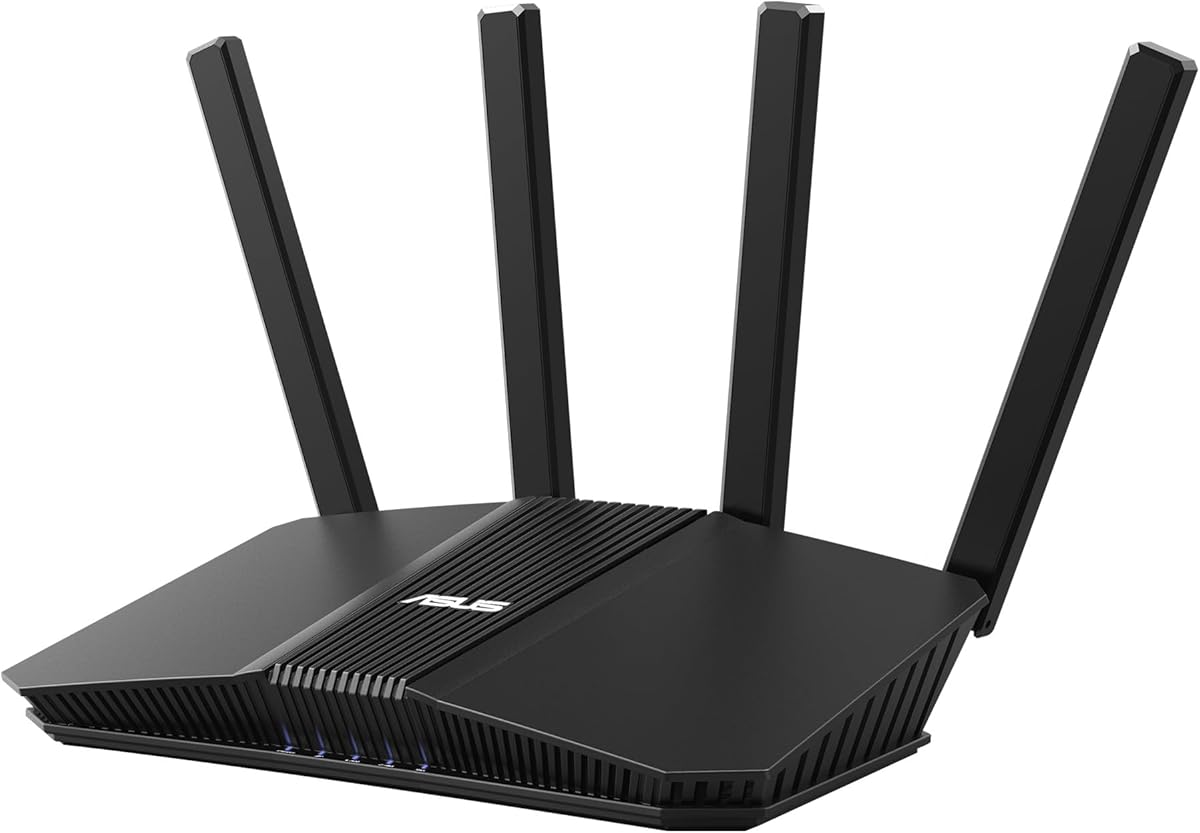
ASUS RT-AX3000
4.5Editor score
Affordable dual-band WiFi 6
Up to 3000 Mbps aggregate speed
Four Gigabit Ethernet ports
AiMesh expansion support
Our ASUS WiFi Routers guide compares ten models across WiFi generation, mesh coverage, wired speed, security, gaming, smart-home features, and ease of use.
Choosing among ASUS WiFi Routers can feel complicated because the range covers inexpensive WiFi 6 models, business-managed systems, feature-rich gaming routers, and high-end WiFi 7 equipment. A useful router must match your internet speed, home layout, connected devices, and tolerance for network administration rather than simply offer the largest headline specification.
We compared the ten models using their stated WiFi standard, aggregate wireless speed, Ethernet capabilities, mesh support, security tools, gaming features, smart-home controls, and intended use. The list includes standalone and mesh routers, renewed equipment, a business platform, and both dual-band and tri-band designs so readers can identify a realistic fit.
Each selection highlights the reason its router earns a place on the list, along with limitations that may matter to your household. Ratings reflect the supplied customer feedback, while features and specifications are based on the available product information. Prices and promotions can change, so confirm the current listing and deal before buying.
4.5Editor score
4.0Editor score

4.3Editor score
The comparison below places every ASUS router by wireless generation, theoretical aggregate speed, mesh capability, and standout functionality. The table makes it easier to separate straightforward home use from gaming, business, high-speed wired, and whole-home mesh requirements.





The ASUS RT-AX1800S is an approachable dual-band WiFi 6 router for homes that want a clear upgrade from older wireless equipment without moving to a premium multi-band system. Its 4.3 rating reflects generally positive feedback, while the stated 1800 Mbps aggregate speed and four external antennas provide a practical foundation for everyday browsing, streaming, video calls, and connected-home devices.
We may earn a commission when you buy through this link, at no additional cost to you.
MU-MIMO and OFDMA are central to the router's appeal because they help the two bands communicate with several devices more efficiently. The five Gigabit Ethernet ports, consisting of one WAN and four LAN connections, make it suitable for wired computers, televisions, game consoles, and network storage. AiMesh compatibility also means the router need not remain isolated if dead zones appear later.
Security is unusually complete for a value-oriented model. AiProtection Classic is powered by Trend Micro, while ASUS Instant Guard provides a one-click secure VPN for use away from home. Parental controls add another layer of household management without making the central setup unnecessarily complicated. However, the RT-AX1800S is still limited to two bands, so it is not the natural choice for users seeking WiFi 7 or a dedicated backhaul system.
This is a strong recommendation for apartments, small houses, and budget-conscious households that need reliable WiFi 6, sensible wired connectivity, and useful security features. It is less suitable for large homes full of high-bandwidth devices, competitive gamers, or users who want the latest 6 GHz and multi-link capabilities. For those needs, one of the more advanced ASUS routers in this guide will be a better long-term fit.
MU-MIMO and OFDMA allow the RT-AX1800S to handle multiple simultaneous connections more efficiently. The result is especially relevant in homes where phones, televisions, speakers, cameras, and work devices frequently connect at the same time.
AiProtection Classic and Instant Guard cover core household protection and secure remote access. Parents can also use the included controls to manage how family members use the network.
We may earn a commission when you buy through this link, at no additional cost to you.
The ASUS RT-BE58U combines a current WiFi 7 platform with features that extend beyond basic wireless speed. It has a 4.0 rating and is designed for households that want access to 802.11be, Multi-Link Operation, 4096-QAM, and flexible WAN options without moving to a quad-band flagship.
We may earn a commission when you buy through this link, at no additional cost to you.
Its advertised aggregate speed reaches 3600 Mbps, and Multi-Link Operation can link multiple bands at once to improve connection stability and data-transfer efficiency. AI WAN detection and USB tethering for 4G LTE or 5G mobile connections make the router more versatile as a primary or backup network hub. It also supports AiMesh, allowing it to become part of a broader ASUS mesh system.
Smart Home Master is particularly valuable because it can create up to three SSIDs for different device groups. That makes it easier to separate ordinary household traffic, connected-home equipment, and guests while centralizing management. AiProtection Pro, a one-tap security scan, Safe Browsing, and instant VPN connections reinforce the router's focus on security and flexible household organization.
The main compromise is that the RT-BE58U remains a dual-band design. It is a compelling general-purpose WiFi 7 router, but it cannot offer the six-gigahertz capacity or enormous aggregate throughput of the tri-band and quad-band alternatives. It is best for modern devices, medium-sized homes, and users who value management and resilience. It may be more capability than a conventional WiFi 6 user needs.
The RT-BE58U introduces 802.11be, 4096-QAM, and Multi-Link Operation in a more approachable dual-band format. This makes it a practical option for households beginning a WiFi 7 upgrade.
Smart Home Master can establish up to three SSIDs, simplifying device segmentation. Separate networks can improve organization and make it easier to manage guests and connected-home hardware.
We may earn a commission when you buy through this link, at no additional cost to you.
The ASUS ROG Rapture GT-BE98 Pro is the flagship choice in this roundup for users who want the most capable ASUS wireless platform. Its quad-band WiFi 7 design supports 320 megahertz channels in the 6 GHz band, 4096-QAM, and an advertised aggregate rate of up to 30 Gbps. The 4.3 rating indicates solid customer reception despite its specialist positioning.
We may earn a commission when you buy through this link, at no additional cost to you.
Its wired connectivity is a defining strength. Two 10-gigabit ports and four 2.5-gigabit ports provide abundant capacity for fast storage, workstations, modern gaming PCs, and networks that need more than conventional Gigabit Ethernet. Multi-Link Operation can use multiple bands simultaneously, while the external dual-feeding antennas are designed to improve signal strength and coverage efficiency.
Triple-Level Game Acceleration is the feature most directly tied to the ROG name. The system is intended to optimize gaming traffic from the PC's gaming port through the route to the game server. Mesh support also makes it possible to extend this class of performance to larger homes, although coordinating a full premium mesh system would be a substantial investment.
This router makes the most sense for enthusiasts, high-end gaming setups, homes with several multigigabit devices, and users who want both exceptional wireless capacity and extensive wired connectivity. It is difficult to justify for basic browsing, a small apartment, or a modest internet connection. Those users would gain little from the additional bands and ports.
Dual 10G and quad 2.5G ports make the GT-BE98 Pro unusually flexible for high-speed wired networks. NAS systems, creative workstations, and demanding local transfers can benefit from the additional bandwidth.
Triple-Level Game Acceleration targets the route between the gaming device and the game server. It adds a specialized layer to an already powerful quad-band wireless platform.
We may earn a commission when you buy through this link, at no additional cost to you.
The ASUS RT-BE92U is a tri-band WiFi 7 router that brings a dedicated 6 GHz band and up to 9700 Mbps of aggregate speed to a more moderate footprint than the quad-band GT-BE98 Pro. Its 4.0 rating makes it a solid option for households seeking a clear WiFi 7 upgrade with modern multi-gigabit potential.
We may earn a commission when you buy through this link, at no additional cost to you.
The router uses 320 MHz channels in the 6 GHz band and 4096-QAM to increase capacity and throughput. Multi-Link Operation allows devices to connect across multiple bands for stability and efficient transfers. This is a meaningful distinction from dual-band WiFi 7 equipment, particularly for compatible modern phones, laptops, and other high-performance clients.
Its network-management features are extensive. AI WAN detection, 4G LTE and 5G mobile tethering through USB, Smart Home Master with up to three SSIDs, instant VPN access, and parental controls give it the flexibility of a small-business gateway. AiProtection Pro, Safe Browsing, and a one-tap security scan add protection without a stated subscription requirement.
Choose the RT-BE92U if you want a dedicated high-speed band but do not need the GT-BE98 Pro's four-band capacity or extensive 10-gigabit port selection. It works well in large, device-dense homes with current WiFi 7 clients. For a smaller residence with mostly WiFi 6 equipment, the feature set may be more advanced than necessary.
The 6 GHz band helps separate compatible traffic from crowded 2.4 and 5 GHz channels. Wider 320 MHz channels can also support very high throughput when clients and the local internet connection allow it.
AI WAN detection and USB mobile tethering provide more ways to establish or preserve connectivity. These features are useful for remote work, temporary outages, and flexible small-office setups.
We may earn a commission when you buy through this link, at no additional cost to you.
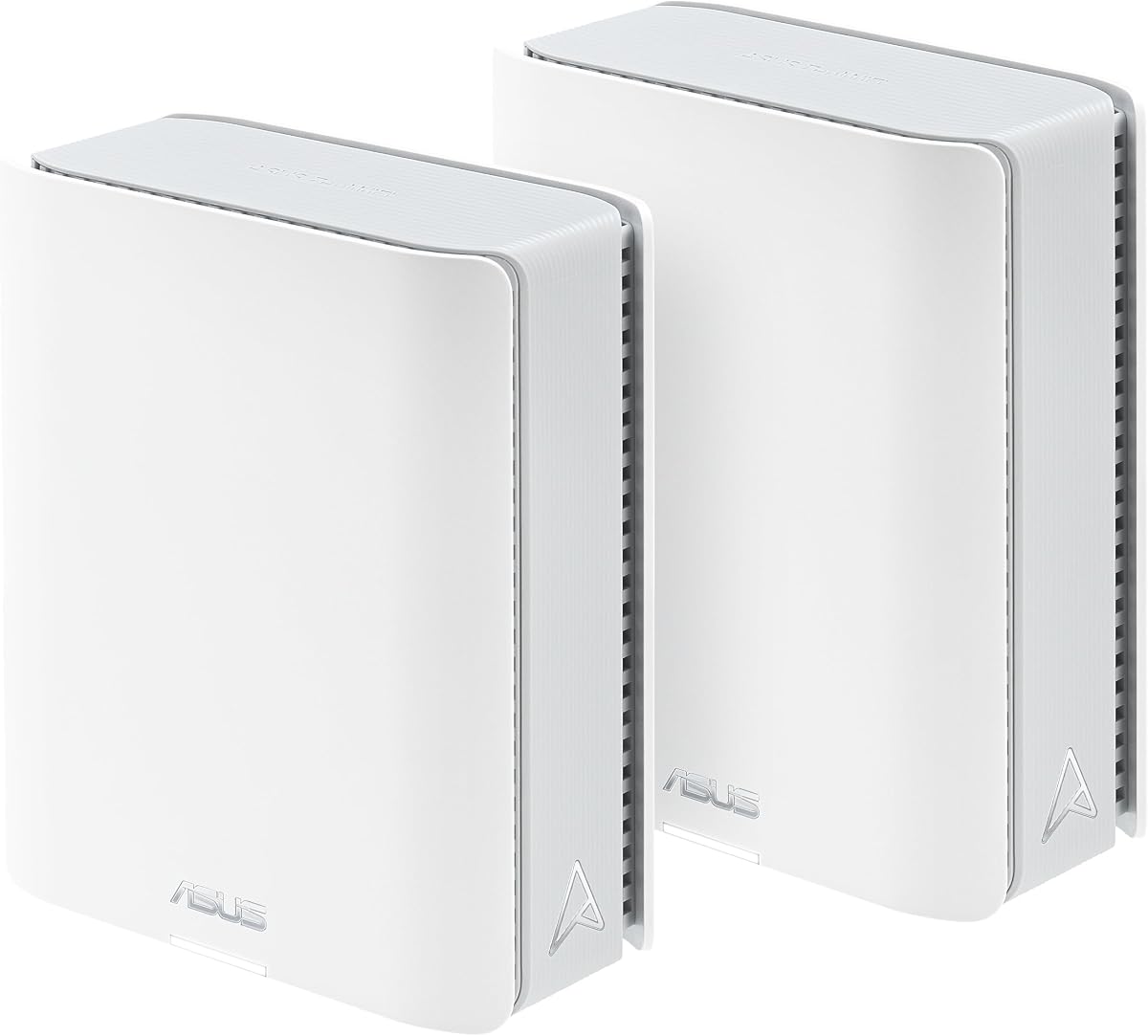
The ASUS ZenWiFi BT10 two-pack is built for large homes that need more than one access point. It supports tri-band WiFi 7, an advertised aggregate speed of up to 18 Gbps, and coverage of up to 6000 square feet. The 3.4 rating is the lowest among the selected products, so buyers should weigh the stated capabilities carefully against their local conditions.
We may earn a commission when you buy through this link, at no additional cost to you.
AI-powered AiMesh is central to the system. It is designed to maintain robust backhaul connections, provide seamless roaming, and expand into a broader ASUS mesh network. Eight internal antennas and ten high-power front-end modules in each unit aim to reduce directional dead zones, while the stated heat dissipation is intended to support sustained reliability.
The package also provides dual 10-gigabit Ethernet and Multi-WAN capabilities, including 4G LTE and 5G mobile tethering through USB. Smart Home Master supports up to three SSIDs for organizing connected-home devices, guests, and primary users. These features make the BT10 appealing to smart-home enthusiasts and households that want a structured, scalable network.
The two-pack is best suited to a property with challenging coverage needs and current WiFi 7 clients. It can also form part of a mixed ASUS mesh setup. Its lower rating warrants attention, particularly because real coverage depends heavily on building materials, device placement, and the number of obstructions. Consider the BT10 for its mesh and high-speed wired design, but check the current customer feedback before committing.
Two mesh nodes make the BT10 a more complete starting system than a single-router solution. Placement becomes critical because each unit contributes to the strength and consistency of the overall network.
Dual 10-gigabit ports allow high-speed wired devices to take advantage of the mesh system. This is helpful for homes that combine extensive wireless coverage with demanding local network tasks.
We may earn a commission when you buy through this link, at no additional cost to you.
The ASUS RT-AX82U combines AX5400-class WiFi 6 performance with gaming tools and a distinctive Aura RGB design. Available here as renewed equipment, it has a 4.4 rating and provides up to 5400 Mbps of aggregate speed through dual-band WiFi 6 and 160 MHz channels.
We may earn a commission when you buy through this link, at no additional cost to you.
A dedicated gaming port and Mobile Game Mode distinguish it from ordinary dual-band routers. The latter can be activated through the ASUS Router app to minimize lag and latency for mobile gaming. The physical RGB lighting is customizable, making the device appealing to users who want networking hardware to fit a gaming setup rather than disappear into a living room.
The router also supports AiMesh, so it can join a flexible whole-home network with compatible ASUS models. Lifetime-free AiProtection Pro, powered by Trend Micro, adds security along with WPA3 and advanced parental controls. These features make it more versatile than a gaming-only router and allow it to serve as a general household gateway.
The renewed status is the main qualification. Cosmetic wear, prior use, and warranty details may vary, so the listing should be checked carefully. It is best for gamers who value a dedicated gaming connection, responsive mobile features, and strong WiFi 6 speed but do not need WiFi 7 or multi-gigabit wired ports. Its 4.4 rating is among the strongest in the group.
The dedicated gaming port and Mobile Game Mode address different ways that gaming traffic can be delayed. Together they make the RT-AX82U more purposeful for competitive and mobile play.
Aura RGB lighting gives the router a distinctive appearance, while AiMesh support allows it to become part of a broader home network. It balances entertainment with practical flexibility.
We may earn a commission when you buy through this link, at no additional cost to you.
The ASUS ZenWiFi BT8 is a one-pack WiFi 7 mesh router for buyers who want a flexible starting point rather than a fixed multi-node bundle. It offers tri-band connectivity, up to 14 Gbps of aggregate speed, 6 GHz support, Multi-Link Operation, and a stated coverage area of up to 3000 square feet. Its customer rating is 4.0.
We may earn a commission when you buy through this link, at no additional cost to you.
AI-powered Smart AiMesh is designed to improve coverage and create a seamless whole-home experience. The unit can be extended with compatible ASUS routers, giving users a gradual path if their coverage needs change. Seven internal antennas and eight high-power front-end modules are intended to reduce dead zones, although real results still depend on placement and construction materials.
Security and management are comprehensive. AiProtection Pro provides commercial-grade protection, advanced VPNs support secure access, and Smart Home Master simplifies IoT network setup with multiple SSIDs, parental controls, and easier VPN configuration. These functions make the BT8 appropriate for smart homes and households that want more control over device categories.
The single-unit format is the key trade-off. Larger homes may need more than one access point immediately, and the BT10 two-pack provides a more extensive starting package. The BT8 is still a strong option for medium residences, smaller businesses, or users who prefer to add nodes gradually. It sits between basic dual-band routers and the ROG flagship in both performance and positioning.
The one-pack format gives users control over how quickly they expand. Compatible ASUS routers can be added when a larger property or more complex layout creates additional coverage needs.
Smart Home Master makes it easier to assign connected devices to dedicated SSIDs. Separate networks can simplify management and keep everyday traffic distinct from smart-home hardware.
We may earn a commission when you buy through this link, at no additional cost to you.
The ASUS RT-AX3000 is a value-focused WiFi 6 router that offers a useful balance of speed, security, and expandability. Its 4.5 rating is tied for the highest in this selection. The router provides up to 3000 Mbps aggregate throughput through 160 MHz bandwidth and 1024-QAM, with 575 Mbps assigned to 2.4 GHz and 2402 Mbps to 5 GHz.
We may earn a commission when you buy through this link, at no additional cost to you.
Four Gigabit LAN ports create a useful wired foundation for a small home or office. A USB 3.0 port adds a convenient place to attach storage or compatible peripherals, while Adaptive QoS can help prioritize applications when the available connection becomes congested. OFDMA and MU-MIMO support are valuable for homes where many devices need simultaneous access.
AiMesh compatibility allows the RT-AX3000 to scale into a larger ASUS mesh system. AiProtection Pro supplies network-level security, and advanced parental controls help manage family internet use. These features make the model more than a basic wireless access point, particularly for buyers who want room to grow without replacing the device immediately.
The stated maximum range of 3000 square feet is an important qualification because real coverage varies with walls, floors, interference, router location, and client capabilities. The product is a sensible fit for apartments, small houses, and straightforward offices. A larger property or a household seeking the newest wireless generation should consider a tri-band WiFi 7 or mesh system instead.
The RT-AX3000 delivers enough stated throughput for modern everyday use without adopting the complexity of a flagship. It is a practical selection for homes that still rely on a mixture of WiFi 5 and WiFi 6 devices.
AiMesh support means the router can join compatible ASUS nodes if dead zones become a problem. This makes the initial purchase more adaptable than a standalone router with no mesh support.
We may earn a commission when you buy through this link, at no additional cost to you.
The ASUS RT-AC68U is a well-established dual-band Gigabit router built around 802.11ac, also known as WiFi 5. Its 4.5 rating shows that many users remain satisfied with its capabilities, and its five Gigabit LAN ports continue to make it useful for homes focused on wired connections rather than the latest wireless standard.
We may earn a commission when you buy through this link, at no additional cost to you.
The router offers combined speeds of up to 1900 Mbps using 3-by-3 dual-band technology. A 1 GHz dual-core processor separates Wi-Fi and USB data tasks, while 128 MB of flash and 256 MB of RAM support its networking operations. Setup is handled through the ASUSWRT web interface, and the ASUS router app provides mobile management.
Its security and networking options are extensive for the generation. AiProtection Pro, malicious-site blocking, two-way intrusion prevention, infected-device blocking, dual WAN support, port forwarding, DMZ, DDNS, and multiple VPN passthrough protocols create a flexible configuration platform. USB functionality and the five-port Gigabit LAN switch add value for local storage and connected equipment.
Choose the RT-AC68U when a dependable Gigabit wired connection matters more than WiFi 6 or WiFi 7. It is a capable gateway for an older device mix, a wired office, or a secondary network. Newer WiFi 6 routers generally offer more efficient capacity and broader client support, so buyers with many current devices should compare those alternatives before settling on this older platform.
Five Gigabit LAN ports give the RT-AC68U an advantage for desktops, televisions, and other wired devices. The 1 GHz dual-core processor helps keep Wi-Fi and USB traffic from interfering with one another.
Dual WAN, port forwarding, DDNS, DMZ, and VPN passthrough support make this older model adaptable to specialized networking needs. AiProtection adds a modern layer of household security.
We may earn a commission when you buy through this link, at no additional cost to you.
The ASUS ExpertWiFi EBR63 is designed for small offices, hospitality spaces, and technically inclined households that need centralized network management. It provides AX3000-class dual-band WiFi 6, a 4.2 rating, and a feature set centered on segmentation, remote administration, and business-oriented security.
We may earn a commission when you buy through this link, at no additional cost to you.
The router can create up to five SSIDs, allowing staff, guests, IoT equipment, and other device groups to be separated and prioritized according to different operating needs. Its customizable guest portal lets a business choose the network name, portal type, branding, and templates, creating a more polished experience for visitors than a generic password page.
ExpertWiFi supports easy setup and remote management through the ASUS ExpertWiFi app, while ExpertWiFi AiMesh provides a path to scale the network. A free subscription to AiProtection Pro and Safe Browsing adds commercial-grade security. VLAN support, VPN features, and the ability to use a connected phone hotspot as backup WAN improve operational resilience.
The EBR63 is best for a small business that values remote control and segmented access more than gaming acceleration or premium wireless specifications. It can also serve an advanced home, although the management platform adds complexity that many families will never use. The backup WAN option is particularly useful for a workplace that cannot afford an unexpected internet outage.
Up to five SSIDs let administrators place different device groups on separate networks. This improves control over access and traffic priorities across staff, guests, and connected equipment.
Remote management through ExpertWiFi is valuable when the administrator is away from the office. A phone hotspot can also serve as backup WAN through the USB port.
We may earn a commission when you buy through this link, at no additional cost to you.
The right ASUS router depends on more than headline speed. Consider wireless generation, radio bands, Ethernet capacity, physical layout, security requirements, and how much network management you actually want before choosing a model.
WiFi 6 models such as the RT-AX1800S, RT-AX82U, RT-AX3000, and ExpertWiFi EBR63 remain broadly useful for current households and businesses. They improve efficiency through features such as OFDMA, MU-MIMO, wider channels where supported, and 1024-QAM. WiFi 7 models add 4096-QAM, Multi-Link Operation, and wider 6 GHz channels, making them better suited to newer compatible equipment and high-capacity networks. The newest standard cannot create internet speed that your service does not provide, so upgrading every client is rarely necessary before choosing a WiFi 7 gateway.
In short, choose WiFi 6 for proven everyday value and WiFi 7 when you want the newest platform, modern devices, or greater future headroom.
Aggregate speed combines the theoretical maximum rates of all radio bands and is most useful for comparing similar classes of router. It is not the expected speed for one laptop or phone, and real performance depends on client capabilities, distance, interference, congestion, building materials, network overhead, and the speed of the internet connection. A dual-band model with 3600 Mbps can outperform a more expensive router in a typical home if the latter is poorly placed or its clients cannot take advantage of the extra bands.
In short, compare like with like and focus on client compatibility, coverage, and connection quality rather than treating the largest aggregate number as a guaranteed real-world result.
Dual-band routers use 2.4 GHz and 5 GHz, making them straightforward and economical. The 2.4 GHz band offers longer reach but tends to be slower, while 5 GHz is faster but more limited in range. Tri-band models add a third radio, often 6 GHz in newer WiFi 7 systems, while quad-band routers add still more high-bandwidth capacity. Additional bands can separate traffic and support compatible modern clients, but they also make the system more complex and expensive.
In short, dual-band is sufficient for many homes, tri-band is valuable for high-density WiFi 7 use, and quad-band is primarily for enthusiasts and demanding gaming or wired networks.
The number of Gigabit ports determines how many wired devices you can connect without an additional switch. The RT-AX1800S and RT-AC68U each offer four Gigabit LAN ports, while the RT-AX3000 provides four as well. At the high end, the RT-BE92U and ZenWiFi BT10 include dual 10-gigabit connections, and the GT-BE98 Pro combines dual 10G with four 2.5G ports. Dual-WAN, AI WAN detection, and USB mobile tethering can improve failover options, especially for business users.
In short, count current and planned wired devices first, then check port speed, WAN flexibility, and USB support before choosing a router.
Coverage depends on the router's radio design and, just as importantly, its placement. Large homes, thick walls, multiple floors, and long narrow spaces often benefit from a coordinated mesh system. ASUS AiMesh compatibility appears across several models, allowing compatible routers to work as a single expandable network. The ZenWiFi BT10 two-pack arrives with two nodes and claims coverage of up to 6000 square feet, while the single BT8 is positioned for up to 3000 square feet. Manufacturer coverage figures should be treated as guidance rather than a promise because walls and layout can change results substantially.
In short, start with one well-placed node, but choose a mesh-capable model if your property has obvious dead zones or a need for seamless roaming.
AiProtection, AiProtection Classic, and AiProtection Pro are built around Trend Micro technology and provide different levels of network protection. Several models include subscription-free security features, while the ExpertWiFi EBR63 specifically mentions a free AiProtection Pro subscription. ASUS Instant Guard, integrated VPN support, WPA3, parental controls, Safe Browsing, and one-tap security scans add further protection and control. Review the included features carefully because terminology differs across product generations, and confirm any subscription terms shown in the current listing.
In short, prioritize models that provide core protection without requiring a recurring fee, then add parental controls, VPNs, or segmentation only if your household or business will use them.
Gaming-specific features may include a dedicated Ethernet port, Mobile Game Mode, or Triple-Level Game Acceleration. The RT-AX82U focuses on a dedicated gaming connection and mobile latency, while the GT-BE98 Pro goes much further with its high-speed ports and multi-level traffic optimization. For smart homes, Smart Home Master can create multiple SSIDs, making it easier to separate IoT devices, guests, and main users. These features are valuable when they match your setup, but they do not overcome poor placement or an internet connection that cannot sustain the desired performance.
In short, choose the gaming router if low-latency features and high-bandwidth Ethernet matter to you, and favor multi-SSID controls if your household contains many connected-home devices.
A standard ASUS router can handle ordinary home networking through the ASUS Router app, while ExpertWiFi targets administrators who need remote management, scalable deployment, multiple SSIDs, branded guest access, and VLAN support. More advanced features do not automatically make a router easier to use. Business environments benefit from centralized control, backup WAN options, and device separation, but may also require deliberate network design. Home users should avoid paying for capabilities they will never configure unless those features solve a specific and recurring problem.
In short, simple management suits typical homes, while ExpertWiFi makes sense for small businesses or advanced users who genuinely need centralized administration.
Begin by positioning the router in an open, central location rather than inside a cabinet, behind a television, or at the edge of the property. Connect the internet source to the designated WAN port, use the ASUS Router app or ASUSWRT interface for setup, and create a strong administrative password. If using mesh nodes, choose positions that overlap slightly for reliable backhaul and follow the manufacturer's guidance for assigning each node.
After setup, update the router firmware, review WiFi security settings, and create separate SSIDs for guests, smart-home devices, and work equipment when appropriate. Change any default account credentials, enable WPA3 where all clients support it, and configure parental controls or Smart Home Master based on actual household needs. A speed test should be performed near the router first and then in the rooms where reliable service matters most.
Treat the router as part of the home rather than a device that can be forgotten. Keep its firmware current, maintain reasonable ventilation, avoid covering it with objects, and periodically check connected devices and security notifications. For mesh systems, check node placement after moving furniture or changing network use. Restarting when performance degrades can resolve temporary congestion, but persistent problems may require cable inspection, configuration changes, or a different router class.
For large homes, the ASUS ZenWiFi BT10 and ZenWiFi BT8 are the most direct choices because they are designed as mesh systems. The BT10 includes two nodes and states coverage of up to 6000 square feet, while the BT8 is a single node positioned for up to 3000 square feet. Actual results depend on building materials and placement, so assess dead zones before choosing a bundle size.
A WiFi 7 client can use an older WiFi 6 router, but it will operate using the standards both devices support. A WiFi 7 router is most useful when compatible clients can use its 6 GHz band, wider channels, higher modulation, or Multi-Link Operation. If most connected devices remain WiFi 6, the immediate benefit may be modest.
No. Aggregate speed is a theoretical combination of the router's radio bands, not a guarantee of real-world throughput. Internet service speed, client specifications, interference, distance, walls, and network congestion all affect results. A correctly placed midrange router can provide a better experience than a flagship model with poor placement or outdated clients.
AiMesh is ASUS's broader technology for combining compatible routers into a coordinated mesh network. ZenWiFi products are dedicated mesh systems built around that ecosystem and often provide specialized node design and higher-end specifications. Check compatibility and setup requirements because not every ASUS router and access point supports the same combination.
Several models in this guide explicitly provide subscription-free network security, while others include AiProtection or AiProtection Pro with different terms. The ExpertWiFi EBR63 lists a free AiProtection Pro subscription. Availability and conditions can change, so review the current product listing before purchase to verify exactly which security features are included.
Several listed models support a USB connection for 4G LTE or 5G mobile tethering, and the ExpertWiFi EBR63 can use a phone hotspot as backup WAN. This can maintain connectivity during an outage, although tethering performance and reliability depend on the phone, mobile signal, plan, and local network conditions.
Count the devices you expect to connect with a network cable, including desktop computers, televisions, game consoles, printers, and network storage. Leave room for future devices or use a switch when more ports are needed. If you operate fast NAS systems or workstations, pay particular attention to 2.5-gigabit and 10-gigabit options on the higher-end models.
Place the primary node near the center of the home or office with clear air around it. Additional nodes should be positioned where they can maintain a strong connection to the rest of the system while extending useful coverage. Thick walls, metal appliances, appliances, and long cable runs can reduce performance, so test the network in important rooms before finalizing placement.
The ASUS RT-AX1800S is the most straightforward value pick for a small home, while the RT-AX3000 offers more aggregate capacity and a high 4.5 rating. The RT-BE58U is the balanced choice for buyers who want WiFi 7, Multi-Link Operation, flexible WAN options, and Smart Home Master without moving to a flagship configuration.
Prioritize the features that correspond to your actual network. Choose a tri-band or mesh model for large homes and dense device environments, a multigigabit ROG model for serious gaming and fast wired networks, and ExpertWiFi for remote business management. Placement, compatible clients, and a suitable internet service can influence results more than small differences in router specifications.
Finally, check the current listing, customer rating, warranty terms, and promotion before purchasing. Router prices and bundles can change, and renewed equipment requires particular attention to condition and coverage. Choose the model that meets your coverage, wired-speed, security, and management needs rather than buying solely on the largest advertised number.