
UGREEN SD Card Reader USB C, USB 3.0 Micro SD Card Reader
4.6Editor score
USB 3.0 transfer speeds
USB-C and USB-A connectors
Concurrent SD and microSD access
No external power required
An SSD card reader for PC gives photographers, filmmakers, and content creators a faster, more convenient way to move files from memory cards into a computer. The right model should match your card formats, USB ports, and workflow while delivering transfer speeds that reduce frustrating delays during backups, editing, and file sharing.
We compared all ten featured products by examining supported media, interface standards, maximum stated transfer speeds, simultaneous card access, operating-system compatibility, portability, and installation requirements. The guide covers traditional SD and microSD readers, multi-card adapters, an internal desktop front-panel solution, and specialized direct-attached storage options.
Each entry explains the product's strongest feature, practical trade-offs, and ideal user, showing how options range from simple dual-interface readers to advanced multi-slot hubs and high-speed storage devices. Ratings and availability can change, and current prices vary, so verify the latest listing details before purchasing.
4.6Editor score

4.6Editor score

4.5Editor score
As an Amazon Associate we earn from qualifying purchases.
This side-by-side comparison highlights the connections, formats, transfer capabilities, and workflow features that distinguish each option, from compact dual-interface readers to multi-card hubs and specialized portable SSD storage.



The Lexar Dual-Slot SD/Micro SD Card Reader combines a 4.6 rating with a straightforward set of features that suits many PC users. Its defining advantage is the inclusion of both USB-A and USB-C connectivity, allowing it to fit modern laptops and desktops without requiring an adapter while still supporting older systems.
We may earn a commission when you buy through this link, at no additional cost to you.
The reader supports SD and microSD media, with simultaneous file transfers through the two slots. Its stated performance reaches up to 205MB/s, making it appropriate for large RAW files, high-resolution photographs, and video clips. Plug-and-play operation means no additional drivers or software are needed, while compatibility with USB 3.1 and USB 2.0 ports broadens its usefulness across mixed hardware setups.
The main limitation is its format range. Users who rely on CompactFlash, Memory Stick, or other legacy media will need a multi-format reader instead. Actual transfer results will also depend on the memory card and the speed of the connected USB port, so the headline rate should be understood as an upper capability rather than a guaranteed result for every file.
This is a strong all-around recommendation for PC owners who want more than a basic adapter without moving to a complex hub. Photographers can move photos from SD or microSD cards, students can transfer course materials, and office users can keep a single reader for both newer and legacy computers. The balanced connector arrangement makes it especially practical for hybrid workspaces.
The integrated USB-A and USB-C design removes the need to carry a separate adapter for each computer. That convenience is particularly valuable when moving between a modern USB-C notebook and an older desktop with a conventional USB port.
With stated read performance of up to 205MB/s, the reader can substantially reduce waiting time when copying sizable photo or video collections. The two slots also support simultaneous transfers, which is useful when comparing footage or moving files from two cards at once.
We may earn a commission when you buy through this link, at no additional cost to you.
The SmartQ C368 USB 3.0 Card Reader has a 4.6 rating and stands out for supporting SD, microSD, Memory Stick, and CompactFlash cards in one compact unit. It is aimed at users who move between different types of recording equipment and want one reader that can handle several common media formats.
We may earn a commission when you buy through this link, at no additional cost to you.
Its four-in-one design makes card recognition independent, so a photographer may carry one device instead of separate readers for cameras using SD and older systems using CF or Memory Stick. The stated transfer rate reaches 5Gbps at USB 3.0 speeds, and backward compatibility with USB 2.0 makes it usable on older computers as well.
A blue LED provides a quick visual indication that the reader is powered. The package includes a cable organizer and user manual, though memory cards are not included. Its principal constraint is the conventional USB-A connection, which may require an adapter when used exclusively with a USB-C-only PC or tablet.
This reader is well suited to travel, legacy-camera work, and mixed-format archiving. It is less ideal for buyers seeking USB-C native connectivity or a permanently installed desktop solution. Even so, its broad platform support and uncomplicated setup give it strong value for users who value flexibility over specialized performance.
Supporting SD, microSD, MS, and CF cards lets the C368 serve modern cameras and older equipment without requiring a drawer full of dedicated readers. Independent reading also allows files to be accessed without juggling separate adapters.
Compatibility with Windows, macOS, and Linux removes the need for specialized software. The reader works as a plug-and-play device, making it a practical choice for offices, classrooms, and mixed operating-system travel kits.
We may earn a commission when you buy through this link, at no additional cost to you.
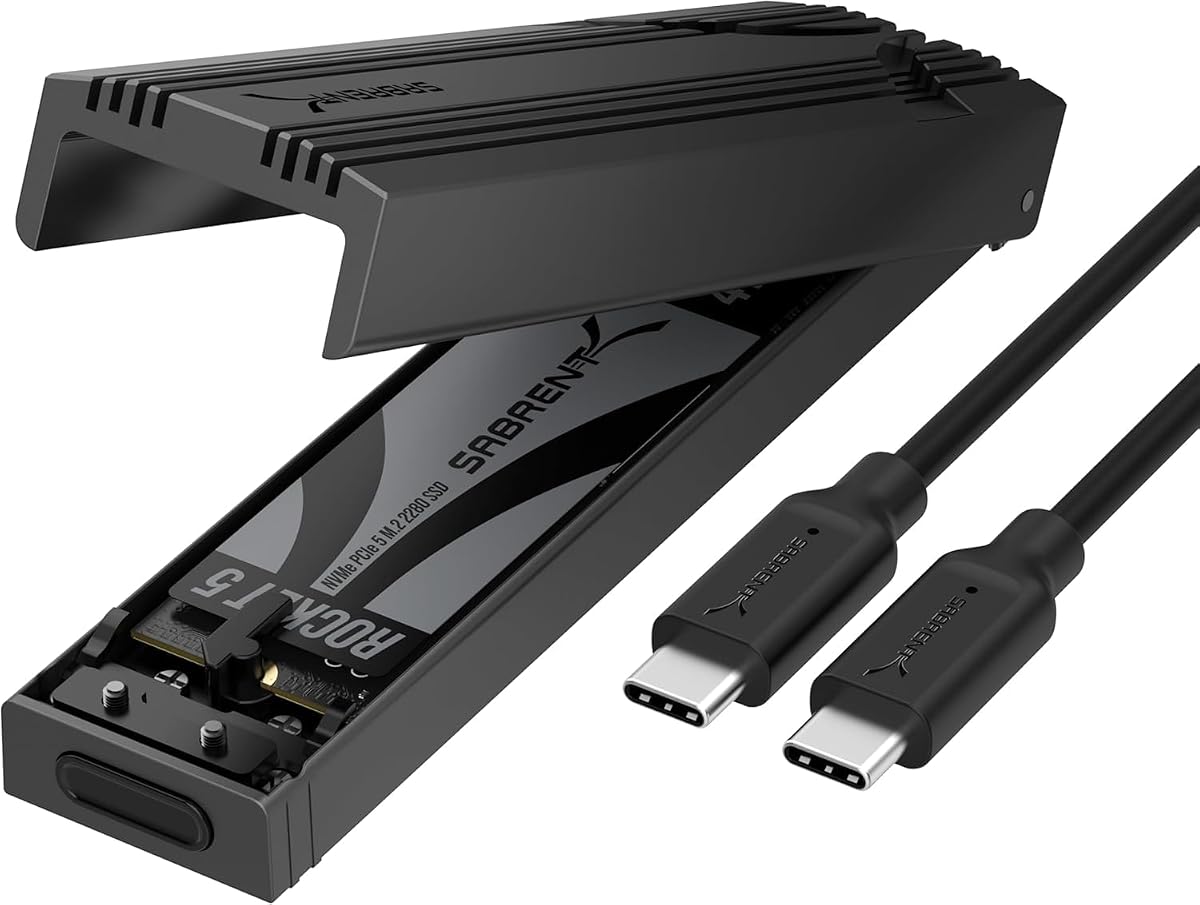
The SABRENT USB-C NVMe Enclosure and Reader is a specialized alternative for users who want to connect an M.2 PCIe solid-state drive directly to a PC. Its 4.5 rating reflects a feature set aimed at upgrades, cloning, troubleshooting, and portable high-speed storage rather than conventional memory-card transfer.
We may earn a commission when you buy through this link, at no additional cost to you.
The enclosure supports M.2 NVMe SSDs in 2230, 2242, 2260, and 2280 formats, accommodating a broad range of drive sizes up to at least 8TB. Its USB-C connection uses USB 3.2 Gen 2 for up to 10Gbps and requires no external power or drivers. Laptops, desktops, gaming handhelds, and other USB-C devices can therefore access the enclosed drive directly.
The flip-open, tool-free design allows the SSD to be inserted and locked into place without screws. Aluminum construction and direct thermal-pad contact are intended to improve heat dissipation and maintain steadier performance during extended transfers or demanding workloads. Users must confirm that their drive is NVMe rather than M.2 SATA, as SATA models are not compatible.
This product is ideal for PC builders, data-recovery users, and professionals who routinely work with bare M.2 drives. It is not a substitute for an SD card reader, but it can serve as an external SSD reader with excellent interface speed. Buyers with conventional removable memory cards should choose a multi-slot card reader instead.
Opening the cover, inserting an NVMe drive, and closing the enclosure takes only a few steps. That convenience makes the device useful for temporary drive access, cloning, diagnostics, or carrying an SSD between systems without a screwdriver.
The aluminum upper shell and reinforced frame protect the drive while encouraging heat transfer. Its slim, portable form also suits mobile workflows, although users should avoid treating the enclosure as a substitute for a protective case during rough travel.
We may earn a commission when you buy through this link, at no additional cost to you.
The 7-in-1 Multi Card Reader is built for photographers and archivists who need access to many different card standards. It includes dedicated positions for CompactFlash, two SD slots, TF, microSD, XD, and Memory Stick, providing much broader coverage than the more common SD-and-microSD configuration.
We may earn a commission when you buy through this link, at no additional cost to you.
Five cards can be read or written simultaneously, improving efficiency when footage or images are spread across several media. USB-C and USB-A connectors support newer laptops, tablets, phones, and legacy computers. A stated 5Gbps transfer rate is suitable for large media collections, though card specifications and host ports determine real-world results.
The broad compatibility list includes SD, SDHC, SDXC up to 2TB, microSD variants, TF, MS, XD, UDMA CompactFlash, and other common formats. The reader also supports Windows, macOS, Linux, Android, and Chrome OS, making it a flexible solution for multi-device workflows.
Its many slots make it less pocket-friendly than a basic reader, and users should verify the exact type of Memory Stick or legacy card they own. Even so, this is the option to consider for a repair bench, media lab, professional field kit, or home archive containing many card formats. A 12-month warranty also adds reassurance.
Seven slots reduce the chance that an old camera or obscure card format will become inaccessible. Dual SD positions, separate TF and microSD slots, and dedicated legacy readers make this model particularly useful for mixed archives.
The ability to work with five cards simultaneously helps users ingest footage from multiple sources without repeatedly disconnecting the reader. This is valuable for event shooters, editors, and anyone converting a large physical media collection.
We may earn a commission when you buy through this link, at no additional cost to you.
The 4-in-1 USB C to SD/TF/CF/MS Card Reader emphasizes flexibility across computers, tablets, and phones. Its detachable USB-C-to-USB adapter gives it a practical way to serve both modern USB-C systems and older USB-A computers while keeping the main connector compact.
We may earn a commission when you buy through this link, at no additional cost to you.
Supported media includes SD, SDHC, SDXC, microSD, microSDHC, microSDXC, CompactFlash, Memory Stick Pro Duo, and RS-MMC cards. The reader handles common JPEG and RAW photographs as well as SD and HD video formats including H.264 and MPEG-4. Plug-and-play OTG operation requires no additional drivers, software, or network connection.
Compatibility is especially broad for mobile workflows, covering listed iPhone, iPad, MacBook, iMac, Samsung Galaxy, Pixelbook, Dell XPS, Surface Book, and Galaxy Tab models. One important exclusion is Wi-Fi SD, a specialized card category that this unit cannot read.
This reader is a strong choice for creators who want to move files between a camera and a USB-C phone before uploading them. It also works well as a general PC adapter. Those who only use SD and microSD may prefer a smaller dual-slot model, while users with many legacy formats should consider the seven-slot hub.
OTG support lets compatible phones and tablets treat the inserted card as an accessible storage device. That can shorten a workflow involving camera footage, downloaded clips, and immediate social sharing without requiring a full laptop.
The detachable adapter addresses the compatibility gap between USB-C and USB-A computers. Its removable nature also means the adapter can be left behind when only USB-C access is needed, reducing the chance of losing a small essential piece.
We may earn a commission when you buy through this link, at no additional cost to you.
The UGREEN SD Card Reader USB C, USB 3.0 Micro SD Card Reader is a compelling everyday choice with a 4.6 rating. Its combination of USB 3.0 performance, dual connectors, and simultaneous SD and microSD access covers the needs of most photographers without adding a large hub.
We may earn a commission when you buy through this link, at no additional cost to you.
The reader offers a stated transfer speed of up to 5Gbps and fits a broad collection of media, including SDXC, SDHC, SD, MMC, RS-MMC, microSDXC, microSD, and microSDHC. Both card slots can operate at the same time, reducing repeated plugging and unplugging when files are spread across two cards.
Its slim, lightweight enclosure is designed to fit in a camera bag or laptop sleeve. Plug-and-play operation requires no drivers or external power, while Windows, macOS, and most Android compatibility broadens the device's role beyond desktop computers. The USB-C and USB-A interface arrangement also keeps it useful with older laptops.
The obvious limitation is that it does not handle CompactFlash, Memory Stick, XD, or other legacy formats. Within the dominant SD and microSD category, however, it offers an excellent balance of portability, speed, and convenience. It is a particularly sensible purchase for travel, social media content, and everyday camera backups.
Combining USB-C and USB-A in a compact body avoids a separate adapter while reducing desk clutter. The slim form is especially convenient for photographers who want to keep backup equipment in a small camera bag.
Simultaneous SD and microSD access is a practical feature for modern camera kits that commonly use both formats. It also helps when transferring separate image sets from a phone card and a camera card in one session.
We may earn a commission when you buy through this link, at no additional cost to you.
The GRAUGEAR 5.25-inch Front Panel USB Hub is a different kind of solution: it installs permanently inside a desktop PC and brings card reading and high-speed USB access to the front panel. Its 4.3 rating reflects a feature-rich design aimed at builders and workstation users rather than portable workflows.
We may earn a commission when you buy through this link, at no additional cost to you.
Built-in UHS-I slots support SD and microSD media from cameras, drones, and other devices. The front panel includes a USB-C connection with up to 20Gbps using Gen2x2, alongside dual USB-A ports for peripherals. These additions make it possible to connect high-bandwidth storage without routing cables to the rear of the case.
Two tool-free 2.5-inch SATA bays support 7mm and 9.5mm SSDs or hard drives, providing dedicated internal storage positions. The unit connects through USB 3.2 Gen2x2 A-Key, USB 3.0 19-pin, and SATA power headers, so compatibility with the desktop's motherboard and case layout must be checked carefully before purchase.
This product is best for a desktop builder who wants card access and front-panel USB convenience permanently integrated. Installation requires technical care and a compatible 5.25-inch bay. It offers little benefit to laptop users, but for the right workstation it can become a central, always-accessible media and storage hub.
Keeping SD and microSD slots at the front of the desktop removes the need to reach around the case or connect a loose reader each time media arrives. That convenience is useful for frequent transfers and permanent archiving stations.
The USB-C, USB-A, and internal drive bays turn the unit into a broader desktop expansion hub. It can consolidate multiple storage functions, but buyers should confirm case bays, motherboard headers, operating system, and available power connections before installation.
We may earn a commission when you buy through this link, at no additional cost to you.
The Lexar Dual-Slot SD/Micro SD Card Reader is the premium choice among the conventional card readers in this guide. Its stated read speed of up to 312MB/s is the highest figure offered by a dedicated SD and microSD model here, making it appealing to working photographers and video editors.
We may earn a commission when you buy through this link, at no additional cost to you.
It uses USB 3.2 Gen1 Type-C and can read SD and microSD UHS-I cards at up to 170MB/s. Backward compatibility with USB 2.0 ports allows the device to be used on older computers, although a USB 2.0 connection cannot deliver the full speed of a modern Gen1 port.
An LED activity light provides clear confirmation that the reader is powered or working. The dual-slot design reduces the need to swap cards manually, while the compact enclosure keeps the overall footprint appropriate for a laptop sleeve or editing desk. A two-year limited warranty adds coverage beyond the basic reader category.
This model is ideal for users who routinely move large volumes of images or video and want the fastest stated reader speed in the roundup. Its primary USB-C-only connection may inconvenience owners of USB-A-only PCs without an adapter. Otherwise, the speed focus and clear status indication make it a strong premium workflow choice.
A stated read rate of up to 312MB/s gives the reader a performance advantage for large RAW libraries and high-resolution video. Actual performance still depends on the card's rating, file sizes, computer storage, and whether the host port supports the full interface.
The activity LED makes it easier to know when the reader is powered or transferring data. This visual cue is particularly helpful during larger transfers, when users want confidence that the system has recognized the media.
We may earn a commission when you buy through this link, at no additional cost to you.
The Insta360 Quick Reader 512GB is not a conventional removable-card reader. It is a compact external SSD designed to provide direct, high-speed storage for compatible Insta360 cameras, phones, tablets, and PCs. Its 4.2 rating reflects a specialized product that can complement rather than directly replace an SD card reader.
We may earn a commission when you buy through this link, at no additional cost to you.
The device delivers stated read and write speeds of up to 420MB/s, allowing footage to be moved rapidly between supported devices without a computer. With 512GB of capacity, it can serve as an offload destination, reducing the need to switch among multiple memory cards while shooting. It also supports direct phone access without external power or a Wi-Fi connection.
Its USB-C interface is compatible with both iOS and Android devices, and the enclosure weighs only 5.4 grams. The package includes weather-resistant covers for Insta360 X5, X4 Air, and Ace Pro 2 cameras along with a USB-C port spacer. These accessories confirm that the product is oriented toward a specific mobile filmmaking ecosystem.
The reader is a compelling choice for Insta360 users who want immediate offloading and consolidated local storage. It cannot read SD, microSD, CF, or other removable media, so it is not appropriate as a universal card reader. Its fixed storage capacity and specialized design also make it less flexible than a general-purpose PC adapter.
Directly moving footage into the Quick Reader can streamline a mobile shoot by creating a fast local destination for new files. This reduces dependence on limited camera storage and avoids a complete PC-based import for every take.
At 5.4 grams, the device is small enough to remain in a camera or everyday carry kit. Its USB-C design and included camera covers help create a more integrated workflow for users of the supported Insta360 ecosystem.
We may earn a commission when you buy through this link, at no additional cost to you.
The Lexar Dual-Slot SD/Micro SD Card Reader is a compact, user-friendly option for moving files from the two card formats most commonly found in current cameras, phones, and action cameras. It combines a 4.6 rating with USB-A and USB-C connectivity for broad use across desktop and laptop systems.
We may earn a commission when you buy through this link, at no additional cost to you.
Its stated performance reaches up to 205MB/s, and both SD and microSD slots can transfer files simultaneously. The reader requires no additional drivers and works with USB 3.1 and USB 2.0 ports. This makes it a dependable option for office PCs, newer USB-C notebooks, and systems that predate the latest interface standards.
The enclosure is compact and portable, so it can remain in a camera bag or laptop sleeve rather than being installed permanently. That makes it well suited to travel and field transfers. Users should remember that older USB 2.0 systems will operate more slowly and that the memory card itself can be the limiting factor.
This reader is a good general recommendation for anyone who needs uncomplicated SD and microSD access without adapters or software. It lacks CompactFlash, Memory Stick, and XD support, so users with older media should choose the BENFEI or seven-slot model. For most contemporary workflows, however, it is straightforward and dependable.
The compact design keeps it easy to carry between a home desktop and a laptop. A reader that stays in the camera kit can serve as a dedicated media-ingest tool rather than a permanent desk accessory.
Plug-and-play operation reduces setup time and makes the reader accessible to users who do not want to install transfer utilities. Once connected, the PC can use the card as a conventional storage location for copying and organizing files.
We may earn a commission when you buy through this link, at no additional cost to you.
The best SSD card reader for PC depends on the formats you use, the ports available on your computer, and the volume and type of files you transfer. Interface speed, simultaneous access, portability, and compatibility should be evaluated together rather than relying on a single headline transfer rate.
Begin by identifying every removable format in your workflow. SD and microSD cover many current cameras, phones, drones, and action cameras, while CompactFlash remains important for some professional cameras. Memory Stick, XD, TF, MMC, and RS-MMC may matter for older devices or specialized equipment. A dual-slot reader is simpler and more portable, a four-slot reader offers a useful compromise, and a seven-slot hub is preferable for broad archives.
Interface ratings describe the connection's theoretical ceiling, not guaranteed card performance. USB 2.0, USB 3.0, USB 3.1, USB 3.2 Gen1, and Gen2x2 all have different bandwidth levels, while the memory card's rating, controller, file size, and the computer's storage speed also matter. A reader advertising 5Gbps may be limited by a UHS-I card, while the stated 312MB/s and 420MB/s figures belong to more specialized performance tiers.
USB-C is standard on many modern laptops, while USB-A remains common on desktops and older systems. A reader with both connectors is the simplest solution, and one with a detachable adapter can provide similar flexibility in a smaller form. Pure USB-C designs may require an adapter for legacy PCs, and adapters can also introduce physical stress or disconnect concerns during long transfers.
Readers with separate SD and microSD slots can often work with both formats at the same time, allowing users to transfer from two cards without repeatedly unplugging the device. Multi-card hubs go further, with some supporting several cards concurrently. This matters for high-volume shoots, media ingestion, and users who routinely move footage from more than one source.
Travelers and field photographers should favor a slim enclosure that fits comfortably in a camera bag. Desktop users may prefer a permanently installed front-panel reader with accessible slots and USB ports. A multi-slot hub is naturally larger, while a direct-attached SSD or specialized quick-storage device may offer higher capacity but narrower compatibility. Choose the form that matches where and how often files will be moved.
Check whether the reader supports your operating system and whether it requires drivers, software, or network access. Most conventional options are plug-and-play across Windows, macOS, and Linux, while mobile workflows also depend on OTG support and compatible phone or tablet ports. Also verify exclusions such as Wi-Fi SD, specific Memory Stick variants, or CF Type I, since a broad product title does not guarantee universal support.
A card reader accesses removable media but does not provide extra working storage. An external or direct-attached SSD stores files independently and can serve as a high-capacity destination. The SABRENT enclosure accepts an M.2 NVMe drive, while the Insta360 Quick Reader includes integrated portable storage. These options are useful for high-speed work or offloading, but they do not replace a card reader when removable media must be accessed.
Even the fastest reader cannot compensate for a slow memory card or storage drive. Check the card's standard, maximum read speed, capacity class, and whether the computer can absorb files quickly enough. The PC's port version, file system support, available storage, and background activity can all affect the experience. A newer reader still offers useful benefits through better compatibility and concurrent access, but realistic expectations prevent misleading performance comparisons.
Begin by checking that the reader's connector matches the port on the computer or adapter. Insert the memory card fully into the appropriate slot, paying attention to the card orientation and any mechanical locking or eject mechanism. Connect the reader directly to the computer rather than through an unpowered hub, then wait for the operating system to mount the card before opening files.
Copy important material to the computer or an external storage device before removing the card. Use the operating system's eject or safely-remove function, wait until transfers have stopped, and then remove the card. Do not pull it out while files are being written. For cards used in cameras, format them in the intended device when appropriate and avoid using the reader's computer format controls unless they are specifically designed for that task.
Keep the contacts clean and dry, and protect the reader from impact, moisture, and extreme temperatures. Avoid inserting damaged cards or forcing a card into the wrong slot. For a direct-attached NVMe enclosure, power down or disconnect the drive before opening it and handle the SSD by its edges. Regular inspection of cables, connectors, and slots helps prevent intermittent transfers and protects both the reader and the media.
For many SD and microSD workflows, USB 3.0 is fast enough to transfer 4K clips quickly, provided the memory card and computer can sustain the same pace. A UHS-I card may cap the result well below the reader's headline speed, while a higher-rated card and USB 3.2 connection can do better. Check both the card's advertised read speed and the PC's port standard.
Yes, if it has both connector types built in or includes a detachable adapter. Integrated USB-C and USB-A connectors are usually the simplest option for a portable reader, while an adapter can make a USB-C-only device usable with a legacy PC. Check that the adapter is included and that the host port supports the reader's intended speed.
An SD card reader provides access to removable memory cards and usually does not add permanent storage capacity. An external SSD stores files on its own internal drive and can act as a working drive, backup destination, or offload device. The SABRENT enclosure and Insta360 Quick Reader fall into the SSD category rather than the traditional card-reader category.
A USB 3.2 reader can usually connect to a USB 2.0 port, but it will operate at the older port's lower speed. The compatibility does not make transfers faster. If the PC has no faster alternative, a basic reader may still be sufficient for photos and ordinary documents, but high-resolution video may take noticeably longer.
Many dual-slot readers support simultaneous SD and microSD transfers, including the UGREEN, Lexar 205MB/s, and Lexar 312MB/s models listed here. Confirm that the device specifically states simultaneous operation. Parallel access is especially useful for photographers who routinely switch between camera cards and phone cards.
You need a model with a dedicated CompactFlash slot, such as the SmartQ C368, the seven-in-1 multi-card reader, the four-in-1 USB-C reader, or the BENFEI reader. The SmartQ C368 offers a relatively simple four-format design, while the seven-in-1 hub provides the broadest range and simultaneous operations. Check the exact CF type if your card is an older or specialized variant.
The fastest component determines the practical result. The card may have a lower speed rating, the PC may use an older USB port, background applications may reduce performance, and the computer's storage may be the bottleneck. Small files can also transfer less efficiently because of overhead. Compare devices using the same card, computer, file set, and connection.
Most readers in this guide are designed for plug-and-play use without extra drivers or software. Windows, macOS, and Linux systems generally recognize standard removable media directly. Mobile OTG operation also depends on the phone or tablet supporting the appropriate interface and file access. Specialized desktop installations may require motherboard connections and normal hardware setup procedures.
The Lexar 205MB/s reader is the most balanced overall choice because it combines USB-A and USB-C connectivity, simultaneous SD and microSD transfers, and a strong 4.6 rating in a compact form. For a simpler, highly portable alternative, the UGREEN reader offers USB 3.0 performance and dual connectors at a budget-friendly position, while the premium Lexar 312MB/s model leads conventional readers in stated read speed.
Prioritize the media formats and computer ports you actually use rather than choosing solely by transfer rate. Multi-card hubs are more valuable for broad archives and simultaneous ingestion, direct-attached SSD products suit users with very different storage needs, and a front-panel hub is appropriate only for compatible desktop builders. Compatibility details and exclusions should be checked before ordering.
Ratings, product availability, and prices can change over time, so confirm the current listing and specifications at the point of purchase. With the right balance of format support, interface speed, portability, and ease of use, a card reader can greatly simplify media transfers and make a PC-based creative workflow far more efficient.