
Lexar ES3 1TB Portable SSD
4.4Editor score
Up to 1050MB/s read
Xbox Series X|S compatible
Compact 42-gram design
This guide compares the best external SSD for Xbox Series X storage, including capacity, speed, compatibility, design, and expansion options.
Expanding an Xbox Series X game library calls for more than a drive with enough room. The best external SSD for Xbox Series X storage should provide compatible transfer speeds, dependable construction, convenient setup, and enough capacity for the games you already own plus the large releases you expect to install next.
This roundup compares ten storage options across capacity, interface speed, Xbox compatibility, portability, lighting, and physical design. It includes external SSDs, portable hard drives, and the officially licensed WD_BLACK C50 expansion card, with particular attention to how each option manages games, saves, and future library growth.
The entries below reveal which drive stands out for value, which prioritizes console integration, and which offers the most premium feature set. Product details and ratings can change, and current prices fluctuate frequently, so readers should verify the latest listing information before purchasing.
4.4Editor score
4.6Editor score

4.8Editor score
The comparison highlights the major differences among ten storage choices, including SSD or hard-drive construction, storage capacity, interface generation, and the degree of native Xbox integration.


The Seagate 2TB Game Drive holds a 4.5 rating and is an appealing option for players who want substantial library space without moving to a premium solid-state drive. Its headline strength is the 2TB capacity, which makes it well suited to storing a large collection of titles, updates, and other console data while the internal drive remains focused on frequently played games.
We may earn a commission when you buy through this link, at no additional cost to you.
Seagate built this model around the Game Vault concept. Users can move games between internal Xbox storage and the external drive, helping keep the console's limited internal space organized. The drive is Xbox-certified for Xbox Series X, Series S, and every generation of Xbox One, which reduces uncertainty about basic platform support. Its sculpted enclosure is designed to complement an Xbox setup, and the built-in LED bar adds a recognizable green accent.
The principal limitation appears in the product description: games cannot be played directly from this external hard drive. It is therefore a storage and archiving solution rather than a seamless direct-play drive. Its USB 3.0 interface also cannot match the headline transfer rates of the SSD models in this guide, so full installations and large transfers will take longer. Neither point makes the Seagate unsuitable for its intended role, but buyers should understand that the device serves a different purpose from an internal expansion card.
This is a strong recommendation for Xbox owners who prioritize capacity, recognizable design, and a straightforward way to maintain a large external library. It may be the most practical choice when the goal is to preserve older or less frequently played games. For those who require the fastest transfers or want to launch a game directly from the external device, one of the solid-state options would be a better match.
The 2TB capacity gives players room to build a broad external library without continually deleting games to free internal console space. It is especially useful for titles that are installed but rarely launched.
Xbox certification, broad console compatibility, and the illuminated green bar make this drive feel purpose-built for a gaming center rather than a general-purpose desktop accessory.
We may earn a commission when you buy through this link, at no additional cost to you.
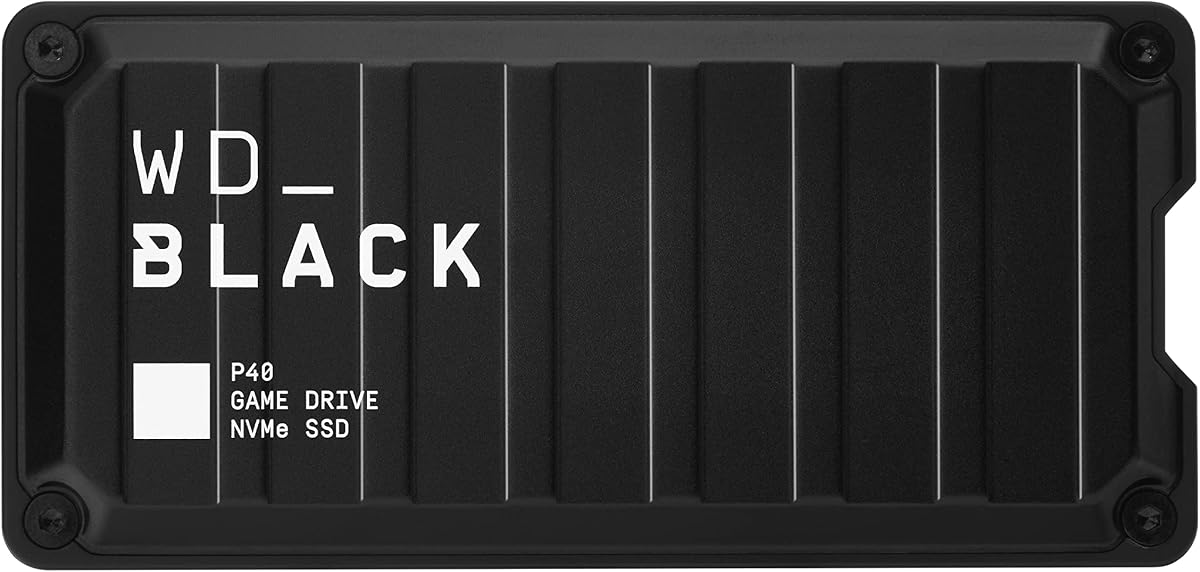
The Western Digital 1TB P40 earns a 4.6 rating and stands out as the fastest external SSD listed in this guide, with a claimed read speed of up to 2,000MB/s. That performance makes it particularly attractive for players who want quicker file movement while remaining within the familiar external-drive format.
We may earn a commission when you buy through this link, at no additional cost to you.
The drive uses a USB 3.2 Gen2x2 interface and is compatible with Xbox Series X|S, Xbox One, PlayStation 5, and PlayStation 4. Its compatibility details distinguish between playing and storing Xbox One games and archiving Xbox Series X|S games, so checking the current Xbox requirements for a particular title remains sensible. Customizable RGB lighting adds visual appeal, and the downloadable WD_BLACK Dashboard for Windows provides control over the lighting effect.
Its headline transfer rate depends on the host device, usage conditions, capacity, and other factors, as the product information explains. The Xbox's own connection and workload will therefore determine the experience rather than producing a constant 2,000MB/s result. In addition, 1TB of capacity is less generous than the 2TB, 4TB, and 6TB alternatives here. The drive is shock-resistant and described as capable of surviving a drop of up to two meters, adding reassurance for frequent transport.
The P40 is our Editor's Choice for players who place speed and customization at the top of their priorities. It offers a stronger performance case than conventional external hard drives while remaining more flexible than the console-specific C50. Choose it if your workflow involves regular transfers, a preference for RGB styling, and a need to use one portable drive across multiple compatible systems.
A claimed 2,000MB/s read rate places the P40 at the top of this roundup for speed. That makes it attractive for large modern installations and users who frequently reorganize their game library.
The customizable RGB system adds more personality than a plain enclosure. Windows users can adjust the effect through the WD_BLACK Dashboard to coordinate the drive with a gaming setup.
We may earn a commission when you buy through this link, at no additional cost to you.
The Lexar ES3 1TB carries a 4.4 rating and combines useful transfer performance with an unusually slim enclosure. At only 10.5mm thick and 42 grams, it is easy to carry between a console, laptop, phone, or camera without occupying much space in a bag.
We may earn a commission when you buy through this link, at no additional cost to you.
Its USB 3.2 Gen 2 interface supports read speeds up to 1,050MB/s and write speeds up to 1,000MB/s. The supplied information also lists compatibility with Xbox Series X|S, PS4, PS5, Android devices, iPhone 17-series models, laptops, and cameras. A USB-C cable is included for plug-and-play convenience, making the drive broadly useful beyond game storage.
DataShield 256-bit AES encryption software provides an added layer for users who also keep documents or other personal files on the drive. On the other hand, there is no game-specific lighting, sculpted Xbox styling, or dedicated console integration. Performance may also be lower when the connected Mac or other system does not support USB 3.2 Gen 2. The listed iPhone 17-series compatibility does not extend to iPhone 14 and older models, which is worth noting for mixed-device users.
The ES3 is a convincing recommendation for a buyer who wants a thin, versatile SSD that can serve both an Xbox and other devices. It offers enough speed for everyday game management and a more portable profile than many gaming drives. If the purchase is exclusively for a large Xbox library, however, a higher-capacity option may provide more room for a similar role.
At 42 grams and 10.5mm thick, the ES3 is designed to move easily between devices. Its slim enclosure and included USB-C cable suit users who want one small drive for console and computer storage.
DataShield 256-bit AES encryption software gives the drive value for work files, photographs, and backups. That makes the ES3 more versatile than a game-only accessory.
We may earn a commission when you buy through this link, at no additional cost to you.
The WD_BLACK 1TB C50 holds the highest rating in the roundup at 4.8 and offers the most deeply integrated approach to expanding an Xbox Series X|S. Rather than connecting through USB, this officially licensed storage expansion card fits into the console's dedicated expansion slot, making it feel like a native part of the gaming system.
We may earn a commission when you buy through this link, at no additional cost to you.
Microsoft licensing and optimization for Xbox Velocity Architecture are central advantages. The card supports Quick Resume, allowing players to move between suspended games with minimal delay, and its NVMe core is designed to reduce waiting and deliver fast access. Because the card is installed directly into the console, users avoid cable management and the physical placement of a drive beside the television or entertainment center.
This distinction also defines its limitations. The C50 is designed specifically for Xbox Series X|S, not as a portable drive for a PC, older console, or multiple devices. Its 1TB capacity may also feel modest for owners of a large collection of modern games, particularly as block-based titles continue to require substantial space. Because it is installed inside the console, portability is not a feature; another enclosure would be required to move the storage elsewhere.
The C50 is the premium recommendation for a Series X or Series S owner who values the cleanest possible integration. It is especially attractive for players who use Quick Resume and want storage to behave like an extension of the console rather than an external accessory. Buyers who need broad device compatibility or maximum capacity should instead focus on a USB external SSD or portable hard drive.
The C50 occupies the Xbox expansion slot and receives official licensing, making it the most integrated choice here. Games stored on the card can be treated as part of the console's own storage workflow.
Support for Quick Resume lets players switch among suspended games with less delay. This feature gives the expansion card a meaningful advantage over many conventional external storage devices.
We may earn a commission when you buy through this link, at no additional cost to you.
The Seagate 1TB Game Drive SSD has a 4.5 rating and targets Xbox owners who want a drive that visually and functionally belongs beside the console. Its 1TB of solid-state capacity provides a useful upgrade path for a console with limited internal storage, while the built-in green LED reinforces its game-center aesthetic.
We may earn a commission when you buy through this link, at no additional cost to you.
This model is designed for Xbox Series X|S, all generations of Xbox One, and Game Pass usage. That broad support makes it easier to move between console generations than some newer accessories that focus exclusively on the latest hardware. Seagate also includes three years of Rescue Data Recovery Services and a three-year limited warranty, providing a reassuring ownership package.
The main technical compromise is its USB 3.2 Gen 1 connection. It is still appropriate for moving and storing games, but it does not offer the headline transfer capability of USB 3.2 Gen 2 or Gen2x2 models. The available capacity can also vary according to the operating environment, so buyers should not assume that the nominal figure represents exactly 1TB of visible space. Its 1TB capacity is less suitable for owners who routinely install dozens of current-generation games.
The Seagate Game Drive SSD is a sensible recommendation for buyers who value Xbox-specific styling, broad console support, and solid-state responsiveness more than maximum transfer speed. It fits particularly well beside a Series X or Series S and is a straightforward choice for building an organized external library.
The enclosure and green illumination are designed to coordinate with an Xbox setup. It looks like a dedicated gaming accessory rather than a generic portable drive.
Three years of Rescue Data Recovery Services and a three-year limited warranty add useful protection. These services are especially relevant for a drive containing a valuable collection of installed games.
We may earn a commission when you buy through this link, at no additional cost to you.
The Samsung T7 1TB has a 4.7 rating and is one of the most refined general-purpose portable SSDs in the roundup. Its combination of compact construction, solid-state transfer performance, and broad compatibility makes it useful for console storage, computer backups, and high-resolution media.
We may earn a commission when you buy through this link, at no additional cost to you.
Using PCIe NVMe technology, the T7 reaches read and write speeds of up to 1,050MB/s and 1,000MB/s. Its USB 3.2 Gen 2 interface suits modern computers and consoles, although the advertised performance is not guaranteed across every host and workload. The product is also listed as supporting high-resolution recording, including 4K 60fps video workflows with compatible cameras and mobile devices.
Physical design is a major strength. The solid aluminum unibody construction gives the drive a premium feel, while shock resistance and fall protection up to six feet make it suitable for travel. Samsung produces its firmware and components in-house, which supports tighter control over the product stack. As with other 1TB drives here, the nominal capacity will not translate into exactly one trillion usable bytes.
The T7 is a strong recommendation for a buyer who wants a drive that performs well across many devices rather than one made exclusively for gaming. It lacks console-specific lighting and direct installation, but the understated enclosure can look at home beside a console, laptop, or monitor. Those seeking a larger game archive may prefer a 2TB external SSD, but the T7 provides a balanced package for mixed-use storage.
The T7 handles console storage, file transfers, backups, and high-resolution recording. That flexibility makes it a strong choice for a household that shares one portable SSD across different devices.
A solid aluminum unibody and protection against falls up to six feet provide confidence outside a desk. The compact design makes it easy to keep in a bag or carry between locations.
We may earn a commission when you buy through this link, at no additional cost to you.
The Western Digital 4TB P50 combines the high speed of the company's gaming SSD line with one of the largest solid-state capacities in this guide. Its 4.7 rating and 4TB capacity make it a compelling option for players who want fast transfers without limiting their external library to the 1TB or 2TB ranges.
We may earn a commission when you buy through this link, at no additional cost to you.
A claimed read speed of up to 2,000MB/s can reduce the waiting associated with moving large game installations. The drive uses a SuperSpeed USB 20Gb/s interface for compatible PCs and consoles. Performance will vary according to the connected host, usage conditions, and drive capacity, so the headline number should be treated as a maximum rather than a constant result.
The included cable is an 18-inch USB Type-A to Micro-B cable with a SuperSpeed interface rated up to 5Gbps, and the manufacturer notes that cable length may vary. That detail matters because interface and cable limitations can affect real-world transfers. The shock-resistant portable form factor is reassuring for regular travel, while the 4TB capacity offers enough room for large libraries, new releases, and older favorites.
The P50 is our recommendation for established game collectors who need substantial room and value speed. It is more specialized than a standard desktop SSD and more capacity-focused than the 1TB P40. If the budget comfortably supports it, the combination of storage volume and transfer performance reduces the need to split a large library across multiple devices.
A 4TB capacity is especially helpful for users who retain older titles and regularly add large releases. It reduces the frequency of archive management compared with smaller external SSDs.
The claimed 2,000MB/s read rate supports fast movement of substantial installations. The connected Xbox and other conditions will influence the result, but the interface provides a strong platform for speed.
We may earn a commission when you buy through this link, at no additional cost to you.
The Lexar 2TB ES3 provides a balanced alternative to smaller and faster-looking options. Its 4.5 rating, 2TB capacity, and transfer rates of up to 1,050MB/s read and 1,000MB/s write make it suitable for users who want more library space without committing to a 4TB premium model.
We may earn a commission when you buy through this link, at no additional cost to you.
The drive is positioned as 9.5 times faster than hard disk drives, according to the supplied product information. That comparison reflects the advantage of solid-state storage during file movement. A 2-in-1 USB-C and USB-A cable supports connection to PCs, Macs, tablets, and smartphones, helping the drive function as a general-purpose portable storage device.
Thermal management is handled through double-layer graphite sheets designed to conduct heat and keep the drive cool during fast transfers. It is also drop-resistant up to two meters, adding an important layer of protection for a device that may live near an entertainment center. Unlike the smaller 1TB ES3 listing, this product's supplied information does not explicitly state Xbox Series X|S compatibility, so potential buyers should confirm the current console requirements and drive formatting before purchase.
The 2TB ES3 is best for a buyer who values a practical balance of capacity, speed, and portability. It may be less immediately convenient for console-only use than a drive that advertises Xbox certification, but its broad device support is valuable for combined gaming, backup, and file-transfer tasks.
Two terabytes offers a practical middle ground between compact 1TB drives and larger 4TB models. It can hold a meaningful game collection while remaining easy to transport.
Double-layer graphite sheets help dissipate heat during high-speed activity. This thermal design supports more consistent use when moving large game files or working with other substantial media.
We may earn a commission when you buy through this link, at no additional cost to you.
The ADATA SE880 1TB is a compact, high-speed portable SSD with a 4.5 rating. It supports USB 3.2 Gen2 x2 and claims read speeds of up to 2,000MB/s, placing it alongside the fastest external drives in the guide while retaining a relatively simple, minimalist design.
We may earn a commission when you buy through this link, at no additional cost to you.
The product information specifically notes support for new-generation game consoles, making it a relevant option for expanding an Xbox Series X|S library. It also supports multiple operating systems, so the same drive can potentially serve computers and other compatible devices. Its lightweight and compact form factor is beneficial when storage needs to travel or when the drive is stored away between gaming sessions.
The supplied information does not provide detailed Xbox game-play, archiving, or storage behavior, so owners should verify current platform support before buying for a specific workflow. The 1TB capacity is also the smallest SSD capacity in this roundup and may require regular pruning of the game library. In addition, there is no game-specific lighting or special console integration to distinguish it from a general-purpose fast SSD.
The SE880 is a solid recommendation for users who prioritize speed, portability, and a restrained appearance. It is best suited to a manageable collection of games that can be moved between internal and external storage, rather than owners seeking to archive a very large library. It also serves buyers who want a fast portable SSD for more than one compatible platform.
The USB 3.2 Gen2 x2 interface and claimed 2,000MB/s read speed provide a strong foundation for quick file movement. A compact enclosure helps the performance-focused drive remain easy to carry.
Support for multiple operating systems and new-generation consoles makes the SE880 a flexible choice. The understated titanium-style housing suits both entertainment and work environments.
We may earn a commission when you buy through this link, at no additional cost to you.
The WD_BLACK 6TB P10 has a 4.7 rating and offers the largest storage capacity in the guide. Its 6TB of space can hold up to 150 games according to the product data, making it the leading option for a large archive of completed, older, or infrequently played titles.
We may earn a commission when you buy through this link, at no additional cost to you.
The drive is described as the world's first 6TB 2.5-inch portable hard drive. It uses a sleek metal top covering and a portable form factor designed to provide convenient access to a growing library. For Xbox Series X|S, it can play and store Xbox One games and archive Xbox Series X|S games, with comparable PlayStation 5 support for compatible PS4 titles.
Its listed speed of up to 130MB/s is the crucial limitation. This is dramatically lower than the transfer rates of the external SSDs included here, so installations and archive transfers can take considerably longer. The mechanical nature of the drive may also make it less suitable for users who want a direct-play experience with minimal loading delay. It works best as a high-capacity archive rather than a fast active game deck.
The P10 is the right recommendation for collectors who have already filled a smaller external drive and want the largest possible library. Its 6TB capacity can postpone frequent deletion while preserving access to an extensive game collection. For players prioritizing rapid transfers or direct launching, choose an SSD instead; for sheer archive volume, this is the standout option.
A stated capacity of up to 150 games gives the P10 a major advantage for extensive libraries. It is especially attractive to players who want to preserve older favorites while adding new releases.
Compatibility for storing Xbox One games and archiving Xbox Series X|S games supports a practical archive workflow. The lower transfer speed is the trade-off for gaining such a large capacity.
We may earn a commission when you buy through this link, at no additional cost to you.
The right Xbox storage solution depends on whether you value direct-play speed, deep console integration, portability, or the largest possible game archive. These factors help separate an internal expansion card, a conventional external SSD, and a portable hard drive.
Start by confirming that the drive is intended for Xbox Series X|S or Xbox One. Compatibility language matters: some products explicitly support playing and storing Xbox One games while archiving Xbox Series X|S titles, whereas others provide broad platform claims without the same detail. The WD_BLACK C50 is an officially licensed internal expansion card, while the Seagate Game Drives carry explicit Xbox-oriented compatibility. Reviewing the current listing and console guidance is important before formatting a drive or transferring a game.
Transfer speed affects how quickly large installations move between the console and external storage. The WD P40, P50, and ADATA SE880 list read speeds up to 2,000MB/s, while the Lexar ES3 and Samsung T7 reach up to 1,050MB/s. Real results depend on the host device, interface, workload, capacity, and other factors. Faster theoretical figures are useful, but the console's connection and the need to play directly from a drive can matter more than maximum benchmarks.
Capacity determines how much breathing room the drive provides. The choices here range from 1TB to 6TB. A 1TB drive is manageable for active titles but can fill quickly with large modern releases. The Seagate 2TB Game Drive and Lexar 2TB ES3 offer a middle ground, while the 4TB WD P50 and 6TB WD P10 are better suited to collectors. Account for formatting differences and the possibility that nominal capacity will not appear fully available.
An external SSD connects by USB and can often be moved between compatible devices. The WD_BLACK C50 occupies the console's dedicated card slot, providing deeper integration and Quick Resume support but remaining dedicated to Xbox Series X|S. A conventional external drive gives more placement flexibility, while the expansion card offers a cleaner internal-storage experience. Choose based on whether portability or native console behavior matters more.
Not every storage product supports the same playing experience. The 2TB Seagate hard drive explicitly states that games cannot be played directly from it and is intended for moving games into a Game Vault. Other external SSDs may support direct play depending on the model and Xbox requirements. If uninterrupted access to titles on the drive is important, verify that function before buying rather than assuming every external drive behaves like internal storage.
Consider the dimensions, weight, cable arrangement, and materials. The Lexar ES3 1TB is only 10.5mm thick and weighs 42 grams, making it particularly easy to carry. Gaming models such as the WD P40 and Seagate Game Drives emphasize distinctive styling or LED lighting. The C50 must be installed inside the console, while portable hard drives require a nearby connection and sufficient space for the enclosure.
Look for documented drop resistance, sturdy construction, warranty coverage, and recovery services where possible. The Samsung T7 lists fall protection up to six feet, the WD P40 and Lexar ES3 are described as resistant to two-meter drops, and the Seagate Game Drives include Rescue Data Recovery Services. These details add confidence when the drive holds a large or difficult-to-recreate game collection.
Appearance can matter in a visible entertainment setup. The WD P40 includes customizable RGB lighting controlled through the Windows WD_BLACK Dashboard, while the Seagate Game Drives use a built-in green LED bar. The C50 prioritizes functional console integration, and the Samsung T7, Lexar ES3, and ADATA SE880 use more restrained designs. Choose a look that complements the console area while considering whether lighting software or extra cables create unnecessary complexity.
Before transferring games, check the drive's Xbox compatibility and connect it using the specified interface and cable. Allow the console to recognize the new drive, follow the on-screen formatting prompts, and avoid interrupting the process. A first-time setup can take a little time because the console may need to prepare the storage for game management.
Organize games by frequency of use rather than filling the fastest drive with every title. Keep recently played games on the console's internal storage, place occasional titles on the external device, and remove duplicates when necessary. Allow large transfers to finish before moving the drive or disconnecting the cable, and do not unplug a drive during an active game update.
For a portable drive, handle the enclosure carefully and keep it away from moisture, extreme heat, and impact. When moving it to a different computer, safely eject it first. If the drive contains a large collection, maintain a separate backup of irreplaceable personal files and use the included recovery or encryption features where appropriate. Periodically check the console's storage settings for any errors or required updates.
Yes. Compatible external storage can expand the games available on an Xbox Series X or Series S, while an officially licensed internal card acts as native console expansion. The exact functions vary by device, so check whether the listing supports playing games directly, storing Xbox One games, or archiving Xbox Series X|S games. Confirm current Microsoft guidance before formatting a drive.
The C50 is better if your priority is seamless Xbox integration and Quick Resume support. It installs inside the console and is officially licensed for Series X|S. A USB external SSD is better if you want portability, broader device compatibility, or the ability to move between console generations. The C50 also cannot be used as a conventional portable drive without additional hardware.
No. Support varies by product and platform. The Seagate 2TB Game Drive explicitly states that games cannot be played directly from the external hard drive and is intended as a Game Vault. Other compatible SSDs may allow direct play, but buyers should confirm the drive and game requirements before moving a title they expect to launch immediately.
It can be enough for a selective collection, especially when recent games remain on the console's internal storage. However, modern game installations can consume space quickly, so 2TB or more is usually more comfortable. A 4TB or 6TB external drive makes more sense for collectors who intend to preserve a large archive rather than rotate active titles.
A faster drive can make file transfers quicker and may improve performance when games are accessed directly, but it cannot change the speed of the console's internal storage. Direct-play behavior also depends on the drive's compatibility and Microsoft's requirements. Transfer speed and loading performance should therefore be considered as related but distinct benefits.
USB 3.2 Gen 2 or Gen2x2 provides a strong foundation for transfers, while older USB 3.0 and Gen 1 interfaces remain usable for storage workflows. The host device and included cable can limit the result. Always use the cable specified or recommended for the drive and verify the console's current external-storage guidance.
Choose an external SSD when transfer speed, low latency, and direct access are important. Choose a portable hard drive when maximum capacity and economical archiving matter more than speed. The 6TB WD P10 is ideal for a large archive, while the WD P40, Lexar ES3, and Samsung T7 are better suited to active and portable game storage.
Connect the compatible drive, let the Xbox detect and format it, and then use the console's storage interface to transfer or move eligible titles. Keep the console and drive connected until each transfer finishes, and avoid unplugging the device during updates. Before beginning a large transfer, confirm that the selected game supports the intended storage mode.
The Lexar ES3 1TB is the most balanced budget-oriented choice for buyers seeking a compact SSD, while the WD P40 earns the Editor's Choice for its high claimed speed, RGB customization, and broad compatibility. The WD_BLACK C50 stands apart as the premium option because it installs directly into the console and supports Quick Resume.
Prioritize the storage type that matches your habits. Choose the C50 for native integration, a fast external SSD for transfers and portability, or a high-capacity portable hard drive for archiving an extensive collection. Capacity, direct-play support, interface generation, and physical design should be evaluated together rather than by headline speed alone.
Finally, check the current product listing, console software guidance, and available price before buying. Ratings, firmware, compatibility details, and prices can change, so the information in this guide is a starting point rather than a substitute for checking the latest listing.