
ScreenBeam ECB7250K02
4.4Editor score
2.5Gbps MoCA connection
Two adapters and splitters
Sixteen-node network support
Our Moca 2.5 Adapters for Ethernet over Coax guide compares 10 kits for speed, wired reach, compatibility, setup ease, and dependable whole-home networking.
Moca 2.5 adapters turn compatible coaxial wiring into a wired Ethernet backbone, helping homes extend high-speed internet beyond the router without opening walls. The right model depends on port speed, existing coax layout, ISP equipment, and the number of rooms or devices that need a stable connection.
We compared the listed kits by examining advertised link speed, Ethernet port capacity, included components, PoE support, compatibility requirements, and ease of expansion. The guide includes two-adapter bundles, single adapters, add-on units, and a 1 Gbps option alongside several 2.5 Gbps choices.
Each review shows what makes the adapter distinct, while the comparison table helps narrow the field quickly. Ratings and specifications can change over time, and market conditions affect availability and pricing, so verify the current listing, your coax configuration, and your provider's requirements before purchasing.
4.4Editor score
4.6Editor score

4.4Editor score
The comparison below highlights each kit's port speed, packaging, installation requirements, and standout capability, making it easier to identify the right adapter for your coax network and connected equipment.


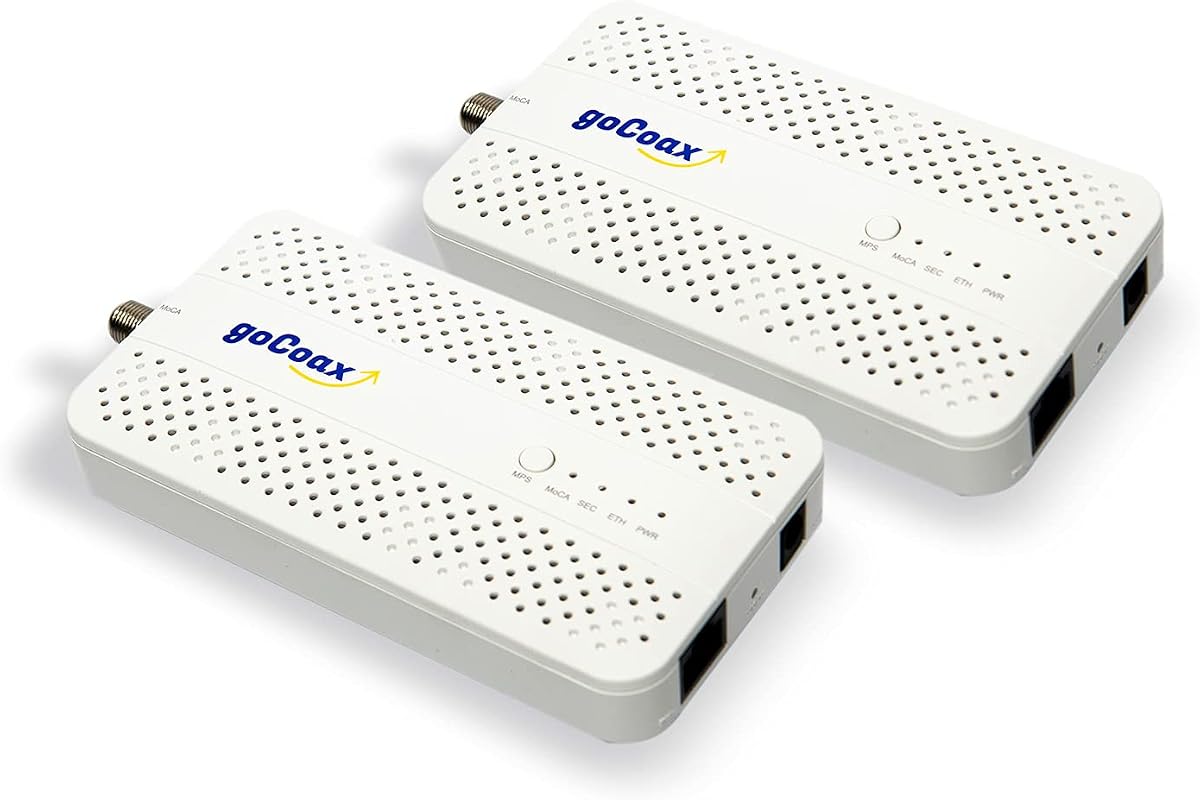
The goCoax MA2500D 2-Pack combines MoCA 2.5 performance with dedicated 2.5GbE Ethernet ports and earns a 4.6 rating. It is designed for households that want a dependable wired backbone rather than relying on Wi-Fi alone. The two-adapter format provides a straightforward way to connect a router to a remote room, while the high-speed ports suit gaming, streaming, file transfers, and demanding smart-home equipment.
We may earn a commission when you buy through this link, at no additional cost to you.
The kit includes two adapters, Ethernet cables, coax cables, and power adapters. That makes it more complete than a simple add-on listing and reduces the chance of discovering that additional wiring accessories are still needed. According to the product information, the adapters auto-configure in seconds and can work alongside an existing modem, router, and cable television service. They are also compatible with other MoCA adapter brands, which gives the network useful flexibility.
The principal caveat is environmental rather than feature-related. MoCA requires coax outlets linked through a central splitter, and the system is not compatible with satellite television wiring or AT&T U-verse. A MoCA PoE filter is also recommended for optimal performance and security, but it is not included. Users should verify their wiring and, where relevant, ask their cable provider about the appropriate filter before installation.
This is the strongest general recommendation for a home seeking fast, stable Ethernet over existing coax. It combines a high rating, 2.5GbE connectivity, a complete bundle, and broad compatibility in one package. Choose the 2-pack when you have two locations to connect or want a ready-to-install first link, then add compatible single units if the network must grow.
The dedicated 2.5GbE port gives each adapter useful headroom for modern networks. This is particularly helpful for gaming consoles, computers, smart televisions, network storage, and other equipment that benefits from a stable wired connection.
Both adapters and the essential connection cables are included, so one unit can be placed near the router and the other near the intended Ethernet device. Additional compatible adapters can extend the same MoCA network to more rooms.
We may earn a commission when you buy through this link, at no additional cost to you.
The ScreenBeam ECB7250K02 is a two-adapter MoCA 2.5 starter kit with a 4.4 rating. It offers 2.5Gbps Ethernet ports while including two power adapters, two Ethernet cables, two coax cables, two coax splitters, and a quick-start guide. That broad package makes it a practical entry point for creating an Ethernet-over-coax link without assembling the basic accessories separately.
We may earn a commission when you buy through this link, at no additional cost to you.
The adapter is positioned as a faster, more reliable alternative to Wi-Fi in rooms where running new Ethernet is inconvenient. It can connect routers, switches, gaming consoles, computers, televisions, and remote Wi-Fi access points. The network can support up to 16 nodes, and the Ethernet side remains compatible with 10/100/1000 Mbps connections when connected hardware does not support 2.5Gbps.
Compatibility deserves careful attention. Some DOCSIS 3.1 modems can create frequency-overlap issues and random disconnections, so the listing recommends checking with the internet service provider. It also states that certain Comcast gateway configurations support only MoCA 2.0 and that MoCA should be turned off in the gateway to take full advantage of the ECB7250 adapters. Satellite television, AT&T internet, and AT&T U-verse wiring are excluded.
This kit is a sensible value choice for buyers who want MoCA 2.5 and 2.5Gbps ports without paying for a specialized feature they will not use. It is especially useful for a gaming room, home office, entertainment center, or any area where Wi-Fi performance is problematic. Confirm gateway and modem compatibility before ordering, and use the included splitters as part of the planned coax topology.
The inclusion of cables, power supplies, splitters, and instructions makes this more convenient than buying individual adapters. It is well suited to creating one complete router-to-room connection or two linked endpoints.
Remote access points can be connected through the MoCA network, helping extend wireless coverage through hard-to-reach areas while preserving a wired path from the main router.
We may earn a commission when you buy through this link, at no additional cost to you.
The Hitron MoCA 2.5 2-Pack carries a 4.4 rating and emphasizes straightforward compatibility assessment. It uses 1Gbps Ethernet ports, making it better suited to standard gigabit networks than to users who need more than 1Gbps. Its strengths are the detailed wiring guidance, included accessories, and free technical support, which can be valuable when troubleshooting home coax configurations.
We may earn a commission when you buy through this link, at no additional cost to you.
The two-pack includes two adapters, Ethernet cables, coax cables, power adapters, and a setup guide. The listing is unusually explicit about what the product can and cannot do. It works with cable internet, fiber, DSL, and other services when coax outlets are interconnected through a central splitter. It is not a modem or router and therefore must operate with an existing internet connection and router.
The most important limitation concerns legacy wiring. AT&T U-verse uses HPNA and is incompatible, while satellite installations may have isolated or disconnected coax runs that remain in place even after the service changes. Cable users with a high-split DOCSIS 3.1 or DOCSIS 4.0 modem may need a point-of-entry MoCA filter. Fiber and DSL users do not need that filter. These distinctions make checking the home's wiring before purchase essential.
This adapter is a good choice for households with confirmed interconnected coax and a need for reliable gigabit Ethernet. It may be the better fit for users who value support and careful compatibility instructions more than multi-gig performance. If your internet service or devices regularly exceed 1Gbps, the 2.5Gbps Hitron alternative offers more relevant headroom.
The product information offers useful checks, including whether traditional cable outlets previously worked simultaneously and whether the coax remains connected to a central splitter. This can prevent a purchase that cannot work with the home's existing infrastructure.
Free technical support is included, which is useful for separating adapter problems from common wiring issues. Support is particularly valuable when MoCA must coexist with a high-split cable modem or an unfamiliar coax arrangement.
We may earn a commission when you buy through this link, at no additional cost to you.
The single goCoax MA2500D provides the same 2.5GbE adapter platform as the two-pack, making it useful for expanding an existing MoCA network one location at a time. It has a 4.4 rating and includes a coax cable, Ethernet cable, and power adapter. Although the unit itself is complete, at least two MoCA adapters are required to create a network.
We may earn a commission when you buy through this link, at no additional cost to you.
This option is ideal for a buyer who already owns one compatible adapter or who plans to build a room-by-room network. The 2.5GbE port can serve a computer, television, console, network storage device, or wired access point. goCoax states that its adapters work with other brands, so a mixed-brand network can be used where compatible MoCA standards are supported.
The same infrastructure requirements apply as with the larger kit. Coax outlets must be connected through a splitter, and satellite television and AT&T U-verse systems are not supported. A MoCA PoE filter is recommended at the cable entry point but is sold separately. Purchasing a single unit without confirming these requirements can leave the buyer with an adapter that has no usable connection path.
Choose this model when your existing network already has a MoCA endpoint or when you need only one additional room. It provides the same high-speed port and broad device support as the two-pack without buying duplicate equipment. For a first-time installation, however, the goCoax two-pack is the more complete and less confusing route.
A single adapter is convenient when the main network location is already equipped. Purchase another compatible unit only for the specific remote location that needs a wired Ethernet connection.
The 2.5GbE port can provide a high-capacity link to compatible equipment, making the unit relevant to fast storage, modern gaming systems, and high-resolution streaming devices.
We may earn a commission when you buy through this link, at no additional cost to you.
The Hitron HTEM5 2-Pack offers 2.5Gbps Ethernet connections through existing coax and has a 4.3 rating. It is designed for homes with an active, interconnected cable network or compatible fiber installation. The package includes two adapters, two coax cables, two Ethernet cables, two power adapters, and a quick-start guide.
We may earn a commission when you buy through this link, at no additional cost to you.
The kit provides more throughput headroom than the 1Gbps Hitron option, which makes it relevant for multi-gig internet plans, high-speed local storage, and demanding connected devices. It remains a network adapter rather than a modem, router, or Wi-Fi system, so an existing router and internet connection are required. The product information says actual performance depends on the internet plan and network conditions.
Compatibility is strict in several areas. The HTEM5 does not work with AT&T Fiber because of signal interference, and it cannot operate through cut or isolated coax runs commonly left by satellite installations. Round screw-on coax connectors are required, not satellite F-connectors. A POE filter may also be necessary in a high-split DOCSIS cable system, although the filter is not included.
This is a well-balanced choice for a two-location network needing more than 1Gbps ports. Its clear distinctions between network adapters and internet service equipment reduce confusion, while included cables and support simplify installation. Confirm the wiring and provider before buying, then place one adapter near the router and the other at the intended Ethernet endpoint.
The 2.5Gbps port distinguishes this kit from common 1Gbps adapters. It can take advantage of faster local transfers and appropriately sized internet connections when the router, service, and endpoint equipment also support them.
The bundle contains the accessories needed for a basic link, including both cables and both power supplies. It is a practical starting point for a remote gaming, office, or entertainment room.
We may earn a commission when you buy through this link, at no additional cost to you.
The ScreenBeam ECB6250K02 is a two-pack with 1Gbps Ethernet ports and a 4.4 rating. It targets users who want the convenience of a MoCA 2.5 wired network but do not require multi-gig local throughput. The package includes two ECB6250 adapters, power adapters, Ethernet cables, coax cables, coax splitters, and a quick-start guide.
We may earn a commission when you buy through this link, at no additional cost to you.
For many homes, the 1Gbps port remains a practical match for internet access, 4K streaming, gaming, and remote work. The adapters can connect Ethernet-enabled equipment and remote wireless access points, while the MoCA network can support as many as 16 nodes. Devices limited to 10/100 Mbps can still be used because the Ethernet side is backwards compatible.
The listing gives clear warnings about DOCSIS 3.1 frequency overlap, random disconnections, and the need to consult the internet provider. It also notes that satellite television, AT&T internet, and AT&T U-verse coax networks are not compatible. Comcast gateway configuration may need to be adjusted because the gateway itself supports MoCA 2.0 rather than the full MoCA 2.5 capability of these adapters.
Choose the ECB6250K02 for a standard gigabit connection and straightforward expansion. It is especially attractive when a complete two-adapter bundle is preferred and the internet plan does not exceed 1Gbps. For local transfers or future multi-gig requirements, the ScreenBeam ECB7250 alternative offers a faster Ethernet port, but both depend on compatible coax wiring and provider equipment.
A 1Gbps Ethernet port is sufficient for many streaming, gaming, and office devices. It also keeps the product straightforward for users who do not need a 2.5GbE connection or PoE capability.
Two splitters are included alongside the adapters, cables, and power supplies. This reduces the number of separate accessories a first-time buyer must identify before setting up the network.
We may earn a commission when you buy through this link, at no additional cost to you.
The TRENDnet TMO-312C is a single MoCA 2.5 Ethernet-over-coax adapter with a 4.3 rating. It has an F-type female coax input and one RJ-45 Gigabit LAN port, making it a practical choice for extending a wired network to a single room or adding an endpoint to an existing compatible MoCA installation.
We may earn a commission when you buy through this link, at no additional cost to you.
Its compact, lightweight housing is suitable for a desktop, entertainment center, or other space where a larger unit would be inconvenient. Installation requires no configuration: the adapter uses existing coax to carry network traffic and presents a familiar Ethernet connection. It is backwards compatible with MoCA 2.0, 1.1, and 1.0 standards, which can help when building a mixed-generation network.
The adapter supports up to 16 nodes on one network and is marketed for streaming, gaming, clear video, and working from home. Compatibility limitations include DirecTV, Dish Network, AT&T U-verse, and other non-MoCA-compliant services. As with other products in this category, the home's coax outlets need to form a usable connected network rather than isolated runs.
The TMO-312C is best for buyers who want a compact, single unit with manufacturer support rather than a large starter bundle. It includes three years of TRENDnet manufacturer protection and access to English-language technical support during normal business hours. If a complete two-location installation is the goal, the matching two-pack may be more convenient.
The compact design is useful around entertainment centers and workstations where cable management matters. It provides a full Gigabit LAN connection without the footprint of a larger router or gateway.
Support for MoCA 2.0, 1.1, and 1.0 makes the adapter relevant to homes with mixed equipment. Check provider settings and coax topology before adding it to an existing network.
We may earn a commission when you buy through this link, at no additional cost to you.
The TRENDnet TMO-313C2K combines two 2.5Gbps Ethernet-over-coax adapters in a single package. With a 4.5 rating, it stands out for delivering multi-gig wired ports in compact housings. Each adapter uses an F-type female coax interface and one 2.5GBASE-T RJ45 port, allowing compatible devices to connect through the home's existing coax.
We may earn a commission when you buy through this link, at no additional cost to you.
The kit is designed to create a more reliable wired network for a router, gaming console, computer, television, or wireless access point. MoCA 2.5 technology is presented as improving packet error handling and lowering latency, which supports consistent 4K video, streaming, and gaming. The network can support up to 16 nodes, and the adapters are backwards compatible with MoCA 2.0, 1.1, and 1.0.
The same broad service exclusions apply: DirecTV, Dish Network, AT&T U-verse, and other non-MoCA-compliant services are not supported. No configuration is required, but the coax network must be suitable for MoCA operation. The listing focuses on the two adapters and their interfaces, so buyers should also confirm that suitable power and connection cables are available in the package or at hand.
This two-pack is a strong alternative for users who want 2.5GbE and prefer TRENDnet's compact design. It is especially relevant to households creating a wired backhaul for remote access points or connecting performance-oriented devices in two separate rooms. Compare it with the goCoax 2-pack when included accessories, PoE needs, and provider support are decisive.
The multi-gig port delivers additional local-network headroom without requiring a large converter. Its small housing is suitable for entertainment furniture, office desks, and network cabinets.
Two matched adapters provide the foundation for a router-to-room connection. The same MoCA network can be expanded with additional compatible adapters as coverage needs grow.
We may earn a commission when you buy through this link, at no additional cost to you.
The PowerBridge KB-M3-03 is the most specialized product in this guide, combining a 2.5G Ethernet port with IEEE 802.3at PoE+ capable of delivering up to 30W. It carries a 4.4 rating and includes two PowerBridge adapters. That combination makes it a strong choice for access points, IP cameras, and VoIP phones that can receive both network data and power over one Ethernet cable.
We may earn a commission when you buy through this link, at no additional cost to you.
The kit's appeal is particularly clear in a larger home or small office where installing a local power outlet beside every network device would be inconvenient. A Wi-Fi 6E or Wi-Fi 7 access point, high-resolution surveillance camera, or compatible VoIP phone can be connected to the adapter's Ethernet port. The coax side carries the network link, while the Ethernet side provides data and PoE power.
As a MoCA 2.5 product, the kit supports high-speed links up to 2.5Gbps and is intended to work with most MoCA 2.0 and 2.5 devices, Ethernet-enabled smart-home equipment, mesh systems, and compatible internet providers. Satellite television is excluded. Plug-and-play installation is advertised, though the usual requirement for usable interconnected coax wiring still applies.
This is the premium choice when PoE+ eliminates a separate power cable or supports equipment that cannot conveniently use a nearby outlet. Buyers whose devices do not require PoE may get better value from a standard 2.5Gbps two-pack. For access-point and camera installations, however, the integrated 30W PoE+ makes the KB-M3-03 notably more versatile.
The integrated PoE+ output can power compatible devices through the Ethernet connection. This is especially helpful for ceiling-mounted access points and cameras in locations where adding a power outlet would be difficult.
The kit is specifically aimed at Wi-Fi 6E and Wi-Fi 7 access points, making it relevant to users building a modern whole-home wireless system over coax. The 2.5G port also accommodates high-bandwidth wired backhaul requirements.
We may earn a commission when you buy through this link, at no additional cost to you.
The ScreenBeam ECB7250S02 is a single add-on adapter for extending an existing MoCA network, with a 4.4 rating. It has a 2.5Gbps Ethernet port and is designed for a room that already has a coax outlet but needs another endpoint. Users can connect it to compatible Ethernet equipment or use it for a remote wireless access point.
We may earn a commission when you buy through this link, at no additional cost to you.
The package includes one ECB7250 adapter, one power adapter, two Ethernet cables, one coax cable, one coax splitter, and a quick-start guide. Because it is an add-on rather than a complete starter pair, it is most useful when another MoCA adapter or MoCA-capable router already anchors the network. Full speed requires compatible 2.5Gbps devices, while 10/100/1000 Mbps equipment remains supported.
The product's compatibility guidance is detailed. The network needs built-in or added MoCA capability, each room requires coax connectivity, and some DOCSIS 3.1 modems may cause frequency overlap and random disconnections. Satellite television, AT&T internet, and AT&T U-verse are excluded, and certain Comcast gateway configurations may need MoCA disabled.
This is a convenient way to add one room without purchasing another complete two-adapter kit. It is particularly useful for expanding coverage gradually, connecting a second entertainment center, or adding a wired access point. Confirm that your existing endpoint supports compatible MoCA 2.5 operation and that the new outlet belongs to the same connected coax network before ordering.
The add-on format is ideal when a working MoCA connection already exists. It adds a 2.5Gbps Ethernet endpoint in another room without requiring the buyer to assemble a second complete starter kit.
The Ethernet port supports 10, 100, 1000, and 2.5Gbps devices, so the adapter can serve both older network hardware and newer multi-gig equipment. A coax splitter is included to support the connection arrangement.
We may earn a commission when you buy through this link, at no additional cost to you.
A useful MoCA purchase begins with the home's wiring and service provider, then narrows to port speed, network size, included accessories, and specialized features such as PoE+. Reviewing these factors first helps avoid an otherwise capable adapter becoming unusable or unnecessary.
MoCA requires coax outlets to be interconnected through a central splitter. A room may have a coax connector yet still sit on an isolated run that cannot communicate with the other outlets. Traditional multi-outlet cable television wiring is a useful indication that the network may be suitable, especially when several outlets worked at the same time.
Prioritize a connected splitter network and avoid satellite or U-verse installations unless the current provider confirms that the wiring was reconnected.
The modem or gateway can affect MoCA operation even when the adapter itself is compatible. Some DOCSIS 3.1 modems create frequency overlap, while certain Comcast gateways support only MoCA 2.0 and require their own MoCA function to be disabled. AT&T U-verse uses conflicting HPNA technology, while the listed Hitron HTEM5 additionally excludes AT&T Fiber.
Check with the internet provider before ordering and ask whether a specific gateway setting, firmware update, or point-of-entry filter is required.
The Ethernet port establishes the maximum local wired throughput, subject to the router, service, cable, and endpoint equipment. A 1Gbps adapter is sufficient for many ordinary home networks, while a 2.5GbE port adds headroom for faster local transfers, high-bandwidth storage, and appropriately sized internet connections.
Choose 2.5GbE when the router and connected devices support it; otherwise, a 1Gbps adapter may meet the same needs with a simpler configuration.
At least two MoCA endpoints are generally required for a non-MoCA router, while a compatible router may act as one endpoint. A two-pack is usually the simplest complete kit for connecting a router to one remote room. Additional rooms each need another adapter, and a network may support up to 16 nodes according to the listed products.
List every room that needs wired connectivity before buying, then select a two-pack or a combination of starter kits and add-on units that matches the count.
A complete kit may include coax cables, Ethernet cables, power adapters, splitters, and setup instructions. The ScreenBeam starter kits are notably comprehensive, while the goCoax two-pack also includes its principal connection accessories. A single adapter is better treated as an expansion component unless another compatible endpoint already exists.
Compare the package contents with the equipment already at hand so that essential cables, power supplies, and splitters are not overlooked.
PoE+ allows a compatible device to receive power and network data through one Ethernet connection. This is valuable for Wi-Fi 6E or Wi-Fi 7 access points, IP cameras, and VoIP phones located where a nearby outlet is inconvenient. The PowerBridge KB-M3-03 provides up to 30W through its 2.5G Ethernet port, while the other listed adapters focus on conventional network connectivity.
Select a PoE+ model when the endpoint explicitly supports it and cabling a separate power supply would be difficult; otherwise, a standard adapter may provide better value.
Cable users with certain high-split DOCSIS 3.1 or DOCSIS 4.0 modems may need a MoCA point-of-entry filter. Such filters are generally not included in these kits, although the goCoax listings recommend one for optimal performance and security. Fiber and DSL users generally do not need the same filter, while U-verse remains incompatible for technology reasons.
Determine the service type and modem generation early, then include any required filter in the installation plan and overall purchase.
A wired MoCA network can connect computers, televisions, consoles, storage devices, switches, and wireless access points. Remote access-point use is especially useful for reducing dependence on Wi-Fi in distant rooms. Higher port speeds matter most when the connected device, switch, router, and local workload can all support them.
Design the network around the endpoint's purpose rather than maximum headline speed alone, and retain adapters that support the entire planned chain of equipment.
Begin by mapping the coax outlets and confirming that they connect to a central splitter. Ask the internet provider whether the modem or gateway supports MoCA, whether any settings must be changed, and whether a point-of-entry filter is required. Do not connect the adapters until the service provider's guidance is understood, especially in homes that previously used satellite television or AT&T U-verse.
Place one adapter near the router and connect it to the router with an Ethernet cable. Connect the second adapter to the target device with another Ethernet cable, then attach each adapter to an appropriate coax outlet. Power both units and allow the MoCA network to form. Test the wired connection with the target device, and confirm that it receives an address and can reach the internet before adding more rooms.
For expansion, add one compatible adapter and one Ethernet connection for every new endpoint. Install a PoE filter where required, keep cables strain-free, and avoid placing adapters in enclosed or excessively hot locations. If a connection is unstable, check the coax path and provider settings before changing equipment. Regular firmware updates through the relevant provider or manufacturer can help maintain compatibility.
A Moca 2.5 adapter carries Ethernet traffic over compatible coaxial wiring, allowing a home to extend a wired network without running new Ethernet cables through walls. One adapter typically connects near the router and another connects near a remote device. It can also provide a wired backhaul for a wireless access point.
Most installations need two endpoints when the router does not have built-in MoCA. A two-pack provides one adapter for the router side and another for the remote room. If the router already supports compatible MoCA, a single add-on adapter may be enough for the first remote endpoint.
The products in this guide are not compatible with DirecTV, Dish Network, and other satellite television systems. Satellite installations often cut or isolate coax runs, meaning a connector may exist even though the outlets cannot communicate. Ask the current provider to verify whether the home's coax was reconnected into a shared network.
AT&T U-verse is not compatible because it uses HPNA technology that conflicts with MoCA. The listed Hitron HTEM5 also states that AT&T Fiber is incompatible due to interference. Other providers and service types may work, but the specific modem, gateway, and coax configuration should always be checked first.
The primary difference is the maximum Ethernet throughput each adapter can provide to a connected device. A 1Gbps adapter is adequate for many home internet, streaming, and gaming needs. A 2.5GbE adapter offers more headroom for faster local transfers and compatible high-bandwidth equipment.
No. Moca adapters are network adapters, not modems or routers. They extend an existing internet connection through coax and still require a functioning modem, router, and internet subscription. Their Ethernet ports connect that existing network to remote rooms or devices.
A point-of-entry MoCA filter is installed where the main coax service enters the home. It can prevent interference between MoCA traffic and certain high-split DOCSIS cable modems, supporting reliable operation and network separation. It is particularly relevant for compatible cable internet installations, while it is generally unnecessary for fiber and DSL.
Yes. A MoCA adapter can provide the wired Ethernet connection between the router and a remote wireless access point. This arrangement helps avoid relying entirely on a wireless link across the home and can improve the access point's placement flexibility, provided the coax outlet is part of the interconnected network.
The goCoax MA2500D 2-Pack is the most balanced overall recommendation because it combines 2.5GbE ports, a complete accessory package, broad device support, and a strong rating. The ScreenBeam ECB7250K02 stands out as the value-oriented starter kit, while the PowerBridge KB-M3-03 is the specialized premium option for installations that need integrated 30W PoE+.
Prioritize compatibility before features. Confirm that the coax outlets are interconnected, that the service is not excluded, and that the modem or gateway can cooperate with MoCA. After that, match the port speed to the router and endpoint, count the number of adapters required, and determine whether a PoE+ adapter would eliminate a separate power installation.
Ratings, bundle contents, and market conditions can change, so review the current listing before buying. Most importantly, verify the home's wiring and provider requirements at the same time as the product, because those factors can determine whether even a high-performance Moca 2.5 adapter can create the intended Ethernet-over-coax network.