
Lenovo Digital Pen 2
4.3Editor score
4,096 pressure sensitivity levels
Customizable dual side buttons
Sleek 17.3-gram metal design
This Pressure Sensitive Stylus guide compares pen pressure, compatibility, palm rejection, battery design, and device support for artists, students, and
A pressure sensitive stylus can make handwriting, sketching, and photo editing feel more natural by varying line width according to the force applied. A capable pen also needs accurate tracking, a comfortable tip, dependable compatibility, and controls that suit the device and apps you regularly use.
We compared the listed styluses using their documented pressure levels, connection methods, supported devices, palm-rejection behavior, battery requirements, shortcut options, and physical design. The list covers audio-jack and USB-C SonarPen models, a Windows-focused Lenovo pen, an iPad-focused Metapen, and a basic capacitive alternative.
Each review explains the features that distinguish the product and identifies the users most likely to benefit from it. Ratings reflect the supplied customer feedback, while compatibility claims and feature limitations come from the product information. Current prices and availability can change at any time.
4.3Editor score

4.0Editor score

3.6Editor score
The table below compares all ten products by pressure support, connection method, device compatibility, and the most important convenience features. It also highlights which options are true active pens and which are basic capacitive styluses that do not provide pressure response.




The Metapen A8 carries a 4.4 customer rating and stands out as a polished, rechargeable pen for compatible iPads. Its metal barrel, palm rejection, magnetic attachment, and fast USB-C charging make it appealing for handwriting, notes, sketching, and everyday tablet navigation, although the supplied information does not list pressure sensitivity.
We may earn a commission when you buy through this link, at no additional cost to you.
Charging is designed around convenience. A full charge takes 30 minutes and can deliver up to 10 hours of use. The indicator changes color to show battery status, while automatic shutdown after five minutes of inactivity helps conserve energy. A short charge also provides usable runtime, making the pen practical for workdays, classes, and travel.
The aluminum barrel is a meaningful departure from many inexpensive plastic styluses. According to the product information, it has a 200 MPa flexural strength, is designed to survive repeated drops, and is more wear-resistant than plastic. The tips have passed a stated durability test, and the package includes an installed nib and a spare replacement nib.
This is not a pressure sensitive stylus despite its broader relevance to tablet users. It also has model-specific limitations, particularly because older iPads, iPhones, Android devices, and Microsoft devices are excluded, and several newer models do not support magnetic attachment. Choose the A8 for a compatible iPad when rechargeability, palm rejection, and physical durability matter more than graduated stroke pressure.
The USB-C charging system supports a full charge in 30 minutes and up to 10 hours of use. Color-changing battery indicators and inactivity shutdown help make charging needs easier to monitor between sessions.
The aluminum barrel offers a firm, premium-feeling grip and greater wear resistance than plastic. Replaceable tips and a stated impact-resistance design support continued use by students and active creators.
We may earn a commission when you buy through this link, at no additional cost to you.
The black SonarPen has a 4.0 rating and is the most versatile pressure-sensitive option in this guide. It uses the device's audio jack for both connectivity and power, eliminating charging, Bluetooth pairing, and the need to manage an internal stylus battery while retaining pressure control, palm rejection, and a shortcut button.
We may earn a commission when you buy through this link, at no additional cost to you.
Pressure sensitivity allows the user to control strokes by varying hand force, which is useful for sketching, handwriting, annotation, and precision work. Palm rejection allows the hand to rest naturally on the screen, reducing the awkward hovering posture that can cause fatigue during longer sessions. The shortcut button can be assigned to frequently used functions.
Its main compromise is the connection method. Devices without a compatible headphone or audio-jack connection will need an appropriate adapter, and some modern phones no longer include a physical port. The pen also manages its attached cable, and the bundled adhesive holder provides a convenient place to keep it against a device.
This SonarPen is a strong recommendation for a user who values a genuine pressure response and broad support for iPad, iPhone, Android, Chromebook, Windows notebooks, tablets, and Switch systems. It is especially practical for anyone tired of charging active pens or pairing them over Bluetooth. Confirm the compatibility guide and your device's available connection before ordering.
The audio-jack design lets the host device supply power, so the stylus does not need routine recharging. That also removes Bluetooth pairing from the setup process and makes the pen convenient for travel.
Palm rejection lets the writing hand settle on the display instead of hovering. Combined with pressure control and a shortcut button, it supports a more natural, productive workflow for extended digital work.
We may earn a commission when you buy through this link, at no additional cost to you.
The Lenovo Digital Pen 2 has a 4.3 rating and offers the highest documented pressure resolution in the group, with 4,096 pressure levels. It is designed for Windows 10 and later devices supporting AES 1.0 pen technology, making it a strong choice for professional markup, document signing, note-taking, photo editing, and digital art on compatible laptops.
We may earn a commission when you buy through this link, at no additional cost to you.
The elastomer pen tip is intended to deliver a natural, tactile writing feel, while 4,096 pressure levels provide fine control over line weight. Two side buttons can be customized for common actions, helping reduce reliance on menus or keyboard shortcuts. Those controls are particularly useful for annotation and workflow-oriented tasks.
Its frosted all-metal body weighs only 17.3 grams with the battery installed, reducing fatigue during long sessions. A single AAAA battery powers the pen, and Lenovo states that runtime can reach twice that of the previous generation. It is therefore a practical premium option, though not a universal stylus for every tablet platform.
Choose the Lenovo Digital Pen 2 when you work primarily in a compatible Windows environment and want fine pressure resolution, a natural tip, customizable controls, and a lightweight metal design. Verify that your laptop supports AES 1.0 before purchase. The pen is less suitable for users seeking broad phone or tablet compatibility or a completely battery-free design.
With 4,096 pressure levels, the pen offers detailed stroke variation for sketching, lettering, retouching, and markup. The result is particularly useful when thin-to-thick transitions matter.
The 17.3-gram metal body keeps the pen light, while two programmable buttons provide shortcuts for frequently used functions. An AAAA battery supports extended work without frequent charging interruptions.
We may earn a commission when you buy through this link, at no additional cost to you.
The blue SonarPen has a 4.0 rating and shares the proven feature set of the black model while offering a different visual style. It is a genuine pressure-sensitive stylus with palm rejection and a customizable shortcut button, making it useful for artists, students, and mobile workers who want more control than a basic capacitive pen.
We may earn a commission when you buy through this link, at no additional cost to you.
Its power and data connection run through the audio jack. That arrangement means there is no internal battery to recharge and no Bluetooth pairing process. The user can plug the pen into a compatible device and begin using its pressure-responsive features, which is convenient for short creative sessions and travel.
The pen supports Apple devices, Android phones, tablets, Chromebooks, Windows notebooks, and Nintendo Switch systems according to the supplied information. It also includes a standard nib, an Android nib, and a stick-on pen holder. Built-in cable management keeps the attached lead from becoming tangled.
The blue SonarPen is a good choice for users who like the audio-jack SonarPen approach and want a distinctive color. Its limitations are the same: modern devices may require an adapter, and the physical connector is less convenient than Bluetooth. Confirm compatibility before purchasing, particularly for phones that lack an audio jack.
The blue finish makes the pen easy to identify among accessories. Its bundled stick-on holder and integrated cable management help keep it accessible and organized.
Pressure sensitivity, palm rejection, and host-powered operation make this a straightforward choice for sketching and note-taking. The user can vary strokes without maintaining a separate charging routine.
We may earn a commission when you buy through this link, at no additional cost to you.
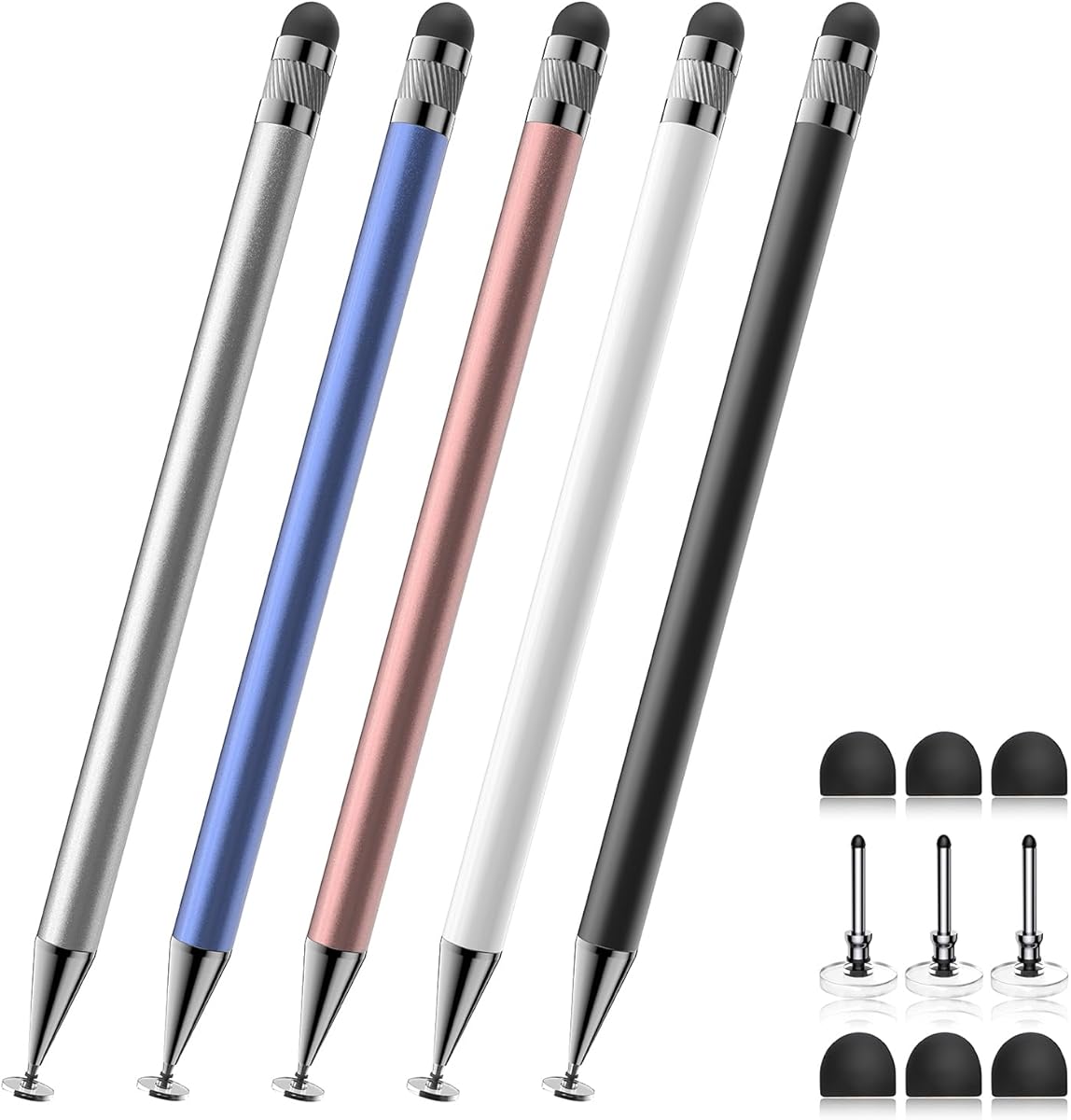
The Bopomofo Two-in-One set has a 4.6 rating, the highest customer score among the listed products. It is a five-pen package built for general touchscreen interaction rather than professional pressure input. Each pen combines a flexible transparent disc tip with a rubber tip, allowing users to choose between two basic contact styles.
We may earn a commission when you buy through this link, at no additional cost to you.
The disc tip offers smooth gliding and precision at the edge of a screen, while the rubber tip can provide more stable contact on some displays, especially when a protective film is installed. The set works with iPads, iPhones, Samsung Galaxy Tab devices, Android tablets, Kindles, and other smartphones using capacitive touchscreens.
Its major limitation is explicit: it does not support pressure sensitivity or palm rejection. It therefore does not belong on a shortlist of active styluses for artists who need tapered lines, shading, or natural variable-width strokes. Its stronger appeal is inexpensive, simple access to tapping, scrolling, ordinary note-taking, and light sketching.
Choose the Bopomofo set for students, families, teachers, or casual users who need several spare pens and a battery-free alternative to using fingers. The package also includes six replacement rubber nibs and three replacement disc nibs. For serious drawing, select an active pressure-sensitive pen instead.
The transparent disc tip supports smooth, precise screen interaction, while the rubber tip can create a more conventional contact point. Switching tips can be useful across different devices and personal preferences.
Five differently colored pens make the set practical for shared devices or group activities. Replacement rubber and disc nibs help extend the usable life of the set.
We may earn a commission when you buy through this link, at no additional cost to you.
The SonarPen USB C has a 3.6 rating and addresses a common limitation of the original audio-jack model by using the increasingly common USB-C port. It retains pressure sensitivity, a customizable shortcut button, and host-powered operation while supporting many modern phones, tablets, laptops, Mac systems, and Nintendo Switch consoles.
We may earn a commission when you buy through this link, at no additional cost to you.
Because the device supplies power through the USB-C connection, the pen requires neither battery charging nor Bluetooth pairing. That makes it a practical option for creators who dislike another accessory to maintain. Built-in cable management and the bundled adhesive holder help keep the pen connected and within reach.
Compatibility is the most important caveat. The product information says palm rejection is not available for Android or Chromebook devices, and users should consult the supplied compatibility guide before ordering. Individual apps may also need their own support for the connected stylus and shortcut behavior.
The USB C SonarPen is worth considering as a budget-oriented pressure-sensitive option when your device lacks an audio jack. Its low customer rating should prompt attention to recent feedback, especially regarding compatibility. The core feature set remains attractive for drawing and note-taking, but platform verification is essential.
USB-C removes the need for an audio-jack adapter on many current devices. The host supplies power directly, so the pen remains ready for use without a separate charging cycle.
Pressure control lets artists vary stroke width according to hand force. A programmable shortcut adds another layer of workflow support for compatible apps and devices.
We may earn a commission when you buy through this link, at no additional cost to you.
The Dirty Pink SonarPen combines a distinctive appearance with the same core capabilities offered by the other audio-jack SonarPen versions. It has a 4.0 customer rating and provides pressure sensitivity, palm rejection, and a customizable shortcut button for supported devices and creative applications.
We may earn a commission when you buy through this link, at no additional cost to you.
The device-powered audio-jack arrangement removes charging and pairing from the process. Users can connect the pen, begin writing or drawing, and rely on the host device for power. Its bundled Android nib offers an alternative tip for compatible Android use, while the holder provides a simple storage solution.
The pen is especially attractive for users who want a creative accessory that looks less like standard office equipment. Beyond appearance, however, its value rests on the same proven combination of pressure response, natural palm support, and broad platform potential. It supports iPads, iPhones, Android devices, tablets, Chromebooks, Windows notebooks, and Nintendo Switch systems.
Choose the Dirty Pink version if color preference is important and your device supports the audio-jack method. The functional compromise remains the connection: newer phones may require an adapter, and the attached cable is less discreet than a self-contained Bluetooth pen. Check the compatibility guide before buying.
The Dirty Pink finish gives the stylus a more personal look for a student kit, creative workspace, or mobile setup. Its color choice does not change the underlying pressure and connectivity features.
The audio-jack connection supplies both communication and power. This reduces setup time and avoids the charging interruptions associated with active styluses that contain their own batteries.
We may earn a commission when you buy through this link, at no additional cost to you.
The Fuchsia SonarPen has a 4.0 rating and serves users who want pressure-sensitive input across a broad selection of mobile and computing devices. Like the black, blue, Dirty Pink, and Purple versions, it uses the audio jack for a combined data and power connection.
We may earn a commission when you buy through this link, at no additional cost to you.
That design makes it particularly useful for spontaneous creative work. There is no battery level to monitor and no wireless pairing to configure, so the pen can be connected when inspiration arrives. Pressure sensitivity gives strokes more variation, while palm rejection allows the hand to rest naturally on the display.
A customizable button provides quick access to a useful function, and the included holder can be attached to the back of a device. Cable management keeps the pen's lead organized. The package also includes a standard nib and an Android nib, giving the user options for different supported systems.
The Fuchsia SonarPen is a good fit for mobile artists, students, and casual creators who use devices with a compatible audio connection. It is less suitable for someone who prioritizes a wireless workflow or owns only devices without a physical headphone port. Confirm device and app support before committing.
Host-powered operation removes battery management from the creative process. Once connected, the user can begin pressure-sensitive work without waiting for a stylus to charge.
The bundled stick-on holder keeps the pen close to the device and reduces the chance of leaving it behind. Integrated cable management helps prevent tangles during transport.
We may earn a commission when you buy through this link, at no additional cost to you.
The Purple SonarPen has a 4.0 rating and offers a balanced set of features for mobile note-taking and light illustration. Pressure sensitivity allows the user to vary strokes with hand force, while palm rejection supports a more natural position when writing on a tablet or phone.
We may earn a commission when you buy through this link, at no additional cost to you.
Its audio-jack connection is the defining design choice. The host device powers the stylus and communicates with it through the same connection, eliminating internal battery charging and Bluetooth pairing. This makes the Purple SonarPen useful for students, commuters, and workers who want a straightforward pen for notes, annotations, and drawings.
The listed compatibility includes iPad, iPhone, Android phones, tablets, Chromebooks, Windows notebooks, and Nintendo Switch systems. A standard nib, Android nib, and adhesive pen holder are included. Users can also configure the shortcut button to suit the functions they use most often.
Choose this model when the audio-jack method works for your devices and you value a colorful, portable, pressure-sensitive tool. It is less convenient for modern phone-only workflows and cannot replace a full active stylus ecosystem with Bluetooth pairing. Always review the compatibility guide and test your intended applications when possible.
Pressure response can make handwriting and annotation feel less uniform than a basic finger or capacitive stylus. Users can emphasize selected marks by increasing pressure.
The audio-jack design combines device communication and power. This makes the pen useful across several device families without managing a separate rechargeable battery or wireless connection.
We may earn a commission when you buy through this link, at no additional cost to you.
The red SonarPen completes this selection with a bold appearance and the same proven set of pressure-sensitive functions. It carries a 4.0 customer rating and is aimed at users who want a functional stylus for iPad, iPhone, Android, tablet, Chromebook, Windows notebook, and Nintendo Switch workflows.
We may earn a commission when you buy through this link, at no additional cost to you.
Pressure sensitivity improves the range of marks available, palm rejection provides a more natural writing position, and the shortcut button can be customized for common actions. The pen draws power from the connected device through its audio-jack design, so there is no separate charging cycle or Bluetooth pairing routine.
Its package includes one standard nib, one Android nib, and a stick-on holder. Integrated cable management helps keep the attached lead organized, making the pen easier to carry between classes, meetings, and creative sessions.
The red SonarPen is a reasonable choice for users who want pressure control, a colorful design, and broad compatibility with devices that support the audio-jack connection. Check the compatibility guide before ordering, especially if your primary device relies exclusively on USB-C or Bluetooth. A modern USB-C SonarPen may be more convenient for that setup.
The red finish is easy to recognize and adds personality to a mobile creative kit. The pen retains the same pressure, palm-rejection, and shortcut features as the other color options.
The included standard and Android nibs, adhesive holder, and cable management create a compact system. It is particularly useful for users who move between several compatible devices.
We may earn a commission when you buy through this link, at no additional cost to you.
The most important choice is whether the pen truly senses pressure and whether its connection method fits your devices. From there, comfort, app support, battery needs, tip type, and portability can determine which model will be most useful.
Pressure sensitivity is the defining feature for this category, but not every touchscreen pen provides it. A basic capacitive stylus behaves much like a fingertip and usually cannot vary line thickness according to force. Active pressure-sensitive pens communicate additional input data with the device, allowing drawing and handwriting apps to render broader or narrower strokes. The Lenovo Digital Pen 2 documents 4,096 levels, while the SonarPen family explicitly supports pressure control. The Metapen A8 and Bopomofo set do not document pressure sensitivity.
Choose a pen with documented pressure response whenever drawing, shading, calligraphy, or natural handwriting is central to your work. Do not assume that a compatibility label or a pen-shaped design guarantees pressure input.
Check the physical ports on every device you expect to use. The audio-jack SonarPen models connect through the headphone socket, while the USB C model uses that connector. Bluetooth is more convenient for wireless workflows but is not the operating method of the listed SonarPen products. The Lenovo Digital Pen 2 is built around AES 1.0 support in compatible Windows devices rather than broad phone connectivity. The Bopomofo capacitive pens and the Metapen A8 follow their own device-support rules.
Choose the connector that already matches your main device. If you need an adapter, verify that the adapter supports the pen's communication method rather than only audio output.
Device compatibility is more than a list of operating systems. The pen must be recognized by the hardware, and the application must support pressure, palm rejection, and programmable buttons where those features are expected. SonarPen provides a compatibility guide for its supported systems, while the Lenovo pen requires Windows 10 or later and AES 1.0 pen technology. The Metapen A8 has a detailed model list and excludes several newer iPad configurations from magnetic attachment.
Make a shortlist of the apps you need, then verify those apps and your exact device model. This prevents an otherwise suitable pen from losing important features after purchase.
Palm rejection allows you to rest part of your hand on the screen while using the pen. It can reduce tension and make long note-taking or illustration sessions more comfortable. The SonarPen audio-jack models list palm rejection, as does the Metapen A8. The SonarPen USB C model does not support palm rejection for Android or Chromebook devices, according to the supplied information. The Bopomofo capacitive pens explicitly do not offer it.
Choose palm rejection if you write with a firm hand or commonly brace your palm. Confirm the platform-specific limitation, because a stylus can support the feature on iPad while excluding it on another operating system.
Battery-free operation offers fewer interruptions. The audio-jack and USB C SonarPen models draw power from the host device, and the Bopomofo set is entirely battery-free. The Metapen A8 charges through USB-C in 30 minutes and can provide up to 10 hours of use, while the Lenovo Digital Pen 2 runs from one AAAA battery. Rechargeable pens remove disposable-battery work, while replaceable cells can be convenient for users who keep spare batteries nearby.
Choose based on your charging habits. For spontaneous use across many devices, host-powered pens are efficient; for an iPad-focused workflow, a dedicated rechargeable pen may be more convenient.
The tip influences glide, control, and the feel of a stroke. The Lenovo Digital Pen 2 uses an elastomer tip designed for a natural, tactile response. SonarPen packages include standard and Android nibs, while the Bopomofo set offers interchangeable disc and rubber tips. The Metapen A8 includes an installed tip and a spare. Pen weight, barrel shape, and button placement also affect comfort during long sessions.
Choose a tip that feels stable rather than overly slippery. If you draw frequently, consider a grip shape that supports the fingers and a replacement-tip system that keeps the writing surface consistent.
A programmable shortcut button can save time by placing frequently used actions close at hand. Both the Lenovo Digital Pen 2 and the SonarPen models provide two customizable side controls according to their product information. The Lenovo buttons are positioned for productivity tasks such as annotation, signing, and navigation, while SonarPen's single button can switch between commonly used functions.
Choose shortcuts only if the connected software supports them. A feature that appears on the pen may not be configurable in every app, so verify the behavior of your preferred applications.
A stylus used on the move should be easy to carry, store, and retrieve. The SonarPen models include an adhesive pen holder and integrated cable management. The Metapen uses two built-in magnets to attach to compatible iPads, although magnetic charging and attachment are not supported on every listed model. The Bopomofo set includes five pens, making it practical for shared workspaces, while the Lenovo pen's lightweight metal body suits mobile Windows use.
Choose storage that matches your routine. A magnetic system is convenient on compatible tablets, an adhesive holder works across many devices, and a lightweight body matters most when the pen travels between locations.
Begin by confirming that the pen is compatible with the exact device and operating system. Connect the stylus using its specified audio-jack or USB-C method, or install the required battery in the Lenovo Digital Pen 2. For the Metapen A8, charge the pen with a certified adapter and USB-C cable, then use the double-tap touch switch to turn it on or off.
Open the app you intend to use and test light, medium, and firm strokes on a blank page. Pressure-sensitive apps should display corresponding changes in width or opacity. Configure the shortcut button if needed, and update the relevant device or application software when a firmware or driver update is available. Palm rejection is most useful once the app recognizes the stylus and places it in its pen-input mode.
Store the pen with its tip protected and avoid dragging a damaged tip across a screen. Keep active pens away from excessive heat and humidity, and use only certified charging equipment where charging is required. Clean the barrel with a soft dry cloth, do not disassemble the pen, and stop using it if a rechargeable model becomes unusually hot, swollen, or emits an odor.
A pressure-sensitive stylus detects how hard the tip presses and sends that information to the device. A capacitive stylus generally acts like a fingertip and cannot vary stroke width according to force. The SonarPen family and Lenovo Digital Pen 2 provide documented pressure input, while the Bopomofo set does not.
Not always. A capacitive pen can handle tapping, scrolling, and ordinary writing when variable line width is unimportant. Pressure sensitivity becomes more valuable for detailed illustration, shading, handwriting with tapered strokes, and applications that let the artist control pressure like a real pen.
The answer depends on the available port and required features. The SonarPen USB C is intended for many USB-C devices, while the Metapen A8 supports specified iPad models and the Bopomofo pens work with many capacitive screens. Check both the device model and the app before buying.
The SonarPen models use the host device's audio-jack or USB-C connection for communication and power, so they do not require stylus charging or Bluetooth pairing. The Bopomofo set is also battery-free. The Metapen A8 needs USB-C charging, and the Lenovo Digital Pen 2 uses an AAAA battery.
Palm rejection can improve comfort because it allows your hand to rest on the screen instead of hovering. It is especially useful for left-handed users, people with a firm writing grip, and anyone completing long sessions. Confirm support on the exact operating system, since the USB C SonarPen's palm rejection has stated platform limitations.
Usually, yes, provided the device and app support active pen input. The Lenovo Digital Pen 2 is explicitly positioned for annotation, document signing, and productivity on compatible Windows devices. SonarPen models can also be used with supported applications, although users should confirm device recognition and shortcut behavior.
First, confirm that the device model and port meet the manufacturer's compatibility requirements. Next, open the app's pen settings and check whether it recognizes the stylus as an active input device. Also verify that the app supports pressure rather than treating it as a basic pointer, and restart the app after reconnecting the pen.
Avoid pressing harder than necessary, particularly on rigid surfaces that can produce a blunt or uneven tip. Use a protective case during transport and keep replacement tips available. The Metapen A8, SonarPen packages, and Bopomofo set include spare nibs, allowing worn tips to be replaced without replacing the entire pen.
The SonarPen Black is the most well-rounded pressure-sensitive choice for users who can use an audio-jack connection, while the Lenovo Digital Pen 2 stands out for Windows users who want 4,096 pressure levels, a natural elastomer tip, and a lightweight metal body. The SonarPen USB C offers the core pressure and shortcut features on a more modern connection, although its palm-rejection support has platform-specific limits.
Prioritize true pressure detection, correct connector type, and confirmed device and app support. Palm rejection matters for long sessions, while battery-free host-powered operation is valuable for users who dislike charging accessories. Artists who need graduated strokes should avoid basic capacitive options such as the Bopomofo set, while iPad users interested in the Metapen A8 should verify the exact model and understand that it does not document pressure sensitivity.
Current prices, ratings, and availability can change, so compare the latest listing details before purchasing. Checking the exact hardware model and the software you use will prevent most compatibility disappointments and help ensure that the selected stylus delivers the pressure, comfort, and workflow features you actually need.